



Many software development teams start with Azure DevOps because it fits neatly into a Microsoft stack.
While it offers a comprehensive suite of tools for project management, version control, and CI/CD, it may not be the perfect fit for every organization. As your product and engineering needs scale, you may find it harder to adapt workflows, keep non‑technical stakeholders aligned, or consolidate reporting.
This guide walks through leading Azure DevOps alternatives for 2026 — including monday dev, GitHub, and GitLab — so you can pick a platform that fits how your teams actually work.
Try monday devQuick comparison: The top alternatives to Azure DevOps
Choosing an Azure DevOps alternative isn’t just about features on paper — it’s about how well a platform fits your dev stack, workflows, and team. Use this quick comparison to scan the top options before diving into the full breakdown.
| Software | Use case | Starting price | G2 rating |
|---|---|---|---|
| monday dev | End‑to‑end product and software development with cross‑team visibility and flexible workflows | $9/seat/month | 4.7/5 |
| Jira | Agile project tracking for engineering teams that want deep backlog and workflow configuration | $9/user/month | 4.3/5 |
| ClickUp | All‑in‑one work management that combines dev tasks, docs, and non‑technical projects | $7/user/month | 4.7/5 |
| CircleCI | Cloud‑hosted CI/CD pipelines focused on speed and ease of setup for Git‑based projects | $15/month | 4.4/5 |
| Bitbucket | Teams that want Git repos and pipelines tightly integrated with the Atlassian ecosystem | $3/user/month | 4.4/5 |
| GitHub | Git‑centric development with GitHub Issues and Actions for integrated planning and CI/CD | $4/user/month | 4.7/5 |
| GitLab | All‑in‑one DevSecOps with built‑in CI/CD, code review, and security scanning | $29/user/month | 4.5/5 |
| Jenkins | Highly configurable, self‑hosted CI/CD with extensive plugin ecosystem | Free open-source | 4.4/5 |
| Octopus Deploy | Release orchestration and deployment automation across complex, multi‑environment infrastructures | $4,330/year | 4.4/5 |
| TeamCity | On‑prem or self‑hosted CI with deep configuration options and strong support for polyglot codebases | $45/month | 4.3/5 |
| Harness | Modular, enterprise‑grade CI/CD, feature flags, and cloud cost management | Custom pricing | 4.6/5 |
What is Azure DevOps?
Microsoft’s Azure DevOps is a comprehensive software development platform with integrated tools and services to support the entire software development lifecycle. It consists of five main components to help teams plan, develop, test, and deliver software more efficiently:
- Azure Boards: For Agile planning, work item tracking, and visualization of project progress.
- Azure Repos: Provides version control systems, including Git repositories and Team Foundation Version Control (TFVC).
- Azure Pipelines: Enables continuous integration and delivery (CI/CD) for various platforms and languages.
- Azure Test Plans: Offers tools for manual and exploratory testing.
- Azure Artifacts: Manages software development packages.
You can use all the components or choose only the ones you need to complement your existing workflows.
Azure DevOps is available as both a cloud service — Azure DevOps Services — and an on-premises solution — Azure DevOps Server. It supports various development methodologies, including Scrum, Kanban, and hybrid approaches, making it adaptable to different team needs and project requirements. Its key features and benefits include:
- Collaboration: Facilitates teamwork across different functions within an organization.
- Workflow planning: Enables teams to plan and manage their work effectively.
- Code development: Supports collaborative coding and version control.
- Automated builds and deployments: Streamline the build and deployment processes.
- Customizable dashboards: Provide configurable dashboards for project insights.
- Integration capabilities: Offers deep integration with community and commercial tools.
Why development teams are leaving Azure DevOps behind
As teams scale, many discover that Azure DevOps no longer fits the way they actually work. Common pain points include rigid project structures, limited flexibility for hybrid Agile and Waterfall workflows, and an Azure‑centric ecosystem that makes cross‑tool collaboration harder than it needs to be.
Leaders also report challenges with getting clear portfolio‑level visibility across products, squads, and regions. Reporting often requires custom queries, manual exports, or additional tools, which slows decision‑making and leaves non‑technical stakeholders in the dark.
Finally, the total cost of ownership can increase as you add more projects, repos, and integrations. While Azure DevOps can be very cost‑effective for Microsoft‑first organizations, many teams look to alternatives like monday dev that offer a more visual, flexible workspace with predictable pricing and built-in alignment across product, engineering, and business.
How to choose the right Azure DevOps alternative
The best Azure DevOps alternative depends on your tech stack, team structure, and growth plans — not just which tool has the longest feature list. Use these criteria to narrow down your options.
- Ecosystem fit: Decide whether you want to stay tightly integrated with Azure and the wider Microsoft stack, or move to a platform that plays well with multiple clouds, Git providers, and collaboration tools.
- Methodology support: Check how well each tool supports your real workflows, including Scrum, Kanban, scaled Agile, and hybrid approaches that mix iterative development with more structured planning.
- Git and CI/CD integrations: Look at how deeply the platform connects to GitHub, GitLab, Bitbucket, or your existing pipelines — including automatic status updates, branch links, and build visibility in context.
- Reporting and portfolio visibility: Make sure product managers and leaders can see progress across epics, sprints, and releases without relying on manual exports or custom scripts. For example, monday dev surfaces portfolio‑level views and dashboards out of the box.
- Pricing and scalability: Compare how costs evolve as you add teams, projects, and integrations, not just entry‑level prices. Look for transparent, per‑seat or per‑module pricing that’s easy to forecast over the next few years.
Top 11 Azure DevOps alternatives for 2026
While Azure DevOps is an excellent platform for software development teams, it’s not the only option. Due to its steep learning curve, potential high costs for large teams, and limited customization options, you may want an alternative that offers more flexibility, easier integration with diverse systems, and lower subscription costs while still providing robust project management and development tools.
Below, we’ve gathered 11 Azure DevOps alternatives to consider when choosing your product and software development solution. Let’s take a look at each platform in more detail.
1. monday dev
Use case: End‑to‑end product and software development with cross‑team visibility and flexible workflows
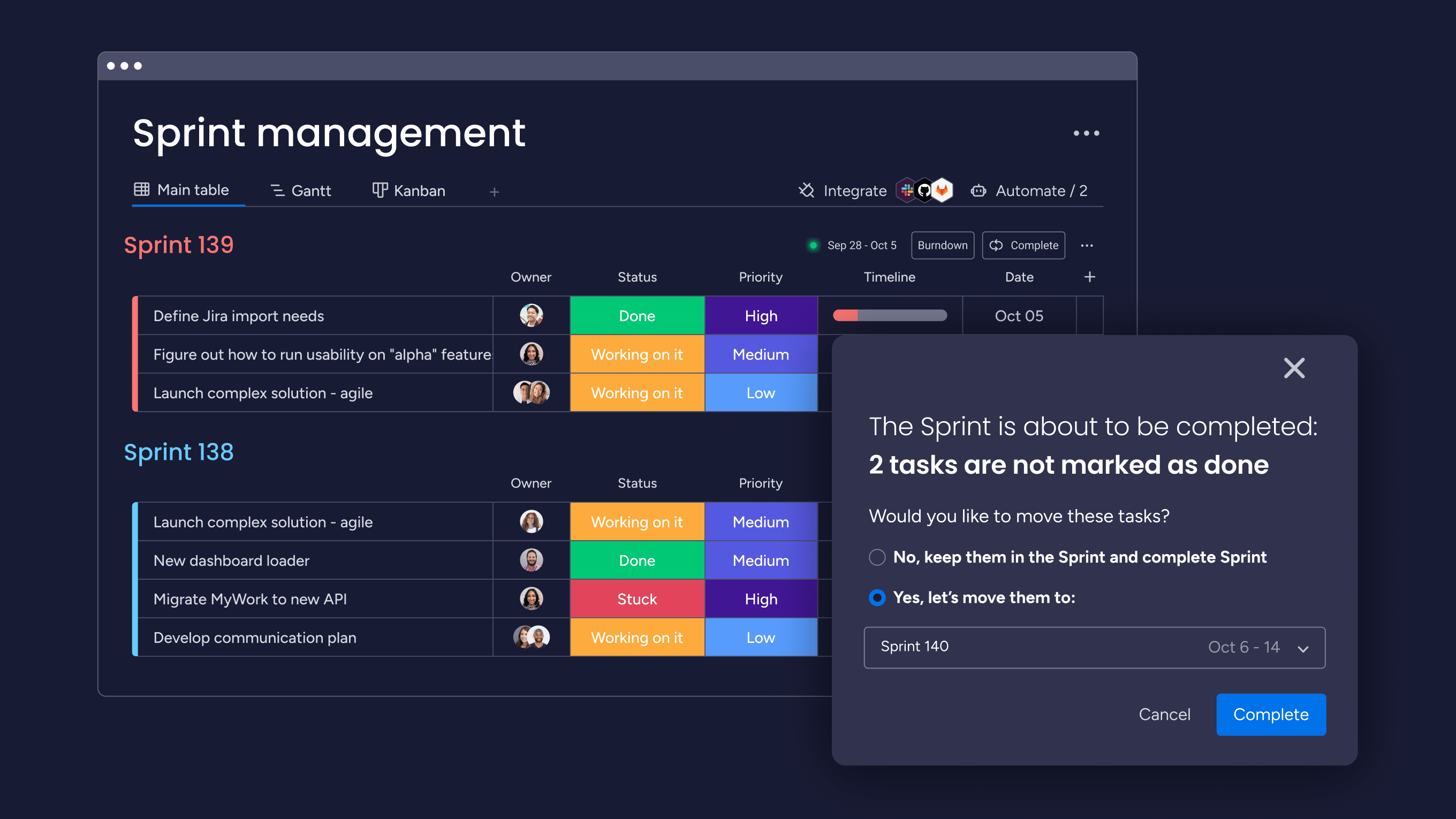
Built on monday.com Work OS, monday dev is a flexible yet powerful product management and software development platform for managing the entire product lifecycle, from conceptualization to launch. It provides customizable workflows, robust integrations, and collaboration features to streamline software development processes.
Key features of monday dev
- Sprint management with customizable Scrum and Kanban boards
- Git integration (GitHub, GitLab) for easy repository and pull request connections
- Customizable automations for task assignments and workflow integrations
- Highly customizable workflows and views to fit specific team needs
- Robust integration capabilities with over 200 apps and tools
- AI‑powered risk analysis, resource allocation, and sprint planning
monday dev pricing
- Basic: From $9/seat/month
- Standard: From $12/seat/month
- Pro: From $20/seat/month
- Enterprise: Custom pricing
Read more about the monday dev plans and pricing.
monday dev ratings and reviews
Compare
Try monday dev2. Jira
Use case: Agile project tracking for engineering teams that want deep backlog and workflow configuration
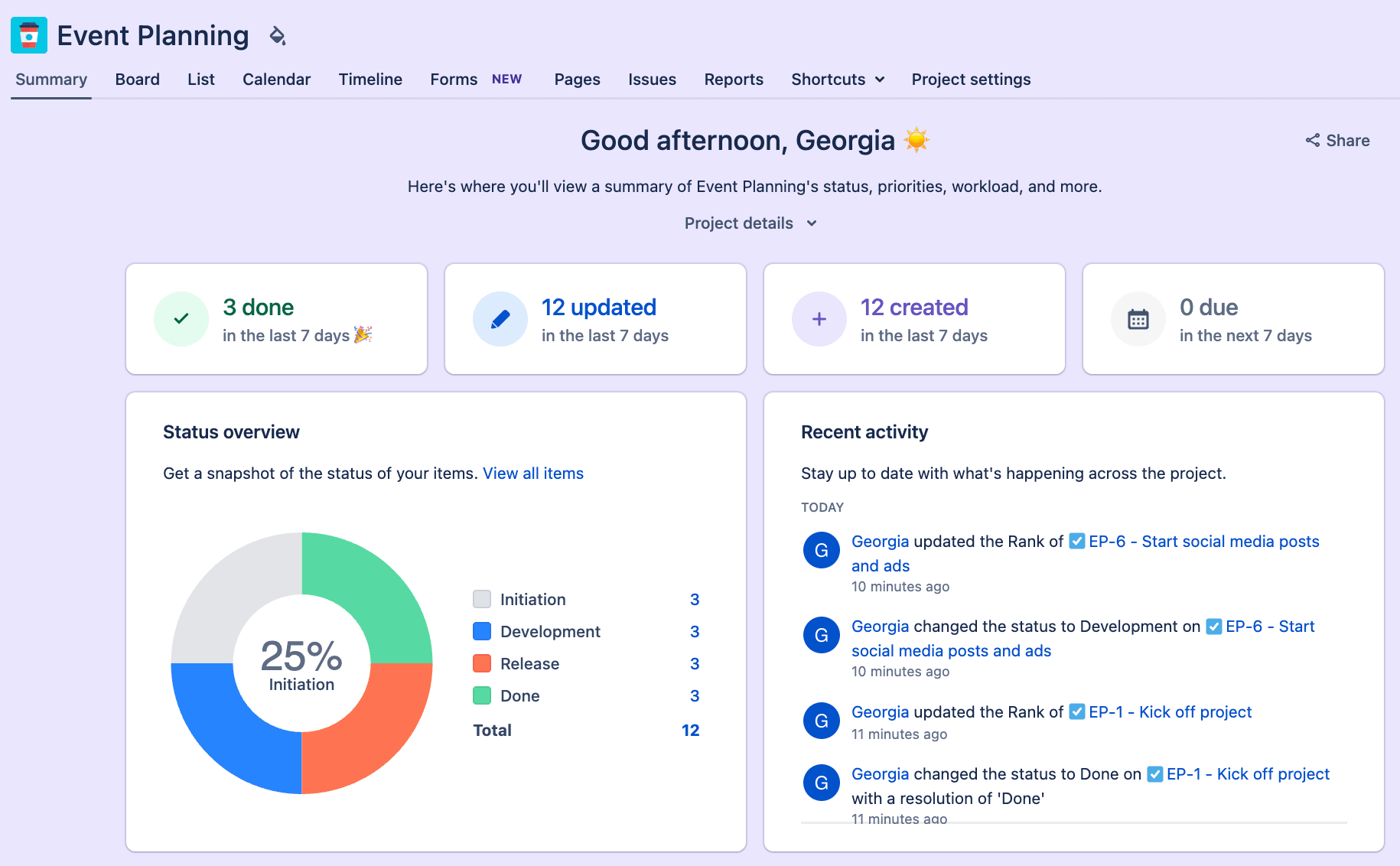
Jira is a project management and issue-tracking platform developed by Atlassian, widely used for Agile software development. It offers customizable workflows, powerful tracking capabilities, and extensive integration options to streamline the software development lifecycle.
Key features of Jira
- Customizable Scrum and Kanban boards
- Advanced roadmaps for strategic planning
- Robust issue tracking and bug management
- Highly flexible and customizable workflows
- Robust integration capabilities with over 3000 apps
- Comprehensive reporting and analytics tools
Jira pricing
- Free: Up to 10 users
- Standard: From $9/user/month
- Premium: From $18/user/month
- Enterprise: Custom pricing
Read more about Jira’s plans and pricing.
Jira ratings and reviews
Compare
3. ClickUp
Use case: All‑in‑one work management that combines dev tasks, docs, and non‑technical projects
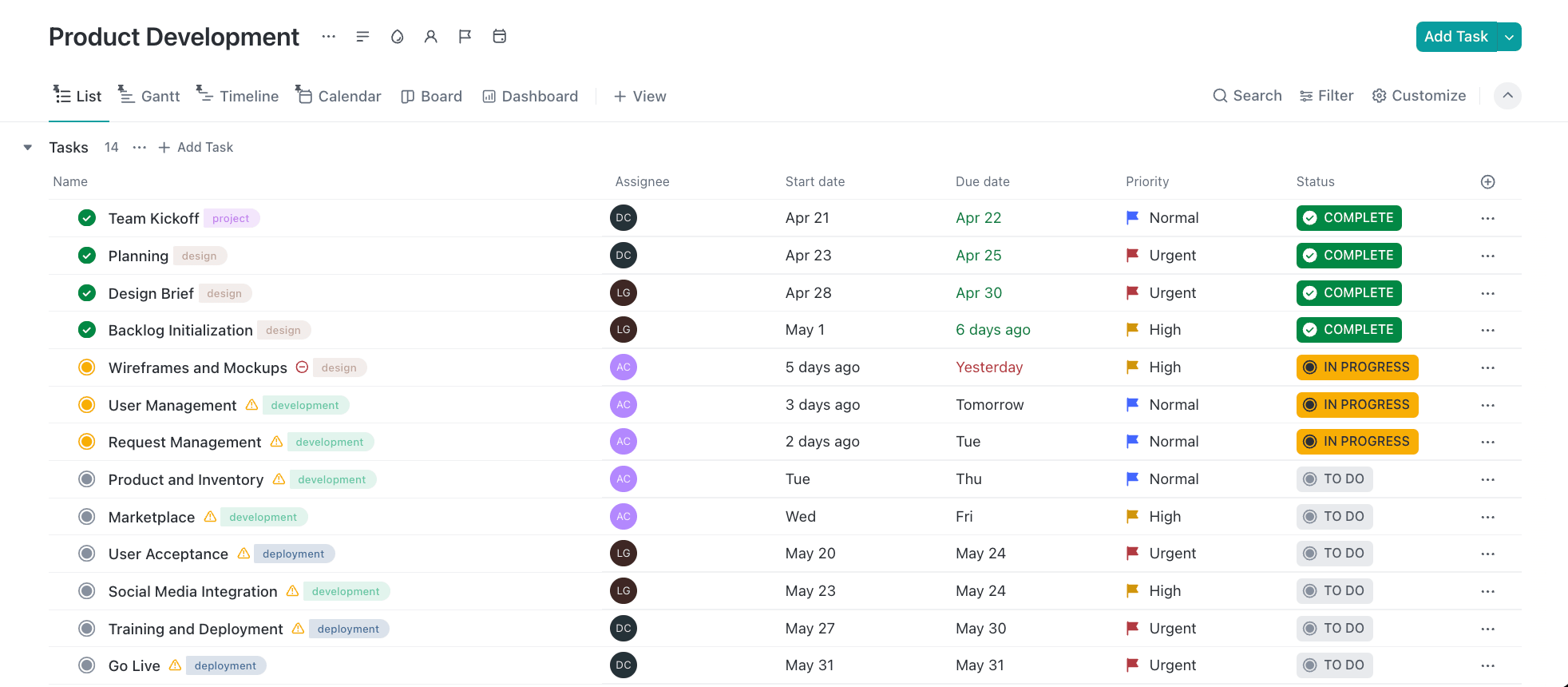
ClickUp is a versatile cloud-based project management tool with a centralized platform for planning projects, managing tasks, and facilitating team communication. It provides a wide range of features and customization options to streamline workflows and enhance productivity across various industries.
Key features of ClickUp
- Customizable Agile workflows (Kanban boards, Scrum)
- Git integration (GitHub, GitLab, Bitbucket)
- Time tracking and estimation
- Robust automation capabilities
- Highly customizable with numerous views and features
- Comprehensive task management with dependencies and subtasks
ClickUp pricing
- Free: Basic features for unlimited users
- Unlimited: From $7/user/month
- Business: From $12/user/month
- Enterprise: Custom pricing
Read more about ClickUp’s plans and pricing.
ClickUp ratings and reviews
Compare
4. CircleCI
Use case: Cloud‑hosted CI/CD pipelines focused on speed and ease of setup for Git‑based projects
CircleCI is a cloud-based continuous integration and delivery (CI/CD) platform that automates the software development pipeline, enabling teams to build, test, and deploy code faster and more reliably. It offers a wide range of integrations and supports multiple programming languages, making it a versatile choice for DevOps teams looking to streamline their development processes.
Key features of CircleCI
- Customizable workflows with support for parallel jobs
- Extensive integration capabilities with tools like GitHub and Bitbucket
- Orbs for reusable packages of configuration and simplified setup
- Easy setup and maintenance of CI/CD pipelines
- Fast build times with support for concurrent jobs
- Robust security features, including encrypted environment variables
CircleCI pricing
- Free: $0/month for up to 6,000 build minutes
- Performance: From $15/month for additional features and build minutes
- Scale: Custom pricing for large teams and enterprises
CircleCI ratings and reviews
5. Bitbucket
Use case: Teams that want Git repos and pipelines tightly integrated with the Atlassian ecosystem
Bitbucket is a versatile Git-based code hosting and collaboration platform developed by Atlassian, offering robust features for version control, continuous integration, and project management. It provides deep integration with other Atlassian tools and supports Git-based version control, making it a popular choice for software development teams.
Key features of Bitbucket
- Built-in continuous integration and delivery (CI/CD) with Bitbucket Pipelines
- Advanced code review capabilities with pull requests and inline comments
- Deep integration with Jira for seamless issue tracking and project management
- Unlimited private repositories with flexible per-user pricing
- Strong security features, including IP whitelisting and two-step verification
- Supports both Git and Mercurial version control systems
Bitbucket pricing
- Free: Up to 5 users
- Standard: From $3/user/month
- Premium: From $7/user/month
Bitbucket ratings and reviews
Compare: Best software development tools
6. GitHub
Use case: Git‑centric development with GitHub Issues and Actions for integrated planning and CI/CD
GitHub is a widely adopted Git-based code hosting and collaboration platform that allows developers to manage, share, and collaborate on software projects. It offers version control, project management tools, and a vast open-source community, making it a central software development and collaboration hub.
Key features of GitHub
- Version control with Git repositories
- Pull requests and code review capabilities
- GitHub Actions for CI/CD workflows
- Extensive integration capabilities with popular development tools
- Large and active community for open-source collaboration
- AI-powered development assistance with GitHub Copilot
GitHub pricing
- Free: $0 for public repositories and basic features
- Team: From $4/user/month
- Enterprise: From $21/user/month
GitHub ratings and reviews
Compare
7. GitLab
Use case: All‑in‑one DevSecOps with built‑in CI/CD, code review, and security scanning
GitLab is a comprehensive DevOps platform that provides a complete CI/CD toolchain delivered in a single application, offering version control, project management, and collaboration features. It’s an open-source solution that can be self-hosted or used as a cloud-based service, making it highly flexible for various development needs.
Key features of GitLab
- Built-in CI/CD pipelines with automated testing and deployment
- Integrated issue-tracking and project management tools
- Container registry and Kubernetes integration
- All-in-one platform reducing the need for multiple tools
- Highly customizable to suit specific development needs
- Strong security features like fine-grained access controls
GitLab pricing
- Free: $0 for basic features
- Premium: From $29/user/month
- Ultimate: Custom pricing
GitLab ratings and reviews
Compare
8. Jenkins
Use case: Highly configurable, self‑hosted CI/CD with extensive plugin ecosystem
Jenkins is an open-source automation server widely used for continuous integration and delivery (CI/CD). It offers extensive customization through plugins and supports various programming languages and tools, making it a versatile choice for automating build, test, and deployment processes.
Key features of Jenkins
- Customizable CI/CD pipelines with support for multiple languages and tools
- Extensive plugin ecosystem with over 1,500 plugins for integration and functionality extension
- Distributed builds and test execution across multiple machines
- Highly flexible and customizable to fit specific development needs
- Strong community support and extensive documentation
- Free and open-source with no licensing costs
Jenkins pricing
Jenkins is a free and open-source platform with no direct costs, but organizations may incur infrastructure, maintenance, and support expenses.
Jenkins ratings and reviews
9. Octopus Deploy
Use case: Release orchestration and deployment automation across complex, multi‑environment infrastructures
Octopus Deploy is a sophisticated continuous delivery (CD) platform for modern software teams, offering automated release management, application deployment, and routine operations. It excels at handling complex deployment challenges while providing a user-friendly interface that enables teams to manage application releases and streamline software delivery.
Key features of Octopus Deploy
- Comprehensive deployment process management with customizable steps and workflows
- Multi-environment support with advanced variable management
- Built-in release management and versioning capabilities
- Extensive integration capabilities with CI/CD tools and cloud platforms
- Powerful automation features for complex deployment scenarios
- User-friendly interface that simplifies deployment management
Octopus Deploy pricing
- Free: $0/year for 10 projects
- Professional: From $4,330/year for 20 projects
- Enterprise: From $24,600/year for 100 projects
Octopus Deploy ratings and reviews
Compare: Best release management tools
10. TeamCity
Use case: On‑prem or self‑hosted CI with deep configuration options and strong support for polyglot codebases
TeamCity is a powerful continuous integration and deployment (CI/CD) server developed by JetBrains that provides automated build, test, and deployment capabilities for software projects. It provides a user-friendly interface, extensive integrations, and advanced features to streamline the software development lifecycle.
Key features of TeamCity
- Customizable build configurations and workflows
- Comprehensive version control system integrations
- Advanced code quality analysis and testing capabilities
- User-friendly interface with intuitive project management
- Extensive plugin ecosystem and integration options
- Real-time build monitoring and detailed reporting
TeamCity pricing
- Cloud Enterprise: From $45/month
- On-Premises Professional: $0 for 3 build agents and 100 build configurations
- On-Premises Enterprise: From $2,399/year (for 3 agents)
TeamCity ratings and reviews
11. Harness
Use case: Modular, enterprise‑grade CI/CD, feature flags, and cloud cost management
Harness is an enterprise‑grade software delivery platform that combines CI/CD, feature flags, and cloud cost management in a single offering. It’s often chosen by larger organizations that need strong governance, AI‑assisted deployments, and support for complex, multi‑cloud or hybrid environments.
Key features of Harness
- Multi‑cloud and on‑premises deployment support
- AI‑powered deployment verification and rollback
- Built‑in feature flags and experimentation tools
- Cloud cost management with anomaly detection
- Enterprise RBAC, policy management, and audit trails
- Developer portal and pipeline automation for velocity
Harness pricing
- Free: $0 for individuals and small teams
- Essentials: Custom pricing
- Enterprise: Custom pricing
Harness ratings and reviews
5 steps to migrate from Azure DevOps successfully
Migrating away from Azure DevOps doesn’t have to be disruptive if you treat it as a structured project. These steps can help you move work without losing context or momentum.
- Clarify your scope and goals. Decide whether to migrate all projects or start with a pilot, and define what success looks like for your new platform.
- Audit your current setup. Inventory projects, repos, pipelines, boards, and integrations to understand which components must move and which can be retired.
- Choose your migration approach. Pick whether you’ll use built‑in importers, third‑party tools, or manual migration for specific work items, attachments, and history.
- Rebuild workflows in your new platform. Recreate (or improve) your boards, automations, and dashboards in your chosen alternative, mapping epics, sprints, and releases to the new structure.
- Run a pilot, then roll out in waves. Start with a small team or project to validate mappings, gather feedback, and refine your process before migrating additional squads or product lines.
Throughout the migration, keep stakeholders informed with clear timelines, training, and support so teams can adopt the new platform with confidence. Using monday dev’s visual boards, dashboards, and AI‑powered insights can make the transition smoother by giving everyone an immediate, shared view of priorities and progress.
How AI-powered development accelerates team productivity
Modern development teams are under pressure to ship faster without sacrificing quality, but manual coordination work often becomes the bottleneck. AI‑powered capabilities can remove much of that overhead by turning scattered updates, code changes, and meeting notes into clear, actionable insights.
AI is increasingly used to spot risks, balance workloads, and streamline planning. Teams rely on AI‑driven risk analysis to surface potential blockers before they derail a sprint, and intelligent resource suggestions help them assign the right work to the right people at the right time.
AI assistants can also translate high‑level requirements into structured tasks, complete with owners and rough timelines, so backlog grooming and sprint planning take minutes instead of hours.
AI also reduces status reporting and context switching. For instance, Git‑based updates can be summarized automatically into daily standup digests, while end‑of‑sprint summaries highlight what changed, what slipped, and where to focus next.
Instead of writing reports and chasing updates, developers and managers get concise, data‑driven views of progress, freeing more time and attention for building features that matter.
Transform your development workflow with monday dev
If Azure DevOps is slowing your teams down, it may be time for a platform built for flexibility, alignment, and speed.
Built on monday.com Work OS, monday dev lets product and engineering teams manage the entire development lifecycle in one place — from roadmap and backlog to releases and post‑launch analysis.
With customizable workflows, deep Git and CI/CD integrations, and AI‑powered insights, it connects daily execution to your broader product strategy. Leaders get real‑time visibility across epics and portfolios, while developers work in a visual workspace that reflects how they actually build software.
User-friendly interface: monday dev provides a more intuitive and visually appealing platform for development and collaboration.
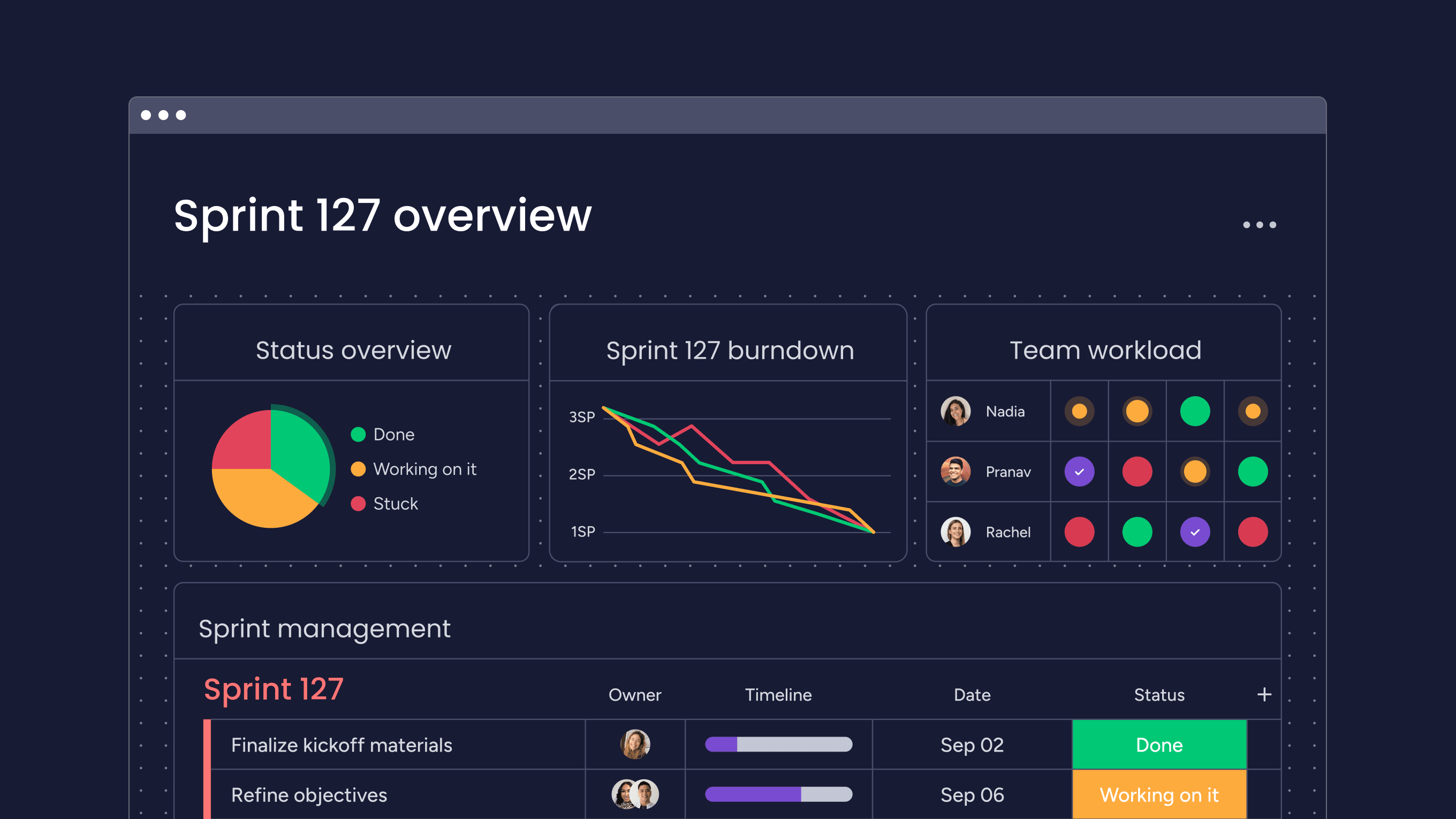
Customizable workflows: monday dev offers flexible and customizable workflows to fit specific development team needs.
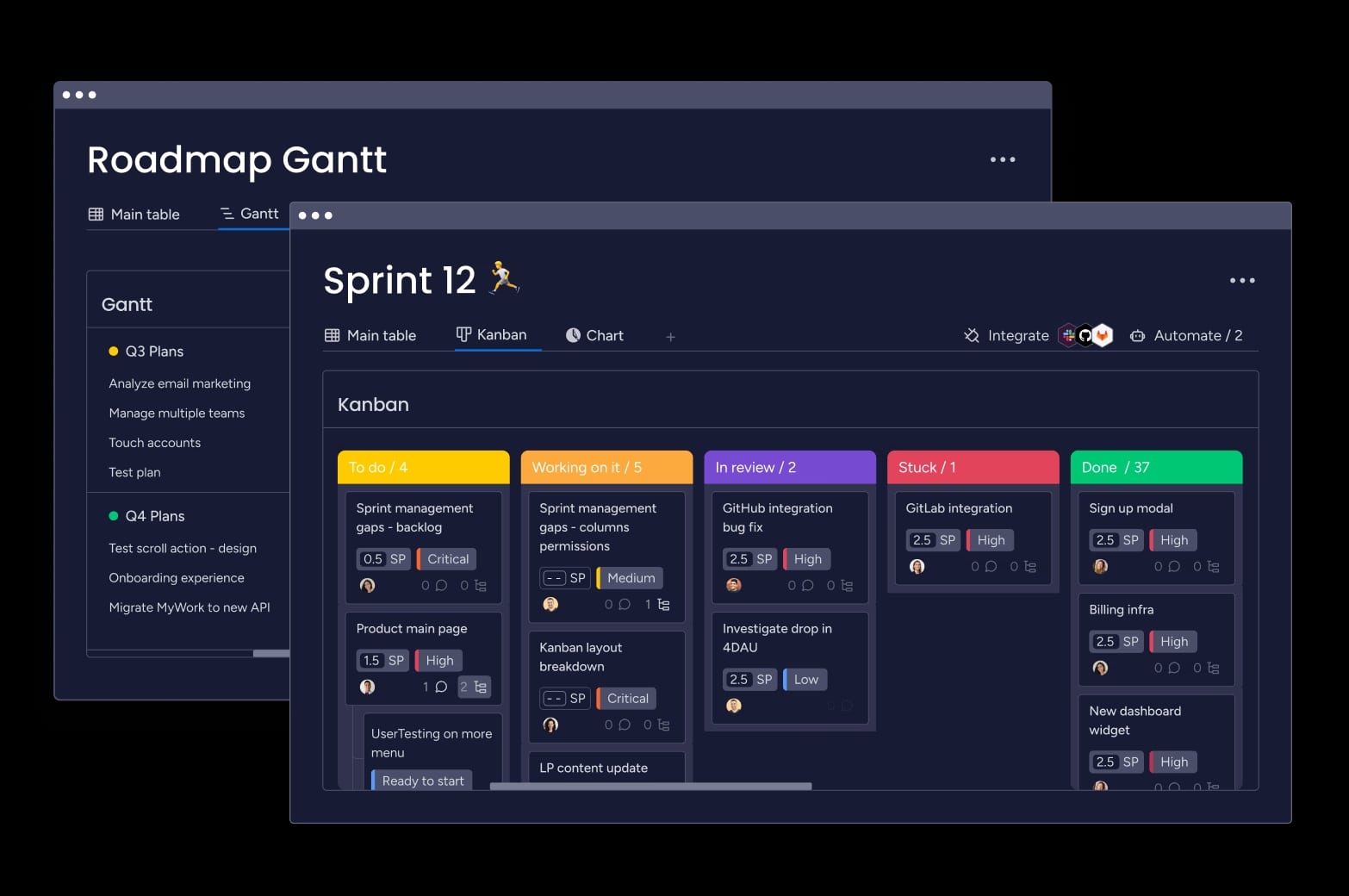
Seamless integration capabilities: monday dev integrates with over 200 apps and tools, including Git repository tools like GitHub, GitLab, and Bitbucket, so teams can keep using their existing dev stack.
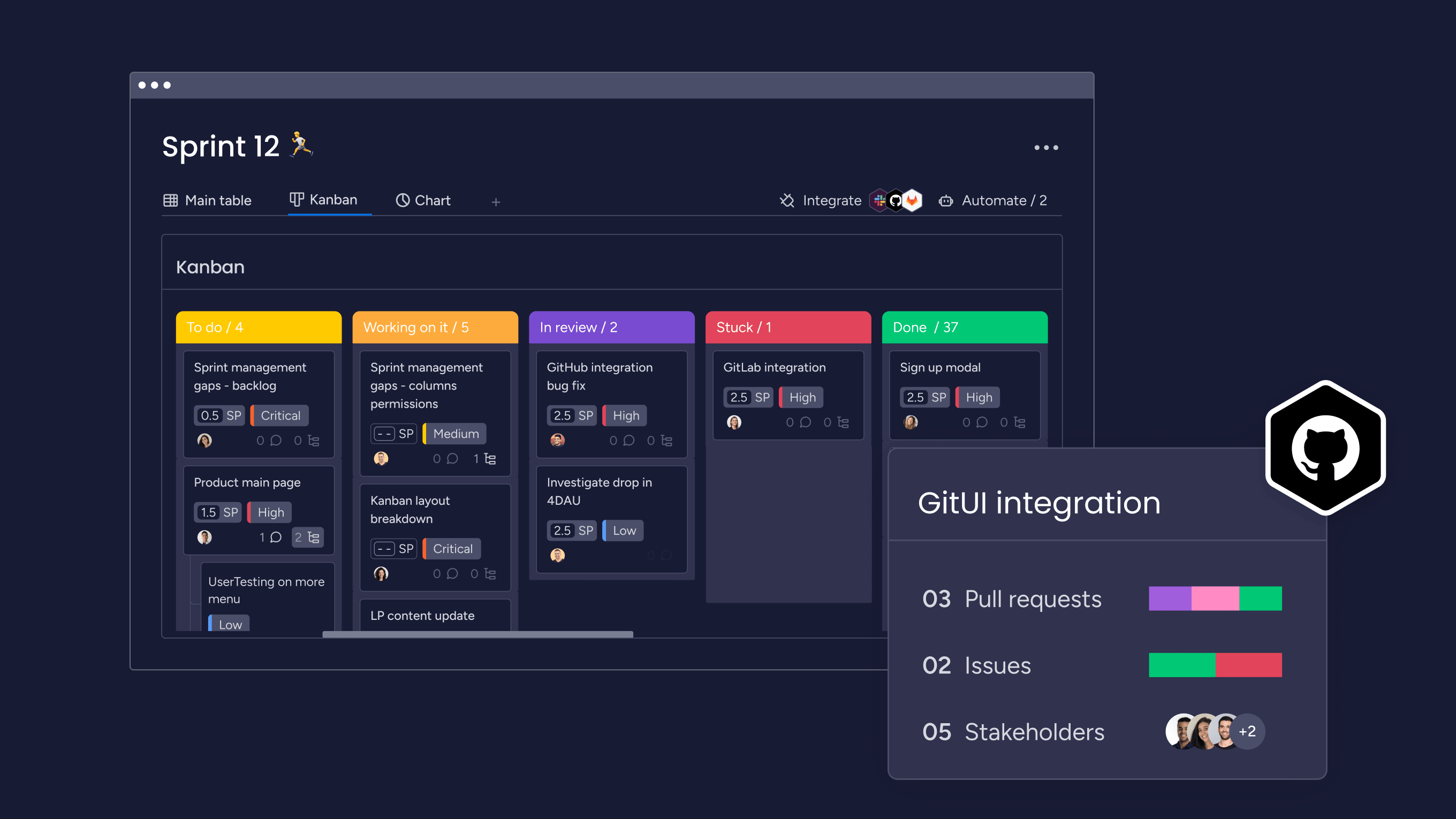
AI‑powered insights: monday dev brings AI directly into your development workflows, with capabilities that summarize updates, flag potential risks across projects, and highlight where sprints are off track — so teams can act on data, not chase it.

Ease of use and support: Compared to Azure Boards and Pipelines, G2 reviewers found monday dev easier to use, set up, and administer with excellent customer support.
| Ratings | monday dev | Azure Boards | Azure Pipelines |
|---|---|---|---|
| Ease of use | 9.1 | 8.9 | 8.3 |
| Ease of setup | 9.0 | 8.5 | 8.3 |
| Ease of admin | 9.2 | 8.5 | 8.3 |
| Quality of support | 9.1 | 8.6 | 8.3 |
If you’re ready to explore an Azure DevOps alternative that adapts to your team, not the other way around, experience monday dev yourself with a free trial and see how it compares to Azure DevOps or any of the other alternatives in your own sprints, releases, and cross‑team projects.
Try monday devFAQs
What will replace Azure DevOps in the future?
There’s no single “official” replacement for Azure DevOps, and it’s likely to coexist with other platforms for years. Teams are increasingly adopting platforms such as monday dev, GitLab, GitHub, and Harness as Azure DevOps alternatives that best fit their tech stack, governance needs, and collaboration style.
Which is the best CI/CD tool for development teams?
There isn’t one best CI/CD tool for every team — the right choice depends on your language stack, hosting model, and regulatory requirements. Azure DevOps, GitHub Actions, GitLab CI/CD, and Harness are all popular options, while platforms like monday dev integrate with these CI/CD tools to provide a unified workspace for planning and tracking.
Can development teams use multiple DevOps platforms together?
Yes, many organizations intentionally combine platforms rather than doing a big‑bang switch. For example, teams might keep Azure DevOps for existing pipelines while adopting GitHub, GitLab, or Harness for new services, and use a platform like monday dev for planning, reporting, and cross‑team collaboration across all those tools.
How much does migrating from Azure DevOps typically cost?
Migration costs vary widely based on team size, number of projects, how much history you move, and whether you hire external consultants. Budgets usually cover discovery and planning, migration tooling, implementation work, and training or change management, with larger organizations spending significantly more than small teams due to complexity and compliance needs.
How long does Azure DevOps migration typically take?
Timelines range from a few weeks for small teams with a handful of projects to several months for enterprises with many repos, pipelines, and integrations. Duration depends on how much data you migrate, whether you redesign workflows, how much testing you perform, and whether you phase the rollout across teams or products.
What are the main security considerations when switching from Azure DevOps?
When moving away from Azure DevOps, review how the new platform handles identity and access management, including SSO and MFA support. You should also verify data encryption in transit and at rest, audit logging and exportability, compliance certifications, and how permissions map to your existing roles to avoid over‑privileged accounts.

 Get started