


Finance teams operate like the nervous system of a business — reconciling invoices, chasing approvals, coordinating close across departments, and producing accurate reports while everyone else keeps moving. But all of that repetitive, rules-based work that eats up most of your time can now be offloaded to a digital team instead, consisting of AI agents – autonomous software teammates that watch your financial data, figure out what needs to happen, and act on it.
The same logic increasingly extends to most tasks finance teams deal with, such as compensation, for example, where teams are adding AI payroll anomaly detection tools to use alongside these financial agents. This helps flag unusual pay runs or duplicate entries before they get approved, not after. The agents and AI tools handle the volume so your finance team can focus on the judgment calls that require your expertise.
Try monday agentsKey takeaways
- AI agents do the volume work so your team handles the judgment calls: agents monitor boards, flag exceptions, and send follow-ups 24/7, without waiting for someone to trigger them.
- Finance is one of the strongest fits for AI agents: high transaction volumes, defined rules, and cross-department dependencies make finance workflows ideal for autonomous agents.
- Cross-department visibility is what makes finance agents useful: an agent that sees sales pipeline, project spend, and vendor data produces outputs that a finance-only system simply cannot.
- monday agents let you build, test, and deploy finance workflows using a fully no-code experience: describe the agent’s role, connect your boards and documents, then validate every action in simulation mode before going live.
- Start with one high-volume workflow, measure the results, then expand: teams that pilot agents on invoice reconciliation or payment matching first build confidence faster and see ROI within 30 days.
What are AI agents for finance teams?
AI agents for finance teams are autonomous programs that monitor financial data, decide what action a situation calls for, and carry out that action without a person prompting them. On monday AI Workspace, finance agents work continuously across boards like accounts payable, accounts receivable, and budget tracking — reconciling invoices, matching payments, flagging budget overruns, and routing approvals as issues arise.
Unlike a spreadsheet macro or a chatbot waiting for a question, an agent runs in the background around the clock. It watches for a defined condition, such as an unmatched payment, an overdue invoice, or a budget threshold crossed. Next, it applies the rules and context it’s been given, takes action, and refines its response the next time a similar situation comes up.
8 finance workflows AI agents handle
The following workflows display where finance teams get the most value from AI agents. For each one, you’ll see the specific agent actions, the boards and knowledge sources it uses, and the measurable outcome.
Payment matching and cash application
Matching incoming payments to open invoices demands hours of manual attention, especially when customers pay multiple invoices at once or round payment amounts.
The Payment Match Agent can handle this end-to-end — verifying that each incoming payment matches the right invoice and customer, then flagging exactly how confident that match is. Connect it to your knowledge sources (payment terms docs, AR boards) and test its logic in simulation mode:
- Monitor the AR board: The agent watches the accounts receivable board for new payment entries.
- Cross-reference payment data: The agent uses AI’s Extract Info capability to pull payment details from bank feed documents, then matches payments to invoices based on amount, reference number, and customer name.
- Flag unmatched items: When a payment cannot be confidently matched — a partial payment, a missing reference, or an amount that spans multiple invoices — the agent creates a review item with the relevant details pre-populated and assigns it to the cash application specialist.
- Update matched records: For clean matches, the agent updates the invoice status to “Paid,” records the payment date, and moves the item to the completed group.

Invoice reconciliation and daily reporting
Finance teams often spend the first hour of every day reconciling yesterday’s invoices and compiling a status report for leadership. That’s 20+ hours per month of manual work.
The Invoice Reconciliation Agent, a ready-made agent from the monday agents finance library, automatically reviews both AP and AR boards at a set time each morning, comparing invoice statuses against expected payments and delivery confirmations:
- Scan AP and AR boards on schedule: The agent reviews both boards at a set time each morning.
- Identify discrepancies: The agent flags invoices where the status does not match expectations — a “Pending” invoice that should have been paid, a received goods entry without a corresponding invoice, or a duplicate submission.
- Generate a daily digest: The agent compiles a reconciliation summary highlighting discrepancies, totals by category, and items requiring action, then sends it to the finance lead via email or Slack.
- Log the reconciliation: Each daily run is recorded with a timestamp and results, creating an audit trail for month-end review.

Dispute tracking and automated follow-ups
Invoice disputes tend to live inside long email threads, and follow-up cadences vary by person. A dispute opened 45 days ago can easily slip past the next review cycle.
The Dispute Follow-Up Agent monitors the disputes board and maintains a consistent follow-up cadence:
- Monitor the disputes board: The agent watches for disputes that have been open beyond a defined threshold (e.g., 15 days without activity).
- Send automated follow-ups: The agent sends a follow-up notification to the relevant account manager, pulling context from the connected monday board — the customer’s name, deal history, and primary contact.
- Escalate unresolved disputes: If the dispute remains unresolved after a second follow-up, the agent escalates to the finance director with a summary of the dispute history and recommended next steps.
- Track resolution patterns: The agent records how each dispute was resolved, building a knowledge base that helps the team identify recurring dispute causes by vendor or invoice type.
Days Sales Oustanding (DSO) drops as disputes get resolved faster, and your team keeps a consistent follow-up rhythm without tracking it manually.
Learn more: AI dispute follow-up agent

Budget overrun routing and coverage reporting
Budget overruns usually flag after the fact — project managers update spend data on their own cadence, and finance gains visibility into project-level budgets only at month-end.
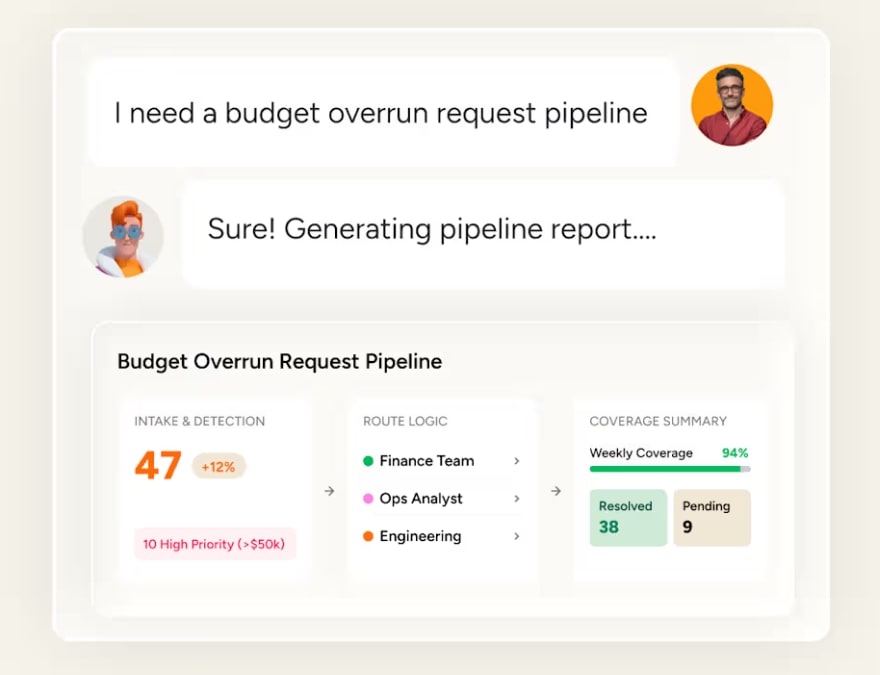
The Budget Overrun Agent scans project boards for spend columns that exceed budget thresholds:
- Continuously monitor project boards: The agent scans project boards for spend columns that exceed budget thresholds.
- Flag at-risk projects: When a project’s actual spend crosses 80% of its allocated budget with significant work remaining, the agent updates the project’s risk status and adds a note explaining the variance.
- Alert the finance controller: The agent sends a notification to the finance controller with a summary of at-risk projects, sorted by severity, including links to the relevant project boards.
- Suggest corrective actions: Based on the project timeline and remaining budget, the agent recommends whether to request additional funding, defer non-critical deliverables, or reassign resources. It’s the same proactive alerting people look for in software that keeps your budget and forecasts in sync, since catching variance early beats explaining it after the fact.
Finance teams stop firefighting (finding overruns at month-end) and start managing budgets proactively with real-time visibility into project spend.
Month-end close scheduling across time zones
Coordinating close activities across global teams in different time zones creates scheduling conflicts and handoff gaps. APAC finishes their entries, and EMEA picks up the next step the following morning — adding a full day to the close.
The Close Schedule Agent monitors the close checklist board and coordinates handoffs across regions:
- Track close activity completion: The agent monitors the board, tracking which activities are complete on each regional board and which are pending.
- Send time-zone-aware reminders: The agent sends reminders to owners in their local time zone, ensuring that a reminder for the Singapore team goes out at 9:00 a.m. SGT, not 9:00 a.m. EST.
- Identify blockers: When a close activity is overdue, the agent checks for dependencies — is this item waiting on an input from another region? — and notifies both the owner and the dependent team.
- Generate a consolidated close status: The agent compiles a real-time close status update showing progress by region, outstanding items, and estimated completion time, available to the finance controller at any point during the close.
Your team runs a coordinated global close without chasing status updates, and the agent’s 24/7 operation means no handoff gets missed because of time zones.

Vendor and procurement approval workflows
Vendor approvals involve multiple stakeholders, and requests often sit in queues while each approver waits for visibility into their next action. Submit a new software vendor request on Monday, and it may take until next week to reach the final approver.
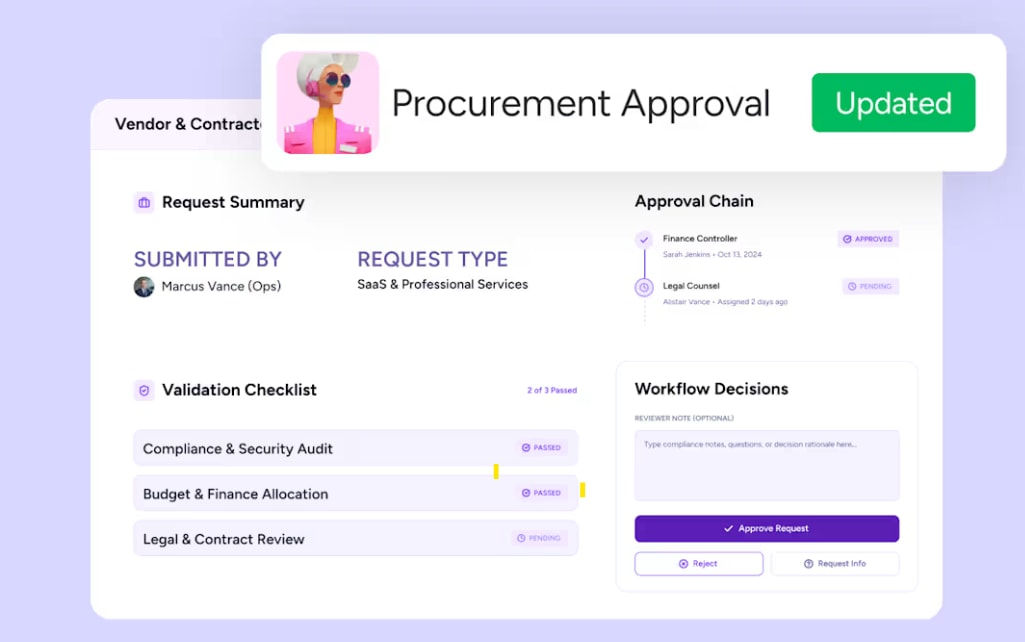
The Procurement Approval Agent, validates vendor and contractor requests and routes the approval through a defined workflow:
- Validate vendor submissions: The agent checks incoming vendor and contractor requests against required documentation and policy before routing them for approval.
- Request missing details proactively: If the vendor submission is incomplete (missing a W-9, insurance certificate, or security questionnaire), the agent sends a request to the submitter specifying exactly what is needed.
- Route the approval request: The agent moves the request through a defined approval workflow, notifying each approver in sequence and providing them with the vendor summary and supporting documents.
- Escalate stalled approvals: When an approver does not act within the SLA (e.g., 48 hours), the agent sends a reminder and, if still unresolved, escalates to the approver’s manager.
Procurement cycles get shorter — approvals move through the workflow without anyone nudging them, and every approval gets documented with an audit trail.
Executive digest and financial reporting
CFOs and finance directors need a weekly or daily summary of financial health, but compiling it means pulling data from multiple boards and systems. That can take a finance analyst two to three hours.
The Executive Digest Agent continuously tracks AR, AP, budget, and cash position boards for changes:
- Monitor high-value finance boards: The agent continuously tracks AR, AP, budget, and cash position boards for changes.
- Compile a periodic digest: At a scheduled interval (daily or weekly), the agent generates a digest highlighting overdue items, budget variances, cash position changes, and upcoming obligations.
- Flag items needing executive attention: The agent identifies items that exceed defined thresholds — a receivable over 90 days, a budget variance above 10%, a vendor payment due within 48 hours — and surfaces them at the top of the digest.
- Deliver to executives: The digest is sent to the CFO and finance directors via email or Slack, formatted for quick scanning with links to the relevant boards for drill-down.
The CFO makes faster decisions with a curated, actionable summary instead of requesting ad hoc reports from the team.

Contract renewal and vendor negotiation support
Contract renewals arrive faster than most finance teams expect. Catching the renewal window ahead of time keeps you in control of pricing and prevents any interruption to operations.
The Contract Renewal Agent tracks upcoming renewal dates and builds renewal briefs for the procurement team:
- Monitor the contracts board: The agent tracks upcoming renewal dates on the contracts board, triggering a review workflow 90 days before expiration.
- Pull historical data: The agent gathers historical spend data, vendor performance metrics, and service level compliance from connected boards, building a renewal brief for the procurement team.
- Generate a renewal brief: Using its knowledge grounding capability (docs, PDFs, and boards as context), the agent produces a structured summary including total contract value, year-over-year spend changes, service issues logged, and market alternatives identified via web search.
- Initiate the review workflow: The agent creates a renewal review item, assigns it to the procurement lead, and schedules a reminder for the finance controller to review the brief before negotiations begin.
The procurement team enters renewal negotiations with real leverage: historical spend trends, documented service issues, and market comparisons. The team enters every negotiation prepared, with the full picture ready in advance.
Try monday agentsWhy cross-department visibility makes finance AI agents more effective
Revenue forecasts need pipeline data from sales. Budget tracking needs project spend data from operations. Headcount planning needs hiring data from HR. When an AI agent can see all of this in one place, it connects dots that a siloed agent would miss.
That cross-department context changes what finance outputs look like:
- Revenue forecasting with pipeline context: An agent pulls deal stages from CRM, delivery timelines from PMO, and support tickets from service boards — producing forecasts based on operational reality, not optimism.
- Vendor payment validation with delivery confirmation: An agent checks procurement terms and operations delivery data before releasing payment, holding funds when invoiced quantities don’t match what was received.
- Board-level budget reporting with cross-functional spend: An agent factors in marketing campaigns, sales commissions, and engineering contractor costs — giving the CFO the complete picture instead of a finance-only view missing 40% of actual costs.
Cross-department context is built into monday AI Workspace, letting all departments work on the same data layer. Every board, item, and update lives in one connected system, so agents can see across the entire organization. Standalone automation platforms or single-department agents can’t access that kind of context. Cross-department context reveals the pipeline shift behind a revised revenue forecast or the delivery shortfall that should hold a vendor payment — the platform’s shared data layer is what gives finance agents the full organizational context they need to deliver meaningful outputs.
How to set up monday agents for finance workflows
Setting up a finance agent on monday AI Workspace is a no-code experience your team can complete independently in three steps.
Step 1: Choose a ready-made finance agent template
monday offers ready-made finance agents for common finance scenarios, including Invoice Reconciliation Agent, Payment Match Agent, Budget Overrun Agent, and Dispute Follow-Up Agent. Each comes pre-configured and can be customized with additional knowledge sources and permissions.
Step 2: Describe a custom agent and connect knowledge sources
For workflows unique to your team, the AI agent builder lets you create a custom agent by describing its role in natural language, connecting knowledge sources (payment terms PDFs, vendor contracts, relevant boards), and defining available actions (update statuses, send emails via Gmail, post in Slack, search the web).
Step 3: Test with simulation mode before going live
Simulation mode shows what the agent would do — which items it would flag, which notifications it would send — without making any changes. Start with one agent on a non-critical workflow, review simulation results for 3 to 5 days, then activate and expand as confidence builds.

How monday agents connect to accounting and finance systems
Connecting agents to your existing finance systems is straightforward, whether you need a quick integration with Gmail and Slack or a deeper connection to an ERP. Here is how each integration layer works and what it enables for finance teams.
One-click integrations with Gmail, Slack, and web search
monday agents natively connect to Gmail (for sending follow-up emails on overdue invoices or dispute notifications), Slack (for notifying team members about approvals, exceptions, or close status updates), and web search (for researching vendor information, market rates, or regulatory updates).
These integrations require no code. They are configured during agent setup as part of the “connect knowledge and tools” step, and the agent uses them as action channels whenever its logic determines an external communication is needed.
Connecting accounting systems through monday MCP and open APIs
The Model Context Protocol (MCP) is an open standard that lets external AI assistants securely read and act on monday AI workspace data, and vice versa. Finance teams can use monday MCP to connect AI assistants (Claude, ChatGPT, Cursor, Copilot Studio) to their monday AI Workspace, enabling those assistants to create items, update records, run analyses, and perform actions on finance boards.
For deeper accounting system integrations — connecting to an ERP, general ledger, or financial reporting platform — teams can use monday AI Workspace’s open API — GraphQL — or 200+ pre-built integrations to sync data between their accounting platform and monday AI Workspace boards. Once the data is on a monday AI Workspace board, agents can act on it: monitoring for changes, flagging exceptions, and triggering workflows.
Direct native integrations with specific ERP systems — SAP, Oracle, NetSuite — use API configuration or third-party connectors rather than one-click setup. MCP and the open API provide the bridge, and monday AI Workspace’s integration ecosystem continues to expand.
How monday CRM syncs with QuickBooks for finance workflows
monday CRM’s integration ecosystem includes connectors for QuickBooks, enabling finance teams to sync deal data, invoicing triggers, and payment statuses between the CRM and their accounting system. When a deal moves to “Closed Won” on the monday CRM board, an automation triggers invoice creation in QuickBooks, and an AI agent monitors the subsequent AR board for payment receipt, following up with the customer whenever payment falls outside terms.
How to keep financial data secure with AI agent guardrails
Security and governance sit at the center of every finance operation. monday AI agents are built with the controls finance teams need to operate confidently, from granular permissions to full audit trails.
Granular permissions and role-based access controls
Admins define exactly which data each agent can access and whether it has permission to read, create, or edit information. An agent monitoring accounts receivable can be restricted from accessing HR or engineering boards — it sees only the data it needs to do its job. These permissions align with the same role-based access controls used across monday AI Workspace.
Human-in-the-loop validation with simulation mode
Before an agent auto-approves a vendor payment, escalates a budget overrun, or sends a collection notice, the finance team can require human approval for high-stakes actions. Any action involving payments above a defined threshold requires human sign-off, while routine status updates and notifications proceed automatically.
Audit trails and agent activity logging
Every action an agent takes is logged with a full audit trail: what the agent did, why it did it, and what it planned to do next. Finance teams can review agent activity logs through the platform’s built-in run history, with timestamps, action details, and outcomes recorded for every cycle.
Compliance certifications for enterprise finance environments
The platform holds SOC 2 Type II, ISO/IEC 27001, ISO/IEC 27701, HIPAA, and GDPR compliance certifications. Data processed by monday AI adheres to the same encryption protocols (AES-256 at rest, TLS 1.3 in transit) as the rest of the platform. Customer data stays with the customer — the platform keeps it out of AI model training, and third parties are prohibited from using it as well.
How to plan a pilot and measure finance AI agent ROI
Start with one high-volume workflow, measure the results, then expand. Here’s how:
Step 1: Pick one high-volume workflow
Choose a workflow that’s rules-based and eats up manual time — invoice reconciliation, payment matching, dispute follow-ups, or vendor approvals. Pick something where you can see results within 30 days.
Step 2: Set your success metrics upfront
Define what success looks like before you deploy. Capture your baseline now:
- Hours spent per week on this workflow
- Days to resolve disputes
- Exceptions requiring human review
- On-time close rate
Step 3: Deploy one agent, then expand
Run the agent in simulation mode for 3 to 5 days. Review what it would do, then activate it. After 30 days, check your metrics. If it’s working, add a second workflow. If not, refine the agent’s instructions and try again.
Start with one workflow, scale from there
The fastest way for your finance team to achieve value with monday agents is to stay focused. Finance teams that start small and scale deliberately see faster adoption and stronger results. Get started with monday agents today.
Try monday agentsFrequently asked questions
How are AI agents used in finance?
Finance teams use AI agents to autonomously handle invoice reconciliation, dispute tracking, budget overrun monitoring, vendor approval routing, executive reporting, payment matching, month-end close coordination, and contract renewal management. Agents observe financial data on monday AI Workspace, reason about exceptions or risks based on connected knowledge sources, take action (updating statuses, sending notifications, generating reports), and refine their behavior based on outcomes.
Which AI agents are best for finance teams?
The most relevant monday agents for finance include the Budget Overrun Agent (for budget and project risk monitoring), the Procurement Approval Agent (for vendor and contract approval workflows), the Invoice Reconciliation Agent and Executive Digest Agent (for daily reconciliation and executive reporting), and the Payment Match Agent and Dispute Follow-Up Agent (for payment matching and dispute follow-ups). The best choice depends on which workflow currently consumes the most manual effort on your team.
How do you set up a monday AI agent for finance?
Setting up a monday AI agent follows three steps: describe the agent's role and triggers in natural language (e.g., "Flag invoices unpaid for more than 45 days"), connect the knowledge sources and integrations the agent needs (payment terms docs, AR boards, Gmail for follow-ups), and test the agent in simulation mode to validate its actions before going live.
Are monday agents secure for financial data?
The platform holds SOC 2 Type II, ISO/IEC 27001, ISO/IEC 27701, and HIPAA compliance certifications, and is GDPR compliant. Agents operate within role-based permissions (admins define exactly which data each agent can access), every action is logged with a full audit trail, and simulation mode allows human-in-the-loop validation before agents take high-stakes actions. monday AI Workspace doesn't use customer data to train AI models.
How much do monday agents cost?
Pricing details are available on the monday.com pricing page. Every account receives AI credits to explore AI capabilities, with additional credits available as needed. monday MCP — which connects external AI assistants to your workspace — is included on all plans at no additional cost. Visit the pricing page for current details on agent-specific tiers and credit allocations.
Can monday agents connect to ERP systems beyond QuickBooks?
The platform offers 200+ integrations, an open GraphQL API, and MCP protocol support, which allow finance teams to connect to ERP systems like SAP, Oracle, and NetSuite. These connections may require API configuration or third-party connectors rather than one-click setup. Once ERP data is synced to monday AI Workspace boards, agents can monitor, analyze, and act on it using the same capabilities described throughout this article.

 Get started