


Imagine asking one question and having every relevant answer — from CRM records, project boards, email threads, and support tickets — appear in seconds, complete with citations. That’s the promise of AI enterprise search, and it’s already reshaping how organizations turn disconnected knowledge into instant decisions.
This guide explores how AI enterprise search works, what sets it apart from keyword search, how to evaluate platforms on security and governance, and how to build a business case that earns executive support. We’ll also look at how monday agents work within the monday AI Workspace to give your search the context it needs to deliver real answers.
Try monday agentsKey takeaways
- AI search answers questions and queries: With one question, employees receive a single, sourced answer drawn from across the organization — replacing multiple app switches with a unified response.
- Your data structure determines your search quality: Connected, cross-department data produces far stronger results than fragmented silos — the platform behind search is as important as the search itself.
- Security must be built in, not bolted on: Permission-aware retrieval, audit trails, and human-in-the-loop controls are non-negotiable, especially for regulated industries handling sensitive data.
- AI agents turn search results into real action: Instead of identifying information and stopping there, AI agents can automatically score leads, route tickets, flag project risks, and update records — all within your existing permission model.
- Start small, then scale: A phased rollout beginning with one high-value knowledge base delivers fast, measurable wins and builds the organizational trust needed to expand across departments.
What is AI enterprise search?
AI enterprise search helps employees find information across every internal system, application, and data repository in your organization. It uses natural language processing, machine learning, and semantic understanding so people can ask questions the way they naturally talk and get answers pulled from every connected source.
Unlike a simple search bar applied to internal data, AI enterprise search understands the meaning behind a question. It retrieves results from email, CRM records, project boards, documents, chat logs, knowledge bases, and more, then generates a coherent answer rather than returning a list of links.
This is an important win for enterprises because your data lives across dozens of disconnected applications. Employees spend significant portions of their workweek simply looking for information, navigating between systems, messaging colleagues, and piecing together answers from disconnected sources. AI enterprise search solves this by acting as a single intelligent access point across the entire organization’s knowledge. According to a Forrester Total Economic Impact study, technical knowledge workers spent an average of 13% of their day — roughly 21 hours per month — on search and knowledge discovery before deploying an AI-powered enterprise search platform.
The core technologies behind AI-powered search
AI enterprise search runs on several core technologies working in concert. Each handles a specific part of the pipeline from question to answer. Understanding them helps you spot the difference between real implementations and surface-level ones.
- Natural language processing (NLP) enables the system to use conversational language, including synonyms, abbreviations, and implied intent. When someone searches for “latest deck on the Johnson account,” NLP understands they’re looking for a recent presentation related to a specific client, even if no document contains that exact phrase.
- Semantic search and vector embeddings convert content and queries into mathematical representations (vectors) that capture meaning. This means “Q4 revenue forecast” and “fourth quarter sales projections” are understood as the same concept. Vector embeddings are numerical fingerprints of meaning, so the system matches ideas instead of just words.
- Machine learning ranking models learn from user behavior — which results people select, which answers they find useful, which queries they refine — to improve which results are highlighted first over time. Search quality improves the more your organization uses it.
- Large language models (LLMs) understand complex, multi-part queries and generate readable answers from retrieved content. The system can synthesize information from multiple sources into one coherent response instead of dumping a list of documents.
- Knowledge graphs map relationships between entities, including people, projects, departments, documents, and clients, to improve retrieval accuracy. A knowledge graph understands that “Sarah” is on the engineering team, which is working on “Project Atlas,” which has a dependency on the “API migration” — so a question about any one of these can identify relevant context from the others.
Common misconceptions about AI enterprise search
To clear up any misconceptions, here’s what AI enterprise search doesn’t do:
- AI enterprise search isn’t Google pointed at your file server. It’s purpose-built for enterprise security, permissions, and data structures.
- AI enterprise search isn’t a chatbot. While it can generate answers, it retrieves and grounds those answers in actual organizational data rather than generating responses from general training data alone.
- AI enterprise search isn’t a simple file search or document management system. It spans structured data (databases, CRM records, project boards) and unstructured data (emails, PDFs, chat transcripts, meeting notes).
- AI enterprise search isn’t a replacement for data governance. It operates within existing permission structures rather than bypassing them.
AI enterprise search vs. traditional keyword search
Most organizations still rely on keyword-based search within individual applications — searching for files in Google Drive, records in their CRM, tickets in their service platform. This type of traditional search forces employees to know where to look and what keywords to use. Here’s how AI enterprise search stacks up against traditional search:
| Dimension | Traditional keyword search | AI enterprise search |
|---|---|---|
| Query understanding | Exact keyword matching; misspellings or synonyms return poor results | Semantic intent and context understanding; interprets meaning behind the question |
| Data sources | Single application or repository at a time | Unified search across all connected enterprise systems simultaneously |
| Results format | List of document links ranked by keyword frequency | Synthesized answers with source citations and links to original content |
| Personalization | None or basic filters (date, file type) | Results ranked by role, department, past behavior, and permissions |
| Permission handling | Varies by application; inconsistent enforcement | Enforced consistently across all sources at query time |
| Learning over time | Static relevance algorithms | Continuously improving through usage patterns and feedback |
| Cross-department visibility | Siloed within each application | Connects information across teams and workflows |
How AI-powered enterprise search works
Understanding how AI enterprise search works — from the moment someone asks a question to the delivery of a grounded, actionable answer — helps you evaluate platforms more critically and set realistic expectations with stakeholders. The pipeline below breaks down each stage of the process.
Step 1: Connect to enterprise data sources
The first step is linking your search system to all the places where organizational knowledge lives. Without comprehensive connections, your AI can only search a fraction of what your organization knows. Common data source categories include:
- Structured work platforms: Project management boards, CRM records, service ticketing systems, HR databases.
- Communication channels: Email (Gmail, Outlook), messaging (Slack, Microsoft Teams), meeting transcripts.
- Document repositories: Google Drive, SharePoint, Confluence, internal wikis.
- Code and development systems: GitHub, GitLab, Jira.
- Business applications: ERP systems, finance platforms, analytics dashboards.
Connectors — pre-built integrations — pull data from these sources into the search index. The breadth of connectors directly determines how comprehensive the search experience will be.
Step 2: Index and enrich content with metadata
After ingestion, the data goes through indexing — organizing content for fast retrieval. During this stage, metadata enrichment adds contextual labels to every piece of content: who created it, when, which department it belongs to, what project it relates to, and what type of content it is.
AI models automatically classify, tag, and extract entities from content during indexing:
- A sales proposal gets tagged with the client name, deal stage, and account owner.
- A support ticket gets labeled with the product area, severity, and resolution status.
Richer metadata produces more accurate search results. Platforms where work is already structured — with status columns, ownership fields, project associations, and timeline data — produce richer metadata than platforms where information lives in unstructured documents.
Step 3: Process queries with hybrid retrieval
Hybrid retrieval combines two methods: keyword matching for precise terms (product names, error codes, account numbers) and semantic search for meaning-based queries. You need both. Keyword search catches exact matches semantic search might miss. Semantic search understands intent keyword search can’t.
Consider this example: an employee searching “why did the Acme deal stall?” would find keyword search alone insufficient, since no document contains that exact phrase. Semantic search understands the intent and retrieves:
- CRM notes about the Acme account’s pipeline status.
- Email threads discussing pricing concerns.
- Meeting summaries where the deal was discussed.
Together, both methods give you complete, accurate results.
Step 4: Generate grounded answers with RAG
Retrieval-augmented generation (RAG) turns retrieved documents into coherent, natural-language answers:
- The system retrieves the most relevant chunks of content from the index based on the query.
- Those chunks are passed to the LLM as context alongside the user’s question.
- The LLM generates a synthesized answer that references the specific sources.
The key word is “grounded” — meaning the answer cites real internal data rather than generating plausible-sounding information from general knowledge. RAG reduces hallucination — when AI generates plausible but wrong information — by constraining the model to retrieved content.
When the system says “The Acme deal stalled due to pricing concerns raised in the October 15th call,” it’s pointing to an actual call note, not inventing a narrative.
Step 5: Enforce permissions at every stage
Enterprise search has to respect the same access controls that govern each source system. Access controls should keep HR compensation data visible only to authorized HR team members and confidential legal case documents visible only to legal team members — even when both pieces of information are indexed.
Permission-aware retrieval filters results when you search, based on your identity and access rights. This enforcement happens at every stage:
- During ingestion: What gets indexed and tagged with access control lists.
- During retrieval: What gets returned in response to a query.
- During answer generation: What the LLM is allowed to reference when composing a response.
Platforms with built-in permission models — where access controls are already defined at workspace, board, and item level — enforce permissions more reliably than systems reconciling permissions across dozens of disconnected apps.

Why cross-department context improves retrieval quality
The quality of AI enterprise search depends not just on the technology but on the structure and connectedness of the underlying data. Most organizations miss this: two systems using identical search technology deliver very different results if one has structured, connected data and the other has fragmented silos.
Structured work data vs. fragmented content silos
Two scenarios show why data structure matters as much as search technology.
Scenario 1: Fragmented data An organization stores work across disconnected applications — CRM in one platform, project management in another, support tickets in a third, documents in Google Drive. When AI search queries this fragmented data, it can retrieve individual pieces but cannot connect them. A question like “What’s the status of Acme onboarding?” requires searching four systems and manually assembling the answer, if the search system can even access all four.
Scenario 2: Connected data Work data lives in a connected platform where CRM records, project boards, service tickets, and documents share a common data layer. The search system can trace relationships: the Acme deal in the CRM is linked to the onboarding project board, which connects to the support tickets and the onboarding documentation. The answer is richer, more accurate, and delivered in one response.
How context flows across teams on a connected platform
Cross-department context turns search from document retrieval into organizational intelligence. Here’s what this looks like when data flows across team boundaries:
- Marketing + Sales + Support: A marketing team member asks “What objections are prospects raising about our pricing?” The search pulls from sales call transcripts, CRM deal notes, and support ticket themes — not just marketing documents. The answer reflects the full customer experience, not one department’s view.
- Engineering + Project Management + Stakeholders: An IT manager asks “Which projects are blocked by the API migration?” The search connects engineering sprint boards, project management timelines, and stakeholder update threads to find every project with a dependency on that migration.
- HR + IT + Department Leads: An HR team member asks “What’s the onboarding completion rate for Q3 hires?” The search pulls from HR records, onboarding project boards, and training completion data to deliver a complete picture.
The business benefits and ROI of enterprise AI search
Investing in AI enterprise search is a business decision driven by measurable outcomes. The benefits break down into three areas: productivity gains, cost reduction, and knowledge preservation.
Productivity gains from reduced search time
Employees spend less time searching for information and more time acting on it. Here’s what productivity gains look like:
- Reduced search time: Employees find answers in seconds instead of minutes or hours spent navigating multiple systems. Instead of opening 4 applications and cross-referencing results, they ask one question and get a synthesized answer with source links.
- Fewer interruptions: Instead of messaging colleagues to ask “Where is the latest version of the proposal?” or “What’s the status of the Johnson project?”, employees get instant answers from the search system. More focused time for everyone — both the person asking and the person answering.
- Faster decision-making: When relevant data from across departments is identified in one answer, decisions that previously required multiple meetings and email chains can happen in real time. A manager reviewing a project risk doesn’t need to schedule calls with three department leads — the search system finds the relevant context from all three.
Reduced support costs and faster resolution
AI enterprise search cuts internal and external support costs. For internal IT and HR helpdesks, employees can self-serve answers to common questions — including password reset procedures, benefits enrollment steps, and software access requests — instead of submitting tickets. Research from Deloitte finds that 25% of support cases are opened on topics already addressed in the organization’s knowledge repository, underscoring how much ticket volume AI search can deflect through improved self-service.
For customer-facing support teams, agents can find resolution steps, product documentation, and similar past cases instantly instead of escalating or researching manually.
As the search system learns from resolved cases and updated docs, it gets more accurate and deflects even more tickets.
Faster onboarding and knowledge reuse
New employees benefit most from AI enterprise search. Instead of spending weeks learning which systems to check, who to ask, and where documentation lives, new hires can ask questions in their own words and get answers grounded in the organization’s current knowledge base.
For example, “How do we handle enterprise pricing requests?” returns the relevant process document, past examples, and the team responsible, without the new hire needing to know any of that context in advance.
Knowledge reuse solves a different problem: when experienced employees leave, their institutional knowledge walks out the door. AI enterprise search preserves and reveals that knowledge by indexing their documents, project histories, decision records, and communications. Individual knowledge becomes organizational knowledge: searchable, reusable, and persistent.
How to keep AI enterprise search secure and permission-aware
Security is the top concern for enterprises evaluating AI search, and for good reason. The system accesses your most sensitive data. Here’s the security framework every organization should demand from an enterprise search platform.
Permission-aware retrieval from ingestion to answer generation
Enforce permissions at three layers to prevent sensitive information from leaking through search results:
- Ingestion layer: Access control lists (ACLs) from source systems are mapped during data ingestion, so the index itself is permission-aware. Content from a confidential HR board is tagged with the same access restrictions it has in the source system.
- Query layer: When a user submits a query, the system checks their identity and filters results to only include content they are authorized to see. A sales rep’s query never returns results from boards or records they don’t have access to.
- Generation layer: When RAG generates an answer, the LLM only receives content the user has permission to access, preventing sensitive information from leaking into synthesized responses. The model cannot reference a document the user wouldn’t be able to open directly.
Platforms with native, granular permission models — workspace-level, board-level, and item-level controls — provide stronger security than platforms reconciling permissions from multiple external systems at query time.
Governance, audit trails, and human-in-the-loop controls
Enterprise search platforms need three governance capabilities as standard:
- Audit trails: Every query, every result served, and every action taken based on search results should be logged and auditable. You need this for compliance and to understand how AI gets used across the organization. If a question arises about what data was accessed or what action was triggered, the audit trail provides the answer.
- Human-in-the-loop controls: For high-stakes actions triggered by search results, such as updating records, sending communications, or modifying workflows — the system should require approval before execution. “Human-in-the-loop” means the AI recommends or drafts an action, but a person must confirm it before it takes effect.
- Admin controls and guardrails: Administrators should be able to define what each AI capability can and can’t do, which data sources it can access, and whether it has read-only or read-write permissions. This includes the ability to scope AI access to specific workspaces and monitor AI-driven activity.
Compliance standards every enterprise search platform should meet
Key compliance certifications and standards to look for:
- SOC 2 Type II: Validates that the platform’s security controls are designed and operating effectively over time, not just at a single point-in-time audit.
- ISO/IEC 27001: International standard for information security management systems, covering risk assessment, access control, and incident management.
- ISO/IEC 27701: Extension of ISO 27001 covering privacy information management, relevant for organizations handling personal data.
- GDPR: European data protection regulation governing how personal data is collected, stored, and processed, applicable to any organization with European customers or employees.
- HIPAA: U.S. regulation for protecting health information, relevant for healthcare and insurance organizations.
Compliance certifications are table stakes — everyone should have them. The real question: does the platform’s AI infrastructure (including search and agent capabilities) fall under these certifications, or just the underlying data storage?
Where AI enterprise search makes the biggest impact by department
AI enterprise search benefits everyone, but the impact varies by department based on how each team creates, uses, and acts on information. The sections below focus on the specific questions each department asks and how AI search answers them.
IT and helpdesk
IT teams handle a high volume of repetitive queries and time-sensitive escalations. Top search scenarios:
- Ticket resolution: “Has this issue been resolved before?” Search combs past tickets, resolution steps, and knowledge base articles that match the current issue’s symptoms, reducing time-to-resolution and preventing duplicate investigation.
- System documentation: “What’s the configuration for the SSO integration?” Search retrieves technical documentation across wikis, runbooks, and past incident reports, even when the information is spread across multiple repositories.
- SLA monitoring: “Which tickets are approaching SLA breach?” Search queries structured data from service boards to flag at-risk cases before they breach, giving managers time to intervene.
When search is connected to AI agents, these queries can trigger automated actions: routing tickets to the right team, alerting managers about SLA risks, and matching knowledge base articles to incoming requests — all without manual intervention. The leadership outcome is improved customer satisfaction and reduced escalation costs.
HR and people operations
HR teams manage sensitive, policy-heavy information that employees need to access frequently. The top search scenarios include:
- Policy questions: “What’s our parental leave policy for employees in California?” Search retrieves the relevant policy document and spotlights the specific section, saving HR from answering the same question repeatedly.
- Onboarding support: “What systems does a new engineering hire need access to?” Search pulls from onboarding checklists, IT provisioning boards, and department-specific setup guides to deliver a complete answer.
- Candidate research: “What feedback did we receive on candidates for the product manager role?” Search aggregates interview notes, reference check summaries, and recruiter assessments into a unified view.
The leadership outcome is faster onboarding and preserved HR capacity for strategic work rather than repetitive question-answering.
Sales and customer-facing teams
Sales teams need fast access to account context, competitive intelligence, and reusable assets. The top search scenarios include:
- Deal intelligence: “What’s the latest activity on the Acme account?” Search pulls CRM records, email threads, meeting notes, and support tickets into a unified view, so the rep sees the full picture before a call.
- Competitive positioning: “How have we positioned against [competitor] in recent deals?” Search retrieves battlecards, win/loss analyses, and sales call transcripts where competitive positioning was discussed.
- Proposal reuse: “Do we have a proposal template for enterprise SaaS deals?” Search reveals past proposals, pricing frameworks, and approved messaging that can be adapted for the current opportunity.
For CRM-connected search, the value multiplies when the CRM shares a data layer with project management and service workflows. A sales rep can see not just deal data but delivery status, support history, and account health in one query. The leadership outcome is improved retention and higher win rates.
Marketing and content teams
Marketing teams create and consume large volumes of content across campaigns, channels, and brand guidelines. The top search scenarios include:
- Content discovery: “What content do we have about [topic]?” Search retrieves blog posts, whitepapers, social media assets, and campaign briefs across all repositories, preventing duplicate content creation.
- Campaign performance: “How did our Q3 email campaigns perform?” Search pulls analytics data, campaign boards, and post-mortem documents to locate performance insights without requiring manual report assembly.
- Brand consistency: “What’s our approved messaging for [product feature]?” Search finds brand guidelines, approved copy, and messaging frameworks so every team member works from the same source of truth.
The leadership outcome is faster campaign launches and improved ROI through message consistency and insight reuse.
Engineering and product development
Engineering teams work across code, documentation, and project management systems that are often poorly connected. The top search scenarios include:
- Code and documentation: “Where is the API documentation for the payments module?” Search retrieves technical docs, code comments, and related wiki pages, even when documentation is scattered across multiple systems.
- Bug history: “Have we seen this error pattern before?” Search looks through past bug reports, incident post-mortems, and related code changes, helping engineers avoid re-investigating known issues.
- Sprint context: “What’s the current status of the authentication refactor?” Search pulls from sprint boards, pull request descriptions, and stakeholder updates to deliver a complete status picture.
The leadership outcome is reduced delays and improved planning accuracy through dependency visibility.

What to look for in an enterprise search platform
The technology capabilities described throughout this article translate into specific evaluation criteria. When comparing platforms, these are the dimensions that separate effective implementations from disappointing ones.
Connector breadth and data source coverage
The platform should connect to every system where organizational knowledge lives. Key evaluation questions to ask:
- Pre-built connector coverage: Does the platform offer connectors for your existing applications, including CRM, project management, communication platforms, document storage, and development systems?
- Custom connector support: Does it support custom connectors or open APIs for proprietary or niche systems that pre-built connectors don’t cover?
- Sync frequency: How frequently does the platform sync data from connected sources — real-time, hourly, or daily? Stale data leads to stale answers.
- Native data centralization: Does the platform already centralize work data across departments, reducing the number of external connectors needed in the first place?
Platforms built as unified work operating systems — where CRM, project management, service, and development workflows already share a common data layer — require fewer connectors because the data is already centralized. This reduces integration complexity and improves data freshness.
Relevance tuning and hybrid retrieval capabilities
Search quality determines whether employees trust and adopt the system. Key evaluation questions to ask:
- Hybrid retrieval: Does the platform support both keyword and semantic search working together?
- Relevance tuning: Can administrators adjust ranking based on content type, recency, department, or user role?
- Learning from usage: Does the system improve results over time based on user behavior and feedback?
- RAG with citations: Can the platform generate synthesized answers, and does it cite the specific sources used?
- Ambiguous query handling: How does the platform handle vague queries — does it ask clarifying questions, or return overly broad results?
Security, governance, and deployment flexibility
Security and governance criteria to evaluate:
- Permission-aware retrieval: Does the platform enforce permissions at every stage, including ingestion, query, and generation?
- Audit trails: Does it log all AI-driven queries and actions for compliance and review?
- Human-in-the-loop controls: Does it require human approval for actions triggered by search results?
- Compliance certifications: What certifications does the platform hold?
- Deployment flexibility: Does the platform offer cloud, hybrid, or on-premises deployment options?
- Data ownership: Does the platform retain ownership of your data, or do third parties train on it?
Data ownership and third-party training policies are increasingly important. Organizations should confirm that their data stays private and is not used to train external AI models. This is a non-negotiable for regulated industries and a best practice for everyone else.
How standalone search platforms compare to platform-native search
When evaluating AI enterprise search, organizations face a fundamental architectural choice: adopt a standalone search platform that connects to existing systems, or use search capabilities native to the platform where work already happens. Each approach has distinct tradeoffs.
| Approach | Strength | Limitation |
|---|---|---|
| Standalone enterprise search | Broad connector coverage across many systems | Requires separate adoption; no execution layer; must reconcile permissions across sources |
| Single-domain platforms (CRM-only, IT-only) | Deep domain expertise within one area | Siloed context; cannot answer cross-functional questions |
| Connected work platforms | Cross-department context + execution paths | Requires work to already live on the platform |
Standalone search platforms excel at connecting to many data sources, but they introduce a new application that teams must adopt and learn. They also lack an execution layer, meaning search results still require manual action in the source systems.
Single-domain platforms offer deep search within their specialty (CRM, IT service management, etc.) but cannot answer questions that span departments. “What’s blocking the Acme launch?” requires context from sales, marketing, product, and engineering — which a CRM-only search cannot provide.
How to build the business case for AI-driven enterprise search
Even when the technology and security requirements are met, organizations need a compelling business case to secure budget and executive sponsorship. The framework below translates the benefits discussed earlier into the language of ROI.
Calculating time saved and cost avoided
The ROI calculation follows a straightforward framework:
- Estimate current search time: Survey a sample of employees across departments to determine the average time spent searching for information per day. Most organizations find this number is higher than expected.
- Calculate the total annual cost: Multiply average daily search time by the number of employees and their average hourly cost. This is the organization’s current “search tax.”
- Estimate the reduction: Based on pilot results or vendor benchmarks, estimate the percentage reduction in search time that AI enterprise search would deliver.
- Add cost avoidance: Factor in reduced support ticket volume, faster onboarding time-to-productivity, and fewer redundant work efforts (teams recreating documents or processes that already exist).
The ROI calculation should also account for qualitative benefits that are harder to quantify but equally real: faster decision-making, reduced employee frustration, and improved knowledge retention when experienced team members move on. In Microsoft’s 2026 Work Trend Index survey of 20,000 AI team members across 10 countries, 66% say AI has allowed them to spend more time on high-value work — a signal of the broader productivity shift organizations can expect from AI-powered search.
Metrics to define before deployment
Establishing baselines before deployment is essential for measuring impact. Key metrics to track:
- Average time to find information: Measured through employee surveys or time-tracking studies before and after deployment.
- Internal support ticket volume: Number of tickets submitted to IT, HR, and other internal helpdesks — a direct indicator of self-service effectiveness.
- Onboarding time to productivity: How long it takes new hires to become fully productive, measured by manager assessments or milestone completion.
- Knowledge reuse rate: How often existing documents, templates, and processes are discovered and reused vs. recreated from scratch.
- Search satisfaction score: Employee satisfaction with their ability to find information, measured through periodic surveys.
Addressing common stakeholder objections
The most common objections — and how to address them:
- “Our data is too sensitive for AI search.” Permission-aware retrieval ensures the search system never exposes data a user wouldn’t already have access to. Encryption, audit trails, and compliance certifications (SOC 2 Type II, ISO 27001, HIPAA) provide additional layers of protection. The search system doesn’t create new access; it makes existing access more efficient.
- “We already have search within our individual applications.” Siloed search forces employees to know where to look and cannot connect information across departments. When a sales rep needs to understand an account’s full picture — including deal data, delivery status, and support history — searching within the CRM alone gives an incomplete answer.
- “The implementation will be too complex and disruptive.” A phased approach — starting with a single high-value example and expanding — reduces risk and delivers early wins. Platforms where work data is already centralized require significantly less integration work because the data structures and permissions are already consistent.
- “How do we know the AI won’t give wrong answers?” RAG grounding constrains the AI to retrieved content rather than general knowledge. Source citations let users verify every answer. Human-in-the-loop controls ensure that actions triggered by search results require human approval before execution.

How to implement AI enterprise search in 3 phases
A phased implementation reduces risk, builds organizational confidence, and delivers early wins that justify continued investment. Each phase builds on the previous one, expanding scope as the organization gains experience and trust.
Phase 1: Start with a high-value internal knowledge base
The first phase focuses on a single, high-value example — typically an internal knowledge base or IT helpdesk. This keeps the scope manageable while delivering measurable results quickly.
The focus areas for Phase 1:
- Connect 2-3 primary data sources: Internal wiki, IT ticketing system, and HR policy documents are common starting points because they serve high-volume, repetitive queries.
- Configure permissions and access controls: Map existing access control lists to the search index and validate that permission enforcement works correctly.
- Run a pilot with a defined user group: An IT support team or HR team makes a strong pilot group because they handle frequent, well-defined queries with measurable outcomes.
- Measure baseline metrics: Track search time, ticket volume, and user satisfaction before and during the pilot to establish the business case for expansion.
This phase typically takes 4–8 weeks and should produce measurable results — including reduced ticket volume, faster resolution times, and positive user feedback — that inform the business case for Phase 2.
Phase 2: Expand to cross-department sources
After validating the pilot, the search index expands to include cross-department data sources:
- CRM records and sales pipeline data.
- Project management boards and workflow data.
- Communication channels (email, messaging).
- Document repositories across departments.
This phase is where cross-department context becomes valuable. A query from a sales rep can now check project delivery status, support ticket history, and marketing campaign data alongside CRM records. A question from a project manager can pull in resource availability, budget data, and stakeholder communications.
Platforms with a unified data layer across departments make this phase significantly simpler because the data is already connected. There’s no need to build custom integrations between siloed systems or reconcile different data models.
Phase 3: Connect search to workflows and AI agents
The final phase transforms search from a passive retrieval system into an active execution layer:
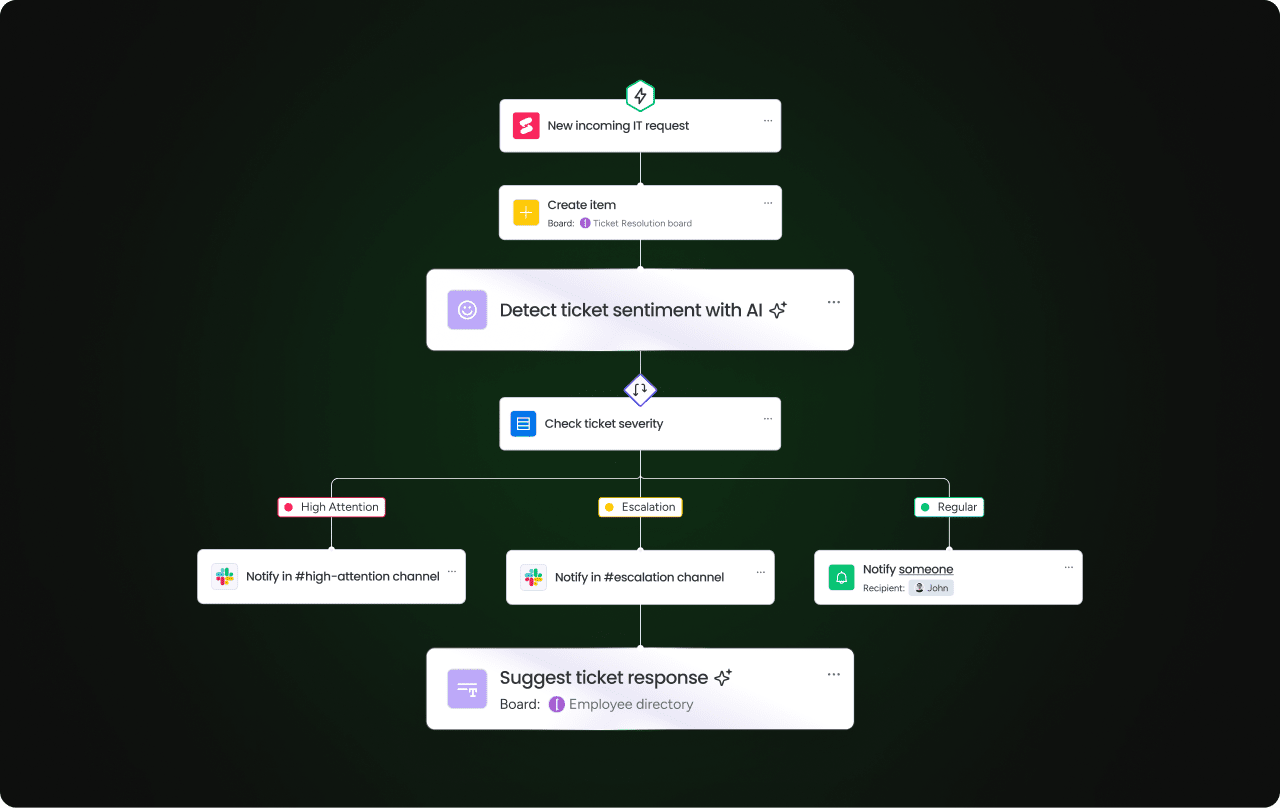
- Search-triggered workflows: Finding an overdue project automatically creates a follow-up action and notifies the owner. Identifying a support ticket pattern triggers a knowledge base update.
- Agent grounding: AI agents use search as their context layer, retrieving relevant data before taking actions like drafting reports, routing tickets, or updating records.
- External AI assistant integration: The search system connects to external AI assistants through protocols like MCP (Model Context Protocol), allowing employees to query and act on their work data from platforms like Claude, ChatGPT, or Cursor.
This phase represents the shift from “finding answers” to “getting work done” — where search becomes the foundation for autonomous action, not just information retrieval.
How to move AI enterprise search from pilot to production
The transition from a successful pilot to a production deployment is where AI enterprise search initiatives either accelerate or lose momentum. Technical validation is only part of the equation — content readiness, integration depth, and ongoing evaluation determine whether the system delivers sustained value.
Content readiness and metadata hygiene
The quality of search results depends on the quality of the underlying content. Before scaling from pilot to production, address these 4 areas:
- Audit existing content: Identify outdated, duplicate, or contradictory documents and archive or update them before indexing. Stale content degrades search quality and erodes team member trust. If the system returns an outdated policy document, employees stop trusting the results.
- Standardize metadata: Ensure consistent naming conventions, tagging, and categorization across departments. When marketing calls it a “campaign brief” and sales calls it a “launch plan,” the search system needs consistent metadata to connect them.
- Establish content ownership: Assign owners responsible for keeping indexed content accurate and current. Without ownership, content drifts out of date and search quality degrades over time.
- Define content refresh cadences: Set schedules for reviewing and updating high-traffic knowledge base articles, policy documents, and process guides. Quarterly reviews for stable content and monthly reviews for fast-changing areas are common starting points.
The integration work most teams underestimate
Several integration challenges consistently catch teams off guard. Understanding them in advance helps you plan realistically.
- Permission mapping across systems with different access control models is the most common friction point. One system uses role-based access, another uses group-based access, and a third uses individual permissions. Reconciling these into a consistent permission model for search requires careful mapping and testing.
- Data format variations across sources — including structured vs. unstructured, different field names for the same concept, and inconsistent date formats — require normalization during ingestion.
- Sync frequency alignment also requires deliberate planning: real-time sync for CRM data may be essential, while weekly sync for archived documents may be sufficient.
Building continuous evaluation into operations
AI enterprise search is not a “set it and forget it” deployment. Ongoing evaluation practices that keep the system effective include:
- Monitor search quality metrics: Track click-through rates, query abandonment rates, and user satisfaction scores. A rising abandonment rate signals that results aren’t meeting expectations.
- Review unanswered queries: Regularly analyze queries that returned no results or low-relevance results to identify content gaps or retrieval issues. These unanswered queries are a roadmap for content creation and connector expansion.
- Gather user feedback: Lightweight feedback mechanisms — such as thumbs up/down on results and optional comments — provide continuous signal for improving relevance without requiring formal surveys.
- Update connectors and permissions: As the organization adds new applications or changes access policies, the search configuration needs to be updated accordingly. A quarterly review of connector health and permission mappings prevents drift.
From finding answers to getting work done with AI agents
AI enterprise search is evolving from a retrieval system into the foundation for autonomous AI agents that can take action on behalf of employees. Search becomes the “brain” that gives agents the context they need to act, and the quality of that context determines the quality of those actions.
How search becomes the grounding layer for AI agents
AI agents — autonomous software that can perform workflows on behalf of employees — depend on accurate, permission-aware search to function effectively. Without grounded search, agents would either hallucinate (generate incorrect actions based on incomplete context) or operate without sufficient information to make good decisions.
Here is how this works in practice:
- Risk analysis: A Risk Analyzer agent queries the search index to identify projects approaching deadline with unresolved blockers, then automatically alerts stakeholders and suggests mitigation steps — all grounded in actual project data, not assumptions.
- Ticket routing: A Ticket Assignment agent searches past resolution patterns to classify incoming tickets by intent, urgency, and required expertise, then routes them to the right team with the right priority level.
- Meeting intelligence: A Meeting Summarizer agent searches for related project context before generating action items, so the summary includes relevant background and links to existing workflows — not just a transcript of what was said.
The quality of the agent’s actions is directly proportional to the quality of the search context it receives. An agent grounded in structured, cross-department data makes stronger decisions than one working from a single application’s data.
MCP and the shift from retrieval to execution
The Model Context Protocol (MCP) is an open standard that allows external AI assistants — like Claude, ChatGPT, Cursor, and Microsoft Copilot — to securely connect to a platform’s data and take actions on behalf of the user. MCP represents the shift from “search finds information” to “search enables action.”
Here is how MCP works:
- The user asks their AI assistant a question or gives it an instruction — for example, “Create a project board for the Q4 launch and add the key milestones from the strategy document.”
- The AI assistant uses MCP to securely access the platform’s data, retrieving the strategy document and understanding the workspace structure through OAuth-based authentication.
- The AI assistant takes the action — creates the board, adds the milestones — within the platform’s permission model, and the user reviews the result before confirming.
MCP operates within existing permission structures: the AI assistant can only access and modify data the user is already authorized to change. The security model doesn’t change when you connect an external AI assistant — the same permissions that govern your workspace govern what the assistant can do.
How monday AI Workspace connects enterprise search to real work
AI enterprise search is only as powerful as the context behind it. monday AI Workspace provides the structured, cross-department context that makes search actionable, with CRM, project management, service, and development data sharing a unified data layer.
monday agents and AI that acts on what search finds
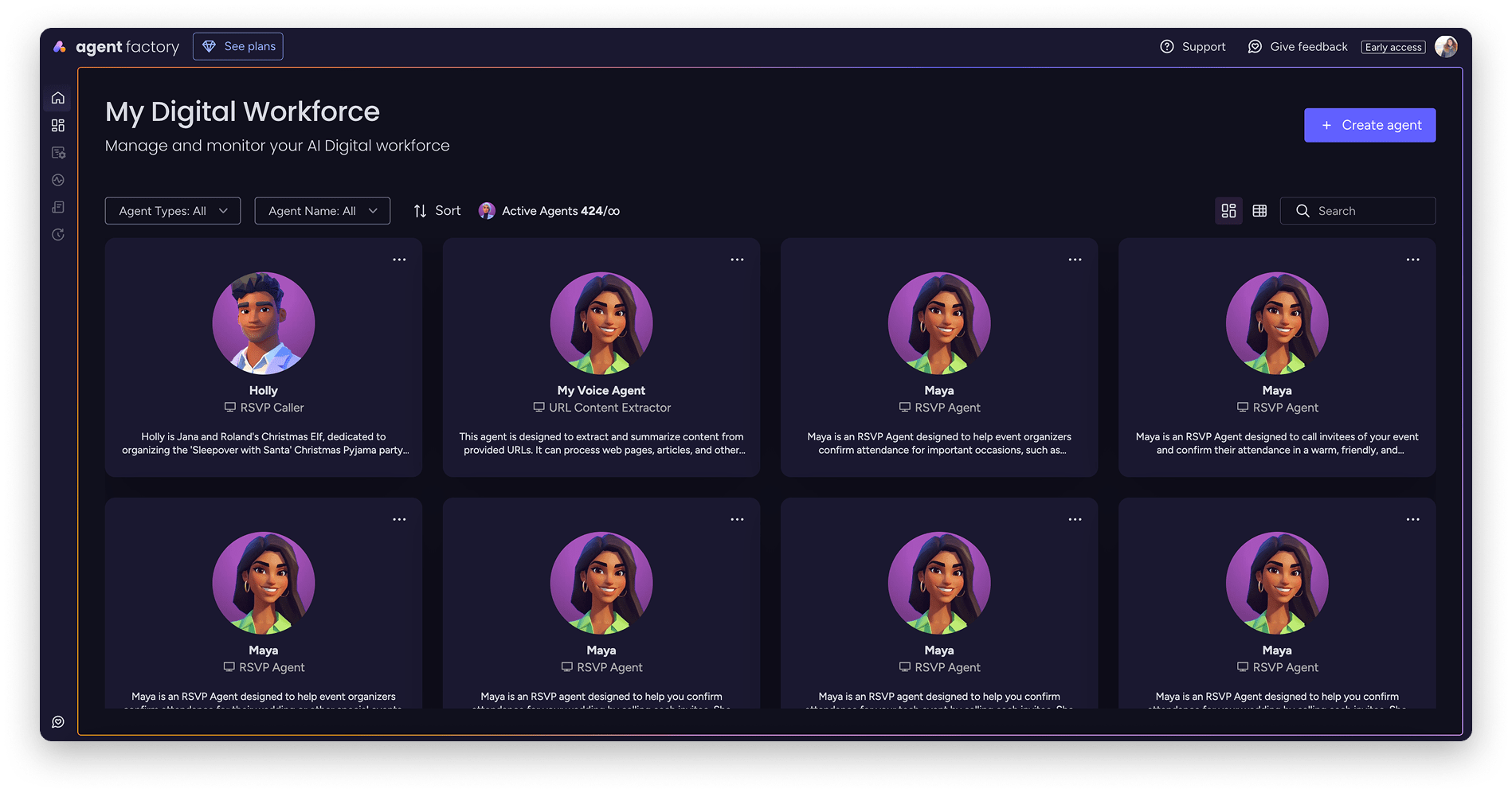
monday agents are AI agents that operate within monday AI Workspace, grounded in the platform’s structured work data. These agents go beyond search by taking action based on what they find:
- Lead Scorer: Scores leads using fit, intent, and engagement signals across the sales funnel, then routes high-intent leads and schedules follow-ups automatically.
- Risk Analyzer: Detects schedule, dependency, and workload risks across projects in real time, then reassigns owners, updates timelines, and alerts stakeholders.
- Ticket Assignment: Detects ticket intent, urgency, and required expertise, then assigns owners, sets priority, and routes to the right team.
- Sentiment Detector: Detects sentiment shifts across tickets, emails, and feedback in real time, then flags risks and notifies the right owner.
- Vendor Researcher: Gathers vendor details like pricing, security, reviews, and contract terms, then builds a structured vendor summary.
- Custom agents: Organizations can build their own agents using a three-step builder — describe the role and triggers, connect relevant knowledge and integrations, then test and refine.
Every agent operates within monday.com’s permission model with full audit trails, human-in-the-loop controls, and admin-defined guardrails. Agents are available across departments, including marketing, sales, operations, IT, HR, product, and engineering, and can be scoped to specific workspaces and data sources.
monday MCP and secure AI assistant integration
monday MCP is the implementation of the Model Context Protocol that connects external AI assistants — including Claude, ChatGPT, Cursor, Microsoft Copilot, and others — to monday.com workspaces. Employees can query and act on their work data from their preferred AI assistant without leaving that assistant’s interface.
Specific MCP capabilities include:
- Cross-board analysis: Ask questions like “What’s overdue across all launch boards?” or “Which team has the most blockers?” and get answers drawn from multiple boards and workspaces.
- Smart workflow management: Convert meeting notes into structured items with owners, priority, and due dates through natural language — no manual data entry required.
- CRM workflows: Create leads and deals, update pipeline stages, and log next steps from call notes — all from within your AI assistant.
- Executive reporting: Generate weekly rollups including shipped vs. planned, scope changes, and risk summaries across the entire organization.
- Workspace discovery: Find the right board, document, form, or folder across large workspaces instantly, even when you don’t know exactly where something lives.
monday sidekick and context-aware search built into your workspace
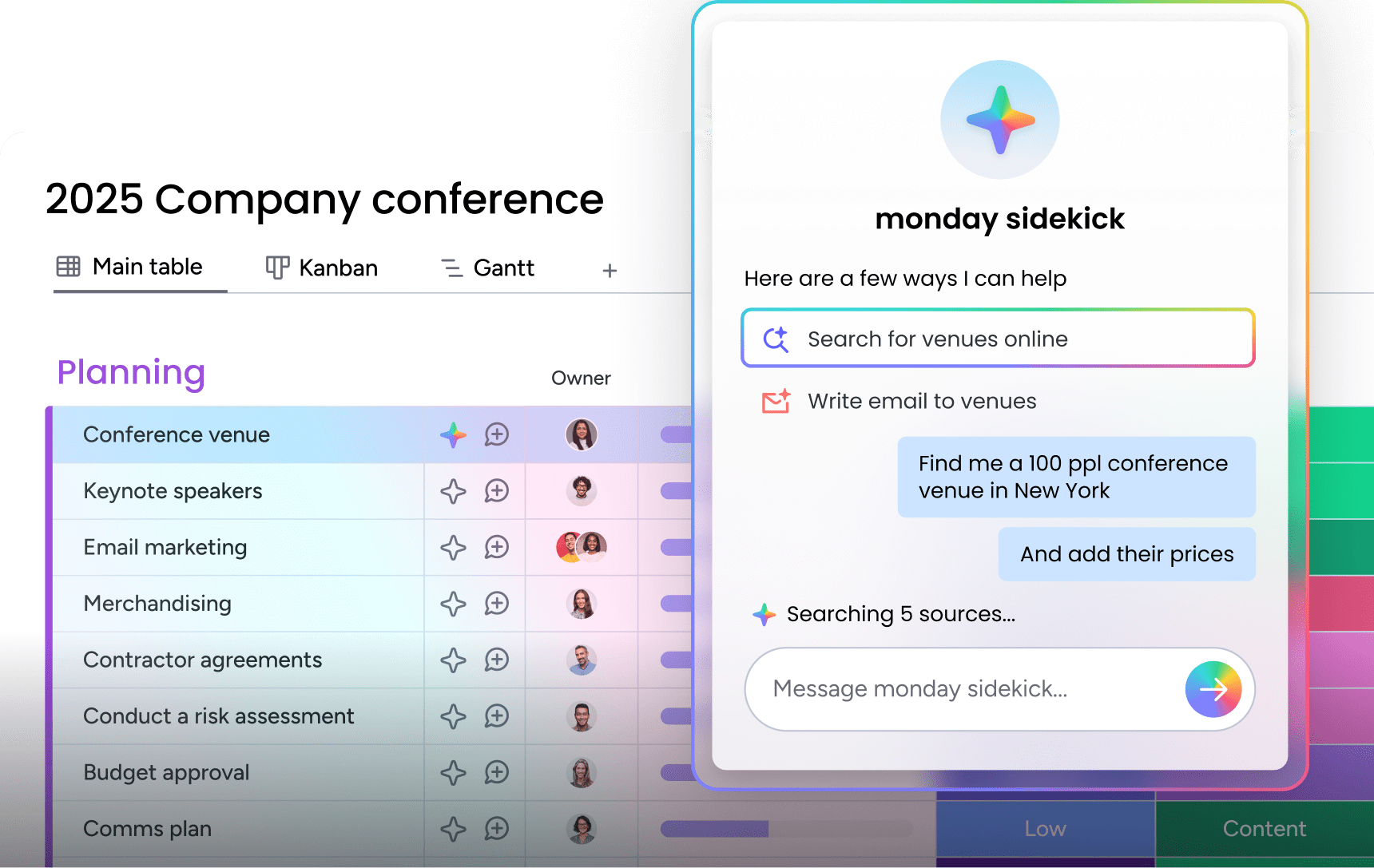
monday sidekick is the platform’s built-in AI assistant, connecting to work data and integrated applications — Slack, Gmail, and Google Calendar — to help employees think, create, and take action through natural conversation. Sidekick represents AI enterprise search embedded directly into the workspace where work happens — no switching to a separate search application.
Key sidekick capabilities relevant to enterprise search:
- Summarizing updates and conversations: Ask sidekick to summarize what happened on a project, in a channel, or across a set of boards, and get a concise answer grounded in actual workspace data.
- Analyzing data: Ask questions about pipeline status, project progress, or team workload and get instant answers drawn from real-time board data.
- Taking action from search results: After finding information, sidekick can update records, create workflows, notify teammates, and schedule meetings without leaving the conversation.
- Creating workflows from prompts: Describe what you need in natural language, and sidekick builds automations, dashboards, and forms — turning a search result into an operational workflow.
Enterprise-grade trust across every interaction
The platform’s security and trust infrastructure applies across all AI-powered search and agent capabilities:
- Data privacy: Data stays private and encrypted by default. Customer data stays private on the platform, and third parties are never allowed to train on it.
- Access control: Admin settings and granular permissions define who can use AI capabilities and what data each AI feature can access.
- Compliance: SOC 2 Type II, ISO/IEC 27001, ISO/IEC 27701 certifications, GDPR compliance, and HIPAA support.
- Guardrails: Every agent action has an audit trail, every agent has admin-defined permissions, and simulation mode allows validation before activation.
- Human-in-the-loop: AI recommends and drafts actions, but people confirm before changes take effect.
AI enterprise search that delivers
AI enterprise search transforms how organizations find and act on information. The real value comes when search becomes the foundation for execution — turning answers into automated workflows that score leads, route tickets, flag risks, and update records.
monday agents deliver this next step. Grounded in structured, cross-department data with permission-aware retrieval and enterprise-grade security, they turn search results into real action within your existing workflows. Start with a focused pilot, measure the impact, and scale with confidence.
Try monday agentsFrequently asked questions about AI enterprise search
How does retrieval-augmented generation work in enterprise search?
Retrieval-augmented generation (RAG) works by first retrieving the most relevant documents and data from the organization's indexed sources based on the user's query, then passing that retrieved content to a large language model that generates a natural-language answer grounded in and citing those specific sources. This reduces the risk of the AI generating incorrect information.
Can AI enterprise search work across all my existing applications?
AI enterprise search can work across most enterprise applications through pre-built connectors and open APIs, though the breadth of coverage depends on the platform's connector library. Platforms that already centralize work data across departments through extensive integrations and MCP protocol support require fewer external connectors because much of the searchable data already lives in one connected system.
How long does it take to see ROI from an enterprise search platform?
Organizations that follow a phased implementation approach — starting with a high-value internal knowledge base and expanding to cross-department sources — typically begin seeing measurable improvements in search time and support ticket volume within the first pilot phase. Broader ROI from productivity gains and knowledge reuse compounds as more data sources and departments are connected.
Is AI enterprise search safe for regulated industries?
AI enterprise search can be deployed safely in regulated industries when the platform enforces permission-aware retrieval at every stage, holds relevant compliance certifications (SOC 2 Type II, ISO 27001, HIPAA), provides full audit trails for all AI-driven queries and actions, and guarantees that customer data is not used to train third-party AI models.
How does monday AI Workspace approach AI enterprise search differently from standalone search platforms?
The platform approaches AI enterprise search by providing the structured, cross-department context layer that search depends on, with CRM, project management, service, and development data sharing a unified data model. This is combined with AI agents that act on search results, MCP integration with external AI assistants at no additional cost, and enterprise-grade security with built-in guardrails — so organizations move from finding answers to executing work within the same platform.

 Get started