


Every time you type a question into ChatGPT and get a useful answer back, you’re using zero-shot prompting. No setup, no examples, no configuration required. You gave the model an instruction, and it handled the rest. That’s the whole idea, and it turns out to be one of the most practical AI skills a business team can develop. Zero-shot prompting works because large language models are trained on enormous volumes of text before you ever interact with them. By the time you write your first prompt, the model has already absorbed patterns for classification, summarization, extraction, and dozens of other common workflows.
We’ll break down what zero-shot prompting is, how it works under the hood, and when to use it instead of few-shot prompting or fine-tuning. You’ll see real examples from marketing, sales, and ops teams, plus best practices for writing prompts that actually work. Along the way, we’ll explore how teams using monday AI Workspace put zero-shot prompting into action to automate high-volume workflows in real time.
Key takeaways
- You’re already using zero-shot prompting: Every time you ask an AI a question without giving examples first, that’s zero-shot prompting: no technical setup needed.
- Specific instructions get better results: Tell the AI exactly what to do, what format to use, and what labels to apply: vague prompts produce vague outputs.
- Know when to add examples: Zero-shot works well for common tasks like summarizing or classifying, but nuanced or specialized workflows may need one or two examples to guide the model.
- One skill works across every team: Marketing, sales, ops, and HR can all use zero-shot prompting for classification, extraction, and summarization: no separate training required per department.
- Put zero-shot prompting to work automatically with monday agents: Agents like the Lead Scorer and Ticket Assignment agent run zero-shot prompting continuously in the background, grounded in your real workspace data.
What is zero-shot prompting?
Zero-shot prompting is a technique where you give a large language model (LLM) an instruction without providing any examples of the desired output. The model relies entirely on patterns it learned during pretraining to interpret your request and generate a response. The “zero” in zero-shot means zero examples.
Think of zero-shot prompting like handing a task to a new team member on their first day.
You could say, “Categorize these support tickets by urgency,” and trust that their education and experience will guide them. Or you could show them three already-categorized tickets first so they see your specific criteria. Zero-shot prompting is the first approach: instruction only, no demonstrations.
Most people don’t realize they’re already using zero-shot prompting every time they interact with ChatGPT, Claude, or Gemini. Every time you type a question or instruction and expect a useful response without attaching sample outputs, you’re using zero-shot prompting. In fact, among U.S. employees who use AI at work, 61% use chatbots or virtual assistants, making instruction-only interactions the dominant entry point to AI at work.
How zero-shot prompting works
Knowing what happens under the hood makes your prompts sharper and your outputs more reliable. We’ll cover the core components of a zero-shot prompt, why pretraining matters, and what happens from the moment you submit your prompt to the moment you get a response.
The 3 core components of a zero-shot prompt
Every zero-shot prompt is built from the same core components. Getting each one right makes your outputs sharper and more useful.
- Instruction/task description: The explicit statement of what you want the model to do. Without examples, the instruction has to do all the work of explaining what you want.
- Input data: The content the model should process. This could be an email, meeting notes, a customer review, or any text you need analyzed.
- Output format (optional but recommended): Any specification of how the response should be structured. Adding format guidance keeps your outputs consistent.
Here’s how all three components come together:
Prompt: You are a customer support triage system. Read the following support ticket and classify it by urgency (high, medium, or low) and the responsible department (billing, technical, or account management). Respond with only the urgency level and department, separated by a comma.
Ticket: ‘I’ve been charged twice for my subscription this month and I need a refund processed before end of business today. My account number is 4471.’
Expected output: High, billing
Why pretraining is the engine behind zero-shot performance
During pretraining, LLMs process massive amounts of text: books, websites, articles, documents. Through this exposure, the model learns language patterns, factual knowledge, reasoning approaches, and how to handle different types of tasks.
That broad exposure is what makes zero-shot prompting work. The model has encountered countless examples of classification, summarization, translation, extraction, and question-answering during training. When you ask it to “classify this email as spam or not spam,” the model draws on thousands of classification patterns it absorbed during pretraining.
Zero-shot performance depends on whether the model saw similar tasks during pretraining:
- Common tasks (sentiment analysis, summarization): tend to produce strong, reliable results.
- Highly specialized tasks (niche industry terminology, proprietary formats): may produce weaker results because the model has less relevant training data to draw from.
Step-by-step: What happens when the model receives a zero-shot prompt
The entire process takes seconds. Here’s what happens at each stage:
- Receive: The model receives the full prompt text as input.
- Interpret: It interprets the instruction by matching it against patterns learned during pretraining.
- Process: It processes the input data in the context of that instruction.
- Generate: It generates a response token by token, selecting the most probable next word.
- Return: The completed response is returned to you.
One important note: the model does not “learn” from this interaction. Each zero-shot prompt is independent, so every prompt starts fresh. That consistency is a feature: it keeps outputs predictable across sessions.
Zero-shot prompting examples for business teams
Zero-shot prompting works best when you need quick AI outputs without building a library of examples first. Here’s how different teams use it in everyday workflows.
Example 1: Text classification and sentiment analysis
Here’s a zero-shot prompt for classifying customer feedback:
Prompt: “Classify the following customer review as Positive, Negative, or Neutral. Respond with only the classification label.
Review: ‘The onboarding process was smooth, but the reporting dashboard feels clunky and slow compared to what we had before.'”
This works well because LLMs saw thousands of sentiment examples during pretraining.
Example 2: Content generation and summarization
Prompt: “Summarize the following sales call transcript into three bullet points covering: (1) key decisions made, (2) action items assigned, and (3) agreed next steps. Keep each bullet to one sentence.”
Summarization is a strong zero-shot example because the model doesn’t need samples of “good summaries.” The instruction alone gives the model enough structure to produce something focused and useful.
Example 3: Data extraction from unstructured text
Prompt: “Extract the following fields from themeeting notesand return them as a labeled list: Company Name, Contact Person, Deal Value, and Next Steps.”
| Field | Extracted value |
|---|---|
| Company Name | Greenline Logistics |
| Contact Person | Priya Sharma |
| Deal Value | $42,000 annually |
| Next Steps | Send custom demo environment by Thursday; schedule follow-up with IT lead next week |
Zero-shot extraction works well when the data fields are common and clearly labeled.
Zero-shot prompting vs. few-shot prompting
Choosing between zero-shot and few-shot depends on task complexity and how specific your output needs to be. Here’s how they compare:
| Attribute | Zero-shot prompting | Few-shot prompting |
|---|---|---|
| Examples provided | None | 1–5+ input-output pairs |
| Prompt length | Shorter | Longer |
| Setup time | Minimal | Requires curating examples |
| Token cost per prompt | Lower | Higher |
| Best for | Well-defined, common tasks | Nuanced, domain-specific tasks |
| Output consistency | Moderate | Higher for specialized formats |
When zero-shot prompting outperforms few-shot
Zero-shot prompting shines when the task is common and the output format is flexible. Knowing when to lean on it saves time and reduces prompt engineering overhead. Here are the situations where it consistently outperforms few-shot approaches:
- Standard classification categories: When labels are common terms the model already knows, adding examples doesn’t help much.
- General-purpose content generation: When the output format is flexible and doesn’t need to match a precise template.
- High-volume, varied inputs: When you’re processing many different types of requests and can’t pre-build examples for each variation.
- Rapid prototyping: When you’re testing whether AI can handle a new workflow before building out examples.
How one-shot and n-shot prompting fit in
One-shot prompting provides exactly one input-output example alongside the instruction, while n-shot prompting provides a variable number: typically two to five. General rule: add examples only when the instruction alone isn’t clear enough.
Why zero-shot prompting matters for business teams
Zero-shot prompting isn’t just a technical concept: it’s the most accessible entry point to AI automation for business teams. It removes the barrier of needing labeled datasets, example libraries, or technical expertise. You write an instruction, the model executes it, and you get a result. That simplicity makes it practical for teams who need AI to work now, not after weeks of setup.
Here’s why it matters:
- Speed to value: You can start automating tasks immediately without collecting examples or building training datasets first.
- Lower technical barrier: Anyone who can write a clear instruction can use zero-shot prompting: no coding or machine learning background required.
- Flexibility across use cases: The same technique works for classification, summarization, extraction, and generation across every department.
- Cost efficiency: Shorter prompts mean lower token costs, especially when processing high volumes of requests.
For teams using monday agents, zero-shot prompting becomes even more powerful when embedded directly into workflows. Instead of manually copying data into ChatGPT, agents trigger AI actions automatically based on board updates, form submissions, or status changes—applying zero-shot prompting continuously in the background without requiring manual prompt writing for every task.
Try monday agentsBest practices for writing effective zero-shot prompts
Writing a good zero-shot prompt isn’t about being clever: it’s about being clear. The model can’t read your mind, so your instruction needs to do all the work. Here are the practices that consistently produce better outputs.
Be specific about the task and output format
Vague prompts produce vague outputs. Tell the model exactly what to do and how to structure the response.
Weak prompt: “Analyze this email.”
Strong prompt: “Read the following customer email and extract: (1) the customer’s main issue, (2) the urgency level (high, medium, or low), and (3) any account numbers mentioned. Format your response as a bulleted list.”
Use clear labels and categories
When asking the model to classify or categorize, provide the exact labels you want it to use. Don’t make it guess.
Example: “Classify this support ticket into one of the following categories: Billing, Technical Support, Account Management, or Feature Request. Respond with only the category name.”
Add constraints to reduce variability
If you need consistent outputs, add constraints that limit how the model can respond.
- “Respond in 50 words or less.”
- “Use only the labels provided: do not create new categories.”
- “Return your answer as valid JSON with no additional commentary.”
Test and iterate on real inputs
Your first prompt rarely works perfectly. Test it on a few real examples, see where it breaks, and refine the instruction. Small wording changes can produce significantly better results.
Know when to add one example
If your zero-shot prompt keeps producing inconsistent outputs, try adding just one example. That single demonstration often clarifies what you want without the overhead of full few-shot prompting.
Common challenges and how to solve them
Even well-written zero-shot prompts can produce unexpected results. Here are the most common issues and how to fix them.
Inconsistent output formatting
Problem: The model returns answers in different formats each time, making automation difficult.
Solution: Explicitly specify the output format in your prompt. Use phrases like “respond with only,” “format as JSON,” or “return a comma-separated list.”
The model invents categories or labels
Problem: You ask for classification into specific categories, but the model creates new ones.
Solution: Add a constraint: “Use only the following categories: [list]. Do not create new labels.”
Outputs are too verbose or too brief
Problem: The model writes paragraphs when you wanted a single sentence, or gives one word when you needed context.
Solution: Add length constraints: “Summarize in exactly three bullet points” or “Respond in 2–3 sentences.”
Poor performance on specialized or niche tasks
Problem: The model struggles with industry-specific terminology or proprietary formats.
Solution: This is where zero-shot hits its limits. Add one or two examples (one-shot or few-shot prompting) or consider fine-tuning if the task is critical and high-volume.
How monday agents use zero-shot prompting in real workflows
Zero-shot prompting becomes exponentially more valuable when it runs automatically in the background of your actual work. That’s exactly what monday agents do: they apply zero-shot prompting continuously to your workspace data without requiring manual prompt writing for every task. Here’s how it works in practice:
Lead Scorer agent
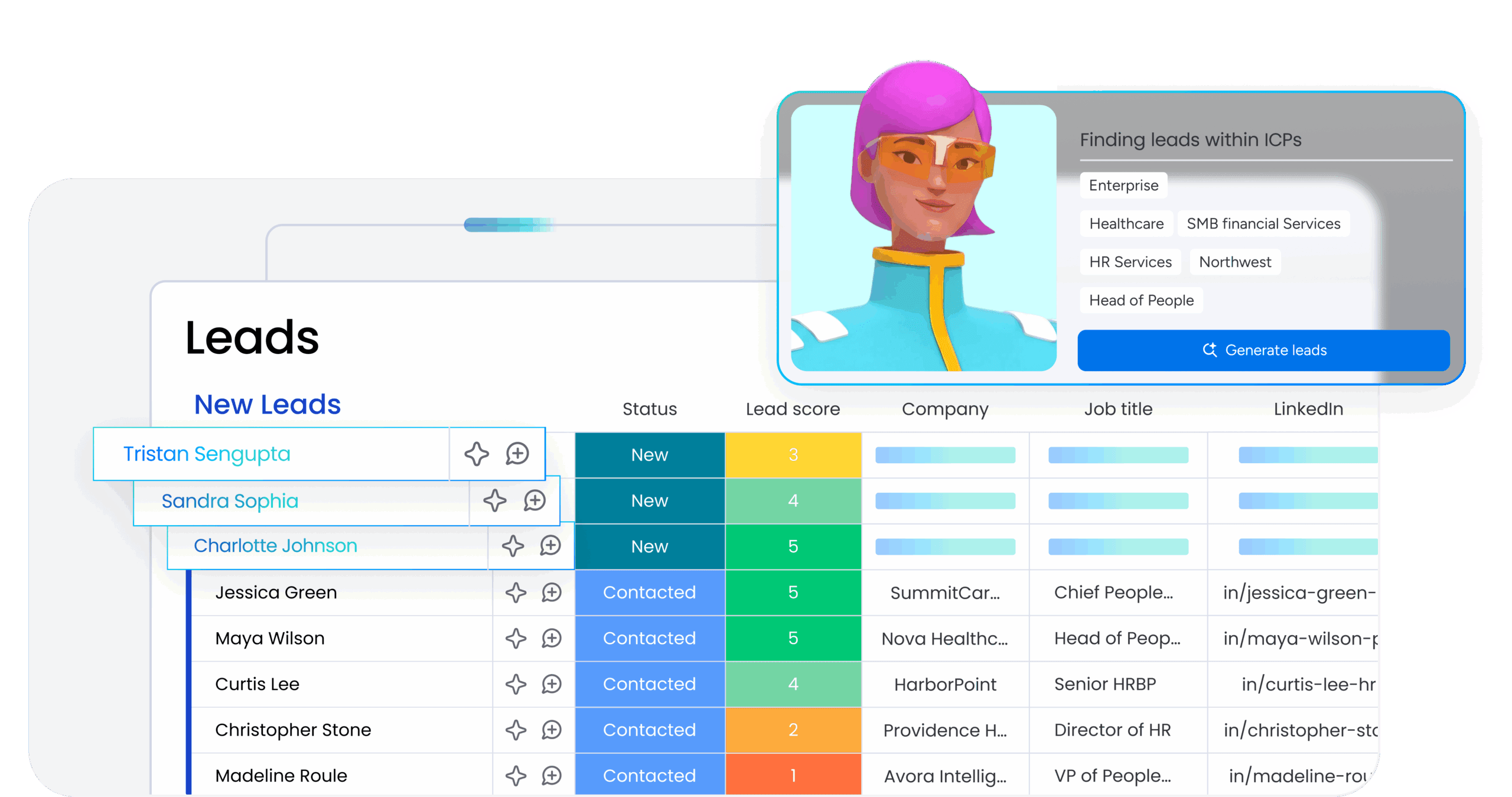
The Lead Scorer agent reads incoming lead data: company size, industry, engagement signals, and assigns a priority score using zero-shot classification. No examples needed. The agent interprets your scoring criteria from a simple instruction and applies it to every new lead automatically.
Use case: A sales team receives 200+ inbound leads per week. The Lead Scorer agent classifies each as high, medium, or low priority based on fit criteria, so reps focus on the best opportunities first.
Ticket Assignment agent

The Ticket Assignment agent reads support tickets and routes them to the right team or person based on content, urgency, and category. It uses zero-shot prompting to interpret the ticket and match it to your routing rules: no manual tagging required.
Use case: A customer success team handles tickets across billing, technical support, and account management. The agent reads each ticket, classifies it, and assigns it to the correct queue instantly.
Custom agents built on your workflows

Beyond pre-built agents, you can create custom agents that apply zero-shot prompting to any repeatable workflow in your workspace. Extract data from meeting notes, summarize project updates, classify feedback: all triggered automatically when items are created or updated.
The key advantage: these agents are grounded in your actual monday.com data. They don’t just process text in isolation: they understand your board structure, column values, and workflow context, making their outputs immediately actionable.
Try monday agentsGetting started with zero-shot prompting
You don’t need a technical background or a prompt engineering course to start using zero-shot prompting effectively. Here’s how to begin:
- Pick one repetitive task: Choose something you do manually multiple times per week: categorizing emails, summarizing notes, extracting data from forms.
- Write a clear instruction: Describe exactly what you want the model to do and what format you want back. Be specific.
- Test on real examples: Run your prompt on 3–5 real inputs and see what happens. Look for patterns in where it succeeds and where it fails.
- Refine based on results: Adjust your wording, add constraints, or clarify the output format. Small changes often produce big improvements.
- Automate it: Once your prompt works reliably, move it into an automated workflow using monday agents or your preferred AI platform.
The goal isn’t perfection on the first try: it’s building a habit of writing clear instructions and iterating based on real outputs. That skill transfers across every AI tool and every business function.
Start using zero-shot prompting today
Zero-shot prompting is the simplest, fastest way to put AI to work in your business. It requires no examples, no training data, and no technical setup: just a clear instruction and a model that’s already been trained on billions of words. The real power comes when zero-shot prompting moves from manual experimentation to automated execution with monday agents, applying AI continuously in the background of your actual workflows.
Start with one task. Write one clear instruction. See what happens. Then automate it with monday agents. That’s how zero-shot prompting becomes a practical, repeatable skill that scales across your entire team.
Try monday agentsFAQs
What is the difference between zero-shot and few-shot prompting?
Zero-shot prompting means giving the AI an instruction without any examples, while few-shot prompting includes one or more input-output examples to guide the model. Zero-shot is faster and simpler for common tasks like classification or summarization. Few-shot works better when you need the AI to match a specific format or handle nuanced, domain-specific tasks. If your zero-shot prompt keeps producing inconsistent results, try adding just one example to clarify what you want.
Can zero-shot prompting work for specialized industry tasks?
It depends on how specialized the task is. Zero-shot prompting works well when the task uses common terminology and patterns the model saw during pretraining. For highly specialized tasks with niche terminology, proprietary formats, or industry-specific logic, zero-shot performance may be weaker. In those cases, adding one or two examples (few-shot prompting) or fine-tuning the model on your specific data will produce better results.
How do I know if my zero-shot prompt is good enough?
Test it on 3–5 real examples and check for consistency. A good zero-shot prompt produces the same output format every time and correctly interprets the instruction without inventing new categories or missing key details. If outputs vary widely or the model misunderstands what you want, refine your instruction by adding constraints, specifying the exact output format, or clarifying the task description.
Do I need coding skills to use zero-shot prompting?
No. Zero-shot prompting requires no coding or technical background. If you can write a clear instruction in plain language, you can use zero-shot prompting effectively. The skill is writing specific, structured instructions that tell the AI exactly what to do and how to format the response. That's a communication skill, not a technical one.
How does zero-shot prompting work with monday agents?
monday agents apply zero-shot prompting automatically to your workspace data without requiring you to write prompts manually for every task. Agents like the Lead Scorer and Ticket Assignment agent use zero-shot prompting in the background to classify, route, and prioritize items based on your board structure and workflow rules. You set the criteria once, and the agent applies it continuously as new items are created or updated.
When should I switch from zero-shot to few-shot prompting?
Switch to few-shot prompting when your zero-shot outputs are inconsistent or when the task requires matching a specific format the model hasn't seen before. If you're getting 70–80% accuracy with zero-shot but need higher consistency, adding one or two examples usually closes the gap. Few-shot is also better for tasks with nuanced judgment calls where showing the model what "good" looks like makes a measurable difference.

 Get started