


Most project plans change faster than anyone can update them. A supplier misses a delivery date or a stakeholder adds a late request, and the project manager spends the next morning chasing owners and rewriting the timeline. AI agents for project management take on this coordination work, watching deadlines and dependencies in the background and acting within the rules your team sets, so project leads can spend their time on decisions.
This guide compares 12 best AI agents for project management side by side, with pricing and the type of team each one suits best. It also covers the evaluation criteria and governance controls to check before you put any agent into live project work, along with how monday agents handle project coordination inside the monday AI Workspace.
Try monday agentsWhat are AI agents for project management?
AI agents for project management are software tools that carry out project tasks on their own once you give them a goal and a set of rules. Each agent connects to the systems where project work lives, such as task boards and calendars, and reads the data in them to decide what to do next. When a task slips past its due date, for example, an agent can notify the owner and warn anyone whose work depends on it, without waiting for someone to ask.
The main difference between an AI agent and a standard AI assistant is who starts the work. An assistant responds to prompts, so it drafts a summary or answers a question when you ask and then stops. An agent runs in the background and acts when a trigger it monitors fires, such as a status change or an approaching deadline.
| Approach | How it starts work | Typical project tasks | What stays with people |
|---|---|---|---|
| AI assistant | Responds when someone enters a prompt | Drafting updates and summarizing documents | Deciding when to act and what happens next |
| AI agent | Acts when a monitored trigger fires | Routing tasks and flagging schedule risks | Approvals and strategic priorities |
Every agent works within limits the project team defines, including which data it can read and which actions need a person’s approval before they go ahead. Project managers set these boundaries once, and the agent applies them each time it runs, so decisions about scope and priorities stay with the people accountable for the project.

12 best AI agents for project management platforms
The 12 platforms below all offer AI agents and automation that take action inside project workflows, but they differ in how much of the business each agent can see and how much control teams keep over what it does. We compared them on four criteria: cross-department context, native workflow connections, governance controls and pricing transparency. The table below shows where each platform stands out and which teams it suits best, and the sections after it look at each tool in more detail.
| Platform | Focus | Standout agent capability | Starting price* | Best for |
|---|---|---|---|---|
| monday agents | Cross-department project execution | Agents act on context from every department in the monday AI Workspace | $12/user/month | Teams managing work across multiple departments |
| Atlassian Rovo and Jira | Dev and IT knowledge management | Teamwork Graph links Jira and Confluence data | Included with paid Jira Cloud plans | Development teams in the Atlassian ecosystem |
| Microsoft Copilot and Planner Agent | Enterprise-wide automation | Planner Agent works across Microsoft 365 apps | $30/user/month add-on | Organizations standardized on Microsoft 365 |
| Asana AI Teammates | Governed collaboration | Work Graph grounds agents in project history and relationships | $10.99/user/month | Teams prioritizing human oversight |
| ClickUp AI | Department and lifecycle automation | Prebuilt Super Agents for each project stage | $7/user/month plus AI add-on | Teams wanting a large library of prebuilt agents |
| Airtable AI Agents | Data-centric project management | Agents trigger off changes in custom databases | $20/user/month | Teams with custom database structures |
| Epicflow | Portfolio resource optimization | AI agents modeled as governed capacity in the resource pool | €22.50/user/month | PMOs managing large project portfolios |
| Dust | Multi-platform agent building | Agents pull live context from many third-party tools | $24/user/month | Technical teams building custom agents |
| Wrike Work Intelligence | Enterprise work management | Predictive risk detection across projects | $25/user/month | Enterprise teams already using Wrike |
| Zoho Zia | Cross-application intelligence | Shared AI layer across Zoho apps | $4/user/month | Organizations using multiple Zoho applications |
| Notion AI | Workspace automation | Custom agents run on existing docs and databases | $20/user/month | Teams using Notion as their primary workspace |
| Trello AI | Simple project tracking | AI-assisted Butler automations | $5/user/month | Small teams with simple workflow needs |
1. monday agents
monday agents run inside the monday AI Workspace, on the same boards and docs teams already use to plan and track projects. Project leads can add ready-made agents for common project tasks or build their own, and each agent can draw on work data from other departments in the workspace.

Best for:
PMOs and project leads running cross-functional projects who want status reporting and dependency tracking handled without manual follow-up.
Key features:
- Ready-made project management agents: Prebuilt agents cover recurring coordination at each stage of a project. Teams can start with these before building their own:
- Project intake agent collects and organizes incoming project requests.
- Project Planner Agent builds a detailed project plan from your goals and timelines.
- Dependency and Risk Mapper maps project dependencies and flags blocked chains before they affect the timeline.
- Resource Rebalancing Agent spots overallocation early and proposes ranked ways to rebalance workloads.
- Nudger Agent sends reminders and follow-ups on tasks and deadlines.
- Approvals Agent routes requests and sign-offs so approvals keep moving.
- Status Reporter writes progress summaries and flags blockers for stakeholders.
- Custom agent builder: Teams can build their own agents in plain language and ground them in the boards and docs they choose. Each agent can be tested before it goes live, so it follows the team’s own handoff rules.
- Cross-department context: Agents read work data from across the workspace. Dependency and Risk Mapper can flag a launch at risk because a marketing asset is late or an IT ticket is still open, even when that work sits on another team’s board.
- Action on what agents find: Agents can update board items and notify the right owners, so a flagged risk becomes a next step straight away.
- Built-in guardrails: Admins decide what each agent can access and which actions need a person’s approval before they take effect.
Pricing:
- Free: Up to 2 users
- Basic: $9/user/month
- Standard: $12/user/month (the lowest plan with AI features)
- Pro: $19/user/month
- Enterprise: Custom pricing
Prices are billed annually, with a minimum of 3 users on paid plans. AI usage runs on credits, and teams can buy more as usage grows.
Why it stands out:
- Planning and execution in one workspace: Agents work on the same boards teams use to run projects, so there’s no project data to copy into a separate AI tool.
- Coverage across the project lifecycle: The ready-made library spans every stage of a project, so teams can automate intake and reporting first and add planning or capacity agents later.
2. Atlassian Rovo and Jira
For teams already working in Jira and Confluence, Atlassian Rovo adds AI agents to the project data they use every day. Rovo is built on the Teamwork Graph, which maps how people and work connect across Atlassian tools, so agents start with an understanding of the team’s environment.
.

Best for:
Development and IT teams in the Atlassian ecosystem who want AI agents that can triage and monitor delivery work inside Jira.
Key features:
- Rovo Search: Pulls relevant information from Jira, Confluence and connected third-party apps, cutting the time spent searching for context.
- Rovo Studio: Gives teams a no-code way to build custom agents without developer support.
- Jira-native agents: Teams can assign agents to work items or @mention them in comments, and a central “Agent sessions” view keeps their activity visible to people.
Pricing:
- Paid Jira Cloud plans: Rovo Search, Chat and Agents included
- Standalone: $5/user/month
- Extra usage: $0.01 per credit once included allowances run out, with prepaid packs available
- Annual billing: Up to 17% cheaper than monthly
- Atlassian Guard (enterprise security and governance) is a separate subscription
Considerations:
- Rovo works best inside the Atlassian ecosystem, so teams that need visibility into marketing or HR workflows may find its context limited.
- Heavy agent use draws down credits quickly, which can make high-volume costs harder to predict.
3. Microsoft Copilot and Planner Agent
Microsoft builds its AI agents into Microsoft 365 rather than into a standalone project tool. Copilot connects work across apps like Teams and Outlook, and the Planner Agent adds an AI collaborator to the planning software many organizations already use.

Best for:
Mid-market and enterprise organizations standardized on Microsoft 365 that want AI agents to build plans and track project progress inside their existing apps.
Key features:
- In-context project execution: The Planner Agent handles planning and task execution within a plan, and it shares status reports through Loop so updates stay tied to Teams and Outlook.
- Knowledge-grounded planning: Teams can attach project documents and specifications as context, so the agent builds plans from real project material.
- Visible agent activity: Clear operating states (Queued, In progress, Needs input and Done) let teams review and approve outputs before work counts as complete.
Pricing:
- Microsoft 365 Copilot: $30/user/month add-on to qualifying Microsoft 365 plans
- Planner in Microsoft 365: Included with eligible Microsoft 365 subscriptions
- Planner Plan 1: $10/user/month
- Planner & Project Plan 3: $30/user/month
- Planner & Project Plan 5: $55/user/month
- Copilot Studio: Separate capacity-based licensing ($200/month message packs) for building standalone agents
Considerations:
- The Planner Agent needs both a Microsoft 365 Copilot license and an eligible Planner tier. Advanced features such as portfolio views need premium Planner plans, which raises the total cost per user.
- Teams that want specialized PMO features from day one will need time to configure Microsoft’s separate tools to fit how they work.
4. Asana AI Teammates
Asana positions its AI as a governed teammate that works inside projects and portfolios. AI Teammates draw on the Work Graph, Asana’s own data model, to carry out work across connected workflows. For organizations that need every AI action to be reviewable, this approach is a major part of the appeal.

Best for:
Project teams leading complex cross-functional initiatives who need AI agents that work within established governance and keep a full audit trail.
Key features:
- Work Graph context: Teammates use Asana’s data model to understand how projects and people relate, which grounds each action in real project history.
- AI Studio: A no-code builder lets teams create custom AI automations without technical expertise.
- Checkpoints for multiple reviewers: Several stakeholders can guide or adjust a Teammate at any point, and every action is logged and reversible.
Pricing:
- Personal: Free (AI Teammates not included)
- Starter: $10.99/user/month (includes AI Teammates and AI Studio)
- Advanced: $24.99/user/month (adds portfolios and resource management)
- Enterprise / Enterprise+: Custom pricing (adds SSO, data residency and advanced governance)
- AI usage: Paid plans include a small monthly allowance of AI requests. Extra requests cost $0.50 each in prepaid packs or $0.60 pay-as-you-go.
All prices are billed annually.
Considerations:
- Metered AI usage means automation-heavy teams will need to track consumption to keep costs predictable.
- Asana takes a deliberately cautious approach to autonomy, so the product leans on checkpoints and human review. Teams that want fully hands-off execution may find it conservative.
5. ClickUp AI
ClickUp builds its AI agents into a workspace that already combines tasks, docs and chat. Its “Super Agents” sit inside project workflows and handle coordination and reporting across the delivery cycle, which cuts down on switching between tools.

Best for:
Teams that want a large library of prebuilt agents, organized both by department and by project stage.
Key features:
- Prebuilt Super Agents: Agents cover functional departments like marketing and engineering, as well as each stage of a project. Examples include Sprint Planning Agent and Scope Creep Detector.
- Permission-aware context: Agents follow the workspace’s existing permissions and can draw on 50+ external apps through ClickUp Enterprise Search.
- Central AI Hub: Admins can monitor agent activity and review audit logs from one place, including credit usage for each run.
Pricing:
- Unlimited plan: $7/user/month
- AI add-on: From $7/user/month for entry-level AI features
- Everything AI: $28/user/month (full agent suite, 5,000 monthly credits)
- Max: $100/user/month (enterprise controls, 10,000 monthly credits)
- Extra credits: $0.001 per credit, with a typical agent run using 100–300 credits
All prices are billed annually.
Considerations:
- Multi-step agent runs draw credits from a shared pool, so high-volume teams should track usage to avoid unexpected top-up charges.
- ClickUp describes its agents as “the world’s only human-level AI agents,” so enterprise buyers should test performance in their own workflows before committing.
6. Airtable AI Agents
Airtable approaches project management from the data model outward. Its AI agents work directly inside flexible databases, which suits teams that run projects through structures they’ve built themselves. Automation and large-scale data handling sit in the same platform.

Best for:
Teams that manage projects through custom databases and want AI agents that work with their own structures.
Key features:
- AI-powered automations: Agents trigger off data changes and run multi-step workflows across project tables, such as flagging risks or compiling status reports.
- Field Agents: AI-generated summaries and categorizations live as native fields within records, so insights stay attached to the data they describe.
- Enterprise scale: Agents work against custom schemas, and Enterprise teams can run them on datasets of up to 100 million records through HyperDB.
Pricing:
- Free: $0 (500 AI credits per editor each month)
- Team: $20/user/month (15,000 AI credits per user each month)
- Business: $45/user/month (20,000 AI credits per user each month)
- Enterprise Scale: Custom pricing (25,000 AI credits per user each month)
All prices are billed annually, and teams can buy extra AI credit packs when included credits run out.
Considerations:
- Teams must build their own project management structure in Airtable, which takes longer than starting with a dedicated PM platform, and the AI layer inherits that complexity.
- Some enterprise features, including HyperDB, aren’t available with European data residency. Business and Enterprise Scale upgrades also require a private email domain.
7. Epicflow
Epicflow models AI agents as governed capacity inside a project portfolio. The platform is built for mid-sized and large enterprises running hundreds of projects at once with shared specialist resources, and its focus is resolving bottlenecks at portfolio scale.

Best for:
PMOs and portfolio leaders in resource-constrained environments who need AI-based capacity planning and scenario modeling across large project portfolios.
Key features:
- AI agents as governed resources: Epicflow places AI agents inside the resource pool with their own capacity and cost rates, and pairs each task with a designated human reviewer.
- What-if scenario modeling: Portfolio leaders can simulate agent deployment before committing, using metrics such as ROI to find where AI can free the most constrained hours.
- Epica AI assistant: A role-based assistant answers plain-language questions about workload and budgets, and flags overloaded team members.
Pricing:
- Growth: €22.50/user/month for 20–50 users and up to 50 projects (30-day free trial)
- Enterprise: Custom pricing for 50+ users, with unlimited projects and advanced portfolio analytics
Prices are billed annually.
Considerations:
- Epicflow focuses on portfolio-level resource planning, so teams looking for day-to-day workflow automation may find its scope narrow.
- Recommendations depend on accurate capacity and demand data, so organizations with inconsistent inputs may need to clean up their data first.
8. Dust
Dust lets technical teams build custom AI agents that pull live context from many tools at once, including Jira and GitHub as well as Notion and Slack. This cross-platform approach appeals to organizations whose project knowledge is spread across several systems.

Best for:
Technical teams that want to build custom agents coordinating work across multiple platforms.
Key features:
- Multi-source connections: Agents can draw on several tools at the same time, keeping project status and ticket data connected in one governed environment.
- Event-driven and scheduled agents: Teams can trigger agents through Jira or Linear webhooks, or schedule them for recurring jobs like standups and risk scans.
- Multi-agent composition: One agent can call another as a sub-routine, which supports more advanced workflows such as cross-team reporting.
Pricing:
- Free: $0 (one-time 500 credits)
- Pro: $24/user/month (8,000 credits per user each month)
- Max: $120/user/month (40,000 credits per user each month)
- Enterprise: Custom pricing, with pooled credits and single-tenant deployment
Prices are billed annually.
Considerations:
- Dust needs more technical setup than AI built into project management software, which can slow rollout for teams without developer support.
- Heavy automation uses credits faster, and two-way sync with external PM tools needs careful design to avoid feedback loops.
9. Wrike Work Intelligence
Wrike adds AI agents that turn project data into routing decisions and early risk signals. Its Work Intelligence® Graph grounds those actions in live work data, so teams already using Wrike can add agents without moving to a new system.

Best for:
Enterprise teams already using Wrike who want AI-driven risk detection and intake triage on the platform they know.
Key features:
- Predictive risk detection: Agents continuously scan projects for delays and budget concerns, flagging issues early enough for leads to respond.
- Prebuilt and custom agents: Teams can deploy ready-made agents for intake and risk straight away, or describe the behavior they want in plain language to create a custom agent.
- MCP connectivity: Wrike’s Model Context Protocol (MCP) server links external AI assistants such as Claude and ChatGPT to live Wrike data, with OAuth access and audit trails.
Pricing:
- Free: $0
- Team: $10/user/month
- Business: $25/user/month (lowest plan with AI agents, includes a starter allowance of AI Elite actions)
- Pinnacle: Custom pricing (3× the AI Elite actions of Business)
- Apex: Custom pricing (10× the AI Elite actions of Business)
Prices are billed annually. AI agents need Generative AI turned on and a signed AI Addendum, and teams can buy extra AI Elite action packs as usage grows.
Considerations:
- Setting up agents requires space-admin permissions, which may slow rollout in organizations with limited IT support.
- Agent usage is metered through an AI Elite actions quota, so high-volume teams should estimate consumption before choosing a plan.
10. Zoho Zia
Zia is Zoho’s AI layer, and it spans the wider Zoho ecosystem, linking project data with CRM and support activity. Organizations already standardized on Zoho can use this shared context for AI queries and autonomous actions without buying a separate AI product for each team.

Best for:
Organizations running several Zoho applications that want one AI layer across project management and customer-facing teams.
Key features:
- Cross-application intelligence: Zia works across Zoho Projects and other Zoho apps like CRM, so teams can see connected insights without switching screens.
- Agentic project execution via MCP: The Model Context Protocol connects Zoho Projects to AI models that monitor live project data and act on it, such as triaging issues overnight or sending risk alerts.
- Responsible AI governance: AI features are off by default and Zoho doesn’t train models on customer data. Role-based permissions and audit trails cover every AI interaction.
Pricing:
- Free: $0 (up to 5 users, limited features)
- Premium: $4/user/month
- Enterprise: $9/user/month
- Ultimate: $14/user/month
Prices are billed annually, and AI features are included in all paid plans. Building and deploying Zia Agents is free, with usage costs based on model consumption beyond a free monthly allowance.
Considerations:
- Zia isn’t available in Zoho’s Saudi Arabia and China data centers, and third-party AI model availability varies by region, which can affect teams with strict data residency needs.
- Zia’s strength is breadth across the Zoho suite, so PMO teams that need advanced project-specific features may find dedicated platforms a better fit.
11. Notion AI
Notion AI turns a knowledge-centric workspace into an operational one. It lets multi-step agents run directly on the docs and databases teams already keep in Notion, which brings automation closer to the work for organizations that use Notion as their main workspace.

Best for:
Teams that run projects in Notion and want agents to automate recurring coordination on their existing pages and databases.
Key features:
- Custom agents for PM workflows: Teams can build agents that run on a schedule or a database trigger, handling jobs like task routing and status reporting.
- MCP integrations: Agents can connect to external tools such as Slack and GitHub, extending their reach beyond Notion.
- Enterprise-grade governance: Enterprise workspaces get per-agent permission scopes and audit trails, and changes agents make can be reversed.
Pricing:
- Plus: $10/user/month (core AI features not included)
- Business: $20/user/month (lowest plan with core AI features, including Notion Agent and AI Meeting Notes)
- Enterprise: Custom pricing (adds zero data retention with default AI providers and advanced admin controls)
- Custom Agents: $10 per 1,000 monthly Notion credits, shared across the workspace
Prices are billed annually.
Considerations:
- Notion’s flexible data model is often unstructured, so agents may find it harder to query business data consistently than they would in a platform built on structured project data.
- Notion offers less cross-functional orchestration than tools built for complex multi-team portfolios.
12. Trello AI
Trello AI adds AI features and agent connectivity to one of the best-known Kanban-style project tools, while keeping its lightweight interface. For teams that already run their work in Trello, the appeal is getting AI support without changing how they work.

Best for:
Small teams using Trello for simple project tracking who want AI support without the weight of an enterprise platform.
Key features:
- AI-powered card suggestions: Trello recommends card content and due dates, cutting the manual effort of keeping boards up to date.
- Butler automation with AI: Butler spots repetitive activity and suggests one-click automations, so teams spend less time setting up workflows.
- MCP server for external AI assistants: An official MCP server connects Trello boards to assistants such as ChatGPT and Claude, so teams can act on project data without switching tabs.
Pricing:
- Free: $0 (up to 10 collaborators per workspace)
- Standard: $5/user/month
- Premium: $10/user/month
- Enterprise: $17.50/user/month
Prices are billed annually, and AI features are included on all paid plans. MCP access is on by default for Premium and Enterprise, and Enterprise admins can restrict AI access across the organization.
Considerations:
- Teams handling complex portfolios or cross-department coordination may outgrow Trello’s AI features.
- MCP usage draws on your external AI assistant’s message limits, which can get costly for high-volume agent work.
Key benefits of AI agents for project managers
Much of a project manager’s week goes on coordination, such as chasing updates and reminding owners about deadlines. AI agents take on this recurring work, and the benefits tend to show up in four areas.
1. Less time spent on status reports and admin
Collecting weekly updates from several teams can take hours. Agents pull progress directly from live project data and compile it into summaries for stakeholders, so project leads spend less time gathering information and more time acting on it.
2. Earlier warning of risks across projects
Delays usually build gradually, through slipping completion rates or an upstream task that stalls. Agents monitor these signals continuously and alert the project lead before a milestone is affected. The project lead still decides whether to reassign work or escalate.
3. More consistent execution across portfolios
As the number of projects grows, it gets harder to make sure every request goes through the same approval steps. Agents apply the same intake and approval rules to every request, so standards hold as volume rises without anyone checking each handoff by hand.
4. More time for leadership and decisions
With routine coordination handled, project managers can spend more of their week on work that needs human judgment, such as negotiating priorities with stakeholders and coaching teams through change. Agents take on the repetitive tasks, and the decisions stay with the project manager.

How to evaluate an AI agent for project management
Putting autonomous technology anywhere near critical project workflows naturally raises questions. Plenty of vendors label basic notification logic as “agentic AI,” but the difference between marketing and reality becomes obvious the moment a complicated blocker appears. Before you trust a system with meaningful work, you need a clear view of how it behaves day to day.
Evaluation boils down to five areas: context, connectivity, governance, customization, and pricing. A weak spot in any one slows adoption long before the technology hits its limits.
Step 1: Check cross-department data access and context
A missed milestone often starts outside the project team, for example with a delayed campaign or a stalled engineering task. To catch these problems in time, an agent needs to see work beyond the project itself. Questions to ask:
- Can this agent access data from other departments, or only from isolated project boards?
- Can it connect project milestones to sales targets or marketing launches?
- Does the platform provide structured data across the entire organization?
If most answers are no, the agent might wow you in a demo and stall once real dependencies show up.
Step 2: Review native integrations and interoperability
An agent can’t do much with stale or inaccessible information. It needs steady access to the systems and channels your team already uses. Fragile third-party connectors bring maintenance headaches and fragmented context. Native integrations, and open standards like Model Context Protocol (MCP), hold up better. Questions to ask:
- Does this platform integrate natively with your existing systems, or will you need custom engineering?
- Does it support open standards like MCP for connecting AI assistants securely?
- How does the platform maintain data freshness across real-time and scheduled updates?
The strongest platform fits into your current setup without extra effort and works from live data.
Step 3: Confirm governance controls and permission boundaries
Before an agent goes live, you need to know what it can access and which of its actions need a person’s review. A secure platform makes these boundaries easy to set and enforce. Questions to ask:
- Can you define exact boundaries for what each agent can and cannot do?
- Does the workflow include a checkpoint for a person to review sensitive actions?
- Does the platform maintain a comprehensive audit log for every automated action?
- What formal compliance certifications, such as SOC 2 Type II, ISO/IEC 27001, or HIPAA, does the platform hold?
Project governance is not red tape for its own sake. It is the structure that allows AI adoption to expand without surrendering control.
Step 4: Assess customization and agent-building capabilities
Templates are a useful starting point, but every organization has its own handoff rules and naming conventions. Look for a platform where teams can build agents in plain language and test them before launch. Questions to ask:
- Can team members build custom agents without engineering support?
- Can agents ground their responses in your own documents and internal files?
- Is there a testing mode to validate agent behavior before going live?
- Can effective agents be shared across departments once configured?
A strong platform adapts to how your team works instead of asking you to reshape the business around it.
Step 5: Compare pricing models and usage transparency
A promising AI rollout runs smoothly when billing stays predictable. Before you scale, know how usage turns into monthly cost. Check the pricing mechanics up front and you can plan around real outcomes, not guesses. Questions to ask:
- How does pricing adapt as your team expands or agent activity rises?
- Are there monthly usage limits, and what occurs when your team exceeds them?
- What features belong in the core plan versus paid add-ons?
A good pricing model is one leadership can plan around. Clear usage rules make scaling feel safe.
Try monday agents
What tasks can a project manager agent automate?
A surprising amount of a project leader’s week goes to collecting updates, copying notes, adjusting timelines, and relaying information between tools. Those tasks matter, but they eat time you need for leadership and decisions.
That’s where specialized agents earn their place. They don’t replace accountability or judgment. They handle the high-volume groundwork that keeps projects moving, and you make the critical calls.
Most teams see time savings first in a few recurring workflows. These five show results fastest.
1. Generate status reports from live project data
Few tasks eat time like assembling updates from scattered boards, calendars, and message threads. Agents pull live data from active workflows and turn it into stakeholder-ready summaries in seconds, so you stay accurate without stopping work.
- Daily standups: Highlights immediate progress, upcoming milestones, and active blockers.
- Weekly status updates: Summarizes completed milestones, cross-team dependencies, and schedule health.
- Executive summaries: Focuses on high-level progress, budget tracking, and decisions requiring leadership input.
- Stakeholder briefings: Formats specific project views tailored to client or partner requirements without extra prep work.
Those reports can go out automatically through email, Slack, or embedded dashboards. Stakeholders stay informed, and Friday stops disappearing into slide prep.
2. Convert meeting notes into actionable workflows
Meetings often produce great decisions that deserve equally strong follow-through. People leave with good intentions, then follow-up stalls because no one turned the conversation into tasks. An agent reviews the transcript, pulls out commitments, assigns owners, and sets deadlines right away.
- The meeting concludes and produces recorded meeting notes or a summary.
- The agent analyzes the text to isolate decisions, deadlines, and deliverables.
- Structured workflows populate across your boards with designated owners and due dates.
- Relevant team members receive instant notifications with direct links to their assignments.
- Automated reminders sync with project timelines to keep follow-through on track.
Once that handoff happens automatically, meetings create traction instead of admin debt.
3. Validate intake requests and route assignments
New work moves fastest when it starts with clean inputs. Vague requests, missing details, and duplicate submissions all create friction at the project intake stage. An intake agent can review briefs against your requirements, request missing information, and identify overlaps before the work enters the active queue.
- Requirement validation: Confirms that request forms include budget, scope, and target timelines before passing them along.
- Duplicate detection: Flags similar requests across departments to prevent redundant effort.
- Priority classification: Categorizes incoming briefs by strategic urgency, business impact, and complexity.
- Smart routing: Directs items to the right specialist based on current capacity and role expertise.
That gives project work a cleaner front door. Teams start with better inputs, and planning conversations move faster.
4. Monitor dependencies and spot schedule risks
By the time a deadline slips, the warning signs have usually been there for weeks. Agents can scan timelines, cross-board dependencies, and delivery velocity continuously, which gives project leaders time to respond before a bottleneck turns into a milestone failure.
- Timeline risks: Flags workflows falling behind pace before they compromise the critical path.
- Dependency blockers: Alerts teams when an upstream deliverable delays downstream execution across departments.
- Workload imbalances: Spots team members assigned beyond sustainable capacity so managers can rebalance schedules.
- Scope changes: Detects expanding deliverables that lack corresponding timeline or budget adjustments.
The real advantage is timing. Early signals give project leaders options, not just emergencies.
5. Recommend resource allocation adjustments
Resource allocation demands more agility the moment priorities start shifting midstream. Agents can evaluate assignments, project urgency, and skill requirements across your digital workspace, then suggest practical rebalancing options. Final approval stays with you, but the analysis becomes much faster.
- Capacity rebalancing: Recommends moving upcoming workflows when individual schedules exceed normal limits.
- Priority shifts: Suggests timeline pivots when leadership changes strategic direction or launches urgent initiatives.
- Skill matching: Identifies available team members with the specific capabilities needed for specialized workflows.
- Resource forecasting: Highlights potential hiring or contracting needs weeks before bandwidth constraints hit.
The agent does the background analysis. People make the final call. That’s what keeps automation useful instead of distracting.
Governance and security for agentic project management
Security concerns emerge fast when AI moves closer to core operations, and they should. Project teams handle sensitive timelines, customer information, and internal plans. The goal isn’t to loosen control for speed. It’s to make room for automation while keeping clear guardrails.
In project work, guardrails matter as much as the automation. The best setups let agents act, but only inside boundaries that keep approvals, visibility, and accountability intact.
1. Establish agent identity and permission boundaries
Start by treating agents like people: give them a defined role, a limited scope, and only the access the job requires. That settles what they can read, update, or trigger in your workspace.
Review these settings first to keep your team in control:
- Data access scope: projects, boards, and updates agents can view
- Action permissions: rights to draft, edit, or publish information
- Connected platform access: boundaries across integrated systems
- Escalation rules: defined moments where agents pause to ask people for guidance
Specific permissions build confidence. Everyone knows where automation helps and where people still weigh in.
2. Configure people-first approval workflows
Good automation supports judgment. It doesn’t route around it. The right checkpoints keep people involved where it counts and strip out the status-chasing that slows everything else.
These review checkpoints work particularly well across high-impact scenarios:
- Sensitive record updates: revisions to client contracts, financial projections, or employee records
- External communications: outgoing updates directed toward partners, vendors, or customers
- Resource adjustments: shifts in budget allocations or project timelines
- Permanent actions: finalizing public campaigns or closing out critical tickets
On monday AI Workspace, native approval blocks route decisions to the right people before an action takes effect. You can also test agent behavior in simulation mode before going live. Together, they let you expand automation while keeping the important calls yours.
3. Maintain audit logs and operational visibility
When an agent makes a change, leaders need more than the output. They need to know what happened, why, and what data drove it. Auditability is what makes automation something teams can govern.
A reliable audit trail highlights several essential details:
- Activity logs: chronological records of every automated step taken
- Decision context: the specific project data used to prompt each action
- Outcome tracking: measurable results that confirm workflows met your business criteria
- Handoff history: timestamps marking when agents deferred to team members
When people can see the path behind an action, they trust it, and adoption follows.
4. Meet compliance and data privacy requirements
Enterprise AI only works if security stays intact. You need to own your intellectual property and have independent proof your sensitive data is protected.
The following standards form the baseline for enterprise data protection:
- SOC 2 Type II for security, availability, processing integrity, and privacy safeguards
- ISO/IEC 27001 for information security management systems and protocols
- HIPAA for protected health information standards
- GDPR for European data protection and privacy rights
- ISO/IEC 27701 for privacy information management programs
The platform runs on infrastructure that meets all five certifications. Your organization owns every input and output, and third parties never train models on your business data.
How the monday AI Workspace supports secure agentic project management
Agents in the monday AI Workspace follow the same permission controls teams already use, so project leads can expand automation and still keep oversight of sensitive project data.
- Permission boundaries: Admins choose which boards and docs each agent can use, and whether it can only read or can also create and edit items. An agent can’t access anything beyond what the person who connected it is allowed to see.
- Approval checkpoints: An approval block in AI Workflows sends sensitive actions, such as budget changes or messages to customers, to a person for sign-off before they take effect. Teams can also test agents in simulation mode before going live.
- Audit trails: Every agent action is logged. Each entry shows the data the agent drew on and any point where it paused for human review.
- Compliance and data privacy: The monday AI Workspace is certified to SOC 2 Type II, ISO/IEC 27001 and ISO/IEC 27701, and it supports HIPAA and GDPR compliance. Your organization owns its data and every AI output, and third parties can’t use this data to train models. Data is also encrypted by default.
How monday agents connects people and agents as one team
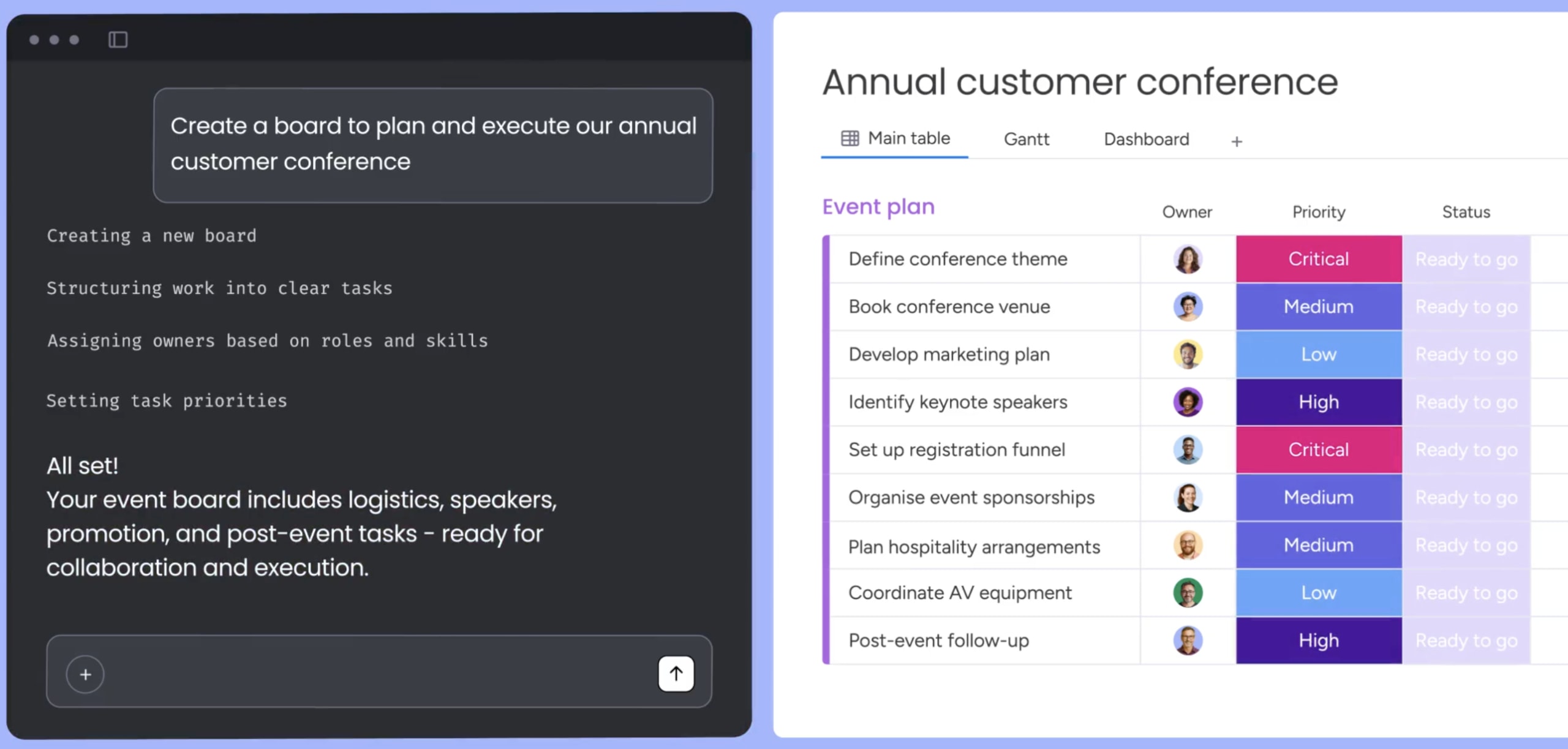
In the monday AI Workspace, people set the goals and priorities, and agents handle follow-through in the same workspace where the work lives. Most teams start with ready-made agents, then build their own as their needs grow.
1. Start with ready-made agents
On top of the project management agents covered earlier, the library includes agents that help project leads stay on top of their day. Daily Briefer summarizes each day’s priorities and flags anything overdue, while Team Capacity Agent tracks active projects and shows who has room to take on urgent work. Teams working across markets can also use Translator to share project updates in other languages.
2. Build custom agents for your own workflows
Teams can build an agent by describing its role in plain language and connecting the boards and docs it should work from. Each agent can be tested before launch and then shared across the organization. A PMO might build a release-readiness checker, for example, that reviews cross-team dependencies before each launch.
3. Connect external AI assistants through MCP
The monday MCP server gives external assistants such as Claude and ChatGPT secure access to the monday AI Workspace, with the same permissions as the connected user. Teams can ask their assistant what’s blocking a launch, or turn meeting notes into tracked items on a board, without switching tools.
Every agent, whether ready-made or custom, runs under the permission and approval controls described in the previous section.
Choose the right AI agent platform to amplify your project team
The right AI agent for project management is one that can see connected work across departments and act within rules your team trusts. A long feature list counts for less than how well an agent fits the way your people already work.
For teams already using the monday AI Workspace, monday agents add this support without a new tool to adopt. Agents can take on status reporting and dependency monitoring across departments, while approvals and ownership stay with your people.
A good place to start is one recurring workflow that takes up time each week, such as project intake or stakeholder updates. Track the hours your team gets back and how quickly follow-up happens, then expand to other workflows once the first one runs well.
Try monday agentsFAQs about AI agents for project management
Which AI agent is best for project management?
The best AI agent for project management is one that operates across your broader workflow, linking updates to cross-functional timelines and business outcomes rather than staying confined to a single board. Look for a platform that combines cross-department visibility, enterprise governance, and flexible automation.
Will AI agents replace project managers?
No. AI agents take over repetitive coordination like status tracking and risk logging, so project managers have more time for strategy, negotiation, and leadership. The role shifts from administration to decisions.
What is the difference between agentic AI and AI agents?
Agentic AI describes the underlying capability of a system to pursue goals, make decisions, and execute multi-step workflows autonomously. AI agents are the concrete implementations of that capability, configured for specific responsibilities such as meeting documentation, bug triage, or resource tracking.
Do AI agents work across different departments?
While some basic agents operate within isolated systems, agents on a unified work platform can share data across marketing, sales, product, and operations. When one team's timeline shifts, stakeholders get notified and dependent work updates automatically.

 Get started