What if we told you there was a magical tool that could organize everything you know about every single one of your customers — past, present, or future?
And what if anyone in your business, from sales to marketing to customer service, could use that tool to get any information they needed about a customer, almost instantly?
It sounds too good to be b2btrue. But lucky for you, it’s not just magic — it’s a real thing. It’s called a CRM.
CRM is a powerful technology that gets your entire organization on the same page, all while putting your customers front and center of your business goals.
Because CRM can do so much, there’s a lot of ground to cover. This complete guide will walk you through everything you need to know about CRM.
What is CRM?
In the simplest terms, CRM stands for customer relationship management.
CRM most often refers to a software or system that helps track all interactions with customers — both existing and potential ones.
But CRM can also refer to the strategy you use to gather, track, and use customer data to improve your relationships with customers. Both CRM technology and CRM strategy are necessary to use your customer data as effectively as possible.
A CRM system keeps a record of all customers and their history with your company. You can use CRM software to track the status of leads, deals, and sales, like in the example below from monday.com.
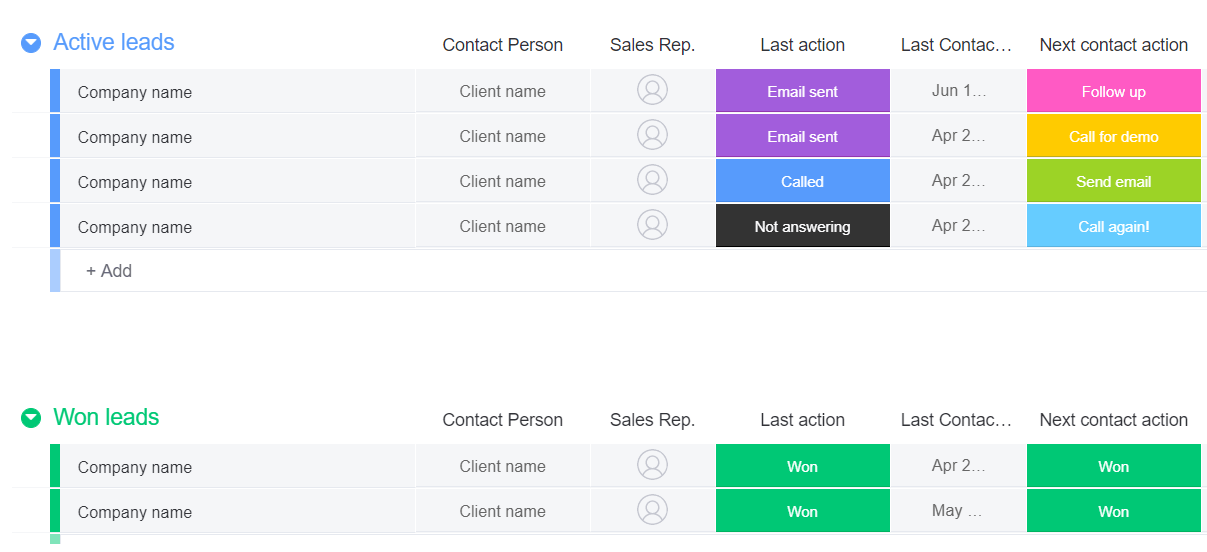
Your CRM will also include contact information, previous orders, and even transcripts from customer service interactions.
While you could track this information in an Excel spreadsheet or another basic tool, you’ll quickly outgrow this method as your business scales.
That problem will show up even more quickly if you’re one of the 95% of companies that have to deal with lots of unstructured data like call transcriptions or social media comments — data that is immensely useful in CRM customer profiles.
Too often, customer information is spread out across multiple data sources, making it time consuming and frustrating to get a complete picture of any single customer. A good CRM platform integrates with the tools you already use, whether that be accounting, email marketing, or customer service software.
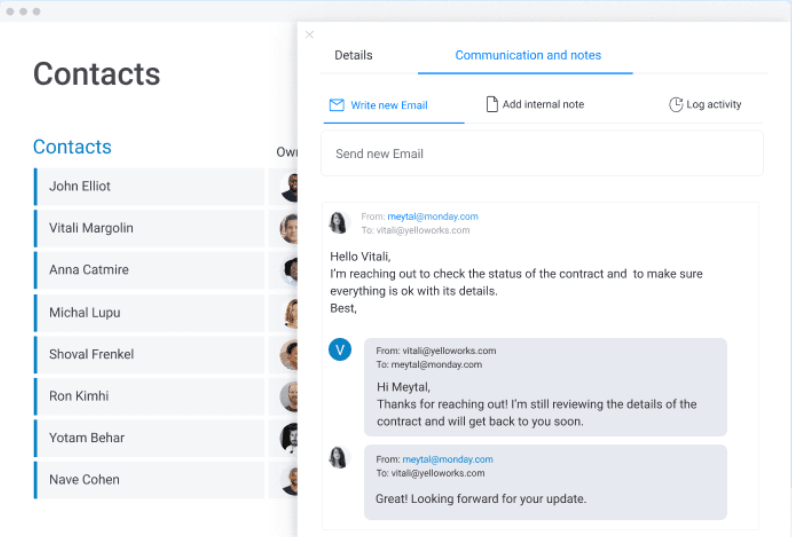
Essentially, your CRM should be a single source of truth for any type of communication or interaction with your customers, whether it’s via sales, marketing, customer service or another department.This helps customers have consistent and personalized experiences with your business. Anyone who interacts with a customer can have the most up-to-date information by checking the customer’s profile.
Anyone who needs to can update a customer’s profile too, like in this contact management template from monday.com.
Typically, CRM software is specialized by department, with most focusing on either sales, marketing, or customer service. Most CRMs, regardless of specialization, will have robust contact management and options for workflow automations that improve efficiency.
But there are also all-in-one CRM systems like monday.com, which incorporates all of the features that each of these teams need.
Who should use CRM?
Virtually any company can benefit from using a CRM system.
Traditionally, CRMs have been focused on sales teams, making them more common in B2B companies with contract or deal-based business models. This is especially true when there is a dedicated sales team that provides personalized support throughout the sales process.
CRM software is also beneficial for B2C companies that focus on major purchases, like vehicles, real estate, furniture, or jewelry.
But now, customer data has uses far beyond sales. It’s used to create personalized experiences at every stage of the customer journey, something that makes 80% of consumers more likely to make a purchase.
Because of this shift, CRM systems are increasingly important for all kinds of businesses. Sales teams still use them to track deals, of course, but marketing and customer service teams are finding new ways to use CRM too.
Marketing teams can track the impact of their initiatives on different channels by seeing which customers opened emails, interacted on social media, and more.
Customer service agents can provide fast and personalized experiences by referring to a customer’s entire history, mitigating the customer’s frustrations and offering a faster resolution.
A CRM platform like monday.com encompasses all of these uses. And, you can expand and customize its features to work perfectly with the way your team does business.
How does CRM benefit your business?
A good CRM system can have a positive impact on every facet of your business. It helps teams work together to provide the best experience for your customers, which in turn increases revenue, boosts customer loyalty, and improves efficiency in your workflows.
Here’s a closer look at just some of the benefits a CRM system like monday.com can provide:
Improved efficiency
Sales pipelines, workflow automations, and a single source of truth for customer data all work toward making your business run more efficiently when it comes to helping customers.
Outdated or disjointed systems mean a disconnect between teams that need to work together to support customers. And separate data sources for sales, marketing, and customer service means it takes longer to find the information you need.
When everything is in one place with a CRM system, everything becomes more efficient. Every team member knows exactly where to go to find the information they need. Workflow automations help speed up manual work and cut down bottlenecks that make work go more slowly.
Even better, employees become more engaged when they have easy access to the information they need — 47% of businesses say this is critical to employee engagement.
Better collaboration
When different teams can all refer to the same information at the same time, it’s easier to collaborate and get more things done.
The marketing team can easily hand off their leads to the sales team to close the deal. The sales team can guide the marketing or customer service teams on the best way to interact with certain types of customers.
Any team that works with customers can have visibility into the needs of their complementary teams, creating more opportunities to work together and build better customer experiences.
Reliable reporting
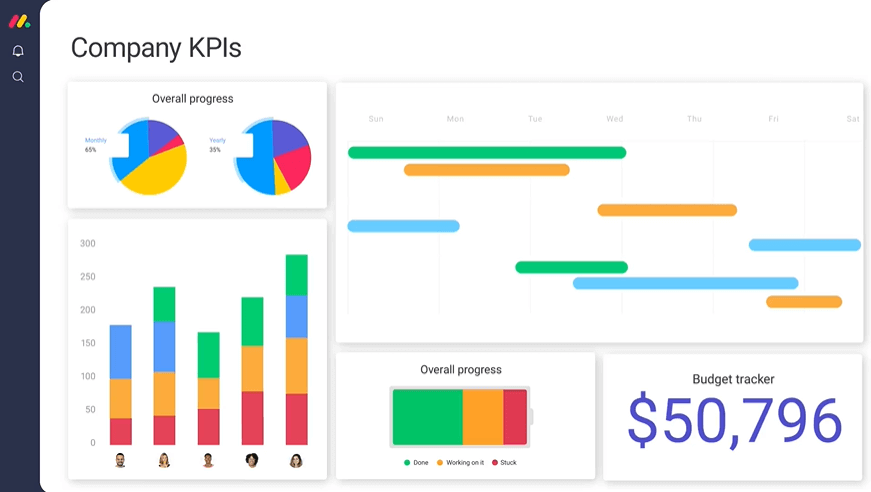
With a single source of truth, your reporting immediately becomes more reliable. You can build dashboards and reports that update in real-time, giving you an instant and accurate snapshot of any or all of your teams.
Dashboards like the one from monday.com below can be customized to showcase whatever KPIs are most important to you and your business, whether that’s leads generated, deals closed, or service tickets completed.
Reduced business costs
Combining several different tools into an all-in-one platform like monday.com saves you the money and the hassle you’d put toward different tools for different purposes.
But there are more subtle cost reductions too. When teams can work faster, whether that’s in closing sales or assisting customers, they can get more done in a day. That means you can do more with a smaller team and save on costly overhead.
Increased customer loyalty
It’s important to remember that a CRM is about the customer at its core — it is called customer relationship management after all.
When you have an effective CRM platform, you provide better customer experiences. And better customer experiences mean increased customer loyalty.
In fact, 66% of Americans say a good customer experience is a very important factor in their loyalty to a brand, with another 32% saying it’s somewhat important.
The better experience you can provide for your customers, the more loyal they will be to your business.
Increased sales and revenue
With increased customer loyalty comes increased sales and revenue. Why?
Well, 83% of Americans say they are more likely to buy a product or service if a family or friend recommends it.
When you make one customer happy, you’re likely to gain even more customers as a result. And more customers means more sales, which means a bigger bottom line.
How your sales team can use CRM
A CRM system can truly take your sales process to the next level.
Instead of each sales rep holding all their information for their deals and clients, all of that information can go into a centralized system that anyone on the team can access. Any sales rep can immediately provide personalized service to any lead thanks to shared, up-to-date client profiles.
A sales CRM provides a holistic view of each lead or deal, putting all pertinent information and files in one place. On monday.com, there are plenty of customizable CRM templates, like this one below, that help sales teams track leads and follow ups.
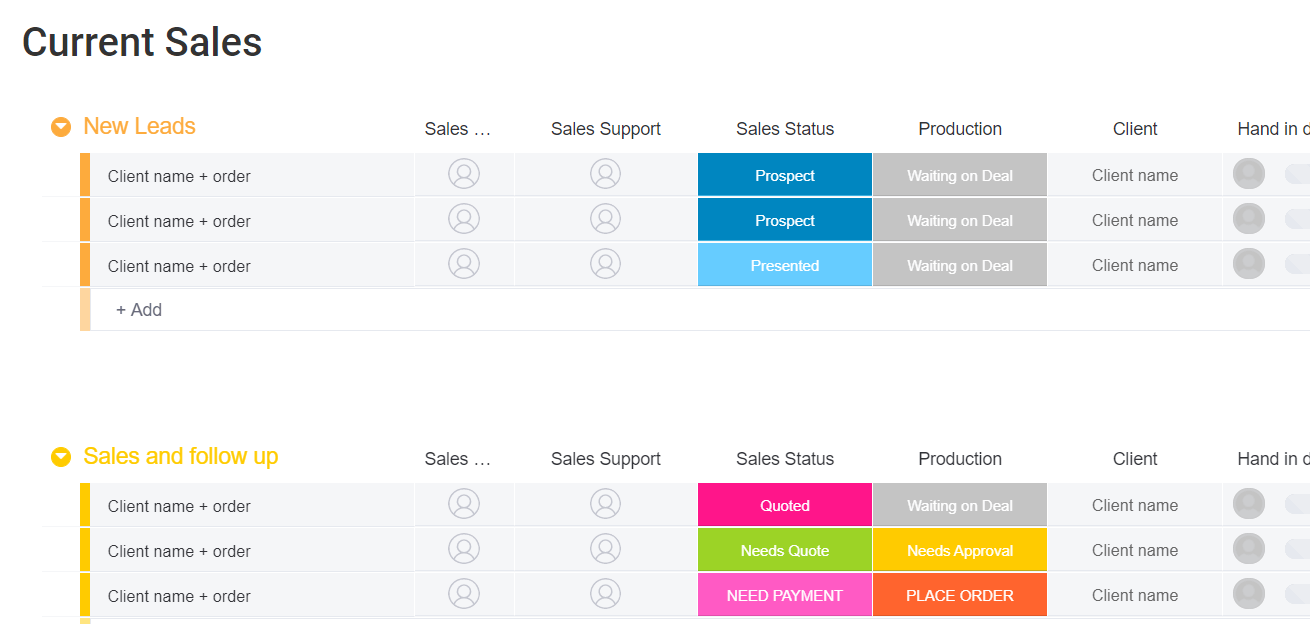
You can also use monday.com to build sales pipelines that follow the customer journey. Standardizing the sales process improves productivity and efficiency, allowing your team to work more quickly to close more deals.
And when you add workflow automation, your sales team can work even faster. Sales automations like the ones available in the monday.com CRM system can improve business productivity by 20%.
Sales team managers can use a CRM system to create dashboards that accurately report on lead generation, deals closed, and any other productivity stats that are important to your team.
How your marketing team can use CRM
As we mentioned earlier, more and more consumers have come to expect personalized experiences when interacting with brands — even before they’ve made a purchase.
This is where customer relationship management for marketing comes in. Marketing teams can use a CRM system to organize customer information in a way that enables highly personalized and effective marketing campaigns across channels.
A marketing CRM can help you make use of the dozens of data points you collect on each prospective customer. This can include social media interactions, email opens and clicks, and more.
But the best marketing CRMs go beyond just tracking customer information. They help marketers see customer data and run their marketing campaigns in the same platform.
monday.com is a marketing CRM that does this. In the platform, you can integrate with other marketing tools like MailChimp and use your customer data to personalize email sequences and other marketing initiatives.
You can take your marketing efforts even further by using marketing automations like these examples. With just a few clicks, manual processes become automatic, saving you time and money.
Automations like these can even result in an increase in leads — 4 in 5 marketers say they saw an increase in leads when they implemented marketing automation.
By sharing customer data with sales and customer service teams, marketers will also get new ways to engage with their target audience. You might even find new markets to target for future campaigns.
How your support team can use CRM
Like the sales team, your customer support team truly benefits from having one place that stores every customer interaction in your business.
And it’s even more important for support teams that have multiple support channels. With omnichannel tracking, customer interactions from phone, email, and chat can be aggregated into a single source, like in the customer query tracker template shown below.
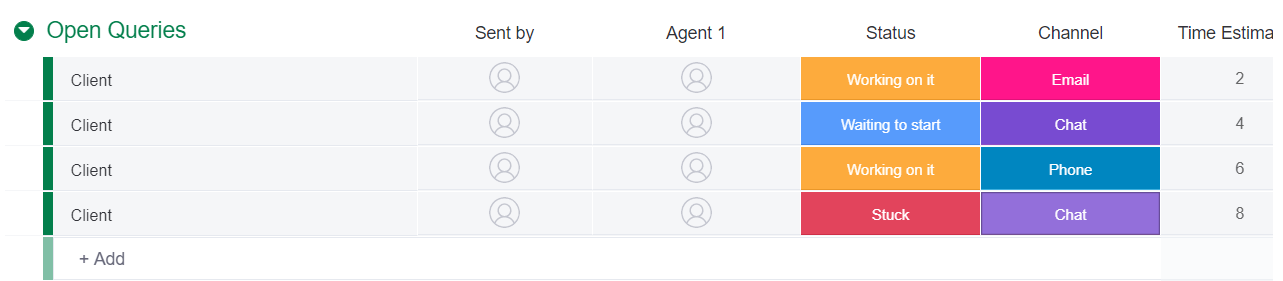
This omnichannel tracking makes it easy for any agent to see a customer’s previous concerns, even if they used a different channel.
With this much information readily available, any customer service agency can provide fast and knowledgeable service to any customer — something that 80% of Americans say is important to a good customer experience, which as we know leads to loyal customers.
Customer service teams can use CRM data in other ways too. They can look for patterns in support queries to identify common problems that customers face, and use that to improve their knowledge base, FAQs, or agent training.
Custom dashboard can report on the types of queries, how fast issues are resolved, and other KPIs to measure the success of the support team.
How to create an effective CRM strategy
We’ve spent most of this guide talking about CRM software and what it can do. But you need more than just B2B software to be successful at customer relationship management.
A CRM strategy makes sure you have a plan for the data you collect and the system you establish. It’s not enough to just collect customer data — you have to be able to use it.
The path outlined below will help you understand what you want to accomplish with your CRM and how to get there.
- Define your business goals. First, you need to understand what you are trying to accomplish with your CRM. Do you want to improve customer data tracking? Provide better customer service? Increase cross-department collaboration? You can have multiple goals, but they all should be clearly defined in order to create the best CRM strategy.
- Understand your customers and their journey. Next, you’ll need to define who your customers are and what path they will take as they interact with your business. Figure out the demographics of your target customers and how many touchpoints they will typically need before making a purchase. Your business processes need to reflect the customer journey in order to provide the best possible experience for your customers.
- Set up workflows that match the customer journey. Your workflows can be sales pipelines, marketing campaigns, or a process for resolving customer queries. You’ll likely need multiple workflows to cover the entire journey, but by creating them all in a platform like monday.com, there can be a seamless transition from one workflow to the next.
- Decide on KPIs for measuring success. How will you know that your CRM strategy is effective? Figure out which KPIs are most important to track for each team. Be sure everyone is aware of how success will be measured so there aren’t any surprises down the road.
- Train team members on the new process. When you implement a new CRM strategy, you’ll need to be sure all your employees understand their role in it and how it works with other employees or teams. A single source of truth only works if everyone who uses it updates it appropriately.
- Review and fine-tune as your business grows. As your business scales, you’ll likely need to make changes to your CRM strategy. Review it regularly and make small adjustments as needed to keep it working seamlessly, even in times of great growth.
When you’re developing your CRM strategy, it’s important to get input and buy-in from every team that will use the CRM in their work. A CRM strategy should work toward improving collaboration and making it easier for your sales, marketing, and customer service teams to be successful.
With a solid CRM strategy, you’ll be able to reap the all the benefits of a CRM that we outlined above. You’ll have better data that allows you to make better forecasting decisions. You’ll find new ways to engage with and support your customers throughout the sales cycle.
And most importantly, you’ll be focused on making your customers happy, leading to increased loyalty and a bigger bottom line.
monday.com is an all-in-one CRM and more
[tiwtter]monday.com is an all-in-one Work OS that works as a CRM system for your entire business. It’s a single source of truth not just for customer data, but for any data your business needs to track.[/tiwtter]
While many CRMs cater to just 1 of the 3 departments we’ve covered here, monday.com works for all of them at the same time.
Sales, marketing, and support teams can all use the monday.com CRM to track customer data while also setting up their own workflows for sales pipelines, marketing campaigns, and support ticket resolution.
But monday.com goes beyond CRM software too.
As a Work OS, it offers project management features and more for any team, from HR to IT to creative. Every template, like the one below, is completely customizable, allowing you to create the workflows that match how your business actually works.
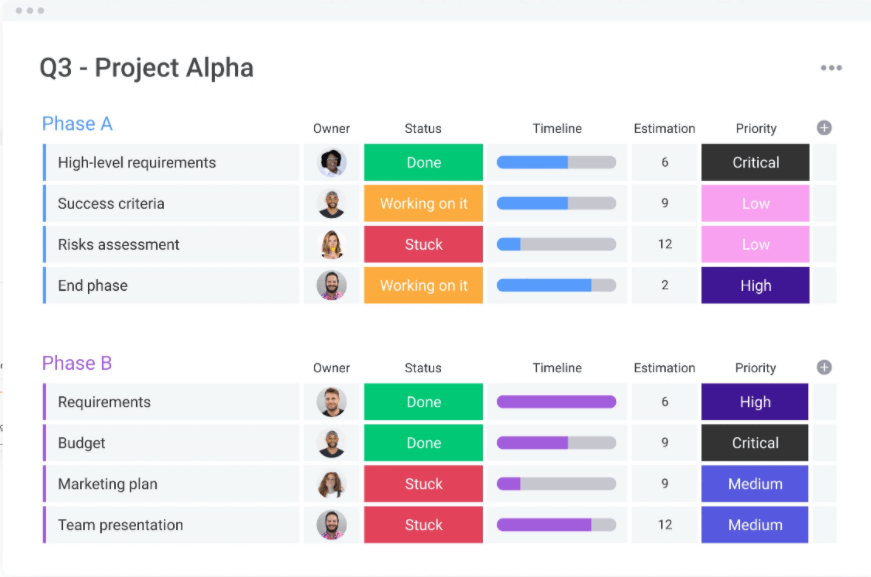
On monday.com, you can set up all kinds of workflow automations to speed up your business processes. Your teams become more efficient and more productive, saving money and increasing revenue.
You’ll also boost productivity by integrating your existing tools into monday.com. For example, you can integrate with marketing tools like Mailchimp or Facebook Ads to bring your CRM and marketing campaigns into a single tool.
Or, if different teams are currently using different CRMs, you can bring them together in the monday.com platform with a CRM integration with Salesforce, Zendesk, Pipedrive, and more.
Get started with monday.com
Customer relationship management is a critical part of virtually every business, allowing every team to provide better service to customers.
A good CRM solution like monday.com will be a single source of truth for sales, marketing, and support teams. It boosts efficiency and productivity while reducing costs and increasing revenue.
Try monday.com as your CRM system today.
 Get started