


Every organization has experienced the gap between a promising idea and successful delivery. Projects stall, budgets stretch, and teams lose momentum, often not because the work itself is impossible, but because no one clearly mapped out how to get from point A to point B.
Without a structured plan, even skilled teams end up reacting to problems instead of anticipating them. Deadlines shift, priorities change, dependencies get missed, and stakeholders start working from different assumptions.
A project plan helps prevent that. It gives your team a shared reference point for scope, timelines, resources, risks, and responsibilities so everyone can move in the same direction from day one.
The good news is that building a strong project plan does not require a project management certification or years of experience. It requires a clear process, the right structure, and a platform that keeps work visible and connected as the project moves forward.
This guide explains what a project plan is, what it should include, how to build one step by step, and how monday.com’s AI Work Platform helps teams turn project plans into connected, trackable work.
Key takeaways
- A project plan is your single source of truth. It documents the scope, timeline, resources, roles, risks, and communication plan so every stakeholder works from the same information
- A good project plan turns goals into action. Instead of keeping strategy separate from execution, it breaks the work into clear steps, owners, deadlines, and dependencies
- Strong planning helps teams prevent common project problems. Scope creep, missed deadlines, budget overruns, and stakeholder misalignment are easier to manage when the plan is clear from the start
- Project planning works across teams and methodologies. IT, marketing, operations, product, PMO, consulting, and construction teams can all adapt the same planning structure to their own workflows
- monday.com’s AI Work Platform helps teams keep project plans visible and actionable. With project templates, Gantt charts, dashboards, automations, workload views, monday agents, monday sidekick, and monday vibe, teams can manage projects in one connected workspace
What is a project plan?
A project plan is a formal document that defines what a project will deliver, how work will be organized, who is responsible for each element, and when milestones are expected to be reached. It serves as the central reference for the entire project team, from kickoff through completion, and is typically approved by key stakeholders before execution begins.
Think of it as the blueprint for your project. Just as an architect would not start construction without detailed drawings, a project manager should not launch a project without a documented plan that covers objectives, scope, schedule, budget, and risk. The project plan is what transforms an abstract goal into a sequence of actionable, trackable work.
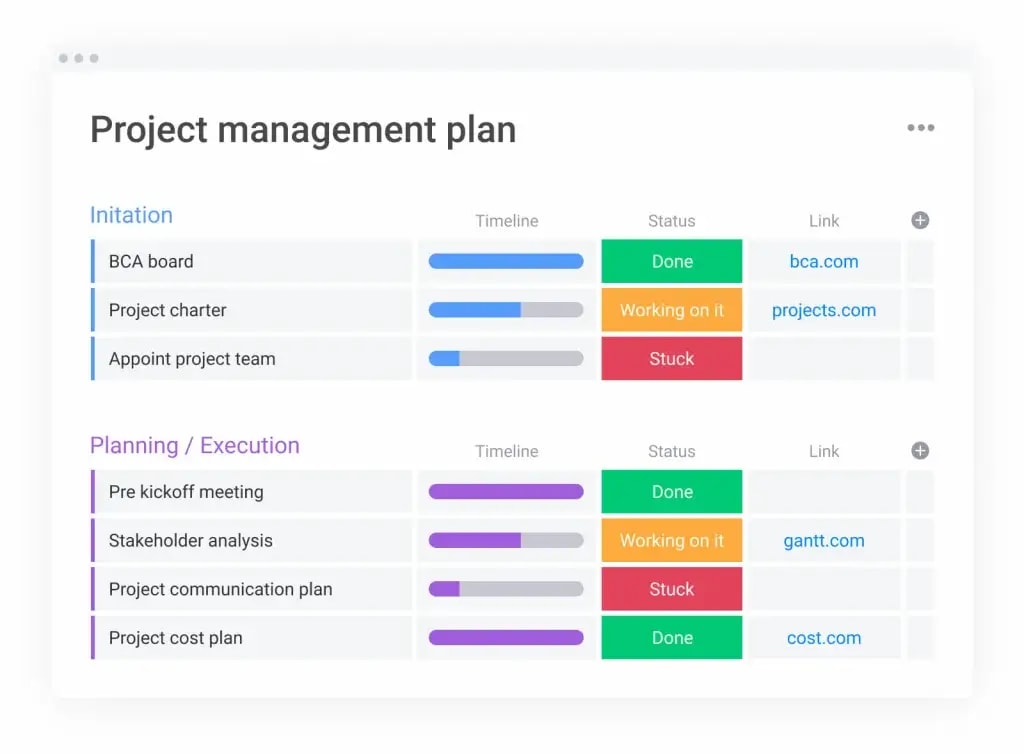
Because “project plan” is often used interchangeably with similar terms, it helps to draw some distinctions. How does a project plan differ from related documents and methodologies?
Project plan vs. work plan
A work plan focuses on the day-to-day execution of ongoing processes and workflows. A project plan, by contrast, is tied to a specific initiative with a defined start date, end date, and set of deliverables. Work plans are continuous; project plans are finite.
Project plan vs. project charter
A project charter is a high-level authorization document that formally greenlights a project. It outlines the business case, high-level objectives, and the project manager’s authority. The project plan follows the charter and provides a detailed roadmap. It includes timelines, activity dependencies, and resource assignments needed to actually deliver the work.
Project plan vs. project scope
Project scope defines the boundaries of what a project will and will not deliver. It answers the question: “What are we building?” The project plan encompasses scope but goes much further: it also answers how, when, with whom, and at what cost. Scope is one component of the larger plan, not a substitute for it.
Project plan vs. work breakdown structure
A work breakdown structure (WBS) is a hierarchical decomposition of deliverables into smaller, manageable components. It serves as the project plan’s structural backbone for scheduling and resource allocation, but it does not cover risk, communication, or budget on its own.
Project plan vs. agile project
An Agile project uses iterative cycles (sprints) to deliver work incrementally, with planning occurring continuously rather than up front. A traditional project plan is typically created in full before execution begins. Many teams blend both approaches, using a high-level project plan for strategic alignment while running sprints for day-to-day delivery. Neither approach eliminates the need for documented objectives, timelines, and accountability.
What should a project plan include?
What should a project plan include? At its core, it should contain all the information your team needs to execute confidently and your stakeholders need to stay informed. While the level of detail varies by project complexity, most effective plans share a common set of components.
Think of these components as the non-negotiable building blocks. Skip one, and you create a blind spot that often surfaces at the worst possible time: mid-execution, when correcting course is expensive and disruptive.
- Objectives and scope: Defining project objectives and boundaries establishes what will be delivered and, equally important, what falls outside the project. This prevents scope creep and keeps the team focused on agreed-upon outcomes
- Timeline and project schedule: A realistic timeline with project milestones, deadlines, and dependencies gives everyone a shared view of when work needs to happen and in what order
- Work breakdown structure (WBS): The WBS decomposes deliverables into smaller components, making it possible to assign ownership, estimate effort, and track progress at a granular level
- Resources: Documenting the people, budget, equipment, and materials required to complete the project. Resource management ensures nothing is over-allocated or forgotten
- Roles and responsibilities: Assigning accountability for every deliverable and decision point. This typically includes a RACI matrix so project stakeholders know who is responsible, accountable, consulted, and informed
- Risk management plan: Identifying potential threats, assessing their likelihood and impact, and documenting risk mitigation strategies before they materialize
- Budget: A detailed cost estimate that accounts for labor, materials, software, and contingency. Tracking actual spend against the budget is essential for financial accountability
- Communication plan: Defining how, when, and to whom project updates will be shared, from weekly status reports to escalation protocols, keeps stakeholders aligned without overwhelming them
What challenges does project planning address?
Why invest the time in building a thorough project plan? Because the alternative (winging it) consistently produces the same set of problems. Here are the most common challenges that structured project planning directly mitigates.
- Scope creep: According to the Project Management Institute, 39% of projects experience scope creep. A documented scope statement with a formal change control process gives your team the authority to push back on unplanned additions without derailing stakeholder relationships
- Resource misallocation: Without visibility into who is working on what, teams end up with some members overloaded while others sit idle. A project plan with resource assignments and workload tracking helps keep utilization balanced throughout the project lifecycle
- Missed deadlines: When dependencies are not mapped, and timelines are based on optimism rather than data, deadlines slip. A schedule built on realistic estimates, critical path analysis, and buffer time gives your team a fighting chance of delivering on time
- Stakeholder misalignment: Projects with multiple stakeholders frequently suffer from conflicting priorities. The project plan, especially the communication and governance sections, creates a single point of reference that prevents “I thought we agreed on something different” conversations
- Budget overruns: Without a detailed budget and regular variance tracking, costs spiral quietly until it is too late to course-correct. A project plan with financial controls catches overruns early, while they are still manageable
How to create a project plan in seven steps
Now that you know what a project plan contains, how do you actually build one? The following seven-step process works regardless of methodology, whether your team follows Waterfall, Agile, or a hybrid approach. Each step builds on the previous one, so working through them in order produces the most cohesive result.
Step 1. Define your project scope and objectives
Start by articulating exactly what the project will deliver and why it matters. Write a concise project description that captures the business problem being solved, the expected outcomes, and the specific deliverables. Be explicit about what is out of scope. This single step prevents more downstream problems than almost any other.
Frame your objectives using the SMART criteria: specific, measurable, achievable, relevant, and time-bound. Vague objectives like “improve customer experience” invite misalignment. A SMART version, such as “reduce average support ticket resolution time from 48 hours to 24 hours by Q3,” gives your team a target they can rally around and measure against.
Step 2. Identify stakeholders and assign roles
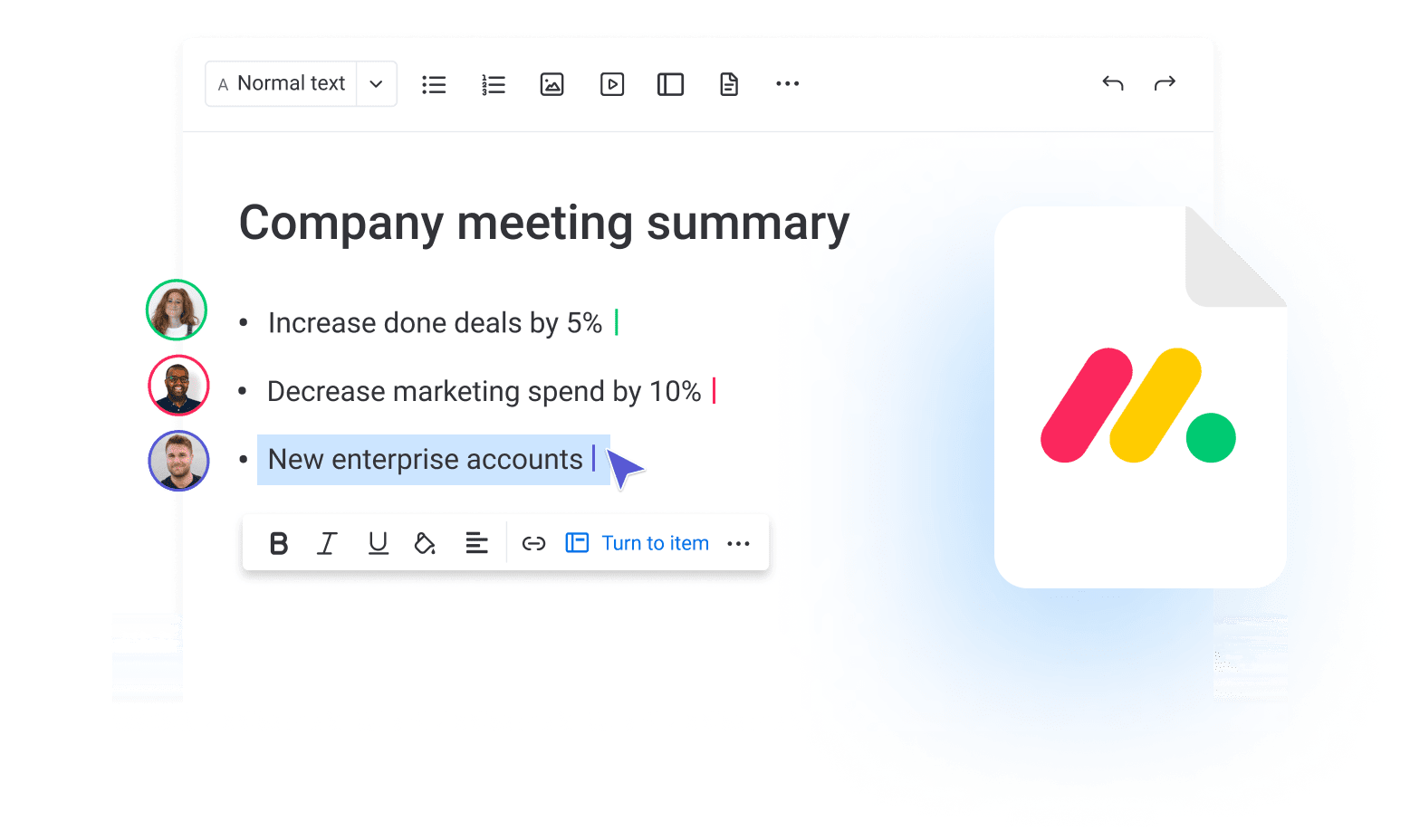
Who needs to be involved, and in what capacity? Map out every stakeholder, from the executive sponsor who approves the budget to the individual contributors who execute the work. Use a RACI framework (Responsible, Accountable, Consulted, Informed) to document exactly who owns each deliverable and decision.
This step is where many project plans quietly fail. When roles are ambiguous, decisions stall, accountability dissolves, and team members duplicate effort or leave gaps. Take the time to have explicit conversations about ownership. It pays dividends throughout execution.

Step 3. Create a work breakdown structure
Decompose your project deliverables into smaller, manageable components. The WBS is a hierarchical map that breaks the final product down into phases, then work packages, then individual activities. Each activity should be small enough to estimate, assign, and track independently.
A well-built WBS also exposes hidden dependencies and helps you identify work that can happen in parallel versus work that must happen sequentially. This directly feeds into your timeline in the next step. Have you ever reached the midpoint of a project only to realize a critical dependency was never documented? The WBS is your insurance against that scenario.
Step 4. Build your project timeline and schedule
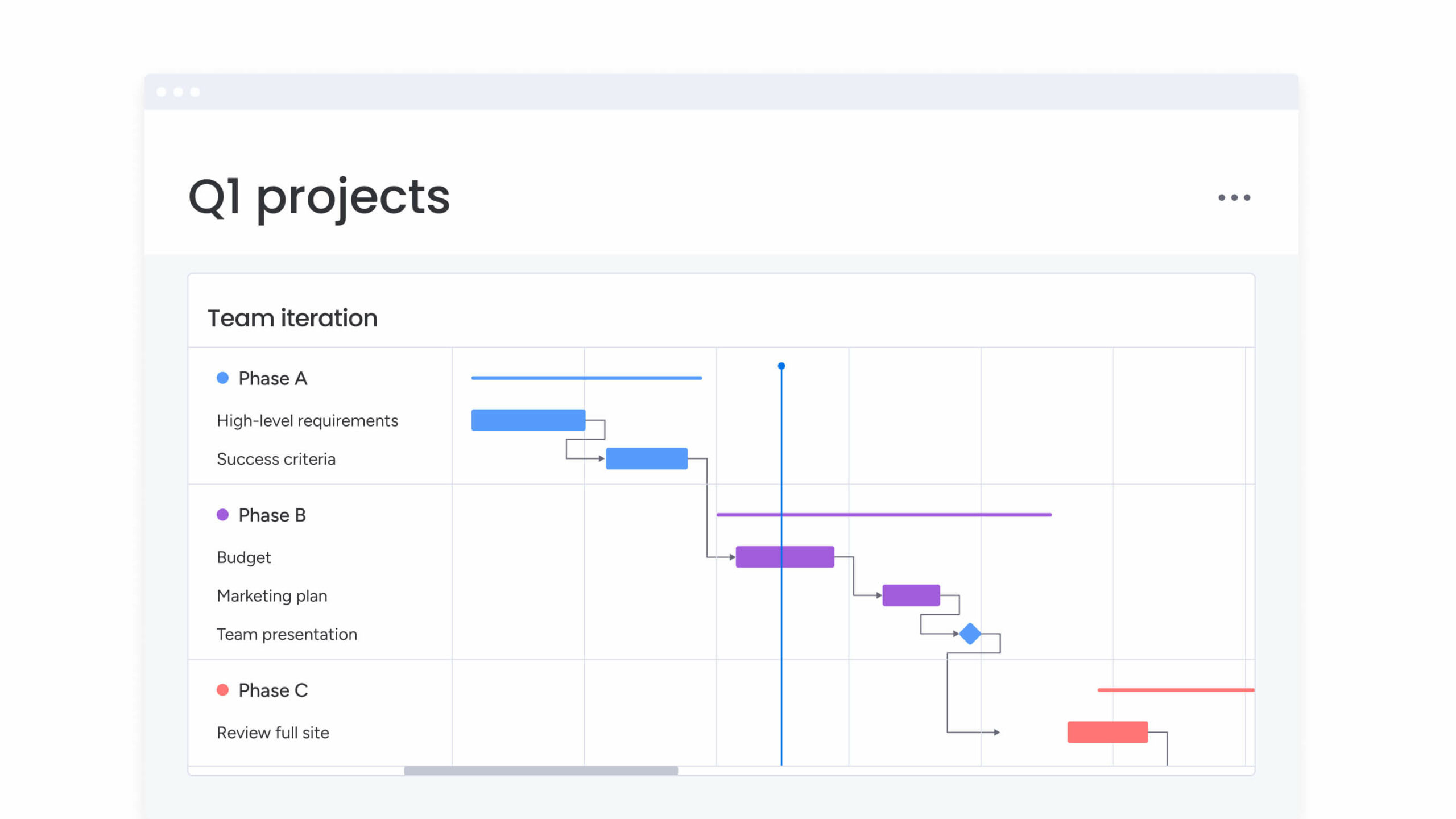
Using your WBS as the foundation, sequence activities, estimate durations, and map out the project schedule. Identify the critical path — the longest sequence of dependent activities that determines your minimum project duration. Any delay on the critical path delays the entire project.
Gantt charts are one of the most effective ways to visualize your schedule because they show duration, dependencies, and milestones on a single timeline. Build in buffer time for high-risk activities, and set project milestones at key checkpoints so the team can celebrate progress and course-correct early if needed. To move from your work breakdown structure to a working timeline quickly, start from a project schedule template matched to your project type.
Step 5. Allocate resources and set your budget
Determine who will work on what, when they are available, and what it will cost. Resource allocation is not just about headcount. It includes equipment, software licenses, third-party services, and physical materials. Compare resource demand against actual availability to identify conflicts or shortages before they become emergencies.
When building your budget, include a contingency reserve (typically 5% to 15% of the total) for unexpected expenses. Projects rarely go exactly according to plan, and having a financial buffer prevents the need for emergency approvals that slow everything down.
Step 6. Develop a risk management and communication plan
Every project carries risk. The goal is not to eliminate risk entirely… that’s impossible. Instead, it’s about identifying the most likely threats, assessing their potential impact, and documenting how you will respond. Create a risk register that lists each risk, its probability, its impact, the owner responsible for monitoring it, and the planned response (avoid, mitigate, transfer, or accept).
Pair your risk plan with a communication plan that specifies how project updates, escalations, and decisions will flow. Who gets weekly status reports? How quickly must blockers be escalated? What platform will the team use for day-to-day collaboration?
Answering these questions upfront prevents information gaps that lead to misalignment. Are your stakeholders truly aligned, or just silent? A strong communication plan surfaces disagreements early, when they are still inexpensive to resolve. Consider planning for those scenarios as well.
Step 7. Review, approve, and iterate
Before execution begins, circulate the completed project plan to all key stakeholders for review and formal approval. This is not a formality. It’s the moment when assumptions are challenged, gaps are filled, and the team commits to a shared path forward.
Once approved, treat the plan as a living document. Schedule regular reviews (weekly or biweekly) to compare actual progress against the baseline. Update timelines, budgets, and risk assessments as new information emerges. The strongest project plans are not the ones that predict every variable correctly. They are the ones that adapt systematically when reality shifts.

How long does the project planning process take?
Timing is everything when planning a project, so naturally, you’ll want to understand how much time to carve out for project planning. Of course, it depends.
- Some projects with a small scope and simple timelines might only take a few days to plan
- Large-scale projects with many moving parts could take weeks or even months to prep
As a best practice, always allocate more time than you think. This way, you’ll be prepared for any unexpected roadblocks that may come up during the planning process. Plus, having extra time to thoroughly plan can prevent mistakes and save money in the long run. Remember the old saying, “measure twice, cut once?” That definitely applies to project planning.
Why you need good project planning software
Creating a detailed project document sounds like a paper-and-pen activity. But it will be miles easier if you digitize the process. A robust project planning software makes it easier to:
- Assign and prioritize tasks: Easily allocate tasks to relevant team members by adding them directly to specific tasks or milestones. You can also prioritize tasks, ensuring everyone knows which activities are urgent and critical for project success.
- Plan timelines: Project software allows you to set realistic timelines, break projects down into manageable phases, and schedule precise due dates. Automated features can also alert team members of upcoming deadlines to prevent delays.
- Understand task dependencies: Many projects have tasks that depend on completing others first. Planning software visually maps out these dependencies, highlighting which tasks can proceed in parallel and which must wait, avoiding bottlenecks.
- Monitor resources: It’s critical to keep track of your core project resources. The right tool makes allocating and monitoring resources easier so you stay within scope and budget.
- Ensure strong communication: Strong communication is key to successful project management so everyone stays informed and aligned without having to switch between multiple platforms.
- Generate visual reports: Visual representations such as Gantt charts, progress reports, and dashboards offer a clear overview of your project’s status. They’re perfect for sharing regular updates with stakeholders or subject matter experts presenting at team meetings.
Try now: Project milestone template (ready to use)
Three project planning best practices
Maximize the value of your project plan by following these essential tips:
Gather information from all stakeholders
Accurate information is the key to a successful project plan. Interview a full range of stakeholders to learn everything you need to know about the tasks and activities involved. Host one-on-one meetings, run focus groups, and distribute surveys to obtain all the details you need before you start the brain work of strategizing.
Work extra resources into your plan
Always give yourself a little wiggle room when planning your resources. Let’s say your client needs the project completed by September 1st at a maximum cost of $15,000. Create your plan with a deadline of August 15th and a budget of $13,500 so you have breathing room in case of any unforeseen circumstances.
Adjust as necessary
Your project plan can and probably will change. While it serves as a useful guide, it’s not set in stone. If your priorities change or you encounter obstacles along the way, don’t be afraid to make adjustments to your documentation to keep you on track toward your end goal.
How monday.com’s AI Work Platform supports project planning
A project plan is only useful if your team can keep it alive throughout execution. Static documents and disconnected spreadsheets often create a gap between the plan and reality. The plan says one thing, but the work is happening somewhere else.
monday.com’s AI Work Platform helps close that gap by giving teams a connected, visual, and automated workspace for planning, managing, and tracking projects. It brings project timelines, tasks, owners, dashboards, documentation, automations, and AI-powered capabilities into one place so people can stay aligned as work progresses.
Teams can start with pre-built templates for common planning workflows, including project plans, project timelines, budget tracking, and risk registers. These templates give teams a structure they can adapt to, rather than starting from a blank page.
Visualization is one of the biggest advantages. Gantt chart views display dependencies, durations, milestones, and critical path information on a single timeline. Timeline views help teams see project activities horizontally and adjust schedules as needed. Kanban boards give teams a stage-based view of work in progress. Workload views help managers see capacity across team members so they can rebalance work before someone becomes overloaded.
Automations help reduce the manual overhead that slows projects down. Teams can set up rules to notify stakeholders when a milestone is reached, reassign work when a status changes, or automatically escalate overdue items. Dashboards bring project data into executive-ready views, combining timeline progress, budget health, workload, and status updates in one place.
monday workdocs let teams document decisions, meeting notes, briefs, and project context alongside the boards where work happens. That helps keep planning and execution connected instead of scattered across separate files.
AI-powered capabilities can take project planning further. monday agents can help execute repetitive workflows and support project coordination tasks. monday sidekick can help individuals find context, summarize information, and move work forward faster. monday vibe can help teams build custom business apps inside monday.com, including project planning tools, intake workflows, or reporting dashboards tailored to the way their organization works.
Together, these capabilities help teams keep the project plan visible, current, and actionable from kickoff to close-out.
Gain visibility into your projects with monday.com features
Project managers, team leads, and operations managers need visibility without extra manual reporting. monday.com’s AI Work Platform helps teams create that visibility through connected project views, dashboards, automations, and AI-powered support.
The Gantt chart view helps teams visualize the entire project schedule, including dependencies, milestones, and critical path. When timelines shift, teams can adjust dates and see how those changes affect downstream work.
The Timeline view gives managers a clear horizontal view of project activities. It is especially useful when overseeing multiple projects or looking for overlaps, gaps, and scheduling conflicts.
The Workload view helps managers monitor team capacity in real time. Instead of waiting until someone is overloaded, managers can see capacity issues earlier and rebalance assignments before they become bottlenecks.
Dashboards bring project information into one place. Teams can combine charts, numbers, timelines, budgets, and status updates into a view that updates automatically and supports faster decision-making.
Automations help teams reduce repetitive project management tasks. For example, when a status changes to “Done,” monday.com can notify the next owner. When a deadline is approaching, it can send a reminder. When an item is overdue, it can be escalated to the project lead.
AI-powered capabilities help teams move faster without losing context. monday agents can support repetitive project coordination workflows, monday sidekick can help summarize or find relevant project information, and monday vibe can help teams build custom project apps inside monday.com.
FAQs
What are the 4 main parts of a project plan?
The four main parts of an effective project plan are the project budget, goals and objectives, deliverables, and schedule (including detailed milestones.)
What does a good project plan look like?
A project plan or work plan contains all the goals, objectives, deliverables, and time frames to complete them. It should be well-structured, regularly updated, and clearly communicated to all team members so everyone is on the same page about when things need to happen within the entire project lifecycle.
Is a project plan a schedule?
A project plan encompasses more than just a schedule. While a successful project requires strict adherence to timing, it also needs clarification about resources, budgets, and accountability for every task involved to reach your project goals.
Is a project plan the same as a timeline?
No, a timeline is a visual representation of the project’s milestones and tasks, but it does not provide the level of detail and accountability that a project plan offers. A project plan includes timelines for each task, along with resources, budget, and potential roadblocks.
Is a project plan a Gantt chart?
A Gantt chart is a fantastic way to display your project's timeline or schedule. It clearly breaks down tasks, dependencies, and durations to help you understand the project's progress. However, timing is just one key element of a comprehensive project plan, including goals, resources, budgeting, and more.
How does monday.com help with project planning?
monday.com helps teams plan projects by providing templates, Gantt charts, Timeline views, workload visibility, dashboards, automations, and AI-powered capabilities in one connected workspace. Teams can plan the work, assign owners, track progress, manage risks, and keep stakeholders aligned from kickoff to close-out.

 Get started