


If your project stakeholders ask for a delivery date and a budget before anyone has even sized up what’s involved, a work breakdown structure (WBS) gives you numbers you can stand behind.
This guide explains the principles that keep scope stable and walks through a 7-step WBS build process, complete with examples. It also shows how monday AI Workspace keeps your WBS aligned with live work: monday agents draft the first breakdown, and your team decides what stays.
Key takeaways
- Break complex projects into structured deliverables teams can estimate, assign, and track confidently.
- Focus your WBS on outcomes, not activities, to keep scope stable as methods evolve.
- Apply the 100% rule so every deliverable fits clearly within the defined scope.
- Create work packages between 8 and 80 hours to improve estimation and ownership.
- Connect planning to execution with interactive hierarchies on the AI Workspace.

What is a work breakdown structure?
A work breakdown structure (WBS) is a hierarchical breakdown of project scope that divides complex work into manageable components. It organizes your project into smaller work packages that teams can estimate, assign, and track.
This structure outlines deliverables clearly from the start. When work is mapped at the right level of detail, teams can move into execution with shared expectations.
WBS definition and purpose in project management
A WBS is a deliverable-oriented breakdown that shows what needs to be delivered rather than listing the steps to get there. This approach aligns with NASA’s 2025 Work Breakdown Structure Handbook, which requires a WBS to encompass the entire project’s approved scope of work within a clear, product-oriented hierarchy. Project managers often call this the 100% rule: every level should account for all of the scope, and only that scope. Organizing work this way provides full scope visibility, supports accurate estimation, and establishes accountability for every component.
The WBS forms the backbone of project planning. It informs your schedule, guides your budget, and establishes the baseline for scope control. Without it, resource allocation and progress tracking become guesswork.
How WBS differs from project schedules and task lists
The difference between a work breakdown structure and a project plan comes down to scope versus orchestration. A WBS defines what must be delivered, while a project plan wraps that scope in schedule, budget, resources, and risk management. A WBS, a project schedule, and a task list each serve a distinct purpose.
A WBS defines what must be delivered. A project schedule defines when that work will happen. A task list outlines the specific activities required to complete each deliverable. The three work together but stop at different levels of detail, as the table below shows.
| Element | What it defines | Level of detail | Example entry |
|---|---|---|---|
| Work breakdown structure | The deliverables that make up project scope | Ends at the work package level | User manual |
| Project schedule | When each piece of work happens | Adds dates, durations, and dependencies | User manual drafted by June 12 |
| Task list | The activities needed to finish each deliverable | Individual actions | Write user manual |
Why your projects need a work breakdown structure
Projects struggle when the scope is unclear, resources are misaligned, or risks are identified late. Unclear scope and scope creep remain among the most common reasons projects run over budget and miss their deadlines. A WBS improves outcomes by clarifying scope before execution begins. Here’s how structured decomposition supports stronger delivery.
Gain complete scope visibility
A WBS requires teams to account for every deliverable within the project hierarchy. Its structure highlights dependencies and gaps early. When change requests arise, teams can assess impact against defined deliverables before committing time and resources.
Optimize resource allocation
Accurate staffing depends on measurable work. A WBS supports precise resource planning by breaking initiatives into estimable packages, making forecasting more realistic and assignments more deliberate.
Work packages allow teams to:
- Estimate effort at a practical level
- Balance workloads across contributors
- Tie ownership directly to defined outputs
Reduce project risk
Large initiatives often hide coordination challenges and skill gaps. Breaking work into defined components flags these issues during planning.
Risk assessed at the work package level becomes easier to manage without slowing overall momentum. AI adds a modern layer here: it can trace dependencies across a WBS and flag at-risk chains before they derail timelines, so teams act on early signals rather than reacting to slippage.
Types of work breakdown structure
The right WBS structure depends on your project type and organizational workflow. Project managers often adapt the framework to fit specific needs. Understanding the most common structures helps you select an approach that supports your team’s execution style.
Deliverable-based WBS
A deliverable-based WBS organizes work around tangible products, services, or results the project will create. This approach aligns naturally with customer expectations and business value by focusing on outcomes rather than timing.
For a website project, Level 2 elements might include Site Design, Content Repository, Backend Functionality, and User Testing. This structure works best for projects with distinct end products where the outcome is more defined than the process.
Phase-based WBS
A phase-based WBS organizes work around project lifecycle stages or time periods. This aligns well with organizational governance and standard operating procedures.
For a product launch, the structure follows the timeline: Research Phase, Development Phase, QA Phase, Launch Phase, and Post-Launch Review. This approach suits projects with strict regulatory requirements or distinct stages that must complete sequentially.
Hybrid WBS for modern projects
Many teams combine phase-based and deliverable-based structures. For example, a project may organize high-level phases first, then break each phase into specific deliverables.
Teams using monday.com can adjust hierarchies as projects evolve. Flexible board views allow the same structured data to be viewed as a Gantt chart, Kanban board, or timeline depending on stakeholder needs.
Using a WBS in agile projects
Yes, you can use a WBS in agile projects. Agile teams adapt the framework by decomposing work from epics into features and then into user stories, keeping clear deliverable ownership at each level. The hierarchy stays outcome-focused while sprints handle the timing, so a WBS complements agile planning rather than competing with it.

Core WBS principles every PM should know
A WBS works best when it follows clear structural rules. These principles keep the hierarchy practical and manageable as projects evolve. The Association for Project Management documents the work breakdown structure as a way to break project scope into a manageable, hierarchical structure.
The 100% rule explained
The 100% rule states that the WBS must include all work defined in the project scope and only that work. This applies at every level. The sum of child elements must equal the full scope of the parent element.
Follow these guidelines:
- Include all required work within the hierarchy
- Exclude work that falls outside approved scope
- Align budget and duration totals at each level
Mutually exclusive elements
Elements at the same level must not overlap. Overlapping deliverables create confusion, double-counting, and accountability gaps.
Focus on deliverables, not activities
A WBS defines outputs. “User Manual” belongs in the WBS. “Write User Manual” belongs in a task list. For how this deliverable-first discipline fits the wider project management body of knowledge, see our PMBOK guide.
Centering the hierarchy on deliverables keeps it stable even as methods shift.
Essential components of work breakdown structures
A practical WBS defines work clearly and supports consistent tracking. At a minimum, it should include:
- Work packages at the lowest level, sized for reliable estimation and ownership
- Supporting documentation that clarifies scope and acceptance criteria
- Hierarchical identifiers that reflect parent-child relationships for reporting
Work packages defined
A widely used rule of thumb, the 8/80 rule, suggests a work package should take between 8 and 80 hours of effort. A work package is the point where work gets assigned, estimated, and tracked.
Each package should be small enough for accurate forecasting and clear ownership, yet large enough to avoid unnecessary fragmentation. That 8 to 80 hour range keeps packages granular without fragmenting the plan into noise.
WBS dictionary and coding
Each element benefits from supporting detail. A WBS dictionary outlines scope description, acceptance criteria, resource needs, and dependencies. It sits alongside related planning structures such as a cost breakdown structure that maps budget to the same hierarchy.
On the AI Workspace, this information can live directly within board items through custom fields and Docs.
Hierarchical coding assigns unique identifiers to each element. Numeric or alphanumeric formats mirror the hierarchy and simplify reporting across systems.
How to build a work breakdown structure in 7 steps
Creating a WBS starts with breaking complex work into clear deliverables and manageable components. While the steps move in sequence, teams often refine the structure as more detail emerges. This approach keeps scope complete while maintaining practical work package sizes.
Step 1: Define your project scope
WBS creation begins with establishing project scope boundaries. The project charter, statement of work, and stakeholder requirements serve as inputs. Define what’s explicitly excluded from the project to prevent scope creep later.
Step 2: Identify major deliverables
Identify Level 2 elements, the highest-level deliverables or outcomes the project will produce. Think from the customer or end-user perspective. For a software project, major deliverables might include Mobile Application, Web Portal, and Admin Backend.
Step 3: Decompose into sub-deliverables
Break major deliverables into smaller components. Ask “What components make up this deliverable?” to guide decomposition. A Mobile Application might break down into UI Design, Authentication Module, and Payment Integration.
Step 4: Create manageable work packages
Decomposition stops when components become work packages adhering to the 8/80 rule, requiring between 8 and 80 hours of effort. At this level, work has a single owner, defined start and end criteria, and can be reliably estimated.
Step 5: Assign WBS codes
Apply a consistent coding system to the structure. This allows easy reference in meetings and reports. The coding system mirrors the hierarchy, providing shorthand for project structure.
Step 6: Document in your WBS dictionary
Create detailed documentation for each element. This dictionary prevents misunderstandings by explicitly stating what “complete” looks like for each work package.
Step 7: Review with your team
Validate the WBS with your team to identify gaps, overlaps, and unrealistic groupings. This review ensures buy-in and often reveals dependencies the project manager might have missed. Digital platforms facilitate this by allowing distributed teams to comment on and refine the structure asynchronously.

Work breakdown structure examples across industries
WBS application varies significantly across sectors, with each industry adapting the framework to match specific deliverable types and workflow requirements. These examples illustrate how the hierarchy adapts to different deliverable types while maintaining core structural principles.
Each example uses hierarchical coding, so a Level 1 deliverable like 1.0 breaks into 1.1, and 1.1 breaks into 1.1.1. This coded depth makes the structure easy to reference and roll up in reporting.
Construction project WBS
Construction WBS is typically organized by physical systems and trade phases, reflecting the tangible nature of work and the strict construction sequence:
- 1.0 Foundation
- 1.1 Excavation and grading
- 1.1.1 Site survey
- 1.1.2 Earthworks and compaction
- 1.2 Concrete pouring
- 1.3 Waterproofing
- 1.1 Excavation and grading
- 2.0 Structure
- 2.1 Steel framing
- 2.2 Flooring systems
- 2.3 Roof structure
- 3.0 Systems
- 3.1 Electrical rough-in
- 3.2 Plumbing rough-in
- 3.3 HVAC installation
Software development WBS
Software projects often use functional or feature-based breakdowns supporting iterative development and distinct technical domains:
- 1.0 User authentication
- 1.1 Login interface
- 1.2 Database schema
- 1.2.1 User table design
- 1.2.2 Session storage
- 1.3 Security protocols
- 2.0 Shopping cart
- 2.1 Product display
- 2.2 Cart logic
- 2.3 Payment gateway integration
- 3.0 Deployment
- 3.1 Server configuration
- 3.2 Load testing
- 3.3 Production release
Marketing campaign WBS
Marketing projects focus on channels and assets, ensuring all creative and logistical elements are ready for launch:
- 1.0 Content strategy
- 1.1 Persona development
- 1.2 Key messaging framework
- 2.0 Creative assets
- 2.1 Social media graphics
- 2.2 Video production
- 2.2.1 Scripting
- 2.2.2 Editing and final cut
- 2.3 Landing page design
- 3.0 Channel management
- 3.1 Email campaign setup
- 3.2 Paid ad configuration
- 3.3 Influencer outreach

5 principles for an effective WBS
Even experienced project managers fall into patterns that weaken a WBS. Recognizing these early keeps the structure useful and actionable.
1. Building activity lists instead of deliverable structures
Teams often confuse the WBS with a checklist, populating it with verbs rather than nouns. “Conduct User Research” is an activity; “User Research Report” is the deliverable. Activity-based structures are unstable because methods often change while goals remain constant.
2. Include project management deliverables
Project management work often gets excluded, which leads to unrealistic timelines and budgets.
Deliverables such as Project Plan, Status Reports, Steering Committee Presentations, and Risk Register should appear in the hierarchy because they require time, ownership, and resources.
3. Over-decomposing too early
Creating a granular WBS for distant project phases leads to waste. When requirements change, that detailed work must be redone.
Progressive elaboration, defining near-term work in detail and long-term work at a high level, keeps the WBS manageable and relevant.
4. Creating WBS in isolation
A WBS created solely by the project manager is often incomplete and lacks team buy-in. Team members possess technical knowledge to identify missing components and hidden dependencies.
Collaborative workshops ensure the WBS reflects reality.
5. Treating WBS as static documentation
When a WBS lives in a PDF or spreadsheet disconnected from daily work, it quickly loses relevance. As projects evolve, the structure should reflect those changes.
Keeping the WBS updated within the same environment where work is tracked helps teams stay aligned throughout the project.
WBS platforms and templates
Modern planning environments bring deliverables, timelines, ownership, and reporting into one system. Updates to work packages reflect across connected views, reducing manual coordination. Ready-made templates provide structured starting points for common project types such as construction, software development, and marketing campaigns. Teams adapt these frameworks to match their workflow without rebuilding the hierarchy from scratch.
Modern platforms support:
- Real-time collaboration
- Expandable hierarchy views
- Direct links between structure and timelines
- Activity logs that track changes
- Granular permissions for editing access
Some platforms also offer AI tools that draft initial WBS outlines from project descriptions and suggest logical breakdowns, helping teams move faster during early planning. To skip the blank page, you can start from a ready-made WBS template and adapt it to your project.
How monday AI Workspace keeps your WBS connected to execution
Traditional WBS documents often sit outside daily execution, so the plan and the work drift apart. monday AI Workspace brings the hierarchy into the same workspace where work is tracked and updated, keeping planning and delivery in sync. The difference between a static document and a connected WBS shows up across everyday planning tasks.
| Capability | Static WBS document | Connected WBS on the AI Workspace |
|---|---|---|
| Scope visibility | A snapshot that ages quickly | A live hierarchy across groups, sub-items, and connected boards |
| Progress updates | Manual roll-up in spreadsheets | Status rolls up automatically as work packages update |
| Ownership | Names in a cell | Owner, timeline, and status on every work package |
| Dependency and risk detection | Found late, often by accident | Agents trace critical paths and flag at-risk chains early |
| Reporting | Rebuilt before every meeting | Portfolio dashboards and AI summaries update in real time |
Build a hierarchy that reflects real work
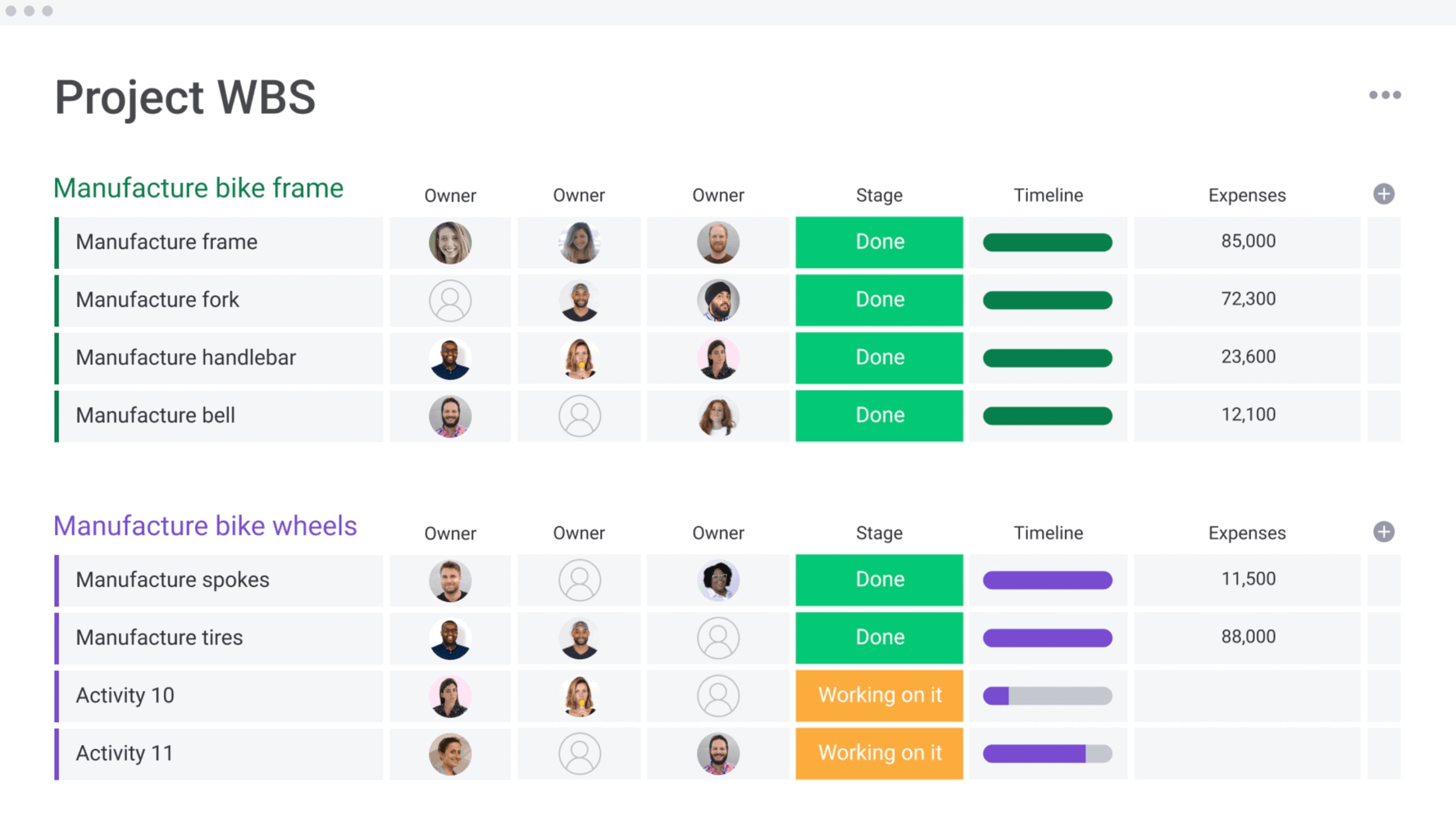
Create layered structures using groups, sub-items, and connected boards. Programs break into projects, projects into deliverables, and deliverables into work packages with defined owners and due dates. When scope shifts, related views update automatically, keeping execution aligned with planning.
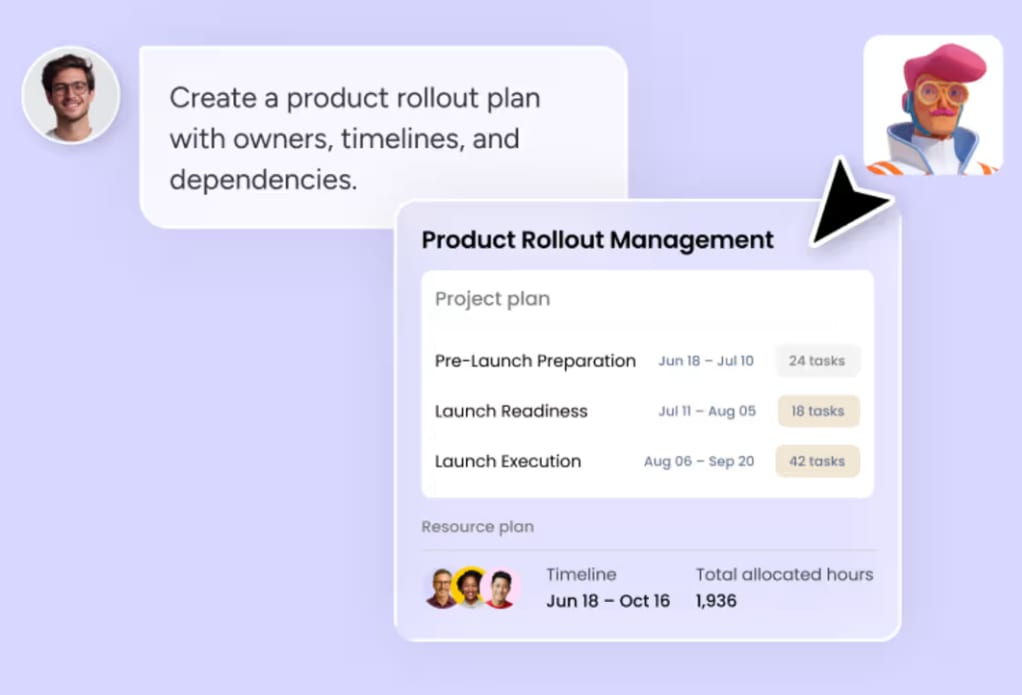
monday agents can accelerate this first pass. A Project Planner agent turns a plain-language brief into groups, tasks, owners, and dependencies, giving your team a structured draft to refine rather than a blank board. People and agents work together here: the agent proposes the breakdown, and your team makes the trade-off decisions.
See progress and risk without chasing updates
Status updates aggregate as work advances. Project managers review deliverable-level progress while leadership tracks overall health through dashboards, with Gantt, timeline, and workload views showing scheduling and capacity. Dashboards also display AI risk alerts and executive summary reports, so risks reach the right people before they escalate.
Agents add another layer by tracing the critical path across a WBS and flagging chains that are trending late. They give teams early warning while people decide how to respond.
Extend your WBS with vibe and MCP
When a standard view isn’t enough, monday vibe lets you build a custom WBS or portfolio dashboard app from a plain-language prompt, with no code required. Vibe apps inherit your existing permissions and data, so a tracker you describe in a sentence stays governed by the same controls as the rest of your workspace.
monday MCP connects assistants like Claude and ChatGPT to your project data within monday’s permission model. Through MCP, you can ask an assistant about dependencies, status, or risk across your WBS and get answers grounded in live board data rather than a stale export.

Transform project disorder into structured success
A well-designed work breakdown structure turns complex initiatives into manageable components. Clear deliverables, defined ownership, and disciplined decomposition are what separate predictable delivery from hopeful guesswork.
The next step is keeping that structure alive on monday AI Workspace. When your WBS lives where work happens, and AI helps map dependencies and risks early, planning stops being a document you file and becomes the system that moves work forward.
Get startedFAQs
What are the 4 levels of a WBS hierarchy?
A standard WBS hierarchy includes four levels: the project level (Level 1), major deliverables (Level 2), sub-deliverables (Level 3), and work packages (Level 4). Each level decomposes the one above it, so the full scope stays intact from the top project down to the smallest assignable package.
What is the difference between WBS and a Gantt chart?
The difference between a WBS and a Gantt chart is what each one defines. A WBS defines what needs to be delivered through a hierarchy of outcomes. A Gantt chart defines when that work happens by organizing activities along a timeline. Most teams build the WBS first, then schedule it.
What are the 5 steps of WBS creation?
The five core steps of WBS creation are defining project scope, identifying major deliverables, decomposing those deliverables into sub-deliverables, creating manageable work packages, and assigning clear ownership to each package. Larger projects often add coding and dictionary documentation to keep the structure easy to reference.
How detailed should a work breakdown structure be?
A work breakdown structure should be detailed enough that each package can be reliably estimated, assigned to one owner, and tracked clearly. The 8/80 rule offers a practical range of 8 to 80 hours per package. Stop decomposing once further breakdown adds effort without adding clarity.
How does the AI Workspace help you build a WBS?
The AI Workspace helps you build a WBS by hosting the hierarchy where work happens, using groups, sub-items, and connected boards. A Project Planner agent drafts the breakdown from a brief, dashboards roll up progress, and dependency mapping flags risk early, so your plan stays connected to execution.

 Get started