

Picture closing a big order, then realizing the stock you just promised isn’t actually on the shelf. When customer data lives in one system and inventory lives in another, that gap happens more often than any team wants to admit.
Traditional CRMs focus on tracking customer relationships and interactions, but today’s platforms do much more. A CRM with inventory management connects your sales, operations, and service data in one place, giving every team real-time visibility into stock levels and customer activity.
In this guide, we’ll explore how choosing the right system can help your team manage sales, service, and inventory together, and what to look for as buying expectations shift in 2026. A connected platform is quickly becoming the way growing teams keep both promises and shelves full.
Key takeaways
- A CRM with inventory management combines customer relationship data with real-time stock tracking in one platform.
- Unifying sales and inventory reduces stockouts, overselling, and manual order errors.
- Key features to look for include real-time stock tracking, AI forecasting, automation, and integrations.
- A CRM focuses on customer-facing workflows, while an ERP manages operations across an entire organization.
- monday CRM offers an AI-first, no-code way to connect pipeline, stock, and fulfillment data in a single workspace.
What is a CRM with inventory management?

CRM in inventory management refers to using customer relationship management software to track stock alongside customer and sales data, so teams work from one connected record. A CRM, or customer relationship management software, is a platform that helps companies connect with customers, but it can do more than one job. CRMs with inventory management are robust platforms that combine relationship building with features to track inventory.
With these systems, companies can combine customer and inventory data to boost growth by building a more seamless user experience and streamlining internal processes.
For companies that handle a lot of inventory, a CRM with inventory management makes it easier to improve order fulfillment accuracy while keeping a close eye on customer behaviors related to products. Some CRMs with inventory management features can even take things a step further and handle post-fulfillment workflows, such as invoicing and customer satisfaction data collection. In practice, this is what people mean by a sales and inventory management system: one place where the pipeline and the warehouse finally speak the same language.
CRM vs. ERP: Understanding the difference
In some cases, functionality between CRM and enterprise resource planning software, or ERP for short, can look quite similar. However, once you dig a little deeper, you’ll see that both platforms serve different purposes. The table below will give you a more in-depth overview of the differences between the two types of software.
| Category | CRM software | ERP software |
|---|---|---|
| Main use case | Managing customer relationships, sales, and marketing activities | Managing core business processes across an entire organization |
| Core functionality | Contact management, sales pipeline tracking, customer service, marketing automation | Financial management, inventory control, supply chain, manufacturing, HR |
| Target users | Sales teams, marketing departments, customer service representatives | Finance teams, operations managers, warehouse staff, procurement, HR departments |
| Data emphasis | Customer-facing data, like interactions, preferences, purchase history, communication records | Operational data, like inventory levels, financial transactions, production schedules, supplier information |
| Key objectives | Increase sales, improve customer satisfaction, enhance customer retention, streamline marketing | Optimize operational efficiency, reduce costs, improve resource planning, ensure compliance |
| Typical ROI drivers | Higher conversion rates, increased customer lifetime value, improved sales productivity | Reduced operational costs, smoother inventory turnover, streamlined processes |
| Implementation | Generally faster deployment, focused on specific departments | More complex implementation, affects entire organization |
Some businesses attempt Salesforce inventory management by connecting third-party platforms or custom integrations. However, this often requires additional setup and maintenance, making it less streamlined than using a CRM with built-in inventory capabilities.
Although CRMs and ERPs differ in focus, there’s still meaningful overlap. Many CRMs extend beyond sales and marketing, supporting HR, finance, and supply chain teams. Some, like the ones elsewhere in this article, include robust inventory management features that unify customer and product data for a single source of truth.
When to use a dedicated CRM with inventory vs. an ERP system
If your goal is to manage customer relationships, scale sales processes, and align them with inventory tracking, a CRM is the best fit. Choose an ERP if you need to optimize operational processes across departments such as manufacturing and finance.
That said, many teams benefit from using both. CRMs can integrate with ERP systems to bridge customer-facing and operational workflows. Small to mid-sized businesses often start with CRM and inventory management software, then add ERP functionality as they grow.
Key features to look for in a CRM with inventory management
If you’re shopping around for a CRM with inventory management, it may seem obvious that you’re looking for a platform with strong inventory tracking features. However, every company’s inventory needs and processes are different. Not only that, there are plenty of other great CRM features that work alongside inventory-specific features that can deliver results you didn’t even expect. Here’s a look at some of the core features to look for.
- Integrated purchasing and vendor management: A quality CRM should allow you to manage supplier relationships, track purchase orders, and monitor vendor performance all in one place.
- AI-powered stock tracking: Use AI to prevent stockouts and order cancellations by analyzing sales trends, triggering reorder alerts, and optimizing stock levels in real time.
- Inventory alerts: Find a platform that has inventory alerts, such as low-stock notifications, overstocking warnings, and reorder point triggers that can be customized based on product velocity and seasonality patterns.
- Order fulfillment automation: Automate every stage of fulfillment, from sending customer updates to notifying internal teams when stock runs low.
- Invoicing and billing: Look for automated invoice generation, payment tracking, and the ability to handle multiple pricing tiers or customer-specific rates; this ensures accurate billing tied directly to order fulfillment.
- Reporting and analytics: Choose a CRM with detailed reports on top-selling items, turnover rates, seasonal demand, and customer segments driving revenue.
- Inventory forecasting: CRMs with forecasting features can predict future inventory needs based on trends, customer behavior, and past orders so that you can make smarter stocking and resource decisions.
- Multi-channel sales integration: Sync inventory across every channel, including e-commerce, retail, and marketplaces, to maintain accurate stock counts.
AI-powered inventory forecasting and integrations
An AI inventory management CRM doesn’t just track what’s in stock. It predicts what you’ll need next. Using historical sales, seasonality, and customer demand patterns, AI forecasting features suggest optimal reorder points and purchase quantities.
To maximize accuracy, ensure your CRM integrates with other business systems like ERP software, e-commerce platforms (Shopify, WooCommerce), and fulfillment platforms (QuickBooks, ShipStation). This inventory management integration keeps your customer, sales, and inventory data synchronized across every channel.
How a sales and inventory management system links pipeline to stock
A sales and inventory management system connects the deal you’re working on to the products behind it, so reps know what’s available before they promise a date. Instead of checking a separate spreadsheet, the pipeline itself reflects live stock counts. That connection is what turns two disconnected records into one working system.
- Deals linked to products: Each opportunity shows the items involved and their current stock, so quotes stay realistic.
- Automatic stock adjustments: When a deal moves to closed-won, inventory updates without anyone re-keying numbers.
- Shared visibility: Sales, service, and operations all read from the same inventory management integration, so no team is guessing.
Benefits of a CRM with inventory management
Companies stand to gain a lot by combining relationship management with inventory management. So what do you actually gain by connecting the two? An inventory management CRM offers a variety of benefits that extend beyond simple inventory control, offering additional perks that can improve both the customer experience and company workflows.
Here’s a look at some key advantages of using a CRM with inventory management functionalities:
- Improved order fulfillment: An inventory management CRM helps with order fulfillment by offering real-time insight into the process, replacing manual steps, and automating order procedures so teams ship faster and more accurately.
- Tailored marketing campaigns: Marketing departments can benefit from inventory insights and use this data to run specific campaigns based on trending items or inventory that customers are shopping for the most.
- Targeted sales insights: Sales teams can also benefit from real-time inventory reports and can use this data to target cross-selling and up-selling strategies and make sure to offer customers products that are currently in stock.
- Accurate quoting and forecasting: Access to accurate inventory levels helps sales reps provide reliable quotes with confident delivery timelines, while historical sales data allows them to forecast customer needs.
- Smoother customer experience: With fewer stockouts and more accurate stock levels, teams can keep orders on track and delivery dates dependable, leading to higher satisfaction levels.
- Streamlined cross-departmental workflows: When you connect customer records with inventory data, everyone can access the same real-time data, eliminating communication silos and ensuring coordinated responses to customer needs.
- Enhanced customer service: With real-time inventory visibility, customer service teams can proactively communicate with clients about order status, shipping timelines, or product availability before customers reach out.
- Interconnected customer data: Get a complete picture of each customer by linking their purchase history, product preferences, order frequency, and communication records with current stock availability for more personalized service and proactive outreach.
- Reduced costs and waste: With a CRM to automate workflows and offer insights into inventory control, there’s less opportunity for costly errors caused by manual inputs, and purchasing can be more aligned with customer needs, leading to less inventory waste.
Why integration matters: When sales, service, and operations teams use disconnected systems, it’s easy for stock levels to fall out of sync, orders to slip through the cracks, and fulfillment timelines to stretch. A CRM with integrated inventory management resolves these gaps by unifying your data, helping teams move faster, reduce errors, and deliver a smoother customer experience.
How to choose the right CRM with inventory management solution
Which software is best for inventory management? The honest answer is that the best crm with inventory management is the one that fits your business size, workflow, and existing stack. If you find yourself weighing your options between 2 or more solutions, you might be wondering how to narrow down your choices. When it comes to CRM and inventory software, it’s important to make the right choice from the start to avoid wasting time, budget, and resources. Here are a few questions to ask yourself before buying new software:
- Does it integrate with our existing tech stack? Consider whether the CRM can seamlessly connect with your current accounting software, e-commerce platforms, shipping providers, and other essential platforms.
- Can it scale as our business grows? Evaluate whether the platform can handle increased inventory volumes, additional team members, multiple warehouse locations, and expanded product catalogs.
- How customizable are the inventory workflows and automations? Determine if you can tailor the system to match your specific processes, from custom fields and automated triggers to unique approval chains and reporting requirements.
- What level of support and training is included? Understand what onboarding resources, documentation, customer support channels, and ongoing training options are available to ensure successful adoption across your team.
- What are the total costs beyond the base subscription? Look beyond the monthly fee to consider expenses like implementation, data migration, additional team members, premium features, integration costs, and potential training investments.
- How user-friendly is the interface? Consider your team’s current technological skill level and whether they will find the system intuitive and easy to navigate, as complicated interfaces can lead to low adoption rates and reduced productivity.
- Does it provide mobile access for field teams? Check if sales reps, warehouse staff, and managers can access critical inventory and customer data on mobile devices when working remotely or on the go.
Top 5 CRMs with inventory management solutions
There are a few CRMs on the market that combine relationship management and inventory control in one single platform. In the table below, you’ll see a side-by-side comparison of some of the top options on the market for a CRM with inventory management.
| Platform | Use case | Free trial | Starting price |
|---|---|---|---|
| monday CRM | Teams needing customizable, AI-powered workflows to align sales and inventory | 14 days | $9/user/month |
| Vtiger | Small businesses wanting an all-in-one CRM with inventory features | 15 days | $12/user/month |
| Zoho Inventory | Companies using Zoho CRM or needing advanced standalone inventory tracking | 14 days | $29/month (billed annually) |
| UpKeep | Maintenance and operations teams managing assets and parts inventory | 7 days | $20/user/month |
| Creatio | Organizations automating workflows and managing inventory with no-code features | 14 days | $25/user/month |
While some options here, like Zoho Inventory, are more focused on inventory management and have less built-in CRM capabilities, it’s still a good option for teams who want to focus on inventory. That said, for teams that still want high-quality inventory management but don’t want to miss out on CRM functionality, a flexible solution like monday CRM might be the best choice.
Sales and inventory management system vs. standalone platforms
Once you know what to look for, the next decision is structural: do you buy one all-in-one sales and inventory management system, or do you stitch a separate CRM and inventory platform together? Both paths can work, and the right one usually comes down to where your business feels the most pain today. So when does an all-in-one system make sense, and when do separate platforms work?
- All-in-one system: Best when sales and stock are tightly linked and you want one source of truth, one login, and fewer sync issues, often on a connected Work OS like monday.com.
- CRM-first, then add inventory: A strong fit when relationships and pipeline drive the business and inventory is a supporting layer you grow into.
- Inventory-first, then add CRM: Makes sense for warehouse-heavy operations where stock accuracy comes first and customer management is secondary.
Best practices for a smooth CRM implementation
Choosing the right CRM is just half the battle. After you’ve picked your software, you need a solid implementation plan in place to make sure your CRM gets used to its full potential. Follow these best practices to build a reliable CRM implementation plan that will start your team off on the right foot.
Leave time for onboarding and training
When crafting your implementation plan, be sure to factor in adequate time for training and onboarding your team. This includes initial and ongoing training sessions, feedback loops, and a buffer time when you first get started.
Start with a limited implementation
Before adopting a platform across multiple departments or your entire organization, start with a small team first and then scale as you go. For example, you may consider starting with your sales team, and as they’re trained on inventory features and how they affect sales strategies, you can expand to your other teams, like marketing and service.
Transfer all your existing data
If you’re moving over from another CRM, make sure to set time aside to transfer over all your existing data and workflows. If you’re migrating to a system like monday CRM, you can transfer data quite easily with CSV files or reach out to the monday support team for assistance with more complex cases.
Run workflow scenarios and tests
Before going live with your new CRM, conduct some tests based on real-world scenarios. This includes looking at how automations react to specific triggers, testing order processing from start to finish, and ensuring integrations between your CRM and other systems are working smoothly without data loss or delays.
Get buy-in from all employees and stakeholders
One of the best ways to guarantee success with any new software implementation is to ensure buy-in from your entire team, all the way from management down to your employees. Make sure the benefits of your new CRM system are understood by everyone, promptly address concerns, and include employees in your CRM selection process and implementation so they feel ownership.
Manage customers and inventory in one place with monday CRM
You don’t need multiple platforms to track your sales, inventory, and customer relationships; you just need one solution that houses it all. With a platform like monday CRM, you get all that and more.
Powered by AI and the monday.com Work OS, monday CRM features an intuitive interface that’s both easy to use and customize. Teams can create inventory workflows that sync data from sales and marketing to build an interconnected workspace where every team member has real-time visibility into stock levels, customer orders, and sales pipeline progress.
AI-powered forecasting and demand planning
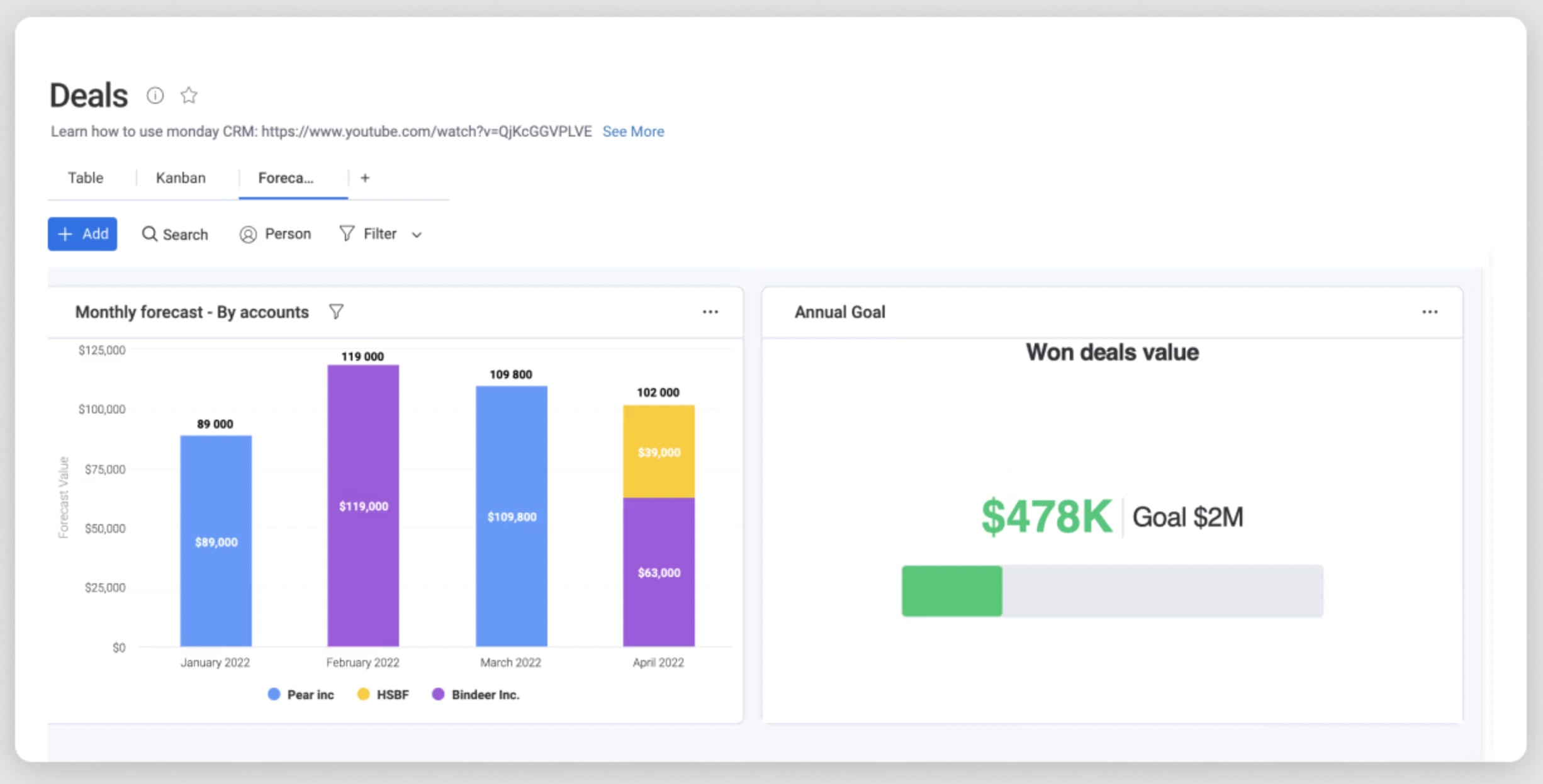
monday CRM uses AI-driven sales forecasting software and predictive analytics to help teams anticipate future demand and adjust stock levels accordingly. Sales teams can forecast deal closures while operations teams use those same insights to prevent stockouts during peak seasons. The platform analyzes historical sales patterns, seasonal trends, and pipeline velocity to suggest optimal reorder points and purchase quantities before inventory runs low.
No-code automations for inventory workflows

Create workflow automations powered by AI without any coding knowledge in monday CRM. With AI automations for inventory management, you can build workflows that notify the right people when inventory is low, automatically generate purchase orders when stock reaches minimum thresholds, or trigger alerts to sales teams when popular items are running out. Automations connect sales activity directly to stock movements, so every closed deal updates inventory counts in real time.
Connected boards that link sales and stock
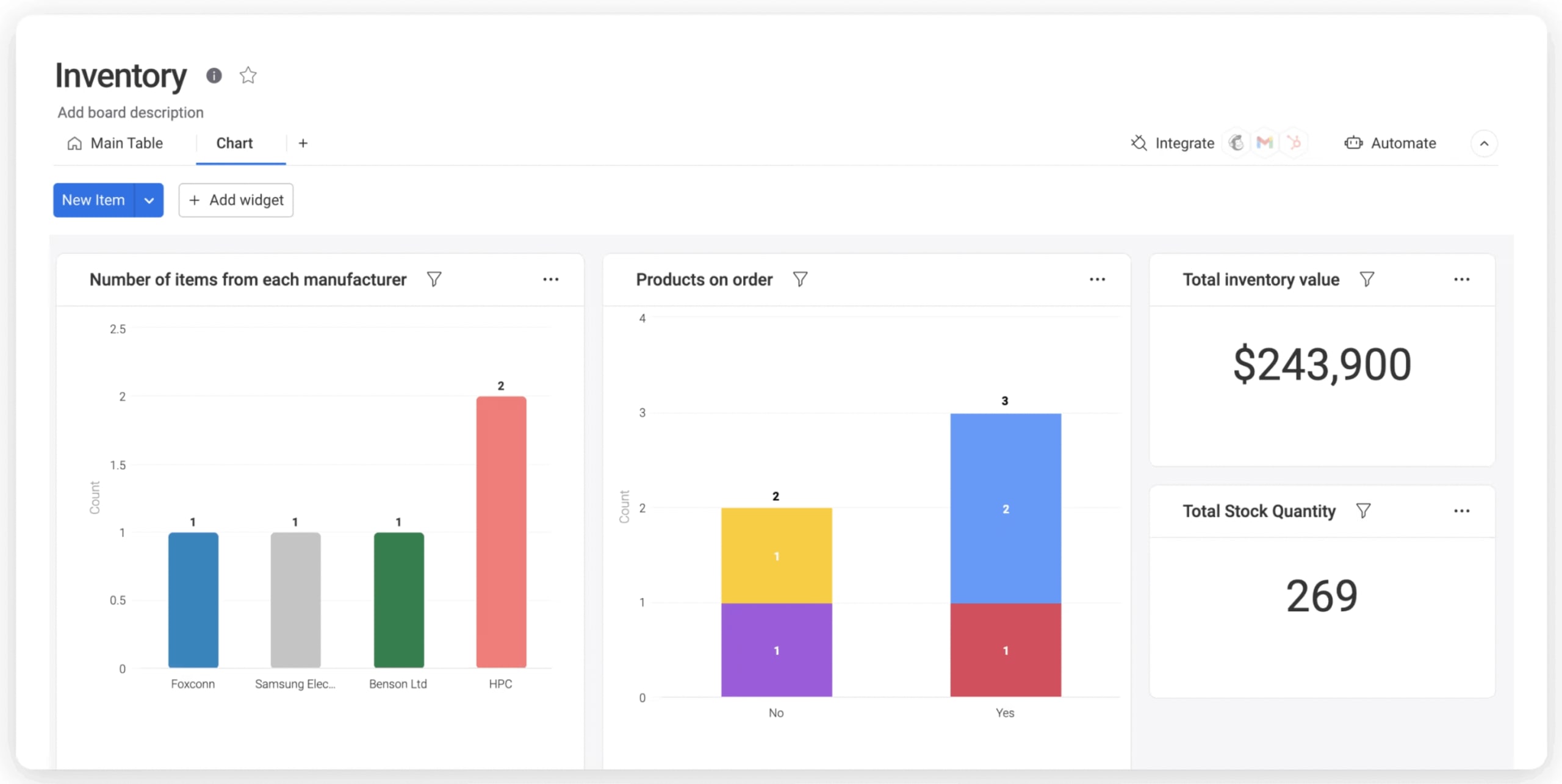
monday CRM’s no-code boards and the Connect Boards column let you link products, deals, quotes, and stock levels so a change in one place updates the rest. Sales reps see live inventory counts inside each deal, operations teams track which orders are tied to which stock, and service teams know exactly what’s available when a customer calls. This connected structure replaces spreadsheets and siloed systems with one shared source of truth.
Real-time dashboards and inventory visibility
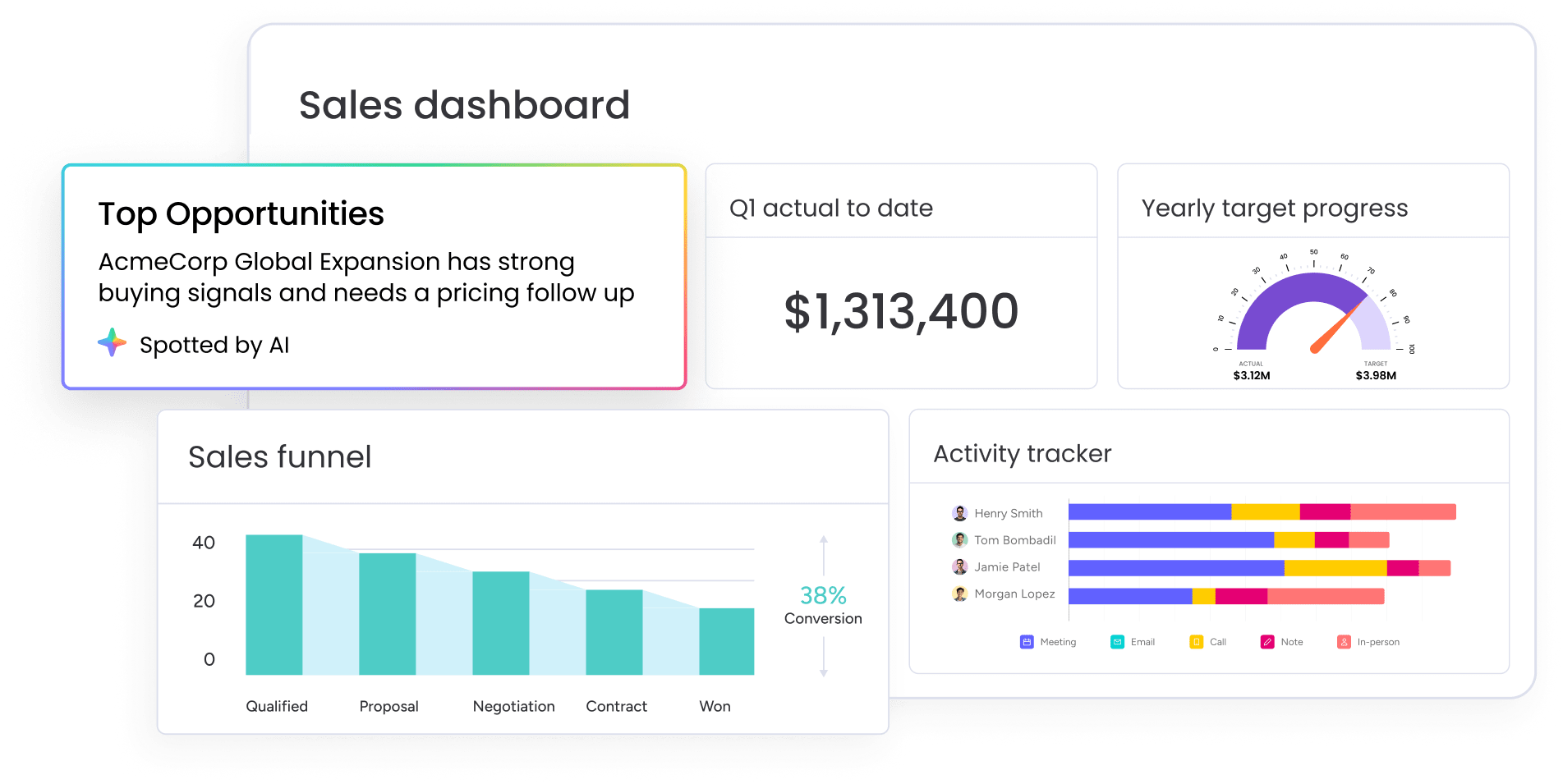
Build custom reporting dashboards in seconds thanks to monday CRM’s different work views, which let you track pipeline, funnel, and forecasting alongside real-time stock counts in one view. Using live data, you can see items you’re running low on, stock that’s backordered, or items that aren’t moving and taking up space in your warehouse. Dashboards update automatically as deals close and inventory moves, so every team works from the same numbers.
To see how a connected approach compares with the alternatives, the table below lines up monday CRM against a standalone CRM, a standalone inventory platform, and an ERP across the capabilities that matter most for teams managing sales and stock together.
| Capability | monday CRM (connected) | Standalone CRM | Standalone inventory platform | ERP |
|---|---|---|---|---|
| Sales pipeline | full pipeline, deals, and forecasting built in | strong pipeline management | limited or none | basic sales orders, not sales-team focused |
| Real-time stock tracking | connected boards track stock alongside deals | usually not included | yes, its core strength | yes, part of operations |
| Automation and AI | no-code automations and AI agents across sales and stock | sales automations only | stock automations only | rules-based, often needs IT |
| No-code customization | drag-and-drop, no code needed | varies, often limited | limited | complex, usually developer-led |
| Integrations | 200+ integrations plus monday MCP | sales-focused integrations | commerce and shipping integrations | broad but heavier to connect |
| Best-fit team | revenue and ops teams that want sales and stock in one place | sales teams without inventory needs | warehouse and fulfillment teams | large organizations standardizing operations |
Manage inventory and sales all under one roof
Consistent inventory levels are an important stepping stone to sales success. When you can see stock and customer activity together, your team can protect both revenue and the customer experience with confidence. By keeping sales workflows, marketing campaigns, service tickets, and inventory in one place, a CRM with inventory management keeps every department aligned and informed.
As buying expectations rise in 2026, a connected platform like monday CRM gives revenue and operations teams a single source of truth to grow from, so promises to customers and counts in the warehouse finally match.
FAQs
What is CRM in inventory management?
CRM in inventory management refers to using customer relationship management software to track stock levels alongside customer and sales data, so teams work from one connected record. It links what you sell with what you actually have on hand.
Can Salesforce do inventory management?
Salesforce can support inventory management, but usually through third-party apps or custom integrations rather than native stock tracking. Teams that want built-in inventory features often look for a CRM with inventory management included.
Can I use a free CRM for inventory management?
You can use a free CRM for inventory management, but free plans usually support only basic tracking and limit team members, storage, and automations. For full inventory control, a paid CRM with advanced reporting and multi-location tracking is the stronger fit.
How can I track purchasing and vendor information within my CRM?
You can track purchasing and vendor information within your CRM by creating vendor profiles that store contact details, pricing agreements, contracts, payment terms, and delivery schedules. From there, you can track purchase orders and set up automated reordering when stock reaches predetermined thresholds.
How can a combined CRM and inventory system prevent stockouts?
A combined CRM and inventory system prevents stockouts by tracking inventory in real time and using predictive alerts to prompt restocking before shortages happen. AI-driven forecasts anticipate demand so you keep key items available.
How does monday CRM handle inventory management?
monday CRM handles inventory management by linking products, deals, and stock on connected no-code boards, then layering automations, dashboards, and integrations on top. Teams get real-time visibility into stock and sales, plus alerts and auto-generated purchase orders when items run low.