


Every team eventually hits the same wall: too many spreadsheets, too many apps, and no single place where work actually comes together. Choosing between Airtable and Trello means deciding what your team values most: data flexibility or visual simplicity.
This Airtable vs Trello comparison breaks down the real differences across features, pricing, AI capabilities, and ease of use so you can make a confident decision. We will also look at how each platform handles automations, integrations, and scaling as your team grows.
By the end, you will have a framework for matching the right platform to your workflow, whether that’s Airtable, Trello, or a flexible alternative that brings structure and scale to any team.
Key takeaways
- Airtable excels at data-heavy, relational workflows: Its 28+ field types, linked records, and customizable views make it ideal for teams managing complex datasets like inventory, CRM, or content calendars
- Trello is the simplest option for Kanban-focused teams: Its drag-and-drop boards require almost no onboarding, making it a strong fit for freelancers and small teams tracking straightforward projects
- Pricing diverges sharply: Trello starts at $5/user per month while Airtable’s Team plan costs $24/user per month, a price that has doubled since 2023
- AI capabilities differ significantly: Airtable offers autonomous Field Agents and natural language-based building, while Trello’s AI is limited to writing assistance on Premium plans and above
- Teams needing both visual tracking and data depth should look for platforms offering 15+ views, extensive integrations, and AI-powered automation: The right platform scales from simple Kanban boards to enterprise workflows without forcing a trade-off between simplicity and power
What is Airtable and who is it for?
Airtable is a database-spreadsheet hybrid that lets teams build relational data structures without writing code. Unlike a traditional spreadsheet, Airtable supports 28+ field types, linked records across tables, and multiple views, including grid, Kanban, calendar, gallery, timeline, Gantt, and form. It is built for teams that manage complex, interconnected data rather than simple checklists.
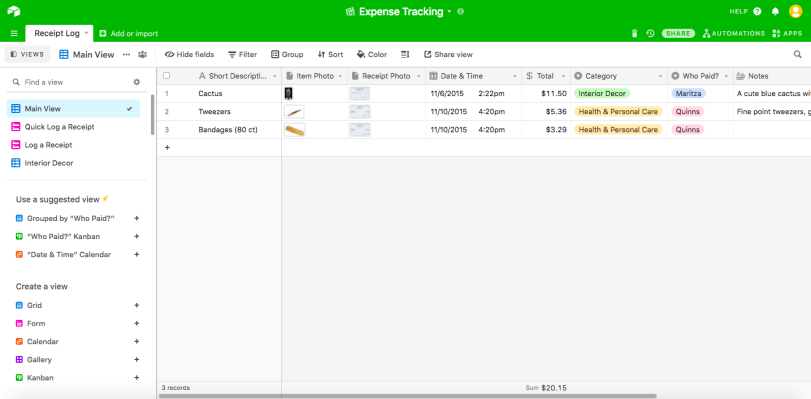
In 2025 and 2026, Airtable leaned heavily into AI. Omni lets users build entire bases using natural language prompts, and Field Agents act as autonomous AI-powered fields that can pull data from external sources and take actions without manual input. AI is now included in all plans, though usage is subject to credit allowances that vary by tier.
So what are the key differences between Airtable and Trello? At the most fundamental level, Airtable is a relational database with spreadsheet flexibility, while Trello is a visual Kanban board for straightforward workflows. Airtable is the stronger choice for teams managing complex data relationships, such as inventory tracking, CRM pipelines, content calendars, or product catalogs. The trade-off is a steeper learning curve. Teams looking for an Airtable alternative often cite the onboarding investment as a key reason for exploring other options.
What is Trello and who is it for?
Trello is a visual project management platform owned by Atlassian, built around the Kanban methodology. Its core experience is simple; cards represent individual work items, and you drag them across columns that represent stages of your workflow. For teams that think visually and prefer minimal setup, Trello delivers.
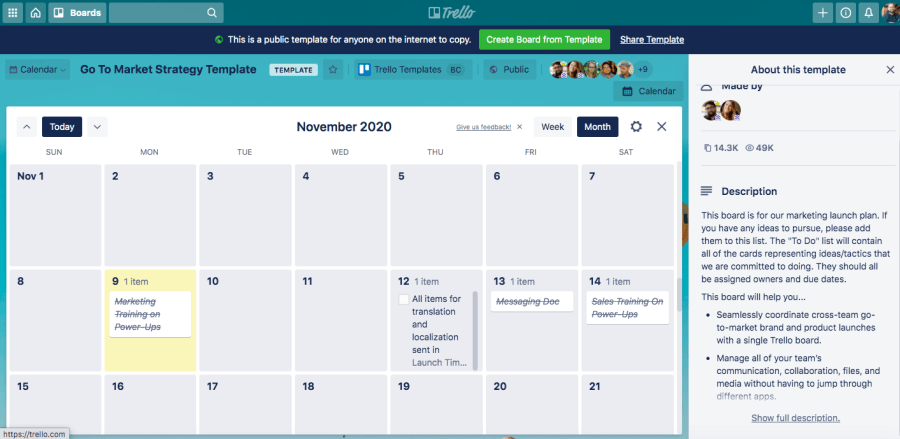 Trello received a significant redesign in 2025, introducing Inbox (a centralized notification hub), Planner (a personal scheduling view), and Smart Capture (quick content clipping from anywhere). On Premium and Enterprise plans, Atlassian Intelligence adds writing assistance and message summarization. However, AI satisfaction scores on G2 remain low, at 74–75%, suggesting that the AI features have not yet met user expectations.
Trello is best suited for small teams, freelancers, and anyone focused on Kanban-style workflows. Its free plan supports unlimited cards with up to 10 boards per workspace, making it a strong entry point. Premium ($10/user per month) unlocks timeline, calendar, and dashboard views, but these additions still do not match the depth of dedicated project management platforms. Teams exploring a Trello alternative often do so when they need Gantt charts, resource management, or more granular reporting.
How Airtable and Trello compare at a glance
Before diving into the details, how do these project management platforms stack up across the dimensions that matter most? The table below summarizes the core differences between Airtable vs. Trello, with monday.com’s AI Work Platform included for additional context.
| Dimension | Airtable | Trello | monday.com’s AI Work Platform |
|---|---|---|---|
| Best for | Data-heavy, relational workflows | Kanban-focused teams and freelancers | Teams needing flexible project management, workflows, dashboards, and AI-powered capabilities |
| Views | 7+ (grid, Kanban, calendar, gallery, timeline, Gantt, form) | Kanban primary; calendar, timeline, dashboard on Premium | Multiple views, including Kanban, Gantt, timeline, calendar, workload, map, and more |
| Paid plans start at | $24/user per month (Team) | $5/user per month (Standard) | See monday.com pricing for current plan details |
| AI features | Omni, Field Agents, AI-generated interfaces | Atlassian Intelligence (Premium+ only) | monday agents, monday vibe, monday sidekick, AI columns, and AI workflow builder |
| Integrations | ~50 native + API | Power-Ups marketplace | Native integrations and an open API |
| Ease of use | Steep learning curve | Minimal — near-zero onboarding | Intuitive and designed for fast team adoption |
| Free plan limits | 1,000 records per base, 1GB attachments | Unlimited cards, 10 boards, 10 MB per file | Up to two seats |
| G2 rating | 4.6/5 (~3,200 reviews) | 4.4/5 (~13,600 reviews) | 4.7/5 (~12,700+ reviews) |
Feature comparison across views, automations, and AI
The at-a-glance table shows the broad strokes, but the real differences between Airtable and Trello emerge when you look at specific feature categories. How do these platforms handle visualization, workflow automation, and artificial intelligence?
Views and project visualization
Airtable offers seven or more native views: grid, Kanban, calendar, gallery, timeline, Gantt, and form. Every view pulls from the same underlying data, so switching between a Kanban board and a Gantt chart does not require rebuilding anything. This makes Airtable especially useful for teams that need to analyze the same dataset from multiple angles.
Trello’s primary view is Kanban, and it does Kanban exceptionally well. The 2025 redesign added Planner and Inbox views, but calendar, timeline, and dashboard views remain locked behind the Premium plan ($10/user per month). For teams that live and breathe Kanban board workflows, Trello is purpose-built. For teams that need to view diversity, it falls short.
Automations and integrations
Both platforms offer automation builders, but their implementations differ. Airtable provides a visual automation designer, scripting extensions, and a robust API, giving technically skilled teams significant flexibility. However, Airtable enforces hard usage limits that can stop automations mid-month when credits run out, which creates real operational risk for teams running critical workflows.
Trello uses Butler, its built-in automation engine, which supports rule-based triggers, scheduled commands, and card buttons. Butler is approachable but less powerful than Airtable’s automation suite. Trello’s integration model relies heavily on Power-Ups, a marketplace of third-party add-ons. The free plan limits Power-Up usage, and the overall ecosystem of native integrations (~50 for Airtable) is smaller than what platforms with 200+ integrations offer out of the box.
AI capabilities
Which platform has stronger AI features? Airtable’s AI is significantly more advanced. Omni enables users to describe what they need in natural language and generates a fully structured base. Field Agents act autonomously, pulling external data, enriching records, and executing actions without manual triggers. AI is bundled into all Airtable plans, though credit limits apply.
Trello’s AI offering, Atlassian Intelligence, focuses on writing assistance and message summarization. Smart Capture lets users clip content quickly. These features are useful but narrower than Airtable’s approach. On G2, Trello’s AI satisfaction scores are 74–75%, indicating room for improvement.
How Airtable and Trello pricing compare
But what does all this actually cost your team each month? Pricing is often the deciding factor when comparing Airtable vs Trello, and the gap is significant. Trello’s paid plans start at a fraction of Airtable’s cost, but each platform bundles different capabilities at each tier.
A few things stand out. Trello Premium at $10/user per month costs less than half of Airtable’s Team plan at $24/user per month. For a 20-person team, that difference adds up to $3,360 per year. Read our full breakdown of Airtable pricing and Trello pricing for a deeper look at what each tier includes.
Airtable’s pricing has increased aggressively. The Business plan has risen from $24/user per month in 2023 to $45/user per month in 2026, an 87% increase. Airtable also does not offer refunds for mid-cycle seat removals, which adds friction for teams with fluctuating headcounts. Trello’s pricing has remained relatively stable, making it the more predictable option for budget-conscious teams.
Which platform fits your team?
So, which one actually matches how your team works? With the features and pricing on the table, the right choice depends on how your team operates day to day. Here are scenario-based recommendations to help you decide between Trello and Airtable.
- Small teams and freelancers: Trello’s free plan and minimal learning curve make it the strongest option for solo workers and small teams managing straightforward projects. The drag-and-drop Kanban experience requires almost no setup; compare that with Trello vs. Asana for another lightweight option
- Data-heavy workflows: Airtable wins when your team needs relational data, 28+ field types, and the ability to build custom interfaces on top of structured datasets. Think inventory management, editorial calendars, or CRM pipelines
- Kanban purists: If your team’s entire methodology revolves around Kanban boards and you do not need Gantt charts, resource management, or extensive reporting, Trello is purpose-built for you. See how it stacks up in a Trello vs. Jira comparison for development-focused teams
- Scaling teams needing flexibility: What happens when you outgrow both? Teams that need visual project tracking, deep data capabilities, and enterprise-grade automation in one place often find that neither Airtable nor Trello fully meets their needs. That is where monday.com’s AI Work Platform bridges the gap, giving teams flexible project views, native integrations, automations, dashboards, and AI-powered capabilities in one connected workspace
How monday.com’s AI Work Platform handles what Airtable and Trello cannot
What happens when a team outgrows both options? Both Airtable and Trello solve specific problems well, but many teams eventually hit their limits. Airtable becomes overly complex for straightforward project tracking. Trello becomes too simple when workflows need structure, reporting, or cross-functional visibility. monday.com’s AI Work Platform occupies the space between these two extremes, combining visual simplicity with the workflow depth, dashboards, automations, and AI-powered capabilities scaling teams need.
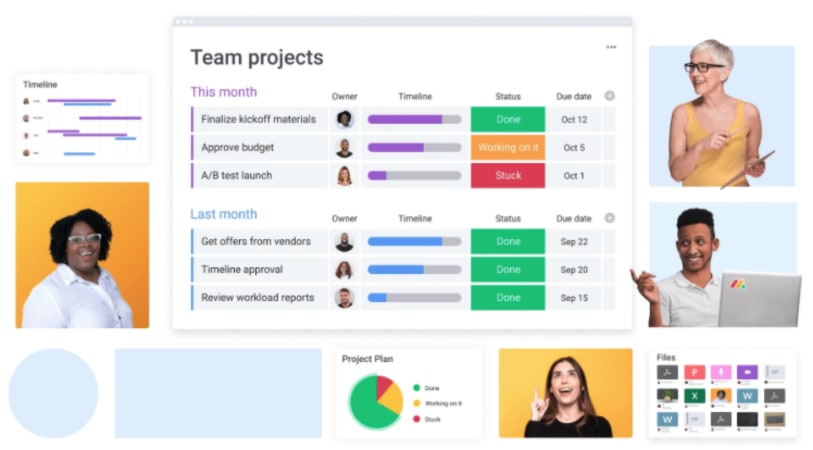
What sets monday.com’s AI Work Platform apart is how its AI-powered capabilities go beyond simple automation rules. monday vibe lets teams describe what they need in plain language and build workflows faster. Rather than spending hours configuring a database or piecing together add-ons, teams can move from idea to workflow faster.
monday agents can support workflow execution by helping teams analyze work, surface risks, summarize updates, and keep processes moving. These agents operate across workflows, not just within a single board or base. AI-powered workflow capabilities can help teams analyze incoming requests, generate summaries, and route work based on content. monday sidekick can help teams work with context from their workspace and focus on what needs attention.
The results back this up. For teams comparing project management platforms, the value often comes from reducing manual follow-up, improving visibility, and connecting project data to dashboards and workflows.
If you’re weighing your options, see how monday.com compares head-to-head in our monday.com vs. Airtable and Trello vs. monday.com comparisons. You can also explore the High-Level Project Plan template to see the platform in action.
Choosing the right project management platform for long-term growth
The Airtable vs Trello decision ultimately comes down to your team’s workflow complexity and where you see that complexity heading. Airtable delivers when you need relational data power. Trello delivers when you need Kanban simplicity with minimal overhead. And for teams that need the flexibility to do both, plus AI-powered automation that scales, monday.com bridges the gap.
The right platform is not just the one that fits today. It is the one that grows with your team as projects get more complex, headcount increases, and cross-functional collaboration becomes non-negotiable. Investing in a platform that adapts to those changes saves you from the cost and disruption of switching later.
If you are looking for an alternative to Airtable or Trello, explore monday.com’s AI Work Platform and see how it fits your team.
Get started with monday.comThe content in this article is provided for informational purposes only and, to the best of monday.com’s knowledge, the information provided in this article is accurate and up-to-date at the time of publication. That said, monday.com encourages readers to verify all information directly.
 Get started