


Employees reach out to HR when they need something. They get in touch to update their address, query a tax calculation that threw their latest paycheck off, or request parental leave documentation. Internally, managers tap HR for advice on an underperforming team member or to flag a resignation. Every request feels urgent, every question feels time-sensitive, and most HR teams are still managing this volume reactively.
HR service management (HRSM) offers a structured alternative. By applying the same scalable, trackable principles that IT service teams have used for years, HRSM turns fragmented people operations into a defined, measurable service model. This guide covers what HR service management is, why it matters for modern organizations, the core processes it supports, and how to implement it step by step. We’ll also explore how platforms like monday service help HR teams move from reactive firefighting to proactive service delivery.
Key takeaways
- Structured support at scale: HR service management brings order to high-volume, high-stakes HR requests, replacing fragmented processes with scalable, structured support.
- Essential integration capabilities: Automation, visibility, and cross-department integration are essential for delivering consistent HR services, particularly as teams expand or operate across multiple regions.
- Strategic business impact: A strong HRSM model improves employee experience, compliance, and strategic decision-making.
- Beyond technology: Success relies on more than software. HR leaders need to audit their workflows, define outcome-driven goals, and commit to continuous service improvement.
- AI-driven performance gains: Organizations that invest in AI-powered HRSM see measurable gains in resolution speed, employee satisfaction, and operational capacity.
What is HR service management?
HR service management applies the same structured, scalable principles used in IT service management to the world of HR. Instead of treating employee support as a series of isolated requests, HRSM approaches it as an end-to-end service that’s defined, trackable, and delivered consistently across the business.
HRSM (short for HR service management) is the term increasingly used by analysts and practitioners to describe this discipline. You’ll also hear “HR service delivery” used as a related concept.
While HR service delivery describes how HR teams provide support and information to employees, HRSM is the system and framework that makes that delivery consistent and measurable.
Once adopted, HRSM reshapes how HR teams handle day-to-day operations. The model connects people, processes, and platforms into a single service flow. In practice, HR service management typically works by:
- Automating HR workflows such as onboarding, approvals, and provisioning
- Connecting HR cross-departmentally with legal workflows, IT, and finance to remove bottlenecks
- Providing HR help desk and knowledge base capabilities for managing employee requests
- Centralizing data and services across teams, locations, and business units
- Offering real-time visibility through dashboards and reporting
How does HRSM relate to the broader world of service management? Think of enterprise service management (ESM) as the umbrella. ITSM brought structure and accountability to IT support decades ago. HRSM applies that same playbook to people operations, with the added complexity of sensitive employee data, compliance requirements, and the emotional weight of workplace issues. The HR service desk, meanwhile, is the intake function within HRSM: the centralized point where employees submit requests and get answers.
What are the benefits of HR service management?
As more HR teams shift to service-based models, the impact on both day-to-day operations and long-term strategy becomes clear. So what does an HRSM investment actually deliver? Here are six outcomes that matter most to HR leaders and the executives they report to.
Expanding operational capacity
When HR teams adopt an HRSM model, one of the first changes they notice is freed-up time. Instead of managing repetitive workflows manually, processes like approvals, document routing, and service requests run automatically.
According to a survey, 92% of HR leaders rank AI and automation as a top-three priority for the year ahead. Teams investing in AI-powered HRSM are reallocating the hours they save toward higher-value work: developing talent strategies, coaching managers, and strengthening the employee experience.
Strengthening retention and engagement
Employees achieve direct gains when they interact with a well-designed HRSM model. Self-service functionality allows them to handle their own HR matters on their own schedule, with instant access to the information they need.
Your workers can access their HR service portal and complete actions like requesting time off, updating personal information, and accessing company policies. The portal surfaces relevant, personalized content so employees find what they need on the first try, without a follow-up email.
Accelerating time-to-value for new hires
When employees experience faster resolutions to their service requests, productivity follows. According to the Gallup State of the Global Workplace report, only 37% of employees report having the necessary materials and equipment to perform their jobs effectively.
A strong HRSM framework closes that gap by connecting HR and IT through automated workflows. Instead of back-and-forth emails to provision a laptop or grant system access, those steps are built into a single onboarding workflow. The result is a faster start for every new hire, whether they’re joining, relocating, or changing roles.
Reducing cost per HR interaction
When HR teams operate with greater structure, cost savings follow. HRSM reduces the hours spent on manual processes, freeing up internal resources and limiting the need for additional headcount to manage growth.
By automating repeatable workflows and consolidating fragmented systems, organizations minimize administrative overhead while improving service consistency. Over time, these changes significantly lower the cost per request handled, especially in high-volume areas like employee data updates and benefits enrollment.
Mitigating compliance risk across jurisdictions
A service-based human resource management model also strengthens compliance. With structured workflows and system-enforced checks, HR teams reduce the risk of important steps being missed, like ensuring required training is completed or the right approvals are in place.
This is especially important for organizations operating across multiple regions where compliance standards vary. New regulations like the EU Pay Transparency Directive and expanding US state pay disclosure laws are increasing the volume and sensitivity of compensation-related HR requests. HRSM platforms introduce structure and accountability so policies are consistently applied and documentation is always accessible.
Enabling strategic workforce planning
Beyond operational gains, HR service management helps teams work more intelligently. With real-time insights, HR leaders can track trends in service delivery and identify issues before they escalate.
From spotting recurring bottlenecks in onboarding to understanding patterns in leave requests or service ticket management platforms, the data supports smarter decisions about staffing levels, resource allocation, and program effectiveness. For example, AI workforce management software can extend automation from individual service requests into full staffing and scheduling decisions. With real-time insights, HR leaders can invest their energy in proactive workforce planning.
How does an HR help desk work within HRSM?
If HRSM is the strategic framework, the HR help desk (sometimes called the HR service desk) is the operational engine. It’s the centralized point of contact where employees submit, track, and resolve HR service requests.
Understanding the structure of an HR help desk helps HR leaders design an intake process that scales. A well-designed HR help desk has three core components:
- Intake channels: Email, a self-service portal, chat, or messaging integrations. Employees choose how they reach HR.
- HR ticketing system: Every request becomes a trackable ticket that’s auto-categorized, routed to the right agent, and managed through to resolution. This is the backbone of any HRSM operation.
- Knowledge base: A library of policies, FAQs, and how-to articles that lets employees resolve common questions independently, before a ticket is ever created.
What is an HR ticketing system, exactly? It’s the technology that captures, tracks, and routes employee HR requests from submission to resolution. When an employee submits a question about updating their tax withholding, the system creates a ticket, auto-categorizes it (payroll), assigns it to the right agent, tracks the SLA, and collects a satisfaction rating once it’s resolved.
Most HR help desks follow a tiered support model. Tier 0 covers self-service and knowledge base deflection, while Tier 1 handles general HR queries like policy questions or leave requests.
Tier 2 routes specialist cases (payroll discrepancies, benefits changes, or compliance questions) to subject-matter experts. Tier 3 escalates sensitive matters to legal or executive leadership.
What’s changed in 2025 and 2026 is the role of AI at Tier 0 and Tier 1. AI agents now handle routine requests end-to-end, answering benefits questions, walking employees through policy lookups, and completing onboarding checklists autonomously. Human agents focus on complex, sensitive, or judgment-intensive cases where empathy and expertise matter most.
8 types of HR process every service model should support
HR teams juggle a wide range of responsibilities, many of which depend on coordination with other departments and reliable access to up-to-date data. HR service management brings order to the complexity, keeping each core process consistent, trackable, and easy to manage at scale.
- Recruitment and selection: HRSM tracks and responds to hiring-related service requests, such as requisition approvals, interviewer scheduling, or candidate status updates, through a centralized system that ensures timely handoffs.
- Onboarding: New hire onboarding involves multiple service touchpoints (equipment setup, policy distribution, payroll, and system access), all of which can be delivered through coordinated service requests and cross-departmental workflows.
- Hardware provisioning: While IT may own the provisioning itself, HRSM supports the process by capturing the request, routing it to the correct team, and keeping the requester informed throughout.
- Training and development: Service management provides a structured way to handle training-related inquiries, course enrollment approvals, and support for access issues or learning content needs.
- Performance management: HRSM supports the infrastructure around performance cycles by responding to manager questions, routing form access issues, and tracking review completions through a service portal.
- Payroll and benefits administration: Rather than processing payroll directly, HRSM systems handle the surrounding support: addressing employee questions, escalating discrepancies, and tracking approval flows for changes or updates. For finance teams that want to go beyond ticket handling, connecting this workflow to dedicated AI payroll software closes the loop between HR service requests and the actual pay run, catching discrepancies before they reach an employee’s paycheck.
- Employee data management: Requests to update records, change job details, or access sensitive employee data are handled securely through a ticketing system with clear ownership and audit trails.
- Offboarding: HRSM coordinates the offboarding process by triggering service workflows such as revoking access, notifying stakeholders, and tracking completion.
monday service connects these workflows into a unified system, giving HR teams a single platform to manage requests across recruitment, onboarding, training, performance, payroll, and offboarding. With automated routing, cross-department handoffs, and real-time visibility, the platform ensures each process runs consistently without manual coordination or fragmented tools.
Try monday serviceImplement HR service management in 6 steps
Shifting to an HR service management model requires thoughtful planning. These six steps help you move from “we should probably organize this” to a measurable, scalable HRSM operation.
Step 1: Audit your current HR workflows
Before making any changes, understand what your team is actually doing today. A time and process audit gives you a solid baseline for improvement. Map out your most common service processes, then track how long they take from request to resolution.
These diagnostic questions help you pinpoint where your HR service model has the most room to improve. Ask yourself:
- Where are requests slowing down?
- Who gets pulled in, and how often do requests get lost, delayed, or rerouted?
- Are employees clear on where to go or who to contact?
- What percentage of requests require follow-ups or manual reminders?
- Are similar workflows being handled differently depending on the requester, team, or location?
Step 2: Define measurable service goals
The success of any HRSM rollout depends on clear, measurable goals tied to outcomes, not activity. The SMART framework gives you that structure by helping you select goals that are specific, measurable, achievable, relevant, and time-bound.
Concrete goals keep the implementation focused and give your team clear milestones to measure against. For example, you might set goals like these:
- Reduce average response time to employee requests from five days to two within the next quarter.
- Resolve 80% of HR queries on first contact by the end of the year.
- Cut onboarding completion time by 30% across all departments within six months.
Build SLA targets around these goals so your team has a shared definition of “on track” and “needs attention.”
Step 3: Unify your HR service channels
HR service management is most effective as a connected network of services that support the full employee lifecycle. HR thought leader Josh Bersin captures this well:

(Image source: Josh Bersin)
Bersin’s observation has only grown more relevant as AI reshapes how HR teams deliver services. In 2025 and 2026, organizations leading in employee experience are those that unify intake, tracking, and communication into a single service model rather than asking employees to navigate siloed COEs.
To apply this thinking, focus on building a single, consistent experience for employees regardless of which HR team owns the request. Centralizing intake and communication is a practical first step toward a more unified and responsive HR function.
Learn more: AI HR software
Step 4: Design your automation strategy
Automation unlocks real value in HR service management when it’s applied to the right moments. The highest-impact teams use it to redesign how services are delivered, setting clear SLAs, enabling self-service, and escalating unresolved issues automatically.
As Christopher Rainey, host of the HR Leaders podcast, puts it:
The real value of automation in HRSM comes when it improves the service experience: setting clear SLAs, enabling self-service, or automatically escalating issues that go unresolved. Start by identifying the moments in your service workflows that regularly cause confusion, delays, or double-handling. Then design automations that remove those barriers.
Consider planning your AI HR agent strategy at this stage, too. Which Tier 0 and Tier 1 requests can AI agents handle autonomously? Which require a human touch? Mapping this early prevents the “automate everything” trap Rainey describes.
Step 5: Select and configure your platform
Even the strongest HRSM design needs the right HR service management software to bring it to life. When evaluating platforms, look for capabilities that match the service model you’ve designed, not just a feature list.
Key evaluation criteria include AI-powered triage and routing, a self-service portal with knowledge base, cross-department workflow support, SLA management, no-code automation builders, and built-in reporting with employee satisfaction tracking. We cover these criteria in detail in the software selection section below.
Step 6: Establish a continuous improvement cadence
HR service management requires ongoing adjustments to stay relevant and employee-centric. Set a review cadence (quarterly works well for most teams) and include representatives from HR, IT, and a sample of employees across departments.
Regular reviews surface patterns and opportunities that a one-time implementation misses. To build a culture of continuous improvement, focus on these practices:
- Monitor performance over time: Track resolution times, service volumes, and request types to spot slowdowns or recurring issues.
- Gather regular employee feedback: Use pulse surveys or portal feedback forms to capture real service experiences.
- Review service data in regular cycles: Hold quarterly service reviews to analyze patterns and make targeted updates.
- Create space for cross-level input: Mixed-level focus groups surface pain points early and give frontline employees a voice in process design.
How monday service supports HR service management
When HR teams are ready to move from planning to action, the right platform makes the difference between a smooth rollout and months of configuration delays. monday service brings ticketing, knowledge management, AI agents, and cross-department workflows together on one platform, purpose-built for teams that need to scale without adding complexity.
Here’s how monday service maps to the HR service request lifecycle, from intake through measurement.
Give employees a single place to get help

The service portal gives employees a centralized, self-service experience. They can submit requests through customizable forms, browse knowledge base articles for instant answers, and track the status of open tickets in “My Tickets,” all from one centralized portal.
Intake channels extend beyond the portal. Teams can capture requests from email, WorkForms, monday Inbox, or an Outlook shared mailbox, routing everything into a single ticketing board for visibility and accountability.
Triage and route requests with AI
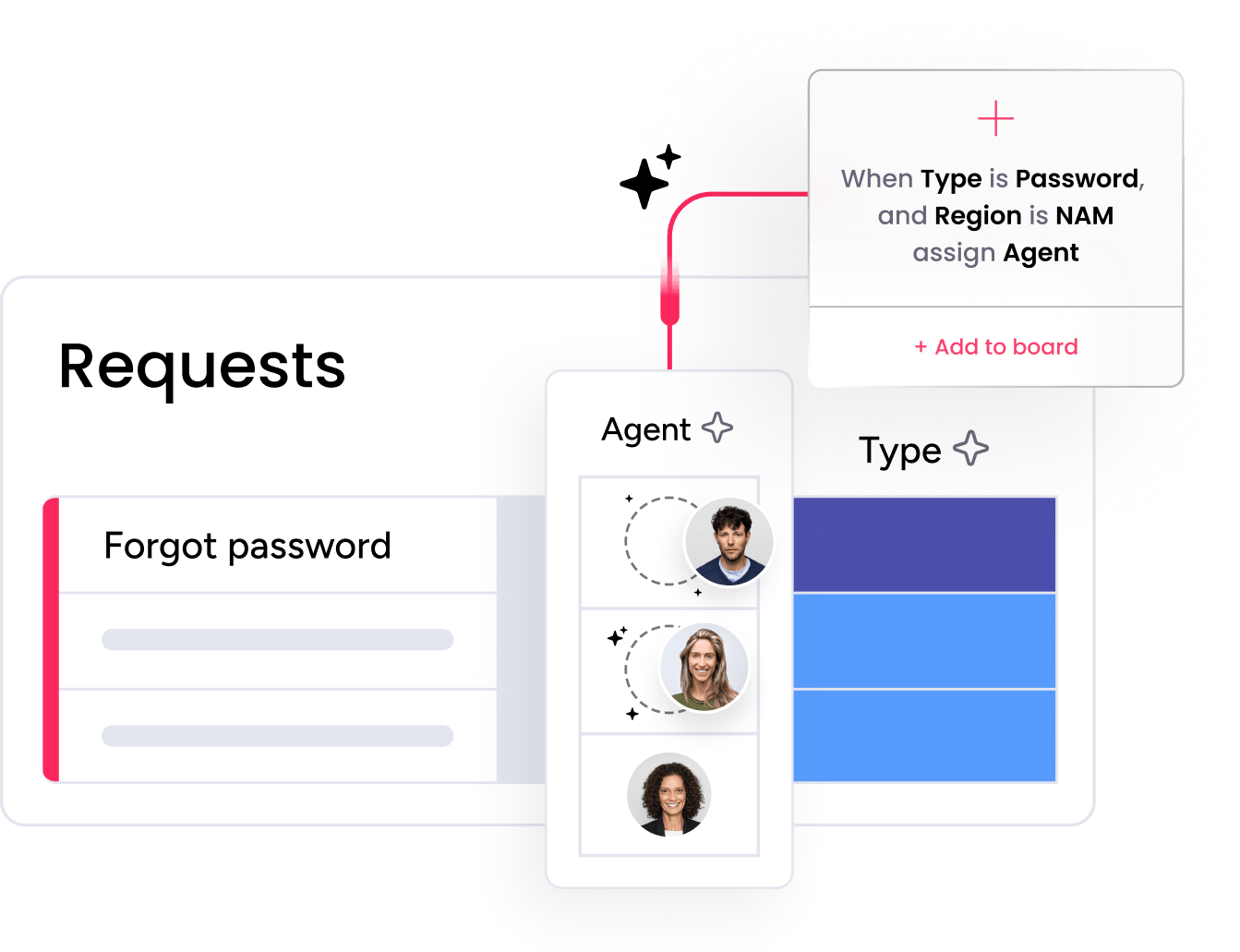
Accurate, fast triage keeps the most critical cases moving without delay. AI-powered ticketing on the platform auto-summarizes incoming requests, categorizes them by type, detects sentiment, and assigns them to the right agent based on priority, skills, and workload.
Smart Assignment distributes work through round-robin or AI-based logic, while the SLA Column tracks live response and resolution timers with breach alerts that auto-pause outside working hours. Teams can define service level agreements by priority level and build in clear escalation rules for urgent incidents like payroll errors or harassment claims.
Resolve requests faster with AI agents
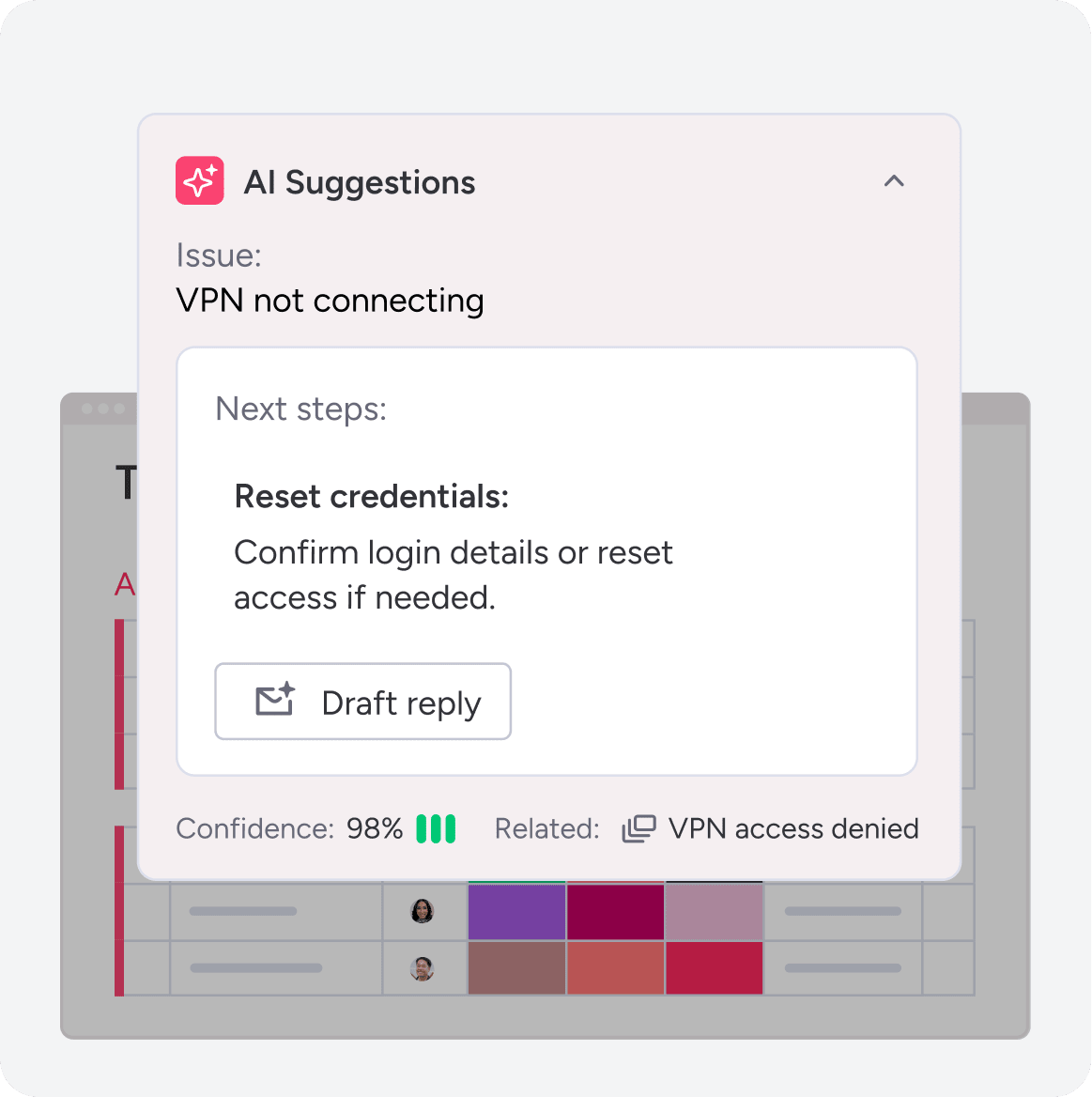
AI agents can resolve many common HR requests autonomously. The AI Service Workforce includes specialized agents for benefits, people operations, and payroll and compensation. A Service AI Supervisor routes each request to the right agent, which resolves it end-to-end, from policy lookups to benefits enrollment questions.
For human agents, monday sidekick provides contextual support: summarizing ticket history, recommending next steps, drafting replies, and surfacing similar resolved tickets. And with AI service management agents for ticket assignment, onboarding assistance, and sentiment detection — plus a custom Agent Builder — teams can extend automation to fit their exact workflows.
Automate workflows across departments

HR service management rarely stays within HR alone. Onboarding requires IT provisioning, offboarding involves finance and facilities, and benefits changes may loop in legal. The platform connects these handoffs through pre-built automations for status updates, ticket routing, and email templates.
For enterprise teams, the Workflow Builder offers a no-code visual editor for designing complex, multi-step workflows with custom blocks. An incident management board links related tickets when a systemic issue surfaces, keeping all stakeholders aligned.
Measure and improve HR service performance
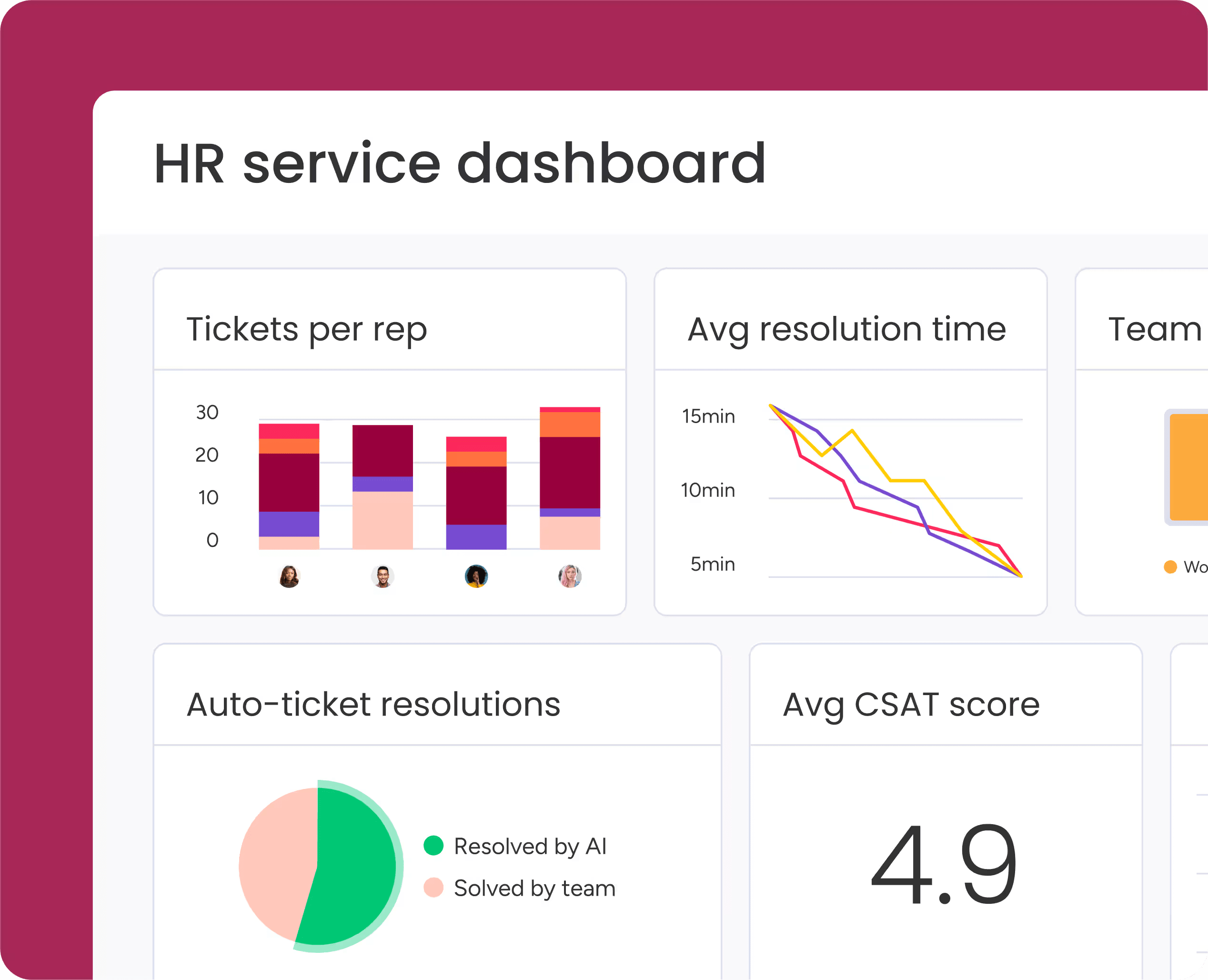
Measurement is the foundation of ongoing service improvement. The platform includes automated CSAT surveys triggered on ticket resolution, so HR leaders get a continuous pulse on employee satisfaction. Dashboards track resolution time, SLA compliance, request volume by type, and agent workload, giving leadership the data to move from reactive firefighting to informed service design.
What should you look for in HR service management software?
Choosing the right HR service management software is a decision that shapes how your team operates for years. Rather than comparing individual vendors, focus on the capabilities that separate a scalable HRSM platform from a basic ticketing system.
The right platform shapes how quickly your team can go live and how confidently you can scale. These eight criteria separate a purpose-built HRSM solution from a generic project management platform. Here are the criteria to evaluate:
- AI-powered triage and routing: Does the platform auto-categorize, prioritize, and assign requests without manual sorting?
- Self-service portal and knowledge base: Can employees resolve common questions independently before creating a ticket?
- Cross-department workflows: Does the platform connect HR with IT, finance, legal, and facilities for seamless handoffs?
- SLA management: Can you set, track, and enforce response and resolution targets by priority level?
- Automation builder: Can non-technical HR teams create and modify workflows without engineering support?
- Reporting and CSAT: Does the platform provide real-time dashboards and employee satisfaction tracking on resolution?
- Scalability: Can the platform grow with your headcount, expand to new regions, and support enterprise service management across business units?
- Security and compliance: Does the platform support role-based access, audit trails, and data residency requirements?
When you’re evaluating platforms against these criteria, look for solutions that combine automating HR requests with workforce optimization and a genuinely intuitive user experience. The platform meets all eight criteria and gives HR teams a solution they can configure, launch, and iterate on from day one.
Get started with HR service management today
HR service management gives your people operations team the structure, visibility, and speed to support a growing workforce without adding headcount for every new challenge. The path forward starts with understanding where your current processes fall short, setting measurable goals, and choosing a platform that adapts as your organization evolves.
Whether you’re formalizing an HR service desk for the first time or upgrading a legacy system, the six implementation steps in this guide give you a practical roadmap. monday service brings your HR workflows, ticketing, AI agents, and SLAs together on one platform so your team can focus on the work that requires a human touch.
Try monday serviceFAQs
What is HR service management?
HR service management (HRSM) is a structured approach to delivering HR support that applies the same principles used in IT service management. HRSM centralizes employee requests, automates routine workflows, and provides real-time visibility into service performance, replacing fragmented, reactive support with a scalable, trackable model.
What is HR service delivery?
HR service delivery describes how HR teams provide support, services, and information to employees. A structured HR service delivery model defines how employees access services, who responds, and how quickly requests are completed. It ensures HR interactions are consistent, trackable, and aligned with organizational expectations.
What is the difference between HR and HR services?
The difference between HR and HR services comes down to scope and function. HR refers to the department responsible for managing people-related policies, programs, and strategy, while HR services are the individual support processes employees rely on day to day, like leave requests, onboarding, and benefits enrollment.
What is the difference between HR operations and HR services?
HR operations focus on the internal processes and systems that keep the HR function running, including compliance, data management, and policy development. HR services are the outward-facing side of that work: how employees interact with HR and get their needs met. HR operations create the structure, and HR services turn it into action for employees.
What is an HR ticketing system?
An HR ticketing system is the technology that captures, tracks, and routes employee HR requests from submission to resolution. When an employee submits a question or request, the system creates a ticket, auto-categorizes it, assigns it to the right agent, tracks response and resolution times against SLA targets, and maintains an audit trail for compliance.
What are integrated HR service management solutions?
Integrated HR service management (IHRSM) solutions connect HR service functions (payroll, benefits, onboarding, and IT provisioning) into one coordinated system. According to the Gartner Market Guide for Integrated HR Service Management Solutions, 70% of organizations with more than 2,500 employees have already invested in IHRSM solutions (Gartner, 2024). These platforms enable HR teams to track, manage, and resolve employee requests through a single interface.
How do I choose the right HR service management software?
Choosing the right HR service management software starts with matching your service model to platform capabilities. Evaluate solutions against these criteria: AI-powered triage and routing, self-service portal with knowledge base, cross-department workflows, SLA management, no-code automation, reporting with CSAT tracking, scalability, and security. The "what to look for" section above covers each criterion in detail.

 Get started