


Nobody wants to wait on hold for a service agent to pick up, or worse, send an email to customer service for an issue only to see the response time is days. Customers want instant answers to their immediate concerns, and it’s important for service teams to address customer expectations.
With customer portals, organizations can help clients help themselves. Providing a self-service hub, customer portals act as a first touchpoint for clients looking for answers. Rather than jumping immediately to calling, emailing, or chatting with a busy support agent, these self-help hubs rely on AI-driven knowledge and personalized resources to offer quick solutions to common issues.
This guide walks through the importance and benefits of customer portals, the features your portal needs, and our suggestions for the best customer portal software like monday service.
Key takeaways
- Self-service demand is accelerating. More customers expect to resolve issues independently through portals, and service leaders are prioritizing self-service investments to meet this growing demand.
- Portals reduce costs and free up agents. A well-structured customer portal deflects repetitive requests, letting support teams focus on complex issues that require real judgment.
- AI is reshaping service delivery. AI-powered tools are rapidly expanding their ability to resolve service cases autonomously, making AI-ready portals essential for staying competitive.
- Retention drives revenue. Even modest improvements in customer retention can significantly boost profitability, and portals directly improve satisfaction by giving customers faster, independent access to support.
- The right features matter. The most effective portals combine self-service content, ticket tracking, AI-powered responses, branded design, and enterprise-grade security.
What is a customer portal?
A customer portal is a secure hub where a company’s clients can find self-service options and answers to their questions. There are a lot of things customers can accomplish in a customer portal, such as:
- Submitting tickets
- Viewing onboarding guides
- Checking support requests
- Tracking orders
- Accessing knowledge bases
- Scheduling appointments
- Updating account info
With a customer portal, companies can build relationships and offer tailored service management software without having agents directly interact with clients around the clock.
The importance of customer portals
According to research, 88% of customers expect organizations to have some type of online self-service portal, demonstrating how essential it is for businesses to keep up with customer demand.
Customer portals are important because they allow clients to access information at their leisure without having to reach out to an agent.
It gives customers the agency to solve basic issues on their own and access quick answers and simple solutions that they can execute independently. When businesses offer tools and resources to improve the user experience, customers feel more satisfied and loyal, building more customer trust and helping companies retain more clients in the long run.
Why customer portals matter for modern businesses
Customer expectations have shifted. According to research, 88% of customers expect organizations to have some type of online self-service portal, demonstrating how essential it is for businesses to keep up with customer demand.
Customer portals are important because they allow clients to access information at their leisure without having to reach out to an agent.
It gives customers the agency to solve basic issues on their own and access quick answers and simple solutions that they can execute independently. When businesses offer tools and resources to improve the user experience, customers feel more satisfied and loyal, building more customer trust and helping companies retain more clients in the long run.
7 customer portal benefits your team will notice
Aside from the many benefits to customers themselves, portals offer significant advantages to the organizations behind them. While customer portals are not meant to replace other service channels, like email, chat, and phone, they can absorb a substantial share of repetitive volume and free your team to do higher-value work. Here are 7 benefits that make the investment worthwhile.
- Increases agent efficiency: When agents feel less pressured to answer a high volume of inquiries and repetitive issues, they can spend more time focusing on solving more complex customer problems
- Reduces support costs: A customer hub can resolve a lot of basic issues while acting as a first and only touchpoint for some clients, reducing the need for a large support team and additional resources
- Provides better visibility and analytics: By offering customers a portal to find information and solve issues, your business can get more insights into customer behavior and understand their most common pain points so that you can make improvements to the customer journey
- Improves customer satisfaction: With 24/7 access to these portals, customers don’t need to wait for a response from your customer service team, offering greater convenience, a smoother client experience, and a boost to customer satisfaction
- Cuts down on wait times: A Gartner survey shows that two-thirds of respondents stated their call volume decreased as a response to self-service options, which indicates that when your company’s support channels are less bogged down by repetitive requests, customers with complex issues can benefit from direct assistants while waiting less time for a response
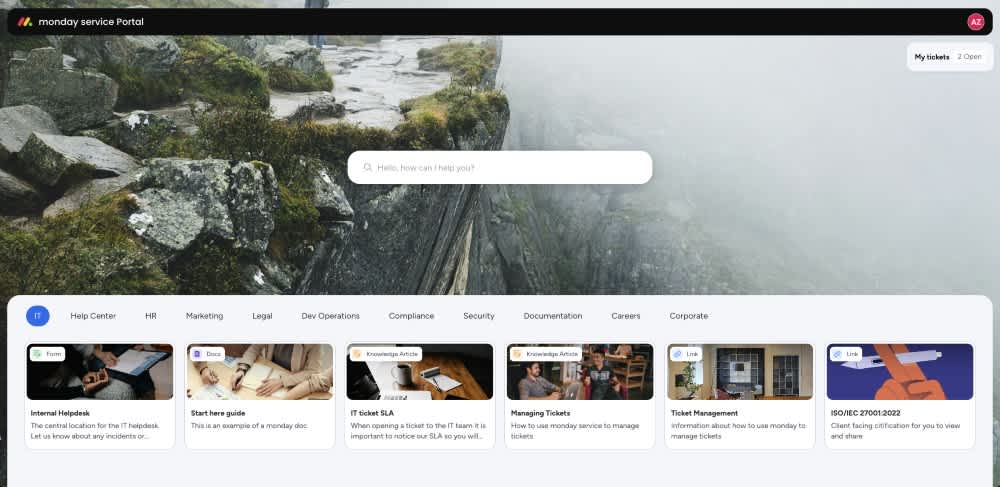
8 features to look for in a customer portal solution
Every company will look for different features in a customer service portal software. You know your customers best, and it’s possible that there are a few features that are more important than others when it comes to offering a strong customer self-service experience. Below, we’ll look at some of the key features most companies look for in a customer portal.
- Self-service knowledge base: A searchable library of articles, onboarding guides, FAQs, and community forums is the foundation of any portal. AI-driven content recommendations can locate the right article based on a customer’s history and behavior, reducing the need to contact support at all
- Ticket tracking and management: Customers should be able to submit, track, and communicate on support requests from a single view. Look for features like status updates, email notifications, the ability to close and reopen tickets, and participant management so customers stay informed without chasing agents
- AI-powered automation: AI agents can triage incoming requests, detect sentiment, categorize tickets, and resolve recurring issues without human intervention.
- Branded, customizable interface: Your portal should be an extension of your brand. Look for the ability to customize logos, colors, background images, login page messaging, and portal URLs so customers recognize and trust the experience.
- Reports and analytics: Companies need visibility into portal usage, ticket resolution rates, SLA performance, and CSAT scores. These insights inform data-driven decisions about where to improve content, staffing, and workflows
- Secure access controls: Customer portals handle sensitive data, so robust security is non-negotiable. Evaluate SSO, SCIM provisioning, role-based access, approved domain restrictions, encryption standards, and compliance with frameworks like SOC 2, GDPR, and HIPAA
- Integrations: Your portal should connect with existing systems like enterprise portal solutions that integrate with CRM platforms, email clients, and chat applications, and emerging AI protocols like MCP for seamless data syncing across your technology stack
- Multi-portal support: Enterprises often need separate portals for different audiences. Whether you are serving external customers, internal IT requests, HR inquiries, or partner support, multi-portal capability lets you maintain distinct branding, content, and access controls from a single account.
Learn more: Enterprise portal solutions
How to set up a customer portal
Building a customer portal does not require months of development or a dedicated engineering team. Most modern service platforms offer out-of-the-box portal capabilities that can be configured and launched in days, not quarters. Here is a practical 5-step approach to get started.
Step 1. Define your portal’s purpose and audience
Start by identifying who your portal serves and what problems it needs to solve. Is it for external customers submitting support requests, internal teams managing IT or HR tickets, or both? Survey your support team to pinpoint the top 10 to 20 issues they handle most frequently. These become your portal’s core self-service content.
Step 2. Choose the right platform
Evaluate platforms based on ease of setup, AI capabilities, customization options, security features, and integrations with your existing systems. The strongest options offer out-of-the-box portals with no-code configuration, so your team can launch without heavy implementation. The strongest solutions provide a portal experience built directly into the service platform, keeping everything in a single, connected system.
Step 3. Design your content structure
Organize your portal into content groups with clear titles, descriptions, and visuals. Include knowledge base articles for common questions, request forms for new tickets, and external links to relevant resources. Prioritize the issues your support team handles most and create articles that address them step by step.
Step 4. Configure branding and access
Customize your portal’s appearance to match your brand: logo, colors, background image, and login page messaging. Then set up security by configuring SSO, approved domains, access permissions, and any compliance requirements your organization needs to meet.
Step 5. Launch, measure, and iterate
Go live and start tracking portal adoption, ticket deflection rate, CSAT scores, and the most common search queries. Use these analytics to identify content gaps, update underperforming articles, and expand self-service coverage over time. A portal grows and improves with ongoing attention, and the most effective ones evolve based on real customer behavior.
The future of customer portals
Today’s customer portals already rely heavily on cutting-edge AI technologies to alleviate stress on human agents and give customers the answers they need quicker than ever before. As this technology and others continue to evolve, we can expect to see certain advancements in customer portal features and capabilities.
- AI and machine learning in customer portals: AI is already paving the way for speedier customer support in client portals, but in the future, we can expect this technology’s abilities to stretch further into personalized content recommendations, more accurate predictive analytics and forecasting, and advanced intelligent chatbots that can handle more complex issues
- Personalization and customization options: The demand for a tailored user experience will only continue to rise, with customer portals offering even more customizable interfaces and personalized dashboards along with tailored content recommendations based on customer data
- Omnichannel integration: In the future, customer portals will integrate seamlessly with different communication channels, whether it’s social media, email, WhatsApp, or live chat, producing a consistent customer experience where users can interact with a business from multiple touchpoints without losing context
- Enhanced self-service options: Client portals will evolve to include even more advanced self-service tools like interactive guides, AI-powered search engines, and automated troubleshooting, encouraging even more users to find viable solutions independently
How monday service helps you deliver a standout portal experience
Not only does monday service offer a customizable customer portal that can fit a variety of needs, but the platform itself is a powerful solution for a team’s service needs from start to finish. monday service offers a simple out-of-the-box solution that’s simultaneously easy to use and robust enough to handle complex tasks and customer accounts.
With monday service, teams can improve their SLAs while collaborating seamlessly in a centralized location to help them work more proactively in solving customer inquiries. Aside from the features we covered above, monday service offers a number of other capabilities:
- Branded customer portal with unique URL: Customers access a centralized portal without needing a monday.com account. Customize the portal name, logo, colors, background image, and login page messaging so the experience feels like an extension of your brand
- My Tickets for full transparency: Customers submit, track, and communicate on tickets in a dedicated portal view. They receive email notifications for status changes, can invite participants, and close or reopen tickets independently
- Multiple portals for different audiences (Enterprise): Create up to 500 portals per account, each with its own branding, content, and access controls. Serve IT, HR, facilities, external clients, and partners from a single platform
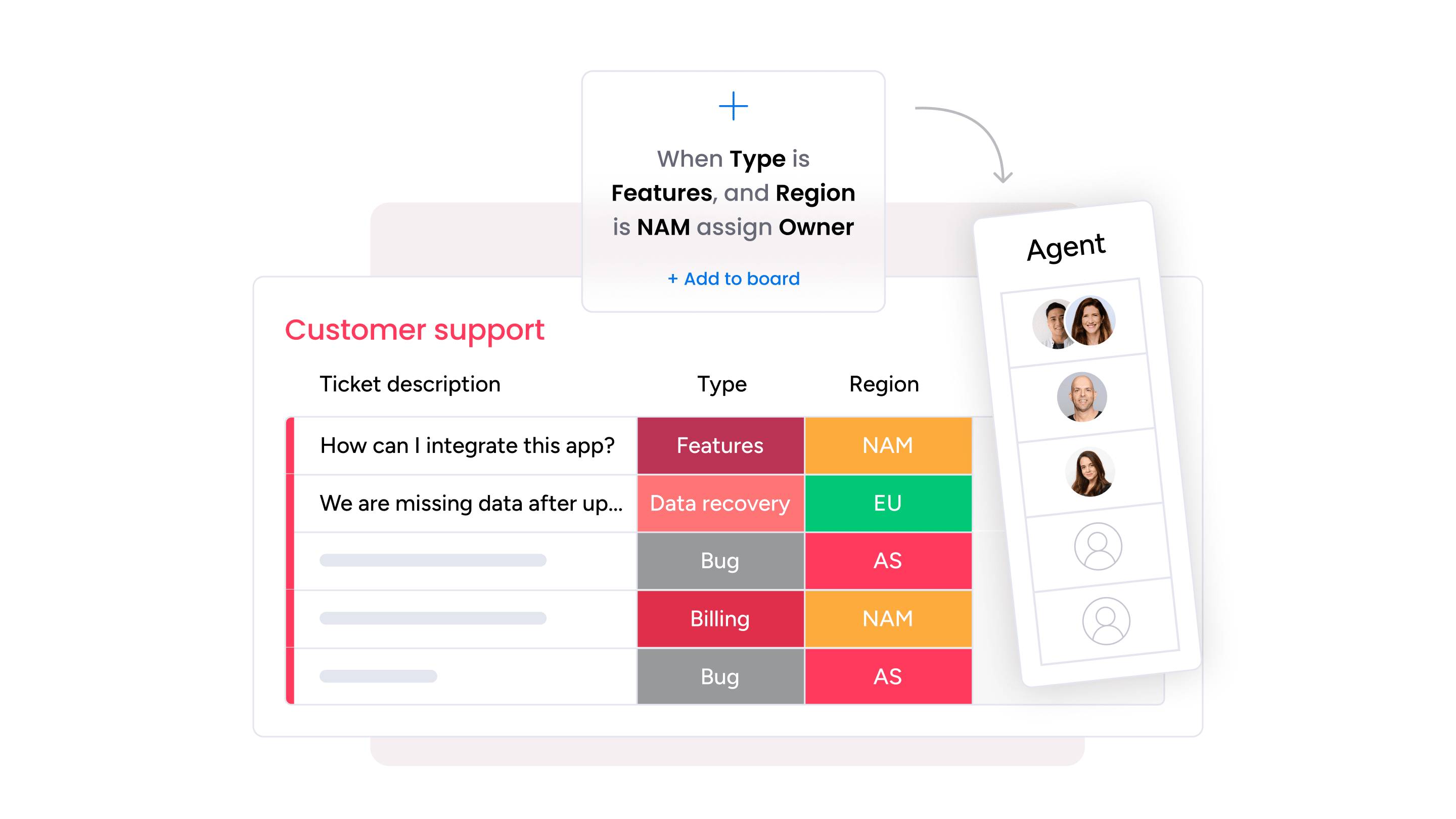
- AI-powered ticket management: AI columns auto-categorize requests, detect sentiment, and route tickets to the right agent. monday sidekick drafts replies, summarizes ticket context, and surfaces similar resolved tickets to accelerate resolution
- AI agents that work around the clock: The Customer Support Agent consults your knowledge base and drafts automatic responses. The SLA Monitor Agent tracks active SLAs and flags at-risk cases before they breach
- Automated workflows and SLA tracking: Pre-built automations, an Email Automation app, SLA timers with live countdowns, and CSAT surveys with automated feedback loops keep operations running efficiently without manual intervention
- Enterprise-grade security: SSO, SCIM provisioning, approved domain restrictions, SOC 2 Type II, ISO 27001, GDPR, and HIPAA compliance give IT teams confidence that sensitive data stays protected.

How monday service compares to other approaches
Choosing a customer portal often comes down to matching the platform to your team’s size, technical resources, and service complexity. Here is how monday service fits alongside other common approaches.
| Platform type | Best for | Portal customization | AI capabilities | Pricing model |
|---|---|---|---|---|
| monday service | Teams of any size wanting an AI-powered portal with no-code setup | Full branding, multiple portals (up to 500), custom login pages | AI agents, sidekick, sentiment detection, auto-categorization | From $26/seat/month; free trial |
| Enterprise ITSM platforms | Large IT organizations with complex IT service management (ITSM) needs | Extensive but requires dedicated administrators | AI agents and workflow automation | Custom pricing; typically higher total cost |
| CRM-bundled portals | Teams already invested in a CRM ecosystem | Template-based; customization varies | AI chatbots and case routing | From $25/user/month; add-ons for advanced features |
| Standalone support platforms | Support-first teams focused on ticket management | Moderate; theme-based customization | AI agents and knowledge base suggestions | From $19/agent/month |
| Low-code portal builders | Small businesses wanting basic self-service | Drag-and-drop; design-focused | Limited native AI | From $8/user/month |
Improve the customer experience with customer portal software
Customer portals give your clients independence, reduce the burden on support teams, and create a single source of truth for service interactions. As AI-powered self-service accelerates, portals have become a core requirement for any business serious about delivering fast, reliable, and scalable customer experiences.
With monday service, businesses can help customers help themselves through a branded, AI-ready portal that launches in days, not months. Whether you are building your first self-service portal or scaling across departments, the right platform makes all the difference.
Try monday serviceFAQs
What does a customer portal do?
A customer portal provides a secure, self-service portal where customers can submit support requests, track the status of open tickets, access knowledge base articles, and find answers to common questions without contacting a support agent. Most portals also include features like personalized dashboards, request forms, and direct communication with service teams.
How much does a customer portal cost?
The cost of a customer portal varies depending on the platform and feature set. Basic portal solutions start at around $8 to $19 per user per month, while more comprehensive platforms with AI capabilities and multi-portal support typically range from $25 to $30 per seat per month. monday service offers a free trial, and enterprise pricing is available for organizations with advanced requirements.
What is the difference between a customer portal and a help center?
Yes, most client portals are designed with robust security features such as encryption, multi-factor authentication, role-based access controls, and more. These portals ensure sensitive customer data stays protected so that businesses comply with data protection regulations such as GDPR.
Do small businesses need a customer portal?
Yes, small businesses with growing support volume benefit significantly from customer portals. Even a basic self-service portal can deflect repetitive inquiries and free up small teams to focus on complex issues that require personal attention. As support requests increase, a portal scales without requiring proportional headcount increases.
Is a customer portal secure?
Yes, a customer portal is secure when built with the right protections. Modern customer portals include robust security features to protect sensitive data. Look for capabilities like single sign-on (SSO), encryption, role-based access controls, SCIM provisioning, approved domain restrictions, and compliance with standards like SOC 2 Type II, GDPR, and HIPAA.
Can a customer portal integrate with my CRM?
Yes, a customer portal can integrate with your CRM. Most customer portal platforms offer integrations with CRM systems, email clients, chat applications, and other business software. monday service, for example, connects with over 200 apps and supports multi-channel connectivity through Gmail, Outlook, and more, ensuring your portal data stays synchronized with the rest of your technology stack.
Can I create multiple customer portals for different teams?
Yes, you can create multiple customer portals for different teams if your platform supports multi-portal functionality. Creating multiple customer portals is possible with platforms that support multi-portal functionality. With monday service on an Enterprise plan, organizations can create up to 500 portals, each with its own branding, content, and access controls for different internal teams (IT, HR, facilities) or external audiences (partners, clients).

 Get started