


AI in most companies consists of single features like chatbots that function well individually but don’t work across departments or act on the bigger picture. With monday AI Workspace, teams get 4 new capabilities that turn work into something the platform executes, rather than just supports.
This piece covers monday agents, Sidekick, Vibe, and MCP in depth, plus the board-level AI blocks, meeting documentation features, credit system, security controls, and CRM-specific workflows that complete the picture. Whether you’re evaluating monday AI for the first time or expanding what your team already uses, here’s what the platform can do.
Try monday agentsKey takeaways
- monday AI works as an execution layer: it handles real work across your organization — scoring leads, triaging tickets, flagging risks, and notifying the right person — without waiting to be asked.
- monday agents run your most repetitive processes continuously: deploy ready-made agents for sales, IT, HR, and marketing, or build a custom one in 3 steps.
- Cross-department context makes AI results far more useful: with all your teams sharing a single data layer, AI connects signals across sales, service, operations, and marketing to give you the full picture.
- You can start small and scale at your own pace: pick one high-volume workflow and test it on a non-critical board, then expand once you see results.
- Governance is built in from day one: permissions, role-based access, audit trails, and simulation mode give your team the visibility it needs to adopt with confidence.
What does monday AI bring to the table in 2026?
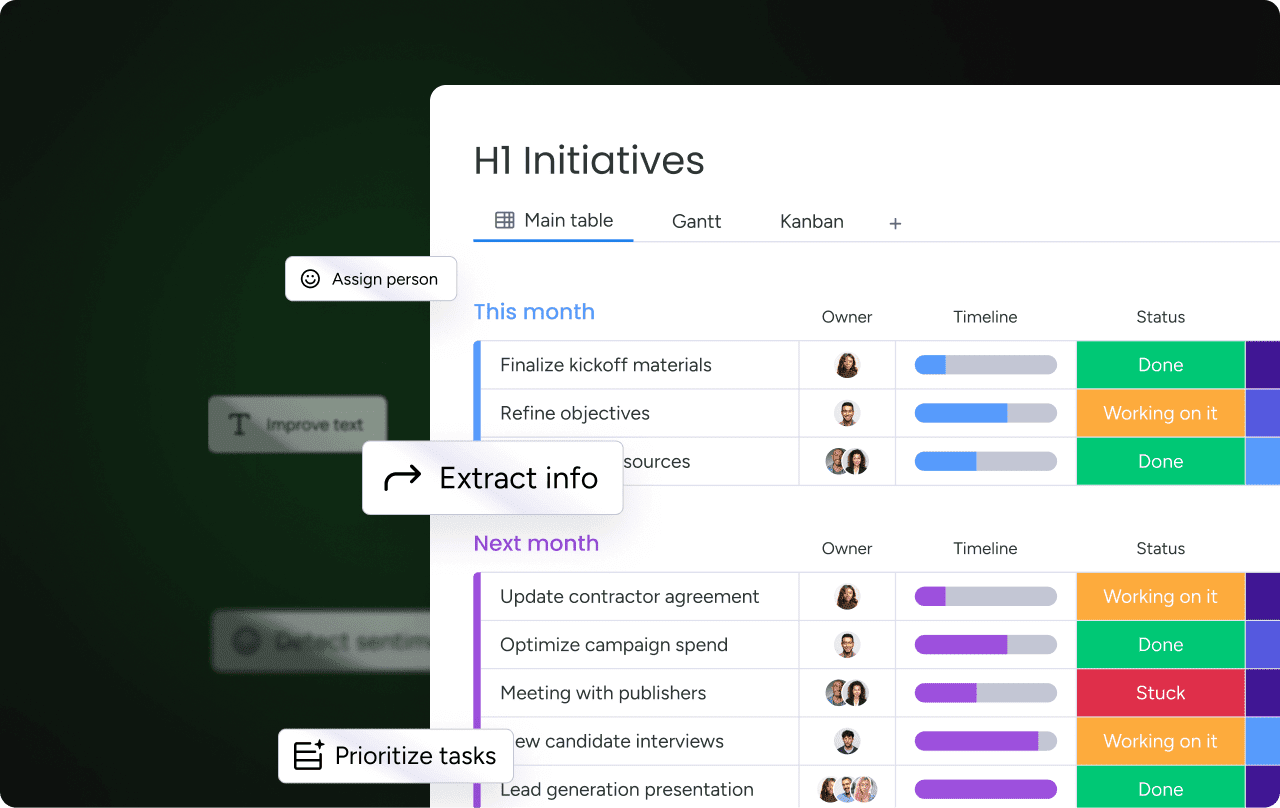
AI capabilities are integral to the monday AI Workspace, letting people and agents work together with full visibility across departments. Rather than a separate app you open on the side, AI lives inside the boards, docs, dashboards, and workflows where your team already works.
Earlier versions of monday.com’s AI focused on assisting — categorizing data, summarizing text, translating content, and answering simple questions. Those capabilities remain, but the platform now goes further, with four additions built for autonomous, in-context work. Each of the following run on a shared data layer (mondayDB) that gives AI context across departments:
- Agents do work on your behalf — scoring leads, triaging tickets, analyzing risks, and summarizing meetings.
- Sidekick acts as a personal assistant with full business context, understanding your boards, docs, teammates, and connected apps.
- Vibe turns a written prompt into custom business software.
- MCP connects external AI assistants like Claude, ChatGPT, Copilot, and Cursor to your workspace data.
The sections below walk through what each capability does on its own. After that, you’ll see how they compare and when to reach for each one.
What monday sidekick does as your context-aware AI assistant
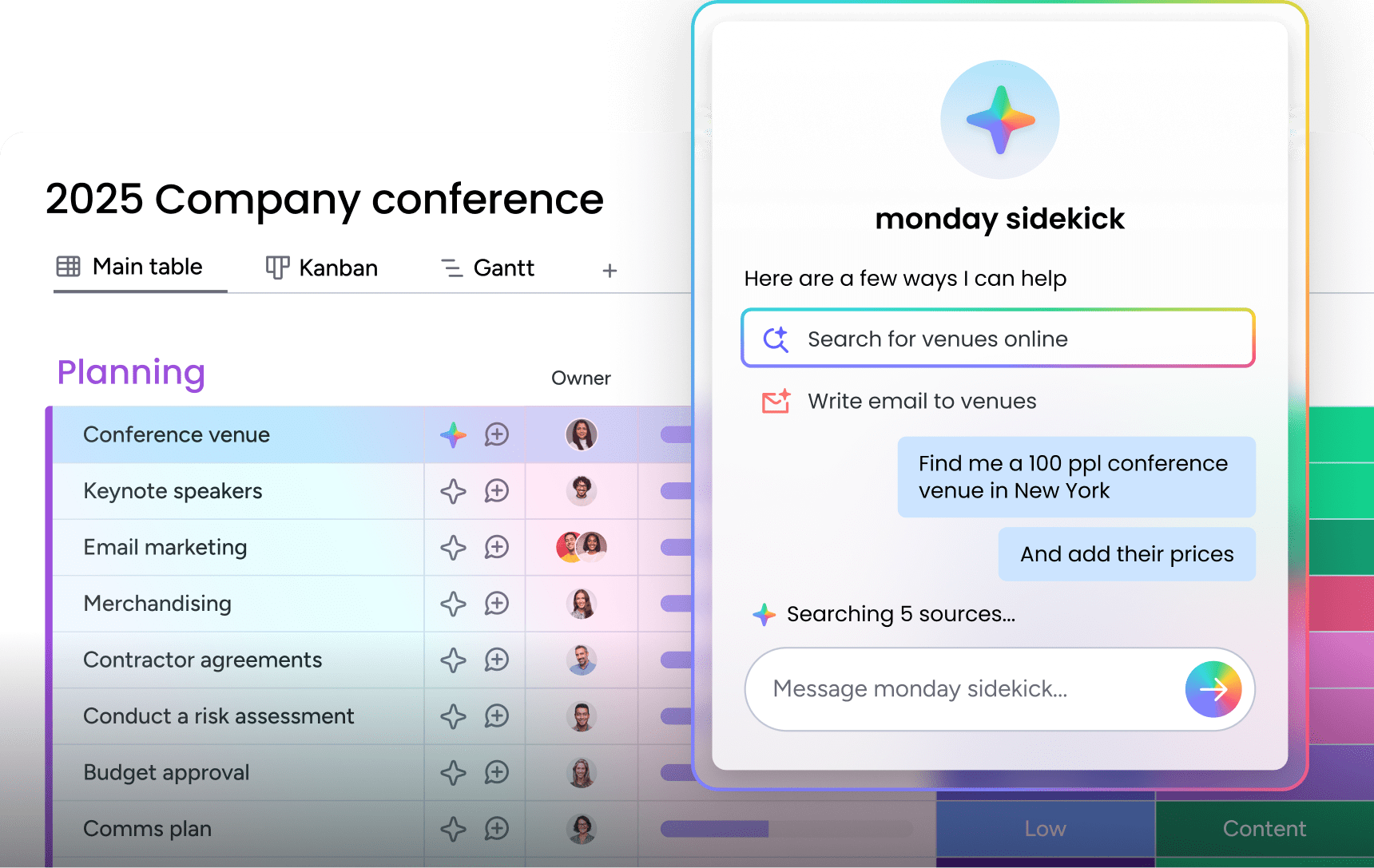
monday sidekick is an AI assistant built directly into the AI Workspace. It connects to your work data and apps to help you think, plan, create, and act through conversation. As it understands your boards, docs, teammates, and connected apps, every response reflects your real work rather than a generic chatbot reply.
Sidekick is accessible at 3 levels:
- Account-wide: from the left panel
- Board-level: from the AI star icon at the top of any board
- Item-level: from the star icon next to any item, or by selecting up to 10 items for batch actions
Voice mode adds a hands-free option that uses conversational speech to go back and forth to the point of confirmation before anything impactful happens.
Work with boards, docs, and people in full context
A few examples show how Sidekick’s context awareness plays out day to day.
- Analyze board data: ask questions like “How many items per priority are there?” or “What’s overdue this week?” and get instant answers drawn from the columns, statuses, dates, and assignees on your live board.
- Update work: create, edit, delete, and duplicate items, groups, columns, and labels through conversation. Instead of clicking through menus, just tell Sidekick “Add a new item called ‘Update homepage content’ with high priority and assign it to Sarah,” and it handles the rest.
- Read sub-items: access column information and updates at the sub-item level, so you can drill into the details of any item without navigating away from the chat.
- Flag what needs attention: Sidekick catches delays, suggests follow-ups, highlights trends, and recommends actions based on team activity, identifying issues on its own rather than waiting for you to ask.
- Notify teammates: tag people, send updates, trigger follow-ups, and escalate issues without leaving the chat. When you need to loop someone in, sidekick handles the communication directly.
- Generate documents: create project plans with owners and deadlines, strategic documents, reports, and on-brand visuals, all ready to use inside your workspace.
Sidekick respects existing permissions. It only accesses and modifies data a team member is already authorized to see, so information stays within its intended boundaries.
Connect Gmail, Slack, Outlook, and Google Calendar
Sidekick integrates with your external work apps directly within the chat. Without leaving monday AI Workspace, you can:
- Send Slack messages
- Compose and send emails, including HTML-formatted emails with file attachments up to 5 MB
- Check Google Calendar availability
- Schedule meetings
Sidekick pulls information from multiple sources to do this, including your monday content, attached files, web search, and advanced language models, so answers land in one place instead of spread across tabs and applications.
Generate content, images, project plans, and dashboards
Sidekick’s creative and building capabilities extend well beyond answering questions.
- Content generation: write emails, project briefs, strategic documents, and reports tailored to your work context, drawing on what sidekick already knows about the project.
- Image and visual creation: generate on-brand visuals and images ready to use for presentations, project documentation, internal communications, and client-facing materials.
- Workflow creation: build workflows, automations, dashboards, and forms from a simple request; describe what you need, and sidekick sets it up.
- App and agent guidance: when your request goes beyond what Sidekick handles directly, it points you to monday vibe to build an app or to the agent builder to create a custom agent, carrying your context along.
- Board creation: use monday magic to generate an entire board from a prompt, with the columns and groups your workflow calls for.
Sidekick also has a dedicated mobile app for working on the go, including voice interactions, so you can research, plan, update, and take action from anywhere.
Sidekick messaging tiers and pricing by plan
Sidekick is available on Standard, Pro, and Enterprise plans, and the daily allowance for Sidekick Lite resets every day. For current pricing on Sidekick Plus and Super Sidekick, visit the monday pricing page.
| Tier | Included with | Messages per user per day | Images/videos per day | Context scope |
|---|---|---|---|---|
| Sidekick Lite | Standard and Pro plans | 5 | — | Single workspace |
| Sidekick Plus | Enterprise (included); available to purchase for Standard and Pro | 100 | 2 | Account-wide |
| Super Sidekick | Available to purchase for Enterprise, Pro, and Standard | 500 | 10 | Account-wide |
Tier differences go beyond message counts: Sidekick Lite works within a single workspace at a time, while Sidekick Plus and Super Sidekick provide account-wide context, referencing and acting on work across your entire account rather than just the workspace you’re in.
How monday agents execute real work for every team

Agents are workers embedded directly into your monday AI Workspace, handling real work on your behalf across departments. Where Sidekick is your personal assistant you chat with in the moment, agents are specialist workers you configure once and then leave to run — scoring leads, triaging tickets, analyzing risks, and summarizing meetings on their own schedule.
The same core capabilities power every agent:
- Knowledge: agents use the docs, PDFs, boards, and forms you define as context, so every action is grounded in your guidelines, not generic training data.
- Actions: agents execute across every part of work — flagging what needs attention, updating items, changing statuses, and reassigning work.
- Integrations: agents keep work in sync across your connected apps, pulling context and taking actions without manual handoffs.
- 24/7 autonomy: agents work with no limits on time zone, volume, language, or day of the week, following up, generating content, and logging results as they go.
- Guardrails: permissions you control and a clear record of what an agent did and why, plus what happens next.
Ready-made agents for sales, marketing, operations, IT, and HR
Ready-to-run AI agents cover the most common processes across departments. Each is pre-configured for a specific job and can be activated directly in your workspace.
- Sales agents: automate prospecting, lead qualification, meeting booking, duplicate contact cleanup, and meeting summarization to keep your pipeline moving.
- Marketing agents: manage event RSVPs, track competitors, analyze market trends, and generate on-brand visuals without manual effort.
- Operations agents: draft support responses, research vendors, suggest process automations, and monitor SLAs to prevent breaches before they happen.
- IT agents: triage tickets, assign owners, audit knowledge bases, classify incidents, and route to the right team automatically.
- HR agents: collect candidate references, source and rank talent, screen applications against your hiring criteria, and flag top candidates for review.
- Product and engineering agents: prioritize bugs, generate release notes, write code, and open automated pull requests.

How to build a custom monday AI agent
Building a custom agent takes 3 steps, with no technical expertise required.
- Describe what you need: define the agent’s role, the work it should handle, and when it should execute. Be specific about the triggers, the data it should monitor, and the actions it should take.
- Make it yours: connect the knowledge sources (docs, PDFs, boards) and integrations the agent needs — this is what grounds it in your work rather than generic responses.
- See it in action: test the agent, make adjustments, and watch how work gets done. Iterate until the outputs match your expectations before deploying at scale.
Custom agents can be built for any business need beyond the pre-built categories.
Examples of custom monday AI agents
Custom agents handle specialized work across every department.
- Research agents – monitor competitors, track market trends, evaluate vendors, and flag risks based on your criteria.
- Reporting agents – generate status updates, compile end-of-day recaps, create executive digests, and highlight delayed projects or budget overruns.
- Insights agents – flag deadline risks, track goal progress, detect anomalies in operational metrics, and continuously re-evaluate priorities based on urgency and impact.
How monday vibe turns prompts into custom business apps

monday vibe is a prompt-to-app builder that creates custom business software from conversational language descriptions. Instead of waiting weeks for development resources or settling for generic templates, anyone on your team can describe what they need without needing any coding skills. Vibe builds it and then connects to live board data, updating in real time.
Vibe handles everything from simple dashboards to complex multi-step workflows. Describe a commission calculator, an event portal, a time tracker, or an executive overview dashboard, and Vibe builds it with the right interface and data connections. The result is custom software that fits your exact process, not a compromise shaped by what’s available off the shelf.
Examples of Vibe apps teams build across departments
Teams build with Vibe across every department:
Marketing:
- Campaign health tracker that analyzes real-time marketing campaign performance
- Social media content calendar for planning engagement across channels
- SEO tracker for monitoring search performance
- Customer segmentation app that identifies trends in customer base health
Sales:
- Deal pipeline tracker and deal flow analyzer for visualizing pipeline health
- Commission calculator that tracks deals, calculates earnings, monitors targets, and flags reps falling behind
- Account health dashboard indexing every client to check ARR health
- Sales forecasting app that transforms sales data into accurate forecasts
Operations:
- IT inventory system for tracking hardware and software assets
- Supply chain tracker for monitoring and updating logistics data across your network
- Meeting booking system for scheduling and coordination
- Time tracking app that calculates billable hours with an interactive interface
HR:
- Onboarding workspace for guiding new hires through their first steps
- Talent pipeline for tracking candidates through hiring stages
- Organizational chart creating a searchable map of company structures
- Employee resource portal unifying all employee information in one searchable place
Finance and leadership:
- Budget planner and expense approval app for managing financial workflows
- Revenue forecasting application for projecting financial outcomes
- OKR monitoring app identifying how each department is meeting their objectives
- Strategic initiative tracker for monitoring progress on key business priorities
AI-driven Vibe apps that search the web and generate insights
Vibe apps can incorporate AI capabilities and web search to do more than display static data. When you instruct your Vibe app to “use AI” or “search the web,” it can perform intelligent actions.
- Run an AI chatbot that generates answers based on provided knowledge materials
- Create a competitor analysis app that searches data online and builds battle cards
- Generate social media posts tailored to your brand and audience
- Produce a dashboard with AI-generated insights about your project
- Update board items with AI-generated insights based on patterns in your data
Each AI call within a Vibe app consumes 8 AI credits. Ask your app directly, “How many credits will this app consume?” to check usage before it becomes a surprise.
What monday MCP does and which external AI tools it supports
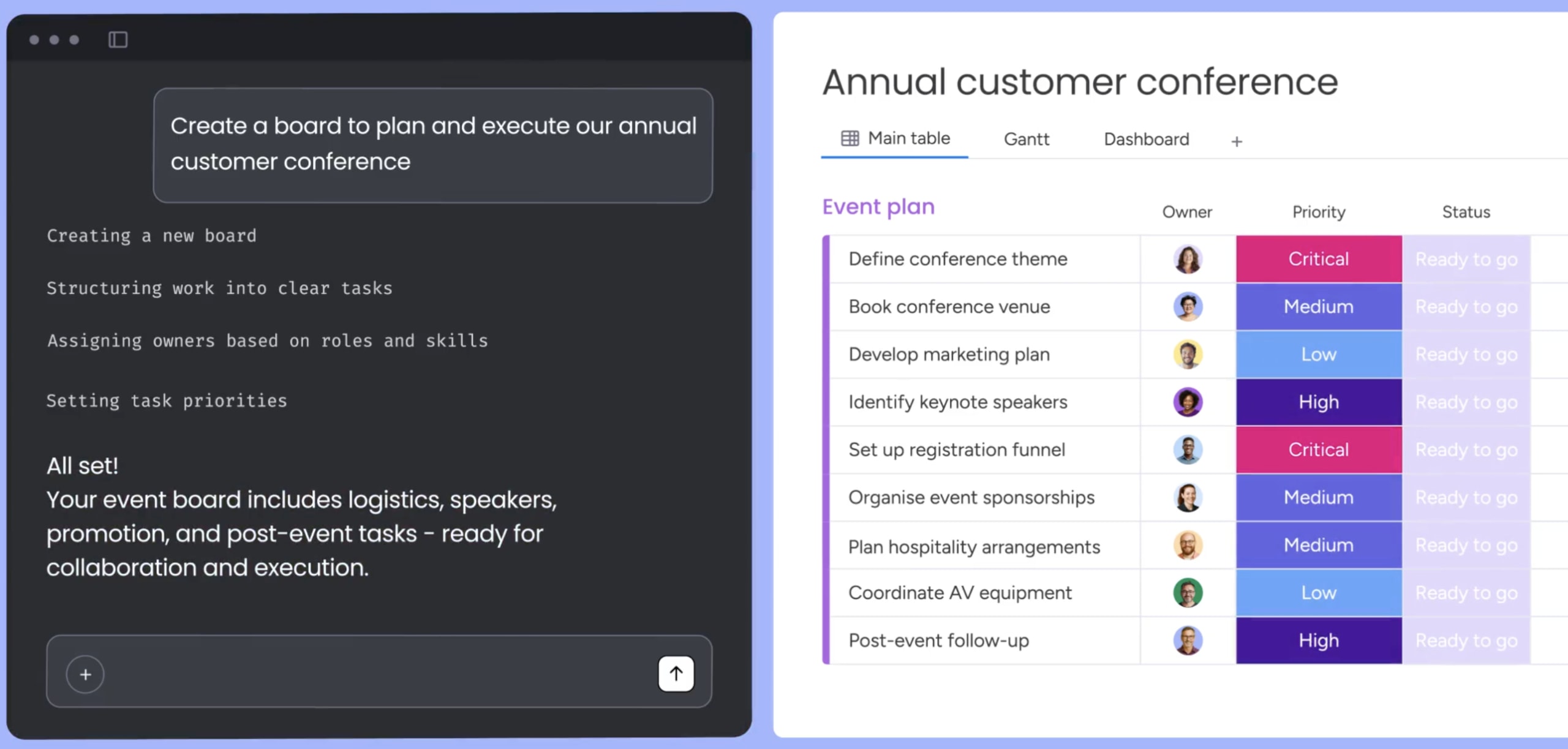
MCP (Model Context Protocol) is an open standard that connects external AI assistants to the monday AI Workspace, so they can securely read and act on your data. monday’s MCP capability is the hosted server behind that connection, meaning you can ask Claude, ChatGPT, Copilot, or Cursor to create items, run analyses, update pipelines, and generate reports directly from their own chat interfaces.
Connecting takes 3 steps:
- Install the MCP app from the monday marketplace (requires account admin).
- Ask your AI assistant to perform any action on your work directly from its chat.
- Get instant results as your AI assistant updates data, creates items, provides analysis, and acts on your behalf.
All monday.com plans include MCP at no extra cost, though standard API limits apply.
Supported AI clients including Claude, ChatGPT, Copilot, and Cursor
monday MCP works with the following AI clients, each connecting to your workspace data through the MCP protocol:
- ChatGPT: OpenAI’s generative AI assistant
- Claude: Anthropic’s AI assistant
- Cursor: AI-powered code editor with integrated assistant
- Copilot Studio: Microsoft’s platform for creating custom AI assistants
- le Chat: Mistral AI’s AI agent
- Figma Make: Figma’s AI design systems generator
- Gemini CLI: Google’s command-line interface open-source agent
Other MCP-compatible assistants should also work, though individual setup steps may vary. Each team member authorizes MCP individually via OAuth, and it only accesses the data that person can already see on monday AI Workspace — the same permission boundaries that apply in the UI carry over to MCP.
Real examples for MCP across projects
MCP is most useful when you want to work with your monday AI Workspace data from inside an AI assistant you already use, organized here by workflow type.
Project workflows:
- Generate sprint summaries, team performance reports, deadline tracking, and blocker alerts from your boards
- Convert meeting notes into structured items with owners, priority, due dates, and status
- Ask cross-board questions like “What’s blocking the launch?” across engineering, marketing, and support boards
- Create weekly rollups showing shipped vs. planned work, scope changes, risk summaries, and open blockers
Documentation workflows: create specs, SOPs, retros, or onboarding guides as monday docs, whether standalone in a workspace or attached to an item, and generate a spec in monday docs to attach directly to the relevant initiative item.
Board management: create boards and configure their columns and status options through natural language, or ask MCP to find items and summarize weekly changes across large workspaces.
A few prompts to try right away:
- “Create a board called ‘Website refresh’ with status, assignee, priority, and due date columns.”
- “Find all items marked as ‘Stuck’ across all my boards and provide details about each one.”
- “Add a comment to the blog post creation item: ‘Waiting for final copy from the content team.'”
AI blocks, workflows, and automations built into your boards
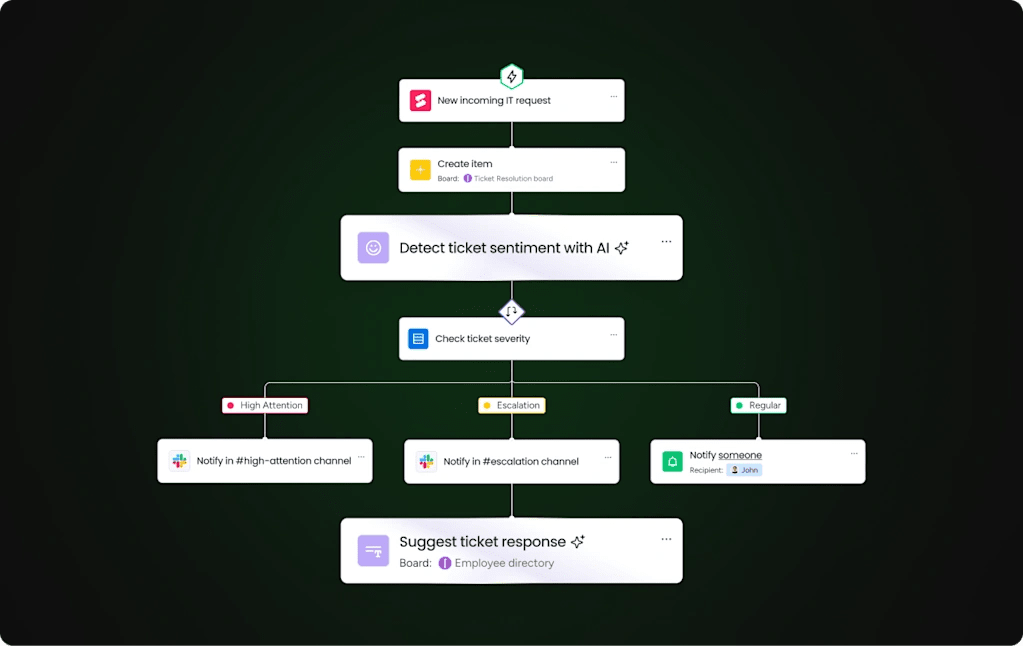
AI blocks are pre-built AI functions you add to your workflows to automate column-level work. Each handles a specific kind of task and can even recommend the following based on what you need:
- Categorize: AI reads text in a designated field and selects the most appropriate label from your status or dropdown column. Works best with 3–10 distinct labels that are easy to tell apart.
- Summarize: condenses complex text into shorter, scannable summaries with key points — useful for turning lengthy feedback, meeting notes, project descriptions, or support tickets into actionable takeaways.
- Extract information: automatically pulls details from PDFs, text columns, monday docs, and images — names, invoice numbers, dates, text drawn from images — directly into board columns. Supported formats include .pdf, .png, .jpg, .jpeg, .webp, .docx, .xlsx, and .pptx.
- Translate: translates text into any specified language from a wide variety of options, breaking language barriers for teams working across markets.
- Detect sentiment: identifies emotional cues from text, categorizing as positive, negative, or neutral — useful for customer feedback, support tickets, survey responses, and product reviews.
- Write: generates text based on a prompt with configurable tone and length, useful for drafting descriptions, responses, standardized content, or item summaries.
- Improve text: refines text for a more professional tone, correcting grammar and typos. Works with any language but performs best with English.
- Custom block: write any prompt in your own words and AI creates a custom automation that fits your workflow, handling situations the pre-set actions above don’t cover.
AI blocks work with text, date, number, dropdown, people, and status columns. Apply them from any column’s three-dot menu using Autofill with AI: click it, choose an action, preview results, and save.
AI workflows for multi-step cross-team automation
AI workflows let you chain multiple AI actions together within monday.com’s automation framework. A single automated sequence might:
- Trigger when a new item is added
- Extract information from an attached file
- Categorize the item based on the extracted data
- Summarize the content
- Assign it to the right person
Build these in the Automation Center using trigger-action patterns, combining AI action blocks with non-AI steps like sending notifications, moving items, updating statuses, and triggering approval requests. The result spans both intelligent analysis and operational execution end to end.
AI notetaker for meeting transcription and follow-up action items
The AI notetaker produces meeting notes, transcripts, summaries, and highlights automatically, then extracts follow-ups and action items and assigns owners on its own. The notetaker works across project management, sales, operations, and service meetings alike — anywhere capturing decisions and next steps matters.
How monday AI credits and pricing work

Every monday AI Workspace account gets 500 free AI credits per month. Knowing which features draw from that pool and which don’t helps budget-conscious teams plan ahead.
Features that run without consuming credits:
- Basic Sidekick interactions within the lite tier’s daily message limit
- MCP usage (no additional cost, standard API limits apply)
- Board-level AI suggestions
Features that consume credits:
- AI block automations (categorize, summarize, extract, translate, detect sentiment, write, custom)
- AI-driven Vibe app calls (8 credits per AI call)
- Vibe app integration triggers (2 credits per trigger)
- Sidekick Plus and Super Sidekick messages within their tier limits
How Sidekick, Agents, Vibe, and MCP fit together
The AI capabilities in monday AI Workspace act as complementary layers rather than competing features. Sidekick helps you think and act in the moment. Agents take over the ongoing, repetitive work you’d rather not manage by hand. Vibe builds what no existing application already does for you. MCP meets you where you already are, in the assistant your team has already adopted.
| Capability | What it does | Who it's for | How you interact with it |
|---|---|---|---|
| monday sidekick | Context-aware AI assistant that thinks, creates, and acts on your behalf | Every team member | Conversational chat inside your workspace |
| monday agents | Autonomous AI workers that execute specialized processes 24/7 | Department leads, ops managers, sales teams | Configure once, agents run continuously |
| monday vibe | Prompt-to-app builder for custom business software | Anyone who needs a custom app | Describe what you want in regular language |
| monday MCP | Protocol connecting external AI assistants to your workspace data | Teams already using Claude, ChatGPT, Copilot, or Cursor | Chat with your preferred AI assistant |
Which capability to use for each job
- Quick analysis or document drafting → sidekick. Open the chat from any board, item, doc, or the left panel and ask.
- Leads scored, tickets triaged, or risks flagged automatically → a ready-made agent like the Lead Scorer, Ticket Assignment agent, Risk Analyzer, or Meeting Summarizer, running continuously in the background.
- A custom dashboard, time tracker, or internal app that doesn’t exist yet → vibe, built from a plain-language description.
- A team already living in Claude or ChatGPT → MCP, so that assistant can act on your workspace data directly.
- Categorizing, translating, or summarizing data inside a column → AI blocks, applied through the Automation Center or Autofill with AI.
- An entire board structure generated from a single description → monday magic, accessible through sidekick or on its own.
- Sending a Slack message, drafting an email, or booking a meeting without leaving monday.com → sidekick’s integrations with Gmail, Outlook, Slack, and Google Calendar.
- A custom agent tailored to a specific process → the agent builder, which walks you through the role, the knowledge sources, and a test run in three steps.
Put monday AI to work, everywhere
Most AI platforms only see data from one department: CRM data lives in a CRM application, IT tickets live in a service application, and so on. monday AI Workspace connects across the entire organization instead, which changes what it can do for your team.
When AI reaches every board, dashboard, doc, team member, and connected app in your workspace, that reach is what makes them effective.
monday AI returns more value the more of your organization runs through it. Every board it touches, every workflow it runs, and every decision it informs adds to a single connected picture instead of another isolated tool. That’s the shift teams are making this year: from AI as a feature bolted onto individual workflows, to AI as the layer that carries context across all of them.
Try monday agentsFrequently asked questions
Does monday.com use my data to train AI models?
No, monday.com doesn't use your customer data or content to train its AI models and does not allow third parties to do so. While monday.com may temporarily access your data (for up to 60 days) to monitor and improve services, it never shares that data with third parties or uses it for model training. You can opt out by contacting [email protected].
What AI models does monday.com use?
The platform primarily uses Microsoft Azure OpenAI as its AI model provider and is actively integrating models available through AWS Bedrock, such as Mistral and Anthropic, while also supporting connections to Claude and Gemini through its open AI infrastructure.
Is monday AI HIPAA compliant?
Yes. monday AI is HIPAA compliant, and the platform also holds SOC 2 Type II, ISO/IEC 27001, and ISO/IEC 27701 certifications along with GDPR compliance.
What happens when I run out of AI credits on monday.com?
Every monday.com account receives 500 free AI credits per month. You can purchase additional credits as needed and monitor consumption through the AI Cost Center, which tracks usage per team and lets admins set limits and alerts.
Can I bring my own AI model or use a custom API key with monday AI?
Currently, monday AI does not support bringing your own model or using custom API keys within the platform itself. monday MCP connects external AI assistants like Claude, ChatGPT, Copilot, and Cursor to your monday.com workspace data using the open Model Context Protocol instead.
How do I opt out of monday.com's temporary content access?
Submit a request via [email protected] or through your account representative, specifying which account(s) to opt out if your email is linked to multiple accounts. Only admins can submit this request, and processing may take up to 5 business days.
What is the difference between Sidekick Lite, Sidekick Plus, and Super Sidekick?
Sidekick Lite (included with Standard and Pro plans) provides 5 messages per day within a single workspace, while Sidekick Plus (included with Enterprise, purchasable for Standard and Pro) provides 100 messages per day with account-wide context. Super Sidekick (for Enterprise, Pro, and Standard) will provide 500 messages per day, also with account-wide context.

 Get started