


Think of enterprise AI like adding a full department of tireless teammates who never sleep, never miss context, and never let a follow-up slip. Most organizations sense that potential; they’ve run pilots, sat through demos, and built business cases. But the gap between “we’re exploring AI” and “AI is running real work for us” is where most organizations are stuck right now.
Enterprise AI isn’t the same as the platforms people use on their own. It connects everything, from sales pipelines, marketing campaigns, support queues, HR workflows, and project timelines, in one place across your entire organization. When AI has that kind of cross-departmental context, it stops being a productivity aid and starts being something closer to an always-on teammate, one that scores leads, flags project risks, triages tickets, and generates status reports without anyone having to ask.
Here’s how to move from evaluation to deployment. We’ll cover what enterprise AI actually is, how it works across departments, what to look for in a platform, and how to implement it so it sticks. We’ll also explore the security and governance requirements that matter most, showing how teams using monday agents deploy AI across the entire organization to unlock cross-departmental value. Let’s start with the fundamentals.
Try monday agentsKey takeaways
- AI agents do the work, not just suggest it: Today’s enterprise AI goes beyond drafts and recommendations; agents score leads, triage tickets, and run reports autonomously, around the clock
- Every department benefits, not just IT: Sales, marketing, HR, operations, and more can all deploy AI agents that handle repetitive, high-volume work without adding headcount
- Cross-departmental context is what separates real AI from point solutions: When AI can see data across every team at once, it makes smarter decisions than any single-department platform can
- monday agents give every team an instant workforce: With ready-made agents for lead scoring, ticket triage, risk analysis, and more, plus a no-code builder for custom needs, that any team can deploy AI in days, no technical skills required
- Trust and governance make scaling possible: Granular permissions, full audit trails, and human-in-the-loop controls allow organizations to confidently expand AI across critical workflows
What is enterprise AI?
Enterprise AI uses artificial intelligence across an organization’s departments, workflows, and data systems to automate work, surface insights, and deliver results at scale. That means machine learning, natural language processing, and autonomous AI agents working together across the business.
Enterprise AI is different from consumer assistants or standalone chatbots; it works with your organizational data. It follows your governance and security requirements while connecting work across departments rather than operating in silos. A personal assistant might help you draft an email. Enterprise AI scores leads from your sales pipeline, triages support tickets using your knowledge base, and coordinates project updates across marketing, operations, and product, all at once.
Enterprise AI has gone through several phases. Early systems relied on basic automation and rule-based logic: “if X happens, do Y.” Then came machine learning models that could analyze data and spot patterns. Copilots came next, helping individual workers with drafts and suggestions when asked. Now we have AI agents: autonomous software that understands goals, taps into organizational context, takes action, and completes multi-step workflows with minimal human help.
Here’s what sets enterprise AI apart from consumer platforms:
- Cross-departmental scope: AI operates across sales, marketing, HR, IT, operations, and product rather than within a single team. An agent helping market a campaign can factor in sales pipeline data and support ticket trends
- Organizational data access: AI draws from structured, shared data layers rather than siloed information, connecting insights across teams and workflows that would otherwise remain disconnected
- Governance and compliance: Built-in security controls, granular permissions, audit trails, and regulatory compliance (SOC 2 Type II, ISO/IEC 27001, GDPR, HIPAA) ensure AI operates within defined boundaries
- Scalable autonomy: AI agents work around the clock without time, volume, or language constraints, handling complexity that grows with the organization
If you want to learn more about AI and what happens “beyond the interface”, here’s our plain-language guide on how AI works.

Why enterprise AI matters for every team
From experimentation to execution: where most organizations can move forward
Most organizations have moved past the “should we use AI?” question. The challenge now is “how do we actually deploy AI across our business?” Many companies have run pilots or experimented with individual AI features, but according to McKinsey’s State of AI 2025 Global Survey, only 7% of organizations have fully scaled AI enterprise-wide, while the majority remain stuck between experimentation and full-scale deployment.
“Execution” in this context means AI that doesn’t stop at generating suggestions or drafts. It means AI that actually does the work: creates reports, routes tickets, scores leads, schedules meetings, manages workflows autonomously. The “assist me” era of copilots and chatbots that require a prompt for every interaction is giving way to the “do it for me” era, where AI agents take action on behalf of teams across entire workflows.
The window to build an AI agent strategy is short. Organizations that act now will pull ahead of those still trying to get their teams to use what they bought.
Every department benefits from AI, not just IT
Enterprise AI isn’t just an IT or engineering project. IT teams might manage the infrastructure, but the real value shows up when every department can use AI in their existing workflows.
The impact across departments is real:
- Sales teams use AI to score leads based on fit and intent signals and to summarize meeting transcripts with assigned action items
- Marketing teams use AI to research competitors, track campaign performance against goals, and generate campaign assets across languages
- HR teams use AI to source and rank candidates, score applications against defined criteria, and automate interview scheduling
- IT teams use AI to triage tickets by intent and urgency, monitor SLAs across active cases, and manage incident response
- Operations teams use AI to flag project risks before deadlines are missed, generate status reports, and identify redundant processes
The biggest impact occurs when AI has context across all these departments simultaneously. When a marketing agent can see sales pipeline data, or a project agent can factor in support ticket volume, that cross-departmental view is what sets enterprise AI apart from single-department platforms.
Benefits of enterprise AI for organizations
If you’re evaluating enterprise AI, focus on the real outcomes, not the hype. The benefits range from individual productivity to organization-wide strategy, and they grow as AI adoption spreads across departments.
Productivity gains across knowledge work
Enterprise AI boosts what knowledge workers can do by handling repetitive, time-consuming tasks. Drafting reports, summarizing meetings, updating project statuses, translating content, and managing data entry are all automated instead of manual. In Microsoft’s 2026 global survey of 20,000 AI users, 66% said AI lets them spend more time on high-value work, effectively expanding a team’s capacity without expanding headcount.
Here’s an example: instead of a project manager spending two hours compiling a weekly status update, checking boards, and chasing teammates, an AI agent pulls real-time data from across the organization and generates the report automatically. It highlights progress, risks, and blockers, giving the project manager an accurate update automatically. That time goes back to work that actually moves the business forward.
Faster, data-driven decision-making
Enterprise AI changes how you make decisions by analyzing data across departments and surfacing insights, risks, and opportunities that would otherwise need manual work. AI agents track metrics against goals, spot anomalies, and alert leaders before problems escalate. Decision-making shifts from reactive, waiting for weekly reports, to proactive, with real-time intelligence.
An insights agent scans project timelines, workloads, and dependencies, flagging risks before deadlines slip. Instead of discovering the problem during a weekly review when it’s too late, managers get an alert in time to reassign resources or adjust timelines. This always-on analysis turns data into action faster than any manual process.
Improved customer experience and personalization
Enterprise AI improves customer interactions with faster responses, more personalized communication, and consistent service quality. AI agents classify tickets by intent and urgency, match them to knowledge base articles, and draft responses. Resolution time drops without sacrificing quality.
A sentiment detection agent monitors shifts across tickets, emails, and feedback in real time, flagging risks and notifying the right owner before small issues escalate. On the sales side, AI workflows generate leads from call notes, update pipeline stages, and automatically log follow-ups. When every touchpoint is captured and acted on, customers get the kind of responsiveness that builds loyalty and trust.
Revenue growth and competitive positioning
Enterprise AI drives revenue growth in two ways:
- Increased output with the same headcount: Teams can execute more campaigns, close more deals, and ship more products without adding resources
- Faster competitive intelligence: AI provides ongoing market signals, helping organizations respond to shifts before competitors do
AI agents track competitors, analyze market trends, and spot emerging opportunities. A market landscape analyzer can continuously identify new competitors, emerging technologies, and macro trends relevant to your business. Organizations deploying enterprise AI can capture market share from slower competitors still relying on manual research and delayed reports.
Reduced operational costs through automation
Enterprise AI cuts costs by automating processes that previously required manual work or multiple software subscriptions. AI agents spot redundant processes, remove duplicate data, and consolidate workflows. That cuts both labor costs and the number of platforms you’re paying for.
A process optimization agent scans workflows across departments, identifies repetitive manual steps, and suggests or implements automations to eliminate them. A contact duplicate finder cleans CRM data by spotting duplicate contacts and suggesting merges.
This isn’t about doing the same work cheaper. It’s about freeing people from routine work so they can focus on strategy while reducing the number of platforms you pay for.
Enterprise AI applications across departments
Enterprise AI works best when it’s deployed across the full organization, extending its impact well beyond a single department. Here are specific, practical applications teams are using today.
Sales and CRM
AI changes sales operations by automating lead management, meeting follow-ups, and pipeline hygiene. Here’s how AI impacts sales:
When intent spikes, AI agents schedule follow-ups and alert reps so nothing slips through. With automated scoring, summarization, and pipeline hygiene, sales teams sell instead of managing data.
Marketing and content operations
AI agents help marketing teams with research, campaign execution, and performance tracking. That helps teams launch more campaigns without adding resources.
Here’s what AI does for marketing:
- Competitor research: Agents track key competitors and pull together signals such as pricing changes, product launches, and messaging shifts into snapshots the team can act on right away
- Market analysis: Agents spot emerging technologies, new competitors, and macro trends relevant to the business, delivering ongoing intelligence rather than one-time reports.
- Campaign performance tracking: Agents track metrics against goals such as leads, signups, and engagement, flagging performance dips so teams can adjust in real time
- Content generation and translation: Agents create campaign visuals that align with your messaging and creative constraints, then automatically translate content for different markets
Tracking competitors, analyzing markets, and monitoring campaign performance all at once removes bottlenecks that slow down global campaigns.
Customer service and support
AI agents handle high-volume, repetitive customer service tasks and escalate complex issues to human agents. That combo of automation and human judgment makes service faster and better.
Here’s what AI does for customer service:
- Ticket intake and triage: Agents classify every ticket by intent, urgency, and expertise needed, then set SLAs and route it to the right team in seconds. Common requests get resolved by matching them to knowledge base articles
- Knowledge base management: Agents audit knowledge articles, identify content gaps in ticket patterns, and feed real-world resolution data back to improve the knowledge base over time
- Sentiment detection: Agents monitor sentiment shifts across tickets, emails, and feedback in real time, flagging risks and notifying the right owner before negative trends escalate
The result is faster resolution times, more consistent service quality, and early signals that help teams protect customer satisfaction.
IT and service management
AI agents support IT teams with service operations, incident management, and infrastructure monitoring. These capabilities help IT teams move from responding to incidents after the fact to proactively managing infrastructure.
Core IT applications include:
- SLA monitoring: Agents track service-level agreements across active tickets, flag at-risk cases, and proactively alert managers before breaches occur
- Incident management: Agents classify incidents by severity, route them to the appropriate on-call team, trigger real-time alerts, calculate mean time to resolution (MTTR), and ensure post-mortems are conducted
- Anomaly detection: Agents continuously scan operational data and flag unusual spikes or drops that might indicate emerging issues, giving IT teams early warning before problems affect end users
When incidents are automatically classified, routed, and tracked, IT teams can focus on resolution rather than coordination.
HR and talent operations
AI agents support the full talent lifecycle from sourcing through engagement. These applications free HR teams to focus on strategic talent initiatives by automating administrative work.
Key HR applications include:
- Candidate sourcing and ranking: Agents find and rank candidates across multiple sources, learn from recruiter feedback to get smarter over time, and reach out with customized sequences once approved
- Application screening: Agents score every application against defined criteria, filter non-fits (with appropriate notifications), and surface strong candidates immediately
- Interview scheduling: Agents eliminate back-and-forth by enabling candidates to self-book against live availability, with automated confirmations and reminders
- Employee engagement: Agents conduct recurring pulse surveys and analyze engagement trends over time, providing HR leaders with ongoing visibility into organizational health
The combination of automated sourcing, screening, and scheduling turns recruiting from a manual grind into a continuous pipeline.
Operations and project management
AI agents support operational efficiency and project delivery across the organization. These capabilities accelerate cross-functional initiatives by automatically handling coordination.
Core operations applications include:
- Status reporting: Agents automatically generate and distribute project status updates that highlight progress, risks, and blockers, saving hours spent compiling information from multiple sources
- Risk analysis: Agents proactively flag items nearing deadlines, detect dependency conflicts, and send timely notifications to stakeholders
- Vendor research: Agents analyze procurement requirements, research potential suppliers, and prioritize vendor lists based on defined criteria including pricing, security posture, reviews, and contract terms
- Meeting coordination: Agents schedule meetings by finding suitable times, sending calendar invites, and generating action items from meeting transcripts with assigned owners and due dates
When status reports, risk alerts, and meeting follow-ups happen automatically, project managers can focus on strategic decisions rather than administrative coordination.
Try monday agentsHow AI agents are reshaping enterprise work
AI agents represent a meaningful shift in how work gets done, not just a faster version of existing automation. This section breaks down what agents actually do, how they differ from the tools you may already use, and what the human-agent working model looks like in practice.
What AI agents do in an enterprise
AI agents are autonomous software entities that can understand a goal, access relevant organizational data, make decisions, and take multi-step actions to complete work. They don’t suggest what to do. They do it.
The core capabilities that define an enterprise AI agent include:
- Knowledge grounding: Agents access documents, PDFs, boards, and organizational data to ensure every action is informed by real context, not generic training data. An agent drafting a response to a support ticket draws on your actual knowledge base
- Action execution: Agents don’t stop at analysis. They create items, update statuses, send notifications, generate reports, assign owners, and trigger workflows
- Integration connectivity: Agents pull context and take actions across connected systems, including email, calendar, Slack, CRM, and project boards, without manual handoffs
- 24/7 autonomy: Agents operate continuously without time, volume, or language constraints. They can follow up, generate content, translate materials, and coordinate across time zones around the clock
- Guardrails and transparency: Every action has an audit trail. Every agent has defined permissions. People maintain oversight and control, with the ability to review what an agent did, why it did it, and what it plans to do next
How agents differ from copilots and traditional automation
These categories aren’t mutually exclusive. Most enterprise AI platforms use all three. The key shift is that agents represent a move from “AI that helps you work” to “AI that works alongside you as a teammate.” Traditional automation handles the predictable. Copilots handle the prompt. Agents handle the complex, ongoing, and cross-functional.
People and agents working as one team
The operating model for enterprise AI is one in which people and AI agents collaborate as a single team. Enterprise AI is about empowering people to focus on high-value work. It’s about redesigning how work gets done so that people focus on strategy, judgment, and creative decisions while agents handle execution, research, reporting, and routine operations.
The relationship is straightforward: people set the direction, define goals, and provide oversight. Agents handle campaigns, reports, workflows, data analysis, and content, operating around the clock across every department under human control. Together, they close the gap between where a business is and where it wants to be.
Many teams feel excited about AI’s potential yet uncertain about what it means for their roles. That’s natural. The most successful enterprise AI deployments position agents as teammates that amplify what people can do, not replacements that diminish their value. This is a future where people are freed to focus on the work that matters most, while agents handle the routine work that used to consume their time.
What an enterprise AI platform includes
Enterprise AI isn’t a single product. It’s a platform that combines multiple capabilities into a unified system. Understanding which components make up an enterprise AI platform helps you evaluate solutions and avoid investing in fragmented approaches that create new silos rather than eliminating old ones.
Data foundation and integrations
The foundation of any enterprise AI platform is its data layer: the structured, connected data that gives AI the context it needs to make informed decisions and take accurate actions. When AI can access data across departments – sales pipelines, marketing campaigns, support tickets, project timelines, HR workflows – in a single unified system, it can connect the dots that siloed systems cannot.
An agent helping market a campaign becomes far more effective when they can also see which customer segments are driving the most revenue in the sales pipeline. This cross-departmental visibility is what separates enterprise AI from departmental point solutions.
The integration layer is equally critical. Enterprise AI platforms must connect to the systems organizations already use, including email, calendar, Slack, Microsoft Teams, CRM systems, and development platforms. The Model Context Protocol (MCP) is an emerging open standard that enables AI assistants to securely read and act on workspace data, allowing organizations to connect external AI models to their work data without compromising security.
Key data foundation requirements include:
- Unified data across departments: One structured data layer spanning all teams and workflows, so AI agents see the full picture rather than a single department’s view
- 200+ integrations: Connections to existing business systems without requiring migration, so teams can keep using the platforms they rely on while AI coordinates across them
- Open APIs and protocols: Support for MCP and custom integrations, enabling extensibility and ensuring the platform grows with the organization’s needs
- Content ownership: Organizations retain ownership of their data, and third parties cannot train on it
AI models and agent capabilities
Enterprise AI platforms provide access to AI models (the “brains”) and agent capabilities (the “hands”) that work together. Leading platforms support multiple AI models, such as Claude, GPT, and Gemini, rather than locking organizations into a single model. This gives teams flexibility as AI technology evolves rapidly.
Organizations can deploy two main categories of agents:
- Ready-made agents: Pre-built agents designed for common business functions, including lead scoring, ticket triage, risk analysis, meeting summarization, and vendor research, that can be deployed immediately without configuration or coding. These deliver value on day one
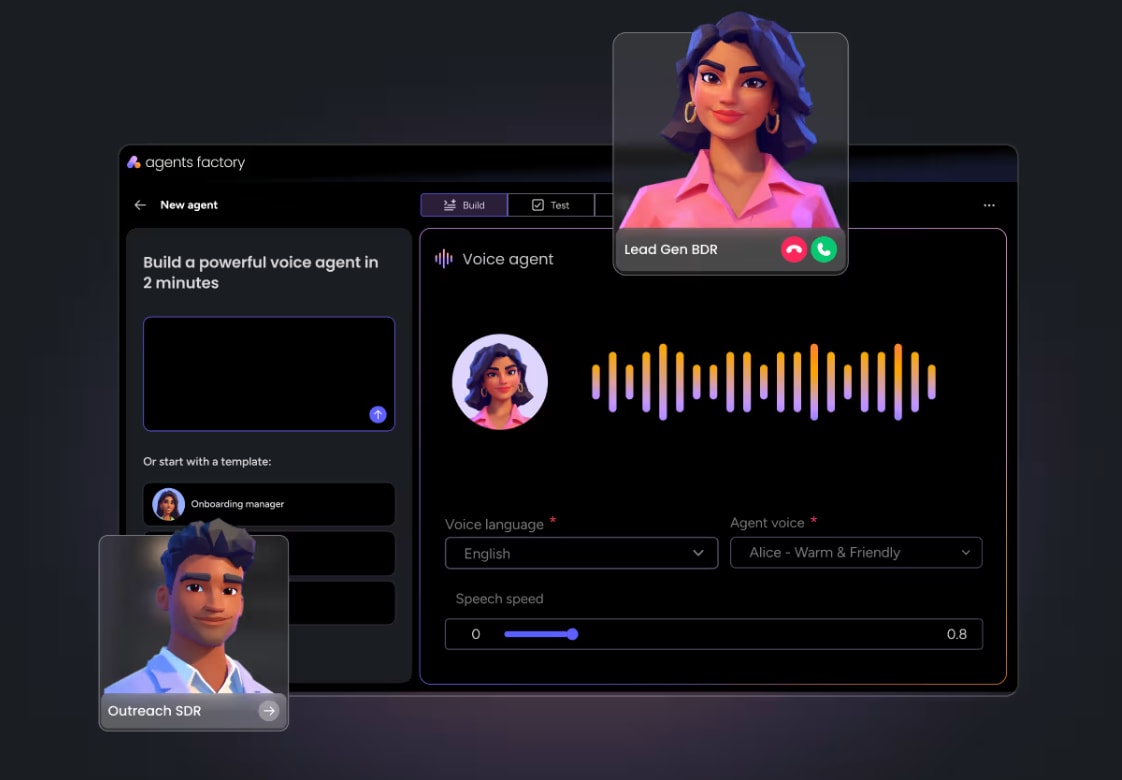
- Custom agents: An agent builder that allows teams to create agents tailored to their specific processes by defining the role, connecting relevant knowledge and integrations, and then testing and refining. The ability to build custom agents without coding enables non-technical teams to create AI solutions for their unique workflows
Workflow automation and orchestration
There’s a meaningful difference between simple automation (if X then Y) and agentic workflows that handle complex, multi-step, cross-functional processes with AI decision-making. Enterprise AI platforms enable teams to visually build, automate, and manage workflows that span multiple departments and systems.
A concrete example: an agentic workflow that starts when a customer submits a support ticket, classifies it by severity, routes it to the right team, checks the knowledge base for existing solutions, drafts a response, and escalates to a human if the issue is complex. Each step involves AI judgment, not just rule-following.
Workflow orchestration becomes especially powerful when combined with cross-departmental data context. A product launch workflow can coordinate marketing assets, sales pipeline updates, operations timelines, and IT infrastructure monitoring rather than operating in departmental silos.
Security, compliance, and governance controls
Enterprise AI adoption requires robust security and governance. This is non-negotiable for organizations handling sensitive data, operating in regulated industries, or managing large-scale deployments.
The key governance components include:
- Granular permissions: Define exactly which data each agent can access and what actions it can perform, whether read-only, create, or edit. Permissions operate within the organization’s existing access model
- Audit trails: Full visibility into every action an agent takes, why they took it, and what they plan to do next. This enables accountability, troubleshooting, and compliance reporting
- Human-in-the-loop controls: The ability to validate agent actions before execution, including simulation modes that test agents on real data without making live changes
- Compliance certifications: SOC 2 Type II, ISO/IEC 27001, ISO/IEC 27701, GDPR compliance, and HIPAA support verify that the platform meets stringent security standards
- Data privacy: Encryption by default, content ownership retained by the organization, and no third-party training on customer data
How to choose the right enterprise AI solutions
The enterprise AI market is crowded, and choosing the right platform requires evaluating capabilities that go beyond feature checklists. The following criteria help you identify solutions that deliver sustained value rather than short-term novelty.
Criterion 1: Cross-departmental context and data connectivity
Cross-departmental context is the most critical evaluation criterion for enterprise AI. Many platforms claim “context awareness,” but most operate within a single domain: CRM data only, IT tickets only, or project management only. The real differentiator is whether the platform’s AI can access and reason across data from marketing, sales, operations, IT, HR, product, and more, all within a single structured data layer.
This matters practically: an AI agent helping marketing plan a campaign is far more effective when it can also see the sales pipeline, understand which customer segments are most engaged, and factor in support ticket trends. Without cross-departmental context, AI agents are limited to the same siloed view that teams already have.
Criterion 2: Adoption and ease of use for non-technical teams
The gap between AI capability and actual AI usage is one of the biggest challenges in enterprise AI. Many platforms offer powerful features that require technical expertise, consultants, or steep learning curves to deploy. This results in low adoption rates even after significant investment.
Ease of adoption in practice means:
- Agents that integrate directly into existing workflows without requiring separate systems
- No-code agent builders that let non-technical teams create custom agents
- Interfaces that feel familiar rather than intimidating
The most successful enterprise AI deployments are those in which adoption happens naturally because AI fits how teams already work.
Criterion 3: Trust, transparency, and enterprise-grade security
Trust is the primary barrier to enterprise AI adoption. Organizations won’t scale AI without confidence that it operates within defined boundaries, respects data privacy, and provides full visibility into its actions.
Trust in an enterprise AI platform looks like this:
- Every agent’s action is visible and auditable. You can see what happened, why it happened, and what’s planned next
- Permissions are granular and admin-controlled, operating within the organization’s existing access model
- Human oversight is built into the workflow, not bolted on as an afterthought
- Compliance certifications meet the organization’s regulatory requirements across SOC 2, ISO, GDPR, and HIPAA
Trust isn’t a compliance checkbox. It’s a cultural requirement. Teams need to feel confident that AI is operating transparently before they’ll rely on it for critical work.
Criterion 4: Agent capabilities and extensibility
Organizations should evaluate both the breadth of ready-made agents and the ability to build custom agents. A platform with only pre-built agents will eventually hit limitations as the organization’s needs evolve. A platform that only offers custom agent building requires significant upfront investment before delivering value.
The ideal combination: a library of ready-made agents for common functions (lead scoring, ticket triage, risk analysis, status reporting) combined with a no-code agent builder for creating agents tailored to unique business processes. Additionally, evaluate whether the platform supports open protocols such as MCP, which allow external AI models to connect to and act on organizational data.
Five steps to implement enterprise AI
Implementing enterprise AI is not a single technology deployment. It’s an organizational transformation that requires aligning business goals, data readiness, platform selection, team enablement, and measurement. The following steps provide a practical framework for moving from evaluation to full-scale deployment.
Step 1: Define business goals and high-impact examples
Enterprise AI implementation should start with business outcomes, not technology features. Identify 3–5 specific, measurable goals that AI should help achieve, such as reducing ticket resolution time, increasing campaign output, improving lead conversion rates, or accelerating project delivery timelines.
Start with high-impact, low-risk examples that demonstrate value quickly, then expand:
- Quick wins: Meeting summarization, status report generation, data deduplication, content translation. These deliver visible time savings within days and build organizational confidence in AI
- Medium complexity: Lead scoring, ticket triage and routing, competitor research, risk monitoring. These require connecting AI to more data sources and defining guardrails, but deliver measurable business impact within weeks
- High complexity: Cross-department workflow orchestration, autonomous campaign execution, predictive resource allocation. These represent the full potential of enterprise AI but require the data foundation and trust built through earlier wins
Step 2: Assess data readiness and infrastructure
AI agents are only as effective as the data they can access. Evaluate your organization’s data readiness across three dimensions:
- Data structure: Is organizational data stored in structured, accessible formats, including boards, items, defined columns, and connected workflows, or scattered across disconnected spreadsheets, emails, and documents?
- Data connectivity: Can data from different departments be accessed through a single platform, or does each team operate in its own silo?
- Data governance: Are there defined policies for data access, privacy, and compliance that can extend to AI agents?
Step 3: Select the right enterprise AI platform
- Map your requirements to the four criteria: cross-departmental context, ease of adoption, trust and security, and agent capabilities
- Run a pilot with one to two departments using ready-made agents to evaluate the platform’s fit with your workflows
- Evaluate extensibility by testing the custom agent builder with an example specific to your organization
- Assess integration depth by connecting the platform to your existing systems
- Review governance controls with your security and compliance teams before expanding deployment
Step 4: Deploy AI agents and workflows with your teams
- Phase 1, pilot team: Deploy ready-made agents with a single team to validate value and gather feedback
- Phase 2, department rollout: Expand to 2–3 departments, introducing both ready-made and custom agents tailored to each team’s workflows
- Phase 3, cross-departmental orchestration: Connect agents across departments so they share context and coordinate work
Step 5: Measure outcomes and scale across departments
Measurement should tie directly back to the business goals defined in Step 1. Track outcomes across four categories: Productivity, Quality, Business Outcome, and Adoption.
Try monday agentsHow to drive enterprise AI adoption across teams
Why adoption matters more than capability
The most important driver of enterprise AI success is adoption, not capability alone. Many organizations get the most value from AI platforms when teams feel confident integrating AI into their daily work, are comfortable with the technology, and trust it enough to rely on it for critical workflows.
Building a people-first AI culture
- Transparency: Teams understand what agents are doing and why they’re doing it, and can review actions before executing
- Empowerment, not replacement: AI is positioned as a teammate that amplifies what people can do, not a threat to their roles
- Accessibility: AI is usable by every skill level, with no coding required and no separate systems to learn
- Gradual trust-building: Teams start with low-risk examples and gradually expand to more complex workflows
Upskilling teams for human-agent collaboration
Working effectively with AI agents is a new skill that teams need to develop. Key competencies include Goal definition, Oversight and review, Workflow design, and Prompt crafting.
Enterprise AI security, governance, and trust
Data privacy and regulatory compliance
Enterprise AI platforms must meet rigorous data privacy requirements, including GDPR, HIPAA, SOC 2 Type II, and ISO/IEC 27001. Data privacy also means content ownership: organizations should retain ownership of the data they provide and the content AI generates.
Permissions, audit trails, and human-in-the-loop controls
- Permissions: Admins define exactly which data each agent can access and what actions it can perform
- Audit trails: Every action an agent takes is logged with full visibility into what was done and why
- Human-in-the-loop: Critical decisions always go to a human for approval, and simulation modes enable risk-free testing
Responsible AI and bias management
Responsible AI principles include Bias awareness, Explainability, and Continuous monitoring. These responsible AI principles build directly on broader AI ethics frameworks that define fairness, accountability, and transparency for any automated decision. Organizations should establish review processes for AI agent outputs, especially in sensitive areas like HR and customer service.

The state of enterprise AI and what comes next
AI agents are moving from pilot to production
Organizations that started with AI pilots are now moving to production deployments. This transition requires platform maturity, governance controls, and AI adoption strategies that allow agents to operate autonomously on real business data.
Cross-departmental orchestration is becoming the standard
The next frontier is orchestration across departments, where agents from different teams share context and coordinate actions. This level of coordination transforms enterprise AI into an organizational operating system.
Governance is now a built-in product feature
Governance has shifted from being a separate compliance exercise to being a built-in feature. Leading platforms now embed permissions, audit trails, and human-in-the-loop controls directly into the agent experience.
How monday.com powers enterprise AI adoption
As the monday AI Workspace, monday.com brings people and agents together as one team, with shared cross-departmental context, enterprise-grade trust, and an interface built for adoption at scale.
AI agents for every department
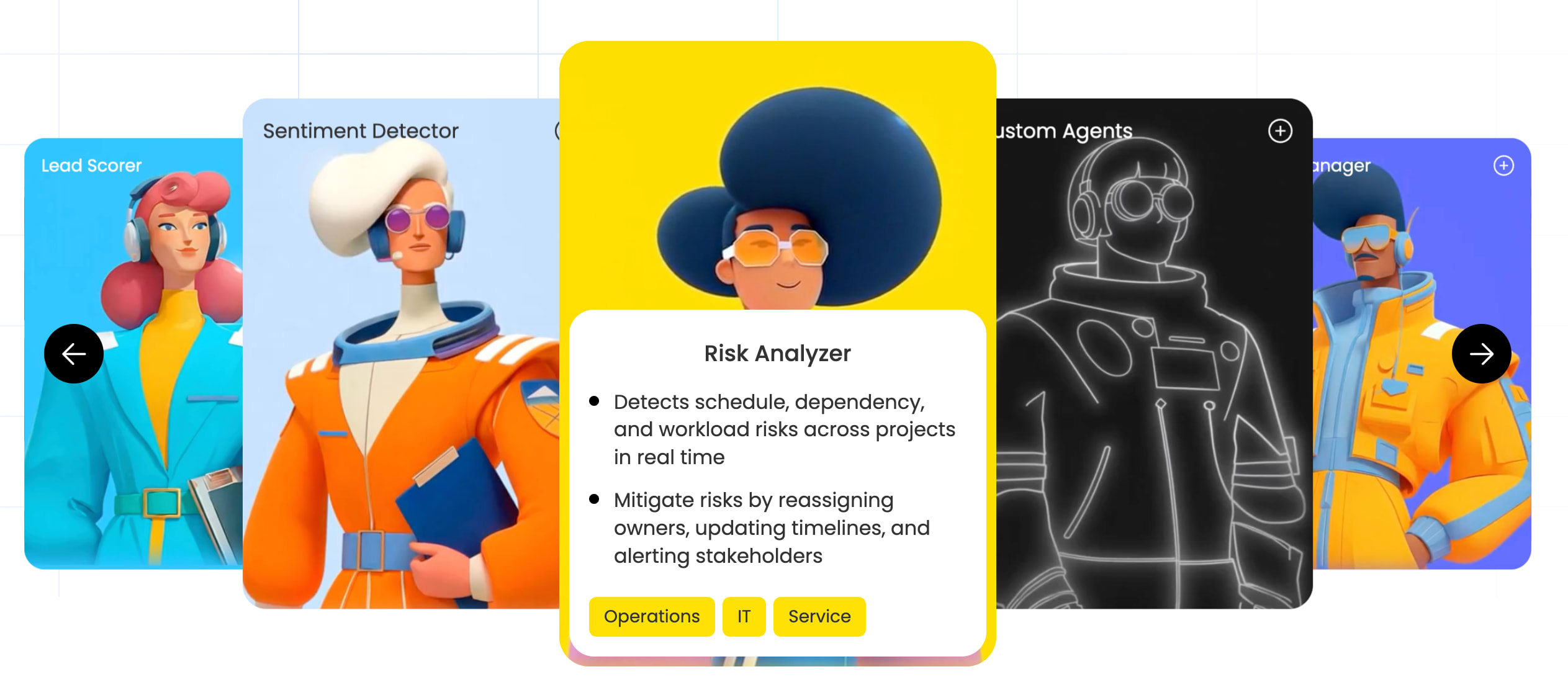
monday agents provide an “unlimited workforce” of autonomous AI agents. Ready-made agents include Lead Scorer, Sentiment Detector, Risk Analyzer, Ticket Assignment, Meeting Summarizer, Vendor Researcher, RSVP Manager, and Translator Agent.
Cross-departmental context in one platform
The core differentiator on monday.com is a shared, structured data layer that spans every department. This context enables agents to drive outcomes rather than automate isolated activities. The platform supports 200+ integrations and the MCP protocol, allowing external AI models to securely connect and act on workspace data.
Enterprise-grade trust built into every workflow
Specific controls include Control over agent actions, Granular Permissions, Human-in-the-loop validation, Compliance certifications (HIPAA, ISO, SOC 2), and Content ownership.
monday MCP and open AI integrations
monday MCP gives external AI assistants, such as Claude, ChatGPT, and Gemini, secure access to workspace data. Through MCP, teams can use their preferred AI assistant for project reporting, smart workflow management, cross-team visibility, CRM workflows, and dashboard creation.
How to get started with enterprise AI today
Enterprise AI represents a fundamental shift in how organizations operate. The path to success runs through three priorities: cross-departmental data context, trust and governance, and ease of adoption. Platforms like monday.com are making enterprise AI accessible by embedding AI agents directly into existing workflows with no separate systems or steep learning curves.
Try monday agentsThe content in this article is provided for informational purposes only and, to the best of monday.com’s knowledge, the information provided in this article is accurate and up-to-date at the time of publication. That said, monday.com encourages readers to verify all information directly.
Frequently asked questions about enterprise AI
Which AI platform is most effective for enterprise organizations?
The most effective enterprise AI provides cross-departmental data context, integrates into existing workflows, and includes built-in governance controls. Platforms like monday.com combine AI agents, workflow automation, and enterprise-grade security in one unified system.
How do enterprises use AI across their organizations?
Enterprises use AI to automate workflows across departments, including lead scoring in sales, ticket triage in IT, candidate screening in HR, risk analysis in project management, and competitor research in marketing.
What is the 10-20-70 rule in enterprise AI?
The 10-20-70 rule suggests that successful enterprise AI depends 10% on algorithms and models, 20% on technology infrastructure and data, and 70% on people, processes, and organizational change management.
How long does enterprise AI implementation typically take?
Initial deployment can begin within days using ready-made agents. Full cross-departmental implementation typically unfolds over three to six months as organizations expand from pilot teams to organization-wide adoption.
Can small and mid-sized businesses use enterprise AI effectively?
Yes. Platforms like monday.com offer AI agents and workflow automation on plans accessible to small and mid-sized businesses, with no-code agent builders that eliminate the need for dedicated AI teams.
How does monday.com approach enterprise AI differently from other platforms?
The platform differentiates through cross-department data context, an "unlimited workforce" of ready-made and custom AI agents that require no coding, and built-in governance with permissions, audit trails, and human-in-the-loop controls.
 Get started