



When email lives inside your CRM, every open, click, and reply updates the deal record automatically. That means reps have full context before every conversation, and leaders can see which opportunities are heating up without chasing down updates.
This guide explores 13 CRM platforms with email marketing, breaks down the features that drive adoption and revenue visibility, and walks through 5 practical steps to choose the right fit for your team. You’ll also learn how to improve deliverability, why combining both functions matters, and what separates a truly native setup from a patched-together integration.
What is a CRM with email marketing?
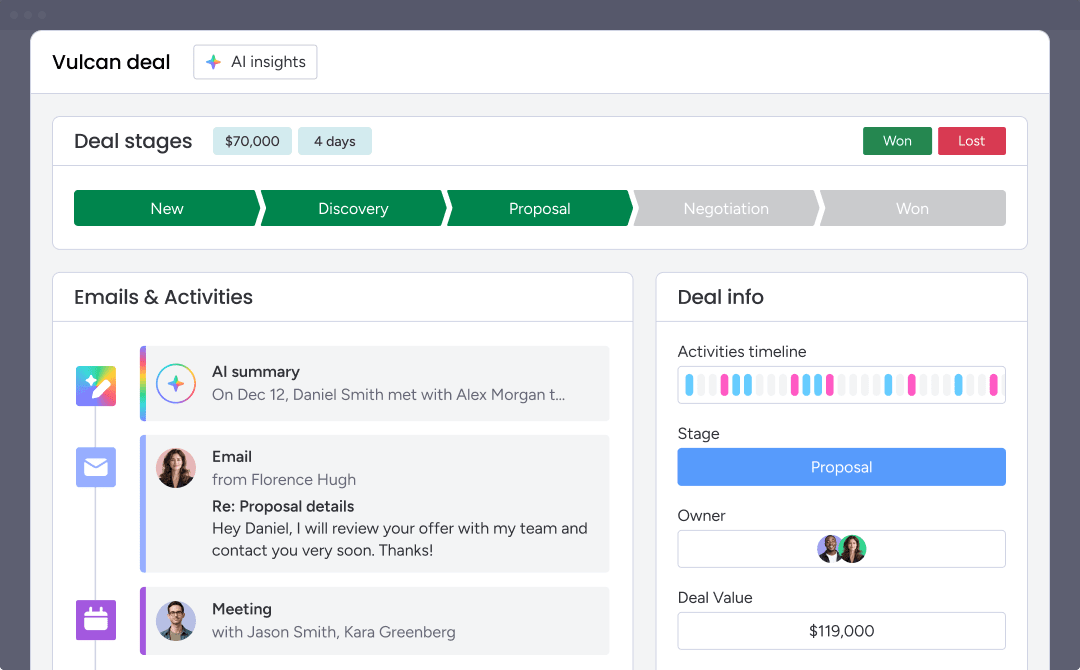
A CRM is what businesses use to manage contacts, deals, and customer relationships. When email marketing is built into that same platform, sales and marketing teams can manage outreach, track engagement, and monitor pipeline activity from a single source of truth.
Instead of switching between separate tools, teams can see how prospects interact with emails and use that information to guide their next steps. Opens, clicks, replies, and campaign activity are automatically connected to the customer record, giving sales reps the context they need before every conversation.
This becomes especially important as buying journeys grow more complex. Modern B2B purchases often involve multiple stakeholders and months of evaluation, making it critical for sales and marketing teams to work from the same customer data. A CRM with email marketing helps keep those interactions organized, visible, and actionable throughout the sales cycle.
What separates one platform from another is how tightly email marketing is connected to the CRM. Native email functionality keeps customer data, campaign activity, and pipeline updates in one place. Platforms that rely on third-party integrations can introduce sync delays, duplicate records, and additional costs, making it harder to maintain an accurate view of customer engagement.
Try monday CRM13 best CRMs with email marketing for growing revenue teams
Choosing the right CRM with email marketing means finding a platform that matches your workflow, not just your feature checklist. The platforms below vary widely in how they handle email — some build it natively into the CRM, while others bolt it on through add-ons or separate products.
This table breaks down use cases, trial availability, standout features, and starting costs so you can evaluate options based on what actually matters to your team:
| Platform | Use case | Free trial | Notable feature | Starting price |
|---|---|---|---|---|
| monday CRM | Revenue teams needing CRM and email marketing together | Yes | AI email assistant + native CRM workflows | $9/seat/month |
| HubSpot | Marketing-led organizations | Yes | Marketing automation | $20/seat/month |
| ActiveCampaign | Advanced email automation | 14-day trial | Automation recipes | $15/month |
| Zoho CRM | Budget-conscious teams | Yes | Zia AI assistant | $14/user/month |
| Pipedrive | SMB sales teams | 14-day trial | Visual pipeline management | $14/user/month |
| Salesforce | Enterprise organizations | 30-day trial | Data Cloud activation | $1,250/org/month |
| Freshworks | Growing sales teams | 21-day trial | Freddy AI | $9/user/month |
| Brevo | High-volume email campaigns | Yes | Transactional email infrastructure | $9/month |
| EngageBay | Startups and small businesses | Yes | Free plan for up to 15 users | Contact for pricing |
| Nutshell | SMB sales and marketing teams | 14-day trial | Pipeline-triggered automation | $13/user/month |
| Keap | Service businesses and solopreneurs | 14-day trial | Automation blueprints | $299/month |
| Benchmark Email | Deliverability-focused teams | Yes | Deliverability support | $27/month |
| Creatio | Mid-market and enterprise teams | 14-day trial | AI Email Generation Agent | Contact for pricing |
*Prices vary based on plan, billing cycle, and region. Verify current pricing on each vendor’s website before making decisions.
1. monday CRM
monday CRM combines sales outreach and pipeline management in one workspace, allowing teams to email prospects and monitor deal progress without hopping between platforms. Revenue organizations use it to handle leads, deals, and post-sale workflows from one place, with email activity stored alongside the broader customer record.

Use case: Revenue teams in SMB and enterprise environments that want email engagement and pipeline visibility inside the same system
Key features
- Mass email and tracking: Send individual and mass emails using dynamic fields and templates, with real-time open rate and link click tracking logged automatically against contact records.
- HTML email editor: Design branded emails directly inside the CRM using drag-and-drop components. No developer is required.
- AI email assistant: Compose emails faster using AI that drafts messages based on deal context and contact history, plus summarizes communication timelines so reps get up to speed in seconds.
Pricing
- Basic: $9/seat/month (billed annually) — core email functionality included.
- Standard: AI email features available.
- Pro: Includes sequences and mass email tracking.
- Enterprise: Enterprise-grade compliance and full AI feature access.
- monday campaigns (email marketing add-on): Starts at $50/month billed annually. A dedicated IP for deliverability is available with the Enterprise plan for this add-on.
Learn more about monday CRM plans and pricing.
Why it stands out
- Emails, calls, meetings, and notes stay together: Teams log and track every interaction in one timeline, so handoffs are seamless and efficient.
- Sales analytics your leaders can use immediately: Dashboards support real-time reporting, with sales-specific views like the Leaderboard widget and Sales funnel widget to spot conversion gaps.
- Forecasting that’s easy to drill into: Teams can track forecast vs. actual sales, and break projections down by month, rep, or other criteria.

“With monday CRM, we’re finally able to adapt the platform to our needs — not the other way around. It gives us the flexibility to work smarter, cut costs, save time, and scale with confidence.”
Samuel Lobao | Contract Administrator & Special Projects, Strategix
“Now we have a lot less data, but it’s quality data. That change allows us to use AI confidently, without second-guessing the outputs.”
Elizabeth Gerbel | CEO
“Without monday CRM, we’d be chasing updates and fixing errors. Now we’re focused on growing the program — not just keeping up with it."
Quentin Williams | Head of Dropship, Freedom Furniture
“There’s probably about a 70% increase in efficiency in regards to the admin tasks that were removed and automated, which is a huge win for us.“
Kyle Dorman | Department Manager - Operations, Ray White
"monday CRM helps us make sure the right people have immediate visibility into the information they need so we're not wasting time."
Luca Pope | Global Client Solutions Manager at Black Mountain
“In a couple of weeks, all of the team members were using monday CRM fully. The automations and the many integrations, make monday CRM the best CRM in the market right now.”
Nuno Godinho | CIO at Velv
“monday.com provides developmental flexibility, operational efficiency, and data transparency — all in one place. We became a company that moved from chasing data to leading with it.”
Hyunghan Lee | Team Lead, Sandbox Network
"monday.com brought every part of our business into one connected space. The harmony between work management and CRM has become our operating system — giving us the clarity and confidence to scale.”
Jennifer Chinburg | Executive Vice President of Corporate Development & Brand, Chinburg Properties
“We just weren’t getting value from our old CRM. With monday.com, it's a thousand times better. Our sales teams are more informed, more consistent, and far more connected."
James Arnold | Chief Operating Officer, Cenversa2. HubSpot
HubSpot pairs a full CRM with native email marketing, giving marketing-led teams one system for contacts, campaigns, and automated nurture flows. It’s built for organizations that want deep marketing automation beside their CRM, with A/B testing, segmentation, and AI-assisted copy built in.

Use case: Marketing-led organizations that want contact management, email campaigns, and automated nurture workflows running from the same CRM data
Key features
- Drag-and-drop email editor: Build branded, mobile-responsive emails using pre-built templates — no coding required.
- Marketing automation workflows: Create multi-step nurture paths that combine email sends, CRM updates, and contact actions at the Professional and Enterprise tiers.
- A/B testing and send-time optimization: Test subject lines and content at the Professional tier, with per-contact send-time optimization available in Enterprise (currently in beta).
Pricing
- Free: Basic email tools included with the free CRM tier.
- Starter: From $20/seat per month, includes 1,000 marketing contacts.
- Professional: From $890/month (3 core seats included), 2,000 marketing contacts; $3,000 onboarding fee required.
- Enterprise: From $3,600/month (5 core seats included), 10,000 marketing contacts; $7,000 onboarding fee required.
- Add-ons: Dedicated IP ($300/month) and transactional email ($600/month) available for Professional and Enterprise plans.
Considerations
- Features like A/B testing, workflow automation, and send-time optimization are reserved for Professional and Enterprise tiers, and those plans require onboarding fees that climb quickly as contact volume increases.
- Teams centered on sales-driven outreach (sequences, follow-ups, and rep-to-prospect communication) may end up paying for a broad set of marketing tools they rarely use.
3. ActiveCampaign
ActiveCampaign earned its name by leading with email marketing automation, and that focus is still obvious. The platform offers a powerful automation builder for marketing teams running sophisticated, behavior-based nurture programs. If complex email orchestration is the priority and CRM plays a supporting role, ActiveCampaign deserves attention.

Use case: Marketing-led teams that need advanced email automation, AI-assisted campaign creation, and multi-channel orchestration
Key features
- Advanced automation builder: Build multi-step email workflows with conditional splits, wait steps, goal tracking, and 1,000+ pre-built automation recipes built for complex nurture sequences.
- AI-powered campaign creation: ActiveCampaign’s Active Intelligence layer generates full campaigns from a prompt, suggests audience segments, and uses Predictive Sending to optimize send times at the individual contact level.
- Email segmentation and personalization: Segment contacts based on behavior, engagement, ecommerce data, and custom fields, with conditional content blocks for personalized messaging at scale.
Pricing
- Starter: From $15/month (pricing scales with contact list size)
- Plus, Professional, and Enterprise tiers available with expanded features including Predictive Sending (Pro/Enterprise) and HIPAA compliance (Enterprise)
- Annual billing discount available
- 20% discount for nonprofits
- Add-ons available for SMS, custom reporting, transactional email, and enhanced CRM packages
- No permanent free plan; a 14-day free trial is available with Professional-tier features
Considerations
- The CRM pipeline works, but it’s basic. Sales teams that need strong deal tracking, pipeline visibility, and email execution in one place will find the sales functionality lighter than what dedicated CRM platforms provide.
- Pricing climbs with contact count, which can increase costs faster than expected if list hygiene slips.
4. Zoho CRM
Zoho CRM combines built-in email capabilities with AI-assisted outreach, so sales teams can follow up at the right moment. It supports businesses from startups on a free plan to larger enterprises, and its broad app ecosystem cuts dependence on outside vendors. For companies already using Zoho products, the connection between Zoho CRM and Zoho Campaigns adds marketing depth without leaving the ecosystem.

Use case: Budget-conscious teams that want AI-assisted send timing, contact-level engagement tracking, and workflow automation without enterprise pricing
Key features
- Zoho Campaigns integration: Send email campaigns directly from Zoho CRM, with contact segmentation and performance tracking synced between both platforms.
- Zia AI assistant: Get AI recommendations for better email send times, subject line improvements, and contact engagement predictions.
- Workflow automation: Automate email follow-ups, task creation, and pipeline updates based on custom triggers and conditions.
Pricing
- Standard: $14/user/month (billed annually)
- Professional: $23/user/month (billed annually)
- Enterprise: $40/user/month (billed annually)
- Ultimate: $52/user/month (billed annually)
- Annual billing saves up to 34% compared to monthly plans.
- Full email marketing features require Zoho Campaigns as an add-on or a higher-tier plan.
- Mass email send limits can be increased for an additional fee by contacting sales.
Considerations
- Email marketing is divided between Zoho CRM and Zoho Campaigns, so teams may still find themselves managing 2 products within the same ecosystem rather than operating from a fully unified platform.
- The platform offers a lot of functionality, but setup can take time and require technical configuration, creating friction for teams that need to move quickly.
5. Pipedrive
Pipedrive centers the experience around visual pipeline management for SMB sales teams that want a quick, intuitive CRM without a steep learning curve. Created by salespeople for salespeople, it keeps deal tracking front and center, while email marketing is offered separately through an add-on. For teams that care more about pipeline visibility than campaign depth, it delivers a focused experience.

Use case: Small and midsized sales teams that want a visually oriented CRM and the option to add email marketing through the Campaigns add-on
Key features
- Visual pipeline management: Track deals across customizable pipeline stages using a drag-and-drop Kanban-style board, giving sales teams an instant view of where every deal stands.
- Email sync: Connect Gmail or Outlook to automatically log emails against contact records, keeping communication history organized without manual entry.
- Campaigns add-on: Build and send bulk email campaigns using a drag-and-drop editor, CRM-native segmentation, and real-time analytics — including open rates, clicks, and delivery performance — all visible at the contact level.
Pricing
- Lite: $14/user per month (billed annually)
- Growth: $39/user per month (billed annually)
- Premium: $59/user per month (billed annually)
- Ultimate: $79/user per month (billed annually)
- Campaigns add-on: From $13.33/month per company (billed separately, across all plans)
- 14-day free trial available on all plans; 21-day Campaigns trial available separately
Considerations
- Email marketing is absent from the core plans. To get campaign functionality, teams must buy the Campaigns add-on separately, which adds both cost and setup work.
- Campaign engagement tracking is turned off by default and must be enabled before sending, since it will not apply retroactively to campaigns that have already gone out.
6. Salesforce
Built for enterprise-level complexity, Salesforce connects CRM data, AI, and marketing orchestration across a broad platform. Email marketing, however, is not included by default; companies need Marketing Cloud or Account Engagement as separate products.

Use case: Large enterprises that need deep CRM customization, data activation across clouds, and sophisticated multi-channel marketing orchestration at scale
Key features
- Marketing Cloud Engagement: Enterprise-grade email marketing with Journey Builder for triggered and multi-step campaigns, Content Builder for drag-and-drop or code-based email creation, and Einstein AI for send time optimization and engagement scoring.
- Marketing Cloud Account Engagement (formerly Pardot): B2B marketing automation with lead scoring, nurture programs, A/B testing, and tight Sales Cloud alignment for revenue attribution.
- Data Cloud activation: Unified customer profiles built from CRM, commerce, and external data sources that feed directly into email segmentation and personalization — no manual data exports required.
Pricing
- Marketing Cloud Engagement: From $2,000/org per month (Pro+) to $30,000/org per month (Enterprise+), billed annually
- Marketing Cloud Next: From $1,500/org per month (Growth) to $3,250/org per month (Advanced), billed annually
- Account Engagement: From $1,250/org per month (Growth+) to $15,000/org per month (Premium+), billed annually
- Add-ons include Sender Authentication Package (SAP), dedicated IPs, additional contact volumes, and messaging credits for SMS and WhatsApp
Considerations
- CRM and email marketing are not bundled together. Marketing Cloud and Account Engagement come with their own pricing, implementation timelines, and admin needs, which substantially increases total cost of ownership.
- Advanced personalization depends on proprietary scripting languages (AMPscript, SSJS, GTL), and the platform generally needs ongoing admin support. Mid-market teams without a Salesforce administrator or implementation partner may struggle to justify the ramp-up time and overhead.
7. Freshworks
Freshworks, specifically Freshsales, combines AI-assisted email and CRM functionality in one platform, giving growing teams a single place to manage contacts, automate follow-ups, and track conversations. Freddy AI handles lead scoring, email suggestions, and next-best-action recommendations, making it a practical option for teams that want AI support without enterprise-level cost or complexity.

Use case: Growing sales teams that want built-in email automation and AI-driven insights without a heavy implementation burden
Key features
- Freddy AI: Delivers email suggestions, lead scoring, and next-best-action recommendations based on contact behavior, so reps spend less time guessing and more time acting.
- Built-in email sequences: Automates follow-up emails with personalization and trigger-based sending to keep prospects engaged without manual effort.
- Unified inbox: Consolidates emails, calls, and notes into a single contact timeline, giving reps full context before every interaction.
Pricing
- Free plan: Available for up to 3 users
- Growth: $9/user/month (billed annually)
- Pro: $39/user/month (billed annually)
- Enterprise: $59/user/month (billed annually)
- All paid plans include 500 marketing contacts; additional contacts and dedicated IPs are available as add-ons
Considerations
- No-code customization is more limited for teams with unusual or highly complex sales workflows that need flexibility without developer support.
- Monthly campaign sends are capped relative to contact counts, and scaling beyond the included marketing contacts requires additional purchases.
8. Brevo
Brevo brings email marketing and CRM into one multichannel platform, covering campaigns, transactional email, SMS, WhatsApp, and push notifications. It is built for teams where email drives growth first, with CRM functioning as a lighter support layer. For marketers who need campaign strength more than deep sales operations, that balance can work well.

Use case: Small to midsized teams running high-volume email campaigns who also need lightweight contact and deal management
Key features
- Drag-and-drop email builder: Design campaigns using 50+ responsive templates, with A/B testing, device previews, and AI send-time optimization to improve engagement.
- Transactional email infrastructure: Send automated order confirmations, password resets, and behavioral triggers with a claimed 99% delivery rate, dedicated IP options, and SPF/DKIM/DMARC authentication support.
- Basic CRM pipeline: Track deals through simple pipeline stages with contact management and activity logging — functional for teams with straightforward sales processes.
Pricing
- Free: $0/month — 300 daily email sends, 1 user, basic automation (up to 2,000 contacts), Aura AI included
- Starter: From $9/month — removes daily send limit, adds advanced segmentation and web push (up to 1,000 subscribers); “Remove Brevo logo” available as a $9/month add-on
- Standard: From $18/month — includes marketing automation, A/B testing, AI send-time optimization, advanced reports, landing pages, and user permissions
- Professional: From $499/month — up to 10 users, AI segmentation, WhatsApp and push, ecommerce AI recommendations, analytics studio, and deliverability strategist access
- Enterprise: Custom pricing — unlimited contact storage, custom monthly sends, loyalty engine, custom data integrations, and dedicated onboarding
- Annual billing saves 10% across paid plans
- Add-on costs to note: additional marketing seats at $9/seat/month (Standard), SAML SSO at $324/month (Professional), and dedicated IP at $251/year
Considerations
- Its CRM capabilities are limited compared to dedicated sales platforms. Teams that need stronger pipeline management, forecasting, or sales automation will likely outgrow it on the CRM side.
- Advanced channels like WhatsApp and mobile push, along with key AI features, are restricted to Professional and Enterprise tiers, which begin at $499/month — a steep jump from Standard pricing.
9. EngageBay
EngageBay combines CRM, email marketing, and marketing automation in one platform with pricing aimed squarely at small businesses. It appeals to early-stage teams that want a combined sales and marketing stack without maintaining several subscriptions. The free plan supports up to 15 users, making it one of the more accessible starting points in this category.

Use case: Small businesses and startups that want CRM and email marketing together without paying for separate platforms
Key features
- Combined CRM and email marketing: Manage contacts, deals, and email campaigns in one place, with behavior-based triggers and segmentation tied directly to CRM data.
- Marketing automation: Build visual workflows that connect email sequences, pipeline updates, and lead capture — with A/B testing and time-zone-aware broadcast scheduling available on higher tiers.
- AI email assistance: Generate subject lines, draft copy, and get send-time suggestions using built-in AI features across the marketing suite.
Pricing
EngageBay structures pricing across 2 main options: the Marketing Bay (email marketing focus) and the All-in-One suite (full stack). Both follow a Free, Basic, Growth, and Pro tier structure.
Marketing Bay:
- Free: $0/month — 250 contacts, 1,000 branded emails/month, basic email features, 2 sequences
- Basic: Paid — 500 contacts, 2,500 branded emails/month, landing page builder, basic automation
- Growth: Paid — 3,000 contacts, 20,000 branded emails/month, marketing automation, A/B testing, custom domain
- Pro: Paid — 10,000 contacts, 30,000 branded emails/month, advanced analytics, SSO, dedicated account manager, phone support
Annual billing saves 8%; biennial billing saves 15%.
Emails sent on all plans include EngageBay branding by default. Removing branding requires purchasing email credits ($4 per 1,000) or routing sends through a third-party SMTP provider such as SendGrid or Mailgun (approximately $1 per 1,000) — costs that sit outside the subscription fee.
Considerations
- More advanced marketing automation starts at the Growth tier, so teams on Free or Basic will run into limitations as their needs expand.
- Reporting depth, AI capability, and pipeline customization are lighter than what mid-market platforms offer, which makes EngageBay a stronger fit for early-stage companies than scaling revenue teams.
10. Nutshell
Nutshell puts CRM and email marketing into one platform, helping SMBs handle outreach and sales without juggling multiple tools. It is built around simplicity and guided selling, which makes it a practical option for smaller teams that want quick setup and a unified view of pipeline and campaigns.

Use case: SMBs looking for CRM-driven email marketing without enterprise overhead, giving sales and marketing teams one system for contacts, outreach automation, and deal tracking
Key features
- Nutshell Campaigns: Send broadcasts, newsletters, and drip sequences directly from the CRM, with a drag-and-drop builder, templates, and AI-assisted writing to speed up campaign creation.
- Pipeline-triggered automation: Automatically start drip sequences when a lead is created, a tag is added, or a deal moves to a new stage, keeping outreach tied directly to sales activity.
- Next Action Selling: A built-in methodology that surfaces the next recommended action for each contact, helping reps stay focused on the right priorities without manual triage.
Pricing
- Foundation: $13/user/month (annual billing)
- Growth: $25/user/month (annual billing)
- Pro: $42/user/month (annual billing)
- Business: $59/user/month (annual billing)
- Enterprise: $79/user/month (annual billing)
- Annual billing saves 15% compared to monthly rates
- Email marketing is included at a foundation level (150 sends/month) with all CRM plans; paid usage scales by contact tier from $5/month
- Marketing Pro add-on available at $49/month, unlocking A/B testing, SMS, advanced reporting, and page-based automations
Considerations
- More advanced email marketing capabilities — including A/B testing, link-level click reporting, and page-based automations — require the Marketing Pro add-on, which raises the overall cost.
- Marketing seat limits are capped by plan (3 seats on Marketing Foundation, 10 on Marketing Pro), which can become restrictive for larger or expanding teams.
11. Keap
Keap combines CRM, email automation, and payment processing in one platform for small businesses. Operating for more than 2 decades, it is a common choice for service-based companies that want to manage contacts, send campaigns, and collect payments without stitching together a stack of separate tools. Pre-built automation blueprints and deep CRM integration make it especially practical for solopreneurs and small teams wearing multiple hats.

Use case: Small businesses and solopreneurs that need CRM, email automation, invoicing, and appointment scheduling in one place instead of across several platforms
Key features
- CRM-powered email automation: Trigger email sequences from tags, pipeline stages, or purchases, so every message is perfectly timed and relevant.
- Drag-and-drop email builder: Design campaigns with multi-column layouts, a stock image library, countdown timers, and mobile/desktop preview, then send from verified custom domains for stronger deliverability.
- Pre-built automation blueprints: Launch proven workflows for lead nurture, appointment reminders, and invoice follow-ups without building sequences from scratch.
Pricing
- Base plan: Starts at $299/month (monthly billing) or $2,988/year (annual billing)
- Free trial: 14-day trial available with limited email sending (up to 25 emails)
- Additional users: $39/month per user beyond the 2 included licenses
- Implementation fee: One-time $500 onboarding service, required at signup
- Contact add-ons: Available in tiers; larger volumes handled via sales
- SMS marketing: Usage-based pricing; available in the U.S. only
Considerations
- Costs increase as contact list size grows, so pricing can climb quickly for businesses with expanding audiences.
- The workflow builder comes with a steeper learning curve than more flexible no-code CRM options, which can slow teams that need to make changes quickly.
12. Benchmark Email
Benchmark Email stays tightly focused on fast email creation, deliverability, and contact management rather than full CRM complexity. Founded in 2004, it’s built for SMBs and busy marketing teams that need to send quickly. If email is the main channel and detailed sales pipeline management matters less, it deserves consideration.

Use case: Teams that care more about deliverability and speed than pipeline management or sales automation
Key features
- Drag-and-drop email builder: Build branded, mobile-responsive emails using pre-built templates, saved blocks, and AI-assisted copy generation (Smart Content) — with a pre-send audit checklist to catch errors before you hit send.
- Deliverability support: Built-in domain authentication guidance (SPF, DKIM, DMARC), dedicated IP options for high-volume senders, and one-on-one deliverability assistance to protect sender reputation.
- Contact management and segmentation: Dynamic lists that update automatically, tag-based filtering, and a real-time contact activity feed to track engagement at a glance.
Pricing
- Free: $0/month — up to 500 contacts, 2,500 sends/month, 1 user, core features included.
- Pro: Starts at $27/month — contact-tiered from 2,500 contacts, sends up to 10x the contact limit, up to 10 domains; additional users at $15/month each (max 10).
- Enterprise: Custom pricing for 100,000+ contacts, includes dedicated IP, whitelabeling, and 24/7 support.
- Annual discount: Save $60/year on the Pro plan when billed annually.
- Add-on: Dedicated IP available at $28.95/month for eligible plans.
Considerations
- Benchmark Email includes basic contact storage and email engagement tracking, but it does not offer pipeline management, deal tracking, or sales automation — teams that need those features will need another platform.
- Advanced automation is described as planned rather than currently available, which limits the ability to build multi-step, behavior-triggered workflows without workarounds.
13. Creatio
Creatio combines CRM and no-code process automation in a platform aimed at mid-market and enterprise teams. Sales, marketing, and service modules sit together with AI-assisted email campaign tools, making it a strong option for organizations that need deep workflow customization alongside outreach. Its AI Email Generation Agent and multi-channel orchestration are notable differentiators.

Use case: Mid-market and enterprise revenue teams that need complex, automated email campaigns running directly inside a unified CRM and process automation system
Key features
- AI Email Generation Agent: Automatically generates email content and coordinates multi-channel campaign orchestration across email, SMS, and digital ads without manual intervention.
- Visual email designer with A/B testing: A drag-and-drop Content Designer lets marketers build responsive emails, test subject lines and content variants, and deploy winning versions to the remaining audience.
- Enterprise-grade deliverability controls: Built-in throttling queues, duplicate suppression, unsubscribe enforcement, and warmup sequencing protect sender reputation at high send volumes.
Pricing
- Platform plans: Growth, Enterprise, and Unlimited tiers available; core pricing is quote-based.
- AI packages: Publicly listed add-on packages (Start, Grow, Accelerate, Scale, Freedom) with published annual prices based on AI Actions quotas
- Marketing contacts: Active contact licenses are sold separately in blocks and are required for marketing functionality
- Support plans: Business support at 10% of subscription cost; Premium support at 20%
- 14-day trial with no feature limits available
Considerations
- Fine-grained subscription preference management, such as segmenting opt-ins by email type, is not included in the base setup and requires extra developer work.
- Implementation can be complex, and the platform generally requires dedicated admin support, which makes it less accessible to smaller teams or organizations that need to get up and running quickly.
7 must-have features in a CRM with email marketing
Not all CRMs with email marketing work the same way. A native platform feels seamless. A patched-together integration creates daily friction. Before you commit, test the basics. Does email activity log automatically? Do automations fire instantly? These 7 features separate platforms that work from ones that don’t:
1. Contact and lead management
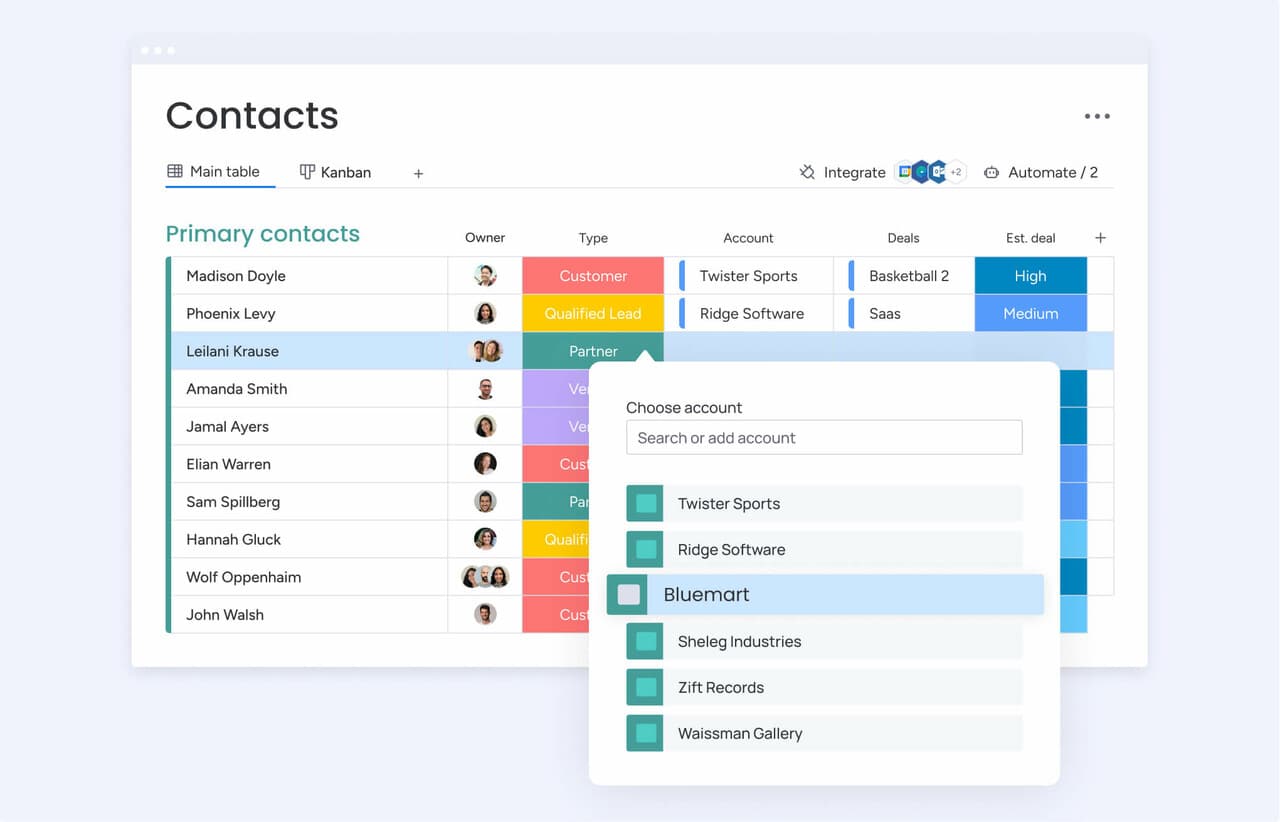
Everything starts here. If a contact opens an email, that signal should immediately update the record so reps have the full picture before the next call. Reps should have the full picture before every call, with all context available in one place.
Look for a system that gives you:
- Full context: Every name, company, deal, email, call, and note in a single timeline.
- Clear associations: Contacts linked directly to the deals they’re part of.
- Smart workflows: Leads that move through stages based on real engagement.
2. Email automation and sequences
Think of sequences as the guardrails that keep follow-up from slipping. They are pre-built email series that keep leads engaged and ensure all important next steps are completed. For teams managing a large number of opportunities, that is table stakes.
Strong automation should include:
- Flexible triggers: Start sequences based on time, behavior, or pipeline stage.
- Smart personalization: Pull contact details directly into your emails.
- Real visibility: See open rates, reply rates, and where people drop off.
3. Mass email and tracking
Mass email is not just list blasting. The real value comes from targeted, personalized outreach to a defined segment without leaving the CRM — think account-based messaging or product updates for a specific group. The tracking piece should be just as granular. If a contact clicks a link, that engagement should show up on their timeline, not only in aggregate campaign metrics.
4. Segmentation and personalization
Generic email gets ignored. Segmentation lets you divide contacts by industry, deal stage, or any custom field that matters to your process, while personalization uses that data to make each message feel relevant.
The important test is where that segmentation comes from. It should pull from CRM data, not just email behavior. Can you target contacts based on deal value or pipeline stage? That is the difference between a message that resonates and one that gets deleted.
5. AI email composition
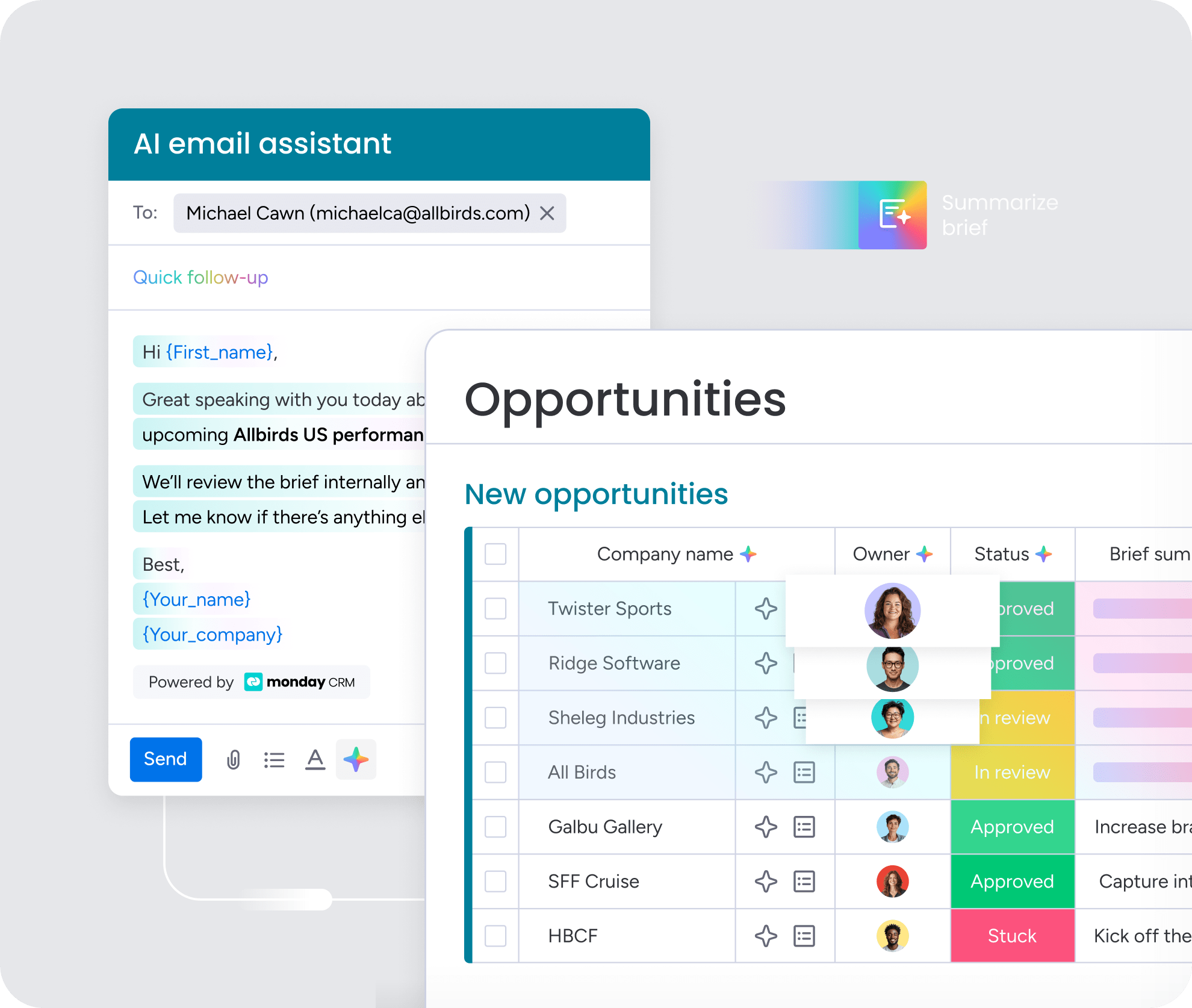
AI email tools have moved from optional to expected. A strong AI composer helps reps draft relevant messages in seconds by using contact history and deal context. Their time should go into selling, not wordsmithing every email.
6. Reporting and revenue attribution
Open rates tell you who engaged. Revenue attribution tells you whether those emails actually influenced closed business. A useful CRM should connect email activity directly to pipeline outcomes.
This link provides direct insight into how email performance impacts revenue. The reporting layer should include:
- Dashboards: Connecting email activity to deal progression.
- Filters: To isolate performance by rep, campaign, or time.
- Attribution: That shows which emails influenced closed-won deals.
7. Native integrations with Gmail and Outlook
Most reps live in their inbox. If the CRM forces them to leave it for every task, adoption drops fast. Native integration means messages sent from Gmail or Outlook automatically appear in the CRM. It also needs to be a real 2-way sync, not a one-way export. The right feature set should remove manual work, not introduce one more system to maintain.
Try monday CRM6 benefits of combining CRM and email marketing
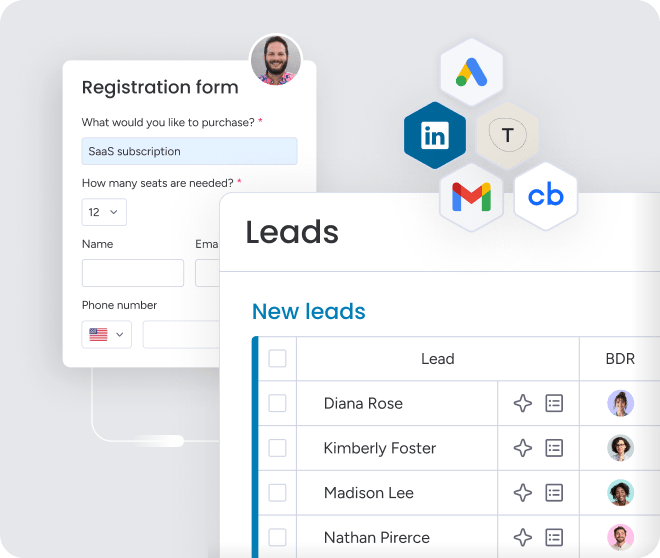
When your CRM and email platform are disconnected, the fallout goes beyond admin hassle. It creates blind spots, slows follow-up, and leaves room for deals to slip through. Once both systems operate together, the difference is immediate.
- Give your teams one source of truth: If email activity lives inside the CRM, every open, click, and reply updates the contact record right away. Sales can see what marketing sent. Marketing can see who is already in an active sales motion. No one has to rely on stale data or chase updates manually.
- Respond to leads before they go cold: With CRM marketing automation built into the platform, those next steps do not depend on memory. A new lead can enter a welcome sequence automatically, and a sent proposal can trigger a follow-up on schedule.
- Know which emails actually make you money: A unified platform closes that gap by tying email activity directly to deal movement. Instead of merely seeing what got opened, sales leaders can identify what actually helped move opportunities forward and use that information in forecasting and reporting.
- Get adoption from a CRM your reps will actually use: Bringing email directly into the CRM simplifies the workflow enough that usage becomes far more natural. monday CRM is built to reduce that friction, so reps can manage outreach in one place and leadership gets more complete data as a result.
- Create a consistent customer experience: A single platform gives each team access to the same customer history. Handoffs become smoother because everyone is operating from a common record, and the customer gets a more consistent experience.
- Pay for one tool instead of 2: Consolidating CRM and email marketing into one platform reduces that overhead. monday CRM is designed to simplify revenue operations instead of layering on more complexity, which can save time, money, and a fair amount of frustration.
Bringing these capabilities together removes friction and frees your team to focus on revenue-generating work.
Try monday CRM5 steps to choose the right CRM with email marketing
Choosing the right CRM with email marketing comes down to matching the platform to your actual workflow, not just checking boxes on a feature list. These 5 steps will help you evaluate options based on how your team really works, what the platform will actually cost, and whether your reps will use it consistently.
- Map your real-life lead journey: Document the actual path a lead takes through your business — who sends emails, at what points, and whether those messages are personal sales notes or automated nurture emails. This helps you eliminate platforms that don’t match your workflow. A platform built for bulk marketing campaigns will frustrate a sales team that depends on one-to-one outreach.
- Choose between native and integrated email: Decide whether you want email marketing built into your CRM or connected through a third-party integration. Native email uses the same database, tracks activity instantly, and eliminates duplicate contacts and sync delays. Integrated setups can create data issues and require ongoing monitoring, making native the safer choice for teams without dedicated admin support.
- Evaluate the AI and automation capabilities: Look for AI that uses your CRM data — contact history, deal stage, and engagement patterns — not just template filling. Check whether AI tools are included in the base price or sold as add-ons, and confirm that automation setup doesn’t require IT involvement.
- Calculate the true annual cost: Go beyond the sticker price. Factor in users, contacts, add-ons, onboarding fees, and any extra products required to get the setup you need. Contact-based pricing can increase quickly as you grow, and maintaining 2 separate systems often erases apparent savings.
- Test for implementation speed and adoption: Run a real workflow during the trial to see how long it takes a rep to send their first tracked email. If setup takes weeks, adoption will suffer. The strongest platform is the one that matches the way your team actually sells, not the one with the biggest feature list.
How monday CRM unifies email marketing and sales
Most platforms split email and sales data into separate places, forcing teams to piece together the customer story by hand. monday CRM takes a different approach: Every open, click, and reply appears directly on the deal timeline, where it can immediately inform the next action.
Here is how teams can run the full sales cycle — from first touch to signature — in one system:
- Send campaigns from your CRM: Build and send personalized emails right from your pipeline. See every open and click in real time, so you know exactly who’s engaged.
- Automate follow-ups based on real activity: What happens when a deal goes cold or a proposal goes unanswered? With automated triggers, you can fire off the next email automatically, ensuring consistent follow-up. Your sales managers can build these workflows in minutes, no code or IT help needed.
- Let AI write your emails: Our AI assistant drafts outreach based on deal stage and recent activity, so your team sells more and types less. It also summarizes long email threads, making handoffs and follow-ups instant.
- Sync your inbox automatically: Work from Gmail or Outlook and let the platform do the logging for you. Every email and meeting is captured in the contact timeline, so nothing gets lost.
- Connect your entire revenue team: When a deal closes, an automated workflow hands it off to the next team: account management, legal, you name it. Everyone gets the full context without digging through old emails.
Email is more than a feature. Inside a unified CRM, it becomes the mechanism that keeps deals moving, helps reps decide where to focus, and gives leadership a clearer view of revenue performance.
Turn your inbox into a revenue engine
When email marketing lives inside your CRM, reps get full context before every conversation and leaders gain the visibility needed to forecast with confidence. Automated follow-ups and AI-assisted drafting free your team to focus on relationships instead of admin work, turning your inbox into a real revenue engine.
monday CRM unifies sales outreach and pipeline management in one workspace, so nothing slips through the cracks. See how it works for your team — no separate tools, no sync delays, just one platform that matches the way you actually sell.
Try monday CRMFAQs
What is the difference between a CRM and email marketing?
The difference between a CRM and email marketing is that a CRM manages the full customer relationship, including contacts, deals, and communication history. Email marketing is one function within that broader process, focused specifically on sending campaigns.
Can you use a CRM for email marketing?
Yes, you can use a CRM for email marketing, and the strongest CRM platforms include those capabilities natively. That connection links email activity to deal data, making it easier to see what is influencing revenue.
What is the best CRM with email marketing for small businesses?
For small businesses, the best CRM with email marketing is the one your team will consistently use. Prioritize a platform that is easy to customize and offers AI-assisted email tools without the weight of enterprise complexity.
How do I integrate email marketing with my CRM?
The simplest route is to choose a platform where email marketing is already built into the CRM, which removes setup work. If you use separate tools, you will need to connect them, and that can introduce delays and extra manual effort.
What are the benefits of combining CRM and email marketing?
Combining CRM and email marketing gives your team a single source of truth. It also removes guesswork by tying email engagement directly to pipeline outcomes.
Do I need separate tools for CRM and email marketing?
No, most teams don't need separate tools anymore. In many cases, the hidden cost of keeping 2 systems aligned (including data issues and wasted time) outweighs the advantages of maintaining a separate email platform.
What CRM has the best built-in email marketing?
The best CRM with built-in email marketing depends on your team's workflow and priorities. monday CRM stands out for revenue teams that want email engagement and pipeline visibility in one system, with AI-assisted drafting, automated sequences, and real-time tracking that updates deal records instantly. The strongest choice is the platform where email activity connects directly to your sales process without requiring separate tools or manual syncing.
