


When you’re running a small business, customer support can feel like controlled chaos. Questions flood in through email, social media DMs, live chat, and text messages, all while you’re trying to actually run your business. Miss one message, and you risk losing a customer. Respond too slowly, and they’re already writing a negative review.
Without a proper system, support is a mess of searching through inboxes and remembering who said what. It doesn’t take long before this approach breaks, especially if your business is growing.
Help desk software gives you a central hub for every customer conversation and automates the repetitive stuff, so you can deliver professional support without the overhead of a full team. This article introduces 12 small business help desk tools, including monday service, that could be a great fit for your tech stack.
Try monday serviceKey takeaways
- Small business help desk software centralizes customer conversations so teams can manage support consistently.
- The best tools reduce manual work with automation and self-service, helping small teams do more without adding headcount.
- Ease of setup and everyday usability matter more than advanced features for most small businesses.
- AI is most valuable when it saves time on triage, responses, and reporting, not when it adds complexity.
- monday service stands out by combining flexible ticketing, automation, and built-in AI in a platform small businesses can adapt to their needs as they grow.
What is small business help desk software?
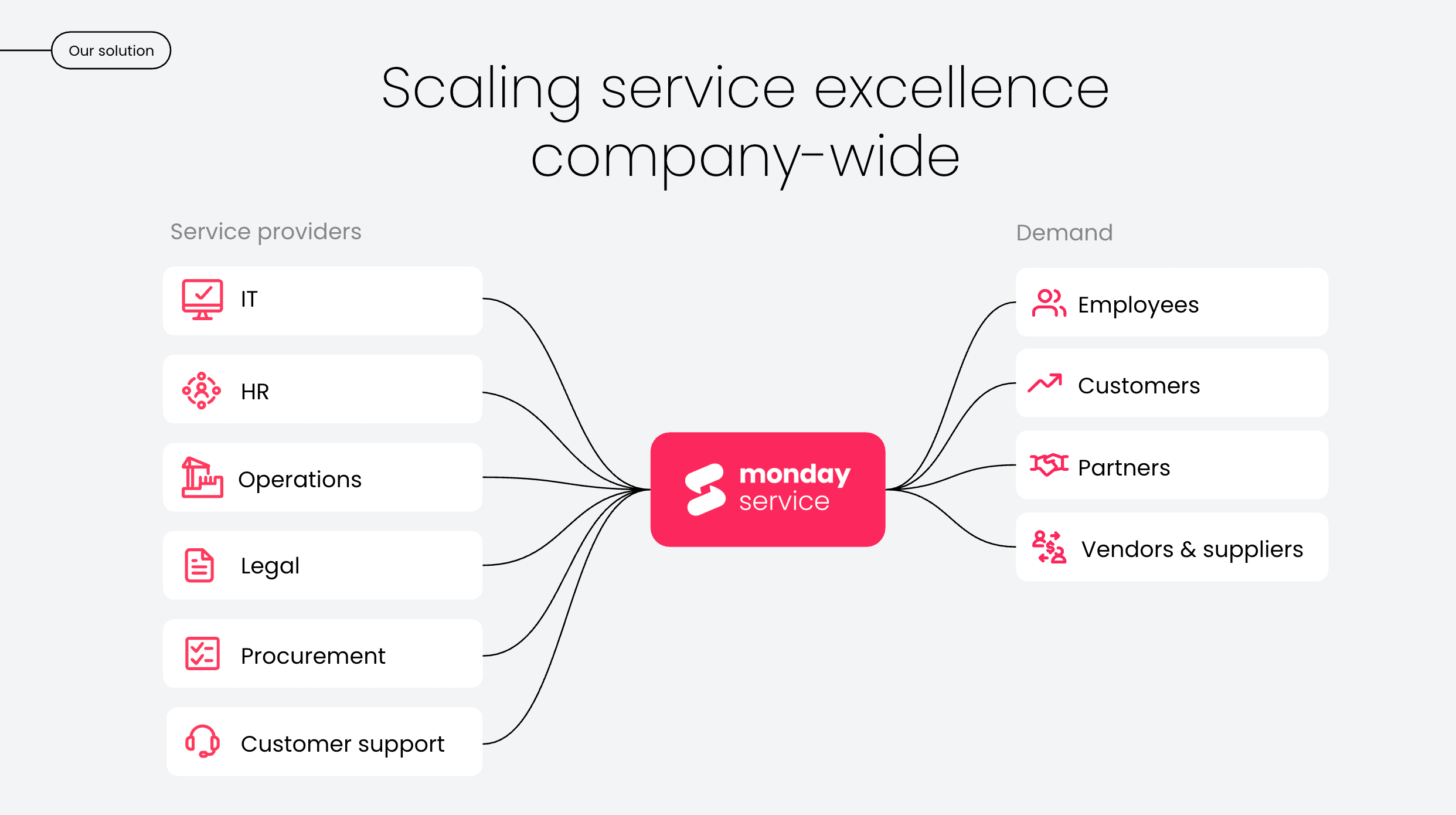
Small business help desk software helps you manage, organize, and respond to customer questions and support requests from one central place. Think of it as mission control for customer service: instead of juggling support emails across multiple messaging and communication tools, everything lands in one organized system.
For small businesses, this software provides:
- Automated responses for common questions
- A knowledge base where customers can find their own answers
- Performance insights to understand what’s working
- Collaboration features so your teams stay in sync
The best platforms also include AI capabilities that handle routine inquiries instantly, freeing you up to focus on the customer interactions that really need your personal touch.
The key difference between help desk software and just using email? Structure and scalability. As your business grows from handling 10 support requests a week to 100, help desk software grows with you. You don’t need to hire a full support team and you’ll still provide the personal service your customers love.

Why is small business help desk software important?
When you’re running a small business, every customer interaction matters. Here’s how help desk software plays an all-important role in turning first-time buyers into loyal brand advocates.
Building long-term customer relationships
Customers will always remember how you made them feel when something went wrong. Help desk software leaves no question unanswered and no customer ignored. With full conversation history at your fingertips, you’ll deliver a level of personalized attention that builds trust and loyalty — the kind that keeps customers coming back for more and recommending you to others.
Lowering operational costs
Time is money, especially for small businesses. Help desk software automates repetitive stuff, like routing tickets, sending status updates, and answering FAQs, so your team can focus on solving complex problems.
Self-service knowledge bases let customers find answers on their own time, reducing the volume of incoming requests. As a result, you’ll deliver better support with fewer resources, without burning out your team or breaking the bank on additional hires.
Unifying customer data
Help desk software brings all your customer conversations together in one place, giving you a complete view of each customer’s journey. You’ll see their purchase history, previous support issues, and communication preferences, all in one dashboard. From here, you’ll notice any recurring difficulties and, ultimately, make smarter business decisions based on what your customers actually need.
What features should you look for in small business help desk software?
Not all help desk platforms are created equal. The right one for your small business should offer features that actually move the needle, without overwhelming you with bloat you’ll never use. Here’s what to prioritize:
- AI chatbots: Customers expect immediate responses, and conversational AI delivers exactly that. They can handle common questions 24/7, or escalate to a human agent as needed.
- AI-powered automation: You’re already wearing multiple hats. Let AI handle the grunt work like categorizing tickets, suggesting responses, and summarizing conversations so you can focus on what matters.
- Omnichannel support: Your customers reach out everywhere: email, live chat, phone, social media, even Slack. Your help desk should bring all these channels into one unified inbox.
- Automated workflows: Set up automatic notifications to keep customers updated on their ticket status, assign incoming requests to the right team member, and trigger follow-ups without manual effort.
- Reporting and analytics: You need insights, not just data. Look for dashboards that show response times, customer satisfaction, common issues, and team performance at a glance.
- Knowledge base: A self-service portal with help articles and FAQs empowers customers to find answers themselves, reducing your support volume.
- Ease of use: If it takes weeks to set up or requires a technical expert, it’s not right for a small business. You need something intuitive that you can configure and manage yourself.
- Responsive customer support: When you hit a roadblock, you need quick answers from real people who understand your business constraints.
- Smart pricing: Free plans can be tempting, but they often come with limitations that cost you more in the long run. Look for lean, focused pricing without unnecessary features.
12 small business help desk software solutions for 2026
To narrow down the selection of small business help desk software, we analyzed hundreds of verified user reviews and leaned on our service management expertise to understand what real small business owners and support teams actually experience with help desk platforms. Here’s some fast facts about each platform.
| Tool | Best for | Key features | Free plan | Paid pricing starts from |
|---|---|---|---|---|
| monday service | Flexible service management for growing small teams | - Centralized ticketing across channels - AI Blocks for routing and summaries - No-code workflows and analytics | Yes | $26/seat/mo |
| Zoho Desk | Budget-friendly support in Zoho ecosystem | - Omnichannel ticketing - Zia AI for prioritization - Blueprint workflow automation | Yes | $7/user/mo |
| Freshdesk | Fast setup for growing support teams | - Ticket-based support - Freddy AI assistance - Rules-based automation | Yes | $15/user/mo |
| Help Scout | Email-based support with a personal tone | - Shared inbox for conversations - Collision detection - Docs knowledge base | Yes | $25/user/mo |
| Hiver | Teams supporting customers from shared inboxes | - Omnichannel ticketing - AI Copilot and QA - Workflow automation | Yes | $25/user/mo |
| Tidio | Ecommerce support with chat-first automation | - Live chat and email tickets - Lyro AI Agent - Shopify integrations | Yes | €24.17/mo |
| Front | Collaborative support for time-sensitive conversations | - Omnichannel inbox - Shared ticket ownership - AI-assisted replies | No | $25/seat/mo |
| HubSpot Service Hub | Support teams already using HubSpot CRM | - CRM-backed ticketing - AI-powered routing (Breeze) - Customer feedback tracking | Yes | $9/seat/mo |
| SysAid | AI-driven IT support for technical teams | - AI ticket categorization - Copilot for agents - Full ticket audit trails | No | Quote-based |
| Jira Service Management | Small technical teams aligned with engineering | - ITSM workflows - Jira and Confluence integration - SLA tracking | Yes | $20/agent/mo |
| Gorgias | Shopify stores handling high-volume support | - Shopify-connected ticketing - AI intent detection and automation - In-ticket order actions | Yes | $10/mo |
| Atera | IT teams managing services and billing | - Automated IT ticketing - AI Copilot support - Built-in PSA and billing | No | $149/technician/mo |
Here’s a full rundown of each small business help desk platform.
1. monday service
Best for: flexible service management for growing small teams
monday service is a flexible service management platform small businesses can use to manage support requests, internal services, and operational work from a single location. Built on top of the monday.com Work OS, it connects service ticketing with workflows, data, and automation, without the complexity or heavy setup of traditional help desk tools.
For small teams, monday service stands out for its ease of use and adaptability. You can start with ready-made templates, bring in tickets from multiple channels, and customize workflows as your business grows. AI is built directly into the platform to improve response times and help teams stay proactive without adding headcount.
Key features
- Centralized ticket management across email and other channels
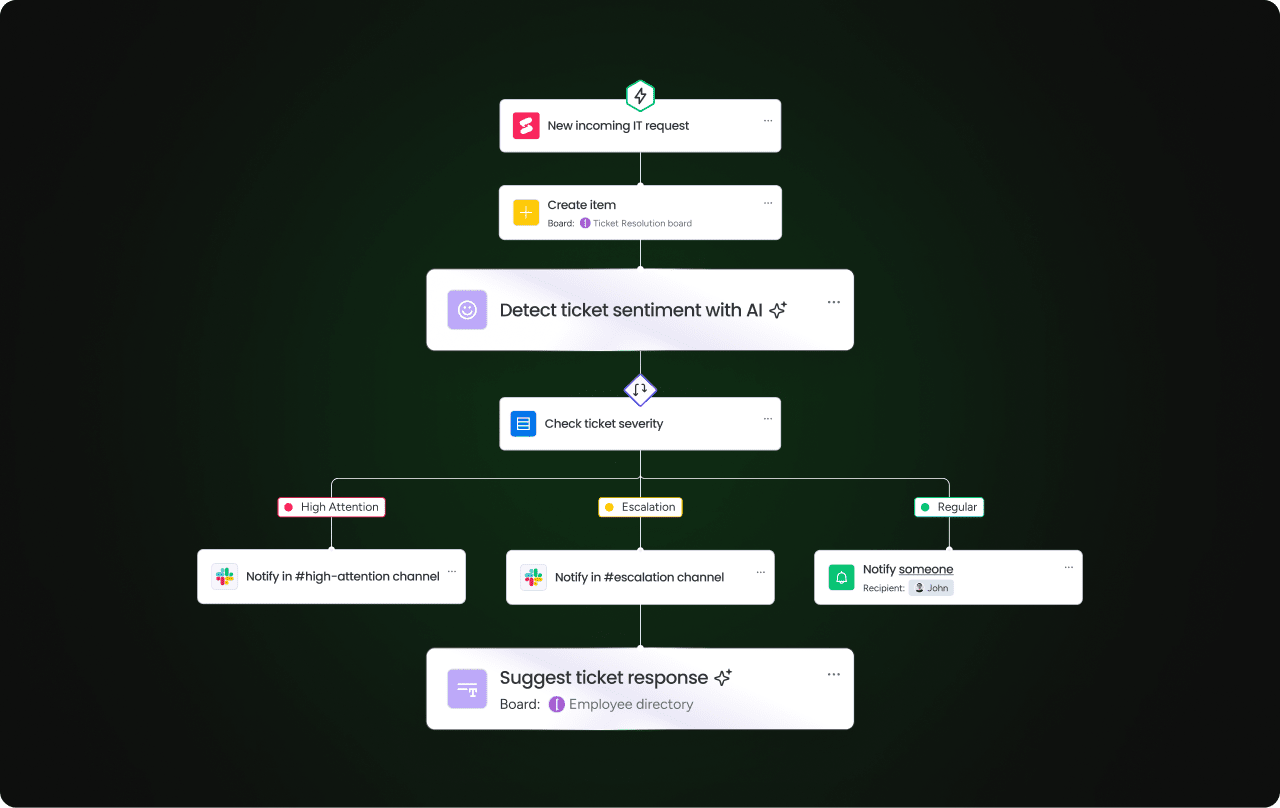
- AI Blocks for ticket categorization, routing, summarization, and sentiment detection
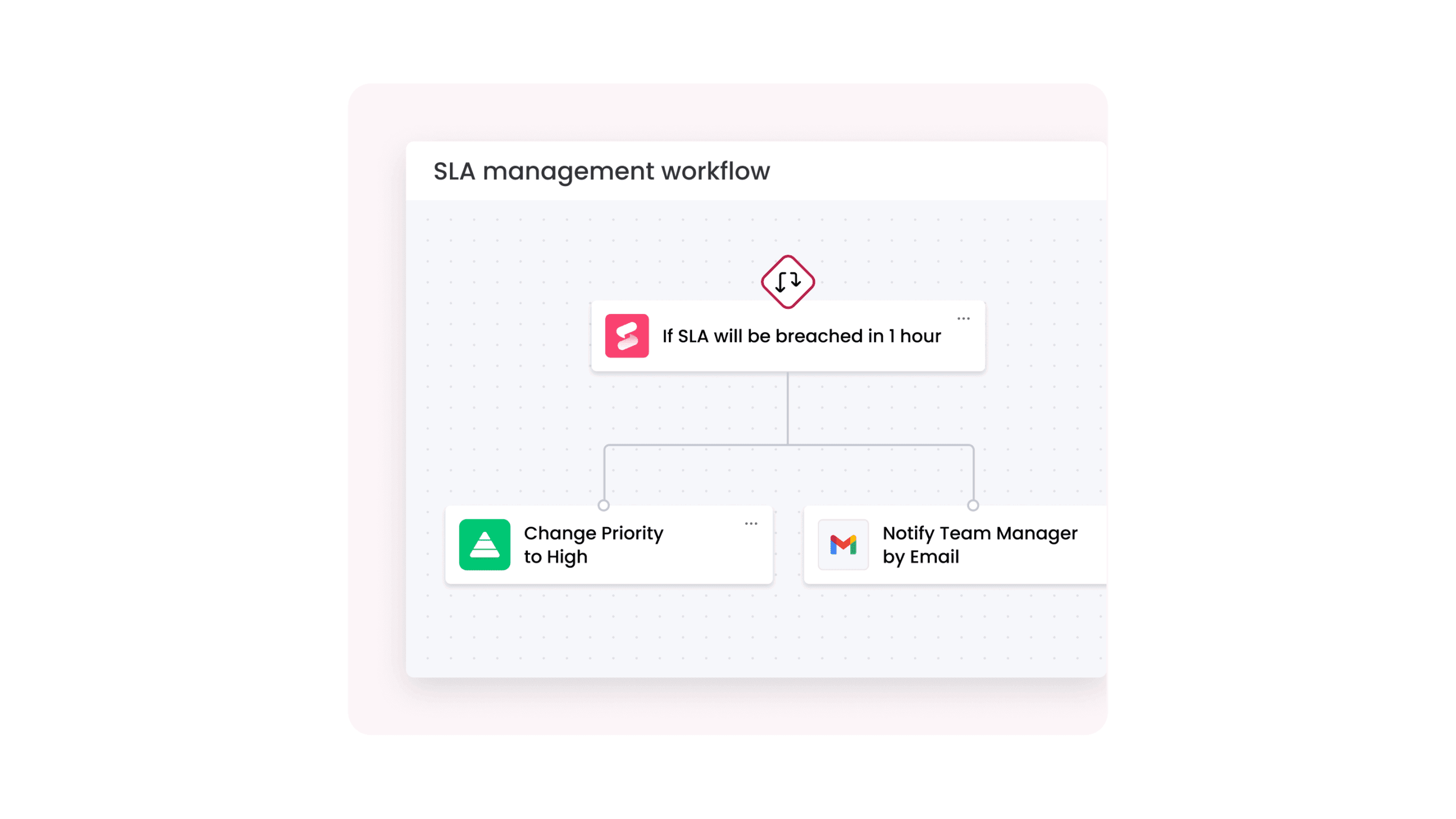
- Automated workflows for assignments, notifications, and SLA tracking
- Digital Workers that monitor trends and generate insights
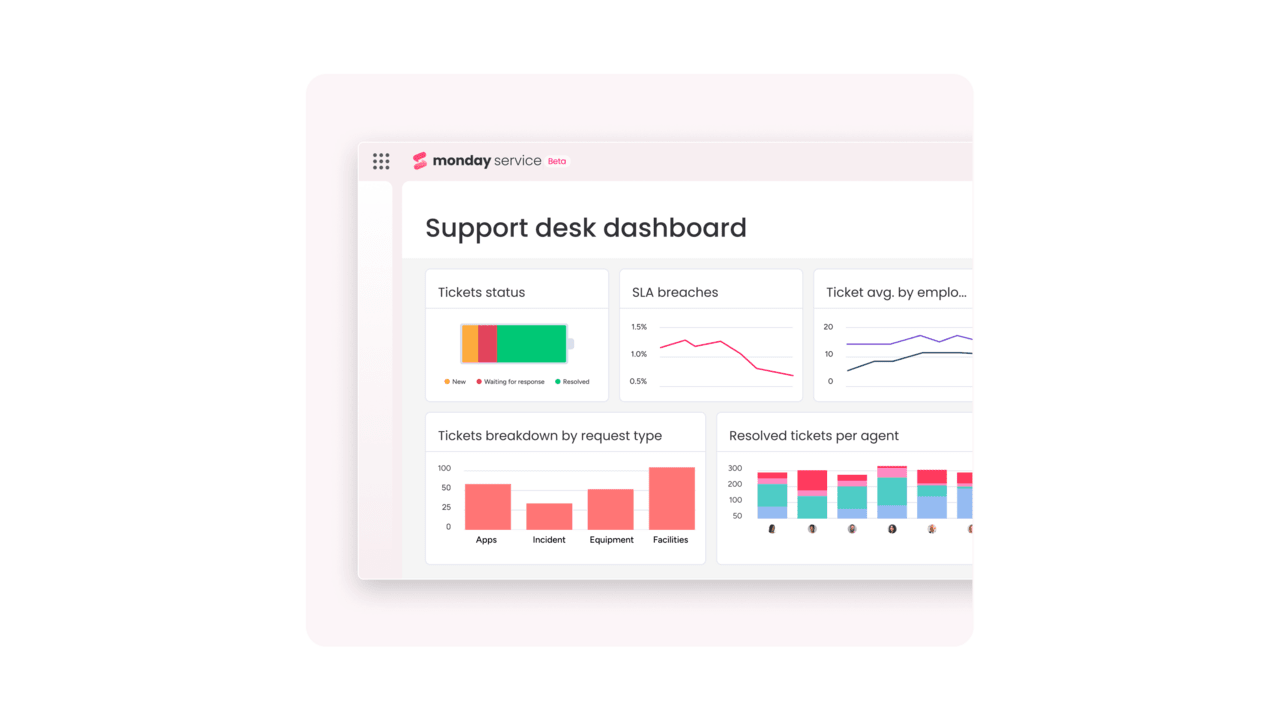
- Real-time service analytics and customizable dashboards
- Knowledge management for self-service support
- Service catalogs and SLA configurations
- Integrations with 72+ tools, including Outlook, Gmail, Slack, Azure DevOps, and DocuSign
- Open API for connecting CRM, asset management, and other business systems
Pricing
- Free plan for up to 2 seats
- Free trial available
- 3 paid plans: Standard, Pro, and Enterprise
- Paid pricing starts at $26/seat/mo
What users are saying

"Our team LOVES the monday service platform and we’re already exploring how we could incorporate it for other departments, too. It has streamlined our workflow in a way that both our team and customers appreciate."
Andrew Marshall | VP Operations
״monday service provides clear insights into requests volume and types, response times, and trends - helping us continuously improve operations"
Grant De Waal-Dubla | CIO
"The biggest value for us is speed and flexibility. You can get up and running in days, change anything instantly, and see everything in real time. And you don’t need a dedicated admin to do it."
Clive Camilleri | Head of People Tech & Operations2. Zoho Desk
Best for: budget-friendly support inside the Zoho ecosystem
Zoho Desk is an affordable help desk platform that’s part of the larger Zoho ecosystem. If you’re already using other Zoho tools like Zoho CRM or Zoho Invoice, everything connects seamlessly. The platform handles tickets from email, live chat, social media, and phone calls in one unified workspace. Paid plans add automation and AI features as you grow.
Key features
- Omnichannel ticketing
- Zia AI assistant for prioritization and responses (higher tiers)
- Blueprints and workflow automation
- Self-service knowledge base and portal
- Mobile apps for agents
- Integrations across Zoho and third-party tools
Pricing
- Free plan available for up to 3 users
- Free trial available
- 4 paid plans: Express, Standard, Professional, and Enterprise
- Paid pricing starts at $7/user/mo
What users are saying
“I appreciate how Zoho Desk helps centralize all our customer queries and project requests in one centralized platform. I receive a lot of client communications detailing projects, which used to come through scattered channels like email and WhatsApp. Now, Zoho helps me receive these messages, sort them, assign them, and follow through in a single ticketing system. The reporting is extensive, but it could be made a little more intuitive for newbies.” — Corine K., a small business marketer
3. Freshdesk
Best for: fast setup for growing support teams
Freshdesk is a customer support platform built for small teams that need structure without complexity. Most teams connect their support inbox and begin responding quickly, then add automation or reporting later if they need it. This makes Freshdesk a common choice for businesses that expect their support operation to grow over time.
Key features
- Ticket-based customer support
- Freddy AI for categorization and response assistance (paid plans)
- Rules-based automation and workflows
- Self-service knowledge base and customer portal
- Team collaboration tools for shared visibility
- Reporting dashboards for support performance
Pricing
- Free trial available
- Free plan available for 2 agents
- 4 paid plans: Growth, Pro, Pro+ Copilot, Enterprise
- Paid pricing starts at $15 per user/mo
What users are saying
“Freshdesk is very easy to use and doesn’t feel overwhelming, even on busy days. Features like canned responses and automation save a lot of time, and internal notes make team coordination smoother. At times, Freshdesk can feel a bit slow or laggy, especially when handling multiple tickets at once. Some features take a few extra clicks to access, which can slow down the workflow on busy days.” — Manish C., a small business case management analyst
4. Help Scout
Best for: email-based support with a personal tone
Help Scout is built for teams that think of customer support as conversations, not tickets. Instead of pushing agents through rigid workflows, it treats support like shared email with structure layered underneath. Help Scout is less focused on complex automation or omnichannel routing, and more focused on helping teams reply clearly, without stepping on each other’s toes.
Key features
- Email-first shared inbox
- Collision detection to prevent duplicate replies
- Saved replies for faster responses
- Docs knowledge base for self-service
- Customer profiles with conversation history
- Lightweight reporting on response time and volume
- Integrations with CRM, ecommerce, and communication tools
Pricing
- Free trial available
- Starts at $25/user/mo
- 3 paid plans: Standard, Plus, and Pro
- Free plan available for 5 users, 1 inbox, and 1 Docs site.
What users are saying
“Technical support is #1. Their team is constantly updating features and notifying their customers with new information and products in a way that isn’t salesy or pushy, but purely informative. The way emails are produced/created can be confusing with the newest update, but once you get the hang of it it’s not so bad. I do prefer the original style from 2020 when we first started utilizing Help Scout.” — Justin G., a small business operations manager
5. Hiver
Best for: teams supporting customers from shared inboxes
Hiver is a help desk platform that helps teams manage customer support from a shared environment many are already using for work communications. It captures requests from email and other sources into trackable tickets, while also offering flexibility to route, assign, and automate work.
The experience is designed so teams spend less time switching between tools and offers built-in AI features that allows small teams to scale their support without adding extra overhead.
Key features
- Ticketing across customer support channels
- AI Copilot for drafting, summarization, and reply assistance
- AI Agents for repetitive task automation
- AI QA to evaluate replies for quality and style
- Self-service knowledge base and portals
- Integrations with CRM, collaboration, and business tools
Pricing
- Free trial available
- Free forever plan
- 3 paid plans: Growth, Pro, and Elite
- Paid plans start at $25/user/mo
What users are saying
“Hiver has been very helpful to us in organizing our shared inbox. It works very well. Some functionalities are not available on the free plan (the multiple tags for example), and sometimes it disconnects.” — Nadia S., a small business operations manager
6. Tidio
Best for: ecommerce support with chat-first automation
Tidio is a customer support platform aimed at helping small businesses respond quickly to customer enquiries, especially in ecommerce environments. It combines ticket management with real-time messaging, making it well suited to teams that handle a high volume of pre- and post-purchase questions. Tidio places a strong emphasis on automation and filtering to help teams stay responsive as ticket volume grows.
Key features
- Lyro AI Agent for automated customer responses
- Automated ticket routing and prioritization
- Advanced ticket filtering for faster triage
- Live chat and email ticketing in a shared inbox
- Self-service options to deflect common questions
- Deep Shopify integrations and ecommerce tooling
Pricing
- Free trial available
- Free account available
- 4 paid plans: Starter, Growth, Plus, and Premium
- Paid pricing starts at €24.17/mo
What users are saying
“What I like most about Tidio is its visual chatbot builder, which makes it easy for anyone to create even complex automations. I don’t like how restrictive the free and lower-tier plans feel, especially the cap on monthly chatbot conversations. On top of that, the pricing ramps up quickly once you start adding multiple operators, which can get expensive for a growing small business.” — Andrea C., a photographer and filmmaker
7. Front
Best for: collaborative support for time-sensitive conversations
Front is a customer service platform for teams that handle time-sensitive conversations and need visibility into who is working on what. Front combines inbox-style workflows with ticketing, automation, and AI, suiting support teams that operate across functions or channels.
Key features
- Omnichannel inbox for email, chat, SMS, WhatsApp, and more
- Ticketing with shared ownership and status tracking
- Front AI for reply assistance, automation, and quality insights
- Workflows and rules for routing and prioritization
- Smart QA and Smart CSAT for agent performance and customer experience analysis
- Knowledge base for faster, more consistent responses
- Integrations with CRM, communication, and business tools
Pricing
- Free trial available
- 3 paid plans: Starter, Professional, and Enterprise
- Paid pricing starts at $25/seat/mo
What users are saying
“The team collaboration features are very useful. You can see who is replying, leave internal comments, and avoid sending duplicate responses to customers. I also like how fast and clean the interface feels. The reporting is good for daily operations, but advanced analytics sometimes feel basic compared to dedicated support analytics tools.” — Sanket P., a small business software engineer
8. HubSpot Service Hub
Best for: support teams already using HubSpot products
HubSpot Service Hub is a help desk built on top of the HubSpot CRM. Support teams manage tickets directly alongside customer records, so every interaction sits in the context of the wider relationship. It’s a good fit for teams that already use HubSpot and want customer support, sales, and marketing data to live in one system.
Key features
- Centralized help desk and ticketing system backed by CRM data
- AI-powered customer agent and automated routing (Breeze)
- Self-service knowledge base to reduce incoming tickets
- Omnichannel support tools (email, chat, web forms, etc.)
- Performance and feedback tracking, including CSAT and agent insights
- Integrations across HubSpot ecosystem and third-party apps
Pricing
- Free trial available
- Free plan available
- 4 paid plans: Service Hub Starter, Starter Customer Platform, Service Hub
- Professional, and Service Hub Enterprise
- Paid pricing starts at $9/seat/mo
What users are saying
“I have been using the free version of HubSpot Service Hub for a while now and it has been a surprisingly smooth and reliable tool for managing customer conversations. It was very easy to set up, and I was able to start using features like the shared inbox, ticketing, forms and basic reporting right away without any complexity.
The free version works well for daily use, but there are some limits. You can only have a certain number of contacts, dashboards, reports, and email templates.” — Tarun K., a small business founder and CEO
9. SysAid
Best for: AI-driven IT support for technical teams
SysAid is an IT-focused help desk that places AI directly inside the ticket queue and agent workflow. SysAid uses AI to classify requests, spot risks, summarize context, and guide responses as work happens. This makes it a strong option for teams managing technical requests.
Key features
- AI-driven ticket categorization, summarization, and priority flagging
- AI Emotion detection for high-risk or sensitive tickets
- SysAid Copilot for real-time agent assistance and reply suggestions
- Ticket Journey view for full audit trails and status tracking
- Custom ticket templates with guided inputs
- Prebuilt AI agents for routine ITSM tasks
- Integrations with Microsoft tools and enterprise systems
Pricing
- Free trial available
- 3 paid plans: Standard, Pro, and Enterprise
- Accurate pricing is available from the vendor on request
What users are saying
“Its integration capability with Microsoft, its technical support, and especially the ability to implement functionalities such as the mailbox, make it our daily tool and it is very easy to use. I also really like the chatbot and the new interface that give it a modern and refined touch. It is an easy-to-use tool for IT technicians. [However] … the reports it generates do not meet current needs.” — Ander V., a small business administrator
10. Jira Service Management
Best for: small technical teams aligned with engineering
Jira Service Management is an IT service management platform that works well for small businesses with technical products or in-house engineering teams. It’s commonly used by growing companies that need a structured way to handle internal IT requests, customer-reported issues, and incidents without losing alignment with development work.
Key features
- ITSM and ITIL-aligned workflows for incidents, requests, problems, and changes
- Native integration with other Atlassian tools like Confluence, and other third-party apps
- Automation rules for routing, approvals, and escalations
- SLA tracking with breach alerts and reporting
- Service portal for employees and customers
- Asset and configuration management (on higher tiers)
- Integrations across Atlassian tools and third-party apps
Pricing
- Free trial available
- Free plan available
- 3 paid plans: Standard, Premium, and Enterprise
- Paid pricing starts at $20/agent/mo
What users are saying
“I especially like the automation rules, SLA tracking, and seamless integration. It makes collaboration between support, technical teams, and stakeholders very efficient while maintaining clear visibility into ticket status and ownership. The initial setup and configuration can feel overwhelming, especially for new users or smaller teams without a dedicated admin. Some advanced workflows and automation rules also require trial and error to get right, and reporting can feel limited unless you customize dashboards extensively or use add-ons.” — Louise Nikki A., a small business executive assistant
11. Gorgias
Best for: Shopify stores handling high-volume support
Gorgias is a natural extension of your Shopify store. It can handle customer support directly alongside ecommerce operations, pulling conversations and order data into one workspace so agents can act quickly without switching tools.
The platform uses automation and AI-driven responses to handle high volumes of repetitive ecommerce questions, helping small teams resolve issues faster while protecting revenue during peak periods.
Key features
- Ticketing tightly connected to Shopify order and customer dataAI-powered intent detection and automated responses for common queries
- AI agent assistance for drafting replies and resolving tickets faster
- Rules and workflows for routing, tagging, and prioritizing tickets
- In-ticket actions for refunds, cancellations, and order updates
- Self-service help center for order and product questions
- Integrations with Shopify apps and other ecommerce tools
Pricing
- Free trial available
- Free plan available
- 5 paid plans: Starter, Basic, Pro, Advanced, and Enterprise
- Paid pricing starts at $10/mo
What users are saying
“I find Gorgias incredibly valuable as it seamlessly handles our help desk needs, particularly for its ease of implementation and excellent integration with Shopify. The setup process was straightforward, thanks in part to the user-friendly UX, which made getting started a breeze.
I find the integration with Aircall to be problematic. It seems to be competing with the voice or VoIP product, which suggests that the features are not fully compatible.” — Jason L., a small business head of digital operations and technology
12. Atera
Best for: IT teams managing services and billing
Atera is an IT-focused help desk built for teams that manage high volumes of technical requests and need automation baked into daily operations. Rather than focusing on customer conversations alone, Atera is designed to streamline IT workflows and support predictable service delivery as demand grows.
Key features
- End-to-end ticket management with automation and SLA tracking
- AI Copilot for ticket summaries, reply assistance, and troubleshooting support
- Automated routing based on technician skills, workload, and availability
- Omnichannel support across email, service portal, Microsoft Teams, and Slack
- Custom ticket forms, fields, and workflows
- Self-service portal and knowledge base for common requests
- Integrated PSA for time tracking, billing, and contract management
- Integrations with accounting tools like QuickBooks and Xero
Pricing
- Free trial available
- 4 paid plans: Professional, Expert, Master, and Enterprise
- Paid pricing starts at $149/technician/mo
What users are saying
“Altera allows us to efficiently scale and seamlessly implement our Managed IT Services for an unlimited number of clients and endpoints, making the process both simple and cost-effective. Regardless of whether a client operates in a legacy IT environment, uses cloud hosting, or relies on IoT, we are able to manage, update, migrate, and optimize their workloads by leveraging AI and automation. Atera does not assist with managing Cloud SaaS workloads or end-user licensing.” — Brian M., a small business CTO
Deliver better small business support with monday service
Many help desk tools solve one part of the problem well, like ticket intake or agent productivity. monday service is built to connect all the moving parts around service delivery, including tickets, people, projects, and data, on one platform.
For small businesses that need to move fast, adapt workflows often, and scale without adding headcount, this makes a material difference. Here’s what you can achieve with monday service.
Resolve tickets faster with AI Blocks for classification and routing
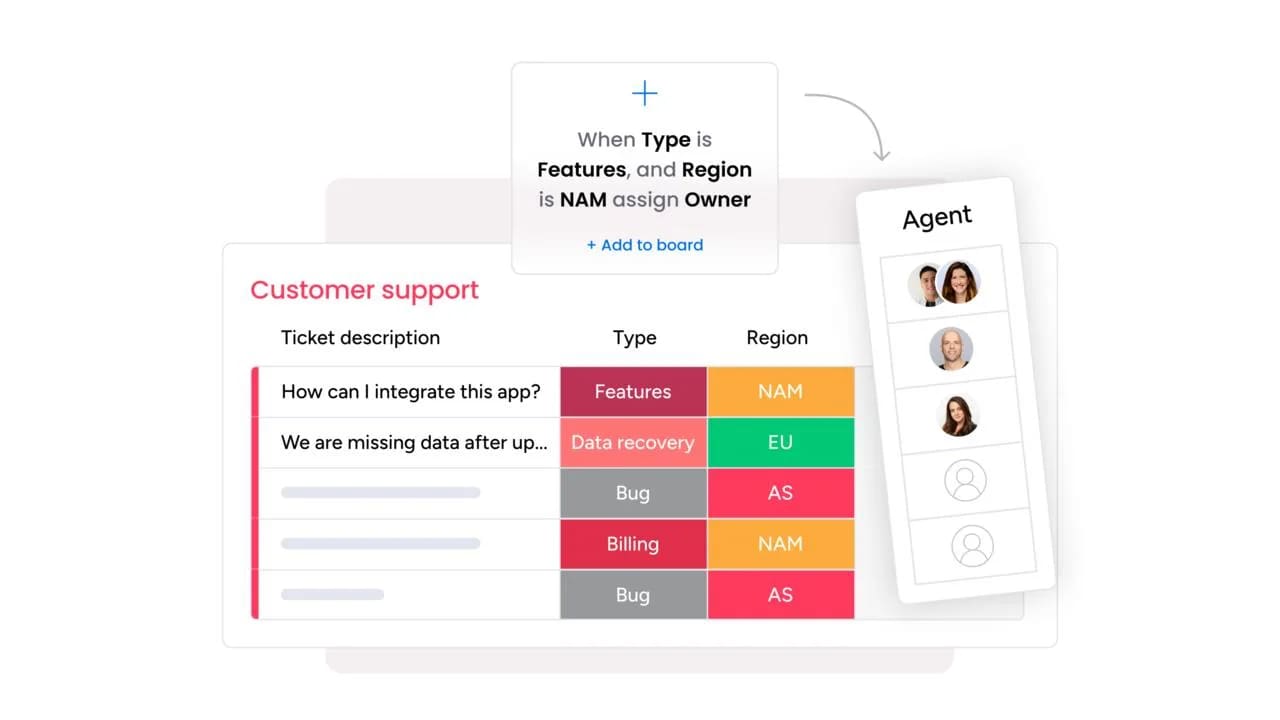
monday service uses AI Blocks to automatically categorize incoming tickets, assign ownership, and flag urgency as soon as requests come in. There’s no need for manual triage; instead, small teams can respond faster, even when support volume spikes or requests arrive across multiple channels.
Reduce repetitive support work with automated workflows and self-service
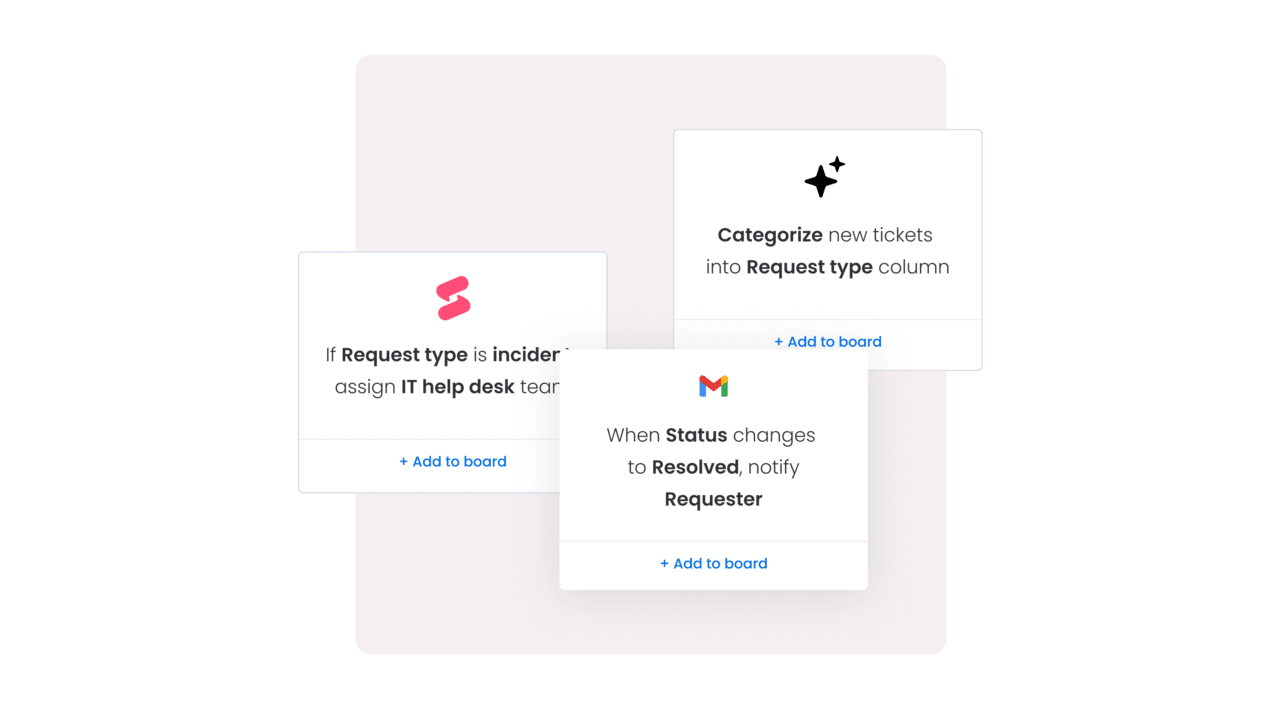
With no-code automations, monday service handles routine actions like acknowledgements or status updates. Combined with knowledge management and self-service options, this reduces repeat questions and creates more time for the requests that really need your attention and expertise.

Keep support organized with centralized ticket management
monday service brings all support requests into one structured workspace, so nothing gets lost in inboxes or chat threads. Tickets, conversations, files, and updates stay connected, making it easier for small teams to stay on top of the work without switching tools or relying on memory.
Adapt your help desk as your business grows with no-code customization
Small businesses change quickly, and monday service keeps pace by letting you adjust workflows, SLAs, forms, and service catalogs, without technical support or long implementations. You can start simple and add structure only when you need it, keeping your help desk in step with how your business operates.
Make better support decisions with real-time service analytics
monday service gives you live visibility into ticket volume, response times, SLA performance, and customer satisfaction. These all-important insights help small business owners spot bottlenecks early and improve service quality without guesswork.
Stay ahead of support issues with digital workers
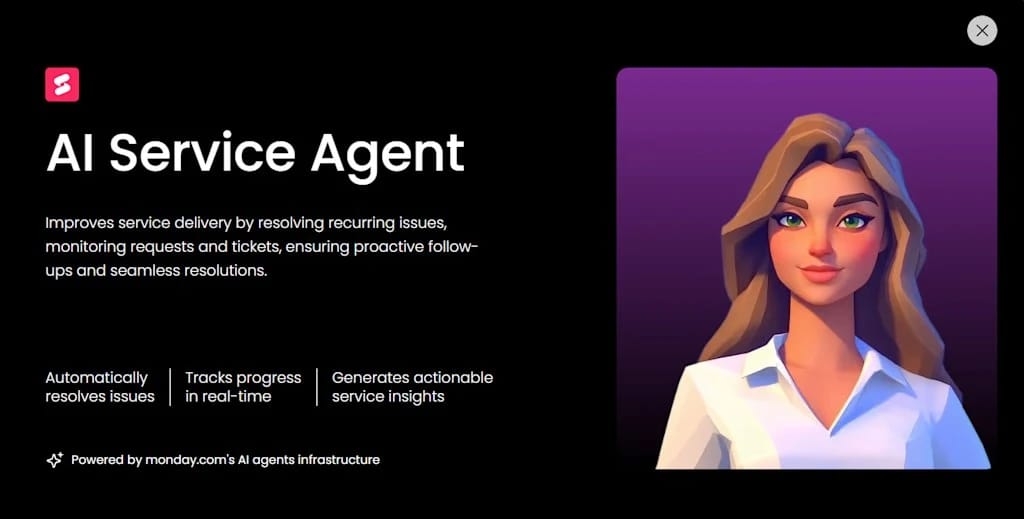
monday service’s Digital Workers can handle real service work alongside your team. They monitor incoming requests, track patterns in ticket volume, and identify recurring issues before they become bigger problems. For small businesses, this means you don’t need someone constantly checking dashboards or pulling reports. Digital Workers can generate summaries, highlight rising request types, and share regular insights automatically, helping you stay proactive without adding headcount.
For small businesses, the right help desk isn’t the one with the most features. It’s the one that’s easy to adopt and powerful enough to handle growing demand. monday service fits that balance, giving you structure where you need it and automation where it saves the most time.
If you want to see how it works in practice, try monday service for free and explore what better support looks like for your small business.
FAQs about small business help desk software
How much should a small business spend on help desk software?
Most small businesses spend between $10 and $30 per user per month on help desk software, though many platforms offer free plans for very small teams. The actual cost depends on your support volume and which features you need. If you're handling fewer than 50 tickets a month, a free or entry-level plan around $10-15 per user often works well. As your volume grows or you need advanced features like AI automation and detailed analytics, expect to budget $25-50 per user monthly. Remember that spending a bit more upfront can save you money long-term by reducing the time your team spends on manual tasks.
Can help desk software replace my business email?
No, help desk software doesn't replace your business email; it works alongside it. Think of it as an upgrade to how you manage customer emails. Most help desk platforms connect to your existing business email address and turn incoming messages into organized tickets. You'll still send and receive emails, but they'll be tracked, categorized, and managed within the help desk system instead of a traditional inbox. Some platforms also add other communication channels like live chat and social media to the same workspace.
What is the difference between a help desk and a CRM?
A help desk focuses on resolving customer issues and support requests, while a customer relationship management (CRM) system focuses on managing sales relationships and the customer journey. Help desk software tracks tickets, response times, and support interactions. CRM software tracks leads, deals, and sales pipelines. That said, many modern platforms blur these lines — some CRMs include basic help desk features, and some help desk tools include light CRM capabilities. Small businesses often benefit from using both, with integrations that connect customer support data to sales records.
How does AI in help desk software protect my customer data?
Reputable help desk platforms use AI to improve efficiency while maintaining strict data security standards. Look for software like monday service that's SOC 2 compliant, GDPR-ready, and clearly explains how AI processes customer information. The best platforms keep your data encrypted, don't train their AI models on your private customer conversations, and give you control over what data AI can access.
How long does it typically take to set up a new help desk system?
For most small businesses, basic setup of a new help desk system takes anywhere from a few hours to a couple of days. You can usually connect your email, create a few automated responses, and start receiving tickets within an hour. The longer timeline comes from customizing workflows, building out your knowledge base, importing customer data, and training your team.
Do I need a technical person to manage help desk automation?
No, most modern help desk platforms are designed for non-technical users. You can typically set up automation rules using simple if-this-then-that logic or visual builders that don't require any coding. For example, you might create a rule like "if a ticket mentions 'refund,' automatically tag it as high priority and assign it to Alex." Of course, having someone on your team who's comfortable with technology will make the process smoother, especially for advanced workflows or integrations with other tools.
What are the most important metrics for a small support team to track?
Focus on these core metrics:
- First response time (how quickly you reply to new tickets)
- Resolution time (how long it takes to fully solve an issue)
- Customer satisfaction score (usually measured through post-ticket surveys)
- Ticket volume trends (so you can spot recurring problems).
For small teams, it's also helpful to track which types of issues are most common. This tells you where to invest in better documentation or product improvements. Don't get overwhelmed by dozens of metrics. Start with these basics and expand as your team grows.

 Get started