


Basic support models don’t work at scale. The neat loop between intake and resolution, handled by a single team, doesn’t hold up in enterprise organizations. Enterprise service is heavier by nature, with each request depending on approvals, policy checks, and work carried out elsewhere in the business. Without the right systems in place, delays and inertia quickly become the norm for both agents and users.
This article stresses the importance of investing in your enterprise service desk. We’ll explain how enterprise service desks differ from traditional help desks, outline the features that support service delivery at scale, and explore how automation and AI handle demand more reliably. We’ll also show how monday service supports enterprise service delivery across teams and workflows.
Try monday serviceKey takeaways
- An enterprise service desk is a centralized system for managing service requests across large organizations, including IT and non-IT functions like HR, finance, and facilities.
- Enterprise service desk software goes beyond basic ticketing systems to support approvals, SLAs, automation, and cross-team workflows.
- Automation and AI, including agentic AI that autonomously resolves repetitive requests, are most effective in enterprise environments when they remove repetitive coordination work, such as triage, routing, summarization, and approvals. They’re not a replacement for human skill or decision-making.
- monday service brings enterprise service delivery into a single platform, connecting intake, workflows, automation, and collaboration across teams and regions.
What is an enterprise service desk?
An enterprise service desk is a centralized support function and platform that manages service requests, incidents, and operational workflows across a large organization. This type of service desk often spans IT and other departments such as HR, facilities, finance, and procurement.
Unlike a traditional help desk that focuses on resolving individual issues, an enterprise service desk is designed for scale and complexity. It typically includes:
- Structured workflows and approvals
- Service level agreement (SLA) tracking
- Knowledge management and self-service
- Reporting across teams and service categories
- Integrations with systems that provide context (such as identity, asset management, or collaboration tools)
The goal is to provide a single, consistent service experience, even when the work behind the scenes is distributed. Gavin D., an IT professional, describes:
The service desk is often the first and most human connection between technology and the people who rely on it every day.
What features does enterprise service desk software include?
Service desks all claim to “do ticketing.” The enterprise-grade differences come from some of the following features:
Ticket management and routing
The basics of service management are still important: intake, categorization, assignment, prioritization, escalations, and status tracking. But in an enterprise environment, routing often needs to reflect:
- Multiple support lines (for example, level 1, 2, or 3)
- Skills-based assignment
- Approval-driven workflows for access, procurement, and policy
- Regional or business-unit segmentation
- Workload balancing across teams
Self-service and knowledge management
Enterprise companies can scale their service by resolving issues faster, including empowering users to find their own solutions. A strong enterprise service desk supports:
- Searchable knowledge articles
- Guided request forms
- Deflection workflows (solve without a ticket where appropriate)
- Consistent answers across multiple support channels (so users aren’t told different things in email vs chat)
- AI-powered knowledge suggestions that display relevant articles before a user submits a ticket
SLA configuration and service quality controls
At enterprise scale, you can enforce service quality using configurable SLAs according to:
- Request type or category
- Priority or impact
- Business unit or region
- User type (e.g., VIP groups, executives, key accounts)
When SLA thresholds are at risk, built-in escalation paths are available.
Automation and AI-assisted operations
Automation is where enterprise service desks win back capacity and reduce operational load, handling tasks like:
- Classifying and routing tickets
- Summarizing long threads
- Detecting sentiment and urgency signals
- Generating suggested responses and next steps
- Triggering workflows, such as approvals, provisioning, updates, and surveys
Incident management and escalation
Enterprise service desks handle major incidents differently from standard tickets. Dedicated incident workflows support:
- Severity classification and priority assignment
- Linking related tickets to a single incident record
- Coordinating response across multiple groups
- Post-incident reviews that feed lessons learned back into the knowledge base
This structured approach helps prevent recurrence and strengthens the organization’s overall service resilience.
Integrations and “full-context” service delivery
An enterprise service desk is only as effective as the context it can access, which is why yours should integrate with the following categories of tools and data:
- Identity and employee directory
- Collaboration (email and chat)
- Dev and change management tooling
- Asset management and licensing systems
- CRM and customer data (if supporting external users too)
Reporting and analytics that drive decisions
Enterprise service desks live and die by visibility. You should be able to report on:
- Ticket volume and trends by category
- SLA compliance and breach drivers
- CSAT and experience trends
- Backlog and aging
- Escalation patterns
- Correlations between service events and projects or changes

Enterprise service desk vs. help desk
The terms help desk and enterprise service desk are sometimes used interchangeably, but they solve very different problems.
- A help desk resolves individual issues within a single team, most often IT or customer support.
- An enterprise service desk, on the other hand, supports complex service operations across large organizations, where requests span everything — departments, systems, approvals, and ongoing initiatives.
The distinction is even clearer for scaling organizations. What works for a few hundred users breaks down when you’re supporting thousands of employees in multiple regions, logging a mix of IT and non-IT service requests. The table below shows how enterprise service desks and help desks compare.
Key differences between enterprise service desk and help desk
Area Help desk Enterprise service desk
Primary focus Individual issue resolution Standardized service delivery across the organization
Typical users Single team or function Multiple departments and shared services
Service coverage Single region or location Global support through a virtual enterprise service desk
Request context Ticket-level information Tickets enriched with user, system, and asset context
Asset visibility Limited or manual Connected through IT asset management integrations
Workflow complexity Simple, linear flows Multi-step workflows with approvals and escalations
Automation Basic rules or macros Advanced automation and AI-assisted workflows
SLA management Basic SLAs Granular SLAs by service type, priority, and region
Reporting Team-level metrics Enterprise-wide trends and performance insights
What are the benefits of an enterprise service desk?
So what does this look like for an organization managing thousands of service requests each month? The benefits of an enterprise service desk become glaringly obvious as organizations scale. Here’s what you can expect when you provide a structured way to manage increasing service demand.
Improved efficiency
Enterprise service desks reduce manual effort by standardizing how teams handle requests. This allows service teams to manage higher workloads without increasing headcount.
Example: Routine requests such as account changes follow predefined workflows. Service agents can handle requests through predefined workflows, significantly accelerating resolution time.
Centralized service management
An enterprise service desk gives large organizations a single, consistent way to manage service requests. Instead of requests living across an array of inboxes, chat tools, or forms, they’re captured and managed in one place using defined processes.
Example: An employee submits an access request through the service desk. The request is assigned to the correct team and follows the same approval path every time. Both the employee and the service team can see its status without chasing updates.
Better cross-functional collaboration
In large organizations, service requests often involve more than one team. An enterprise service desk provides a shared system where teams can collaborate on the same request without losing context or ownership.
Example: A request for new software access requires approval from security and setup from IT. Both teams work on the same request inside the service desk, so there’s no need for separate email threads or manual follow-ups.
Enhanced user experience
An enterprise service desk creates a consistent experience for employees and internal stakeholders. Users know where to submit requests and what to expect after they do.
Example: An employee raises a request for equipment replacement. They receive confirmation immediately and can see when the request is being reviewed and scheduled, rather than wondering who’s responsible or when it’ll be resolved.
Sharper decision-making
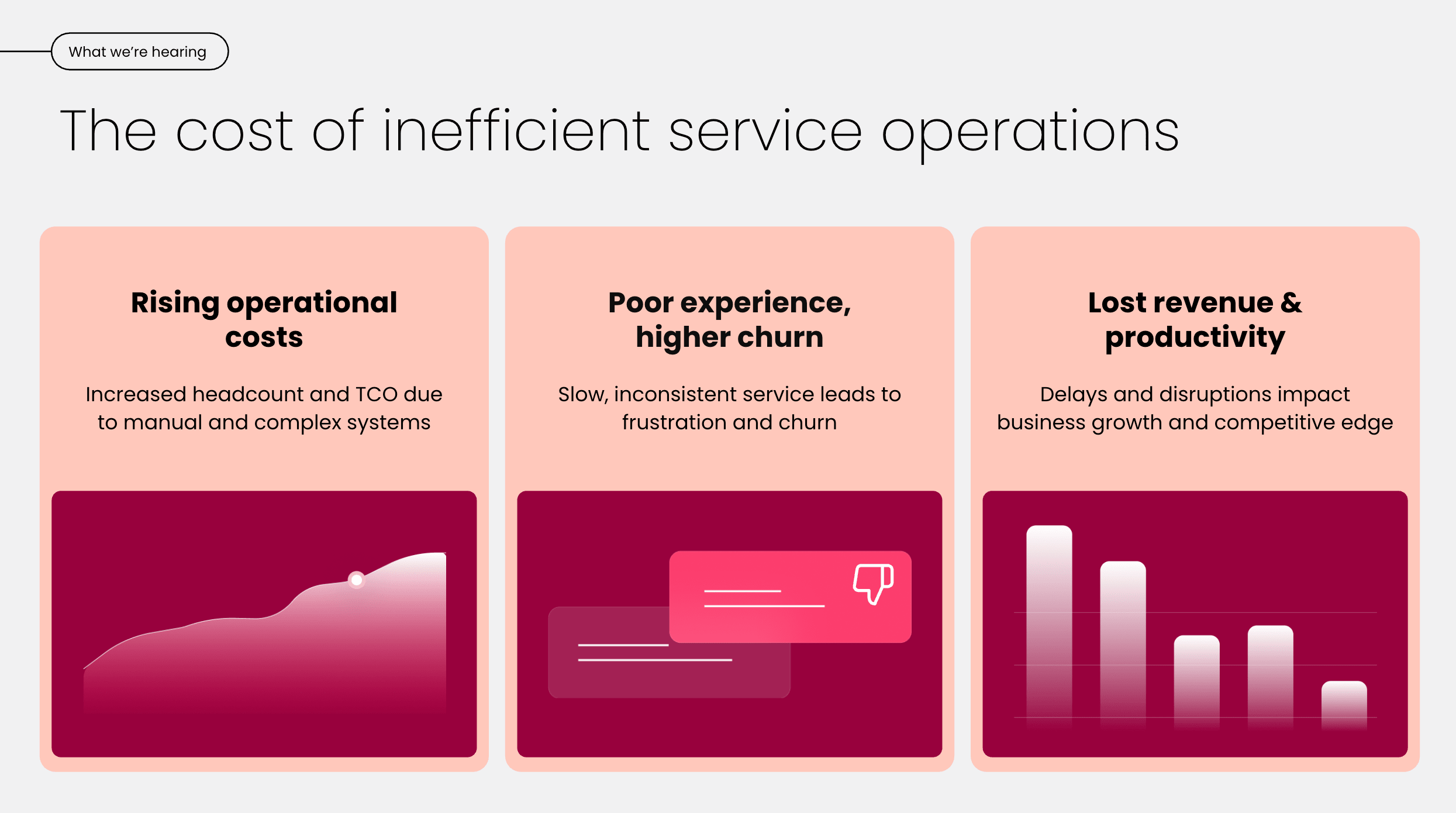
An enterprise service desk centralizes service data, making it easier to understand what’s happening across the organization. Agents can use this data to identify recurring issues and inform operational decisions.
Example: Service reports show that a specific application generates a high number of incidents each month. Leadership uses this information to prioritize investment in a replacement instead of continuing to address individual tickets.
How does enterprise service management extend beyond IT?
Enterprise service management (ESM) takes the principles of IT service management and applies them across the entire organization. When an enterprise service desk is designed with ESM in mind, it becomes a shared operating layer for any department that handles requests, approvals, or workflows.
Organizations that start with IT service management often find that the same structured approach works just as well for other teams. The difference is scope: instead of one department managing tickets, the entire organization runs on consistent service processes. Here are a few examples of how ESM plays out in practice:
- HR and IT onboarding: A new hire triggers provisioning for equipment, software access, badge creation, and benefits enrollment, all coordinated through a single service request.
- Facility access requests: Employees request building access, parking permits, or office moves through the same portal they use for IT support.
- Procurement approvals: Purchase requests flow through predefined approval chains, with full audit trails and SLA tracking.
- Legal contract reviews: Internal teams submit contracts for legal review using structured intake forms, reducing back-and-forth over email.
This expansion turns the enterprise service management model into a strategic advantage, creating visibility and consistency across every department that serves internal or external stakeholders.
How can AI improve enterprise service desk operations?
Enterprise service desks increasingly use AI to manage service volume, reduce manual effort, and improve response times. The following areas show where AI delivers the most measurable impact, supporting existing service processes, rather than replacing them entirely.
AI-powered ticket triage and reporting
Enterprise service desks receive large volumes of requests, many of which are repetitive or misclassified. The right enterprise service desk software uses AI to analyze the context of incoming tickets and support early triage decisions. Mostapha K., Assistant professor and lecturer in control engineering and intelligent systems, describes:
Imagine a system that reads incoming tickets, instantly routes them into the right category, and even drafts the first reply template. Agents remain in full control. They can accept, edit, or override. Every choice they make becomes new training data.
Agentic AI and autonomous resolution
AI-powered triage is just the starting point. The next evolution is agentic AI, where AI agents go beyond classifying tickets to autonomously resolving repetitive requests. These agents use knowledge bases, past ticket history, and business rules to handle common issues end to end, such as password resets, access provisioning, or status inquiries.
What separates agentic AI from a basic chatbot is a system of guardrails and accountability. Agentic AI operates within defined boundaries, escalates when confidence is low, and logs every action for review. How ready is your service desk to let AI handle routine requests while your team focuses on complex issues? The shift from copilot (human-assisted) to agent (autonomous within guardrails) means service teams can absorb growing request volumes without proportionally growing headcount.
Learn more: AI for IT service desk
Low-code workflow automation
Low-code or no-code automation replaces repetitive workflows with a sequence of tasks that run in the background and flow logically. Service desk automation can support actions such as auto-categorizing requests, triggering approvals, or sending updates. Any combination of these reduces the amount of time agents spend on routine coordination. They also allow service teams to apply consistent handling rules without relying on manual intervention.
Measurable impact on resolutoin times
One of the clearest impacts of AI in service desk environments is faster resolution. Organizations using generative AI, in particular, report significantly shorter resolution times. In a State of ITSM report, average resolution time for GenAI users was 22.55 hours, compared to 32.46 hours for organizations not using GenAI. Among the top GenAI-using organizations, the average resolution time was reduced by 54.3%.
These results show that AI delivers the most value when it’s applied to high-volume service operations, where small time savings compound quickly across thousands of requests.
Learn more: AI for enterprise service management
5 best practices for enterprise service desk implementation
Implementing an enterprise service desk is as much an operational change as a technical one. These best practices focus on how large organizations set up service delivery to scale, adapt, and continuously improve over time.
1. Establish clear service processes
Before introducing automation or AI, define exactly how your enterprise service management works.
To understand how service requests move through the organization, start by mapping their current service flows. This usually means reviewing recent requests and documenting how they were actually handled, including where any delays or rework were required. These real examples provide a more accurate baseline than idealized process diagrams.
From there, teams typically define:
- Request types that reflect how users ask for help (for example, access requests, incidents, changes, or general inquiries)
- Ownership rules that clarify which team is responsible at each stage
- Approval paths for requests that involve risk, cost, or policy decisions
- Escalation rules for when requests stall or exceed agreed response times
After defining these elements, standardize them into repeatable workflows you can document and share with your service teams. It’s worth validating them against real scenarios to check they reflect the reality of your work.
With everything double-checked, introduce automated workflows or agentic AI to handle the grunt work. The right enterprise service desk software makes this transition straightforward, letting you build on proven processes rather than starting from scratch.
2. Design user-centric self-service portals
Self-service portals are supposed to make life easier for your users. Getting this right takes deliberate design. To check your real users have a positive experience of your service portals, test them with a small, representative group across departments and regions. During this phase, service teams typically review:
- If users can easily find the right request type
- Where users hesitate or select the wrong category
- How clearly forms explain what information is needed
- Whether knowledge articles answer the question without escalation
These testing insights refine request categories and knowledge content before opening the portal to the wider organization.
Learn more: Enterprise portal solutions
3. Enable data-driven decision-making
Enterprise service desks generate large volumes of service data. To make use of these insights, organizations should be deliberate about what they track. Most teams start by defining a small set of core metrics, such as:
- Ticket volume and trends by category
- Average resolution time
- SLA compliance and breach patterns
- Backlog size and aging
- Recurring issues linked to specific systems or teams
Tracking is only one part of the equation. The next is to review the metrics you’ve recorded and share the results with stakeholders beyond the service desk. Over time, this process empowers teams to identify any systemic issues and justify their resourcing decisions.
4. Prioritize training and change management for large-scale adoption
Enterprise service desks affect many users and teams, which makes adoption a common point of failure. Clear training and communication are essential from the outset. Effective organizations typically:
- Train service agents on new workflows before go-live
- Provide simple guidance for end users on how and where to submit requests
- Explain what has changed and why
- Collect early feedback and address confusion quickly
Treating service desk rollout as an ongoing change process prevents users switching to workarounds and drives consistent, organization-wide adoption.
5. Evaluate the return on investment (ROI) in service desk environments
Measuring success is about more than counting tickets. Enterprise teams need to understand how service desk performance impacts productivity and cost. Common evaluation approaches include:
- Tracking changes in resolution time after automation or process updates
- Measuring reductions in repeat or misrouted requests
- Comparing the support workload before and after service standardization
- Monitoring satisfaction trends over time
Regular ROI reviews help organizations focus investment on changes that deliver meaningful operational impact.
How monday service supports enterprise service delivery
monday service is a service management platform designed for organizations that need to deliver consistent enterprise service operations at scale. It connects ticket management, workflows, automation, and cross-department collaboration in one system, so service requests don’t stall when work moves beyond the service desk.
Rather than treating service as a standalone queue, monday service supports the full lifecycle of enterprise service delivery, from intake and resolution to reporting, automation, and ongoing improvement.
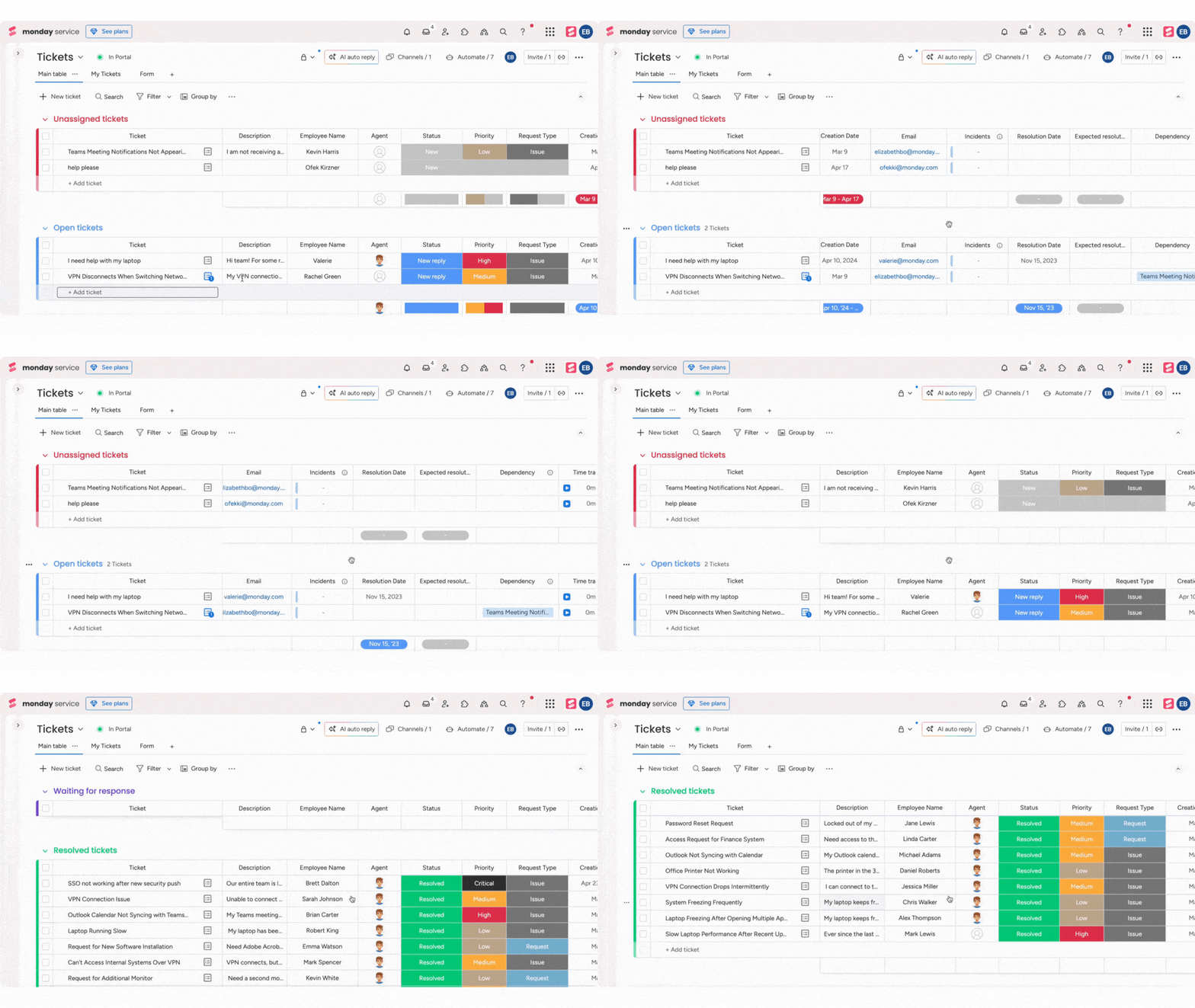
Capture service requests in one channel
monday service lets you feed tickets into one Tickets board through Channels, including Gmail and Outlook, or by creating a custom monday Inbox (a unique email address you manage directly from the board). WorkForms provide another intake option, letting teams collect structured information from the start. You can centralize intake without forcing every team to change how they submit requests on day one.
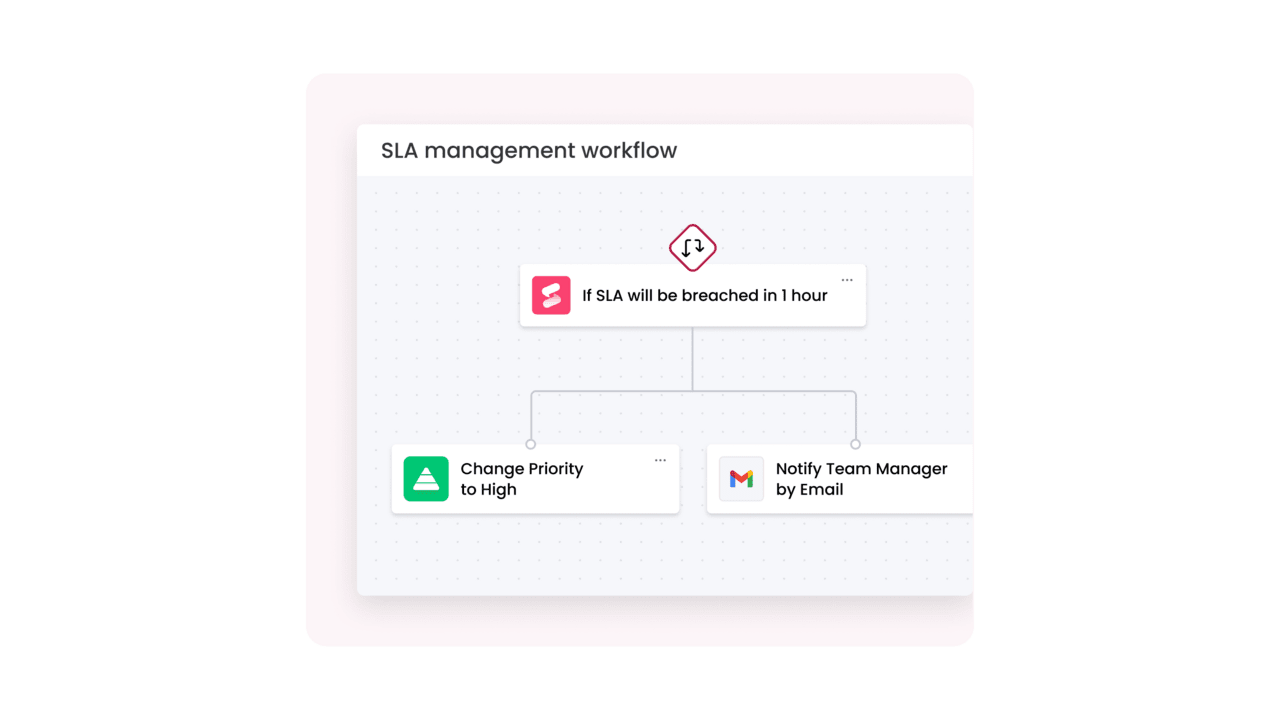
Track SLAs with live timers
Instead of retroactive SLA reporting, monday service’s SLA column tracks time-to-resolution with a live timer and clear states (within target, at risk, breached, paused). It also pauses automatically outside working hours, and the timer follows the timezone of the person who created the SLA column, which is useful when you’re managing coverage across regions. Breach alerts notify the right people before deadlines pass, so teams can act proactively.
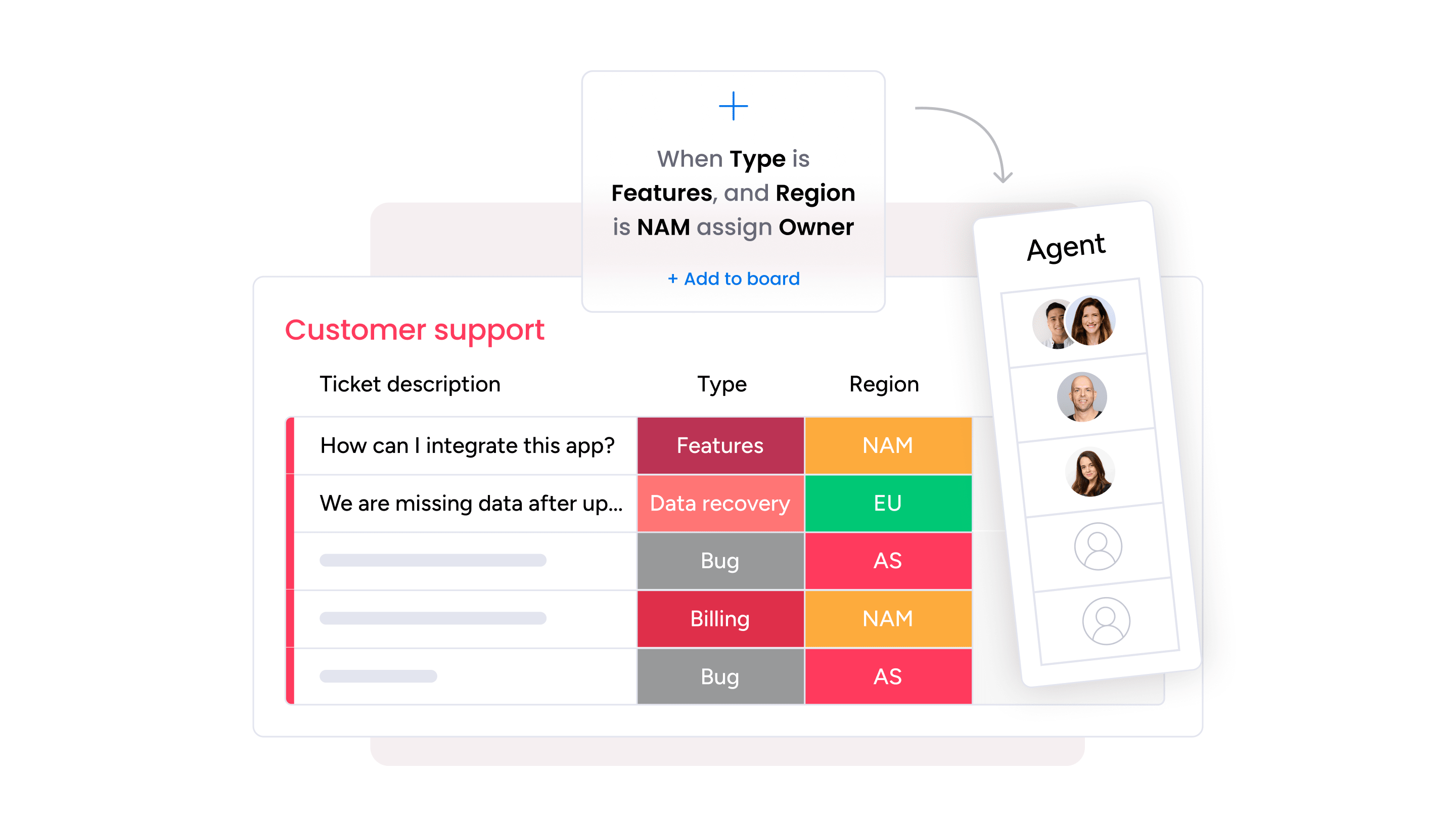
Extract context to route tickets to the right agent
Smart assignments can run as a simple round-robin, or use AI-based matching. With AI assignment, you choose an input column (like Priority) and add agent skills and roles; monday service then matches tickets using that information and the ticket’s content. It also connects with AI-powered triage outputs (like summaries, categories, or sentiment detection) so tickets move from intake to assignment without manual sorting.
Empower users with self-service features
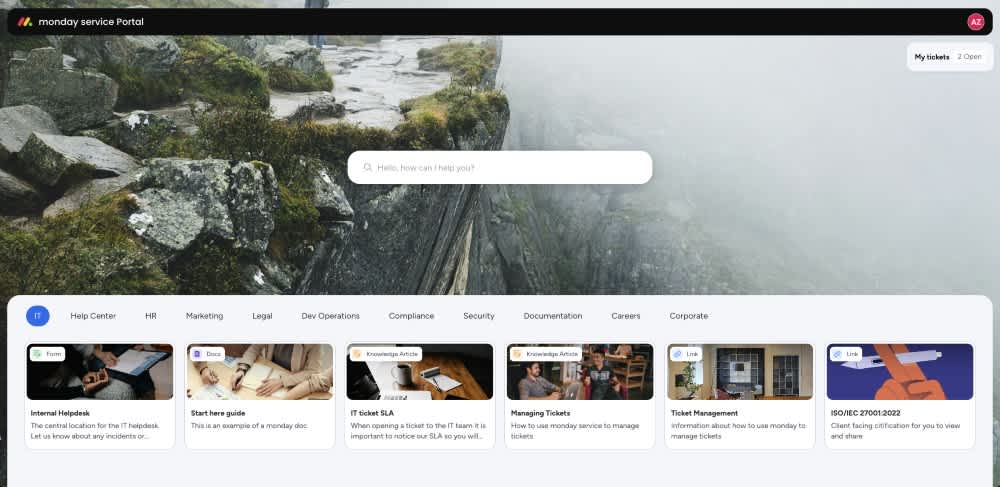
The Customer Portal acts as a hub for request forms and self-service articles, organized by category with descriptions and visuals; forms can open directly in the portal. Users also get a “My Tickets” area that shows their open requests so they can track progress and communicate without chasing agents across email threads. On Enterprise plans, you can create multiple Customer Portals, each with its own branding, content, and access controls, letting you tailor the experience for different departments or audiences while keeping the operational workflow consistent behind the scenes.
Add autonomous agents to your service operations
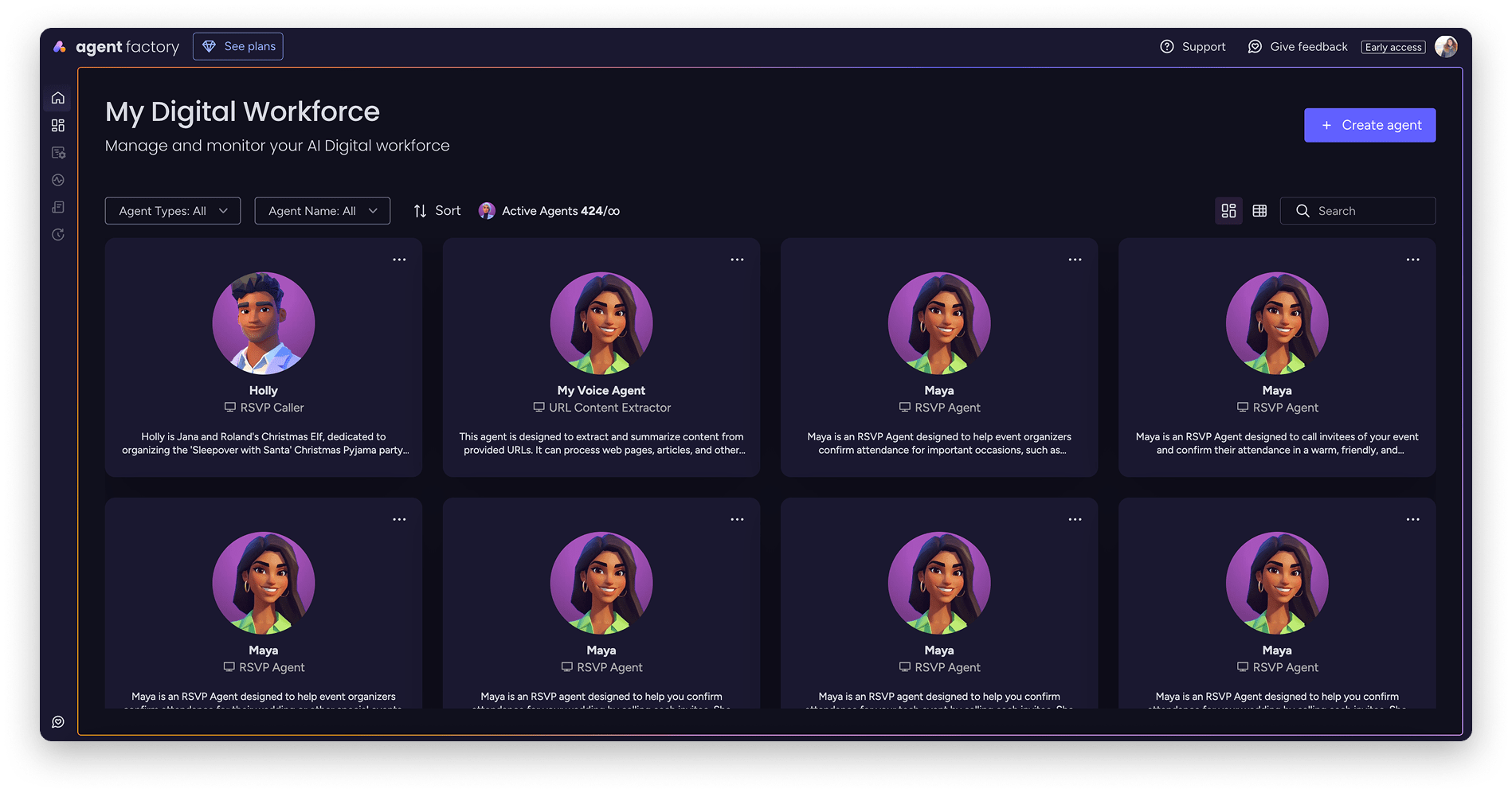
monday service includes an AI Service Workforce made up of specialized agents that autonomously resolve repetitive requests. The Intake and Triage agent classifies and prioritizes incoming tickets, then routes them to the right team or agent. The Knowledge agent surfaces relevant articles and past resolutions. The Incident agent coordinates response across teams when severity escalates. And the SLA monitor agent tracks deadlines and triggers alerts before breaches occur.
These agents use knowledge bases, past ticket history, and business rules to handle common requests end to end, freeing your human agents to focus on complex issues that require judgment. monday service provides unlimited AI credits on Tickets, CSAT, and Incidents boards, so your team can move at full speed.
Extend with monday vibe, MCP, and Sidekick
monday vibe is an AI-powered no-code app builder that lets you describe what you need and get a fully functional app, from custom dashboards and forms to service-specific workflows. monday MCP (Model Context Protocol) gives AI assistants like Claude, ChatGPT, Copilot, and Gemini secure, permission-respecting access to your monday.com workspace for reporting, task management, and cross-team visibility. And monday sidekick, the context-aware AI assistant embedded in your workspace, helps agents summarize context, recommend next steps, draft replies, and find similar resolved tickets.

Enterprise-grade security and scale
monday service is built for enterprise requirements. Certifications include SOC 2 Type II, ISO 27001, GDPR, and HIPAA support. Security features include SSO, role-based access, data residency, and BYOK encryption through Guardian.
Try monday serviceWhat comes next for your enterprise service desk?
The best decision you can make for your enterprise service desk is to invest thoughtfully in the systems and tools that run it. Instead of patchworking a series of tools together across multiple teams and locations, monday service can serve as a single enterprise service desk across your organization, wherever and however your teams operate.
Get a free trial of monday service to start managing your service delivery with enterprise-level features.
Try monday serviceFAQs about enterprise service desks
What is an enterprise service desk?
An enterprise service desk is a centralized platform that manages service requests, incidents, and workflows across a large organization, spanning IT and non-IT departments like HR, facilities, and finance. It provides structured processes, SLA tracking, and cross-team visibility at scale.
What is the difference between an enterprise service desk and a help desk?
A help desk typically handles individual issue resolution for a single team or location. An enterprise service desk supports complex, cross-departmental service operations with multi-step workflows, granular SLAs, AI-assisted automation, and enterprise-wide reporting.
What features should enterprise service desk software include?
Core features include configurable ticket management and routing, SLA tracking, self-service portals, knowledge management, workflow automation, AI-powered triage, integrations with identity and asset systems, incident management, and enterprise-level reporting and analytics.
How does AI improve enterprise service desk operations?
AI accelerates ticket triage, routing, and resolution by automating repetitive tasks. Agentic AI goes further by autonomously resolving common requests using knowledge bases and business rules, freeing agents to focus on complex issues that require human judgment.
- Configurable workflows and approvals
- SLA definition and tracking
- Self-service and knowledge management
- Automation and AI-assisted operations
- Integrations with identity, collaboration, and asset systems
- Enterprise-level reporting and analytics
How does AI in service desk operations improve ticket resolution times?
AI improves resolution times by reducing delays early in the service process. Common applications include:
- Automated ticket categorization and routing
- Summarization of long ticket threads
- Response suggestions for service agents
- Detection of urgency or sentiment signals
How can service desk automation reduce operational overhead?
Service desk automation reduces operational overhead by removing repetitive manual tasks from service workflows. Automated routing, approvals, notifications, and status updates reduce the time agents spend coordinating work. This allows service teams to handle higher request volumes without increasing headcount.
How do you successfully transition during an enterprise service desk implementation?
A successful transition starts with clear process definition before rolling out tools. Organizations should pilot the service desk with a limited group of users, provide targeted training for service teams, and communicate clearly with end users about what has changed. Ongoing feedback helps to prevent workarounds and drive adoption.
What role does asset management play within an enterprise service desk solution?
Asset management provides context that improves service accuracy and speed. It helps by:
- Linking tickets to devices, software, or licenses
- Identifying recurring asset-related issues
- Reducing investigation and resolution time
How can cloud-based service desks improve business scalability?
Cloud-based service desks allow organizations to scale service delivery without major infrastructure changes. It’s easy to add new teams, workflows, and regions in the cloud compared to on-premise systems. Cloud platforms also support regular updates, integrations, and performance improvements as business needs evolve.
What metrics are most critical for measuring service desk process improvement?
Common metrics include:
- Ticket volume and category trends
- Average resolution time
- SLA compliance rates
- Backlog size and aging
- Repeat incident frequency
How does monday service support enterprise service desk operations?
monday service unifies ticket intake, AI-powered triage, SLA tracking, workflow automation, and a self-service Customer Portal on one platform. It includes monday agents for autonomous resolution, monday vibe for no-code app building, and enterprise-grade security including SOC 2 Type II and HIPAA support.

 Get started