

Project management gets harder when roles, decisions, and responsibilities are unclear. Even strong teams can run into delays when no one knows who owns a task, who needs to approve it, or who should simply stay informed.
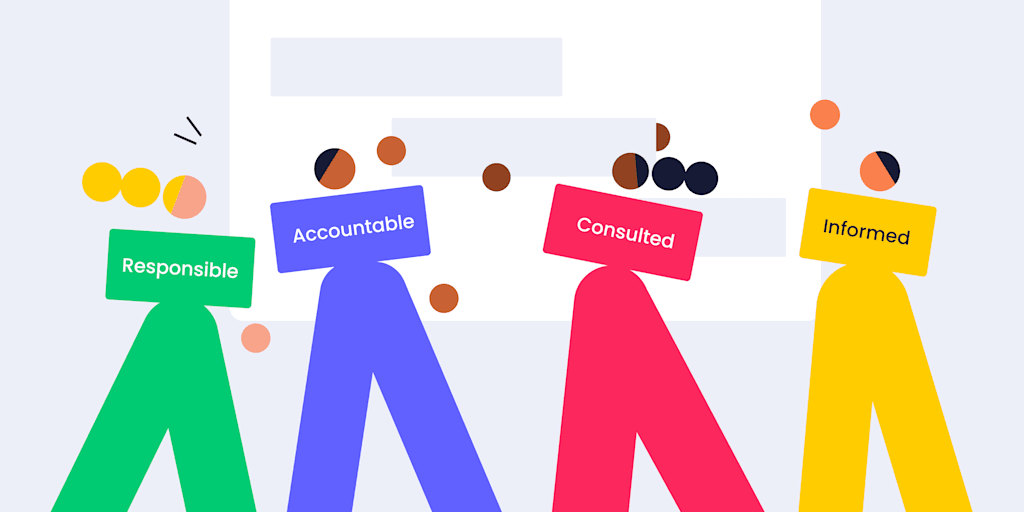
That’s where a RACI matrix can help. A RACI chart gives teams a simple way to define who is Responsible, Accountable, Consulted, and Informed for each task or deliverable. Instead of relying on scattered messages or assumptions, everyone can see their role in the project from the start.
In this guide, we’ll explain what the RACI model is, how to use it, when it works best, and how monday’s AI Workspace can help teams build, update, and share RACI charts in one connected workspace.
Get started with monday.com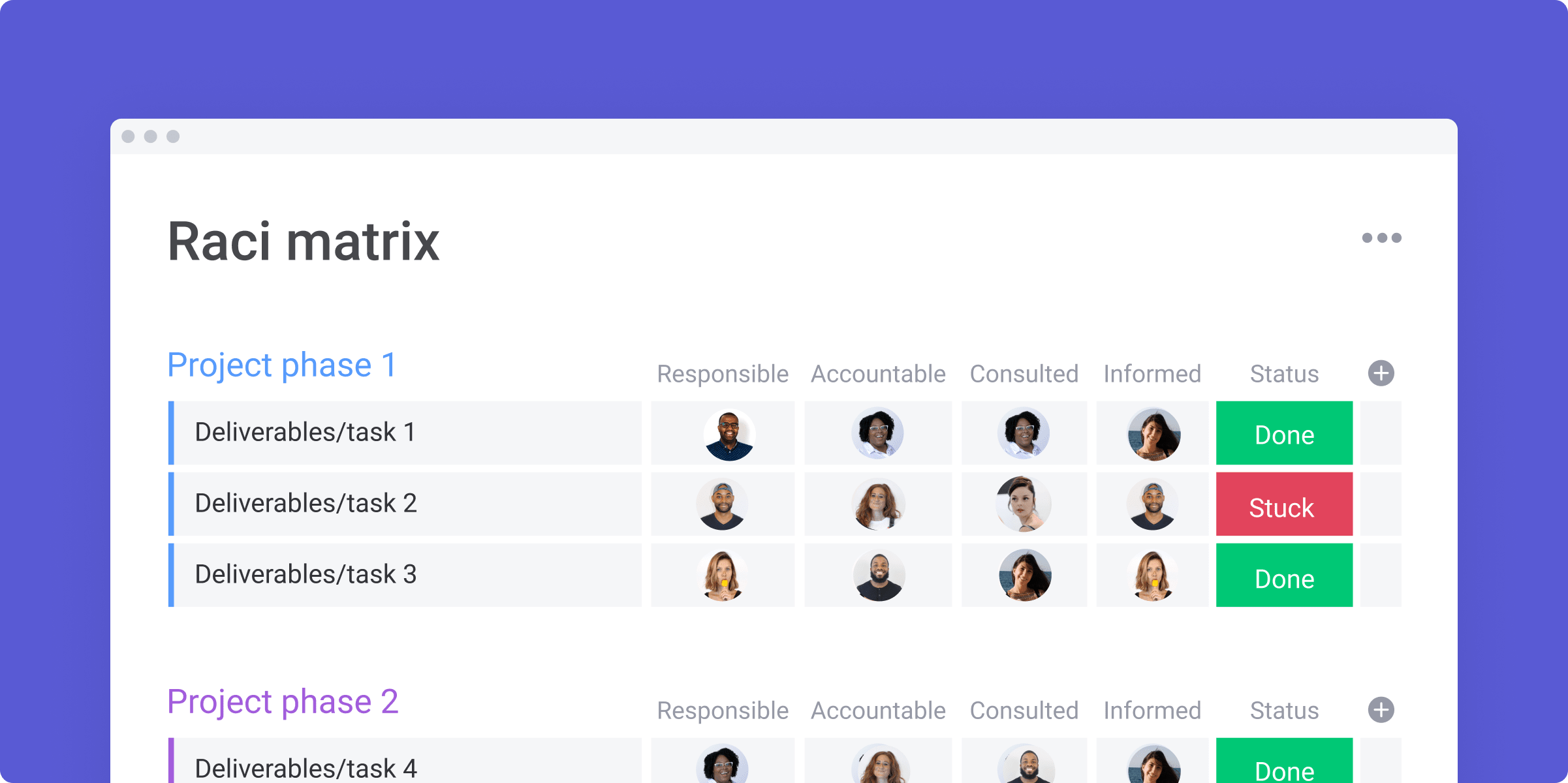
Key takeaways
- A RACI matrix helps teams clarify who is Responsible, Accountable, Consulted, and Informed for each project task or deliverable
- RACI charts are especially useful for complex projects with multiple stakeholders, departments, approvals, or decision-makers
- The main benefit of RACI is role clarity: teams can reduce confusion, prevent duplicated work, and make decisions faster
- RACI works best when each task has at least one Responsible person and one clear Accountable owner
- monday’s AI Workspace helps teams create, update, share, and automate RACI workflows with boards, dashboards, automations, integrations, and AI-powered capabilities
What is a RACI matrix?
RACI is a responsibility assignment matrix that teams use as part of their project management tactics and strategy. Also called a RACI matrix or linear responsibility chart, RACI charts are a type of responsibility assignment matrix in project management. These simple spreadsheets or tables highlight the different states of responsibility a stakeholder has over a particular task or deliverable and denote it with the letters R, A, C, or I. It’s typically implemented by color-coding each responsibility level and creating a simple table layout.
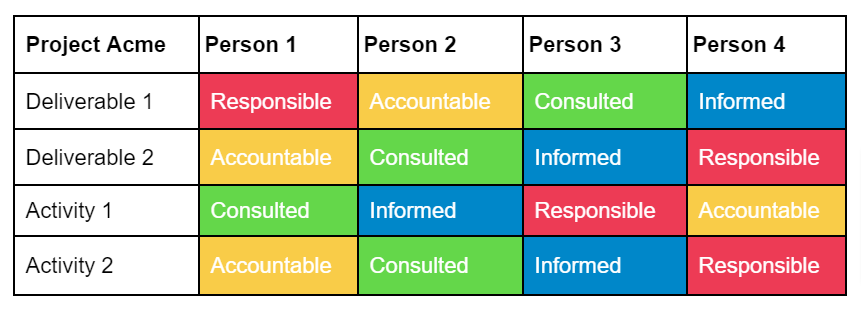
Generally, nobody should have more than one level of responsibility for each deliverable or activity group in the RACI chart. In this example, we’ve given every person some level of involvement to keep things simple. But when you make a real model for more than four people, there’s often more white space. We’ll get more into how a RACI chart looks and functions later.
Pro tip: Check out our easy-to-use RACI matrix template
What does the acronym RACI mean?
The letters in RACI stand for:
- Responsible
- Accountable
- Consulted
- Informed
The RACI matrix uses these terms to describe individuals’ roles and responsibilities for project activities and deliverables.
Once your responsibility assignment is complete, all participants should understand precisely what they need to do to make the project successful.
Definitions of RACI terms
Here’s how the RACI chart framework defines each role and its responsibilities.
Responsible
The person assigned as Responsible is the individual in charge of the project’s day-to-day work, including hands-on work, delegating responsibilities, and day-to-day management. This function is often held by a project manager, team lead, developer, engineer, designer, or content creator.
Accountable
This role is assigned to the person responsible for ensuring the work is completed satisfactorily. This is the individual who signs off that the job is done to the standard required. This function is often held by a department head, C-level executive, or product owner.
Consulted
Sometimes work may require advice or other input from a subject-matter expert to get the job done. Allocate the Consulted role to a person whose advice is necessary for task completion. Consultants are typically subject-matter experts, legal counsel, financial advisors, UX specialists, and marketing specialists.
Informed
The Informed role is for those stakeholders who need to be kept in the loop as a task progresses. They won’t provide any input on how the task gets done, but are likely a key stakeholder who needs to know what’s happening. This role is held by stakeholders, end users, client representatives, or other department heads.
Benefits of using the RACI model in project management
The proverb “too many cooks spoil the broth” applies well to project work when too many people are involved, and there is no clear ownership. Princeton University concluded it was true following its research into the ‘wisdom of crowds’.
You instinctively know when too many people are getting involved in a specific task. It can even lead to conflict, as each team member tries to exert influence over tasks that shouldn’t require their input.
Without documented roles and responsibilities, it’s harder to prevent people from straying outside their lane and disrupting the project’s smooth running.
Using a RACI matrix helps ensure that each task is worked on only by the right, relevant people.
Further benefits of using the RACI model include:
- It simplifies communication. If only the right, relevant people are involved in a task, this streamlines communication, making task completion more efficient
- It prevents team member burnout. Once you have drawn up the RACI matrix, you can easily see if any team member is overloaded with too many tasks on the project. If your project has a single person shouldering most of the load, it creates a weak link that could spell disaster if that person fails to deliver
- It provides clarity of purpose. Clarity of roles gives team members a purpose. If everyone can figure out immediately what they and others are doing using the RACI matrix, then this should result in a smoother workflow
Call a meeting with all the project’s stakeholders to produce a RACI matrix together, so you can reach agreement on this new iteration of everyone’s roles and responsibilities.
When you should use RACI
The RACI model is a great solution when multiple people are involved in a project, and you need clarity. It helps avoid the need to search for answers across multiple team members and stakeholders. Another bonus of using RACI is that it gives team members confidence. Everyone knows exactly what they are responsible for and who to turn to when necessary.
A large-scale project could involve many stakeholders, such as:
- Government regulators
- VIP clients and project sponsors
- Company executives
- Business analysts
- Internal users of the product
- Customers
- Suppliers
- Investors
When RACI is used from the beginning, teams can avoid miscalculations and blunders that could cost precious time and money. And of course, it will contribute to your overall stakeholder engagement efforts.
How do you create a RACI chart?
You can create a RACI chart using a simple grid, but it’s better to use a digital workspace so you can easily update and fix it.
Get a head start with our monday RACI chart template
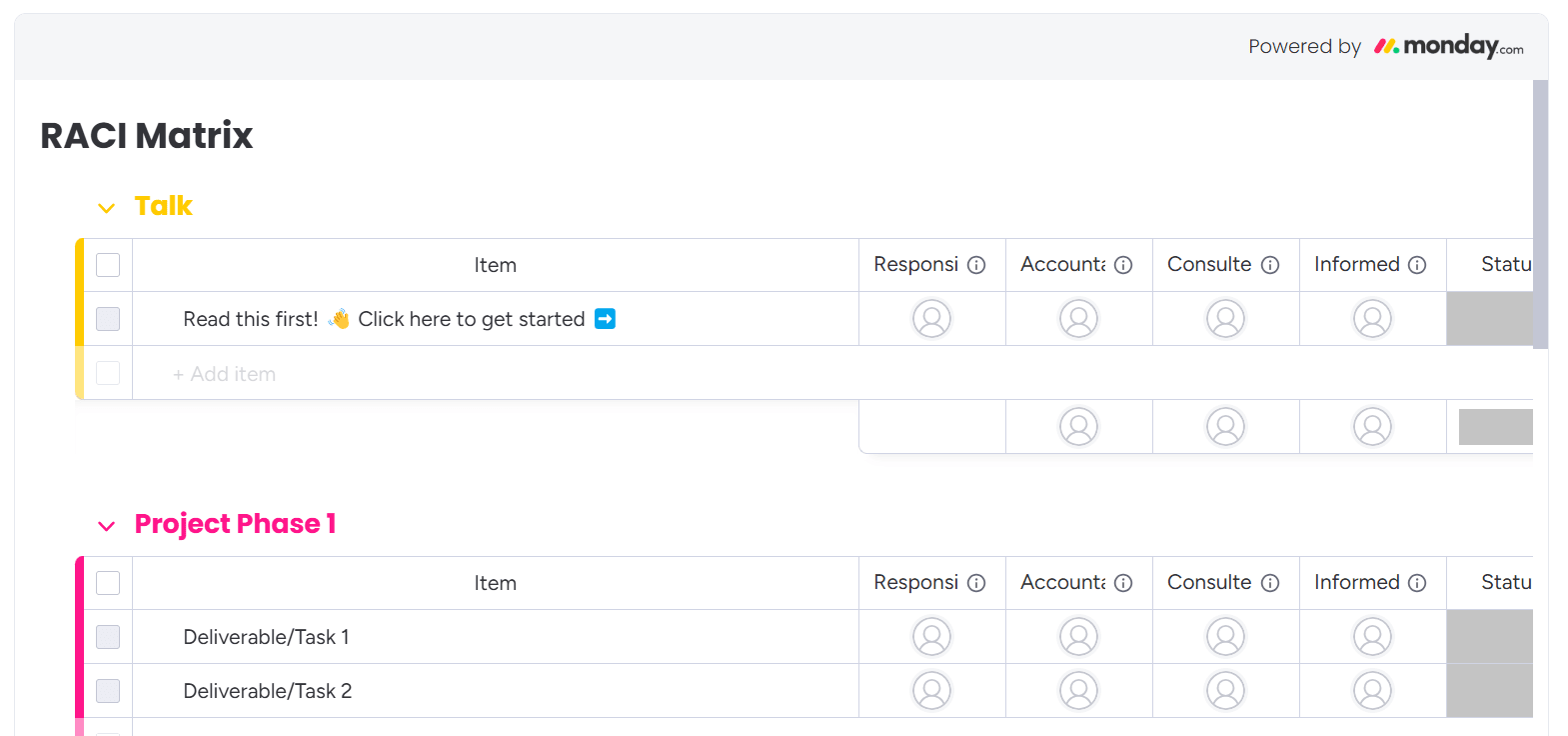
On the left of the RACI diagram, split your project into logical phases, and note down all of the action items that require completion. Along the top of the matrix, the four project roles of the RACI model are already entered for you.
Next, where a task and a role intersect, add in the person who will assume the role. Here’s an example containing a few common tasks for a new product launch:
| Responsible | Accountable | Consulted | Informed | |
|---|---|---|---|---|
| Packaging Design | Mary | Jane | Stephen | Graham |
| Advertising Campaign | Jane, Stephen | Jane | --- | --- |
| Manufacturing QC | Graham | Susan | Mark | Jane |
| Shipping Logistics | Janice | Stephen | --- | --- |
There are a few rules to stick to when you compose your RACI chart.
To make sure a task gets done, each one should have someone allocated as Responsible. Similarly, it’s best practice for every work item to have someone Accountable, too, so they can sign off on the task when it’s finished.
For large tasks, you can assign more than one person to each role if needed. Or, if it makes sense, you can assign the same person to a deliverable as both Responsible and Accountable. As you can see in the above example, not all tasks require a Consulted or Informed person ― you don’t have to assign these roles if you don’t need them.
Now, let’s move on to understanding the benefits of using a RACI diagram to define roles for a project.
RACI best practices
There’s no need to reinvent the wheel when it comes to building your RACI charts. Here are some of the best practices that we recommend sticking to:
1. Map out deliverables and activity groups thoroughly before using RACI
Don’t jump immediately into assigning individual responsibilities. Start by consulting with subject matter experts and accurately mapping out the moving parts. Only once you’ve got a clear outline of your project can you make educated decisions. That could be your Work Breakdown Structure (WBS) or a project roadmap.
2. Don’t be afraid to give responsibility to less senior staff
Assigning the accountable role to a high-level executive or project manager for all tasks is a mistake. Since they have the final say on when a job is complete, you instantly create a bottleneck. Instead, don’t be afraid to assign that role to experienced staff on the project team itself, who is most familiar with the work.
3. Standardize the approach across departments and locations
While a single project team is good, stakeholder relationships don’t exist in a vacuum. Your whole organization must get on board to truly maximize the return on investment. Make distributed responsibility and decision-making part of your corporate purpose. Everyone — from executive to intern — must be on the same page.
4. Each task must have at least one Responsible person and only one Accountable person
The goal here is to avoid overwhelm, not increase it. That’s why it’s critical to have one accountable role for each task to make decision-making as easy as possible.
5. Use the right digital tools to implement RACI at scale
A written memo alone isn’t enough to standardize your methods and break down departmental silos. Use digital tools to build a platform for efficient RACI implementation and stakeholder management.
RACI chart examples
A RACI matrix sounds great in theory, but how do you apply it in the real world?
Here are a few examples:
Launching a new help page on your corporate website:
- Ultimately, the design team would be Responsible for completing the work
- The project manager would be Accountable for most of the tasks, which would be broken down one by one on the matrix
- The head of customer support, whose team will be most directly impacted by the new help page, might be Consulted on the section’s contents
- Lastly, the marketing team would be Informed of the outcome so they could promote the new section
Creating a new employee onboarding program:
- Members of the human resources (HR) team would likely be Responsible for ensuring the work is done
- The director of HR would ultimately be Accountable for the final product
- Each team lead would be Consulted as they wanted to ensure their team was represented in the training
- Finally, members of the C-suite may want to be Informed about the final product
No matter what type of project or task your team is working on, the RACI model can be a great way to allocate responsibilities and avoid confusion.
The pros and cons of RACI
It’s clear that using RACI charts boosts organization and often clearer communication, but like anything else, RACI also has its downside. Let’s take a look at the pros and cons.
Pros
Using a RACI chart can bring several advantages to project management, enhancing efficiency, clarity, and team alignment:
- Communication with stakeholders is clearer and more organized
- Team leads can avoid assigning too much responsibility to specific team members
- Give visibility to stakeholders to understand what is in the pipeline and what is coming their way
Cons
RACI charts can also present challenges, including potential confusion, tension, and delays among team members:
- Roles can be confusing in the beginning (for example, understanding the difference between Accountable and Responsible)
- Tension may exist between Consulted and Informed stakeholders
- Setting up a RACI chart may require an initial time investment
RACI matrix alternatives
As the RACI chart is a simple project plan at its heart, it’s flexible enough for you to optimize it to fit your particular needs. Especially when you’re using a fully customizable template like the one from monday.com.
There are many variants of the RACI matrix that have tried to address the ambiguities with role names or added new roles entirely. Here are a few alternatives you could use instead.
DACI
The DACI chart uses the following role definitions to reduce confusion caused by the Responsible and Accountable roles in RACI.
- Driver: the person who ‘drives’ the task forward (Responsible in RACI)
- Approver: the person who signs off the task (Accountable in RACI)
- Contributor: the Consulted role in RACI
- Informed: same as RACI
RASCI
The RASCI chart uses the RACI format but adds in the additional role of Support. This role involves assisting the Responsible person in completing an allocated task. They won’t provide advice like the Consulted role or be the main driver for task completion.
CARS
The CARS model attempts to define the RACI roles more precisely and adds a supporting role, as in the RASCI model.
- Communicate: combines the Consulted and Informed roles in RACI
- Approve: uses more explicit language for the Accountable role in RACI
- Responsible: same as RACI role
- Support: uses the same support role as the RASCI model
CAIRO
The CAIRO model expands RACI by adding the letter O (and jumbles up the letters). The letter O is for Out-of-the-loop and is for situations where you need to designate an individual or team as not involved in a task at all.
RACI vs. RASCI
The terms RACI and RASCI are largely used interchangeably today. As mentioned above, RASCI is the same as RACI but adds support into the mix. The Support function ensures that the Responsible team member has everything they need to complete the project. This can be helpful on larger projects where more assistance is needed.
Who uses a RACI matrix?
Even though the RACI model is a project manager’s useful tool for stakeholder management, that doesn’t mean it should be used for all projects. The deciding factors on who uses it relate to the scale of the project and the company structure.
Use the RACI matrix for projects that are:
- Large-scale with clear-cut deliverables or workgroups
- For organizations with static roles and responsibilities
- Involving a wide variety of stakeholders for different aspects
- Spanning multiple departments
- In highly regulated industries
Don’t use the RACI matrix for:
- Small, single-department projects, it’s likely not necessary
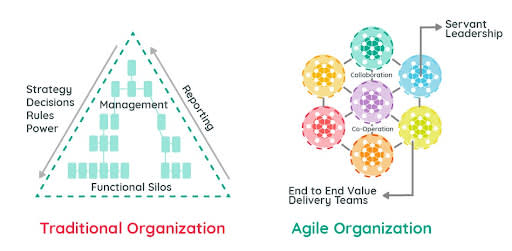
- Teams working with an Agile framework like Scrum
In Agile organizations, cross-functional teams and collaboration are the default. So, task responsibility depends on the employees’ initiative rather than a top-down decision. For Agile teams, implementing a hard RACI model is unlikely to be helpful, as teams should be self-organizing.
RAPID vs.RACI— What’s the difference?
Sometimes, when you want to define RACI, it’s important to use another method for comparison.
RAPID and RACI are both important tools for project managers, but they have different functions. As we have seen, the RACI method centers on deliverables and the key person responsible at each stage of the process. RAPID, however, focuses primarily on the decision-making process and the actions made by an organization.
You can see the breakdown of RAPID here:
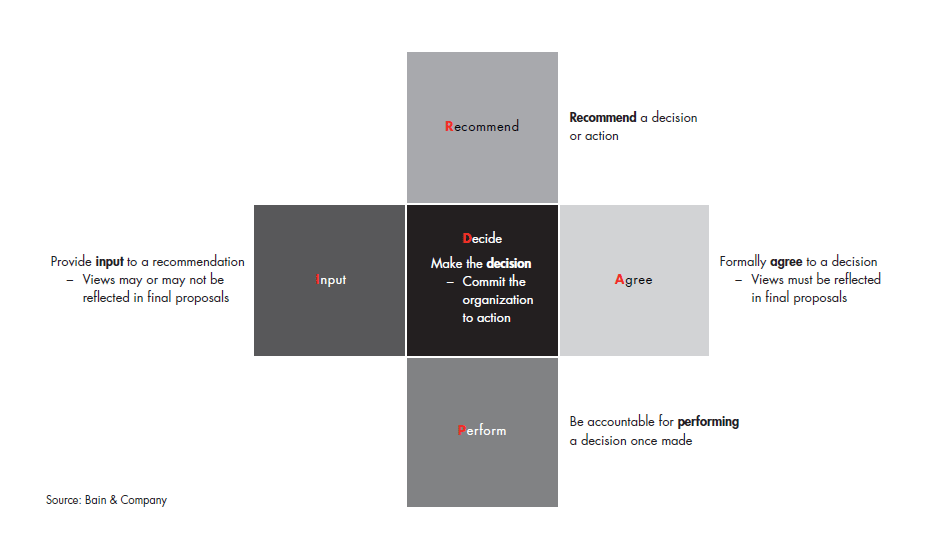
While making a key decision is a part of the project management process, it’s not the whole journey. The RACI framework outlines who should do a task, who to keep in the loop, and who gets the final say.
How to create a RACI chart with monday’s AI Workspace
While there is a wide variety of project management apps out there, for a RACI, monday’s AI Workspace offers an outstanding set of robust integrations and extensibility that let you build the exact platform you need to manage this structure and more.
You can get started much quicker with our RACI matrix template and share it with the right team members and stakeholders. From there, you can track RACI roles across project activities, phases, deliverables, and owners in one workspace.
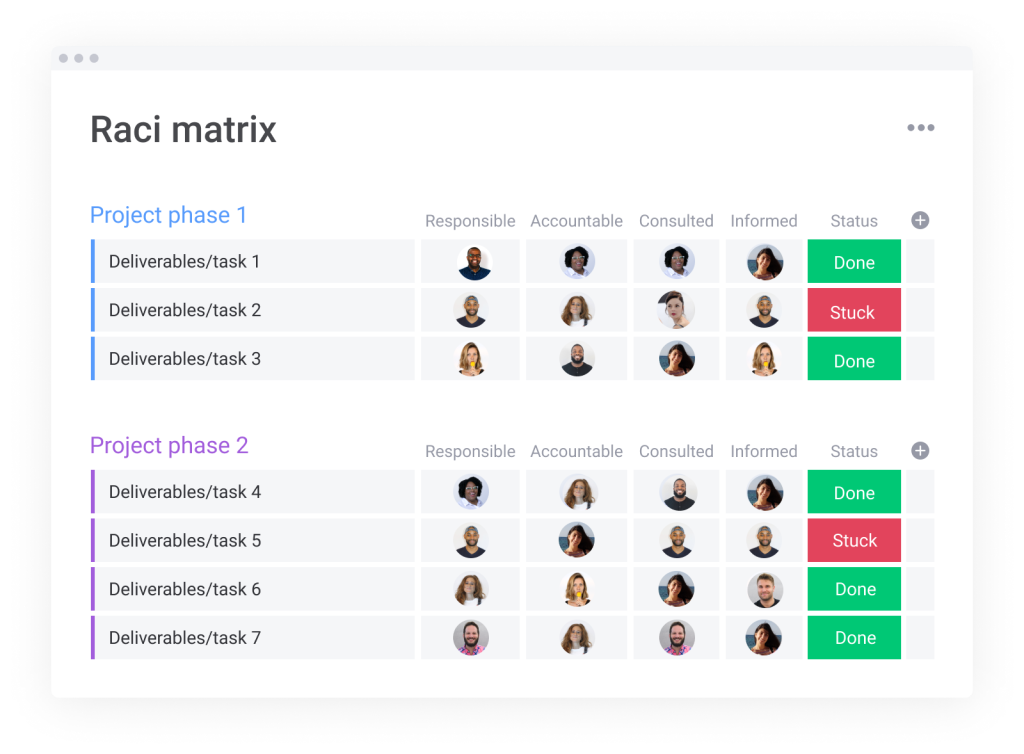
You can customize columns, statuses, owners, and views, then assign roles to internal team members or external stakeholders. Automations can help notify the right people when statuses change, deadlines move, or approvals are needed.
Here are a few more ways you can get the most out of your RACI matrix.
Continually update and revise to reflect the real-time statuses
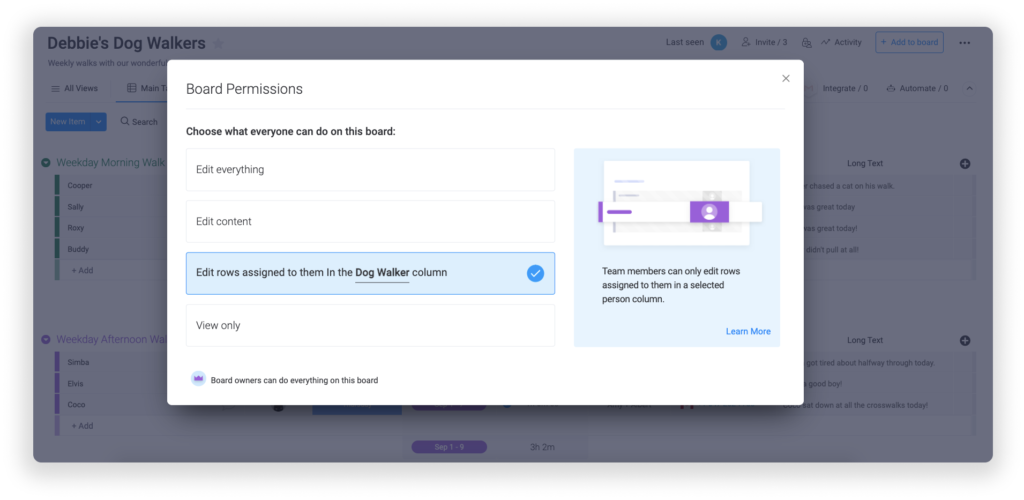
An out-of-date RACI chart quickly loses value. Use permissions to control who can edit responsibilities, statuses, and updates, while still giving stakeholders the visibility they need.
Keep stakeholders involved with shared boards and dashboards
With monday.com, you can easily give them viewer access to project and workflow boards. That way, they know the project’s actual status in real time. They can then use that information to guide their decisions. You can also automatically inform stakeholders of crucial changes with automation.
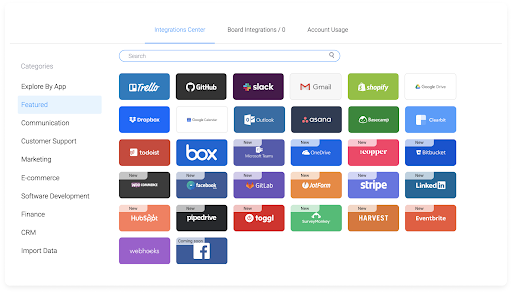
Our integrations with Slack, Microsoft Teams, and Gmail let you send messages based on status changes, new items, missed due dates, and more.
Remove data silos to keep everyone on the same page
Different departments often use different tools and applications. Monday.com’s integrations and open API can help teams connect project information across systems, reducing silos and making responsibilities easier to track.
AI-powered capabilities can also support RACI workflows by helping teams summarize updates, extract action items, organize stakeholder feedback, and surface work that may need attention. monday sidekick, monday agents, monday vibe, AI columns, and the AI workflow builder can help teams connect responsibility planning to real execution while keeping people in control of final decisions.
Empower stakeholders with RACI charts
The RACI matrix is a practical way to assign responsibilities, clarify decision-making, and keep stakeholders aligned throughout a project. When everyone knows whether they are Responsible, Accountable, Consulted, or Informed, teams can reduce confusion and move work forward with more confidence.
The tools you use to manage your RACI chart also matter. With monday’s AI Workspace, teams can build a RACI template, connect it to project boards, automate updates, share dashboards, and use AI-powered capabilities to keep responsibilities aligned as work changes.
FAQs
What are the four roles under the RACI chart?
The four roles in a RACI chart are Responsible, Accountable, Consulted, and Informed. Responsible is the person doing the work, Accountable is the person who owns final approval, Consulted is someone who gives input, and Informed is someone who needs updates.
What is the difference between the R and A in RACI?
Responsible refers to the person or people completing the task. Accountable refers to the person who owns the outcome and gives final approval. A task can have more than one Responsible person, but it should usually have only one Accountable owner.
What is the golden rule of RACI?
The golden rule of RACI charts is that only one person can be assigned the Accountable role for each project.
Can the same person be accountable and responsible in RACI?
Yes, the same person can be both Accountable and Responsible in RACI. The Accountable status can only be assigned to one person, as this is the ultimate authority and owner of the task.
Which software is best for RACI?
monday.com makes it easy to build effective and visual RACI charts. Assign team members the different roles at the click of a button so everyone can stay informed and understand their part in getting the project completed well and on-time.
How does monday.com help with RACI charts?
monday’s AI Workspace helps teams create and manage RACI charts with customizable boards, owners, statuses, automations, dashboards, integrations, and AI-powered capabilities. Teams can assign roles, track responsibilities, share updates, and keep stakeholders aligned in one workspace.
