


Carrying costs average 20-30% of total inventory value annually. For a business holding $500,000 in stock, that means $100,000-$150,000 spent just to store, insure, and manage it. An inventory management template brings structure to your spend, giving teams a reliable way to track what’s on hand, what’s moving, and what needs replenishing.
In this guide, you’ll find inventory management templates for Excel and Google Sheets, along with implementation steps, industry-specific options, and how a work management platform scales inventory tracking from simple templates to fully automated systems.
Get startedKey takeaways
- Structured inventory management templates reduce costly errors, save hours on manual counts, and prevent both stockouts and overordering.
- Match template complexity to business scale — starter templates work for small teams, while growing operations need tools with multi-location support and automation.
- Excel and Google Sheets templates provide an immediate starting point for organized inventory tracking.
- Real-time visibility and automated low-stock alerts are the most valuable features in any inventory template.
- monday.com’s AI Work Platform turns static templates into scalable, automated inventory systems with AI-powered insights and 200+ integrations.
What is an inventory management template?
An inventory management template is a pre-built framework that helps you track, organize, and control stock levels. It gives you a structured way to monitor what you have, what you need, and when to reorder, all in one organized system.
The right template transforms chaotic stockrooms into organized operations. Here are the essential features that make templates useful for your business.
Real-time stock visibility
Real-time visibility means seeing your exact inventory levels right now, not yesterday or last week. This prevents selling products you don’t have and buying stock you don’t need.
When inventory updates automatically as sales happen, you make smarter decisions. You’ll know exactly when to reorder before running out, keeping customers happy and cash flow healthy, especially when paired with an order management system.
Customizable fields for your products
Different businesses track different product details, so flexibility is key. A bakery might record expiration dates, while a hardware store monitors bin locations. Customizable fields ensure the template fits the data your operation relies on most.
Start with essentials, then expand as needed:
- Basic identifiers: SKU, product name, and quantity.
- Supplier details: vendor name, code, and lead time.
- Operational info: location, category, or seasonal tags.
- Compliance data: expiration dates, batch numbers, or inspection notes.
A flexible template grows with your business, capturing only what’s relevant for accurate tracking and smarter decisions.
Multi-location tracking
Managing inventory across multiple locations requires seeing everything in one place. Multi-location tracking shows stock levels at each site and helps you transfer products where they’re needed most.
This prevents one store from turning away customers while another sits on excess inventory, a problem that store management software can overcome (enabling you to balance stock levels across locations and reduce waste).
Automated low stock alerts
Automated alerts notify you when inventory drops below set levels. These smart notifications consider your lead times and typical demand patterns.
Critical items might alert you earlier, while slow movers can run lower. You’ll reorder at the right time without constant manual checking.
Types of inventory management explained
What are the 4 main types of inventory? Understanding them helps you pick the right template for each category of stock you manage. Every business handles at least one of these types, and most deal with several at once.
Here’s how the 4 types break down and which template fits each one:
| Inventory type | Description | Best template match |
|---|---|---|
| Raw materials | Unprocessed inputs used in production (lumber, fabric, chemicals) | Supply chain template with supplier tracking and lead times |
| Work-in-progress (WIP) | Partially completed products moving through production stages | Manufacturing production control template with stage tracking |
| Finished goods | Completed products ready for sale or distribution | Stock control template with reorder points and demand forecasting |
| Maintenance, repair, and operations (MRO) | Supplies that keep the business running (office supplies, spare parts, cleaning products) | Asset management template with usage tracking and reorder alerts |
Effective operations management often requires tracking multiple inventory types simultaneously. A manufacturing company, for example, needs raw materials flowing into production, WIP tracked through assembly, and finished goods monitored for fulfillment.
Matching the right template structure to each inventory type ensures you’re tracking the details that actually matter for that category of stock.
The 80/20 rule for inventory management
What is the 80/20 rule for inventory? The Pareto principle, applied to stock management, means that roughly 80% of your revenue typically comes from just 20% of your SKUs. This insight changes how you allocate tracking effort across your inventory.
In practice, your top 20% of products deserve the most granular tracking fields, the tightest reorder points, and the most frequent review cycles. These are the items where a stockout directly hits your bottom line.
The remaining 80% of SKUs still need tracking, but they can operate with wider safety margins and less frequent audits. When setting up your inventory management template, prioritize precision for high-revenue items first. Automate reorder triggers for your top performers and set broader thresholds for slower-moving stock.
How inventory templates can transform your business
Inventory templates fundamentally change how you operate, functioning as management systems that unify processes for greater efficiency. The impact shows up in saved time, reduced costs, and smoother operations.
Save hours on manual counting
Automated tracking cuts physical inventory counts from weekly to quarterly. Your team spends less time counting and more time serving customers or improving operations.
The accuracy improves, too. While traditional methods can result in an average stock deviation of 25-30%, automated systems eliminate the data entry errors that plague manual methods.
Eliminate costly stock errors
- Overordering: cash sits on shelves instead of working for your business.
- Stockouts: lost sales and disappointed customers who might not return.
Professional templates maintain accurate data that prevents both problems: enabling your business to optimize stock levels and keep cash flowing.
Make smarter purchasing decisions
Templates capture patterns you’d miss manually: showing which products sell together, when demand spikes, and which suppliers deliver reliably.
This data strengthens your position with suppliers, enabling you to negotiate volume discounts confidently and time purchases for maximum savings.
Scale your operations seamlessly
Growth shouldn’t mean starting over with new systems. Professional templates expand with you — add products, locations, or team members without disruption.
The same template that works for 100 products handles 10,000. Your processes stay consistent even as complexity grows.
Get startedEssential inventory management templates
Inventory processes touch every part of operations management, from purchasing and warehousing to asset tracking and fulfillment. Each function requires its own structure to keep information accurate and teams coordinated. Choosing the right inventory tracking template keeps your stock control, asset management, supply chain oversight, and warehouse activities working together rather than in silos.
The following templates address these core areas, helping businesses maintain visibility, reduce costs, and streamline operations across the entire inventory lifecycle.
Stock control template
Stock control templates focus on maintaining optimal inventory levels. They track reorder points, safety stock, and turnover rates to balance availability with costs.
Key features include automatic reorder triggers and demand forecasting. These templates work best when you have predictable sales patterns and reliable suppliers.
Asset management template
Asset templates track expensive, long-lasting items like equipment and machinery, and asset management ensures you maximize their value over time. They monitor depreciation, maintenance schedules, and warranty information.
This template type becomes essential when you have significant capital tied up in equipment. You’ll be able to maximize asset lifespan and plan replacements strategically.
Supply chain template
Supply chain templates follow inventory from suppliers to customers. They track supplier performance, shipping times, and quality metrics across your entire network.
Integration with supplier systems provides real-time visibility, which can be further enhanced by order tracking software. You’ll spot delays early and keep products flowing smoothly.
Warehouse management template
Warehouse templates optimize storage and picking operations. They track bin locations, manage receiving processes, and create efficient picking routes.
Advanced features, similar to those found in warehouse management software, include barcode scanning and cycle counting schedules. These complex workflows become simple to implement and modify on a dedicated AI Work Platform.
Bar and liquor inventory template
Bar and liquor inventory templates address the unique challenges of beverage management. Tracking pour costs, variance between expected and actual usage, and bottle-level quantities requires a structure that standard stock templates don’t provide.
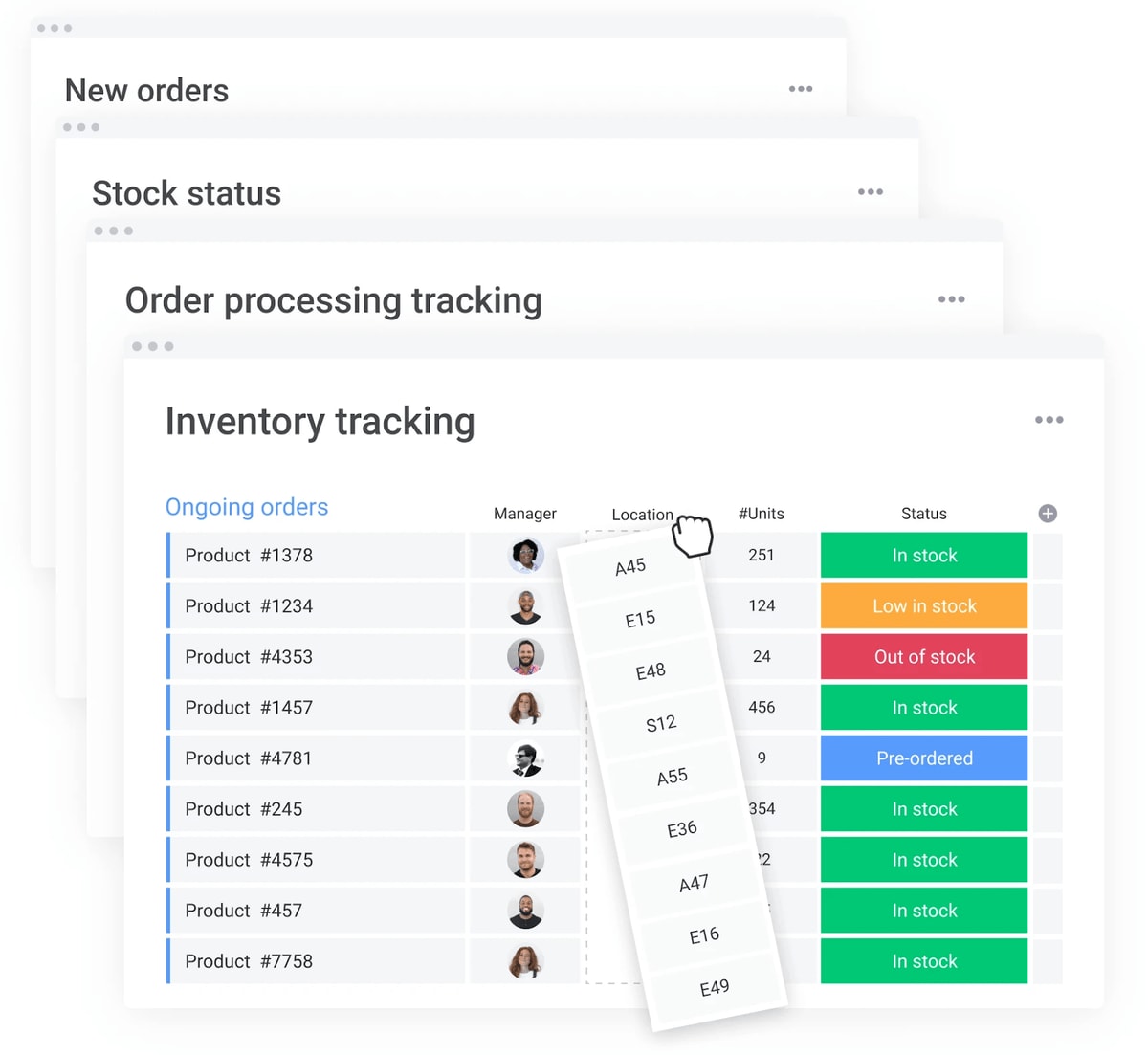
Free inventory templates for Google Sheets
Google Sheets is a viable, free option for inventory tracking — especially for small businesses or teams getting started with structured stock management. Its real-time collaboration features make it easy for multiple team members to update inventory data simultaneously.
A Google Sheets inventory template typically includes these core columns:
- Product name and SKU: unique identifiers for every item.
- Quantity on hand: current stock levels updated after each count or transaction.
- Reorder point: the threshold that triggers a new purchase order.
- Supplier and cost: vendor details and unit pricing for quick reordering.
- Location: where each item is stored across your facilities.
To get the most from a Google Sheets inventory template, use these setup tips:
- Conditional formatting: highlight cells in red when quantity drops below the reorder point for instant visual alerts.
- Data validation: create dropdown menus for categories, locations, and suppliers to keep entries consistent.
- IMPORTRANGE function: pull data from multiple location sheets into a single master view for centralized tracking.
- Filter views: let different team members sort and filter without changing the main spreadsheet for everyone else.
Where does Google Sheets fall short?
Google Sheets works well for straightforward inventory needs, but it does have limitations. There are no built-in automations for reorder alerts, updates require manual input or custom scripts, and collaboration becomes difficult to manage as teams scale. For teams that need automated alerts and real-time dashboards, a spreadsheet template on a work management platform offers more flexibility.
Free inventory management templates for Excel
Excel remains one of the most widely used platforms for inventory tracking, and its powerful data analysis features make it a strong choice for businesses that need detailed reporting alongside stock management.
An Excel inventory management template includes the same core fields as Google Sheets (SKU, quantity, reorder point, supplier, cost) with additional capabilities that Excel handles particularly well:
- Pivot tables: summarize inventory data by category, supplier, location, or time period to spot trends quickly.
- VLOOKUP and INDEX/MATCH: pull supplier details, pricing, or product specs from reference sheets automatically.
- Conditional formatting: color-code stock levels, flag expiring items, and highlight reorder triggers visually.
- Charts and graphs: create inventory dashboards directly within the workbook to visualize turnover rates and stock movement.
Setting up an Excel inventory template takes a few key steps. Start by defining your product categories and creating a master product list. Add columns for quantity, cost, supplier, and location. Then build formulas for reorder calculations and use conditional formatting to create visual alerts.
Where does Excel fall short?
Version control becomes a challenge when multiple people edit the same file. There’s no real-time collaboration without workarounds, and manual data entry at scale introduces errors. For operations managing thousands of SKUs across multiple locations, a dedicated inventory platform scales where spreadsheets reach their limits.
Free inventory templates by business size
Inventory needs change as a business grows. The right template should match both the scale of operations and the complexity of your processes. Smaller teams often need simplicity and clarity, while larger organizations rely on automation, analytics, and multi-location visibility.
The templates below outline how inventory management evolves from basic tracking to enterprise-level control.
| Business size | Typical inventory volume | Key features needed | Team size |
|---|---|---|---|
| Small business | 50–500 SKUs | Basic tracking, simple alerts | 1–5 people |
| Growing business | 500–5,000 SKUs | Multi-location, automation | 5–25 people |
| Entrerprise | 5,000+ SKUs | Advanced analytics, integrations | 25+ people |
Small business starter template
Small business templates keep things simple. They include product lists, stock levels, and basic alerts without overwhelming features.
Focus on establishing good habits first. Track what you have, set reorder points, and build from there, ideally with small business management software.
Growing business template
Growing businesses need templates supporting multiple users and locations. These templates add automation and integration without enterprise complexity.
Features include role-based access and automated purchasing. You’ll delegate responsibilities while maintaining control.
Enterprise management template
Enterprise templates handle complex operations across departments and regions. They include advanced analytics, compliance tracking, and system integrations.
monday.com’s AI Work Platform provides enterprise-grade security and scalability. Your template grows from departmental use to company-wide deployment.
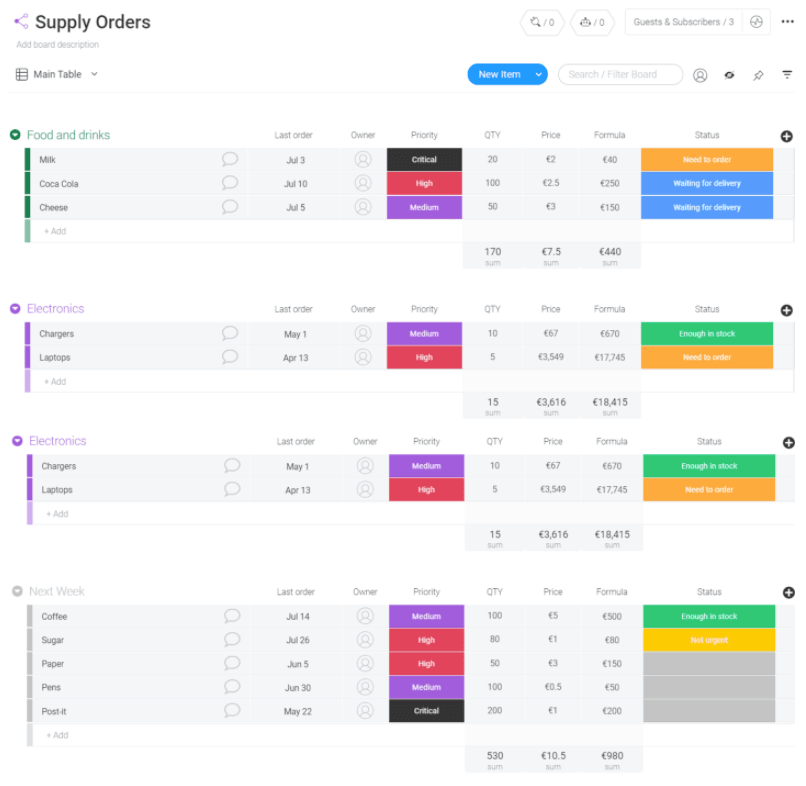
Industry-specific inventory management templates
Generic templates miss industry-specific needs. Specialized templates include the exact features, compliance requirements, and workflows your industry demands.
Restaurant and bar inventory
Food service operations face unique inventory challenges including perishability, portion tracking, and food safety compliance. An effective restaurant inventory template addresses these specific requirements:
- Expiration tracking: monitor freshness dates to reduce waste.
- Recipe costing: calculate dish profitability based on ingredient costs.
- Portion control: track usage against expected portions.
Integration with POS systems updates ingredient levels automatically, ensuring you maintain food safety standards while maximizing profits.
Retail and fashion stock management
Retail inventory involves managing product variants, seasonal demand shifts, and multi-channel sales. These templates handle the complexity that general inventory tracking misses:
- Variant tracking: manage sizes, colors, and styles efficiently.
- Seasonal planning: prepare for demand shifts and markdown timing.
- Multi-channel inventory: sync stock between stores and online.
These features prevent overselling online while physical stores have stock.
Applying project management in retail can further streamline multi-channel operations by providing consistent availability across all channels.
Manufacturing production control
Manufacturing templates coordinate raw materials with production schedules. They track components through assembly and ensure materials arrive when needed.
Bill of materials integration calculates exact component needs. You’ll avoid production delays from missing parts.
Healthcare supply tracking
Healthcare inventory carries compliance and patient safety requirements that generic templates don’t address. Medical supply templates need these specialized features:
- Lot tracking: trace products in case of recalls.
- Expiration management: prevent use of expired supplies.
- Compliance reporting: document everything for regulatory audits.
These features protect patients while meeting strict regulations (ensuring you maintain compliance without manual documentation).
IT asset management
IT templates track technology investments throughout their lifecycle. They monitor warranties, schedule maintenance, and plan replacements before failures.
Integration with help desk systems reveals which assets need attention. You’ll prevent downtime and budget accurately for replacements.
Get started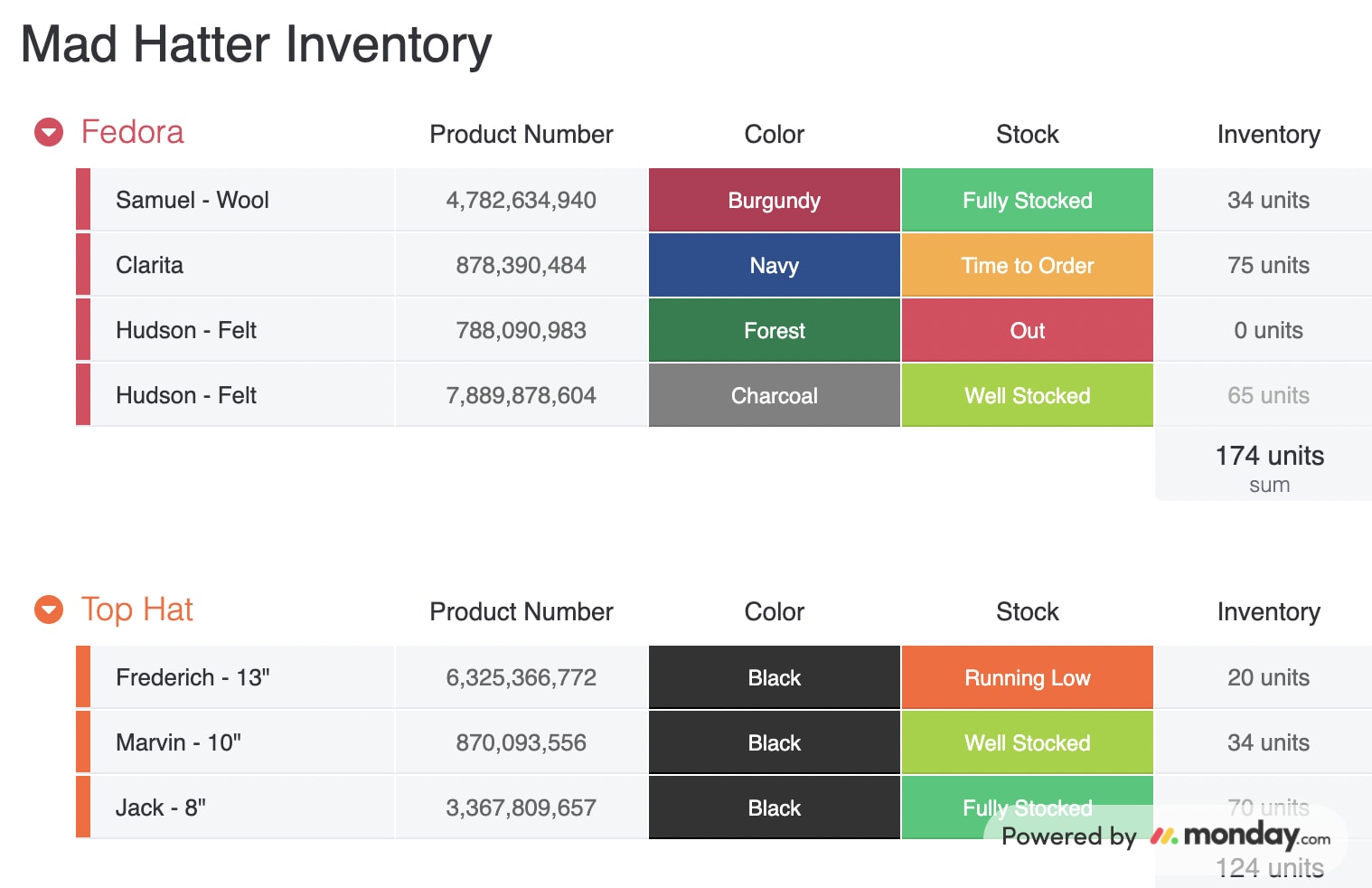
How to choose the right inventory template
Choosing the right template starts with understanding your current situation and future plans. The right choice depends on whether you’re managing 50 SKUs from a single location or coordinating thousands of products across multiple warehouses.
Evaluate these 4 areas to find your ideal match.
Assess your current inventory volume
Count your active SKUs and calculate how often inventory turns over. This reveals whether you need basic tracking or advanced features.
High-volume operations need different templates than businesses with fewer products but complex tracking needs. Match the template to your specific situation.
Consider your growth plans
Templates should evolve with your business, not limit it. Choosing a flexible system ensures that as inventory volumes increase and processes become more complex, your workflows can scale without disruption.
Work management platforms like monday.com’s AI Work Platform support this progression, allowing teams to start with simple tracking and expand into advanced automation and reporting as operations grow.
Evaluate integration needs
List your current software, like accounting, e-commerce, and POS systems, as your template must connect with these platforms.
With teams using an ever-growing number of software applications year-over-year, strong integration is critical to eliminate duplicate data entry. Information should flow automatically between systems so your inventory data stays accurate across every platform.
Plan for team collaboration
How will different roles use the template? Consider who needs access and what they’ll do with it.
Role-based permissions ensure people see relevant information. For example, your warehouse team doesn’t need financial data, and accounting doesn’t need bin locations.
5 steps to implement your inventory system
Once you’ve selected the right template, the next step is implementation. Follow this structured approach to go from setup to fully operational inventory tracking.
Step 1. Organize your product database
Collect all product information in one place, including SKUs, descriptions, suppliers, and historical data.
Clean this data before importing, by removing duplicates, standardizing names, and verifying supplier details.
Step 2. Configure tracking parameters
Set your reorder points based on actual demand and lead times. Always use your historical data instead of guessing. Configure alerts, permissions, and approval workflows that trigger at these points.
Step 3:. Set smart reorder points
Calculate reorder points that balance carrying costs with availability, always considering demand variability and supplier reliability.
Bear in mind that some products need different approaches. For example, fast movers might need higher safety stock than specialty items.
Step 4. Automate key workflows
Automation reduces manual effort and ensures consistency as inventory volumes grow. Start with simple triggers that eliminate repetitive tasks and expand as your team becomes more comfortable.
- Purchase orders: create automatically when stock reaches reorder points.
- Notifications: alert team members when items run low or orders arrive.
- Status updates: move products through receiving, stocking, and fulfillment stages.
Platforms such as monday.com’s AI Work Platform make these automations easy to set up and adjust, so processes can scale smoothly without adding complexity.
Step 5. Train your team for success
Create role-specific training focused on daily workflows. Show warehouse staff how to update locations and teach purchasers the ordering workflow.
Provide ongoing support and documentation. Regular check-ins ensure everyone uses the system effectively, while investing in proper onboarding pays off through fewer errors and faster adoption.
When to upgrade from templates to inventory software
Templates are a strong starting point, but there comes a point where spreadsheets reach their limits. How do you know when it’s time to move to a dedicated inventory platform?
Watch for these signs that your business has outgrown manual templates:
- Error rates are climbing: despite process improvements, data entry mistakes keep increasing as volume grows.
- Multi-location complexity: managing three or more locations with shared inventory creates constant sync challenges.
- Team size over 10: multiple people need simultaneous access, and version control becomes unmanageable.
- Integration requirements: your e-commerce, POS, and accounting systems need real-time data exchange that manual updates can’t support.
- Demand for automation: you need automated reorder triggers, demand forecasting, and approval workflows that spreadsheets simply can’t deliver.
When templates reach their limits, a platform built for inventory workflows brings the automation, visibility, and scale that spreadsheets cannot. The transition doesn’t have to be disruptive — the right platform lets you import your existing data and build on the processes you’ve already established.

Transform your inventory management with monday.com's AI Work Platform
Efficient inventory management depends on more than spreadsheets — it requires connected systems that align purchasing, warehousing, and fulfillment in one place. monday.com’s AI Work Platform brings structure, visibility, and scalability to that process, helping teams build inventory systems that fit their workflows and grow as operations expand.
Visual inventory boards that work your way
Visual boards make inventory data instantly understandable. Color coding shows status at a glance — green for healthy stock levels, yellow for approaching reorder points, and red for items that need immediate attention.
With 15+ board views including Kanban, Gantt, and Calendar, you can customize how different teams interact with inventory data. Warehouse staff see locations and quantities while purchasing sees supplier information and costs.
No-code automations that eliminate manual work
With 200+ no-code automations, you can build sophisticated inventory workflows without writing a single line of code. Drag-and-drop automation handles routine work while your team focuses on exceptions and strategic decisions.
- Conditional triggers: automatically generate purchase orders when stock drops below thresholds.
- Multi-step approval workflows: create approval chains for high-value inventory requests.
- Time-based actions: schedule recurring inventory counts and maintenance checks.
Integrations for seamless inventory control
Connect your inventory system with every application in your tech stack without complex development work.
- E-commerce platforms: sync stock levels automatically with Shopify, WooCommerce, and more.
- Accounting software: keep financial records accurate with QuickBooks and Xero connections.
- Shipping providers: update tracking and delivery status in real–time.
Every integration eliminates duplicate data entry and keeps information flowing across your business.
AI-powered inventory management
AI capabilities on the platform go far beyond basic automation, giving teams intelligent insights and autonomous execution across inventory workflows.
- monday agents: autonomous AI agents analyze inventory patterns, flag low stock levels, and automate reordering decisions without manual intervention — acting as an always-on inventory analyst.
- monday vibe: build custom inventory applications by describing your needs in natural language. Create a supply chain tracker, a receiving dashboard, or a vendor scorecard without writing any code.
- monday MCP: connect AI assistants like Claude or ChatGPT directly to your inventory boards for on-demand reports, bulk data updates, and advanced analysis.
- AI Blocks: categorize inventory items automatically, extract data from supplier documents, and summarize stock reports — all within your existing workflows.
These AI features help you move from reactive inventory management to proactive decision-making, catching issues before they affect your operations.
Real-time inventory visibility across your supply chain
Maintain complete visibility from suppliers to customers with centralized inventory tracking.
- Supplier performance: track lead times and fulfillment rates to identify reliable partners.
- Multi-location management: view and transfer stock between warehouses instantly.
- Batch and lot tracking: maintain quality control and enable precise recalls if needed.
This end-to-end visibility prevents stockouts and overstock situations while maximizing your inventory ROI.
Dashboards and reporting
Real-time analytics dashboards with 10+ drag-and-drop widgets give every stakeholder the view they need. Executives see financial metrics and inventory valuation, while warehouse managers track operational efficiency and stock movement.
Customizable reports update automatically as data changes, so you’re always working with current numbers. No more waiting for month-end reports to understand your inventory position.
Get startedHow to get started with inventory management on the AI Work Platform
The path from scattered inventory data to organized, automated tracking is simpler than it looks. Start with a downloadable template, whether in Excel, Google Sheets, or directly on monday.com’s AI Work Platform, and customize it to match your products, locations, and team structure.
As your needs grow, layer in automations, connect your existing software, and let AI handle the repetitive analysis. The right inventory system doesn’t just organize your stock — it gives you the confidence to make faster purchasing decisions, reduce carrying costs, and keep customers happy with consistent availability.
Frequently asked questions
What are the 4 types of inventory management?
The 4 main types of inventory are raw materials (unprocessed inputs), work-in-progress (partially completed items), finished goods (products ready for sale), and maintenance, repair, and operations or MRO (supplies that keep business running). Each type requires a different tracking approach and template structure.
What is the 80/20 rule for inventory?
The 80/20 rule for inventory, based on the Pareto principle, states that roughly 80% of revenue comes from 20% of SKUs. Applying this means focusing your most detailed tracking, tightest reorder points, and automated alerts on the top-performing 20% of your products.
Can I use Excel for inventory management?
Yes, Excel works well for small to mid-size inventory management, with pivot tables, VLOOKUP, and conditional formatting supporting effective stock tracking. Growing businesses often upgrade to a dedicated platform for real-time collaboration and automated alerts that Excel can't provide.
How do I track inventory in Google Sheets?
Set up columns for SKU, product name, quantity on hand, reorder point, supplier, and cost. Use conditional formatting to highlight low-stock items, data validation for consistent entries, and the IMPORTRANGE function to consolidate data from multiple location sheets into one master view.
When should you upgrade from templates to inventory software?
Consider upgrading when error rates climb despite process improvements, you're managing three or more locations, your team exceeds 10 people needing simultaneous access, or you need automated reorder triggers and real-time integration with e-commerce and accounting systems.
How does monday.com's AI Work Platform help with inventory management?
monday.com's AI Work Platform provides visual inventory boards, 200+ no-code automations, AI-powered demand insights through monday agents, and integrations with platforms like Shopify and QuickBooks. Teams can start with a simple template and scale to fully automated, multi-location inventory systems.

 Get started