

Creating products, services, or experiences that people genuinely want is harder than it looks. Even strong ideas can miss the mark when teams skip research, overlook user needs, or rush from concept to execution.
The design process helps teams reduce that risk. It gives you a structured way to define the problem, research your audience, explore solutions, test ideas, and improve the final product before launch. In this guide, you’ll walk through the seven steps of the design process, see how the process differs across industries, and get practical ways to keep users at the center of every decision. You’ll also see how monday’s AI Workspace helps teams manage research, ideas, feedback, approvals, and launch work in one connected workspace.
Key takeaways
- The design process helps teams move from problem definition to research, ideation, prototyping, testing, and launch
- A strong design process keeps user needs at the center instead of relying only on internal assumptions
- Research, prototyping, and testing help teams reduce risk before investing heavily in a new product, service, or experience
- Design processes vary by industry, but most rely on clear requirements, feedback loops, iteration, and cross-functional collaboration
- monday AI Workspace helps teams manage design workflows with boards, dashboards, automations, integrations, workdocs, and AI-powered capabilities
What is the design process?
The design process is a structured framework that breaks a large project into smaller, easier-to-handle stages, moving from problem definition to a tested, finished solution. It’s prominent in engineering, architecture, and manufacturing because it helps teams deliver finished solutions that customers actually want and need.
At a glance, the stages of the design process look something like this:

(Image source)
To do this well, teams gather feedback from potential users or customers at multiple stages, including before they create a prototype or invest significant time and money into a project.
Why is the design process important?
The design process is important because it lowers the risk of building the wrong thing, keeps user needs at the center of every decision, and gives cross-functional teams a repeatable way to move from idea to launch. Many projects struggle not because the idea was weak, but because teams skipped research, gathered requirements poorly, or committed to a solution before validating it.
A clear process protects against that in a few practical ways:
- Reduces wasted effort: research and prototyping surface problems while they’re still cheap to fix, instead of after launch
- Keeps users central: structured feedback loops stop internal assumptions from quietly overriding what customers actually need
- Improves alignment: a shared sequence of stages gives designers, engineers, product, and marketing one view of where work stands
- Creates repeatability: once a team runs the process a few times, each new project starts faster and with fewer surprises
The payoff is compounding. Every cycle you run teaches the team something about your users, and a documented process turns those lessons into a standard everyone can build on.
What are the seven steps in the design process?
The number of steps depends on the industry and overall method, but a practical, widely used version breaks the design process into seven steps. In this view, the process ranges from identifying the problem the design or product will solve to research, planning, prototyping, and release.
In sequential order, the seven steps of the design process are:
- Identifying the problem
- Researching it in-depth
- Ideating possible solutions
- Evaluating and selecting a promising solution
- Creating a prototype
- Testing and troubleshooting
- Making improvements to and releasing the final product
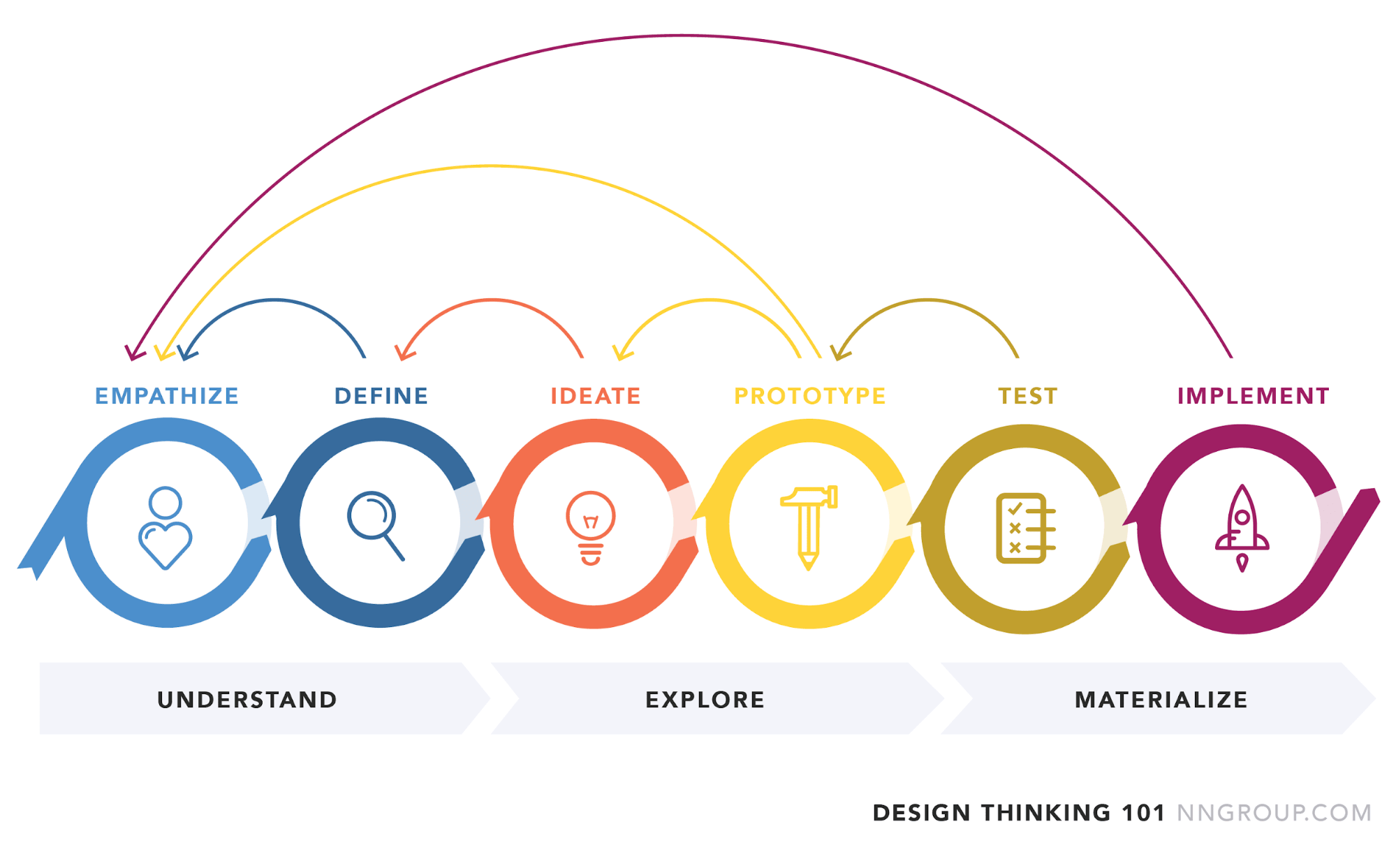
These steps map neatly onto the five-stage design thinking process many teams use (Empathize, Define, Ideate, Prototype, and Test), just with research and release called out as their own stages. Let’s take a closer look at each step and how you can put the design process into practice for your own projects.
1. Identify the problem you want to solve
Whether you found a pattern in negative customer feedback or you have some R&D budget left to spend, the approach stays the same. You and your project or product team need to figure out:
- What problem do you want to solve?
- Who has this problem?
- Can the solution help everyone equally?
- What are the requirements for this project?
- What are your limitations, such as budget and other constraints?
- What is your ultimate goal?
Even if you think you have a good idea, focus on the requirements and your limitations. Many new projects fail before they even start. Poor requirements gathering, weak upfront planning, and an unclear vision are among the most common reasons projects struggle before they ever reach execution.

2. Research the problem in-depth
At this stage, you’ll figure out the market landscape, whether competing products exist or are on the way, and what user needs competitors neglect. Again, a few simple questions can help you get to the bottom of things.
- Do current solutions exist that try to solve the problem?
- Do they fail to meet customer needs in any way?
- Do these solutions offer niche-specific versions?
- How much are customers spending on similar products?
- Can you use existing technologies, open-source or otherwise, to solve the problem?
If you’re trying to solve problems for an existing product or service, starting from scratch isn’t always best. You may find that developing an integration or partnering with another company is the better solution. Don’t enter an established market without a clear differentiator. If your solution is slower, harder to use, or less valuable than what already exists, customers will have little reason to switch.
3. Ideate possible solutions
Finally, it’s time to get down to business and start solving the problem. Start by using “how might we” questions to create a list of ideas. You can also add more detail if you want.
- How might we achieve X?
- What is the scope and timeframe for developing the solution?
You can brainstorm together, or ask each person to write down ideas separately before meeting to compare, combine, and refine them. Starting individually can help reduce groupthink and give quieter team members more room to contribute. A list of 50+ unsorted ideas isn’t a good starting point for in-depth evaluation, so identify the ones with the most potential, and shortlist 10 or so creative ideas to explore further.
At this stage, any project team must avoid two potential traps. Some teams stick to “realistic” ideas and aim too low. Others aim too high, focusing only on the most ambitious idea without considering feasibility.
Luckily, a helpful design thinking process can help teams get the best of both worlds and routinely select the best ideas. It’s called the four categories method, where you group the strongest ideas into four categories.

(Image source)
- The most rational ideas are the easiest to implement and most closely aligned with existing processes
- The most delightful ideas have the greatest potential to impress or support customers
- The darling idea is each group member’s favorite idea
- The long shot is a challenging idea with strong upside if it works
Everyone on your project team should choose one or two ideas for each category. Depending on group size, you may need to vote with colored sticky notes or run an online survey. Distributing questions through surveys and forms lets you collect as many participants and data points as possible. By the end of this process, you should have four to eight good ideas to take to the next stage.
4. Evaluate and select a promising solution
Okay, so you have your shortlist of ideas. Now, it’s time to put them to the test.
- Does it fit the necessary time frame?
- Can you complete it within budget restraints?
- Does it truly align with your target customer’s needs?
- Is the product itself a differentiator for your company?
Even if you can’t meet in person, don’t just let one person decide. Distributed or remote teams can use a Kanban board to prioritize and select ideas.
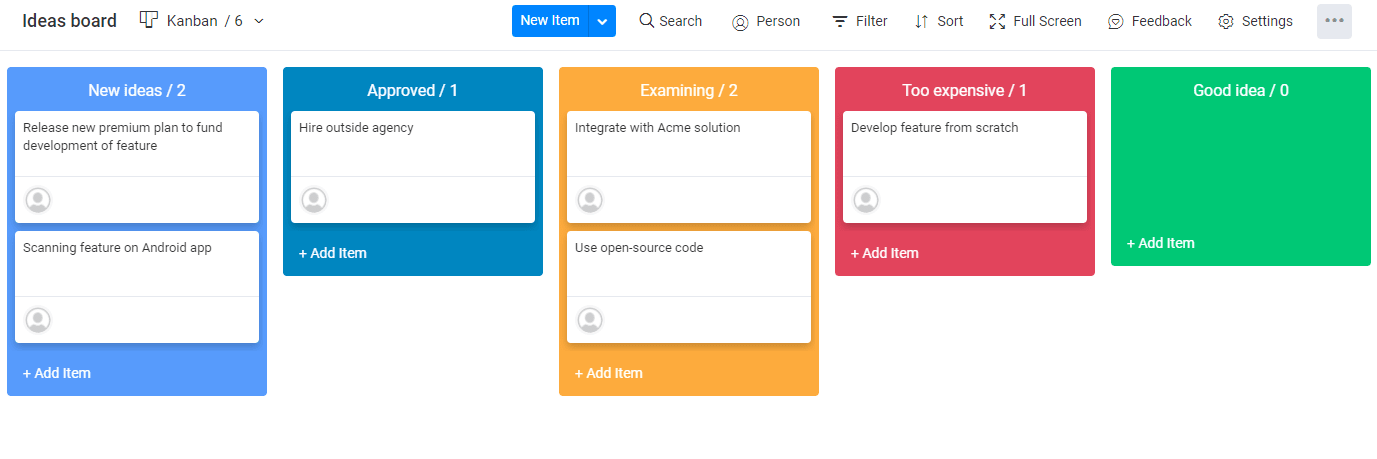 Depending on the company’s size, you may have an approval committee or a senior executive who gives the go-ahead for large projects. You could have them give a quick yes-or-no on the initial shortlist before exploring each option’s viability over a few days. If you end up with multiple viable options, hold a vote on which to proceed with first. Splitting your team’s focus too much won’t lead to good results.
5. Create your prototype
Spend as little time as possible validating your idea with a prototype, but don’t rush the process. Remember that this isn’t what you’re bringing to market. It doesn’t need all the bells and whistles or a complete branding kit.
- For physical products, use cheap materials and reusable segments
- Rely on lo-fi prototypes like storyboards or partially developed products, where you manually fulfill the process
Don’t underestimate the value of lo-fi prototypes. Even a simple manual version of an idea can help teams validate whether users actually want the experience before investing in a full build.
6. Test and troubleshoot
AI-powered capabilities can help teams summarize testing notes, group common feedback themes, and surface repeated usability issues, making it easier to decide what to improve next. If you only have a lo-fi prototype, don’t worry. As long as you deliver the experience your customer expects, you can get meaningful feedback.
For example, if your product is an AI-powered curator for cheap airline tickets based on someone’s bucket list, you can start with a landing page and have someone manually curate tickets using search engines. After user testing, interview your customers and ask relevant questions.
- Did the prototype solve your problem?
- Was there anything unexpected about the experience?
- Did you struggle to complete any tasks?
- What was your first impression of the prototype?
You should also test with some users without direct staff instructions to see how intuitive the experience is. If you’re developing something to replace an existing digital product or feature, set up an A/B test. The A/B testing template on monday.com can help.

An A/B test splits your users or traffic into two audiences. The first continues to see the old design or product, while the second sees the new one. Based on their behavior and a few predetermined metrics such as adoption, conversion, and time on page, you gain valuable insights and feedback from a much wider audience before making your final decision.
7. Make improvements to and release the final product
If your prototype was a huge hit, all that’s left now is to touch up your product and release it to the public. But first, your team needs to answer the following questions.
- Did users report issues completing any specific tasks with your product?
- Did they immediately understand how to use it?
If there were significant issues, go back to the prototyping stage. If not, fix the smaller issues and move straight to release.
Is there a difference in the design process in different industries?
While the term “design process” refers to a similar approach across the board, the number of steps and the most important considerations vary by industry. Let’s break those differences down.
Engineering design process
The engineering design process emphasizes early-stage research and robust prototyping and testing before tackling the final product. Prototyping often means running virtual tests using design and modeling software based on materials, building standards, and requirements.
But that doesn’t make the process any easier. You need to consider the elements and find the right materials to match physical requirements with the desired design. You must also factor in a complex supply chain when evaluating project scope, costs, and viability. For large-scale construction projects, the modern supply chain is exceedingly complicated. It involves renting equipment, using a mix of complete segments plus raw materials like gravel, and many subcontractors.

(Source: McKinsey & Company research on construction.)
Manufacturing or physical product design process
If you’re trying to develop a brand new solution to a complex problem with many varying and hard-to-quantify factors, digital prototyping and testing may not be enough. The prototyping process can take a long time and will often send you straight back to the drawing board.
For example, the lack of manual green chile pickers in New Mexico led agricultural researchers to develop a harvesting machine. Early prototypes ripped out the entire plant or left many of the chiles behind, making the solution impractical for real-world use.
 Only after decades of prototypes did they realize the solution wasn’t a better machine but a more robust, well-rooted plant that could better resist the more hard-handed harvesters. New seeds were the answer, not hardware. If it’s a consumer product, you also have to comply with regulatory testing before launching, which leads to drawn-out research, prototyping, and testing phases. Of course, not all products are physical, and digital product teams can move through these phases much faster.
Graphic or UX design process
A UX or graphic design process can be much leaner. No physical product, supply chain, or heavy regulation is involved. A designer still starts with user research and identifying problems. But they can quickly develop partially functional prototypes and get real users to test them.
The effort required to get actionable data is also much lower, and you can typically access it in real time. That shortens the distance between steps in the cycle, so some teams include user testing in their idea development process. The best way to manage a design project is to put your customers front and center.
The importance of user-centric thinking throughout the design process
You won’t get a perfect understanding of your target customers during the initial stages of research. That’s why it’s essential to keep returning to and maintaining an ongoing relationship with potential customers.
 (Image source)
For example, in software or game development, beta testing is the perfect example of this. You can get feedback from users and even the broader marketplace in real time. If everyone dislikes the beta test, you may need to go back to the drawing board and ask those beta users what they want instead. If they think it’s alright but “misses something,” you need to refine and retest your prototype until they’re satisfied.
Keep customer feedback at the center of design decisions
Most companies understand the value of customer empathy in theory, but internal decision-making can still become disconnected from what users actually need.
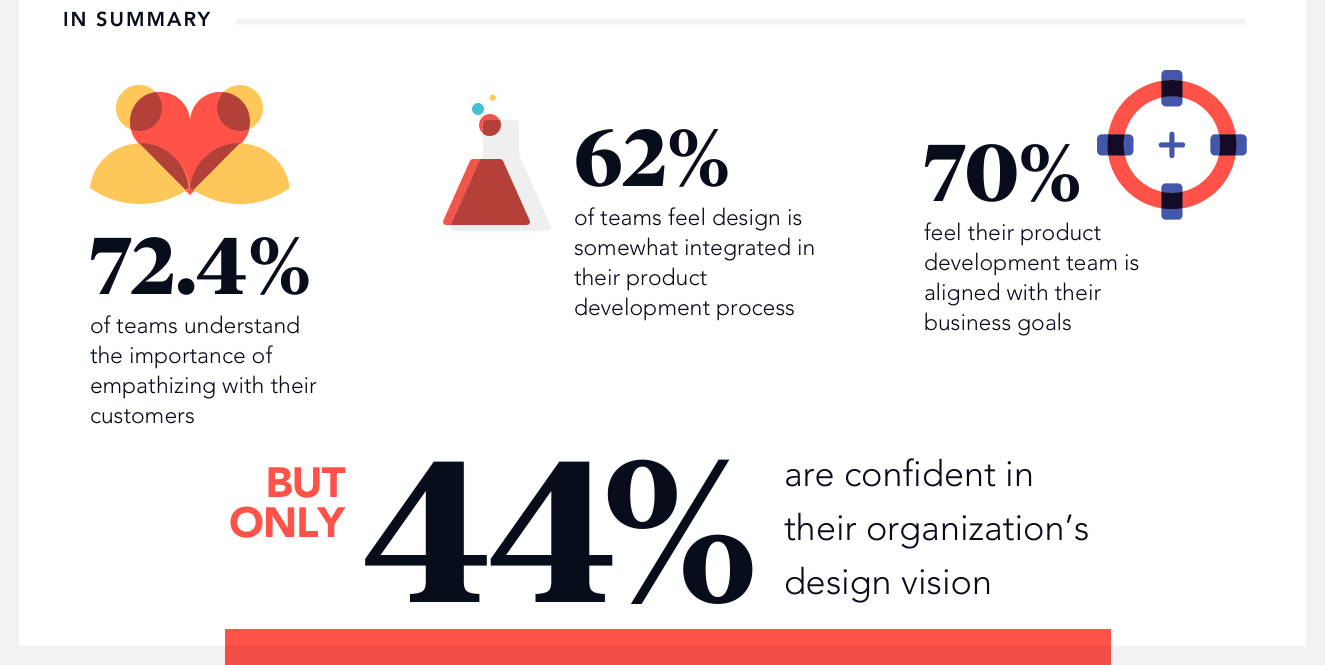 Strong design teams make sure customer insights influence decisions at every level, from early research to final approval. It’s fine to trust the instinct and experience of senior creative staff for some things. But they shouldn’t be able to veto design decisions unilaterally when user research indicates otherwise.
Five stages of the user-centered design process
Another way to think about the design process is to condense it into five distinct phases, which some call the user-centered design process.
- Empathize: gain a deeper understanding of users and their needs through research, observation, and direct engagement
- Define: synthesize findings from the empathize stage and clearly articulate the core user problem
- Ideate: generate a wide range of possible solutions and explore different ways to solve the defined problem
- Prototype: create scaled-down or low-cost versions of the solution to test and gather feedback
- Test: assess prototypes with real users, then refine the solution based on what you learn
Five common design process mistakes to avoid
Even experienced teams slip into a few recurring traps. Watch for these five common design process mistakes, and build habits that keep each stage honest.
Mistake 1: not understanding users’ needs
The most common pitfall creative teams face is jumping straight to solutions without fully understanding their users’ needs. It’s crucial to gain real insights into your target users’ needs and challenges before creating or updating your product. The research stage involves immersive research, user feedback, and direct engagement with users. Skipping this step can lead to products that fail to address real human-centric issues and fall flat in the market.
Mistake 2: focusing too much on business goals
Many teams define problems purely from a business perspective, such as increasing market share or driving revenue. While these goals are important, they shouldn’t overshadow the need for human-centered design. The focus should be on solving users’ problems, which indirectly supports achieving business objectives. For instance, instead of framing the problem as “we need to increase sales,” a more effective approach would be to ask, “How can we enhance user experiences to encourage more purchases?”
Mistake 3: limiting creative idea generation
During the ideation phase, some teams limit their creative process to only “feasible” or “realistic” ideas. This constraint can limit creativity and cause teams to miss stronger solutions. Instead, ideation sessions should encourage a wide range of innovative ideas, including those that may initially seem far-fetched. Techniques like brainstorming and design sprints help generate diverse design ideas.
Pro tip: build a multidisciplinary team to bring different perspectives to the table, push boundaries, and challenge assumptions. By integrating diverse viewpoints and fostering a culture of open idea sharing, teams can explore a broader solution space, leading to more creative and effective designs.
Mistake 4: skipping or rushing prototyping
Prototyping is a critical stage in the design process that shouldn’t be skipped or rushed. Creating prototypes lets teams test and iterate on their design solutions, uncovering potential issues before full-scale development. Skipping this step can result in unvalidated assumptions and costly mistakes down the line.
Effective prototyping involves building low-fidelity versions of the product and conducting initial user testing. This process provides deeper insights into how real users interact with the design, revealing areas that need improvement. Agile teams should invest sufficient time in this stage to refine their solutions and ensure they meet users’ needs.
Mistake 5: ignoring the need for iteration
Treating the design process as a linear sequence of steps is another common mistake. In reality, design thinking is an iterative problem-solving methodology in which each stage informs the others. Ignoring this iterative nature can lead to missed opportunities for refinement and improvement.
For example, findings from the test stage may highlight new insights that require revisiting the empathy or definition phases. Agile teams should embrace this cyclical approach to enable continuous improvement and adaptation. Iterative and observational testing throughout the design cycle is essential for developing a deeper understanding of users and creating truly impactful, human-centered design solutions.
Avoiding these mistakes is easier when research, feedback, deliverables, approvals, and launch work stay connected instead of living across separate tools.
How the monday AI Workspace supports the design process
monday AI Workspace gives design teams one place to manage the full process, from research and ideation through prototyping, testing, approvals, and launch. Boards, dashboards, automations, integrations, workdocs, and AI-powered capabilities keep feedback, decisions, and delivery connected as the work moves forward.
Here’s how running the design process on monday AI Workspace compares with stitching it together across disconnected tools:
| Design process need | Disconnected tools | On monday AI Workspace |
|---|---|---|
| Standardize stages and deliverables | Steps live in separate docs and spreadsheets that drift out of date | Reusable board templates and workdocs keep every stage, owner, and deliverable in one place |
| Centralize customer insights | Feedback is scattered across support, sales, and product tools | 200+ integrations pull insights from connected tools like Zendesk into the design workspace |
| Track progress and risk | Status updates are chased manually across channels | Dashboards show research findings, prototype status, testing feedback, and approvals at a glance |
| Turn feedback into next steps | Notes pile up faster than anyone can read them | AI-powered capabilities summarize updates and group feedback themes while people decide what to act on |
| Build custom design tools | You wait on engineering for a simple tracker or intake form | monday vibe generates a custom intake app or dashboard from a plain-language prompt |
Standardize your design workflow with templates, boards, and deliverables
The first step is to outline the overall workflow in different stages and standardize the process with deliverables, boards, and events. For example, a brief stage can start by identifying a problem and then asking everyone to note their ideas before the idea review meeting.

With a clear process, teams can follow the same design principles, track deliverables, and keep each stage of the workflow visible.
Bring customer insights from other departments into the design process
Cross-functional collaboration across departments is essential for creating products your customers love. Design work often depends on insights from customer support, sales, marketing, product, and operations. Bringing that information into a single workspace helps teams make better decisions without chasing context across disconnected tools.
Teams can connect monday AI Workspace with tools like Zendesk to bring support insights into design and product workflows.

And that’s only scratching the surface of what you can do with a single integration.
Keep customer insights visible throughout development
Of course, it’s not enough to access the data. You also need to make sure your teams use it. Before starting a new product, you can pin crucial customer insights at the top of every board the product team will use.

Monitor design progress and feedback with dashboards
With connected boards and integrations, teams can use dashboards to monitor design progress, feedback, workloads, and launch readiness. Custom widgets help teams track research findings, prototype status, testing feedback, approval progress, and related data from connected tools.

Use AI-powered capabilities to summarize and organize feedback
Design teams often collect feedback from interviews, surveys, support tickets, usability tests, and stakeholder reviews. AI-powered capabilities in monday AI Workspace can help summarize updates, group feedback themes, draft project updates, and surface items that may need attention.
Several capabilities work together here, and people stay in control of every final design decision:
- monday Sidekick: a context-aware assistant that can summarize research updates, draft a project plan, and build a dashboard or form from a simple prompt. After the first mention, Sidekick stays with you across boards and docs
- monday agents: task-specific agents such as a feedback synthesizer or meeting summarizer that cluster usability and research feedback so teams can decide what to fix next. Agents run on triggers within clear guardrails, and they work alongside people rather than replacing them
- monday vibe: a no-code builder that turns a plain-language description into a custom design-intake app, research tracker, or dashboard. With Vibe, anyone on the team can stand up the tool they need in minutes.
- monday MCP: connects assistants like Claude or ChatGPT to your workspace so they can turn research notes into structured tasks and answer questions about boards, all within your existing permissions. MCP keeps that access scoped and auditable
Together, these capabilities help teams move from scattered input to clearer next steps while keeping people in charge of the design.
Build a design process your team can repeat and improve
Creating something new is easier when the work follows a clear process. The design process helps teams break complex projects into stages, keep user needs visible, and improve ideas before they reach the market. The teams that win aren’t the ones with the most ideas; they’re the ones that turn each cycle into a repeatable, well-documented design process.
Start small: document your current stages, decide where feedback should enter each one, and treat your next project as the first run of a process you’ll keep refining. With monday AI Workspace, teams can manage each stage in one workspace and use monday.com’s design workflow template to build a repeatable process they can improve over time.
FAQs
What is the design process?
The design process is a structured framework teams use to define a problem, research users, generate ideas, build prototypes, test solutions, and improve the final product or service before launch. It gives teams a repeatable way to move from an early idea to a validated, finished solution.
What are the seven steps of the design process?
The seven steps of the design process are identifying the problem, researching it in depth, ideating possible solutions, evaluating and selecting a solution, creating a prototype, testing and troubleshooting, and improving the final product before release. Teams often loop back through earlier steps as they learn.
How does the design process differ by industry?
The design process differs by industry mainly in depth and constraints. The core stages are similar, but engineering and manufacturing require more technical testing, supply chain planning, and compliance checks, while UX and graphic design teams can usually prototype and test more quickly.
Why is the design process important?
The design process matters because it reduces risk by validating ideas before major investment. It keeps teams focused on user needs, improves cross-functional collaboration, and creates a repeatable way to move from idea to launch with fewer costly surprises.
How can AI support the design process?
AI can support the design process by summarizing research, organizing user feedback, spotting patterns in testing data, and drafting project updates. The goal is to speed up the busywork at each stage while people continue making the final design decisions.
How does monday AI Workspace support the design process?
monday AI Workspace supports the design process with templates, boards, dashboards, automations, integrations, and workdocs to track research through launch. AI-powered capabilities like monday sidekick, monday agents, and monday vibe help summarize feedback and build the tools teams need.