


Here’s the thing about late projects: it’s rarely because the team stopped working. More often, nobody knew which tasks were actually deciding the finish date. That chain of dependent tasks is your critical path, and when you lose sight of it, a plan that looked solid slowly becomes a missed deadline. Wellingtone’s 2026 State of Project Management report shows how common this is: only 36% of organizations mostly or always finish projects on time, and just 49% mostly or always hit their budget.
The critical path method (CPM) fixes that blind spot. It lays out every task, how they depend on each other, and how much wiggle room each one has, so you can see exactly when a delay goes from “no big deal” to “this will push our end date.” In this guide, we’ll cover what a critical path is, the key components, how to calculate it step by step, a worked example, and how to keep it up to date as your project changes with monday AI Workspace.
Key takeaways
- The critical path is your longest dependent chain. It is the sequence of tasks that sets the shortest possible finish date for your whole project
- CPM finds that chain. The critical path method, also called critical path analysis, identifies the sequence and shows which tasks have zero float and cannot slip
- Float (slack) is your buffer. It measures how long a task can be delayed before it starts pushing the project finish date
- A network diagram drives the calculation. Mapping tasks and running a forward and backward pass reveals the critical path and each task’s float
- monday AI Workspace keeps the critical path live. The critical path feature on monday.com’s Gantt chart highlights the path on your timeline and auto-updates it as dates change
- Monitoring is not optional. The critical path shifts as durations change, so you need to review it continuously throughout delivery
What is a critical path?
The critical path is the longest sequence of dependent tasks that must be completed to execute a project, and it sets the earliest date the project can finish. Tasks on the critical path are called critical activities because the whole project runs over if they’re delayed.
For example, if you’re building a house, the critical path might include activities like digging the foundations, building the walls, and installing the roof. If any of these critical activities fall behind schedule, the whole project gets delayed.
Project managers use the critical path method (CPM) to find the critical path. The CPM, also known as critical path analysis (CPA), is a project management technique used to plan and schedule complex projects. It’s an algorithm that identifies the longest sequence of dependent activities and measures the time required to complete them from start to finish. Each task also carries a value called float, or slack, which tells you how much a task can be delayed before it affects the finish date, a concept the key components section covers in detail below.
What does a critical path look like?
Asking what a critical path looks like is a bit like asking how long a piece of string is: there’s no single answer, because it depends on the project.
Traditionally, people drew the critical path as a flow chart. Some house-building activities take longer than others, so the flow chart highlights the longest-duration route through the work:
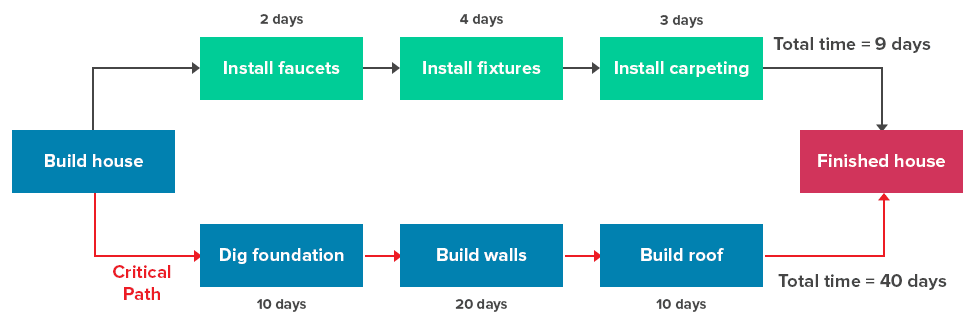 More complex network diagrams can chart dozens of dependent activities at once. The technique dates back to the early 1960s, when an early Harvard Business Review article helped introduce the method to a wider management audience
Today, more visual ways to present a critical path exist. A Gantt chart, for instance, lets you visualize the critical activities against a real calendar:

Critical path vs. critical chain
Critical path and critical chain are two different approaches to completing a project.
The critical chain methodology pinpoints the bottlenecks or limiting factors that can cause businesses to miss project deadlines. It focuses on monitoring resource use, such as materials and labor. For example, a project manager might delay the start of one task so that a skilled worker does not have to perform two tasks at the same time.
The critical path focuses on task management, assumes unlimited resources, and identifies the longest track of tasks. It helps identify tasks that may delay the project and guides project managers to take preventive measures from the start.
In contrast, the critical chain focuses on resource and buffer management, assumes limited resources, and identifies the longest chain of dependent events. It inserts buffers between dependent events to protect the project from delays.
Critical path vs. critical activity
Critical path and critical activity are related concepts in project management, both determined by the critical path method (CPM).
The critical path is the longest sequence of tasks that must be completed for the project and comprises critical activities. Any delay in completing tasks on the critical path will also delay the project.
A critical activity is a specific scheduled activity that is part of the critical path. It’s essential to the project’s timeline, and any delay in completing it delays the entire project.
For example, if digging the foundations for a new house takes twice as long, the entire house-building project gets delayed. A critical activity typically has zero float, meaning there’s no flexibility in the start or finish dates.
Critical path vs. PERT
The critical path and PERT (Program Evaluation and Review Technique) are approaches for planning and controlling projects.
PERT is a framework for mapping task dependencies and estimating how long a project will take. It’s a statistical technique to visualize the overall project schedule, not just the critical path, and shows the relationship between tasks as well as the overall project duration.

The critical path is used to schedule and manage project tasks, focusing on the longest sequence of tasks and considering task dependencies and slack time. It suits projects with predictable task durations.
PERT is used to estimate the time required to complete project activities, especially when task durations are variable and uncertain. It allows for flexibility in project scheduling and focuses on time estimation and uncertainty.
Critical path vs. Gantt chart
The critical path and Gantt chart are both project management visualization methods, but they serve different purposes.
The critical path helps schedule and manage project tasks by accounting for task dependencies and slack time. It suits projects with predictable task durations.
On the other hand, a Gantt chart provides a visual overview of tasks, durations, and dependencies in a project schedule. It helps track progress, allocate resources, and communicate project timelines.
While a Gantt chart can highlight the critical path, its primary purpose is to visualize the project schedule. That overlap is why the phrase “Gantt chart critical path” is so common: the chart is where most teams actually see their critical path today.
Key components of the critical path method
Float, also called slack, is how long a task can be delayed without pushing back the project’s finish date. It is the single most important number in critical path analysis, because tasks with zero float are the ones that make up the critical path. Understanding a few core components makes the whole method far easier to calculate and apply.
- Critical activities and float. Critical activities sit on the critical path and carry zero float. Non-critical tasks have positive float, so they can slip within limits before they affect delivery
- Network diagram. This is a map of every task drawn as boxes or nodes, connected by arrows that show dependencies. The network diagram is the canvas you use to trace paths and calculate durations
- Early start and early finish. The earliest a task can begin and end, assuming everything before it runs on time. You calculate these with a forward pass through the network diagram
- Late start and late finish. The latest a task can begin and end without delaying the project. You calculate these with a backward pass from the project’s finish date
- Total float per task. The gap between a task’s late start and early start. When that gap is zero, the task is critical and belongs on the critical path
Put simply, the forward pass tells you the soonest each task can happen, the backward pass tells you the latest it can happen, and the difference between them is float. Trace the chain of zero-float tasks from start to finish to find the critical path.
What are the benefits of the critical path method?
The critical path method (CPM) improves project planning, scheduling, communication, resource management, cost control, risk detection, and overall project management. The stakes are practical, too: Wellingtone’s 2026 State of Project Management report found that 72% of practitioners still spend half a day or more each month manually collating project reports, time that clearer scheduling and visibility can help win back.

1. Enhances project planning
The CPM provides a structured approach to project planning by identifying activity sequences and dependencies. This helps project managers create a realistic and robust project schedule.
2. Helps prioritize tasks
The CPM identifies the critical tasks and determines the critical path. This helps project managers prioritize tasks effectively and determine where and how to allocate resources.
3. Improves team communication
The CPM requires input from key stakeholders, including team members and subcontractors. This collaboration ensures everyone understands the project timeline and dependencies, improving communication and coordination.
4. Facilitates more effective resource management
The CPM helps project managers identify each activity’s resource requirements. By understanding the critical path and resource dependencies, project managers can allocate resources efficiently, minimizing bottlenecks and unexpected delays.
5. Tightens cost control
CPM helps project managers control costs by allocating the right resources to the right places. This reduces the chances of unexpected delays that may incur additional costs.
6. Detects potential risks
The CPM allows project managers to identify potential risks and their impact on the project schedule. By analyzing the critical path and considering float (slack time), project managers can predict the effects of delays and adjust plans to mitigate risks.
7. Improves project management
CPM enables project managers to communicate project plans, schedules, and performance clearly. This clarity helps them monitor progress, identify issues, and make informed decisions to solve project management challenges.
To summarise: by using the CPM, project managers can optimize project timelines, allocate resources effectively, and mitigate risks, leading to successful projects.
How to find the critical path
To find the critical path in a project, list every task, order them by dependency, estimate each duration, map all possible paths, and select the longest one. Let’s walk through it from start to finish.

1. List all your project tasks
Before you think about a critical path, list the tasks for the project, your work breakdown structure.
Spend some time speaking with stakeholders to confirm the project details. Once you have all the information, you can identify all the activities that must happen to complete the project.
2. Put all the tasks in order
Once you’ve identified the tasks, it’s time to put them in chronological order and identify any task dependencies. This will help you work out the project timeline.
Whether you prefer a project roadmap, tracker, or overview, efficient, easy-to-use work management software like monday.com simplifies the process by giving you a clear visualization of all your tasks.
3. Estimate how long each task will take
There are several ways to estimate activity duration. To save you from sifting through all the methods out there, here are the top three:
- Bottom-up estimating: Add up the estimates of the lowest-level work tasks to arrive at your summary total. Bottom-up estimates take more time to complete, but they are also more accurate than other estimates
- Comparative estimating: Base your estimates on similar work or projects completed in the past. If you used time tracking in previous tasks, you’ll see precisely how long they took
- Parametric estimating: Calculate a portion of the work and then multiply to get the overall estimate. If you believe one ad takes 2 hours and you have five ads to do, it should take 10 hours in total
Read also: Bottom-up vs. top-down
4. Find all the potential ‘paths’ or ‘strings’
Any project can have multiple paths or strings of connected and dependent tasks.
This part of the process involves finding all possible paths and calculating how long each will take, so you can pinpoint the longest one.
Doing this by hand can be a headache and is prone to error, which isn’t ideal. Fortunately, project management platforms, like monday.com, can do this automatically.
5. Identify the critical path
Now for the main event: find the critical path.
Once you, or your work management software, have listed all the paths and strings, you need to identify the longest path through the project from start to finish.
So, if you’ve got a string of tasks that takes eight days, one that takes six days, and another that takes 12, then the 12-day string is the critical path. It’s the one that can’t be delayed without pushing out your project end date. This is also where you calculate float: subtract each task’s early start from its late start, and any task with zero float sits on the critical path.
6. Monitor the critical path
The critical path can, and most likely will, change throughout the project. Some tasks may take longer than expected, or new tasks get added over time.
Any changes to the project can have a knock-on effect on the critical path. This means you’ll need to check continuously throughout the project and update your critical path diagram accordingly. That ongoing effort is exactly where a platform that recalculates the path for you saves time.
Critical path method example
A worked example of the critical path method makes the theory concrete. Imagine you’re launching a simple marketing website with five tasks, each with an estimated duration and a dependency on the task before it or running alongside it.

- Task A: Write copy (four days, no dependency) starts the project
- Task B: Design pages (five days, depends on A) begins once the copy is drafted
- Task C: Source images (two days, depends on A) can run in parallel with design
- Task D: Build the site (six days, depends on B and C) needs both design and images finished
- Task E: Test and launch (three days, depends on D) closes out the project
Two paths run through this network diagram. Path one is A, B, D, E, which totals 4 + 5 + 6 + 3 = 18 days. Path two is A, C, D, E, which totals 4 + 2 + 6 + 3 = 15 days.
The longest route wins, so A, B, D, E is your critical path at 18 days, and those tasks carry zero float. Task C sits on the shorter path with three days of float, meaning it could slip up to three days without delaying launch. If Task B runs two days long, your finish date moves by two days, because B is critical. That is the whole point of the method: it tells you precisely which delays matter and which ones you can absorb.
Manage the critical path with monday AI Workspace
Calculating a critical path once is manageable. Keeping it accurate across a live project, with shifting dates, new tasks, and cross-team dependencies, is where manual methods break down. This is the original critical path method’s enduring limitation: it assumes a static plan in a world where plans change daily.

As the AI work platform where people and agents work together, monday.com keeps that path current. The critical path feature on monday.com’s Gantt chart highlights the critical path directly on your project timeline, showing the activities that must finish on time for the project to land on schedule. As dates shift, the platform recalculates and auto-updates the critical path, so your view stays accurate without manual rework.
Realistic schedules need realistic dependencies. Advanced dependencies with lead and lag time, plus cross-project dependencies, let you model how tasks truly relate across teams and workstreams, not just in a single tidy list.
On top of that structure, monday agents work alongside your team to watch the path so you don’t have to. The Dependency and Risk Mapper agent traces dependency chains, identifies the critical path, and flags blocked or at-risk chains before they slip. The Project Planner agent builds a plan with owners, dates, and dependencies, while the Tasks Progress agent surfaces bottlenecks early. These Agents handle the tracing and the flagging, and you and your team make the calls. When you have a quick question about the schedule, monday sidekick answers it in plain language, so you can ask what’s slipping without digging through boards. As you scale, Agents and Sidekick keep that visibility running in the background.
Visibility ties it together. Project plan data flows into dashboards that provide real-time views of timelines, progress, and resources, while the Workload view balances capacity against critical-path demands. Automations send status reminders and run recurring risk scans, and 200+ integrations, plus monday vibe and monday MCP, connect and extend your schedule to the rest of your stack. Built together, Vibe and monday workflows let you shape the platform around how your projects actually run.
Here’s how the two approaches compare in practice:
| Task | Manual/traditional CPM | monday AI Workspace |
|---|---|---|
| Building the network diagram | Drawn by hand or in a static file, updated manually | Tasks, dependencies, and lead/lag modeled directly on connected boards |
| Finding the critical path | Calculated by forward and backward pass, one project at a time | Highlighted automatically on the Gantt chart across projects |
| Updating when dates change | Recalculated by hand every time a task slips | Auto-updates the critical path as dates change |
| Spotting at-risk chains | Depends on someone noticing in time | The Dependency and Risk Mapper agent flags blocked and at-risk chains early |
| Reporting and visibility | Reports collated manually, often half a day or more each month | Real-time dashboards for timeline, progress, and resources |
| Balancing resources | Tracked in a separate spreadsheet | Workload view balances capacity against critical-path demands |
Turning your critical path into on-time delivery
The critical path is one of the most practical concepts in project management because it shows exactly which tasks determine whether you deliver on time. Once you can define it, calculate its float, and watch it change, you stop guessing about deadlines and start managing them.

The next step is choosing where to run it. With monday AI Workspace, you can visualize your critical path, track dependencies, and adjust timelines as projects evolve. Explore monday AI Workspace to see how connected project planning helps your team stay on schedule.
Critical path FAQs
Why is the critical path important in project management?
The critical path matters in project management because it helps estimate project duration accurately, identify critical activities that must be completed on time, and highlight task dependencies, resource constraints, and potential risks.
What are non-critical activities?
Non-critical activities are tasks that can be delayed beyond their allotted deadline without affecting the project's overall duration. These activities have slack and are not on the critical path.
Can a project have multiple critical paths?
Yes, a project can have multiple critical paths. In complex projects, multiple sequences of activities can be equally critical and must be completed on time for the project to stay on schedule.
Is the critical path method the same as PERT?
No, the critical path method is not the same as PERT. CPM uses single, predictable task durations to find the longest dependent path, while PERT uses optimistic, likely, and pessimistic estimates to handle uncertain durations. Many teams combine both techniques on complex projects.
How does monday AI Workspace handle the critical path?
monday AI Workspace uses a Gantt chart feature to highlight the critical path on your timeline and auto-updates it as dates change. The Dependency and Risk Mapper agent traces dependency chains and flags at-risk chains early, so you can act before delays reach your finish date.