


The right workflow management approach transforms scattered processes into streamlined systems that drive real business results. When workflows are structured, automated, and optimized, teams spend less time coordinating handoffs and more time on high-impact work that moves your organization forward.
This guide breaks down everything you need to build efficient workflows at scale — from core elements and workflow types to AI-driven automation, best practices, and platform capabilities. You’ll discover how modern teams use workflow management software to eliminate bottlenecks, boost productivity, and create repeatable processes that adapt as your business grows.
Key takeaways
- Workflow management defined: Workflow management is the practice of organizing, tracking, and optimizing repeatable sequences of steps to drive consistent, high-quality outcomes across your organization.
- AI-powered automation: AI and automation now enable teams to build efficient workflows through natural language prompts, autonomous agents, and predictive optimization.
- Best practices matter: Best practices like documenting processes, mapping dependencies, and auditing regularly keep workflows aligned with evolving business goals.
- Essential software features: The right workflow management software should offer visualization, automation, integrations, collaboration features, and native AI capabilities.
- monday AI Workspace advantage: monday AI Workspace combines AI-powered sidekick, agents, and visual workflow builders to help teams create, automate, and scale workflows without writing code.
What is workflow management?

Workflow management is the practice of organizing, documenting, tracking, and optimizing a series of steps, known as a workflow. The purpose is to ensure a workflow completes a specific process as smoothly and effectively as possible.
In an organization, workflow management touches a lot of different areas. Businesses can have specific workflows for how they hire and onboard, communicate internally, and deliver updates on projects. While these may seem like one-off activities, workflow management is an ongoing process.
Workflows need to be constantly refined and optimized based on evolving project needs, new technologies like artificial intelligence, autonomous agents, and automation, and changing customer expectations.
This is why workflow management is a core part of an organization’s overall strategic planning. It helps align day-to-day operations with long-term business goals, improves operational efficiency, reduces errors, and ensures teams can quickly adapt to change.
6 key elements of workflow management
Successful workflow management involves 6 core elements, no matter how detailed or straightforward a workflow is. Let’s take a look at the main workflow elements using an example of a software development project.
1. Stakeholders
Stakeholders are the people involved in executing or affected by the workflow, such as team members, adjacent departments, clients, contractors, investors, and business partners. These individuals or groups have a vested interest in the workflow’s outcome, should always be kept informed on important status updates, and are always working towards the same goals.
2. Input
In a workflow, inputs include essential items you need to complete your workflow. For example, your inputs for a software project might include data, software and hardware platforms for development, and scope requirements.
3. Output
The final product or result produced by the workflow could be a physical product, a completed service, a report, or any deliverable that marks the workflow’s completion. From the example above, an output could be a finished software project that’s ready for the next stage.
4. Steps
Each step is a building block designed to move the workflow towards completion. For software development, steps might include gathering requirements, writing code, conducting tests, reviewing the code, and deploying the finished product to a live environment.
5. Transformation
Transformation refers to how inputs are converted into outputs at each stage of the workflow. In a software project, this could include converting user requirements into design specs, turning design into functional code, and translating code into a user-ready application.
6. Conditions
Conditions determine the rules or criteria that dictate when a step should begin, repeat, or be skipped. In software development, a common condition might be to proceed to deployment only if all tests pass with no critical bugs, or send code back for revision if it fails peer review.

Types of workflows
Most workflows fall into a few core categories. Understanding how each type works can help you choose the right structure for different processes.
| Workflow type | How it works | Example |
|---|---|---|
| Sequential | Steps follow a fixed order, with each completed before the next begins. | Employee onboarding where paperwork, training, and equipment setup happen in sequence. |
| Parallel | Multiple independent steps happen simultaneously to speed up completion. | A writer drafts an article while a designer creates accompanying visuals. |
| State machine | Work moves between different states based on conditions, inputs, or triggers. | A bug ticket moves between Open, In Progress, In Review, and Closed. |
| Rules-driven | Predefined rules or conditional logic determine what happens next. | A loan application advances when the applicant meets a specified credit threshold. |
| AI-driven | AI interprets information and takes actions within defined parameters as work progresses. | An AI agent categorizes support tickets, resolves routine issues, and routes complex cases. |
| Collaborative | Multiple people or departments coordinate and share responsibility throughout the process. | Marketing, design, and engineering collaborate on feature planning, testing, and launch. |
Workflow management vs. project management
These 2 disciplines are closely related, but they serve different purposes.
- Workflow management focuses on repeatable, process-level sequences of actions designed to produce consistent outcomes. Think of it as the engine that keeps recurring operations running smoothly — onboarding new hires, processing invoices, or routing support tickets. The emphasis is on efficiency, standardization, and continuous improvement.
- Project management focuses on unique, time-bound initiatives with defined scope, budget, and deliverables. A product launch, an office relocation, or a system migration all qualify as projects.
The 2 are complementary. Projects contain workflows, and workflow management ensures the repeatable parts of project execution run efficiently every time.
What is workflow management software?
Workflow management software is a platform that digitizes, automates, and optimizes the creation, execution, and monitoring of workflows. It replaces manual tracking methods — spreadsheets, email chains, sticky notes — with a centralized system where every step, owner, and deadline is visible.
What does a workflow management system actually enable? Automation of repetitive handoffs, real-time visibility into process status, cross-functional coordination across departments, and data-driven insights that help you continuously refine how work gets done.
The right business process management software turns scattered, manual processes into structured, scalable workflows — so teams spend less time chasing updates and more time on high-impact work.
7 benefits workflow management
With an organized approach to workflow management, your teams become more efficient, empowered, organized, and goal-driven. Here are some specific benefits you can expect when you commit to the workflow management process.
- Increased accountability: Mapping out your workflows and assigning roles and responsibilities to each step ensures everyone knows their part in the workflow and the importance of completing their work on schedule and to a high standard.
- Improved productivity: With well-defined steps and automated transitions between processes, teams can focus on high-value work instead of chasing updates or waiting on approvals, creating more efficient workflows that minimize downtime.
- Greater transparency: When everyone can see what their colleagues are doing, it’s easy to seek support or raise queries with relevant parties in adjacent departments.
- Eliminated redundancies: Taking a granular look at your existing workflows can highlight areas where multiple team members inadvertently complete the same work.
- Quick resolutions: If a process breaks down or needs refining, team leaders can easily refer to their documented workflow management strategy to adjust and optimize the steps.
- Enhanced compliance: Detailed workflows ensure you stay within legal and regulatory boundaries, reducing the risk of non-compliance.
- Smoother communication: Structured workflows outline who’s responsible for what and when, reducing confusion and cutting down on unnecessary back-and-forth, helping teams stay aligned and speeding up collaboration across departments.

6 common workflow management challenges and how to overcome them
Workflow management isn’t always plain sailing. Some common challenges may crop up when you’re trying to get things in order. Here’s a look at 6 challenges to look out for and some workarounds for getting through them:
1. Employee resistance to change
Team members who are used to working a certain way may not appreciate new workflow implementations. They might feel overwhelmed or skeptical when asked to adopt new systems, and this resistance can lead to delays, errors, or even active pushback, stalling workflow improvements.
Solution: Explain the reasons for the change, highlight specific benefits for the team, and involve employees in the transition process to build ownership and trust.
2. Resource constraints
Limited time, tight budgets, and a lack of personnel can impact the efficiency of your workflows. These constraints make it difficult to implement or maintain effective workflows and often lead to overburdened teams, missed deadlines, or subpar results.
Solution: Prioritize your most impactful workflows and focus your efforts there. Use AI and smart automation to reduce manual work and regularly audit your processes to identify inefficiencies and free up resources.
3. Lack of communication
Poor team communication can cause delays, misunderstandings, and errors. Poor team communication can cause delays, misunderstandings, missed steps, and duplicated work, especially across departments.
Solution: Establish communication protocols and use a centralized platform like monday AI Workspace that offers visibility into workflows, status updates, and collaborative features to keep everyone aligned.
4. Poor visibility and tracking
If there’s no way to easily see the status of a workflow, it becomes difficult to identify bottlenecks, assign accountability, or make informed decisions. This often leads to delays and missed deadlines.
Solution: Implement dashboards and analytics that provide visibility into progress, enabling faster adjustments and stronger decision-making.
5. Scalability issues
Manual workflows that work for small teams often break down as an organization grows. More users, processes, and dependencies introduce complexity that’s tricky to manage without robust systems.
Solution: Build scalable workflows using automation and modular design, and choose workflow platforms that can grow alongside your organization.
6. Technology limitations
Outdated or inefficient technology hinders the effectiveness of your workflow management. Legacy systems or disconnected platforms produce siloed workflows, forcing teams to rely on manual tracking, email chains, or spreadsheets that often come with inefficiencies and errors.
Solution: Upgrade to an integrated workflow management system like monday AI Workspace that supports AI automation, real-time tracking, and seamless collaboration across teams and platforms.
5 best practices to optimize workflow management
Every business has different goals, preferences, and processes, so there’s no single way to manage workflows in your organization. However, here are some best practices you can follow to optimize workflow planning.
1. Create thorough documentation
Taking control of your workflows starts with documenting specific details, such as:
- Project responsibilities and ownership
- Dependencies to consider
- Milestones and deadlines
- Iterations and feedback cycles
- Flowcharts and process maps
Add more information as you build out your workflow documentation. For example, you might attach best practices, useful templates, guides, resources, or anything that helps your team complete the work at hand by referring to your workflow documentation.
2. Consider your dependencies
When workflows consist of a series of steps to complete in a certain order, consider the relationships between them. These relationships are known as dependencies, and they’re crucial to note down as they’ll impact your scheduling and resources. For example, a team member may only start Step B after Step A’s owner has notified them that their work is complete.
3. Use the right technology to automate
Workflow management software like monday AI Workspace makes it simpler for teams to create and manage process automation from start to finish. With the right technology, a lot of workflow processes can be automated — updates, reminders, approvals, and even entire multi-step sequences.
AI-powered platforms now let you describe workflows in natural language and deploy autonomous agents that handle repetitive coordination, so your team can focus on strategic activities.
4. Visually map out and prioritize workflows
Sometimes, the most effective way to optimize your workflows is to visualize them. Creating a clear process flow is a great starting point, as you can see dependencies, inputs, owners, and other key details all in one place. Through visualization, you can also prioritize the processes and even entire workflows that need attention based on their value or dependencies.
5. Audit and adjust through feedback and iterations
Your workflows may change as you accept new projects, adopt new technologies, or increase headcount. That means regularly updating your workflow as steps, plans, and team members change. To keep your documentation relevant, aim to perform a quarterly workflow audit. Ask employees for feedback, identify needed changes or optimizations, and implement them through planned iterations.
How AI is transforming workflow management
AI has moved well beyond automating simple, repetitive actions. In 2026, it’s reshaping how teams design, execute, and optimize entire workflows — and the shift is accelerating. McKinsey research sizes the long-term AI opportunity at $4.4 trillion in added productivity growth potential from corporate use cases alone.
Agentic AI and autonomous agents

AI agents no longer just assist — they independently execute workflow steps, make decisions within defined guardrails, and escalate only when human judgment is needed. Imagine an agent that monitors project timelines, detects a risk of delay, reassigns resources, and notifies stakeholders — all without anyone lifting a finger.
This kind of AI workflow automation is becoming the standard for teams managing complex, cross-functional processes.
Natural language workflow creation
Instead of manually configuring each step through drag-and-drop builders, you describe a process in plain English — “When a new lead comes in, score it, assign it to the right rep, and schedule a follow-up if no response in 48 hours” — and AI generates the complete workflow.
Dependencies, conditions, and automations are all handled for you. This dramatically reduces setup time and makes workflow creation accessible to everyone on the team, not just technical specialists.
Predictive optimization
AI now analyzes historical workflow data to forecast bottlenecks, resource conflicts, and delays before they happen. The need is clear: According to PMI’s Pulse of the Profession 2026 report, 97% of project professionals managed at least one complex project in the past year.
Rather than reacting to missed deadlines, teams can proactively adjust timelines, redistribute workloads, and refine processes based on data-driven recommendations.
Hyperautomation
The convergence of AI, machine learning, and robotic process automation (RPA) into unified workflow platforms means end-to-end processes can run across departments and applications with minimal manual intervention.
McKinsey estimates that combining generative AI with all other technologies, work automation could add 0.5 to 3.4 percentage points annually to productivity growth. From invoice processing to employee onboarding, hyperautomation connects fragmented systems into seamless, intelligent workflows.
What to look for in workflow management software
A manual approach to workflow management can only get you so far. However, the right software can transform your approach by introducing speed and visibility to traditionally cumbersome processes. With so many solutions available, here’s what to prioritize.
Visualization
Top of the list is the ability to view your workflow in various ways so you can analyze, tweak, and monitor its success. For example, you should be able to switch between a simple list view as part of a linear workflow or visualize complex dependencies in a Gantt chart format.
Automation
Workflow management is about efficiency. You don’t need to press every button manually; instead, you should be able to set up workflow automation based on trigger conditions. For example, if you finish the first step in a workflow, checking a box could send an automated notification to your teammate to begin the next step.
Integrations
The right workflow management platform should seamlessly integrate with other applications in your tech stack, so there’s no need to hop between systems. For example, you might connect your workflow platform with a communication app like Slack to make sure data syncs directly between processes and workflows.
Collaboration
Invite key stakeholders from your team to see, discuss, approve, and collaborate on workflow items. Ensure you choose a platform with in-app communication to keep all discussions organized and relevant — comments on specific items, tagging colleagues into conversations, and pulling in messages from external channels.
AI capabilities
You want a platform that puts AI first so your team can do more with less. An AI-enabled workflow management system can help you build smart automations, gather data-based insights, deploy autonomous agents, and instantly route and prioritize processes for smoother workflow management.
Get StartedManage workflows with monday AI Workspace
The right platform makes managing workflows dramatically simpler. Officeworks, Australia’s leading retailer for office and school supplies, furniture, and technology, switched to monday AI Workspace to map out its core business processes — and discovered where unnecessary admin was slowing everything down.
Here’s what makes monday AI Workspace stand out for workflow management.
Get a context-aware AI assistant
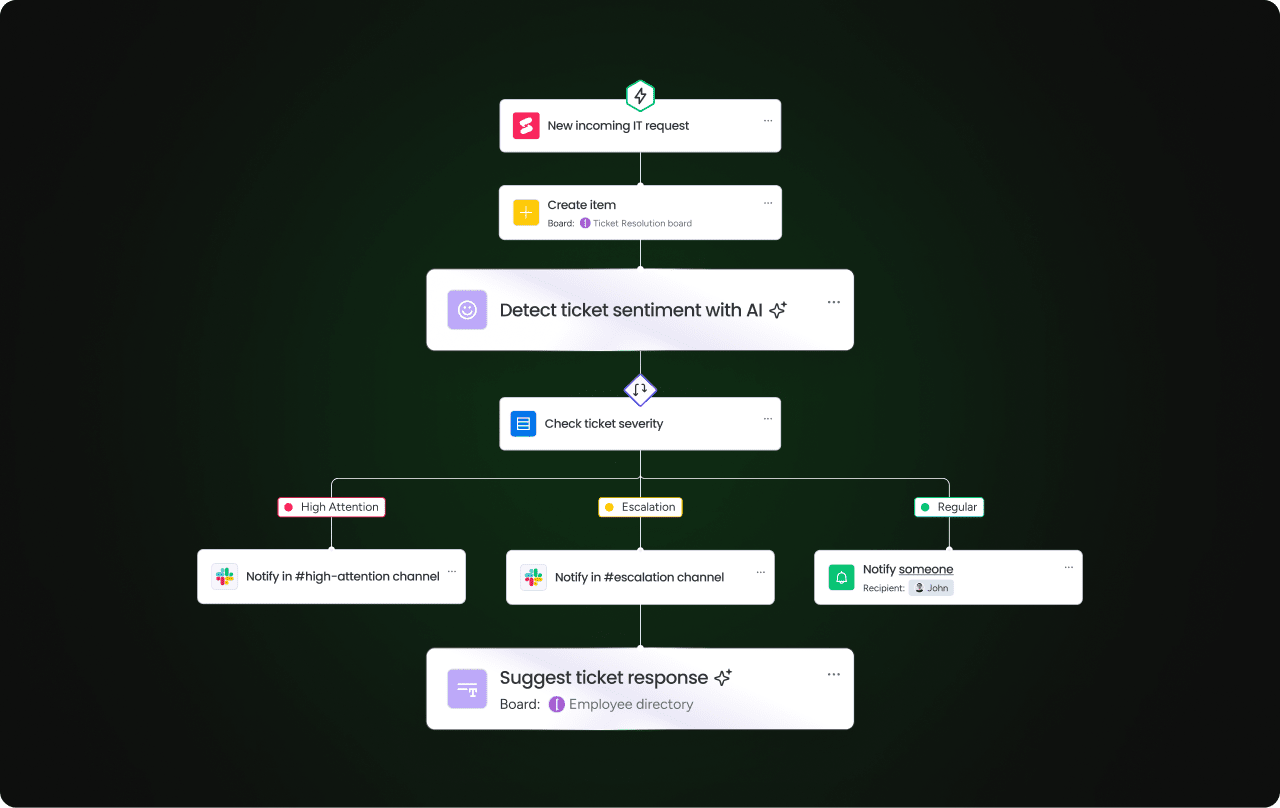 monday sidekick is your context-aware AI assistant. Describe what you need in natural language, and monday sidekick can help organize work, analyze information, adjust timelines and dependencies, and take action directly within your workflows. It also supports voice mode for hands-free interaction and connects to a Skills Marketplace where you can discover AI-powered capabilities built for your specific use case.
Create custom apps
monday vibe turns natural language prompts into custom business applications — no code required. Connect data from multiple boards and build dashboards, OKR trackers, org charts, and more. Every team member becomes a builder, which means you’re not waiting on developers to create the workflows and interfaces your team needs.
Deploy AI agents
Deploy autonomous monday agents across departments to handle task management such as researching information, routing work, maintaining records, and coordinating follow-ups. Teams can also create custom agents by defining instructions, connecting relevant knowledge, and setting permissions and guardrails.
Automate workflows end-to-end
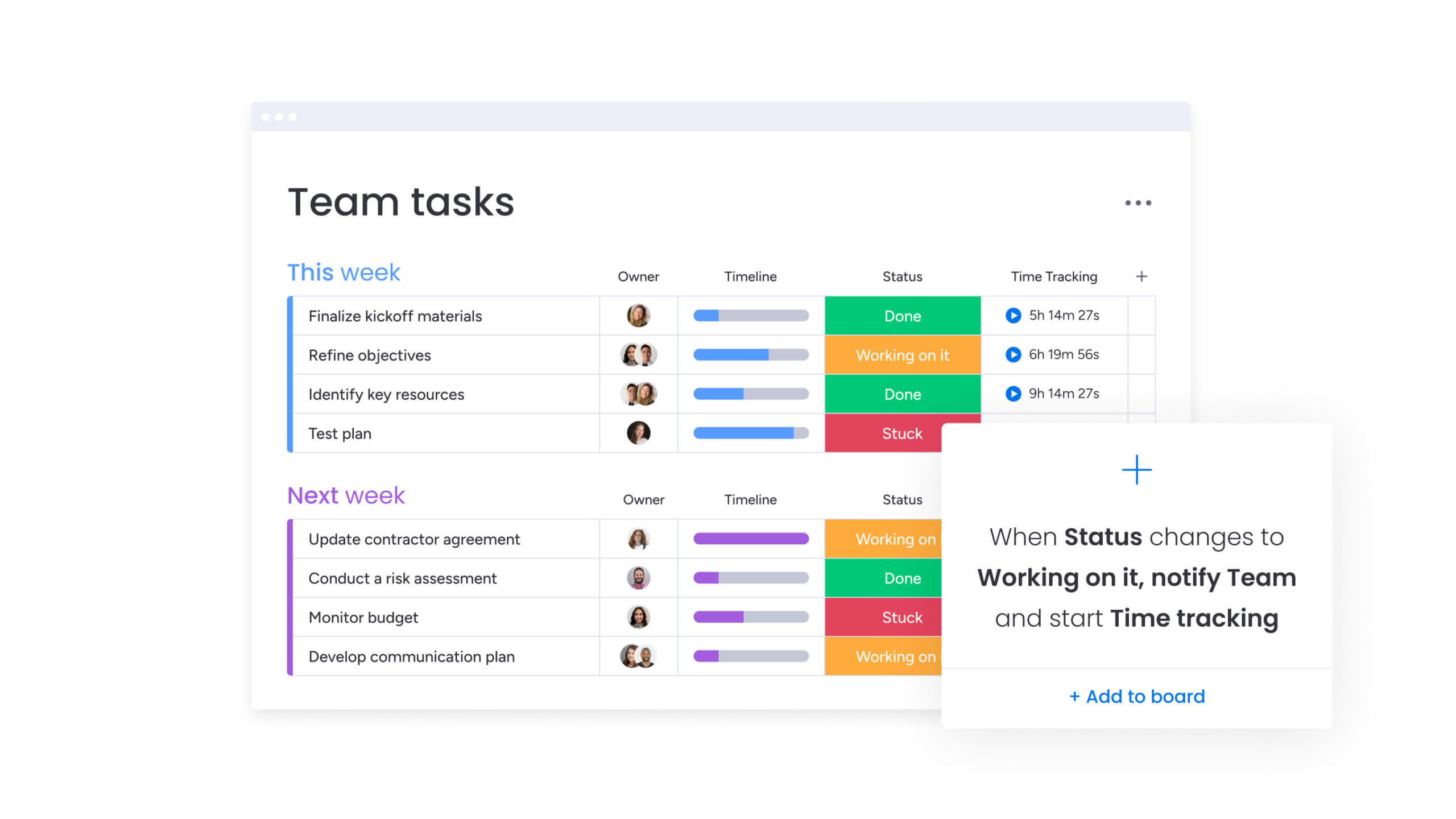 monday workflows provides a visual builder for cross-functional, agentic workflows. Work moves across departments and platforms with less manual coordination — from workflow automation software triggers to multi-step approval chains that span teams and systems.
Connect and integrate AI tools
monday MCP (Model Context Protocol) connects external AI tools — Claude, ChatGPT, Copilot, and Cursor — directly to your monday AI Workspace. Create and update items, run analyses, migrate data, and convert notes into structured workflows, all through secure OAuth-based permissions.
Build smarter workflows with monday AI Workspace
Workflow management has always been essential for keeping teams organized and operations running smoothly. What’s changed is the technology behind it. AI-powered platforms now let you build, automate, and optimize workflows with a level of speed and intelligence that manual processes simply can’t match.
monday AI Workspace brings all of this together — agents, natural language creation, intelligent workflows, and seamless integrations — in one platform designed for teams that want to move faster without sacrificing control. The future of workflow management isn’t just automated. It’s autonomous.
FAQs
What are the 3 basic components of a workflow?
The 3 basic components of a workflow are inputs, processes, and outputs. Inputs are the resources or data needed to begin the workflow, processes are the series of steps that transform the inputs, and outputs are the final deliverables produced once a workflow is complete.
What are the main types of workflows?
Common workflow types include sequential, parallel, state machine, rules-driven, AI-driven, and collaborative workflows. The right type depends on how predictable the process is, whether tasks can happen simultaneously, and how much flexibility or automation the workflow requires.
Is a workflow the same as a flowchart?
A workflow isn't exactly the same as a flowchart. A workflow refers to the actual process of completing steps in a structured way, while a flowchart is a visual representation of that process.
How do you map a workflow?
To map a workflow, start by identifying the goal and the key stakeholders involved, then list the inputs, steps, and decision points in sequential order and use a visual diagram or digital platform to lay out how all the actions connect.
How do you use monday AI Workspace to create and manage workflows?
With monday AI Workspace, you can describe workflows in natural language using monday sidekick, deploy autonomous AI agents for repetitive processes, build custom apps with monday vibe, and automate cross-functional handoffs with monday workflows — all without writing code.
What is the difference between workflow management and project management?
Workflow management focuses on repeatable process sequences designed for consistent outcomes, while project management focuses on unique, time-bound initiatives with defined scope and deliverables. Both are complementary, and platforms like monday AI Workspace support both.

 Get started