


GitBook has earned its reputation as a clean, developer-friendly documentation platform. Its markdown-native editor, version control, and polished public-facing output make it a natural starting point for teams that need to publish technical docs quickly. For many, it does exactly what they need.
But documentation needs aren’t uniform. Workflows become more complex as teams grow, and the gap between what GitBook offers and what a team needs can start to widen. Some teams find the customization options too limiting. Others need tighter integration with their existing toolstack or the ability to connect documentation to broader operational workflows. And for teams managing IT service delivery at scale, a standalone documentation tool may not be enough.
This guide covers 8 of the best GitBook alternatives available in 2026, including what each one does well, what real users say about it, and how to work out which is the right fit for your team.
Try monday serviceKey takeaways
- GitBook is a capable documentation platform, but teams with more complex needs around workflow automation, integrations, or enterprise scalability may find a better fit elsewhere.
- The best documentation platform for your team depends on use case: open-source tools suit developer-led teams with hosting capability, while SaaS platforms are better for broader organizational use.
- AI capabilities vary significantly between platforms. The most useful implementations go beyond writing assistance to automate content maintenance, flag outdated articles, and route requests without manual input.
- Enterprise teams should evaluate security requirements early: SSO, role-based permissions, and compliance certifications aren’t always included in base plans and can significantly affect total cost.
- monday service stands apart from other GitBook alternatives by connecting documentation directly to ticketing, asset management, and service workflows. This makes knowledge an active part of how work gets done, rather than a separate system to maintain.
GitBook alternatives: A quick comparison
| Platform | Best for | Key feature | Free plan? | Paid pricing from |
|---|---|---|---|---|
| monday service | IT service teams managing docs and workflows | AI Blocks plus Digital Workers | Available for some nonprofits | $31/seat/mo |
| Notion | Teams building flexible internal wikis | Block-based editor with interconnected databases | Yes | $10/member/mo |
| Confluence | Teams embedded in the Atlassian ecosystem | Native Jira and JSM integration | Yes, up to 10 users | $5.42/user/mo |
| Docusaurus | Developer teams publishing technical doc sites | MDX support with full React customization | Free, open-source | Free, open-source |
| Archbee | Teams managing docs across multiple audiences | Conditional content and reusable snippets | No | $80/mo |
| Document360 | Teams publishing structured customer-facing docs | Draft-to-publish workflow builder | No | Custom quotes |
| Mintlify | Engineering teams fighting documentation debt | AI agent that monitors repos and updates docs | Yes, for individuals | $250/mo |
| BookStack | Teams needing self-hosted data sovereignty | Simple Books, Chapters, Pages structure | Free, open-source | Free, open-source |
8 top GitBook alternatives reviewed
The market for documentation tools has expanded rapidly, and the options can feel overwhelming, especially when many platforms make broadly similar promises. That’s where monday.com’s breadth of experience helps in narrowing down some of the top GitBook alternatives available. Working with 245,000+ customers across 200+ industries and 200+ countries, we have a genuine vantage point on what works and what doesn’t. Alongside this expertise, we’ve also combed through hundreds of software reviews for each platform, to learn more about how each copes with real-world pressures.
1. monday service
monday service is built around a problem most documentation tools don’t try to solve: the gap between where knowledge lives and where work happens. Built on top of the monday.com Work OS, the platform connects documentation directly to ticketing, IT asset management, and cross-departmental workflows across your entire organization. For teams managing service delivery at scale, this additional context allows agents to resolve requests faster because the information they need is already connected to the work in front of them.
Key features
- AI Blocks for automatic ticket categorization, routing, summarization, and sentiment detection
- Digital Workers that monitor service trends, flag recurring issues, and generate proactive reports autonomously
- Centralized knowledge management with self-service support and CSAT survey integration to measure article effectiveness
- Automated workflows for service level agreement (SLA) tracking, assignments, and review notifications
- Multi-channel support for documentation across email, Slack, and service portals
- Real-time service analytics and customizable dashboards
- No-code workflow customization with service catalog
- Integrations with Slack and Azure DevOps to connect documentation directly to where development and service work happens
What users are saying

"Our team LOVES the monday service platform and we’re already exploring how we could incorporate it for other departments, too. It has streamlined our workflow in a way that both our team and customers appreciate."
Andrew Marshall | VP Operations
״monday service provides clear insights into requests volume and types, response times, and trends - helping us continuously improve operations"
Grant De Waal-Dubla | CIO
"The biggest value for us is speed and flexibility. You can get up and running in days, change anything instantly, and see everything in real time. And you don’t need a dedicated admin to do it."
Clive Camilleri | Head of People Tech & OperationsPricing
- Free trial available for 14 days
- 3 paid plans: Standard, Pro, and Enterprise
- Paid pricing starts at $31/seat/mo
2. Notion
Notion started as a note-taking tool and has grown into a flexible workspace that many teams use as their primary knowledge base. Its block-based editor lets teams build almost any documentation structure they need, from simple organizational wikis to complex interconnected databases. This flexibility is both its strength and its limitation. Notion rewards teams willing to invest time in setting it up, but out of the box it requires more configuration than a purpose-built documentation platform.
Key features
- Block-based page editor for building custom documentation structures without templates
- Notion AI for drafting, summarizing, and updating content directly inside pages
- Interconnected databases that let teams link documentation to projects, tasks, and team members
- Real-time collaborative editing with inline comments and mentions
- Enterprise search across pages, databases, and workspaces
- Flexible permission controls for managing public and private content separately
What users are saying
“You can use it as a simple notes app or build powerful databases for projects, tasks, and knowledge, all in one clean, distraction-free workspace. The way everything links together makes organizing ideas feel natural, and it scales smoothly from personal use to team collaboration.” — IT S., an enterprise analyst
Pricing
- Free trial
- Free plan
- 3 paid plans: Plus, Business, and Enterprise
- Paid pricing starts at $10/member/mo
3. Confluence
Confluence is Atlassian’s collaborative documentation platform, and for teams already working inside the Atlassian ecosystem it’s a natural fit. Its strength lies in how tightly it connects documentation to live project and service work — a knowledge base article can be linked directly to a Jira ticket or incident, keeping context intact across teams. For organizations outside the Atlassian ecosystem, however, that tight coupling becomes less of an advantage and more of a dependency.
Key features
- Page-based documentation with real-time collaboration and full file version history
- Native integration with Jira and Jira Service Management for linking knowledge directly to tickets and incidents
- Structured templates for technical docs, runbooks, and internal team guides
- Granular page permissions and space-level access controls for managing sensitive content
- Inline comments and mentions for collaborative review and sign-off workflows
- Enterprise search across spaces and pages
What users are saying
“I really enjoy using Confluence because it integrates closely with Jira and Jira Service Manager, which we also use. We use it as our knowledge base, and we share articles from it daily with the people who rely on us for support.” — Antonio D., a lead product engineer for an enterprise company
Pricing
- Free trial available
- Free forever plan for 10 users
- 3 paid plans: Standard, Premium, and Enterprise
- Paid pricing starts at $5.42/user/mo
4. Docusaurus
Docusaurus is an open-source static site generator built by Meta for teams that want to publish technical documentation as a standalone website. Unlike the other platforms in this list, it isn’t a hosted SaaS product — it’s a framework that developers configure, deploy, and maintain themselves. Docusaurus gives technical teams precise control over how their documentation looks and behaves, but it requires developer involvement to get there. For non-technical teams, the setup overhead is a genuine barrier.
Key features
- MDX support for writing documentation in Markdown with embedded React components
- Built-in document versioning to keep documentation aligned with product releases
- Localization support out of the box, compatible with git, Crowdin, and other translation managers
- Algolia-powered content search for making large documentation sites navigable
- Fully customizable layouts built with React components
- Plugin architecture for extending functionality without modifying core code
What users are saying
“We built docs.mogenius.com using Docusaurus 1.5 years ago and have stayed with it ever since. The feature set on top of standard markdown support is great and the maintenance is so easy. It also has better options for customizing and integrations than for example GitBook.” — Jan Lepsky
Pricing
- Free and open-source with no paid plans or per-seat costs
- Hosting and infrastructure costs depend on where you choose to deploy it
5. Archbee
Archbee is a knowledge portal platform aimed at product and technical teams that need to manage documentation at scale, both internally and for customers. Its standout capability is its approach to content reuse and conditional publishing, which makes it particularly well suited to teams managing documentation across multiple products, audiences, or regions.
Key features
- Branch-based editing that lets writers work on content in isolation and merge when ready, similar to Git workflows
- Reusable content snippets that update automatically across all pages when the source changes
- Conditional content controls for showing different information to different audiences based on roles or permissions
- AI-powered translation for publishing documentation across multiple languages from a single source
- Detailed analytics on page views, search queries, and user behavior
- SEO and AEO optimization built into the publishing layer
- SSO and granular permission controls for managing access across internal and external audiences
- Embeddable documentation widget for identifying help content directly inside a product
What users are saying
“Archbee makes creating and deploying documentation very easy. The WYSIWYG editor is a joy to use with a wide range of elements for building content, which helps make our docs look fantastic.” — Alexey Z., a senior technical writer
Pricing
- Free trial available
- 3 paid plans: Growing, Scaling, and Enterprise
- Paid pricing from $80/mo
6. Document360
Document360 is built specifically for teams that treat documentation as a product in its own right. While some general-purpose platforms can require significant configuration to function as a knowledge base, Document360 arrives ready for structured authoring workflows out of the box. It suits teams publishing customer-facing help centers or managing tightly governed internal documentation where content quality, discoverability, and the path from draft to publish all need to be carefully controlled.
Key features
- Category manager with drag-and-drop hierarchy for organizing large content libraries
- Dual editors — advanced WYSIWYG and Markdown — with pre-designed templates for different content types
- Workflow builder that maps the full draft-to-publish process with defined roles and checkpoints
- Duplicate content detection powered by its AI layer to keep the knowledge base clean
- Built-in SEO controls including AI-generated metadata, robots.txt editing, and auto XML sitemaps
- Granular visibility controls for managing what’s public, what’s internal, and what’s restricted
What users are saying
“Document360 not only simplifies documentation management but also strengthens collaboration, ensures reliability, and provides actionable insights that help organizations continuously improve their knowledge base.” — Nikita N., a senior technical writer
Pricing
- Free trial available
- 3 paid plans: Professional, Business, and Enterprise
- Accurate pricing is available from the vendor on request
7. Mintlify
Mintlify is an AI-native documentation platform built primarily for developer and engineering teams. Its core proposition is that documentation should keep pace with the product it describes, so rather than treating content maintenance as a manual task, Mintlify monitors connected codebases, detects when changes require documentation updates, and drafts revisions automatically for a human to review and publish. For fast-moving technical teams where documentation debt is a genuine problem, this approach is a meaningful shift from how most platforms handle content upkeep.
Key features
- AI agent that monitors connected repositories and proposes documentation updates whenever code changes ship
- Context-aware AI assistant that guides users through documentation rather than serving static search results
- MDX support with GitHub integration for teams that prefer a docs-as-code workflow
- Built-in API playground and interactive components for technical documentation
llms.txt and MCP support for making documentation accessible to AI models and agents - Authentication controls for managing private, internal, or staged documentation
- SOC 2 compliance with SAML-based SSO for enterprise access management
What users are saying
“Mintlify changed the game for us. It’s clean, easy to use, and just works. Writing and scaling docs doesn’t feel like a chore anymore. The real win? Their support team—fast, thoughtful, and genuinely invested in our success.” — Vas E., a founder
Pricing
- Free 14-day trial
- Free plan for individuals
- 2 paid plans: Pro and Enterprise
- Paid plans from $250/mo
8. BookStack
BookStack is a self-hosted wiki platform built around a simple three-tier structure — Books, Chapters, and Pages — that gives teams a clear, familiar framework for organising knowledge without the complexity of more feature-heavy platforms. It’s free and open-source, making it a practical option for organizations with strict data sovereignty requirements or limited budgets, provided they have the technical capability to deploy and maintain it.
Key features
- Simple three-tier content structure, with Books, Chapters, and Pages, that keeps large knowledge bases navigable
- WYSIWYG page editor with an optional Markdown editor and live preview
- Full-text search across all books, chapters, and pages with direct paragraph linking
- Built-in diagrams.net integration for creating technical diagrams without leaving the editor
- SAML2, OIDC, and LDAP authentication support for enterprise environments
- Role-based permissions and multi-factor authentication enforced at a per-role level
- Multi-lingual interface with community-contributed translations across 10+ languages
What users are saying
“BookStack felt easier to manage than MediaWiki and has a more defined structure. It’s easy to upgrade and maintain with regular ongoing updates from the developer.” — Tom L., a technical manager
Pricing
- Free, open-source platform
How to choose the right GitBook alternative
With so many documentation platforms available, knowing where to start isn’t easy. The right choice for your team, depends on factors that aren’t always obvious from a feature list alone. Working through the criteria below will help you shortlist the tools that are genuinely worth your time.
Markdown and content editing support
If your team writes in Markdown, native support is a baseline requirement. But beyond syntax compatibility, consider how flexible the editor is. Some platforms offer a pure Markdown experience while others layer a visual editor on top, which can create friction for technical writers who prefer to work in plain text. Look for version history and content reuse features. But most of all, explore how cleanly the platform handles structured documentation at scale.
Collaboration and real-time editing
Most documentation involves multiple contributors, reviewers, and approvers at different stages. Check whether the platform supports simultaneous editing, inline commenting, and structured review workflows. For teams spread across time zones, asynchronous collaboration features like page-level comments and change tracking are as important as live co-editing.
Integration with developer tools and code repositories
For technical teams, a documentation platform that doesn’t connect with the tools already in use creates more work, not less. Look for native integrations with GitHub, GitLab, or your preferred CI/CD pipeline, as well as API documentation support if that’s part of your workflow. The tighter the integration, the less context-switching your team has to do.

Security, permissions, and access control
Public-facing docs and internal knowledge bases have very different security requirements. Make sure the platform supports role-based permissions, so you can control who can view, edit, or publish content. For enterprise teams, SSO support and compliance certifications such as SOC 2 or ISO 27001 should be non-negotiable.
AI features and automation
AI capabilities vary significantly between platforms, so it’s worth looking beyond superficial features. The most useful implementations go further than grammar suggestions. Instead, consider automated content drafting, intelligent ticket or workflow routing, and the ability to trigger review reminders or updates based on predefined rules. If your team manages high documentation volumes, this is where the right platform can make a meaningful difference to how much time your team spends on manual upkeep.
Scalability and team size
A platform that works well for a 5-person team may become a bottleneck at 50. Explore how the platform handles growing content libraries, increasing user numbers, and more complex permission structures over time. Pricing models matter here too; per-seat pricing can become expensive quickly, so it’s worth modeling the cost at your anticipated team size before committing.

Centralize your documentation management with monday service
Most documentation tools solve for one thing: a place to put information. What separates monday service from many other GitBook alternatives is what happens after the content is created. Documentation stays connected to the people, tickets, and workflows that depend on it, which means it’s used rather than ignored. The features below reflect that difference in practice — from how knowledge gets maintained over time, to how it reaches the people who need it, to how it scales as your organization grows.
Connect every team with centralized knowledge management
Scattered documentation creates a predictable problem: the people who need information most can’t find it when it matters. monday service brings knowledge management into the same platform where service work happens, so articles, guides, and process documentation are always connected to the tickets and workflows they support. Teams stop hunting across tools, and the knowledge base stays relevant because it’s maintained in context rather than as a separate project.

Cut documentation maintenance time with AI Blocks
Keeping documentation current is one of the most time-consuming parts of managing a knowledge base. monday service’s AI Blocks remove much of that burden by automating the tasks that eat into writing time — summarizing complex topics into clear articles, extracting key information from existing documents, and categorizing content so it reaches the right audience. The result is a knowledge base that stays accurate and useful without requiring a dedicated team to maintain it.
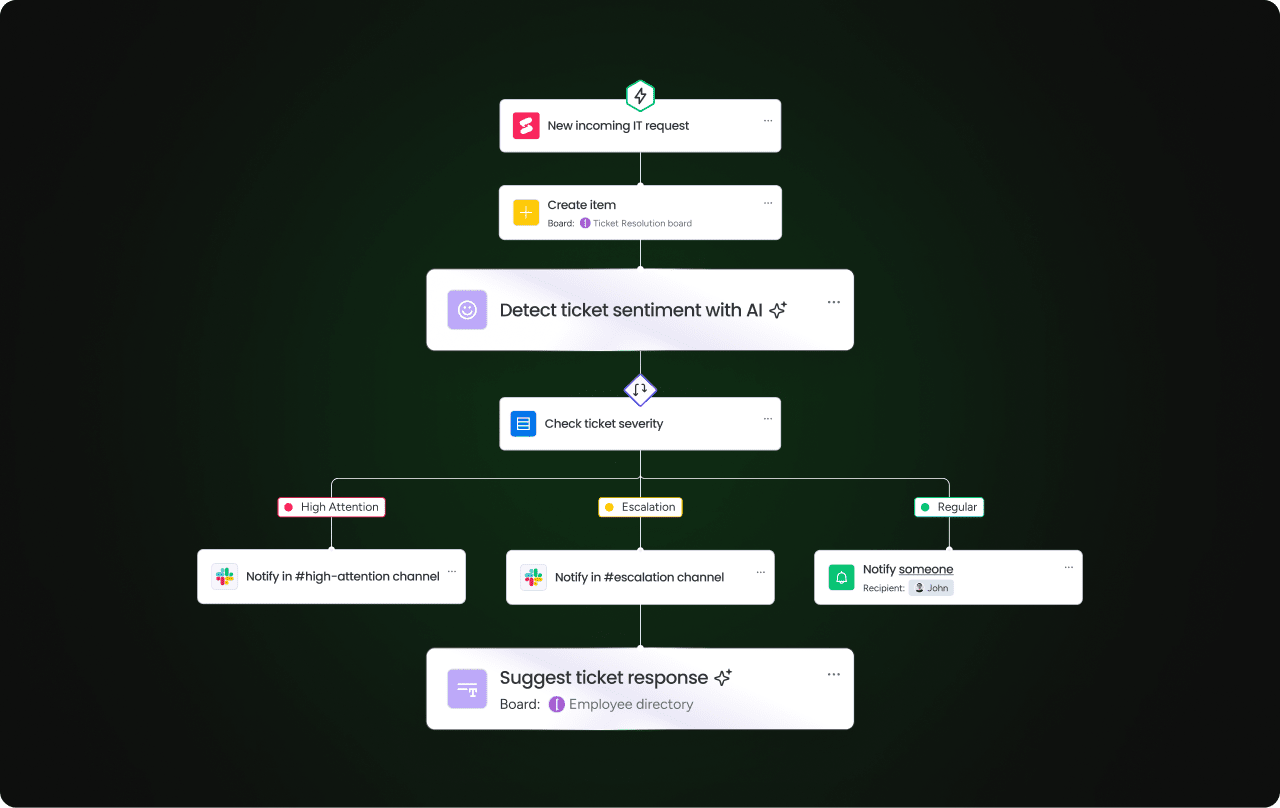
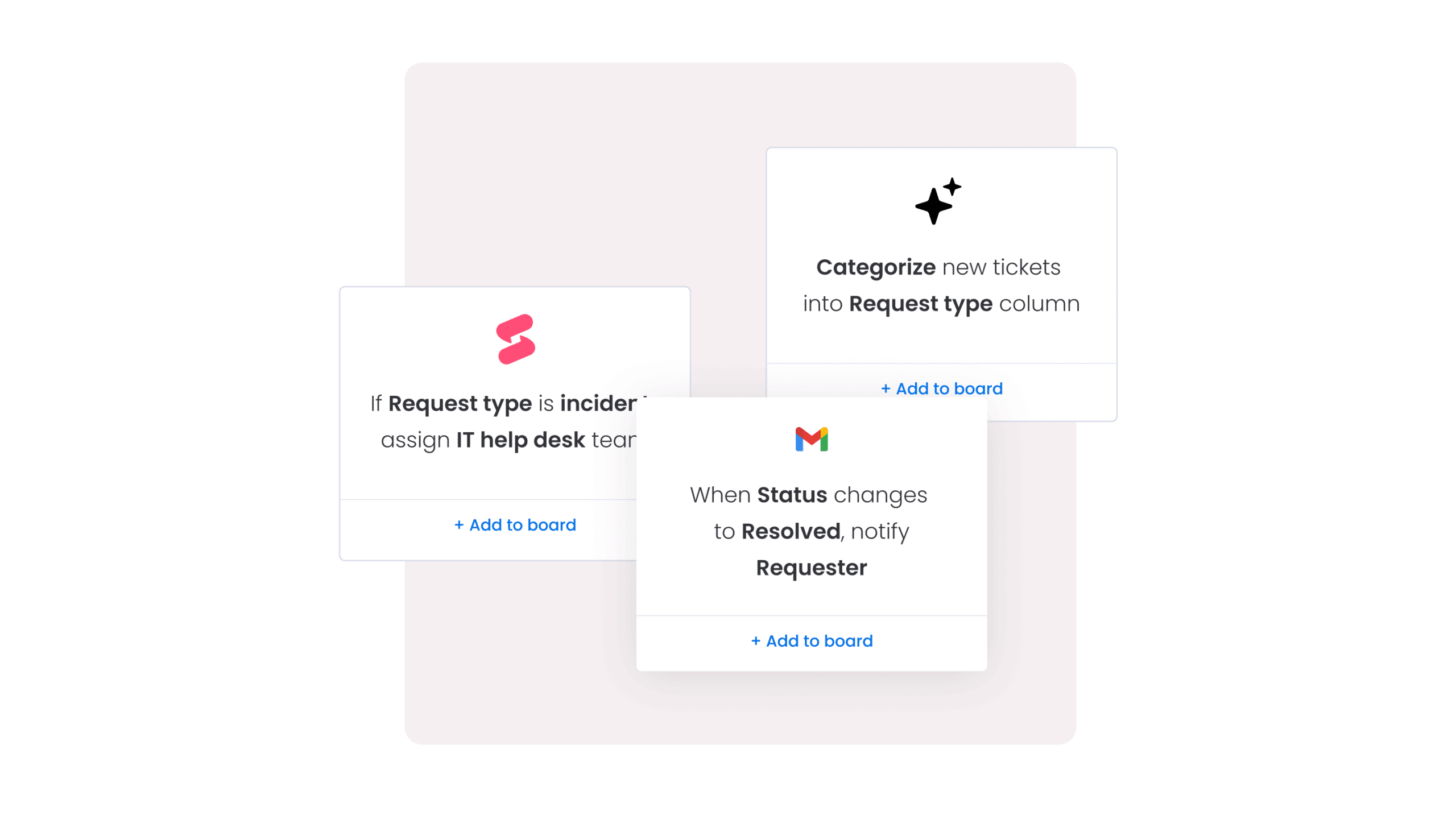
Never miss a review cycle with automated documentation workflows
Outdated documentation is often the result of missed review cycles rather than deliberate neglect. monday service’s automated workflow builder lets teams set trigger-based reminders that fire when content is due for review, when an approval is needed, or when a scheduled update hasn’t been completed. Every stakeholder stays informed without anyone having to chase manually.
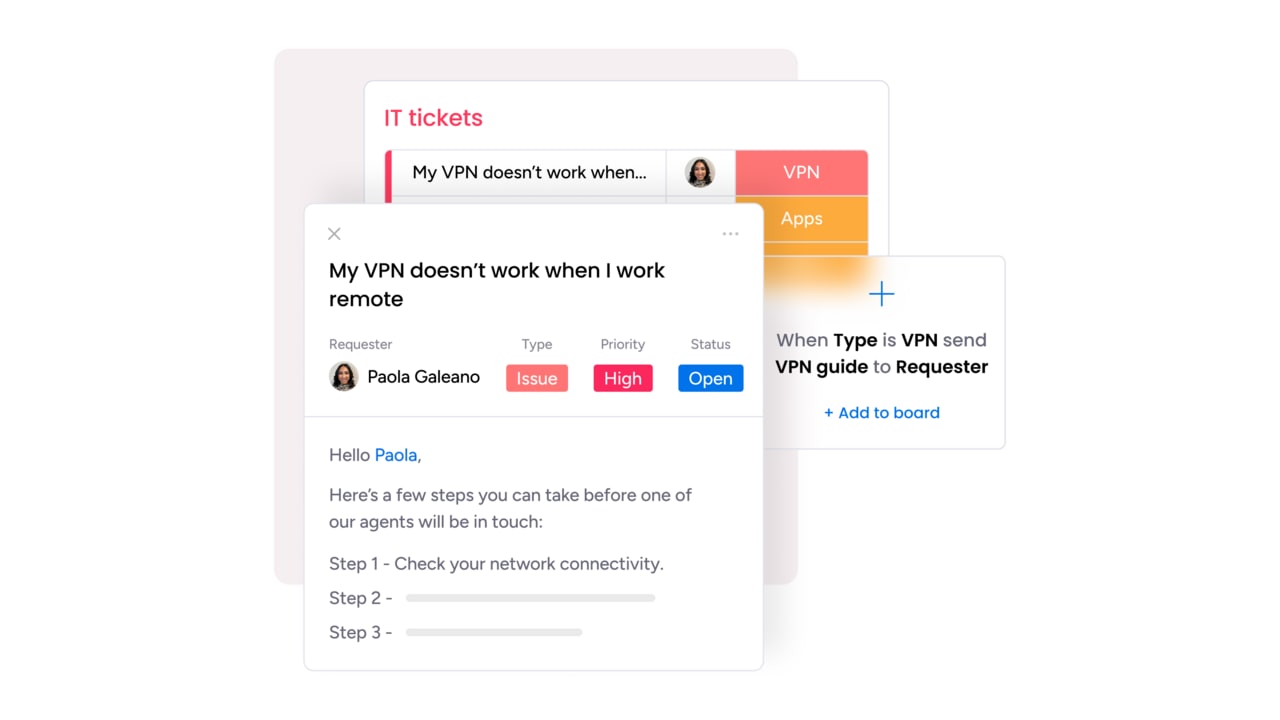
Resolve requests faster by connecting documentation to live service tickets
When an agent receives a request, the time spent locating relevant documentation is time the end user is waiting. monday service connects knowledge base articles directly to live service tickets, locating the right information at the point of need. Combined with AI Copilot, which recommends relevant articles to agents in real time, resolution times drop because the context agents need is already there.
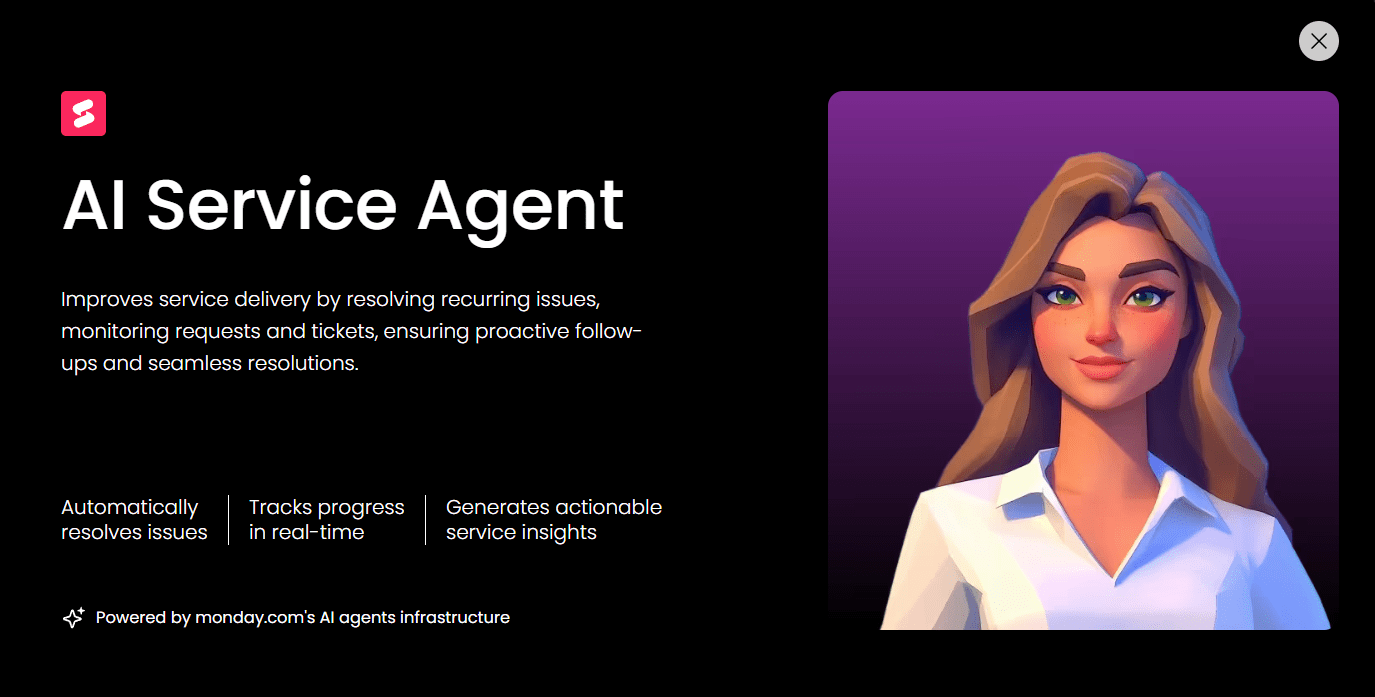
Scale your knowledge base without adding headcount
As an organization grows, so does the volume of requests hitting the service desk — and the documentation needed to handle them. monday service’s Digital Workers handle operational tasks autonomously around the clock, monitoring service trends, identifying recurring issues, and flagging gaps in your knowledge base system before they become bottlenecks. Teams can handle significantly more without the operation becoming harder to manage.
There’s no shortage of GitBook alternatives in the market, but the challenge is finding one that fits how your team works. If monday service looks like the right match, a 14-day free trial gives you the space to explore what documentation management looks like when it’s connected to your entire service operation. Run a real workflow through it and see what changes when knowledge and work finally live in the same place.
FAQs about GitBook alternatives
What are the main benefits of using monday service for documentation over a standard wiki?
The main benefits of using monday service over a standard wiki are its ability to connect documentation directly to live workflows, ticketing, and asset management. Rather than knowledge sitting in isolation, it stays attached to the work it supports. This empowers agents to act on information immediately without switching between tools.
Which GitBook alternatives offer the most robust Markdown support for developers?
The GitBook alternatives with the most robust Markdown support for developers are Docusaurus, Mintlify, and Archbee. Docusaurus is fully Markdown-native and open-source, Mintlify offers clean MDX support with a developer-first editor, and Archbee combines Markdown with a rich API documentation layer.
How can AI features in documentation tools speed up the employee onboarding process?
AI features speed up employee onboarding by locating relevant documentation automatically, drafting onboarding content from existing knowledge bases, and routing new hire requests without manual intervention. Platforms like monday service take this further with Digital Workers that proactively prepare onboarding task lists and equipment requests before a new hire's first day.
Which platforms combine physical asset management with live digital documentation?
monday service combines physical asset management with live digital documentation. Built on the monday.com Work OS, it connects asset records directly to service tickets and knowledge base articles, giving teams full context in one place rather than across separate systems.
Which tools allow for seamless synchronization with external code repositories like GitHub?
The GitBook alternatives that allow synchronization with external code repositories are Docusaurus, Mintlify, and Archbee. All three are built with developer workflows in mind and support GitHub integration, making it straightforward to keep documentation in sync with code changes without manual updates.
Can I automate notifications for documentation reviews and scheduled updates?
Yes, several GitBook alternatives allow you to automate notifications for documentation reviews and scheduled updates. monday service handles this natively through its automated workflow builder, letting teams set trigger-based reminders for review cycles, approvals, and content updates without any manual follow-up.
What are the best GitBook alternatives for teams requiring high-level data encryption and SSO?
The best GitBook alternatives for teams requiring data encryption and SSO are monday service, Confluence, and Document360. All three offer enterprise-grade security features. including role-based permissions and SSO support. monday service and Confluence also carry compliance certifications relevant to larger organizations.
Which GitBook alternatives provide the best balance between internal team use and public-facing docs?
The GitBook alternatives that best balance internal and public-facing documentation are Notion, Confluence, and Archbee. Notion and Confluence handle internal wikis well while supporting selective publishing, and Archbee is purpose-built for teams that need polished public-facing API docs alongside private internal content.

 Get started