


Every airport runs on hundreds of internal services that passengers never see. There’s the team routing baggage, the crew handling gate changes, the staff coordinating medical requests, the technicians repairing equipment, and the schedulers timetabling everything so planes keep moving. When even one of those groups loses track of who needs what, chaos ensues.
Enterprise organizations operate the same way. Their internal teams deliver vital services, but each group often works in its own system with its own process. Enterprise service management (ESM) brings these functions together so the entire operation runs like clockwork. This guide explores how ESM works, why it matters, and how platforms like monday service support complex coordination at scale.
Try monday serviceKey takeaways
- Enterprise service management gives organizations a structured way to handle internal requests across every department.
- ESM helps teams act with more clarity by creating consistent paths for how they receive, assign, and complete work.
- Modern ESM platforms use AI and connected data to support faster decisions and steadier progress.
- The right ESM approach adapts to company size, departmental needs, and the pace of organizational change.
- monday service offers an AI-powered, flexible environment to build and run a cohesive enterprise service operation
What is enterprise service management (ESM)?
Enterprise service management extends IT service management (ITSM) principles to other areas of a business to better service different needs. It extends beyond IT to streamline workflows in departments like human resources (HR), finance, legal, and marketing.
In particular, ESM helps these teams centralize service delivery by automating repetitive tasks, standardizing processes, improving communication, and making sure tasks get completed on time. The overall aim is for all business functions to operate cohesively.
What is an enterprise service desk?
Generally, ESM uses a specific platform to allow these departments to deliver service to their users, often referred to as an enterprise service desk. For example, a company may use a single platform to handle service requests, incidents, and inquiries across all of its business departments. These platforms often come equipped with intelligent automation tools, self-service portals, a ticketing system, and knowledge bases, to name just a few core features.

How does enterprise service management differ from traditional IT service management?
While ESM and ITSM share the same foundations, their scope and applications vary. Here’s an overview of the main differences.
| IT service management | Enterprise service management | |
|---|---|---|
| Scope | Focuses solely on IT services such as incidents, service requests, changes, and assets. | Extends service management principles across all business functions (HR, Finance, Legal, Facilities, Field Service, etc.). |
| Primary users | IT teams and employees with IT-related needs. | Entire organization, including internal teams, cross-department service providers, and occasionally external partners or customers. |
| Core objective | Improve IT service delivery, reduce downtime, and streamline IT operations. | Standardize service delivery enterprise-wide to improve consistency, efficiency, and overall employee experience. |
| Process coverage | Incident, problem, change, configuration, and asset management. | All ITSM processes plus non-IT workflows like onboarding, procurement, financial approvals, legal intake, and facility requests. |
| Automation maturity | Automation often limited to routing, approvals, and IT-specific workflows. | AI-powered automation across the entire business: predictive ticketing, automated knowledge management, cross-department workflows, and smart routing. |
| Technology approach | IT-focused platforms with integrations to core IT systems. | A centralized service platform connecting multiple systems (HRIS, ERP, CRM), enabling unified data and consistent workflows. |
| Organizational value | Improves IT efficiency and service quality. | Breaks down silos, accelerates service delivery across all teams, and supports a cohesive, enterprise-wide operating model. |
Why is enterprise service management important?
Enterprise service management replaces ad-hoc work with a shared method for moving requests through the organization. Instead of relying on a series of disconnected channels, teams use a single-system approach to create steadier progress with fewer blind spots. Here are the specific real-world benefits you’ll experience when service management spans your entire enterprise.
- Greater visibility: Departments gain a single place to monitor incoming work. Leaders see volume patterns and how long requests remain open, and they can compare performance with clear resolution benchmarks. Modern ESM tools pull information from different systems into one view, which removes any guesswork from their planning.
- Higher output: Automation removes the recurring steps that slow teams down. AI sorts incoming requests and prepares early suggestions, freeing people to address actual issues instead of the surrounding administration. This digital transformation creates steadier momentum during busy periods.
- Enhanced employee experience: With ESM, employees don’t need to switch between inbox messages or forms to request help. They use one entry point that guides them toward the right team.
- Better coordination across departments: Many internal processes involve contributions from several groups. With ESM, work moves to the next team without delay, and each group sees the current state without chasing updates.
- Clearer compliance paths: Rising regulatory demands create pressure to document actions and approvals. ESM records each step, helping organizations meet requirements without redesigning their workflows.
- Scalable foundation: Once teams follow a shared model for service delivery, the organization can expand that model without disruption. New services, updated workflows, and broader use of automation fit into the same system, which keeps the operation steady as the business grows.
A 6-step framework for adopting ESM
A structured rollout gives each team a grounded starting point and makes expansion easier as the organization grows.
1. Establish a single entry point for internal requests
Start with one place where employees ask for help. This creates a reliable flow of incoming work and removes uncertainty about how to reach the right team.
At this stage, introduce a knowledge base that appears directly within the request experience. When guidance shows up at the moment someone types or browses for help, many questions resolve before they become tickets, and the system receives a cleaner stream of requests that genuinely need attention.
2. Define ownership paths and access permissions
Assign responsibility for each type of request and map how work moves between groups. Set role-based access rules so sensitive information stays with the right people. Clear ownership and permissions reduce delays and keep departments aligned as volume rises.
3. Map and customize workflows for each department
Each team handles work differently, so workflows should reflect those differences. Build sequences that match how HR, finance, facilities, legal, and IT operate. This helps service work move in a pattern teams can trust, especially when demand increases.
4. Connect systems that support your service operation
Tie your ESM platform to HR data, access systems, CRM records, asset inventories, or other sources of operational detail. When these systems communicate with one another, agents see what they need without switching tools, and decisions happen with fewer delays.
5. Introduce AI and automation once patterns are clear
After workflows and ownership paths settle into place, AI can classify and direct requests, while automation manages the predictable steps that sit between intake and resolution. This gives service teams room to focus on the work that requires judgment.
6. Use performance insights to refine and expand your model
Dashboards and reporting tools show how requests move, where timing shifts, and where progress slows. Use these insights to adjust staffing, revise workflows, or bring additional departments into the model. A steady feedback loop helps the framework scale as the organization grows.
5 enterprise service management platforms compared
Organizations choose ESM software based on their structure, request volume, and level of coordination they need across departments. The right platform gives teams a reliable way to manage requests and maintain steady progress as demand grows. The tools below take different approaches to service delivery, workflow design, and self-service IT automation. This overview outlines where each platform fits and the type of organization it serves best.
1. monday service
Best for: teams requiring a central, AI-backed platform to run every part of their service operation
monday service gives teams a way to run their entire service operation in a single system. Ticketing sits next to project work, so follow-up tasks and larger initiatives stay connected to the issues that sparked them. Teams know exactly who is involved, what information matters, and how work moves from one group to the next.
The platform’s no-code setup means enterprise departments can shape their own processes without waiting on technical support. Best of all, built-in AI ticketing offers steps to handle repetitive actions, prepare useful context, and guide next steps when a request needs attention.
Key features
- 72+ integrations and 217+ apps that connect service work to the systems your organization already uses
- 27 views, 36 column types, and 25 widgets that let teams shape boards and dashboards to match their service processes
- One AI-powered environment for tickets, projects, and departmental workflows, so teams manage service activity without switching tools
User reviews

"Our team LOVES the monday service platform and we’re already exploring how we could incorporate it for other departments, too. It has streamlined our workflow in a way that both our team and customers appreciate."
Andrew Marshall | VP Operations
״monday service provides clear insights into requests volume and types, response times, and trends - helping us continuously improve operations"
Grant De Waal-Dubla | CIO
"The biggest value for us is speed and flexibility. You can get up and running in days, change anything instantly, and see everything in real time. And you don’t need a dedicated admin to do it."
Clive Camilleri | Head of People Tech & OperationsPricing
- Pricing starts at $26/seat/mo
- 3 plans available: Standard, Pro, and Enterprise
- 14-day free trial available
2. ServiceNow
Best for: enterprises with complex, highly governed operations
ServiceNow is a long-standing enterprise platform that supports internal and field teams through a suite of service applications. Organizations use it to structure complex processes and meet regulatory requirements.
Key features
- A broad catalog of modules for IT, HR, operations, and workplace management
- Strong governance and audit capabilities for regulated environments
- Workflow tools suited to large teams with high request volume
User reviews
“Service Now IT Service Management suite helps enterprise organizations address their Incident, Change, Problem Management tasks. Along with the CMDB Integration, it also handles asset inventory management for all infrastructure-related components like servers, storage, cloud resources, network, and security devices.” — Ravishankar S., senior enterprise cloud architect
“While the platform is highly customizable, the learning curve can be steep for new users, particularly in complex enterprise environments. There is also room for improvement in the user experience for certain operational roles.” — Victor L., head of sales
Pricing
- Custom quotes are available from the vendor on request
3. InvGate
Best for: teams that want built-in asset intelligence with an on-premise option
InvGate provides tools for service management and workflow coordination across several departments. The platform supports service operations and teams in areas such as HR or facilities through structures that reflect real internal processes.
Key features
- AI Hub that assists with summaries, knowledge lookup, and updates to ongoing cases
- Asset and configuration tracking that links service activity to hardware or software records for better traceability
- Custom workflows with approval paths that give departments a dependable sequence for handling requests
User reviews
“InvGate Service Management is intuitive, flexible, and easy to roll out across IT and other departments like HR and facilities. The visual workflow builder and automation rules save tons of time by streamlining ticket routing and approvals.” — Dov H., a project manager
“It features various configurations and options for creating trees so that customers can quickly identify the type of support they need. Furthermore, it allows for the creation of “do it yourself” manuals, which are automatically displayed when a relevant term is detected in the subject of the incident.” — Cristian P., a security employee
Pricing
- Free 30-day trial available
- Accurate pricing is available on request
4. Jira Service Management
Best for: teams that run service and development work in the same environment
Jira Service Management extends Jira with request intake, change tracking, and service workflows that sit close to engineering activity. Organizations use it when support teams and technical teams share work or rely on the same project environment. This structure reduces the gap between service requests and development tasks, which helps teams handle incidents and changes with better context.
Key features
- AI via Rovo Agents for knowledge suggestions and summaries
- SLA tracking, automation rules, customizable dashboards
- Tight integration with Jira Software, Confluence, Bitbucket, and Opsgenie
User reviews
“What I like best about Jira Service Management is how seamlessly it helps manage IT support tickets through customizable workflows, automation, and SLAs. It improves visibility across teams and keeps everything well-organized in one place.” — Dineshkumar P., a system engineer
“The initial setup can be complex for new users, especially when configuring custom workflows or automations. Additionally, performance can slow down slightly with very large datasets or projects.” — Shiva Shakthi M., a business development executive
Pricing
- Free trial available for 7 days
- Free forever plan available for up to 3 agents
- Standard pricing starts at $20/agent/mo
5. Freshservice
Best for: IT teams required a traditional, ITSM-first service desk
Freshservice (not to be confused with Freshdesk) is a service management platform developed by Freshworks. It helps internal teams manage the full lifecycle of service delivery across their enterprise organization.
Key features
- Freddy AI
- Incident, problem, change, and request management
- Internal omnichannel support
User reviews
“With Freshservice, we’ve managed to consolidate three separate apps into a single platform, which has not only reduced our costs but also made things much simpler for our team. Now, we only use one place to get our work done.” — Wesley D., an IT systems administrator
“Freshservice gave our global IT team one place to manage tickets, requests, and changes — with a clean interface and smooth workflows.” — Ayoun K., a director of information technology
Pricing
- Pricing from $19/agent/month
- Free trial available
- No free platform
- 4 paid plans: Starter, Growth, Pro, and Enterprise
Optimize enterprise service delivery with monday service
Connecting an entire organization through one platform is no easy task, and it can be tricky to find one unified tool to handle entire enterprise service management workflows.
But with a flexible and robust enterprise service management system like monday service, it’s entirely possible. Built on the powerful monday.com Work OS, and custom-made for enterprise service management, our platform incorporates built-in AI and smart automations to power your operations. Let’s take a closer look at some of the enterprise service management capabilities available with monday service.
Shorter response times through AI-supported ticket handling
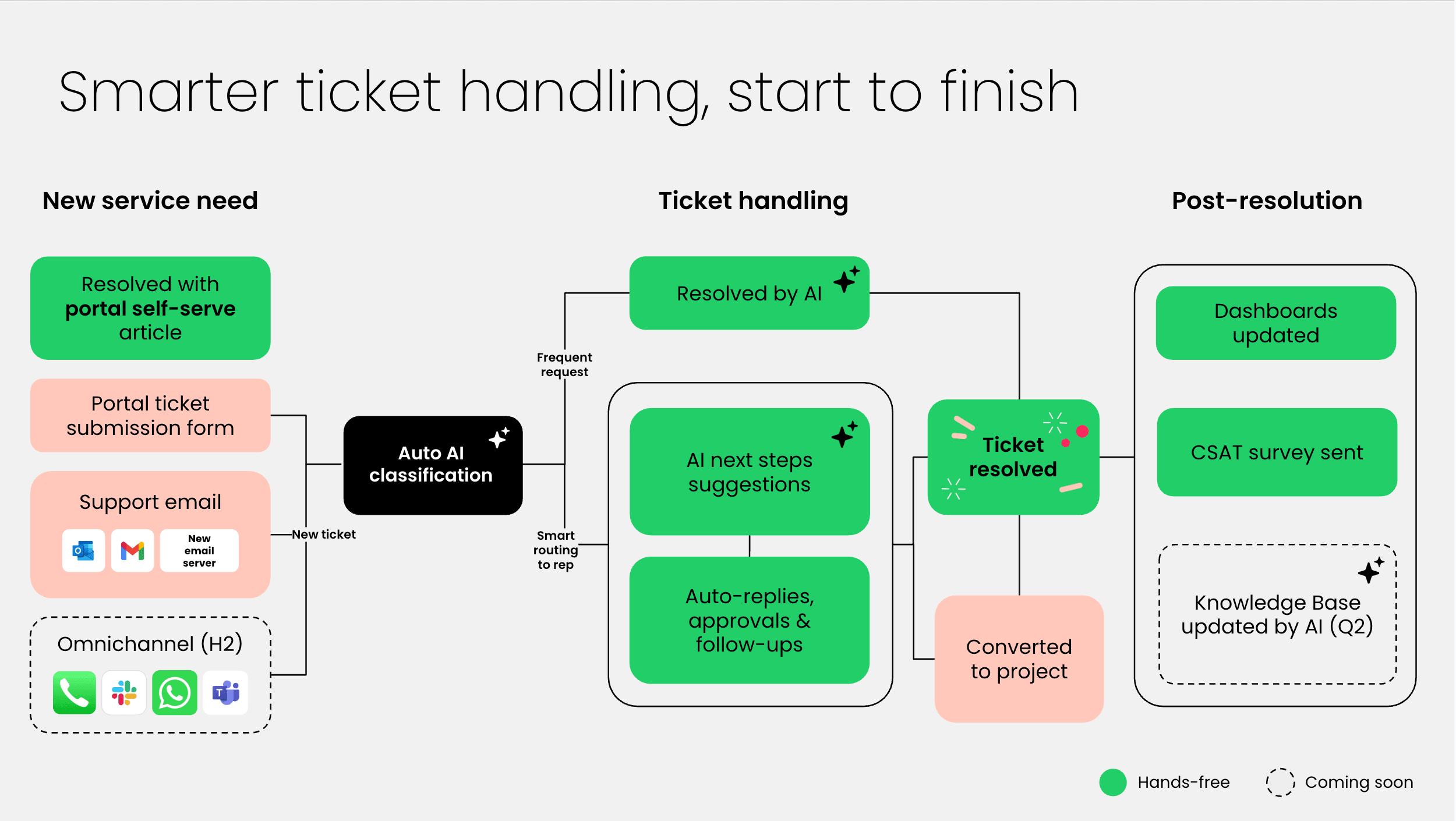
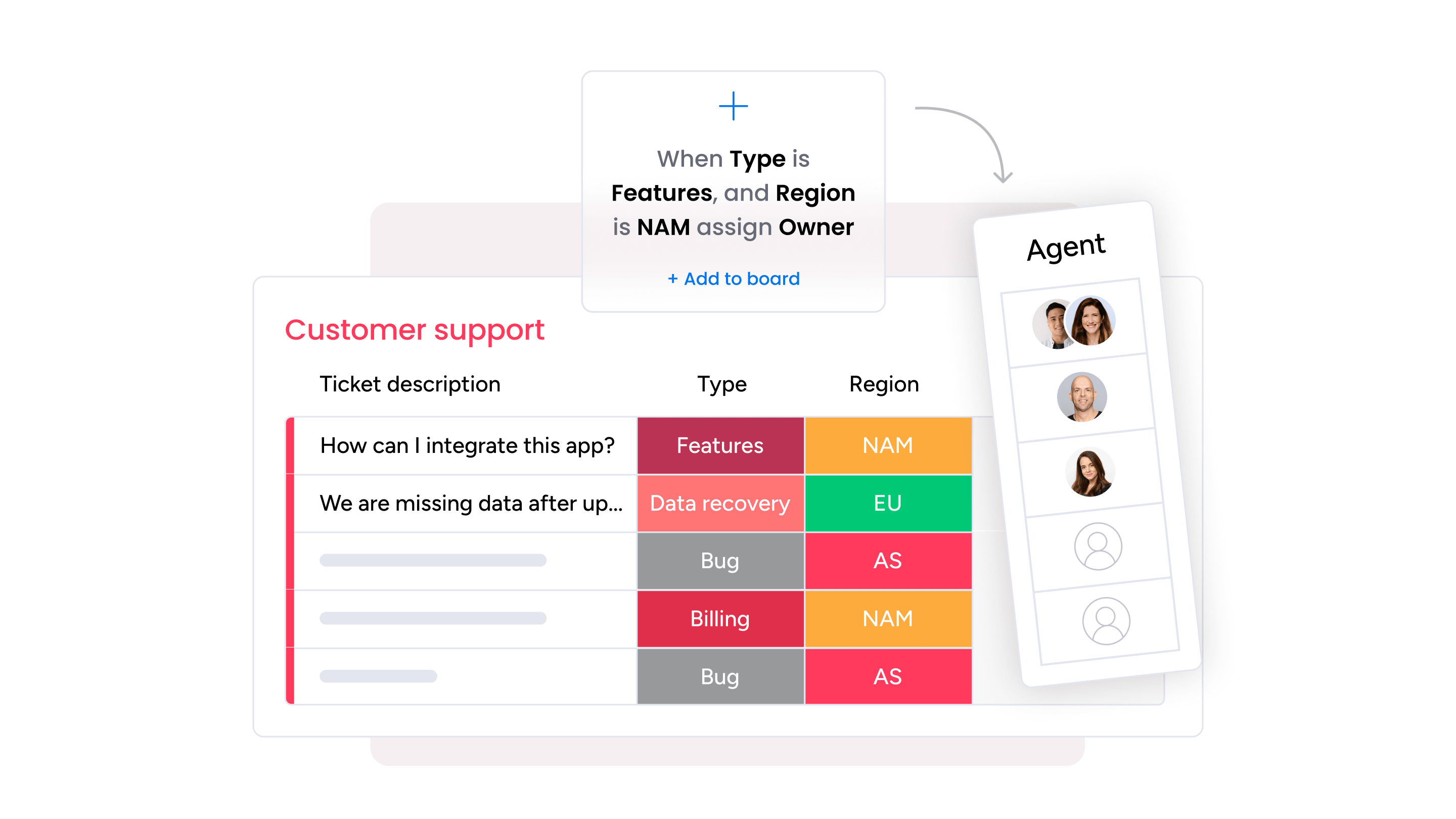
monday service uses built-in AI to help teams understand and act on new requests quickly. As tickets come in, AI auto-classifies them, highlights important details, and suggests the right queue based on type, urgency, or sentiment. Agents start with a clearer picture of what the request is about, instead of working it out from scratch.
Smoother collaboration across departments
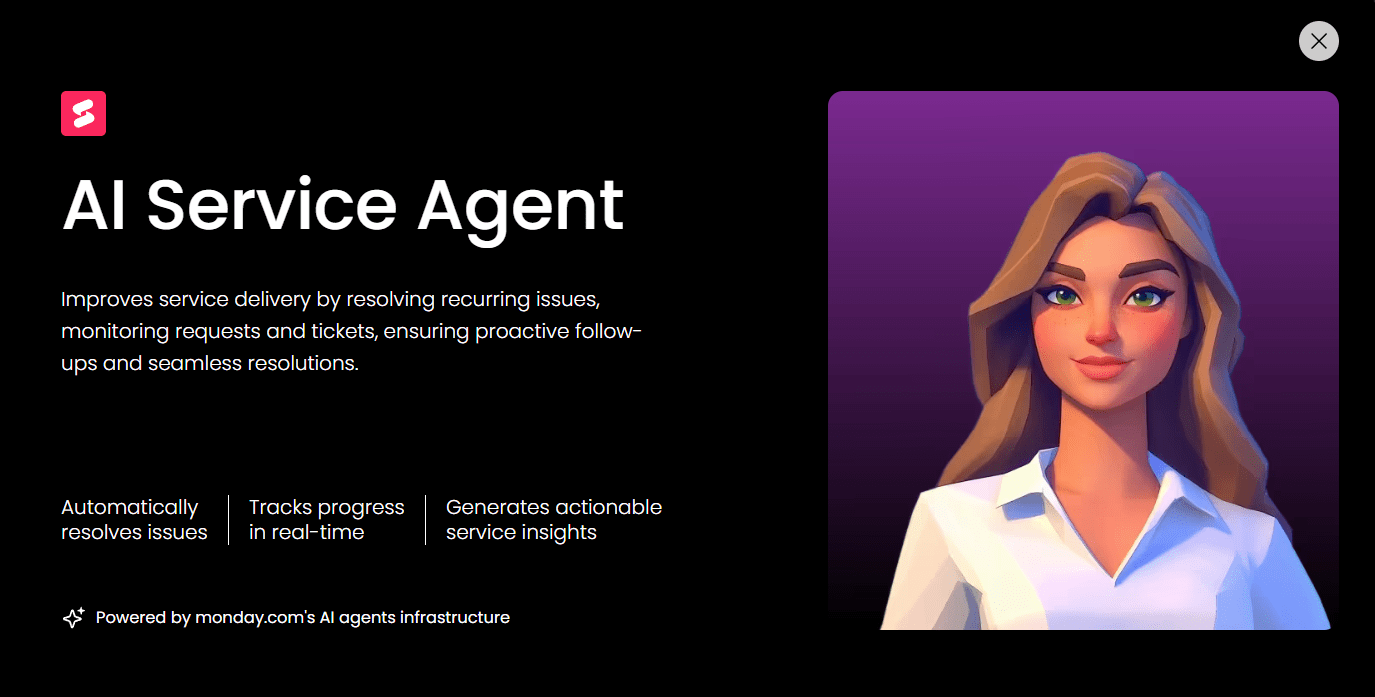
Requests often move through several groups before reaching resolution. monday service keeps the movement clear by linking requests, tasks, and contributors inside one environment. When a case needs input from HR, facilities, or finance, teams see the full history and work together without switching tools. Digital Workers play a role here, too, acting as background teammates that monitor ongoing cases and alert teams when something needs attention.
Greater self-service options to reduce ticket volume
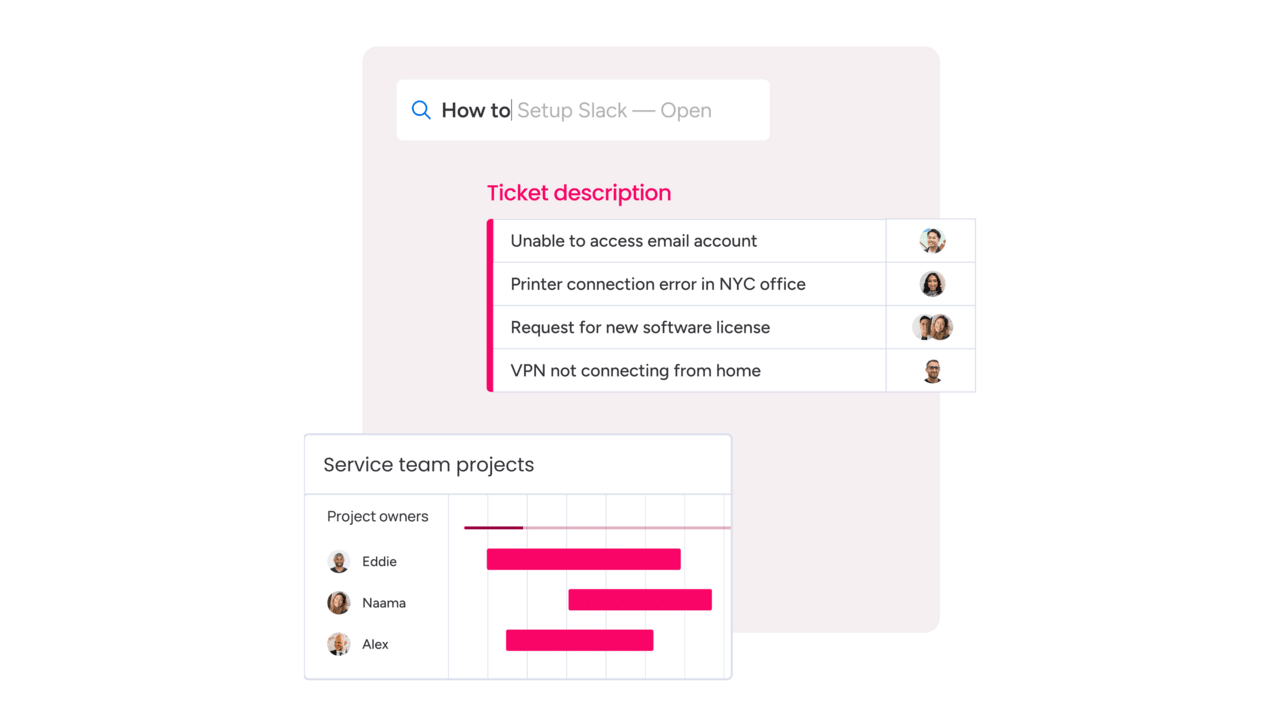
Resolve a large share of requests before they even reach the service team with monday service. Knowledge base assistance presents helpful steps or guidance as soon as someone begins typing. AI Blocks retrieve relevant information from documents or knowledge sources, making it easier for employees to complete tasks on their own. When self-service handles predictable questions, agents gain more time for work that really needs their efforts.
Clear decisions supported by connected data
Service teams often need context from other systems to move a case forward. monday service brings this information into the ticket itself, so agents see what they need without checking separate tools. Connected data can include CRM details, employee records, identity information, or updates from development systems.
Boards present these details through columns that pull from integrations or internal data sources. When an agent opens a ticket, related information sits alongside the request, helping them decide the next step with confidence. This reduces the time lost to searching, switching systems, or piecing together incomplete details.
Better planning with real-time service insights
Leaders need a clear view of how service work moves through their teams, and monday service provides this through dashboards and board views that update as work progresses. Dashboards combine widgets that show volume, timing, backlog changes, SLA status, and other metrics the team relies on.
Views such as Kanban, Workload, and Chart views give managers an immediate sense of capacity and demand. AI-driven insights highlight patterns or shifts that may need attention, such as a rise in requests tied to a specific system or an area where resolution times drift. This information supports planning across departments and helps teams adjust processes before issues grow.
Try monday serviceHow does ESM differ by company size?
ESM adapts to the scale, structure, and workload of each organization. The core framework stays the same, but the way teams use it shifts as the business grows.
Small businesses
- Use ESM to replace email-based requests with one system that captures and tracks work
- Rely on simple workflows that remove repetitive steps
- Benefit from an entry point that guides employees to the right team without extra coordination
Mid-size organizations
- Use ESM to manage rising request volume and reduce delays between departments
- Depend on clearer ownership paths as more teams become involved in each process
- Connect ESM to HR, identity, or finance systems because many requests pass through those tools before they progress
Large enterprises
- Use ESM to maintain consistency across regions and departments
- Apply advanced routing and AI assistance to keep up with high request counts
- Rely on ESM to support governance needs, record actions, and meet regulatory expectations
Futureproof your enterprise service management with monday service
The ESM market is set to reach $13.38 billion in 2025, with steady expansion projected for the years ahead. It’s clear that enterprise service management is far more than a support function. It’s now the defining framework influencing how teams work together, respond to change, and make decisions with the right information at the right moment.
As demand rises and internal operations grow more connected, the systems behind that work need to be adaptable and clear. monday service gives teams a way to build that foundation on a platform they already know, with AI and no-code tools that help them move faster without creating complexity.
If you’re ready to prepare your organization for what’s next, explore monday service with a free trial and see how it fits your operation.
Try monday serviceFAQs
What are ESM tools?
Enterprise service management tools are software solutions designed to manage and streamline service delivery across an organization’s various departments, such as HR, finance, and facilities. They centralize workflows, automate tasks, and enhance collaboration to improve efficiency and the user experience.
What is enterprise asset management (EAM)?
Another important part of ESM is enterprise asset management, which focuses on managing the lifecycle of specific business assets, such as IT hardware, machinery, and facilities. EAM maintains the peak performance of assets so they don’t break down or cause disrupted work and unnecessary downtime.
What is the meaning of the ESM model?
The ESM model refers to the framework for extending IT service management principles to entire business processes. It emphasizes service-oriented practices, standardization, and cross-departmental collaboration to optimize operations across an organization.
What are the different types of ESM?
The term 'ESM' can take on many different forms depending on its application, including:
- IT service management
- HR service management
- Facilities management
- Finance service management
- Legal service management
Each type addresses the specific service needs of its respective department while sticking to foundational ESM principles.
What are the key principles for adopting enterprise service management?
Successful ESM adoption requires a clear, sequenced structure, which organizations can achieve when they focus on these principles:
- A single entry point for internal requests so teams receive work through one channel instead of scattered messages.
- Defined ownership so every request moves to the right group without confusion or follow-up.
- Automation for routine steps so service teams can focus on work that needs judgment instead of administration.
- Measurement of request flow so leaders see where slowdowns appear and how demand changes over time.
How can an enterprise service management framework break down departmental silos?
ESM brings all internal requests into one system, removing the gaps created by isolated tools or inboxes. Departments see the same information, follow the same lifecycle, and pass work forward without extra coordination. This reduces miscommunication and gives teams a shared view of progress.
What integrations are most important when setting up an ESM platform?
Strong ESM setups connect to systems that influence everyday service work. Some of the following examples keep information flowing from one platform to the next, eliminating the need for manual updates:
- HR information systems
- Identity and access tools
- Finance and procurement systems
- Communication platforms
- Asset and inventory systems
How does enterprise risk management software relate to ESM?
ERM SaaS and ESM work together to support internal controls and operational consistency. ESM provides the workflow structure that ERM systems rely on. The connection appears in several areas:
- Recorded actions: ESM keeps a clear trail of steps taken during a service process, which gives ERM accurate operational data.
- Defined access paths: ESM assigns work according to responsibility, which supports ERM controls around permissions and duty separation.
- Policy enforcement: ESM workflows follow a fixed sequence, which helps organizations meet compliance requirements without redesigning processes.
- Issue tracking: ESM routes risk-related findings or exceptions to the right team, which helps ERM teams maintain steady oversight.
How is field service management incorporated into a broad ESM system?
Field service management becomes part of ESM when office teams and field teams work in the same service environment. ESM connects request intake, scheduling, and on-site work so information moves without gaps. This appears in several areas:
- Shared intake: Requests that require on-site support enter through the same channel used for other internal services.
- Linked workflows: Dispatch and assignment steps follow the same lifecycle as office-based work, which keeps tasks moving without extra coordination.
- Real-time updates: Field teams record progress in the same system, which gives office teams current information without separate tools.
- Cross-team coordination: ESM connects the groups involved in field work, such as facilities, operations, or IT, and keeps the process steady from start to finish.
What role does artificial intelligence play in ESM software?
When looking around for an enterprise service management solution, you may notice that some platforms integrate artificial intelligence (AI) and machine learning (ML) features. AI and ML technologies can make already efficient service solutions even more effective through personalization and smart actions. Here’s a look at the role AI can play in ESM software:
- AI-driven automations can streamline repetitive tasks like ticket routing, approvals, and incident resolution
- ML technology can analyze historical data to predict service trends and bottlenecks that can be used to improve processes
- Chatbots and virtual assistants powered by AI can offer round-the-clock support and answer questions with self-service options
- Stronger analytics capabilities offer companies actionable insights from large datasets to support high-level decision-making

 Get started