


For too long, organizations have measured IT service desks by how quickly they close tickets. This creates a reactive cycle where teams are always fighting fires instead of preventing them. The real goal is not just faster resolutions, but fewer tickets in the first place. This guide explores how generative AI for IT service desks moves teams from reactive support to proactive service. We will cover how AI automates ticket handling, predicts issues before they impact users, and turns every resolution into a learning opportunity. You will also find a practical roadmap for implementation, from quick wins to scaling safely.
Understanding these capabilities is the first step toward building a smarter, more efficient service operation. With the right strategy and a flexible platform, you can shift resources from reactive fixes to high-value projects that drive business growth. Let’s start by defining what AI for the service desk really means and how platforms like monday service can help you get there.
Key takeaways
- Start with high-volume, simple tasks like password resets and ticket routing. Quick wins build momentum and prove AI value within 2-3 months.
- AI transforms reactive firefighting into proactive problem prevention. Your team fixes root causes before users notice issues, reducing ticket volume.
- monday service delivers AI-powered classification, smart routing, and knowledge discovery through no-code customization. Deploy intelligent workflows in hours with visual drag-and-drop configuration.
- Focus on knowledge quality first. Bad documentation creates bad automation. Clean up your articles before implementing AI to ensure accurate responses.
- Plan for a 6-month maturity timeline where AI gradually moves from suggestions to full automation. This phased approach builds team trust and prevents overwhelming workflow changes.
What is AI for IT service desk?
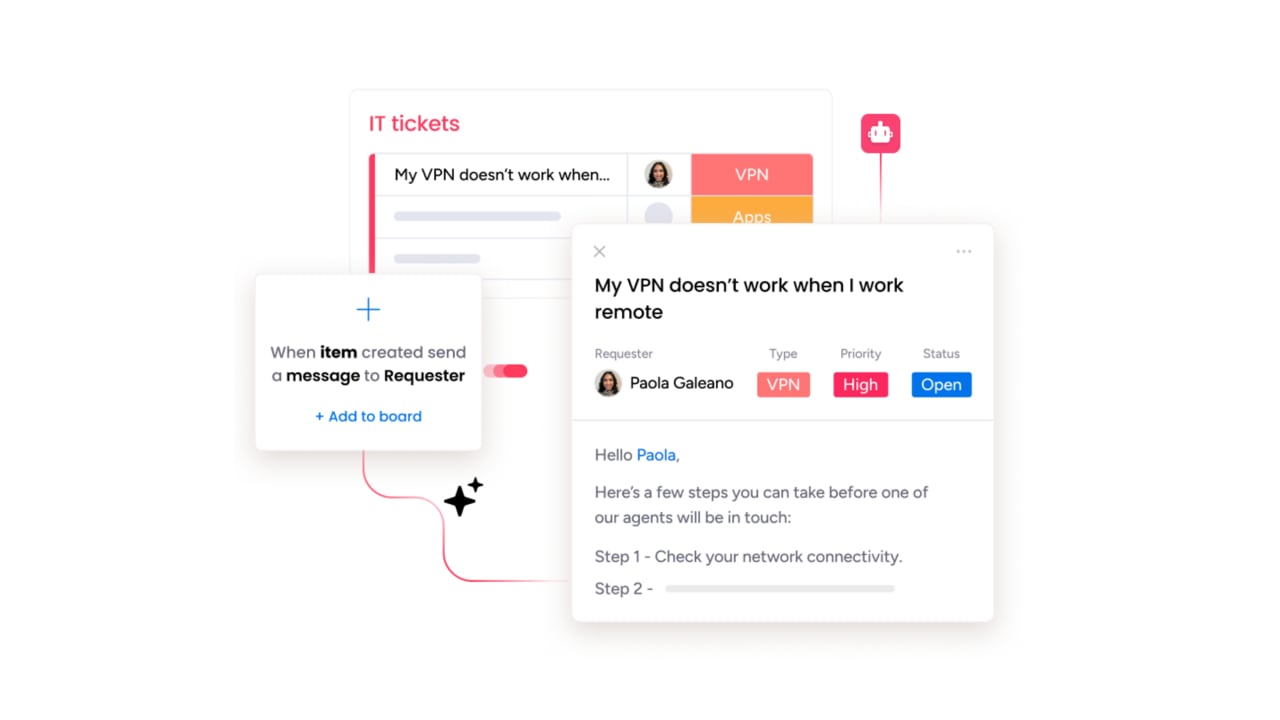
AI for IT service desk is artificial intelligence that automates ticket handling, speeds up resolution times, and improves support experiences. This means your service desk can automatically sort requests, suggest solutions, and even resolve common issues without human intervention.
Think of it as having a smart assistant that never sleeps.
AI for IT service desk reads tickets, understands what users need, and either fixes problems directly or gives agents exactly what they need to resolve issues fast.
Moving beyond basic chatbots to intelligent automation
Basic chatbots follow scripts and match keywords. They break when users phrase things differently than expected. Intelligent AI automation understands what users actually mean, asks clarifying questions, and pulls information from multiple systems to provide real answers — the hallmark of genuinely intelligent AI IT management software rather than a scripted bot bolted onto a ticketing form.
Here’s what makes intelligent automation different from basic chatbots:
- Understanding capability: AI grasps intent from natural language instead of just matching keywords
- Data access: Connects to tickets, assets, user profiles, and service status for complete context
- Action scope: Actually performs tasks like password resets and software provisioning
- Personalization: Tailors responses based on user role, device, and current system state
- Learning ability: Improves through feedback instead of requiring manual updates
Real examples show the difference. A password recovery with AI verifies your identity, resets credentials, and confirms multi-factor authentication, all without routing to a human. Software requests check entitlement, trigger deployment, and track progress automatically. Network troubleshooting detects patterns and posts targeted updates instead of generic steps.
Generative AI vs traditional ITSM platforms
Generative AI creates new text and solutions based on context. Traditional ITSM platforms use pre-built workflows and templates. You need both: traditional platforms for control and process, and generative AI for flexibility and natural language.
Generative AI drafts custom responses for each ticket instead of using the same template. It synthesizes information from similar incidents to suggest solutions, and it learns from outcomes to get smarter over time.
When someone submits “Outlook search broken after update, only on VPN,” generative AI identifies the likely cause, pulls relevant documentation, and creates steps specific to that user’s setup. Traditional platforms would just categorize it as “email issue” and suggest generic troubleshooting.
The rise of agentic AI for autonomous resolution
Agentic AI goes beyond suggestions; it completes work autonomously within defined boundaries. This AI plans multi-step processes, makes decisions, and finishes tasks while maintaining security and compliance.
A password reset shows how this works. The user requests help, and the AI verifies their identity, checks account status, and triggers the reset. It then confirms multi-factor authentication and closes the ticket, completing the entire process without human involvement while staying within policy limits.
Transform reactive support into proactive service with AI
Reactive support means constantly fighting fires. Users hit problems, submit tickets, and teams scramble. AI shifts this to prevention by spotting patterns early and fixing issues before users notice.
Predict and prevent issues before impact
AI watches for warning signals across your systems. It correlates ticket history with system health, user behavior, and recent changes to flag problems early.
Here’s how AI prevents issues before they spread:
- System monitoring: Catches gradual degradation like rising CPU usage or API errors
- User behavior analysis: Spots patterns like repeated login failures after policy changes
- Trend identification: Finds “same symptom, different users” signals humans miss
A real example: AI detects memory growth on a critical service and schedules a restart during low usage. Or it identifies software conflicts after a patch and pauses deployment for affected devices. The University of Michigan’s central IT organization demonstrates this capability by incorporating AI into its service center workflow to triage over 40,000 customer requests more efficiently, identifying high-priority issues and routing tickets to staff experts.
Enable self-service that actually solves problems
Traditional self-service feels like searching through endless FAQs. AI self-service understands requests in plain language and walks users through solutions that match their specific situation.
Here’s what AI-powered self-service handles well:
- Account provisioning: Confirms access rights, submits requests, notifies when ready
- Software troubleshooting: Checks versions and known issues, then suggests relevant fixes
- Access requests: Validates entitlement and routes exceptions with full context
The key difference? AI adapts to each user’s role, device, and current system state instead of showing everyone the same generic article.
Build continuous improvement from every ticket
Every resolved ticket teaches AI what works. This creates a feedback loop that improves automation and reveals systemic issues.
AI learns from ticket data in three ways:
- Response accuracy: User feedback and resolution outcomes refine future answers
- Process optimization: Timestamps reveal bottlenecks like stalled approvals or missing fields
- Knowledge gaps: Repeated questions identify missing or outdated documentation
When “VPN disconnects after sleep” tickets spike, AI clusters them, identifies the driver issue, and suggests pausing updates for affected models. Ticket volume drops because you fixed the cause, not just answered faster.
7 ways AI revolutionizes service desk operations
These capabilities reduce repetitive work and help teams scale without burning out. Organizations using generative AI in service operations are already seeing material results. According to a 2024 McKinsey report on the state of AI, 58% of these organizations reported cost decreases over the prior 12 months. Let’s explore how AI transforms daily service desk operations.
1. Slash ticket volume through smart deflection
AI resolves requests before they become tickets. It detects intent, provides targeted guidance, and completes routine tasks automatically.
Smart deflection in action includes detecting “password reset” requests and launching the fix immediately. It handles common tasks like unlocks and status checks without service agent involvement. During incidents, it provides real-time updates to prevent duplicate tickets.
2. Accelerate agent productivity with AI assistance
AI handles the time-consuming parts of ticket work. Agents keep control while AI does the heavy lifting.
AI assists agents throughout their day in different ways:
- Instant context: Summarizes ticket history, device details, and related incidents
- Solution suggestions: Recommends fixes based on similar resolved cases
- Documentation help: Drafts responses and knowledge articles
monday service delivers these capabilities through its AI service agent, providing real-time suggestions and automated handoffs directly in your workflow.
3. Scale support capacity without growing teams
AI automates routine work completely and assists with complex tasks. Your team supports more users without adding headcount.
Password resets and account unlocks work perfectly for full automation while clear policies and identity checks make them low risk. Software installs follow approval logic that’s easy to track. “How do I” questions map to validated knowledge. But access exceptions and multi-symptom incidents still need human judgment, even with AI assistance.
4. Boost first-contact resolution rates
AI gives agents everything they need to resolve issues on the first try. It matches requests against historical outcomes and suggests the most effective fix.
How does this work in practice? A user reports “Teams calls drop after 10 minutes.” AI checks their device, drivers, and network data. It identifies a Wi-Fi driver conflict with the VPN client and provides the fix sequence plus a customer-friendly explanation. The agent resolves it immediately instead of escalating.
5. Deliver always-on autonomous support
AI handles common issues 24/7, escalating only what needs human attention. This keeps work moving across time zones without expensive on-call coverage.
Autonomous support excels at standardized tasks like resets, unlocks, and status checks. It responds immediately instead of waiting for paging and triage, and it packages full context when escalation is needed, so agents start informed.
6. Transform knowledge management automatically
AI turns static documentation into a living system. It creates articles from successful resolutions, optimizes existing content, and identifies gaps based on actual usage.
monday service powers this through AI knowledge discovery that finds relevant answers across all your documentation, even when users describe problems differently.
7. Drive predictive service improvements
AI forecasts future demand and identifies what changes will reduce it. You move from fighting today’s fires to preventing tomorrow’s problems.
Predictive insights help you align staffing with expected ticket volume. They reveal skill gaps through escalation patterns. And they support upgrade decisions with hard data about which systems cause the most issues.
High-impact AI examples to deploy first
Start with use cases that have high volume and clear success metrics. These early wins build momentum for broader adoption.
Automated ticket classification and smart routing
AI reads tickets and routes them based on content, context, and patterns. This typically takes 2-6 weeks to implement and immediately improves throughput.
Smart routing examples that deliver quick value:
- VPN issues: Route to networking unless there’s an active incident
- Hardware requests: Route based on location, device standards, and stock
- Executive tickets: Escalate to priority queue with on-call coverage
monday service handles this through AI-powered ticketing and classification that categorizes by type, sentiment, and priority, then assigns to the right team automatically.
Virtual agents for self-service success
AI agents handle common requests through chat while completing real actions. Implementation takes 4-10 weeks for core capabilities like password resets, software requests, and device troubleshooting. Recent research shows that 62% of organizations are at least experimenting with AI IT agents, with service-desk management cited as a prominent IT agent use case.
The key to success? Graceful handoffs. When AI can’t complete a request, it transfers full context to human agents so users don’t start over.
AI-enhanced knowledge discovery
Replace keyword searching with intent-based retrieval. AI finds relevant answers across all your documentation, even with different phrasing. This takes 4-8 weeks to implement well.
An agent searching “Excel freezes saving to SharePoint” gets the known issue article, recent ticket resolution, and credential cache fix, all presented as one solution path.
Intelligent ticket summarization
Long ticket threads become concise summaries. AI captures user impact, steps tried, current hypothesis, and next actions. Implementation takes just 2-6 weeks since it works with existing ticket text.
Multi-day tickets with multiple handoffs become clear summaries. The next agent starts informed instead of reading pages of notes.
Proactive issue detection systems
AI monitors system health and user patterns to detect issues early. It alerts teams, correlates symptoms, and can trigger preventive actions. Expect 8-16 weeks for reliable detection.
When authentication failures spike after a certificate change, AI alerts the identity team, opens an incident, and posts user updates, preventing a ticket flood.
5-step AI service desk implementation strategy
A phased approach reduces risk while delivering early results. Here’s how to roll out AI successfully.
Step 1: Evaluate your service desk AI readiness
Check these readiness factors before starting:
- Data quality: Do tickets have consistent categories and clear outcomes?
- Process maturity: Are common workflows documented and followed?
- Knowledge foundation: Is documentation current and searchable?
- Team skills: Can agents evaluate AI outputs and provide feedback?
- Integration capability: Do core systems have APIs for automation?
Fix the basics first. Standardize ticket fields, document top processes, and clean up knowledge articles. This foundation determines AI success.
Step 2: Select quick-win use cases
Choose one or two high-volume, low-complexity use cases. Password resets, software requests, and basic troubleshooting deliver immediate value with clear success metrics.
Keep scope narrow. Focused pilots produce cleaner results than trying to automate everything at once.
Step 3: Prepare your knowledge foundation
AI quality depends on knowledge quality. Inventory your articles, score them for accuracy, and fix the worst offenders first.
Structure matters too. Consistent formatting, clear prerequisites, and validation steps help AI provide accurate answers. Plan six months for meaningful knowledge improvement — it’s worth the investment.
Step 4: Roll out from assist to automate
Build confidence gradually:
- AI suggestions: Agents review and choose what to use
- AI-assisted responses: Agents approve AI-generated content
- Supervised automation: AI acts with review and audits
- Full automation: AI completes tasks independently
This progression prevents trust issues. Users see steady improvement instead of sudden changes.
Step 5: Build governance for safe scaling
Set clear boundaries for AI operation. Define accuracy thresholds, escalation triggers, and monitoring processes. Log all AI actions for auditing and improvement.
Good governance makes automation predictable and trustworthy. Teams know what AI will and won’t do.
Navigate critical AI adoption challenges
Every AI implementation faces similar challenges. Here’s how to handle them effectively.
Solve the knowledge quality gap
Bad knowledge creates bad automation. Run systematic audits to find outdated articles and gaps. Create templates for consistency. Assign owners who review and update content regularly. Remember: higher knowledge quality directly improves AI accuracy. This investment pays off quickly.
Master the 6-month maturity timeline
AI implementations need time to mature. Months 1-2 focus on foundation building. Months 3-4 bring initial automation live. Months 5-6 optimize and scale based on real usage. Set realistic expectations and make sure to show progress through outcomes like time saved and satisfaction scores, not just technical metrics.
Create trust through transparent AI
Make AI decisions understandable. Include explanations like “matched to 27 similar tickets” in outputs. Show confidence scores so users know when to trust automation. Always provide clear escalation paths. Position AI as a system with boundaries, not magic. This prevents disappointment and builds adoption.
Guide your team through role evolution
AI changes daily work, not job purpose. Agents move from repetitive tasks to knowledge management, workflow tuning, and complex problem-solving. Include teams in designing workflows and success metrics. When people help create the system, they adopt it faster.
Track AI success with next-generation metrics
Move beyond ticket counts to measure real impact. Here are the metrics that show whether AI actually helps your organization:
- User productivity gained: Hours returned to employees through faster resolution
- Cost per resolution: Total support costs divided by issues resolved
- Business process cycle time: End-to-end time for workflows like onboarding or provisioning
- Onboarding acceleration: Time reduction for new employee setup
- Downtime prevention: Hours of productivity saved through proactive issue detection
- Automation rate: Percentage handled without humans
- Accuracy tracking: Correctness through feedback and audits
- Learning velocity: How fast AI improves over time
monday service provides these insights through customizable dashboards with 27+ views and 25+ widgets. You can connect AI improvements to business priorities, helping you track what matters most.
Expand AI beyond IT to enterprise service management
AI service desk capabilities aren’t limited to IT, they work across every department in your organization, transforming the entire enterprise service desk experience. The same technology that resolves IT tickets can revolutionize how HR handles employee requests, how facilities manages workspace issues, and how operations coordinates cross-functional workflows. This broader approach to enterprise service management creates consistency and efficiency across your entire organization.
Connect IT, HR, and operations services
Instead of forcing employees to navigate multiple portals and systems, create one unified entry point for all service requests. AI becomes the connective tissue that shares knowledge across departments, coordinates complex workflows, and maintains consistent experiences no matter which team handles the request. Employee onboarding demonstrates this value perfectly: AI orchestrates HR documentation, IT provisioning, and facilities access in parallel, keeping everyone informed of progress and automatically escalating blockers before they cause delays.
Orchestrate multiple AI agents seamlessly
Complex requests often require expertise from multiple domains, which is where specialized AI agents shine. One agent manages identity and access, another handles software provisioning, while a third coordinates approvals across stakeholders. An orchestration layer sits above these specialized agents, intelligently sequencing their work and maintaining context as the request moves through each stage, ensuring nothing falls through the cracks.
Build your unified service platform
The foundation for effective AI orchestration is a unified platform that centralizes service data, workflows, and knowledge across all departments. When AI has access to complete context and operates under consistent governance, it delivers better outcomes with fewer errors. Understanding what is service management and how it connects different functions helps you build this foundation effectively. monday service bridges the gap between service management and broader work management, creating visibility and accountability that improves follow-through from initial request all the way to final resolution.
Why monday service accelerates AI service desk success
Building an AI-powered service desk shouldn’t mean wrestling with complex configurations or waiting months for developer resources. The platform combines intelligent automation with intuitive design, letting your team deploy AI capabilities that actually solve problems without technical bottlenecks.
What sets the platform apart is how it balances power with simplicity. You get enterprise-grade AI features wrapped in a visual interface that service desk teams can configure themselves, creating a foundation that grows with your automation maturity.
AI-powered ticket classification and routing
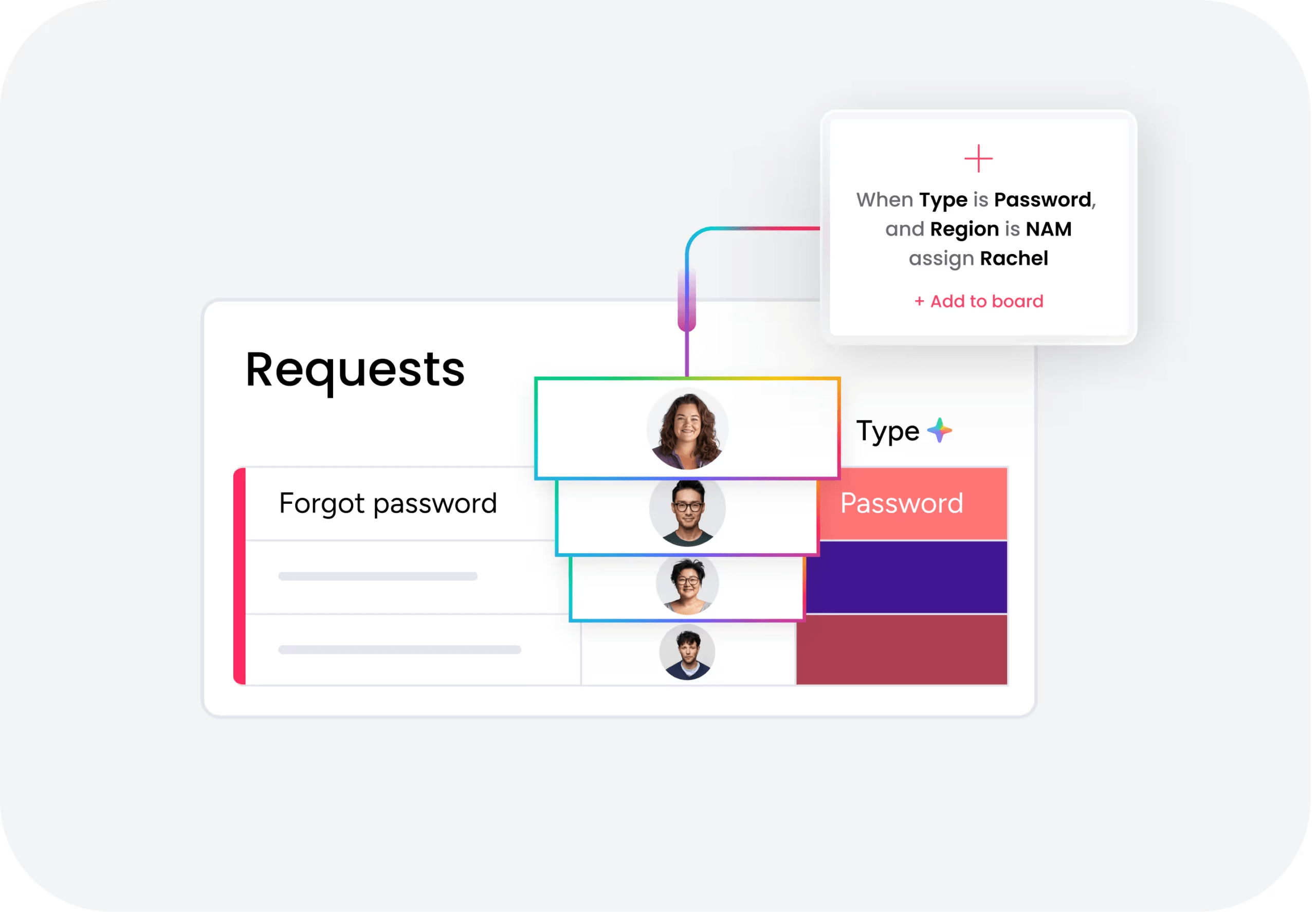
The platform automatically categorizes incoming requests by type, urgency, and sentiment, then routes them to the right team or agent based on skills, workload, and context. AI learns from resolution patterns to improve routing accuracy over time. This eliminates manual triage work and gets tickets to the right expert immediately.
Intelligent knowledge discovery across all documentation
AI searches your entire knowledge base using natural language understanding, not just keyword matching. It surfaces relevant articles, past resolutions, and related tickets even when users describe problems differently. Agents get instant access to the right information without hunting through multiple systems or outdated wikis.
No-code workflow automation with AI assistance

Build sophisticated AI-assisted workflows through drag-and-drop configuration without writing code. The platform handles request detection, information gathering, approval routing, and response drafting automatically. Deploy new automations in hours instead of waiting weeks for development resources, and adjust them as your needs evolve.
Real-time dashboards for predictive service management
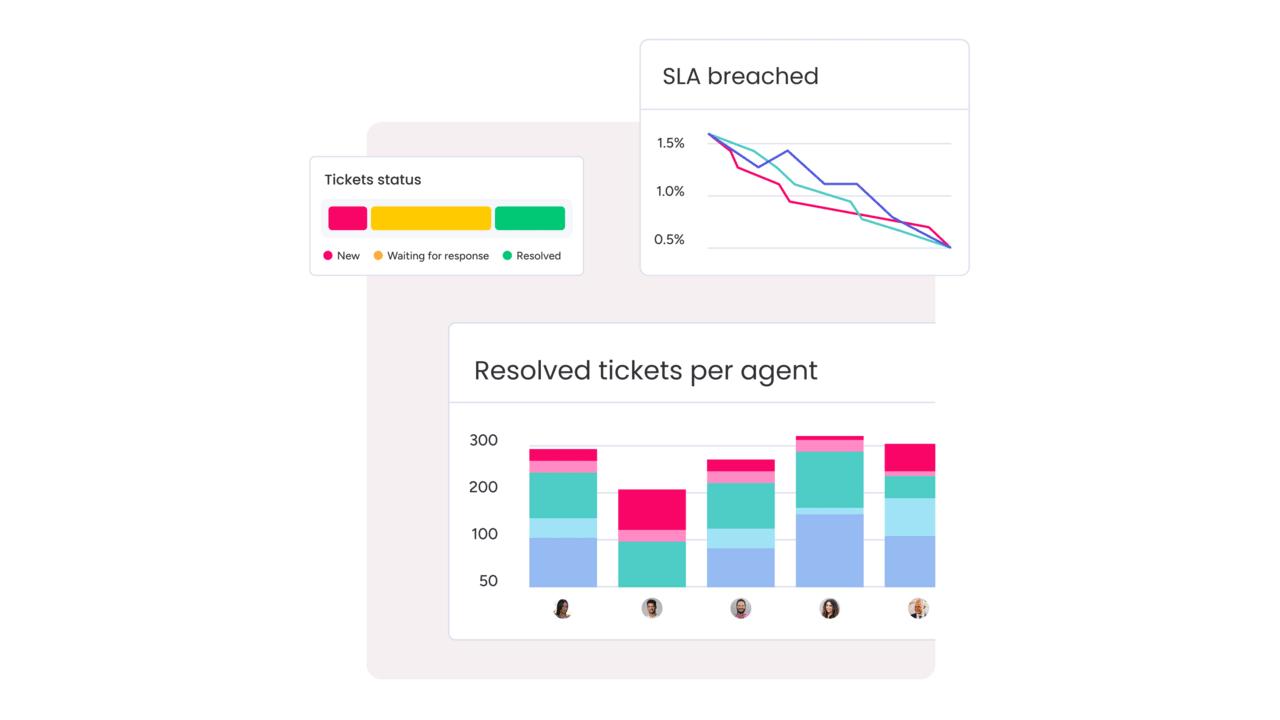
Live dashboards with 27+ customizable views reveal trends as they develop, from Monday morning ticket spikes to emerging issues across departments. AI-powered insights help you spot patterns, forecast demand, and adjust resources proactively. You can track what matters most through 25+ widgets that connect service metrics to business outcomes. These capabilities support comprehensive AI service management across your entire operation.

"Our team LOVES the monday service platform and we’re already exploring how we could incorporate it for other departments, too. It has streamlined our workflow in a way that both our team and customers appreciate."
Andrew Marshall | VP Operations
״monday service provides clear insights into requests volume and types, response times, and trends - helping us continuously improve operations"
Grant De Waal-Dubla | CIO
"The biggest value for us is speed and flexibility. You can get up and running in days, change anything instantly, and see everything in real time. And you don’t need a dedicated admin to do it."
Clive Camilleri | Head of People Tech & OperationsBuild your AI-powered service desk today
AI transforms IT service desks from reactive ticket processors into proactive service engines. The technology handles routine work autonomously, predicts issues before they impact users, and turns every resolution into organizational learning. Success comes from starting focused, building on quality knowledge, and scaling gradually as your team gains confidence.
The shift to AI-powered service management isn’t about replacing your team. It’s about freeing them from repetitive tasks so they can focus on complex problems and strategic improvements. With the right platform and approach, you can deliver faster resolutions, reduce ticket volume, and create better experiences for everyone. monday service provides the AI capabilities, intuitive workflows, and flexibility you need to make this transformation real.
FAQs
How much does AI service desk implementation typically cost?
The typical cost of an AI service desk implementation varies based on organization size, chosen platform, and automation scope. Expenses typically include software licensing, implementation services, and ongoing administration for knowledge management and governance.
What specific skills do IT service desk staff need for AI adoption?
What specific skills do IT service desk staff need for AI adoption? Service desk teams need skills in evaluating AI suggestions, interpreting service data patterns, and improving processes based on AI insights. Deep technical AI knowledge isn't required for most roles.
Can AI service desk solutions integrate with ServiceNow or Jira?
Can AI service desk solutions integrate with ServiceNow or Jira? Modern AI service desk platforms connect with existing ITSM systems through APIs and pre-built connectors. Integration depth varies by vendor, so evaluate this during selection.
How do you prevent AI hallucinations in service desk responses?
How do you prevent AI hallucinations in service desk responses? Organizations prevent hallucinations through confidence thresholds, human review processes, and clear escalation rules. Transparent explanations and audit logs help catch and correct errors quickly.
How do AI assistants and agentic AI differ in a service desk context?
What's the difference between AI assistants and agentic AI in service desk? AI assistants suggest actions and draft responses while humans make final decisions. Agentic AI can complete entire processes autonomously within defined boundaries, though most teams start with assistants first.
How long before you see ROI from AI service desk implementation?
How long before you see ROI from AI service desk implementation? Initial results often appear within 2-3 months for basic automation like classification and routing. Full ROI typically comes after 6-12 months as knowledge improves and automation expands.

 Get started