


If you’re comparing airtable vs smartsheet, you’re likely trying to figure out which platform fits the way your team actually works. Both have earned loyal followings, but they solve fundamentally different problems, and picking the wrong one can mean months of workarounds.
Smartsheet brings a spreadsheet-first approach to project management, making it familiar for teams that already live in Excel. Airtable, on the other hand, is built around a relational database that turns rows and columns into a flexible content and data management system. Both platforms offer automations, integrations, and multiple views, but the depth and flexibility of each varies significantly.
This guide breaks down every meaningful difference across features, pricing, integrations, security, and more so you can make a confident decision. We’ll also look at how monday.com’s AI Work Platform brings AI-powered workflows, no-code app building, and autonomous agents together in a single workspace that neither Smartsheet nor Airtable currently matches.
Key takeaways
- Different core philosophies: Smartsheet extends the spreadsheet model for structured project management, while Airtable reimagines data as a relational database with rich field types and linked records.
- Integration depth varies: Smartsheet connects natively with Microsoft 365 and offers around 100+ connectors, while Airtable provides a developer-friendly API with extensions and scripting, but both rely on third-party middleware for many workflows.
- Pricing scales differently: Smartsheet’s per-seat model gets expensive at the Business tier (~$25–32/seat/month), while Airtable’s free plan is generous but premium plans jump sharply to $20–45/seat/month for teams that outgrow the free record limits.
- AI capabilities are limited in both: Smartsheet and Airtable have added basic AI features, but neither offers an integrated AI workforce, autonomous agents, or a no-code AI app builder that operates natively within the work platform.
- Security depends on the plan: Smartsheet holds a FedRAMP authorization advantage for government teams, while Airtable’s enterprise security features require its most expensive tier. Both lag behind platforms that offer enterprise-grade security on all paid plans.
Smartsheet vs. Airtable: At a glance
Before diving into the details, here’s a high-level view of how these 2 platforms compare across the categories that matter most. This table captures the headline differences, and each section below unpacks them further.
| Category | Smartsheet | Airtable |
|---|---|---|
| Best for | Teams that want spreadsheet-style project tracking with Gantt charts and resource management | Teams that need a flexible relational database for content, product, and marketing workflows |
| Pricing (starting) | ~$9–12/seat/month (Pro); ~$25–32/seat/month (Business) | Free plan available; Team ~$20/seat/month; Business ~$45/seat/month |
| Key features | Gantt charts, resource management, proofing, conditional formatting, sheet summaries | Linked records, extensions, custom field types, Interface Designer, scripting |
| Integrations | 100+ connectors, strong Microsoft 365 integration | Developer-friendly API, extensions marketplace, Zapier/Make reliance |
| Ease of use | Familiar for Excel users; steeper curve for advanced features | Intuitive for data-savvy users; database concepts can confuse beginners |
| Reporting | Dashboards with charts, sheet summaries, pivot-like reports | Extensions-based charts, Interface Designer dashboards, limited native analytics |
| Productivity | Templates, automations, proofing workflows, resource views | Automations, scripting, synced tables, pre-built templates |
| Security | SOC 2 Type II, FedRAMP authorized, SSO, encryption at rest and in transit | SOC 2 Type II, SSO (Enterprise only), encryption at rest and in transit |
| Customer support | Email and chat on paid plans; phone support for Business+ tiers | Email support; priority support on Enterprise only |
| Customer reviews (G2) | 4.4/5: praised for project tracking, critiqued for UX complexity | 4.6/5: praised for flexibility, critiqued for performance at scale |
Smartsheet vs. Airtable: Key features
The feature comparison between Smartsheet and Airtable comes down to how each platform thinks about data. Are you managing a project with milestones and dependencies, or organizing information that connects across multiple workflows? That foundational difference shapes everything from views to automations.
Smartsheet key features
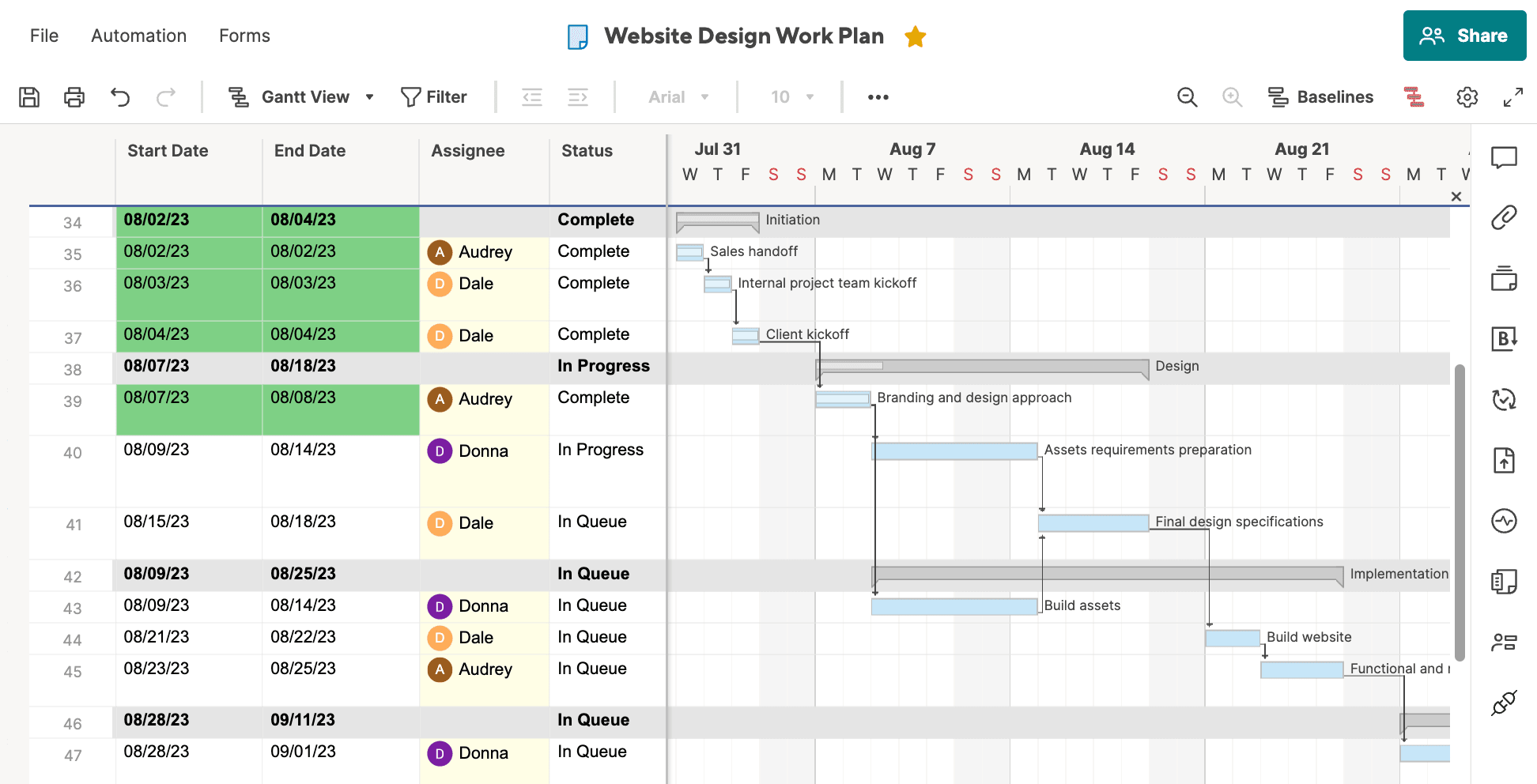
Smartsheet organizes work in sheets that behave like enhanced spreadsheets. You get Gantt charts, critical path tracking, resource management, and conditional formatting, all designed for teams running structured projects with clear timelines. Its proofing feature lets stakeholders review and approve creative assets directly within a sheet, which is a meaningful differentiator for marketing and design teams. Smartsheet also offers card views and calendar views, though these feel secondary to the grid-first experience.
Airtable key features
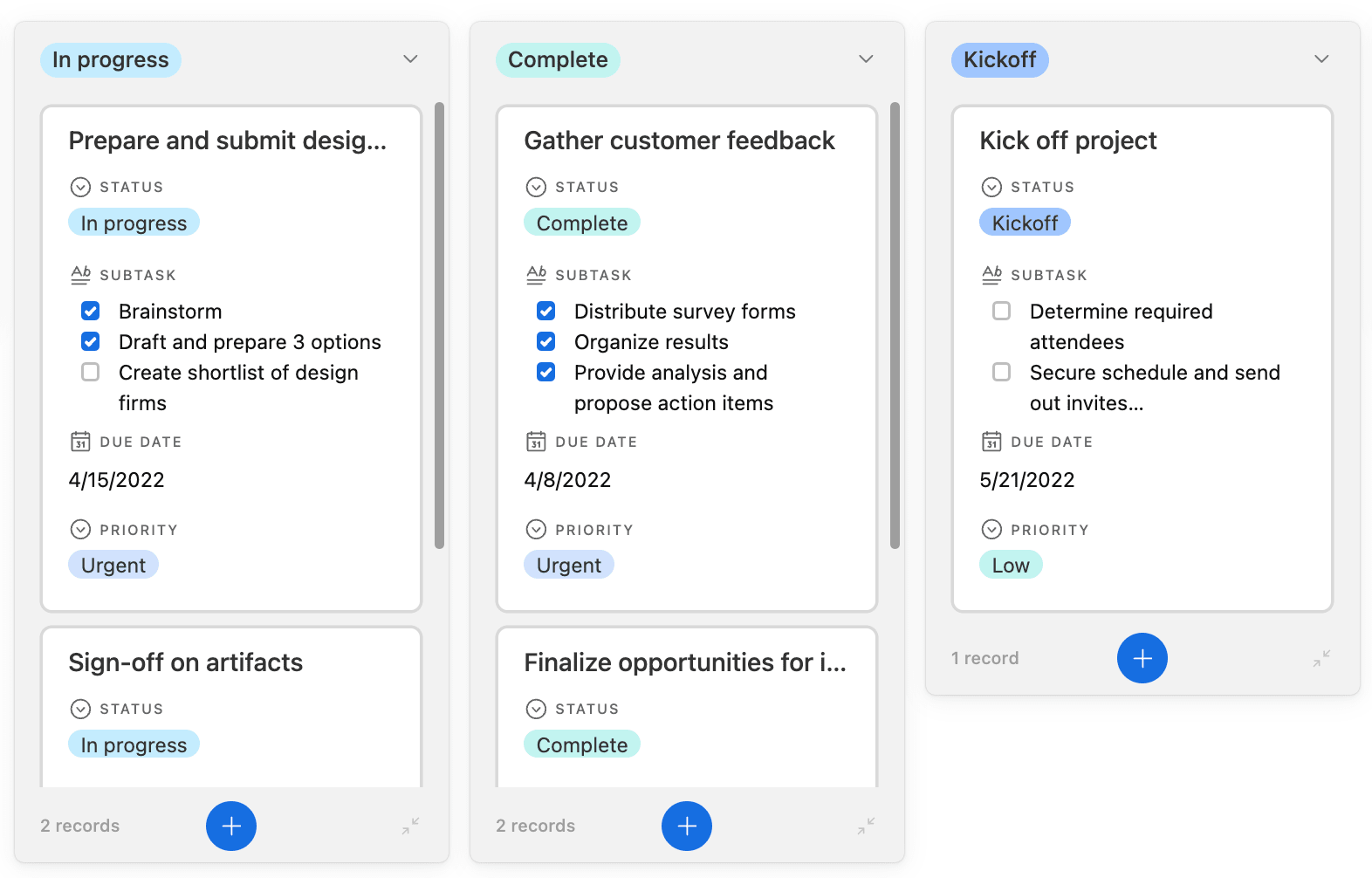
Airtable’s strength is its relational database engine. Every table can link to any other, and field types go well beyond text and numbers: attachments, barcodes, checkboxes, lookups, and rollups turn Airtable into a flexible content management system. Interface Designer lets you build custom front-ends on top of your data, and scripting extensions add logic that no-code automations can’t handle. For teams looking for alternatives beyond spreadsheet-style tracking, this approach opens up real possibilities. However, Airtable’s project management features (Gantt views, workload tracking) remain less mature than Smartsheet’s dedicated project management capabilities.
Both platforms offer Kanban boards, calendar views, and form inputs, but they approach automation differently. Smartsheet’s automations are event-driven and template-based, while Airtable’s blend no-code triggers with JavaScript scripting for more complex logic.
monday.com’s AI Work Platform offers both relational data linking and robust project management in a single environment, plus AI Blocks that let teams categorize, summarize, extract, and translate data directly inside their workflows without switching between platforms or writing code.
Smartsheet vs. Airtable: Integrations
How well does each platform connect to the rest of your tech stack? For most teams, integrations determine whether a work platform stays central to operations or becomes another siloed system that requires manual data transfers.
Smartsheet integrations
Smartsheet offers 100+ native connectors through its marketplace, with particularly strong ties to the Microsoft ecosystem. If your organization runs on Microsoft 365, Teams, SharePoint, and Power BI, Smartsheet fits naturally into that environment. It also connects to Jira, Salesforce, Slack, and Google Workspace, though many advanced integrations require Smartsheet’s Connectors add-on, which comes at an additional cost.
Airtable integrations
Airtable takes a developer-forward approach. Its API is well-documented and extensible, and the scripting extension lets technical users build custom integrations directly within bases. The extensions marketplace adds pre-built connectors for charting, mapping, and data syncing. For everyday workflows, though, Airtable still leans heavily on third-party middleware like Zapier and Make to bridge gaps, which adds cost and complexity, especially as automation volume grows.
Neither platform matches the breadth of monday.com’s AI Work Platform’s integration ecosystem, which includes 200+ native integrations with no middleware required, plus monday MCP, which lets AI assistants like Claude, ChatGPT, and Copilot connect directly to your workspace and act on your data securely.
Smartsheet vs. Airtable: Ease of use
How quickly can your team get productive on a new platform? Ease of use isn’t just about a clean interface. It’s about how fast teams go from sign-up to actually managing real work without needing a dedicated admin.
Smartsheet ease of use
Smartsheet’s grid-based layout feels immediately familiar to anyone who’s used Excel or Google Sheets. That familiarity is a genuine advantage during onboarding, especially for finance, operations, and PMO teams that think in rows and columns. The trade-off is that Smartsheet’s advanced features (resource management, control center, dynamic view) sit behind a steeper learning curve and often require admin-level configuration. G2 reviewers consistently note that while the basics are accessible, unlocking the platform’s full potential takes time.
Airtable ease of use

Airtable’s interface is visually polished and encourages exploration, with color-coded records, drag-and-drop fields, and gallery views that make file management intuitive. But relational database concepts (linked records, rollups, lookup fields) can trip up teams that don’t have a data-savvy champion. Building an effective Airtable workspace requires someone who understands data architecture, which narrows the pool of people who can set it up and maintain it over time.
monday.com’s AI Work Platform consistently earns top marks for ease of use. Teams typically go live in days, not weeks, because the platform adapts to how they already work rather than requiring them to learn a new paradigm.
Smartsheet vs. Airtable: Pricing
Pricing in work management platforms is rarely as straightforward as the plan pages suggest. Both Smartsheet and Airtable use per-seat models, but the value you get at each tier, and the costs that creep in as you scale, differ in ways that matter for annual budgets.
Smartsheet pricing
Smartsheet starts at around $9–12/seat/month for the Pro plan, which covers basic project management, Gantt charts, and automations. The Business plan jumps to approximately $25–32/seat/month and unlocks features like unlimited automations, control center, and proofing. For a 10-person team, the difference between Pro and Business adds up to roughly $1,600–2,400 per year.
Key pricing considerations:
- Pro plan (~$9–12/seat/month): Basic project management, Gantt charts, limited automations
- Business plan (~$25–32/seat/month): Unlimited automations, control center, proofing workflows
- Enterprise (custom pricing): Advanced capabilities, IP allowlisting, premium support
The key consideration is that many of the features teams actually need for cross-functional work (resource management, technical debt reduction through consolidated reporting, and advanced permissions) live in the more expensive tiers.
Airtable pricing
Airtable offers a free plan with generous limits (up to 1,000 records per base and 1 GB of attachments), making it accessible for small teams and personal projects. The Team plan starts at approximately $20/seat/month and raises the record cap to 50,000 per base. The Business plan costs around $45/seat/month and adds sync tables, advanced interfaces, and admin controls. For a 10-person team moving from Team to Business, that’s an additional $3,000 per year.
Airtable’s pricing tiers:
- Free plan: Up to 1,000 records per base, 1 GB attachments, unlimited bases
- Team plan (~$20/seat/month): 50,000 records per base, 5 GB attachments per base, standard automations
- Business plan (~$45/seat/month): Sync tables, advanced interfaces, admin controls, 100,000 records per base
- Enterprise (custom pricing): Priority support, SSO, HIPAA compliance, advanced security
Airtable’s pricing is competitive at the entry level but becomes one of the more expensive options for mid-size teams that need enterprise features.
monday.com’s AI Work Platform starts at approximately $9/seat/month and includes features that competitors reserve for premium tiers, such as automations, integrations, and 24/7 customer support on all paid plans. Teams avoid the gradual cost escalation that often accompanies Smartsheet and Airtable as organizations scale.
Smartsheet vs. Airtable: Reporting and analytics
Can your team pull actionable insights without exporting data to a separate analytics system? Reporting capabilities often determine whether a platform becomes your single source of truth or just another data entry point that feeds a spreadsheet somewhere else.
Smartsheet reporting and analytics
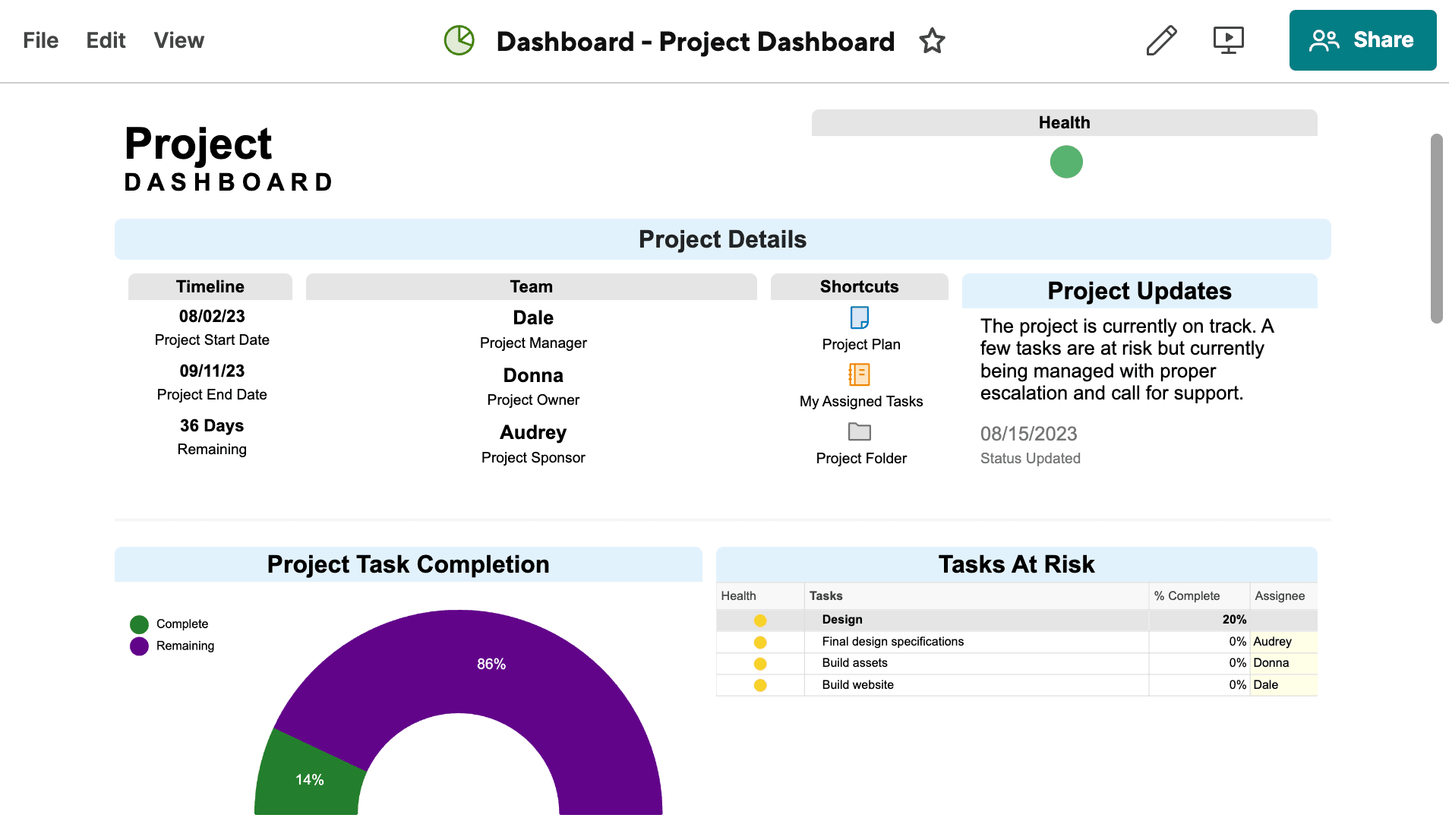
Smartsheet provides dashboards that pull data from multiple sheets, with chart widgets, metric summaries, and conditional formatting that highlight trends across projects. Sheet summaries let you roll up key metrics at the top of any sheet, useful for quick status checks. For more complex analysis, Smartsheet offers pivot-like reports that aggregate data across workspaces. The limitation is that customization options for dashboard widgets are relatively narrow compared to dedicated BI platforms, and real-time collaboration on reports can feel sluggish with large datasets.
Airtable reporting and analytics
Airtable approaches reporting through extensions and Interface Designer. You can add chart extensions to any base and build custom dashboards using Interface Designer’s drag-and-drop layout. Scripting extensions enable more complex data transformations. However, Airtable’s native analytics are limited: there’s no built-in pivot table equivalent, and chart options are basic compared to Smartsheet’s dashboard widgets. Teams that need executive-level reporting often end up connecting Airtable to external BI platforms.
monday.com’s AI Work Platform includes customizable dashboards with 50+ widgets that pull live data from any board in your workspace. Teams can build portfolio-level views, track KPIs, and share reports with stakeholders, all without third-party analytics platforms or data exports.
Smartsheet vs. Airtable: Productivity
What happens after you set up your workspace? The real test of a work management platform is whether it helps teams move faster week over week, or becomes one more system they have to maintain alongside the actual work.
Smartsheet productivity
Smartsheet’s productivity strengths center around structured project execution. Templates get teams started quickly, and automations handle recurring actions like status updates, approval requests, and notifications. Resource views show who’s available and who’s overloaded, which prevents bottlenecks before they stall progress. Proofing workflows let creative teams review assets without leaving the platform. However, real-time collaboration in Smartsheet can feel limited compared to platforms designed for asynchronous teamwork. Comments and updates exist but don’t flow as naturally as in purpose-built collaboration environments.
Airtable productivity
Airtable emphasizes flexibility over structure. Synced tables keep data consistent across multiple files and bases, while automations trigger actions based on record changes, scheduled times, or form submissions. Pre-built templates and the universe of community-shared bases mean teams rarely start from scratch. The scripting extension adds power-user capabilities. The downside is that Airtable’s performance can degrade as bases grow, and users frequently report slowdowns with large datasets, which undermines the productivity gains from its flexible architecture.
monday.com’s AI Work Platform combines no-code automations, AI Blocks for intelligent data processing, and built-in time tracking in a single environment. Teams don’t choose between structured project execution and flexible data management. They get both, along with AI that actively moves work forward rather than waiting to be prompted.
Get StartedSmartsheet vs. Airtable: Security
When you’re managing sensitive project data, security isn’t just a checkbox. It determines which departments and clients are willing to use the platform at all. How do Smartsheet and Airtable handle the security requirements that enterprise teams actually care about?
Smartsheet security
Smartsheet holds a strong position in enterprise and government security. It maintains SOC 2 Type II certification, is FedRAMP authorized (a significant differentiator for public sector teams), and offers SSO, SAML, and multi-factor authentication across all paid plans. Data encryption covers both transit and rest, and Smartsheet provides configurable permissions at the sheet, row, and cell level. For organizations with strict compliance mandates (HIPAA, GDPR, GovCloud), Smartsheet’s security infrastructure is mature and well-documented.
Smartsheet security
Airtable also maintains SOC 2 Type II certification and encrypts data in transit and at rest. However, SSO is only available on the Enterprise plan, which means smaller teams on the Team or Business plans can’t enforce single sign-on, a significant gap for organizations with strict identity management requirements. Airtable’s permission model operates at the base and table level, which is less granular than Smartsheet’s row-level controls. HIPAA compliance is available through Airtable’s Enterprise plan with a Business Associate Agreement.
monday.com’s AI Work Platform provides enterprise-grade security on all paid plans, including SOC 2 Type II, HIPAA compliance, multi-level permissions, and 24/7 support. The Guardian extension adds transparent layer encryption, bring-your-own-key, and data loss prevention for organizations with the most demanding security requirements.
Smartsheet vs. Airtable: Customer support
When something breaks or a team member needs guidance, how quickly can you get help? Customer support responsiveness directly affects adoption rates and time-to-value, especially during the critical first months of implementation.
Smartsheet customer support
Smartsheet offers email and chat support on all paid plans, with phone support available at the Business tier and above. The platform maintains a comprehensive help center, a community forum, and a certification program (Smartsheet University) that trains admins and power users. Response times for email support typically range from a few hours to a full business day, depending on plan tier and issue severity. Enterprise customers receive dedicated account management and faster escalation paths.
Airtable customer support
Airtable provides email-based support across plans, but priority support is reserved for Enterprise customers. The help center and community forum cover common questions, and Airtable offers onboarding assistance for teams on higher-tier plans. However, reviewers on G2 and TrustRadius frequently mention slower response times and limited support accessibility compared to platforms that offer phone or live chat support across all tiers.
monday.com’s AI Work Platform includes 24/7 phone and email customer support on every paid plan, not just premium tiers. That universal support commitment, paired with an onboarding experience rated 8.8 on G2 (versus Smartsheet’s 8.3), means teams get help when they need it regardless of plan size.
Smartsheet vs. Airtable: Customer reviews
What do actual users say about working with each platform day to day? G2 reviews offer a useful signal because they reflect real experience across different team sizes, industries, and use cases, not just the highlight reel from marketing pages.
Smartsheet customer reviews
G2 rating: 4.4/5
Smartsheet holds a 4.4/5 rating on G2 with consistent praise for its project tracking capabilities, Gantt chart views, and familiar spreadsheet interface. Reviewers in project management, construction, and IT frequently highlight it as a reliable workhorse for structured project execution. On the other hand, recurring critiques center on UX complexity. Users report that advanced features like resource management, control center, and dynamic view require significant configuration and training. Formatting limitations and a dated visual interface also come up repeatedly.
Airtable customer reviews
G2 rating: 4.6/5
Airtable earns a 4.6/5 on G2, with reviewers praising its flexibility, visual appeal, and powerful relational data model. Teams in marketing, product, and content operations appreciate how quickly they can build custom workflows. Common complaints focus on performance at scale: large bases with thousands of records slow down noticeably, and the pricing jump between tiers. Several reviewers note that while Airtable excels at organizing data, it doesn’t replace a dedicated project management platform for complex, multi-phase initiatives.
In head-to-head G2 comparisons, monday.com’s AI Work Platform scores 4.7/5, outperforming both Smartsheet and Airtable. Users consistently highlight the platform’s balance of power and simplicity.
Smartsheet vs. Airtable: which is right for you?
Both platforms serve real needs, and the right choice depends on how your team works, not which platform has more features on paper. Here’s a straightforward framework for deciding.
Go with Smartsheet if:
- Your team thinks in spreadsheets: If you’re transitioning from Excel and want familiar grid-based project management with Gantt charts and resource views, Smartsheet will feel intuitive from day one.
- You need FedRAMP authorization: For government teams and contractors with strict compliance mandates, Smartsheet’s FedRAMP status is a concrete advantage.
- Microsoft 365 is your ecosystem: Smartsheet’s native integrations with Teams, SharePoint, and Power BI make it a natural fit for Microsoft-centric organizations.
Go with Airtable if:
- Your work revolves around data relationships: If you need linked records, rollups, and flexible field types to manage content, products, or marketing campaigns, Airtable’s relational database shines.
- You have technical team members: Airtable’s scripting extensions and developer-friendly API reward teams that can customize and extend the platform.
- You’re starting small and scaling: Airtable’s free plan gives small teams room to explore before committing to a paid tier.
But what if your team needs structured project management and flexible data organization without choosing one over the other? That’s where the AI Work Platform fits. It combines 20+ views, connected boards, AI-powered workflows, and a work management approach that adapts to how your team actually operates.
How monday.com's AI Work Platform transforms work management
While Smartsheet and Airtable ask you to choose between structured project management and flexible data management, monday.com’s AI Work Platform eliminates that compromise. It’s a single workspace where every team, from marketing and operations to engineering and leadership, manages projects, tracks goals, and builds custom workflows without switching platforms or stitching together integrations.
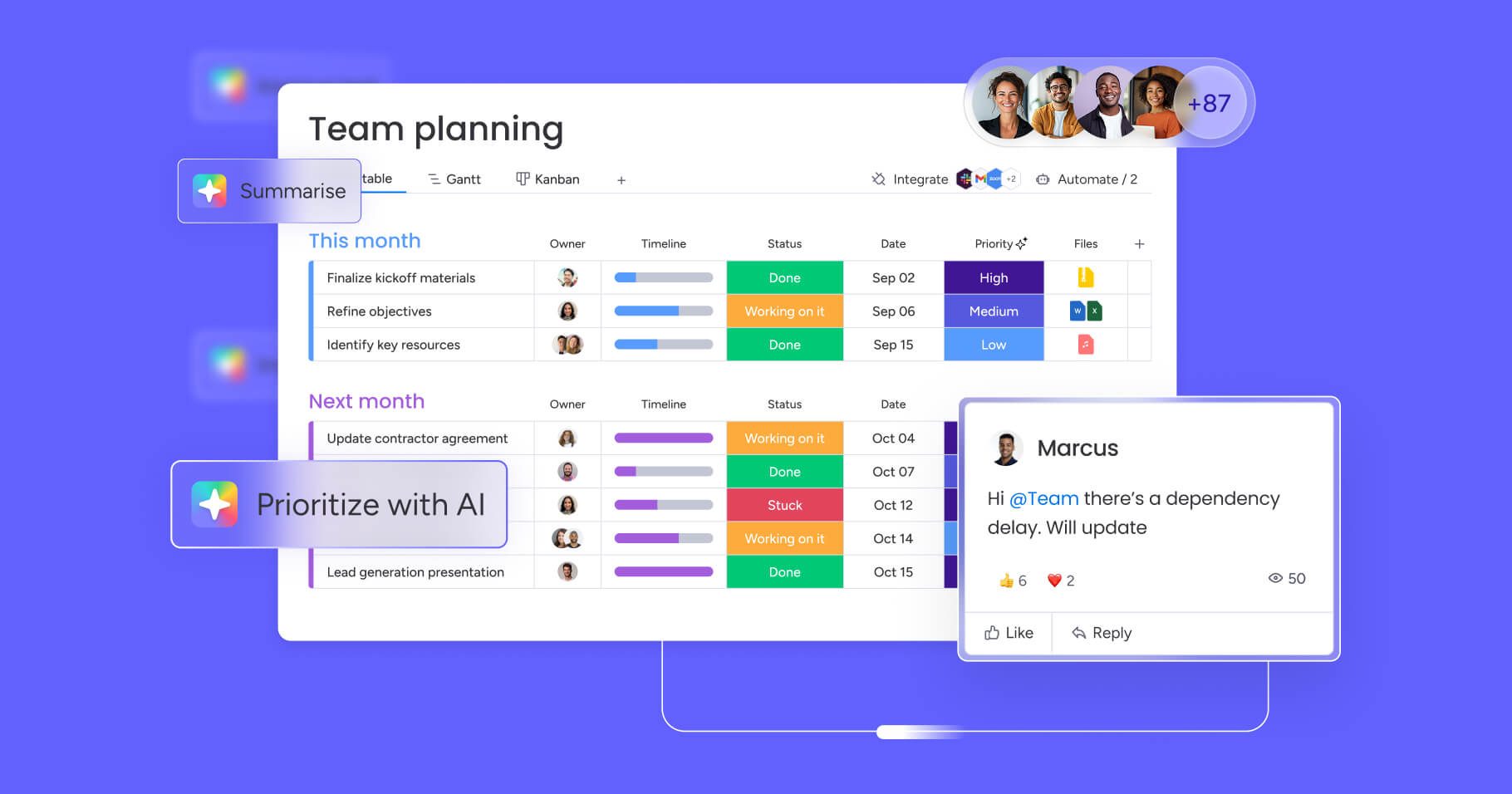
What makes it different is a fully integrated AI layer that doesn’t just assist; it executes. Here’s what that looks like in practice:
- Flexible data architecture: 20+ views (including Gantt, Kanban, timeline, calendar, and workload), connected boards that link data across teams, and no per-base row limits that force you to fragment your workspace.
- monday vibe: An AI-powered no-code app builder that turns plain-language prompts into fully functional business apps in minutes. Need an OKR tracker, a client portal, or a custom intake form? Describe it, and vibe builds it, complete with permissions, mobile responsiveness, and enterprise security.
- monday agents (Digital Workforce): 8+ specialized AI agents (including Project Analyzer, Risk Analyzer, and Ticket Assignment) that work autonomously on your boards 24/7. Build custom agents or choose from ready-made options across marketing, sales, operations, HR, and engineering.
- monday sidekick: A context-aware AI assistant that understands your boards, docs, and workflows. It summarizes updates, generates project plans, analyzes data, triggers automations, and creates dashboards from simple prompts, all inside your workspace.
- monday MCP: Connect AI assistants like Claude, ChatGPT, Cursor, and Copilot directly to your monday.com workspace through the Model Context Protocol. Your AI can read, create, and update items, all within your existing permission model at no extra charge.
- AI Blocks: Drag-and-drop AI capabilities that plug into any workflow: categorize incoming requests, summarize lengthy updates, extract key data from documents, or translate content across languages without code.
- Portfolio Risk Insights: AI-powered risk scanning that surfaces potential issues across multiple projects before they become problems, giving leaders the visibility to act proactively.

Here’s how the AI Work Platform stacks up against the limitations you’ll encounter with Smartsheet and Airtable:
| Capability | monday.com's AI Work Platform | Smartsheet |
|---|---|---|
| Work views | 20+ (Gantt, Kanban, timeline, workload, calendar, and more) | 6 (Grid, Gantt, card, calendar, timeline, resource) |
| AI app builder | monday vibe — prompt-to-app in minutes | Not available |
| Autonomous AI agents | 8+ specialized agents with custom agent builder | Not available |
| AI assistant | monday sidekick — context-aware, executes actions | Basic AI formula generation |
| External AI platform connection | monday MCP (Claude, ChatGPT, Copilot, Cursor) | Not available |
| Row/record limits | No per-board row limits | 20,000 rows per sheet (can be limiting) |
| Support | 24/7 phone and email on all paid plans | Phone support on Business+ only |
Organizations using the AI Work Platform report a 346% ROI over 3 years, $250K saved annually, 6,000 hours saved per year, and a 50% reduction in meetings and emails, according to a Forrester Total Economic Impact study. Those aren’t aspirational targets. They’re measured results from teams that consolidated their work into a single AI-powered platform.
Find the platform that matches how your team actually works
The aAirtable vs Smartsheet decision ultimately comes down to what kind of work your team manages. Smartsheet is a solid choice for teams that want spreadsheet-driven project tracking with strong Microsoft integrations and FedRAMP compliance. Airtableexcels when your workflows depend on relational data, flexible field types, and a developer-friendly environment.
But if your team keeps running into the same trade-offs, like choosing between project structure and data flexibility, adding middleware for integrations that should be native, or waiting for AI features that other platforms already offer, the AI Work Platform is worth a serious look. It brings project management, work management, AI agents, and no-code app building together in one place.
Get StartedFAQs
Can you migrate data from Smartsheet to Airtable easily?
Migrating data from Smartsheet to Airtable requires exporting sheets as CSV files and importing them into Airtable bases. The process is straightforward for basic data, but linked records, automations, and conditional formatting won’t transfer automatically, so you’ll need to rebuild those manually.
Which platform integrates with Microsoft Teams more effectively?
Smartsheet integrates with Microsoft Teams more effectively, offering native connectors that allow users to view, edit, and share sheets directly within Teams channels and chats. Airtable’s Microsoft Teams integration is more limited and typically requires third-party middleware for deeper functionality.
Do you need technical skills to manage either platform?
Smartsheet doesn’t require technical skills for basic project management, though advanced features like control center and resource management need admin expertise. Airtable’s relational database model is more approachable for data-savvy users, but building complex workflows with scripting extensions does require some technical knowledge.
How quickly can teams implement these solutions?
Teams can implement Smartsheet within 1–2 weeks for basic project tracking, though enterprise rollouts with resource management and control center take longer. Airtable’s free plan lets small teams get started in hours, but building a well-structured workspace with linked records and automations typically takes 1–3 weeks.
Can Airtable replace Smartsheet?
Airtable can replace Smartsheet for teams that primarily need flexible data management and content workflows. However, Airtable lacks the dedicated project management depth (Gantt dependencies, resource leveling, and critical path analysis) that makes Smartsheet the preferred choice for complex, timeline-driven projects.
Does Airtable or Smartsheet have AI features?
Both platforms have introduced basic AI features. Smartsheet offers AI-powered formula generation and content suggestions, while Airtable provides an AI field type for summarizing and categorizing records. Neither platform currently offers autonomous AI agents, an AI app builder, or a protocol for connecting external AI assistants.
Can you use AI assistants like ChatGPT with Smartsheet or Airtable?
Neither Smartsheet nor Airtable currently offers native connections to external AI assistants like ChatGPT or Claude. The AI Work Platform supports this through monday MCP (Model Context Protocol), which lets AI assistants securely read and act on workspace data within existing permissions, at no additional cost.

 Get started