


When projects live across too many spreadsheets, messages, and disconnected files, it becomes difficult to see what’s happening. A project timeline template brings everything back into focus. Project timeline templates turn complex plans into simple, visual roadmaps that everyone can understand. They outline what needs to happen, when it needs to happen, and who is responsible, keeping work visible, aligned, and on schedule.
Whether you’re managing marketing campaigns, product launches, construction schedules, or client deliverables, the right template makes coordination effortless. This article covers 15 proven project timeline formats, duration-based and industry-specific options, and step-by-step guidance for building your own. And with a platform like monday.com’s AI Work Platform, you can take any template from static plan to living, connected system.
Key takeaways
- Choose templates by project complexity: Use milestone timelines for simple initiatives and Gantt charts for projects with multiple dependencies.
- Plan realistically: Include buffer time and assign each activity to a specific owner to avoid cascading delays.
- Automate schedule updates: monday.com’s AI Work Platform automatically adjusts dependent dates, flags bottlenecks with AI, and alerts teams when changes affect their work.
- Tailor views to your audience: Executives benefit from high-level summaries, while teams need detailed, activity-level visibility.
- Use industry-specific templates: These include built-in workflows and automation rules that reduce setup time and minimize errors.
What is a project timeline template?
A project timeline template is a pre-built visual framework that shows when project activities happen. You might also see it called a project schedule template, since both terms describe the same core idea: a ready-made calendar designed specifically for project work. You fill in your activities, deadlines, and milestones without starting from scratch.
These templates transform lists of activities into visual roadmaps.
Instead of reading through spreadsheets to understand project flow, project timelines lay out everything chronologically.
This visual approach helps teams grasp project scope, spot scheduling conflicts, and communicate progress at a glance, especially when monitoring project milestones.
Key terms you’ll encounter when working with timeline templates include:
- Milestones: Major project achievements or checkpoints that mark significant progress
- Dependencies: Connections between activities where one must finish before another can start
- Critical path: The sequence of essential activities that determines your shortest possible project duration
- Float time: Buffer periods where activities can shift without affecting the overall deadline
Project timeline vs. Gantt chart vs. roadmap
Searchers often confuse these three formats, but each serves a different purpose. So what’s the right chart for your project?
| Format | Definition | Best for | Level of detail |
|---|---|---|---|
| Project timeline | Any visual that places project activities along a time axis, from simple date lists to detailed schedules | General project tracking and communication | Varies widely |
| Gantt chart | A specific type of timeline that uses horizontal bars to show duration, overlap, and dependencies between activities | Complex execution tracking where you need to see how delays ripple through the schedule | High detail |
| Project roadmap | A strategic view that highlights major phases, themes, and goals across quarters or years without diving into individual assignments | Strategic planning and executive communication | High level |
For most project managers, Gantt-style timelines provide the strongest balance of detail and visual clarity. Executive stakeholders often prefer roadmaps, while team leads need Gantt charts to manage day-to-day dependencies. Choose the format that matches your audience and the level of detail your decisions require.
15 essential timeline formats for modern projects
Every project has unique needs, and choosing the right timeline format makes execution smoother. These 15 formats cover most project scenarios you’ll encounter, from simple milestone tracking to complex portfolio management\
1. Gantt chart timeline template
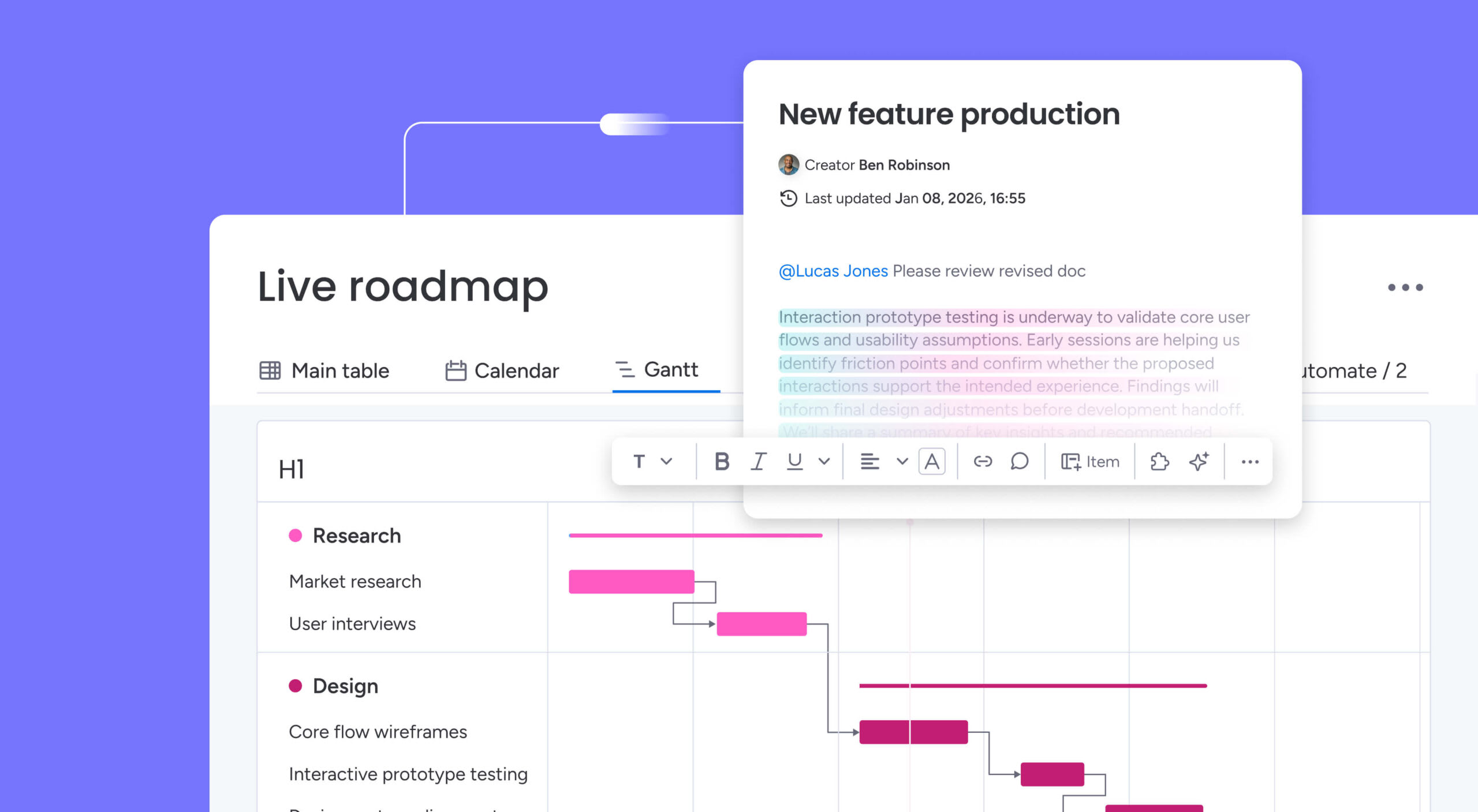
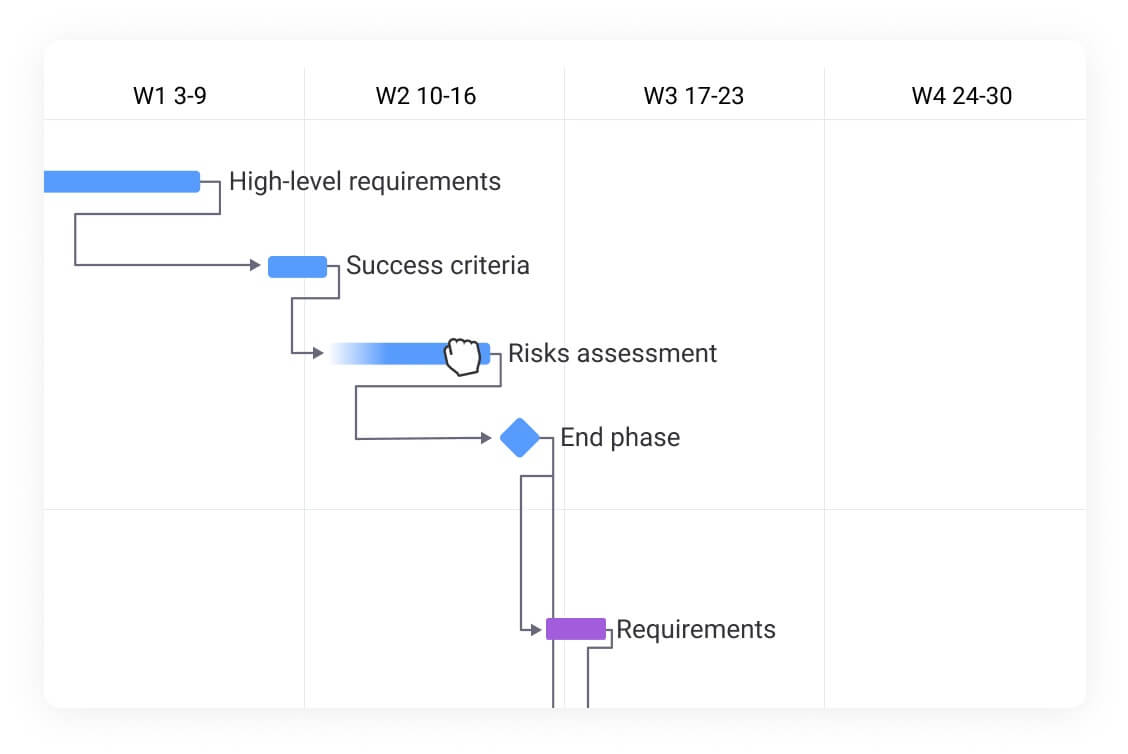
Gantt charts show work items as horizontal bars stretched across a calendar. If you’re looking for a ready-made starting point, a Gantt chart template can save significant setup time. The length of each bar represents duration, and connecting lines show dependencies between activities. Project managers and cross-functional team leads rely on this format for detailed execution tracking.
This format excels when you need to manage complex projects with many moving parts. Research confirms high adoption rates in structured sectors like construction, where managers use Gantt charts to coordinate subcontractors, and IT, where software teams track feature development across sprints.
2. Milestone timeline template
Milestone templates strip away activity details to focus on major achievements. They display key dates and deliverables without overwhelming viewers with day-to-day work. If you prefer a purely visual display, a milestone chart can provide clear checkpoints. Executive sponsors and steering committee members benefit most from this format.
Perfect for executive presentations and stakeholder updates, these templates answer the essential question: are we on track? They work especially well for long-term projects where progress markers matter more than granular details.
3. Project roadmap template
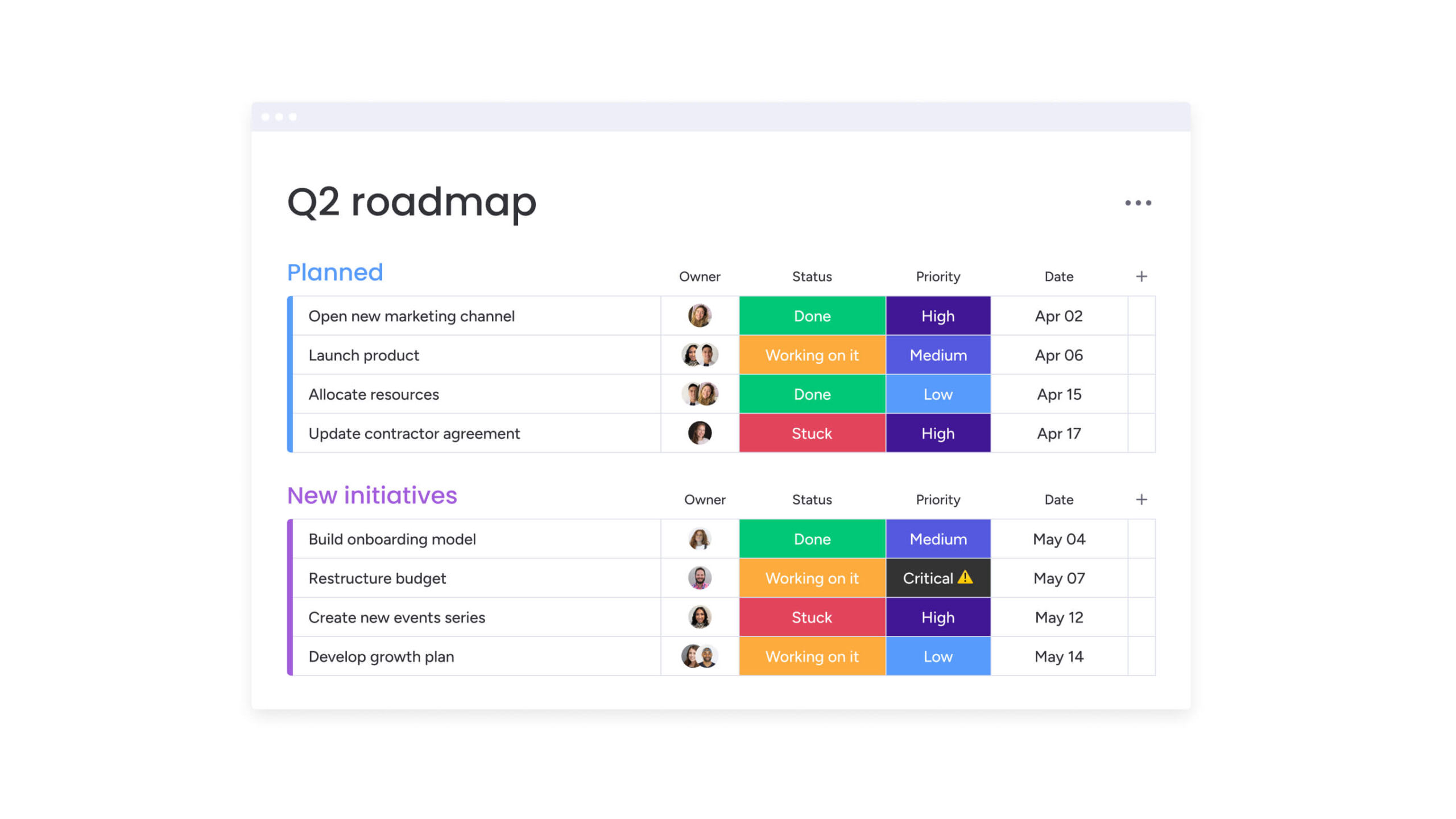
A project roadmap focuses on strategic direction rather than day-to-day execution. It highlights major phases, initiatives, and goals across longer timeframes such as quarters or years. Product leaders and department heads use roadmaps to communicate vision and priority.
Common applications include:
- Product teams: Align development priorities with broader business strategy.
- Leadership teams: Communicate company-wide objectives and long-term vision.
- Department heads: Illustrate how team initiatives contribute to organizational goals.
Roadmaps help stakeholders stay aligned on where the organization is heading and how each effort supports the bigger picture.
4. Agile sprint timeline
Sprint timelines organize work into fixed time boxes, usually one to four weeks. Each sprint includes planning, daily work, review, and retrospective phases. Scrum masters and Agile team leads use this format to maintain iterative momentum.
These templates support iterative development where requirements evolve. Software teams deliver features incrementally. Marketing teams test and refine campaigns. Any team practicing Agile methodology needs sprint-based timeline tracking.
5. Waterfall phase timeline
Waterfall timelines show sequential project phases where each stage completes before the next begins. Common phases include requirements gathering, design, implementation, testing, and deployment. Engineering managers and compliance leads rely on this structure for regulated or fixed-scope projects.
This traditional approach works when requirements are fixed and changes are costly. Manufacturing projects follow waterfall timelines. Regulatory compliance initiatives need sequential approval stages. Construction projects require phase completion before proceeding.
6. Resource planning timeline

A resource planning timeline provides a clear view of who is doing what and when. It tracks team assignments, equipment use, and budget distribution across each phase of the project. Operations managers and resource coordinators use it to prevent overallocation.
Key applications include:
- Project managers: Balance workloads and prevent overallocated schedules.
- Operations teams: Plan equipment use and avoid resource conflicts.
- Finance teams: Monitor budget consumption alongside project progress.
These timelines help ensure resources are used efficiently and teams remain aligned throughout execution.
7. Budget timeline template
Budget timelines map financial planning to project phases, tracking planned versus actual spending while highlighting cost variances and forecast cash flow needs. Financial controllers and project sponsors use this format to connect money to milestones.
Financial visibility becomes critical for multi-phase projects. These templates help procurement teams time purchases. Project sponsors monitor burn rates. Finance departments approve funding releases based on milestone completion.
8. Critical path timeline
Critical path templates highlight the must-complete sequence of activities that determine project duration. Any delay in critical path activities pushes back the entire project, emphasizing the importance of project schedule management for timely delivery. Senior project managers and PMO leads use this format for high-stakes initiatives.
Understanding your critical path helps prioritize resources and attention. Project managers know which activities need immediate resolution. Teams understand where flexibility exists and where it doesn’t.
9. Kanban timeline view

Kanban timelines blend visual workflow management with temporal tracking. They show when work items move through different stages while maintaining Kanban’s flexibility. This hybrid approach works well for teams managing continuous work alongside deadline-driven deliverables.
Support teams track ticket resolution times. Content teams monitor publication schedules. Development teams add time awareness to their flow-based processes. When you need both workflow visibility and deadline tracking, Kanban timelines bridge the gap.
10. Calendar timeline format

A calendar timeline highlights key dates and deadlines in a familiar monthly or weekly view. It focuses on when activities occur rather than how long they take. Event coordinators and marketing managers rely on this format for date-driven coordination.
Common applications include:
- Event planners: Coordinate logistics, venues, and schedules.
- HR teams: Organize training sessions and employee events.
- Marketing teams: Plan content launches and campaign timelines.
This format is ideal for deadline-driven work where timing and coordination are essential.
11. Vertical timeline template
Vertical timelines display events from top to bottom, making them ideal for presentations and documents. They fit naturally into reports and slides where horizontal space is limited. Communications teams and project historians use this format for storytelling and retrospectives.
Company histories use vertical timelines. Project retrospectives show key events chronologically. Status reports highlight recent accomplishments and upcoming milestones. When your audience reads top-to-bottom rather than left-to-right, vertical layouts increase readability.
12. Multi-project portfolio timeline
Portfolio timelines manage multiple related projects simultaneously. They reveal resource conflicts, highlight dependencies between projects, and show overall program progress. PMO directors and portfolio managers use this view to balance competing priorities.
PMOs use portfolio views to balance resources across initiatives. Department heads coordinate cross-functional projects. Executive teams monitor strategic initiative progress.
13. Risk management timeline

A risk management timeline outlines when to assess, mitigate, and respond to potential issues before they affect project outcomes. It helps teams stay proactive rather than reactive throughout the project lifecycle. Risk officers and compliance managers depend on this format for audit readiness.
Typical applications include:
- Compliance teams: Schedule regular risk and audit reviews.
- Project managers: Plan mitigation activities and monitor high-risk areas.
- Operations teams: Prepare contingency responses before disruptions occur.
This format keeps risk visibility high and ensures accountability for every preventive action.
14. Hybrid methodology timeline
Hybrid timelines combine Agile flexibility with Waterfall structure. Many organizations find pure Agile or Waterfall limiting, with some cross-industry surveys showing that over half of all projects now use hybrid methodologies. Hybrid timelines let software teams use sprints within larger phase gates. Marketing teams iterate on creative while meeting fixed launch dates. Program managers overseeing mixed-methodology portfolios find this format indispensable.
15. Executive dashboard timeline
Executive timelines distill complex project data into strategic insights. They emphasize outcomes over activities, trends over details, and decisions over information. C-suite leaders and board members use this format for rapid portfolio assessment.
These high-level views support rapid decision-making. Executives spot portfolio-wide issues. Boards monitor strategic initiative progress. Investors track key milestone achievement.
Best timeline templates by project duration
Every project moves at its own pace. The right timeline view depends on how long the work will take and how often you need to update it. Short projects benefit from detailed, day-by-day visibility, while long-term initiatives need higher-level tracking to stay aligned with strategic goals.
The formats below outline how to match your timeline to project duration, helping teams stay organized, focused, and aligned from start to finish.
Weekly timeline templates
Weekly templates zoom in on immediate work. They show daily activities, meetings, and deliverables across a five or seven-day span.
Sprint teams plan their iterations weekly. Operations teams schedule maintenance windows. Customer service departments manage shift coverage. When every day counts, weekly templates provide the granularity you need.
Monthly project timelines
A monthly timeline strikes the right balance between detail and big-picture visibility. It helps teams track day-to-day progress while staying focused on how each activity contributes to larger goals.
Common applications include:
- Marketing campaigns: Manage content schedules and launch milestones.
- Product releases: Plan development cycles and rollout timelines.
- Department initiatives: Monitor progress toward monthly objectives and performance targets.
This format suits most business projects, offering enough structure to stay organized without overwhelming teams with unnecessary detail.
Quarterly planning templates
Quarterly templates align with business rhythms. They connect project work to financial reporting, strategic reviews, and organizational planning cycles.
Sales teams plan quarterly targets. Finance departments budget by quarter. Strategic initiatives report progress quarterly. This natural business cadence makes quarterly planning essential.
Annual strategic timelines
Annual timelines focus on transformation rather than individual activities. They show major milestones, phase transitions, and strategic achievements across the year.
Digital transformations span years. Organizational restructures take multiple quarters. Market expansions require long-term planning. Annual views keep these initiatives connected to strategic vision.
Industry-specific timeline templates
Different industries face unique challenges that standard templates don’t address. Specialized timeline formats incorporate industry best practices, regulatory requirements, and common workflow patterns. Here’s how to match your project timeline template to your sector.
Marketing campaign timelines
A marketing campaign timeline brings structure to creative collaboration, guiding teams from concept to launch without missed deadlines or version confusion. It coordinates every stage of campaign execution, including:
- Research phase: Market analysis, audience insights, and competitive reviews.
- Creative development: Concept creation, design iterations, and copywriting workflows.
- Production timeline: Asset creation, vendor coordination, and quality checks.
- Launch coordination: Channel scheduling, team briefings, and go-live activities.
With connected workflows and shared visibility, a project management platform helps marketing teams manage every stage in one place. Built-in templates streamline approvals, track creative assets, and monitor campaign performance in real time, keeping momentum from strategy through launch.
Construction project timelines
Construction timelines navigate complex dependencies, weather windows, and regulatory approvals. Key timeline elements include:
- Pre-construction: Permits, site prep, contractor selection.
- Phase scheduling: Foundation, framing, systems, finishing.
- Inspection windows: Code compliance, quality checks, sign-offs.
- Weather contingencies: Seasonal considerations, delay buffers.
These templates account for the sequential nature of construction while building in flexibility for common delays.
IT development timelines
Software timelines balance structured releases with agile flexibility. They accommodate:
- Planning cycles: Requirements gathering, architecture design, sprint planning.
- Development iterations: Coding sprints, feature development, integration work.
- Testing phases: Unit testing, integration testing, user acceptance.
- Deployment windows: Staging releases, production rollouts, monitoring periods.
Development teams need timelines that show both sprint-level detail and release-level progress.
Event planning timelines
Event timelines work backward from immovable dates. Everything builds toward the event day:
- Venue milestones: Booking deadlines, setup requirements, vendor coordination.
- Marketing timeline: Save-the-dates, invitations, reminder sequences.
- Logistics planning: Catering orders, equipment rentals, staffing schedules.
- Day-of timeline: Hour-by-hour run of show, contingency plans.
Event success depends on hitting every deadline. These templates ensure nothing falls through the cracks.
Product launch timelines
Product launches depend on precise coordination between teams. A clear, connected timeline ensures every department moves in sync toward the release date.
Key components include:
- Development milestones: Feature completion, testing, and production readiness.
- Marketing preparation: Messaging, collateral creation, and campaign setup.
- Sales enablement: Training sessions, demo preparation, and quota planning.
- Support readiness: Documentation, FAQs, and team onboarding.
A connected project management platform brings these workstreams together in one shared timeline. Teams can align on dependencies, track progress in real time, and keep every stage of the launch connected from planning to release.
5 questions to ask to choose the right timeline template
Picking the right template starts with understanding your project’s core needs. Ask yourself these key questions to guide your selection:
1. What’s your project complexity?
Simple projects with straightforward sequences work well with basic milestone or calendar templates. Complex initiatives with multiple teams, dependencies, and deliverables need comprehensive formats like Gantt charts or portfolio timelines.
2. How does your team work?
Agile teams need templates that support iterations and frequent changes. Traditional project teams benefit from phase-based templates with clear handoffs. Hybrid teams need flexible formats that combine both approaches.
3. Who needs to see this timeline?
Executive stakeholders want high-level roadmaps showing strategic progress. Team members need detailed views with assignments and deadlines. Clients might need simplified versions focusing on their deliverables. Choose templates that communicate effectively to your primary audience.
4. What’s your planning horizon?
Week-long projects need hour-by-hour detail. Multi-year initiatives need phase-level planning with quarterly milestones. Match template granularity to your project duration.
5. Do you face industry-specific requirements?
Regulated industries need templates with built-in approval stages. Creative agencies need revision cycles. Manufacturing needs sequential phase gates. Pick templates designed for your industry’s unique needs.
Software formats for timeline templates
Timeline templates come in different software formats, each with distinct advantages. Understanding these options helps you choose the right format for your team’s technical skills and collaboration needs.
Excel timeline templates
An Excel timeline remains popular for timeline creation due to its widespread availability and powerful calculation features. You can create custom timelines using formulas, conditional formatting, and charts.
Excel works for teams comfortable with spreadsheets who need calculation capabilities alongside their timelines. Financial projects benefit from Excel’s formula integration. Resource planning leverages its calculation power.
PowerPoint timeline slides
PowerPoint makes it easy to create visually polished timelines for presentations and reports. Its design features help non-designers build professional visuals quickly.
Strongest applications include:
- Executive presentations: Summarize project progress and milestones.
- Client updates: Showcase deliverables and upcoming phases clearly.
- Team kick-offs: Align everyone on objectives, timelines, and key dates.
PowerPoint works best when clarity and visual storytelling matter more than day-to-day project tracking.
Google Sheets templates
Google Sheets brings cloud collaboration to timeline management, but you can also use a timeline template for Google Docs to collaborate. Multiple team members edit simultaneously while automatic saving prevents version conflicts.
Remote teams appreciate real-time collaboration. Start-ups value the free access. Cross-functional projects benefit from shared visibility. Google Sheets works when collaboration outweighs advanced features.
Word timeline documents
Word integrates timelines into narrative project documentation. It combines visual elements with detailed descriptions, meeting notes, and project context.
Documentation-heavy projects need Word’s text capabilities. Regulatory submissions require narrative context. Historical project records benefit from combined visuals and descriptions.
Dedicated project management platforms
Purpose-built project management platforms go beyond what static files can offer. They provide real-time collaboration, automated dependency management, and multiple interactive views, all in one connected workspace. When your project involves cross-functional teams, shifting deadlines, or complex dependencies, a dedicated platform removes the manual overhead of keeping spreadsheets and slide decks in sync.
The table below compares each format across the criteria that matter most when selecting your timeline approach.
| Format | Best for | Collaboration | Automation | Learning curve |
|---|---|---|---|---|
| Excel | Collaboration | Limited | Basic formulas | Medium |
| PowerPoint | Presentations, stakeholder updates | Limited | None | Low |
| Google Sheets | Team collaboration, cloud access | Excellent | Basic scripts | Low |
| Word | Documentation, narrative plans | Good | None | Low |
| PM platform | Complex, team-based projects | Excellent | Advanced | Low-Medium |
5 best practices for effective timeline management
Creating a timeline is the starting point. These practices ensure your project time management remains accurate, useful, and aligned with project reality throughout execution.
1. Start with project scope definition
Define what is and isn’t included before building your timeline. A clear scope prevents scope creep and ensures your schedule reflects the project’s true boundaries.
List all deliverables, document assumptions and constraints, and confirm success criteria with stakeholders. When everyone agrees on scope, your timeline becomes a commitment rather than a wish list. For a more detailed breakdown of this process, see our guide on how to write a project plan.
2. Build in buffer time
Projects rarely go exactly as planned. Smart timeline management includes contingency time for the unexpected.
Add buffer to high-risk activities. Include time for stakeholder reviews and feedback cycles. Plan for common delays like approvals or resource availability. Buffers prevent minor delays from cascading into major timeline disruptions.
3. Identify critical dependencies
Mapping dependencies helps you understand how activities connect and where potential bottlenecks could slow progress. Recognizing these relationships keeps projects moving smoothly and on schedule.
Focus on:
- Predecessor relationships: Identify which activities must finish before others can begin.
- External dependencies: Note factors outside your control that could affect timing.
- High-impact activities: Flag items with multiple downstream effects.
With connected workflows and automated alerts, monday.com’s AI Work Platform tracks dependencies in real time and notifies teams when delays risk impacting other activities, keeping everyone aligned and proactive.
4. Assign ownership
Every timeline item needs a responsible person. Clear ownership drives accountability and ensures progress.
Name specific individuals, not teams or departments. Confirm availability before assigning work. Establish backup owners for critical activities. Clear ownership prevents the familiar “I thought someone else was handling that” problem. It also bridges the perception gap where 92% of senior leaders believe their organization fosters shared ownership, but only 76% of employees eel the same.
5. Plan regular reviews
Timelines need constant calibration to remain useful. Schedule regular check-ins to update progress and adjust plans.
Weekly team reviews catch small issues early. Monthly stakeholder updates maintain alignment. Quarterly timeline overhauls accommodate major changes. Regular reviews keep your timeline connected to reality.
How to create a project timeline in 6 steps
You’ve chosen your template format and you know the best practices. Now, how do you actually build a project timeline from scratch? These six steps walk you through the process, whether you’re creating a timeline for a two-week sprint or a year-long transformation.
Step 1: Define project scope and deliverables
Start by documenting what the project must accomplish. List every deliverable, confirm the boundaries of what’s included and excluded, and align with stakeholders on success criteria. A clear project plan at this stage prevents rework later.
Step 2: Break work into phases and milestones
Divide the project into logical phases, then identify the milestones that mark transitions between them. Milestones act as checkpoints that keep teams focused and stakeholders informed. For most projects, three to six major milestones provide the right level of structure.
Step 3: Estimate durations and set deadlines
Assign realistic time estimates to each activity within your phases. Consult the people who will do the work; they’ll have the most accurate sense of effort. Build in buffer time for reviews, approvals, and unexpected delays. Effective schedule management starts with honest estimates.
Step 4: Map dependencies between activities
Identify which activities must complete before others can begin. Document finish-to-start, start-to-start, and finish-to-finish relationships. These dependency links reveal your critical path and highlight where delays will cascade.
Step 5: Assign owners and allocate resources
Every activity needs a named owner who is accountable for its completion. Check team availability, balance workloads to prevent overallocation, and confirm that each person has the capacity and skills for their assignments.
Step 6: Choose a format and build the visual timeline
Select the template format that fits your audience and complexity level. Plot your activities, milestones, and dependencies on the visual timeline. Share it with your team, gather feedback, and refine until everyone is aligned on the plan.
Plan and track project timelines with monday.com's AI Work Platform
Building a timeline is the first step. Keeping it accurate as work evolves is the real challenge. monday.com’s AI Work Platform turns static templates into living systems that adapt in real time, connecting every dependency, milestone, and team member in a single workspace.
Visualize every dependency and milestone
The platform’s Timeline view creates interactive Gantt charts with milestones where changes ripple through connected activities instantly. When you extend one activity, dependent dates automatically adjust. Cross-project dependencies link related initiatives so a delay in one project surfaces in every affected timeline.
Critical path overlay identifies the must-complete sequence that controls your delivery date, and baseline comparison lets you measure planned versus actual progress at any point. With 15+ board views, including Gantt, Kanban, Calendar, Timeline, and Workload, every stakeholder gets the perspective they need without duplicating data.
Automate routine timeline management
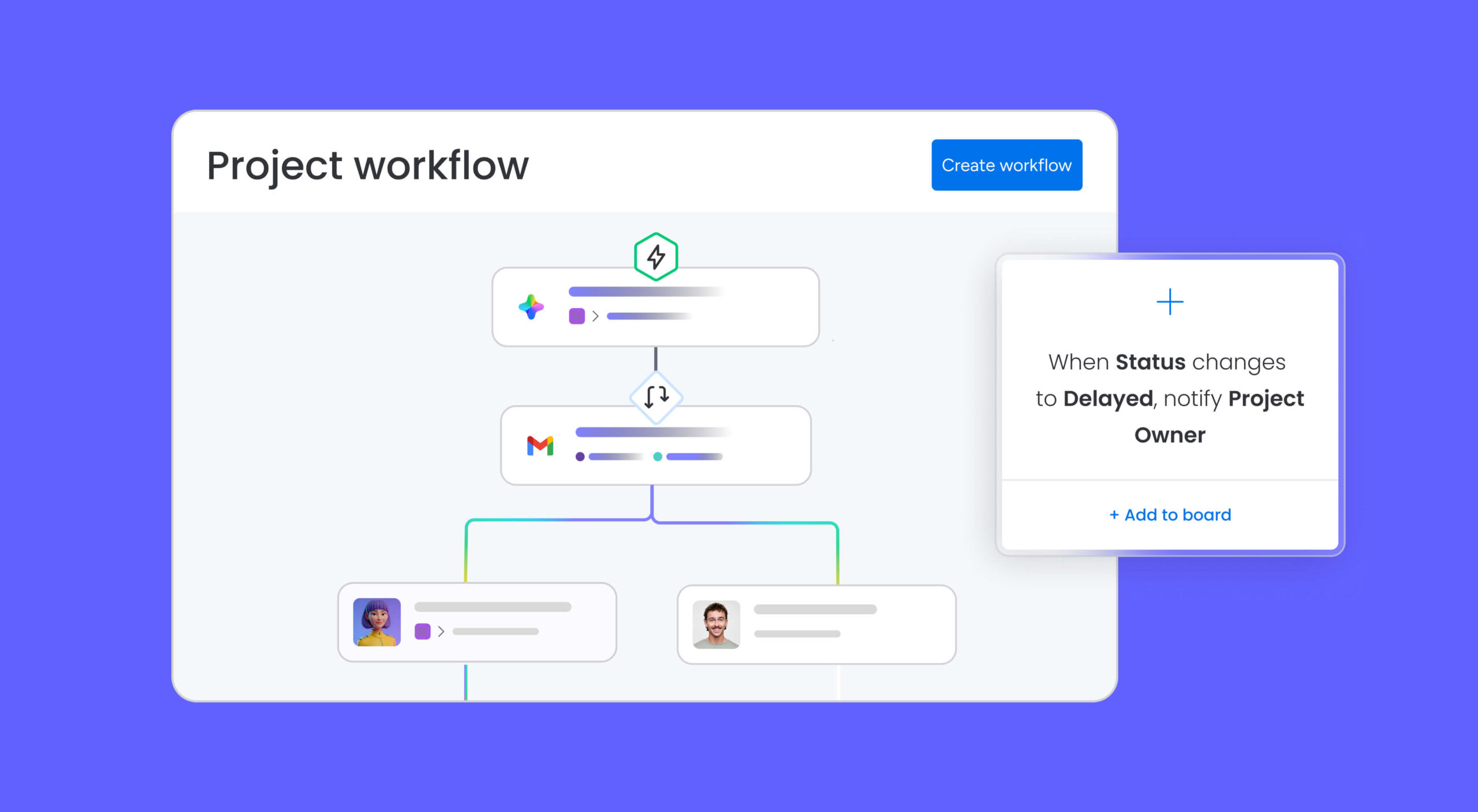
No-code automations handle the repetitive work that slows teams down. Set up recipes that trigger status updates when deadlines approach, calculate completion percentages from sub-item progress, and flag dependency conflicts the moment they arise.
- Automatic notifications: Alert owners when their tasks approach deadlines.
- Progress tracking: Calculate completion percentages based on sub-item status.
- Dependency management: Flag conflicts when timeline changes create issues.
- Status updates: Automatically change task statuses when certain conditions are met.
Hundreds of integrations for connected timeline management

200+ integrations connect your timelines to the rest of your ecosystem, including Teams, Slack, Jira, Google Calendar, Outlook, and GitHub. Calendar syncing pushes timeline dates to the apps your team already uses, so schedule changes stay visible everywhere.
- Calendar syncing: Push timeline dates to Google Calendar, Outlook, and more.
- Development tools: Connect with GitHub, Jira, and other dev platforms.
- Communication apps: Integrate with Slack, Teams, and Zoom for seamless updates.
- File management: Link timeline items directly to Dropbox, Google Drive, or OneDrive files.
Let AI manage your project health
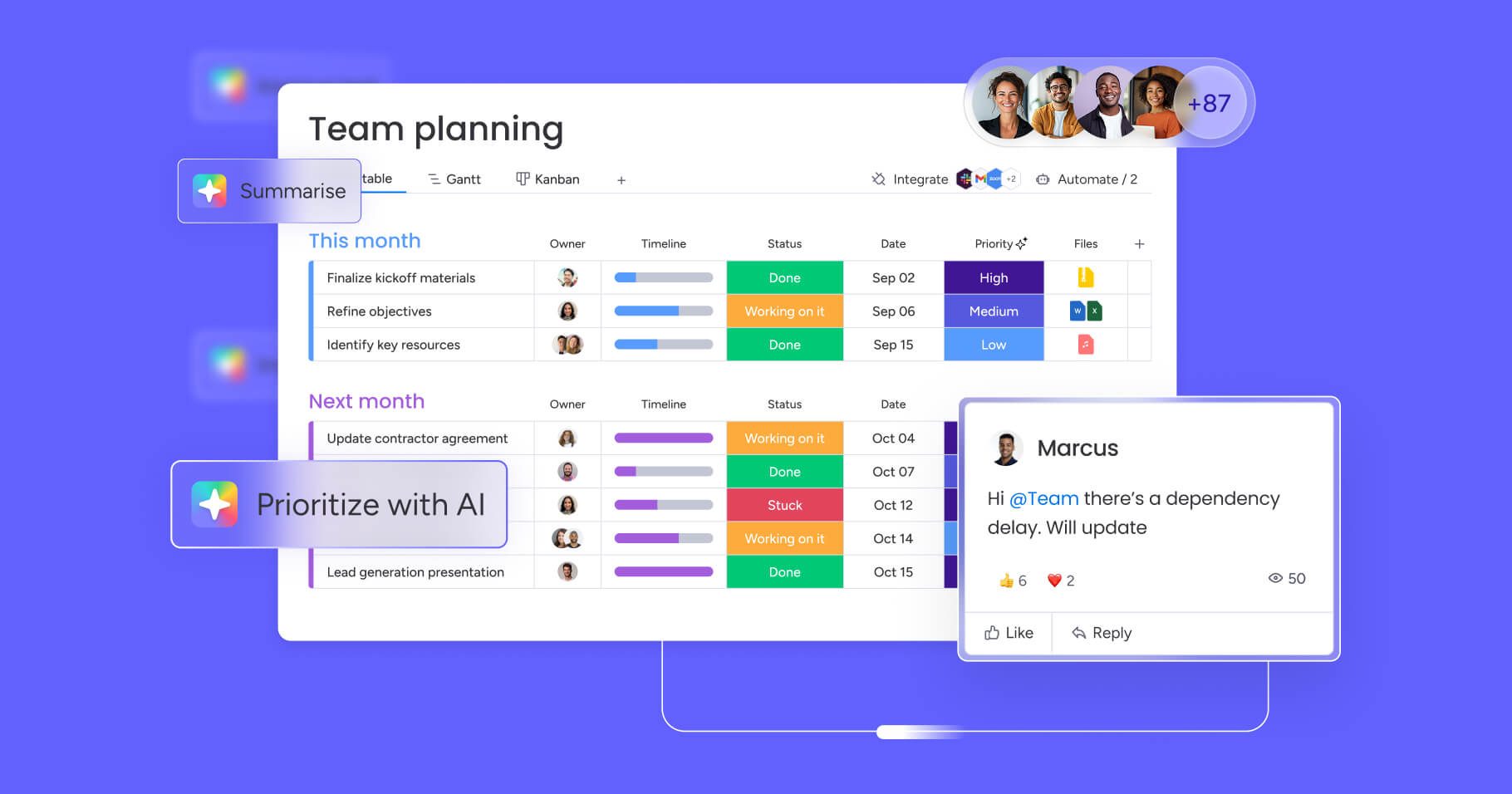
AI capabilities take timeline intelligence further, and with 80% of Millennials believing AI can help them do their jobs more effectively, it’s a capability modern teams are ready to embrace.
- AI Blocks: embed smart scheduling, risk prediction, and resource optimization directly into your workflows.
- Project Analyzer agent: monitors project health in real time, detects bottlenecks, and recommends schedule adjustments before delays compound.
- monday sidekick: an AI assistant that helps with planning, analysis, and generating progress summaries for stakeholders.
- monday vibe: an AI-powered no-code app builder that lets you create custom project workflows without writing a line of code.
- monday MCP (Model Context Protocol): connects AI models directly to your project data for deeper, more contextual insights.
Track progress with real-time dashboards

Dashboard reporting with 10+ drag-and-drop widgets gives leaders a live view of portfolio performance. The Workload widget shows team capacity alongside assignments, so you can spot overallocation before it leads to missed deadlines. Portfolio views aggregate data across multiple projects, revealing trends and resource needs that single-project views can’t surface.
- Customizable views: Switch between Gantt, calendar, and kanban visualizations.
- Color coding: Use visual cues to highlight priorities and statuses.
- Filtering options: Focus on specific timeline segments or team members.
- Presentation mode: Share professional timeline views with stakeholders.
The results speak for themselves. A Forrester Total Economic Impact study found that organizations using the platform achieved a 346% ROI over three years, saving 60 hours per employee yearly on project risk management alone. monday.com was also recognized as a Leader in the 2025 Gartner Magic Quadrant for Collaborative Work Management.
Trusted by nearly 250,000 customers, including more than 60% of the Fortune 500, the platform makes it simple to move from static planning to connected execution. Explore free timeline software options to get started, or jump straight into a project management template built for your workflow.
Start every project with a timeline that works
The right project timeline template does more than organize dates. It aligns your team around shared priorities, surfaces risks before they become roadblocks, and gives every stakeholder the visibility they need to make confident decisions. Whether you’re running a two-week sprint or a year-long transformation, matching your template to your project type, duration, and industry is the first step toward consistent delivery.
Moving from static spreadsheets to a connected platform closes the gap between planning and execution. When your timelines update automatically, dependencies adjust in real time, and AI monitors project health on your behalf, you spend less time managing the plan and more time delivering results. With monday.com’s AI Work Platform, you get the tools to turn any timeline template into a living system that keeps every project on track.
Frequently asked questions
How do you create a project timeline template?
Creating a project timeline template begins by outlining all major phases and milestones. Break each phase into specific activities, estimate durations, arrange them in chronological order, link dependencies, and choose a visual format that fits your audience. Save the completed structure as a reusable template for future projects.
Does Excel have built-in project timeline templates?
Yes, Excel includes built-in timeline templates accessible through File > New. Search for “timeline” or “Gantt chart” in the template gallery to find options like project timelines, milestone charts, and Gantt templates. These templates provide formatted structures you can customize with your project data.
Does PowerPoint have project timeline templates?
PowerPoint offers timeline templates in its template library under File > New. Search for “timeline” to find various visual timeline formats including roadmaps, milestone presentations, and process timelines. These templates focus on visual communication for presentations rather than detailed project tracking.
What’s the difference between a Gantt chart and a project timeline?
A Gantt chart is a specific type of project timeline that uses horizontal bars to show duration and overlap. Project timelines include various formats like calendars, milestone lists, and roadmaps. Gantt charts excel at showing dependencies and resource allocation, while other timeline formats are more suitable for high-level planning or simple date tracking.
Can timeline templates work for Agile project management?
Yes, timeline templates can support Agile when adapted for iterative planning. Agile timeline templates focus on sprint cycles, release trains, and milestone tracking rather than detailed long-term scheduling. They emphasize flexibility, regular updates, and rolling wave planning that aligns with Agile principles.
What is the best chart to show a project timeline?
The best chart depends on your audience and project complexity. Gantt charts work well for detailed execution tracking with dependencies, milestone charts suit executive summaries, and roadmaps show strategic direction. For most teams, a Gantt-style timeline provides the strongest balance of detail and visual clarity.
How does monday.com's AI Work Platform help with project timelines?
The AI Work Platform provides interactive Gantt charts with auto-adjusting dependencies, critical path overlay, baseline comparison, and AI-powered scheduling. Teams can visualize timelines across 15+ views, automate notifications and status updates, and use AI agents like Project Analyzer to monitor project health in real time.

 Get started