


Every successful project begins with a solid plan, but keeping that plan visible and actionable as work evolves is where the real challenge starts. Tasks multiply, priorities shift, and deadlines compete for attention, making it easy to lose sight of the bigger picture. A Gantt chart bridges that gap by turning your entire timeline into a single, visual source of truth.
To help you plan with greater precision, we’ve curated 15 free Gantt chart templates designed for a variety of industries, workflows, and project types. Whether you’re working in Excel, Google Sheets, or a dedicated project management platform, each template provides a foundation for mapping work, organizing schedules, and maintaining visibility from start to finish. For teams that want to go beyond static spreadsheets, monday.com’s AI Work Platform offers a dynamic alternative where templates become living project systems that evolve with your work.
Key takeaways
- Match templates to project scope: Choose your Gantt chart template based on project complexity and team size. Simple projects with fewer than 20 tasks work well with basic templates, while larger teams benefit from resource management features.
- Save time with reusable frameworks: Reusable templates eliminate repetitive setup work, saving hours of planning time across multiple projects.
- Start with familiar spreadsheet tools: Excel and Google Sheets provide accessible starting points for teams that need free, familiar formats for Gantt chart planning.
- Avoid common planning mistakes: Avoid the 4 most common pitfalls: overcomplicated timelines, missing dependencies, irregular updates, and underestimated time requirements.
- Transform static templates into dynamic systems: In monday.com’s AI Work Platform, static Gantt chart templates become dynamic project systems with AI-powered planning, dependency tracking, and real-time collaboration that scales with your team.
What are Gantt chart templates?
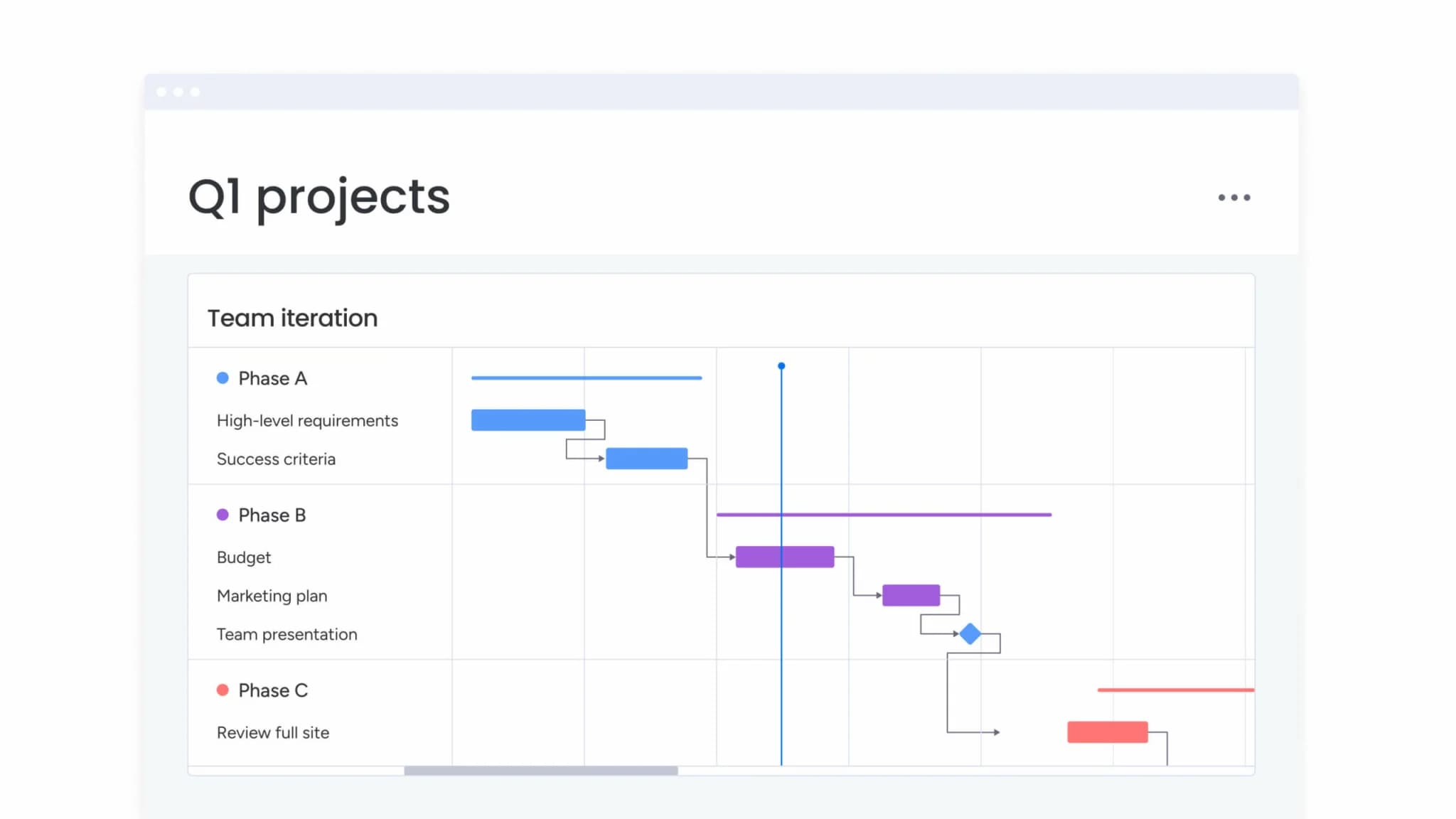
A Gantt chart is a horizontal bar chart that maps project tasks against a timeline. Each bar represents a single task, with its length showing the planned duration and its position indicating start and end dates. Lines between bars illustrate dependencies, revealing which tasks must finish before others can begin. The result is a complete visual snapshot of your project’s schedule, sequencing, and progress.
The chart is named after Henry Gantt, a mechanical engineer who popularized this style of project scheduling in the early 1900s. While Gantt didn’t invent the concept of bar-based scheduling, he refined it into the practical planning format that project managers, team leads, and operations professionals rely on today.
So why do Gantt charts remain essential in a world of agile boards and digital dashboards? Because no other format shows task duration, sequencing, and interdependencies in a single view. With 40 million project professionals worldwide and that number projected to reach 70 million by 2035, demand for structured planning frameworks continues to grow. Templates accelerate that setup, giving teams a reusable starting point so they can focus on execution rather than chart design.
What are Gantt chart templates?
A Gantt chart template is a ready-made framework that displays project tasks as horizontal bars across a timeline. This format provides an instant view of when work begins, how long it takes, and where tasks overlap or depend on one another, all without the need to design a chart from the ground up. By using a structured template, teams can focus on strategy and execution rather than setup.
Adopting proven project management methods pays off in measurable ways. Research from the Project Management Institute consistently shows that organizations using standardized practices waste significantly less money than those that don’t, underscoring how much efficiency improves when teams follow a consistent process.
Essentially, a Gantt chart template gives your project a structured blueprint for progress.
It outlines the essential framework, guiding teams through planning, scheduling, and tracking so everyone stays aligned from kick-off to completion.
Gantt charts vs. Gantt chart templates: Difference explained
Although both formats look similar at first glance, they serve different purposes in project planning. A Gantt chart is created for one specific project, built around its unique tasks, timelines, and dependencies. A Gantt chart template, by contrast, provides a reusable framework that can be adapted for any project, helping teams save time and maintain consistency across workflows.
Building a Gantt chart manually means entering every task, deadline, and dependency one by one, a process that can quickly become repetitive. Templates simplify that effort by offering a structured layout you can customize with your own project details, making it easier to launch new plans and keep work organized from the start.
7 essential elements every Gantt chart template must include
What are the most important elements of a Gantt chart? Every functional template needs specific components that work together. Without these elements, your template becomes a static image rather than a practical planning resource:
- Activity list: All project activities arranged vertically.
- Timeline: The calendar view showing project duration.
- Task bars: Visual blocks showing when each task happens.
- Dependencies: Lines connecting related tasks.
- Milestones: Diamond markers for key deadlines.
- Resource assignments: Names showing who does what.
- Progress indicators: Percentage-complete markers or shading that show how much of each task is finished.
In monday.com’s AI Work Platform, these elements are built into every Gantt view automatically, so you don’t need to configure them manually each time you start a new project.
18 free Gantt chart templates for every project type
Strong project planning starts with a view of tasks, timelines, and responsibilities that the whole team can follow. Gantt chart templates make that possible by turning complex schedules into organized, visual plans.
General-purpose templates work across industries and team sizes, but more specific templates can fit a range of different project types and team structures, helping you plan smarter and deliver work on time.
1. Simple Gantt chart template
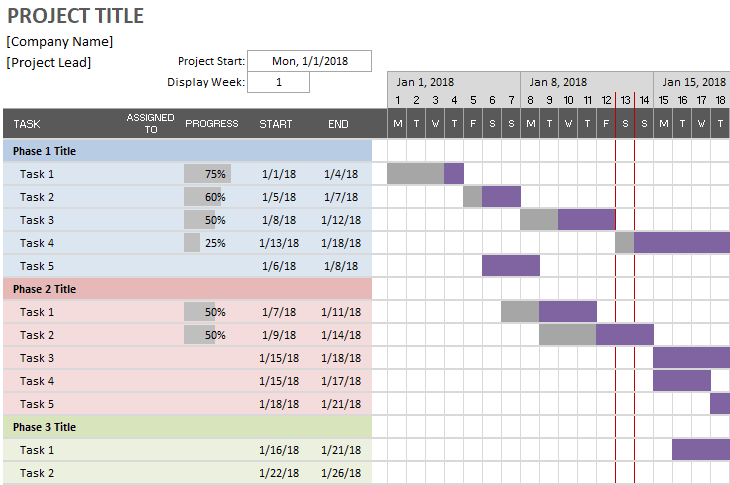
- Best for: Freelancers, solo project owners, and teams new to Gantt planning.
- Perfect for your first Gantt chart or small projects with under 15 items.
- This template strips away complexity, showing only task names, dates, and basic timeline bars.
2. Project management Gantt template
- Best for: Cross-functional teams managing structured initiatives.
- This comprehensive project management template is built for structured environments that demand detailed tracking and visibility.
- It covers resource allocation, budget management, and progress monitoring, helping teams stay aligned from planning through delivery.
3. Weekly Gantt chart template
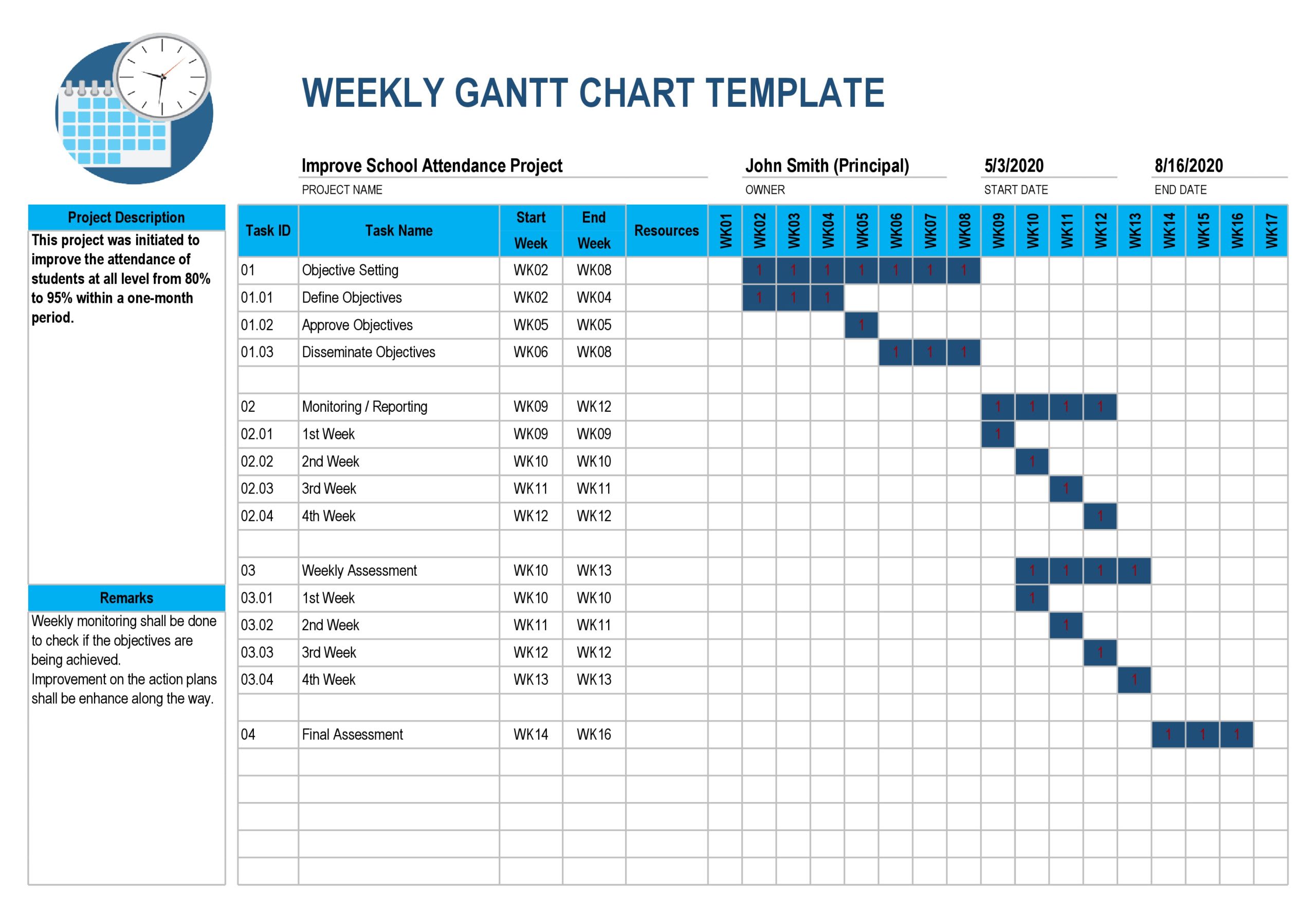
- Best for: Sprint-based teams and short-duration projects.
- Shows daily task breakdowns for sprint planning or short-term projects.
- Each week gets detailed visibility with a weekly schedule template, helping teams focus on immediate priorities.
4. Monthly Gantt timeline template
- Best for: Quarterly planning and long-running initiatives.
- Designed for projects spanning several months, this monthly schedule template provides high-level milestone tracking without daily clutter.
5. Multi-project portfolio template
- Best for: PMO leaders and portfolio managers.
- Manages multiple projects in one view with shared resource tracking.
- Executives see how projects compete for attention and resources.
6. Resource management Gantt
- Best for: Teams balancing capacity across concurrent projects.
- Focuses on workload distribution across team members.
- Managers can spot overallocation before it causes burnout or delays.
7. Budget tracking Gantt
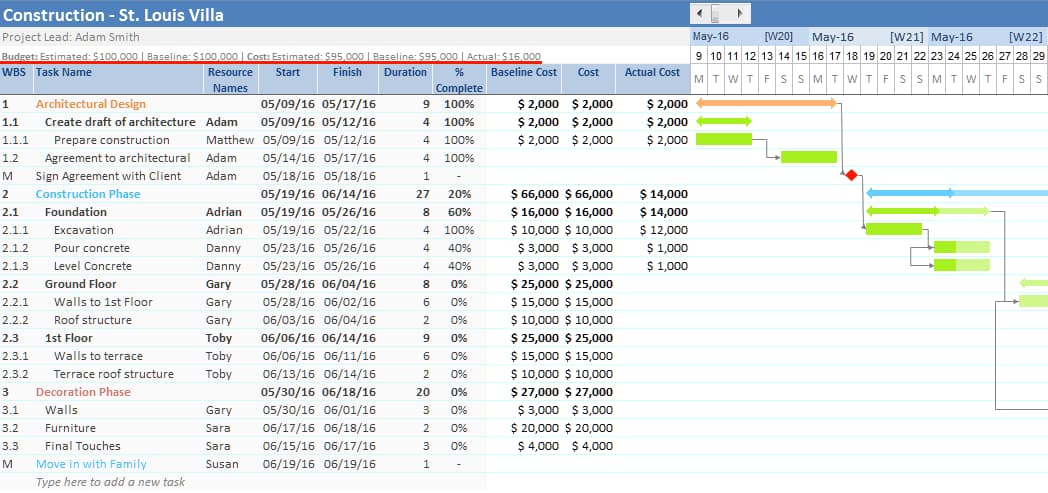
- Best for: Projects with strict budget constraints.
- Integrates cost monitoring with timeline management.
- Project managers track financial progress alongside schedule adherence.
8. Construction project Gantt sample
- Best for: Contractors, builders, and construction project managers.
- Includes permit phases, inspection points, and weather delays specific to construction workflows.
- Contractors use this Gantt chart for construction project to coordinate trades and materials.
9. Software development sprint template
- Best for: Agile teams that need structure while maintaining flexibility.
- This template combines sprint planning and visual tracking to keep development cycles organized and transparent.
- Sprint boundaries define clear start and end dates for each iteration, story points estimate workload, and release cycles visualize progress toward upcoming launches.
10. Marketing campaign Gantt chart
- Best for: Marketing teams managing multi-stakeholder campaigns.
- Tracks content creation, approval rounds, and launch coordination.
- Marketing teams use this Gantt chart for marketing plan to manage multiple stakeholders and creative iterations.
11. Event planning timeline template
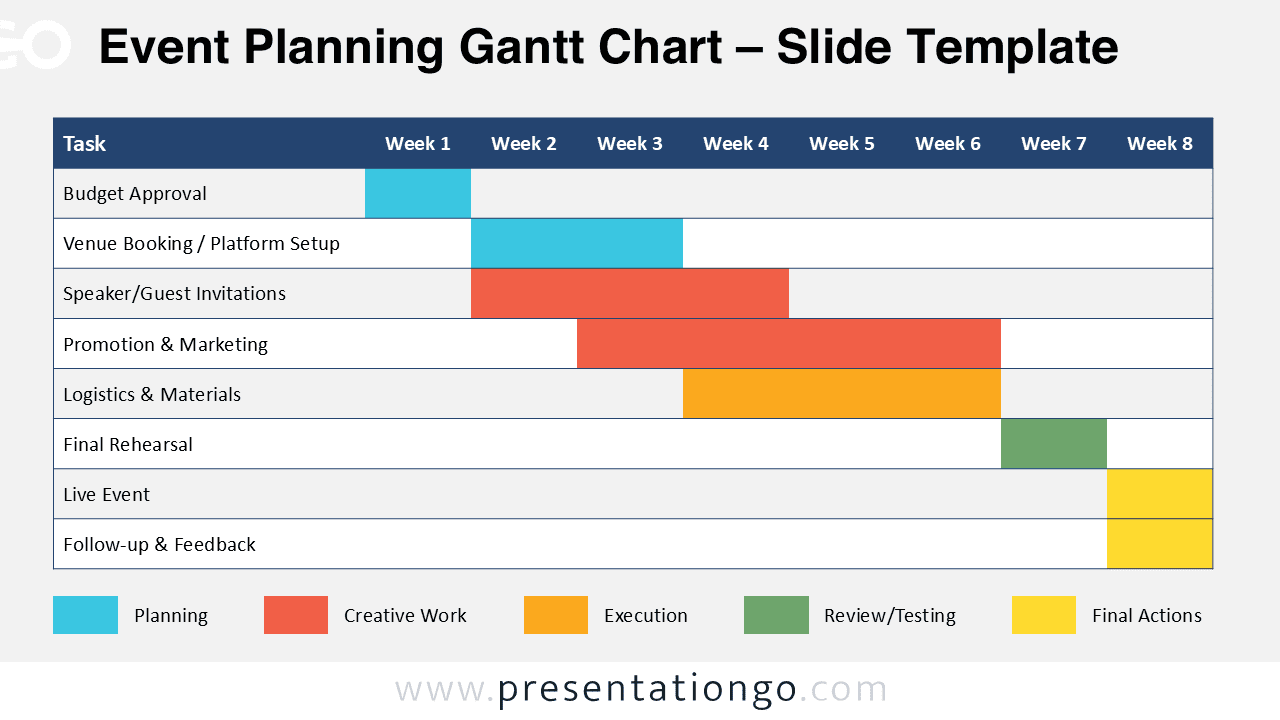
- Best for: Event planners and coordinators managing complex logistics.
- Highlights venue bookings, vendor deadlines, and day-of logistics.
- Event planners rely on a Gantt chart for event planning to track everything from initial planning through post-event wrap-up.
Learn more: Gantt charts for event planning
12. Agile Gantt chart template
- Best for: Agile teams needing stakeholder visibility.
- Combines sprint planning with visual timelines.
- Agile teams maintain flexibility while providing stakeholder visibility.
13. Product launch timeline
- Best for: Product managers coordinating cross-functional launches.
- Coordinates development, testing, marketing, and support activities.
- Product managers align cross-functional teams around launch dates.
14. Client project tracker
- Best for: Service providers and agencies managing client work.
- Includes client touchpoints, approval stages, and deliverable milestones.
- Service providers maintain transparency throughout client engagements.
15. Task management Gantt
- Best for: Complex projects requiring detailed breakdown.
- Provides granular work item tracking with sub-items and detailed progress monitoring.
- Complex projects become manageable through systematic breakdown.
16. Team collaboration template
- Best for: Teams prioritizing transparency and shared ownership.
- Emphasizes communication workflows and collective accountability.
- Teams prioritize transparency and collective accountability.
17. Risk management timeline

- Best for: Projects with high uncertainty or complex risk profiles.
- Maps potential problems and mitigation strategies into project planning.
- Teams prepare for uncertainties before they impact delivery.
18. Strategic planning template
- Best for: Leadership teams tracking long-term organizational goals.
- Tracks long-term initiatives and organizational goals.
- Leadership teams monitor strategic progress across quarters or years.
How to select the perfect Gantt chart template
Choosing the right Gantt chart template starts with understanding what your project needs. The best fit depends on factors like complexity, team size, duration, and the level of tracking required. Use the guidelines below to evaluate these elements and find a template that supports your project from planning to delivery.
Evaluate project complexity and scope
Start by honestly assessing what you’re managing. Simple projects need different templates than complex initiatives with multiple workstreams.
Consider these factors when evaluating your needs:
- Task count: Under 20 tasks works with basic templates.
- Team size: Larger teams need resource management features.
- Duration: Match template granularity to project length.
- Dependencies: Complex relationships require advanced tracking.
Consider team size and collaboration needs
Team structure plays a major role in choosing the right template. Smaller teams can stay productive with simple layouts that track basic tasks and timelines. Larger groups, however, benefit from templates that include resource allocation, communication tracking, and role visibility to maintain coordination across departments.
When supported by a modern and intuitive platform such as monday.com’s AI Work Platform, these collaboration features scale effortlessly. Real-time updates, shared dashboards, and transparent ownership help distributed teams stay aligned without relying on constant check-ins or manual status reports.
Match timeline to project duration
Your project’s length should guide the level of detail in your Gantt chart. Short-term initiatives benefit from weekly or biweekly templates that make it easy to track day-to-day progress and quick milestones. Longer projects, such as strategic or multi-year plans, work better with monthly or quarterly views that highlight broader phases and key deliverables.
Choosing the right timeline view helps teams stay focused on what matters most at each stage without getting lost in unnecessary detail.
Assess required features and functionality
Identify the features that directly support your project goals. The right template should make planning easier, not more complicated.
- Dependency tracking: Visualize how tasks connect and where delays may occur.
- Resource management: Balance workloads and prevent overallocation.
- Budget monitoring: Keep financial progress aligned with project timelines.
- Milestone visualization: Highlight key checkpoints and delivery targets.
How to create your custom Gantt chart template in 6 steps
Creating your own Gantt chart template takes a bit of upfront effort, but the payoff is significant. A well-built template gives you a repeatable system that saves time, improves consistency, and aligns your team around a single project framework.
Follow these steps to design a version tailored to your workflow and ready to reuse across future initiatives.
Step 1: Map your project workflow
Document the phases that repeat across your projects. Look at recent work to identify patterns in task sequences and common bottlenecks.
Step 2: Break down tasks and subtasks
Use work breakdown structure principles to find the right detail level. Start with major phases, then add specific deliverables without going too granular.
Step 3: Establish task dependencies
Most tasks follow finish-to-start patterns: one task must complete before the next begins. Using Gantt charts with dependencies helps map these connections to prevent scheduling conflicts.
Step 4: Assign team members and resources
Choose between role-based assignments (“Designer”) or specific names. Role-based templates offer more flexibility for changing teams.
Step 5: Set milestones and critical deadlines
Identify checkpoints that appear in every similar project. These become your progress markers and communication points.
Step 6: Apply visual customization
Develop consistent color coding and formatting. Visual patterns help teams quickly understand status and priorities.
Key benefits of Gantt chart templates in project management
Using Gantt chart templates brings structure and efficiency to how teams plan, track, and deliver work. The right template makes it easier to see progress, allocate resources effectively, and keep everyone aligned around shared goals. Below are five key ways these templates improve project management outcomes.
Comprehensive project visualization
Visual timelines instantly communicate project status to any stakeholder, a critical function in large enterprises where research finds only 61% of employees are satisfied with transparency . Executives grasp progress without detailed briefings, while teams understand their place in the bigger picture.
Optimized resource distribution
Gantt chart templates help visualize team capacity across multiple projects, reducing the risk of overallocation or idle time. When paired with modern platforms such as monday.com’s AI Work Platform, resource tracking becomes effortless. Real-time workload views and capacity insights make it easier to balance assignments and keep projects moving efficiently.
Seamless team coordination
Standardized formats reduce confusion about where to find information. Everyone follows the same patterns, making collaboration more efficient.
Proactive deadline tracking
Dependencies and critical paths become visible before they cause problems. Teams spot potential delays early enough to adjust plans with a Gantt chart with milestones.
Real-time progress monitoring
Updates happen within the workflow rather than through separate reports, a significant advantage when research shows nearly half of organizations lack access to real-time KPIs. This improves transparency while the administrative burden decreases.
Critical mistakes that derail Gantt chart success
Even the best-designed Gantt chart can fail if it is not used effectively, with any teams fall into the same avoidable traps that turn a helpful planning tool into a source of confusion.
Recognizing these common mistakes early allows you to build more realistic plans, keep timelines accurate, and maintain trust in your project data.
Creating overly complex timelines
Start simple and add complexity gradually. Teams abandon templates that require excessive maintenance relative to their value.
How do you know if your timeline is too complex? If updating takes longer than the actual work, you’ve gone too far.
Missing crucial task dependencies
Hidden connections between tasks cause unexpected delays. Review dependencies with people doing the actual work, they know connections managers might miss.
Neglecting regular updates
Outdated templates lose credibility fast. Establish update rhythms and assign clear ownership for maintenance.
Underestimating time requirements
Build buffer time for unexpected issues and scope changes. Historical data provides more accurate estimates than optimistic guesses.
Elevate your project management with monday.com's AI Work Platform
Traditional templates provide structure, but they often fall short when projects evolve and teams grow. As work becomes more distributed and change happens faster, static tools cannot keep up with shifting priorities or real-time updates. This gap is clear in the data: 45% of senior leaders believe change is managed “very well,” while only 23% of individual contributors agree. Bridging that divide calls for a dynamic platform that keeps every project connected, transparent, and adaptable.
monday.com’s AI Work Platform helps turn traditional Gantt planning into a living, collaborative system that evolves with your projects. The features below show how it helps teams automate routine work, connect tools, enhance accuracy, and create fully customized Gantt views that reflect real progress every day.
From static templates to dynamic Gantt views
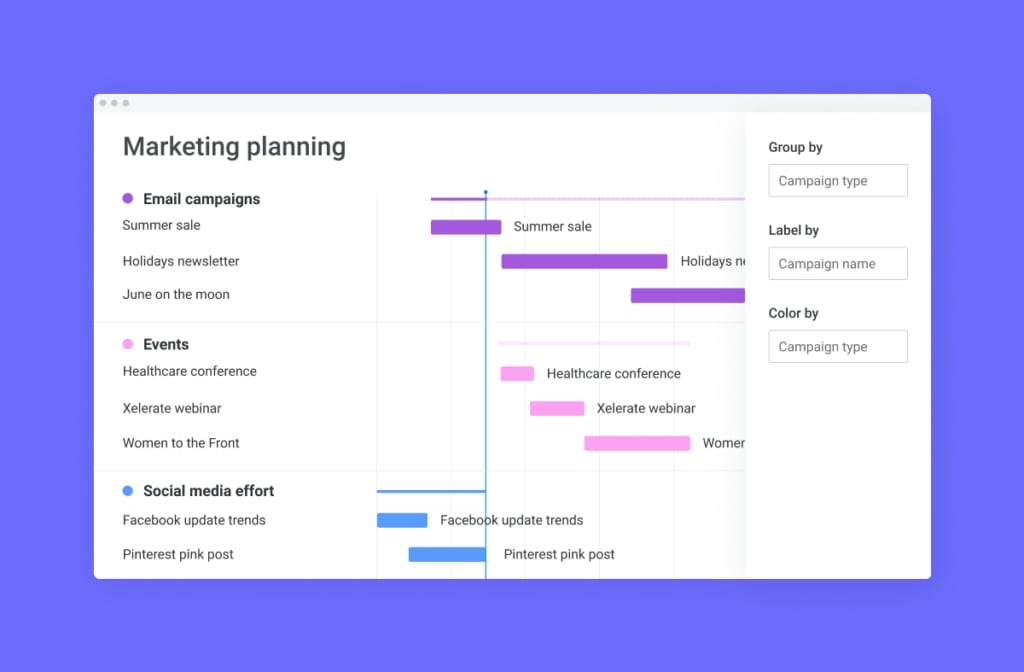
monday.com’s AI Work Platform transforms AI Gantt chart software from documentation into living project orchestration. Drag-and-drop adjustments instantly recalculate timelines and dependencies.
Your project view always reflects current reality. No more outdated spreadsheets or manual updates across multiple documents.
Advanced automations that save hours weekly
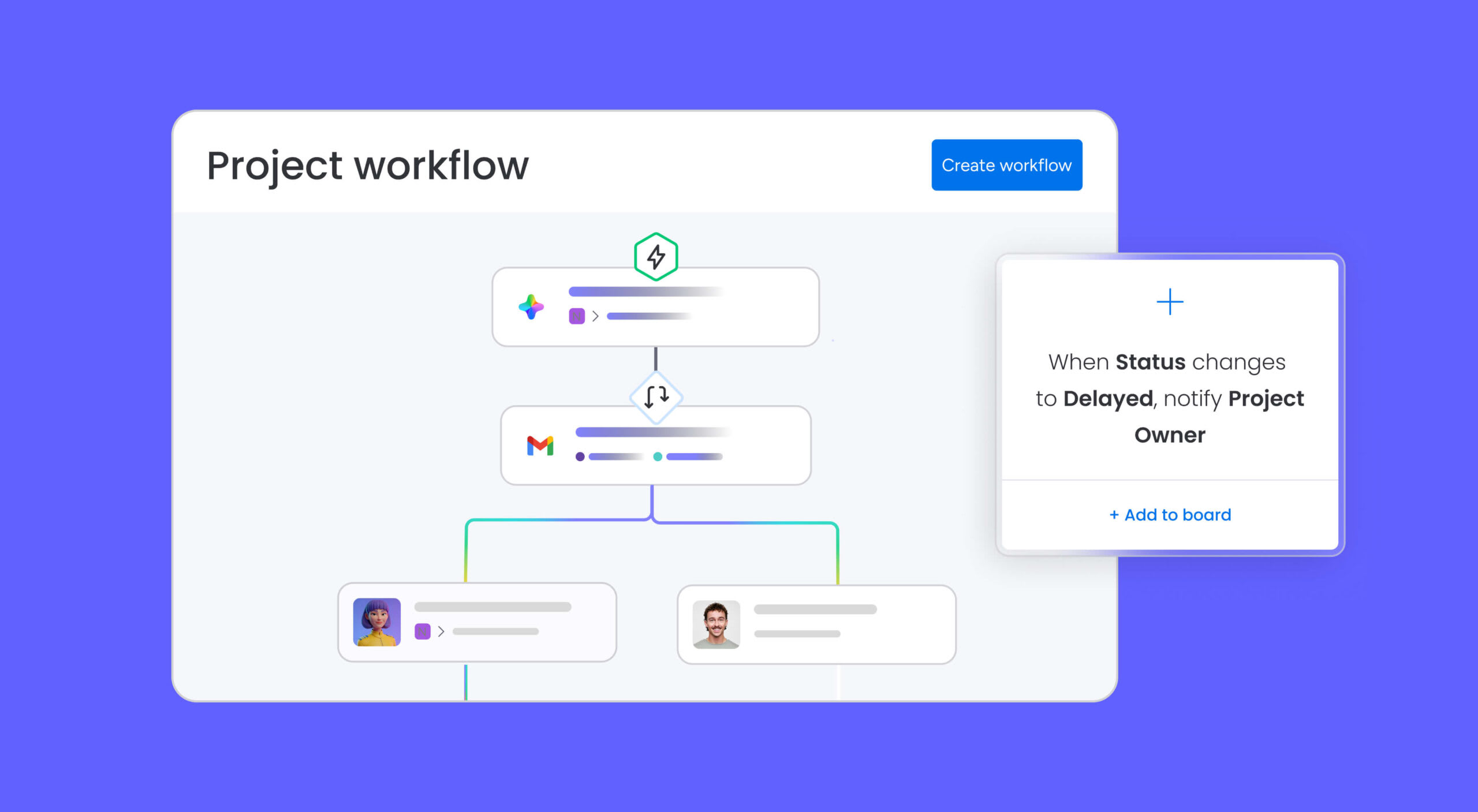
Stop wasting time on repetitive project updates. monday.com’s AI Work Platform automation engine handles routine tasks so your team can focus on high-value work.
- Status-triggered notifications that alert the right people at the right time.
- Automatic timeline adjustments when dependencies shift.
- Custom workflow rules that match your team’s unique processes.
200+ integrations for seamless workflow connections

Connect your Gantt charts with the tools your team already uses. monday.com’s AI Work Platform eliminates data silos by bringing everything into one collaborative workspace.
- Sync with Microsoft Office and Google Workspace for document-driven projects.
- Connect development tools like GitHub, Jira, and GitLab.
- Integrate marketing platforms including HubSpot and Mailchimp.
Powerful AI features that enhance planning accuracy

Let AI do the heavy lifting in your project planning. monday.com’s AI Work Platform intelligent features help create more realistic timelines and resource allocations.
- Smart duration estimates based on historical project data.
- Automated dependency detection to prevent scheduling conflicts.
- Resource optimization suggestions that prevent team burnout.
Visual template customization for perfect Gantt charts

Create templates that perfectly match your project needs. monday.com’s AI Work Platform visual customization tools help you build Gantt charts that communicate exactly what your stakeholders need to see.
- Custom fields and column types for industry-specific information.
- Conditional formatting that highlights risks and opportunities.
- Multiple view options from high-level roadmaps to detailed daily schedules.
Build better projects with the right Gantt chart template
Gantt chart templates give teams a structured way to plan, track, and deliver projects with greater clarity and control. Whether you choose a simple spreadsheet or a more advanced platform, the right template helps you visualize timelines, manage dependencies, and keep everyone aligned around shared goals. The key is finding a framework that matches your project’s complexity and your team’s workflow.
For teams ready to move beyond static templates, monday.com’s AI Work Platform transforms traditional Gantt planning into a dynamic system that adapts as your work evolves. With intelligent automation, real-time collaboration, and seamless integrations, your templates become living project tools that scale with your ambitions and keep delivery on track.
FAQs
Is there a Gantt chart template in Excel?
Yes. Excel includes built-in Gantt chart templates available through the template gallery. You can also create a custom version by using stacked bar charts and applying conditional formatting to display project timelines, durations, and task dependencies.
Can I create a Gantt chart template in Word?
Word does not include built-in Gantt chart functionality, but you can create a simple timeline using tables and shape tools. For more advanced features such as automatic calculations, dependencies, and progress tracking, Excel or a dedicated project management platform is a better choice.
How do I make a Gantt chart template in Google Sheets?
Google Sheets offers free Gantt templates in their gallery that you can copy and customize. You can also build templates from scratch using conditional formatting and formulas, or work from a schedule template for Google Sheets with automatic saving to Google Drive for team access.
What’s the most effective free Gantt chart template for small teams?
The most effective template depends on your specific needs, but if you want a free Gantt chart, Google Sheets templates work well for small teams needing basic timeline visualization and collaboration. For advanced features like automation and resource management, platforms like monday.com's AI Work Platform offer more comprehensive solutions.
How do Gantt chart templates improve project delivery times?
Gantt chart templates improve delivery by providing visual timelines that reveal dependencies, resource conflicts, and critical paths. For long-term goals, a Gantt chart for business plan helps teams identify potential delays early, coordinate more effectively, and maintain consistent planning standards across projects.
Can multiple team members update Gantt chart templates simultaneously?
Yes, cloud-based templates in Google Sheets allow real-time collaboration where multiple users can update simultaneously. Platforms like monday.com's AI Work Platform expand this with advanced features including automated notifications, permission controls, and audit trails for enterprise teams.

 Get started