


Projects rarely fail because teams lack effort. They fail because people are working toward different versions of the same goal. A project roadmap fixes that by giving everyone a shared, visual reference point for where the work is headed and why each phase matters. As cross-functional collaboration grows more complex heading into 2026, a strong roadmap isn’t optional.
This article covers what a project roadmap is, how it compares to related planning documents, the components that make one effective, and a step-by-step process for building your own. You’ll also find examples of common roadmap formats, solutions to the challenges teams face most often, and tips for presenting your roadmap to leadership. monday.com’s AI Work Platform gives teams a flexible foundation to build roadmaps that stay connected to real work and update as conditions change.
Key takeaways
- Understand the purpose: A project roadmap provides a high-level view of goals, milestones, and timelines so teams and stakeholders stay aligned.
- Know what to include: Objectives, major deliverables, resources, dependencies, and a realistic timeline form the core of any strong roadmap.
- Keep it adaptable: A roadmap should evolve as priorities shift or new information surfaces.
- Explore different formats: Timeline, swimlane, Kanban-style, and portfolio roadmaps each serve different project needs.
- Use monday.com’s AI Work Platform: The platform helps teams build visual, connected roadmaps that update automatically as work progresses.
What is a project roadmap?
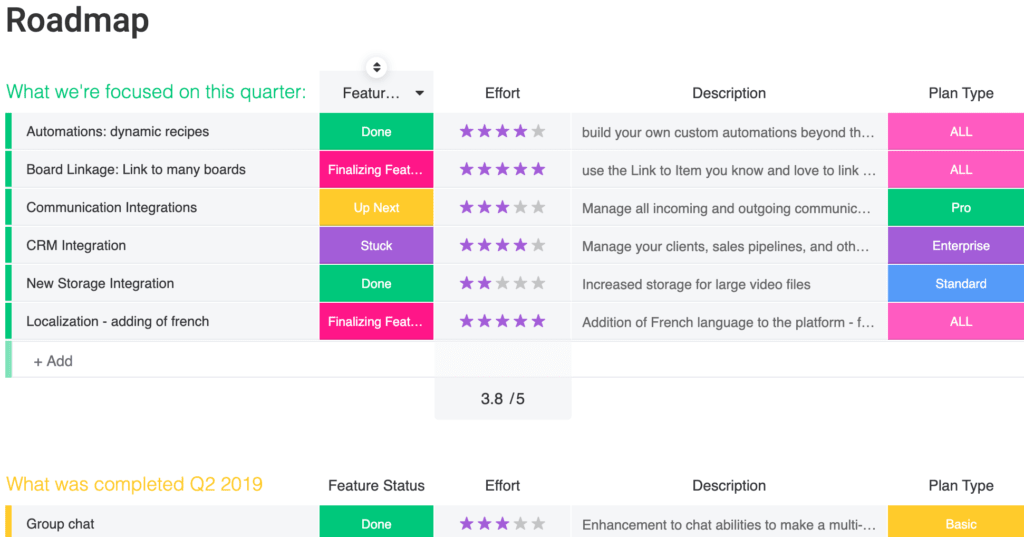
A project roadmap is a high-level visual overview that shows your project’s goals, major milestones, and expected timeline on a single page. It distills the essentials of your project scope so teams and stakeholders can quickly understand what’s happening, when key moments will occur, and how the work fits together. In short, a roadmap in project management serves as the strategic layer that sits above your detailed plans and day-to-day execution.
Rather than outlining every task, a roadmap highlights the big commitments: the outcomes you’re working toward, the major phases of work, and the sequence of events needed to reach the finish line.
It helps teams stay focused on shared priorities, gives decision-makers a line of sight into progress, and creates a central reference point that keeps everyone aligned as the project moves forward.
Project roadmap vs. project plan: Key differences
A project roadmap and a project plan serve different purposes, but teams often mix them up. The roadmap gives you the big picture; the plan explains how the work will actually get done. Both are important, and understanding the distinction helps you set the right expectations from the start.
A more direct way to think about the difference:
- A project roadmap shows the strategy: it highlights goals, major milestones, phases of work, and the timing that ties everything together. It’s built for alignment and communication, especially with stakeholders who don’t need task-level detail.
- A project plan shows the execution: it translates the roadmap into the day-to-day actions needed to deliver the work. This includes owners, dependencies, estimates, risks, and workflows that guide the team through each phase.
- The roadmap answers the “why, what, and when“; the plan answers the “how”: keeping these roles separate helps prevent unnecessary complexity in your roadmap while ensuring the plan has the detail your team needs to deliver.
| Project roadmap | Project plan | |
|---|---|---|
| Purpose | Communicate strategy and direction | Guide day-to-day execution |
| Audience | Executives, stakeholders, cross-functional leads | Project team, contributors, managers |
| Level of detail | High-level: goals, milestones, phases | Granular: assignments, deadlines, workflows |
| Update frequency | Monthly or at major checkpoints | Weekly or as assignments change |
Used together, they help you tell a consistent story: the roadmap sets the direction, and the project plan explains how your team will bring that direction to life.
Project roadmap vs. Gantt chart
A Gantt chart is a scheduling visualization that shows individual activities plotted against a timeline, with bars representing start dates, end dates, and durations. A project roadmap, on the other hand, is a strategic document that communicates goals, milestones, and phases at a higher level. While a roadmap may include a Gantt view as one of its visual formats, the two aren’t interchangeable.
Think of it this way: a Gantt chart answers “when will each activity happen?” while a roadmap answers “where is this project headed and why?” Many teams use Gantt views within their roadmap to visualize timing, but the roadmap’s purpose extends well beyond scheduling.
Project roadmap vs. project charter
A project charter is a formal document that authorizes a project, defines its objectives, and names the key stakeholders responsible for it. It’s typically created before work begins and rarely updated after that. A project roadmap, by contrast, visualizes the execution path and evolves throughout the project’s lifecycle. The charter says “this project exists and here’s why”; the roadmap shows “here’s how we’ll get there.”
Project roadmap vs. product roadmap
A project roadmap is delivery-focused with a defined start and end date. It tracks the phases, milestones, and dependencies required to complete a specific initiative. A product roadmap is outcome-focused and ongoing. It maps the evolution of a product over time, organized around themes, user needs, or strategic bets rather than fixed deadlines. If you’re shipping a new feature by Q3, you need a project roadmap. If you’re planning the next year of product direction, you need a product roadmap.
The 7 key components of an effective project roadmap
A strong project roadmap highlights the essentials of the work ahead without overwhelming teams with detail. These components help stakeholders understand direction, spot risks early, and stay aligned throughout the project’s lifecycle.
- Goals: Define what the project needs to achieve and why it matters. Your project objectives give everyone a shared definition of success and guide decisions as work progresses.
- Major milestones: These are the key moments that show the project is moving in the right direction. Project milestones can include approvals, completed phases, or any event that signals meaningful progress.
- Core deliverables: Every roadmap should outline the outputs the project will produce. This includes both tangible items and critical internal outputs like finalized designs or documentation.
- Resource overview: Teams need to understand which roles, skills, or budget categories are required to deliver the work. A high-level view of resource management helps surface capacity gaps early.
- High-level scheduling: A simplified project timeline shows when major phases start and finish. Many teams visualize this with a Gantt chart to make overlaps, sequencing, and critical periods easy to spot.
- Dependencies: These show which activities rely on others to move forward. Mapping these connections reduces surprises and helps teams coordinate more effectively.
- Ownership: Listing the people responsible for major work areas or decisions ensures that stakeholders always know where to go for updates or approvals.
How to create a project roadmap: 6 steps
Building a project roadmap works best when you move from big-picture thinking to structured detail. So where do you start when building a roadmap from scratch? These steps help you shape a realistic overview that’s easy to share, easy to update, and grounded in the work your team needs to deliver.
Step 1: Define the purpose
Begin by clarifying why the project exists and what outcome it’s intended to create. Capture the problem you’re solving, the benefits you expect to deliver, and the organizational priorities the project supports. This foundation keeps the roadmap focused and ensures every milestone or phase you map later ties back to a stated purpose.
Step 2: Gather essential information
Collect the high-level details that will shape your roadmap. This includes strategic goals, early risks, expected workstreams, initial requirements, and the major decision points that will influence progress. At this stage, you’re not building an assignment list. You’re gathering the context that informs bigger decisions about direction, timing, and scope.
Step 3: Outline the structure
Start mapping the major phases of work and place them roughly in sequence. Look for natural groupings of activities, critical handoffs between teams, and major checkpoints that indicate progress. This structure becomes the backbone of your roadmap and sets up the timeline you’ll refine later.
Step 4: Choose a format
Select a visual format that helps stakeholders understand the plan quickly. Many teams use a project roadmap template to get started, then customize it with views like horizontal timelines, phased layouts, or Gantt-style visuals. See the section below for common roadmap formats and when each one fits. The layout should make relationships, pacing, and key moments instantly understandable, even to someone seeing it for the first time.
Step 5: Collaborate with stakeholders
Review your draft with the people who will guide, approve, or deliver the project. Their input helps confirm priorities, highlight missing steps, and surface dependencies that aren’t obvious on paper. This collaboration not only improves accuracy but also builds early buy-in, which is essential for long-term alignment.
Step 6: Keep it up to date
A roadmap has the most value when it reflects the current reality of the project. Revisit it regularly to adjust phases, refine dates, or re-sequence work as priorities evolve. This becomes especially important if your team follows an Agile approach, where new information and shifting requirements are expected. Using AI-powered updates can help surface changes automatically, so the roadmap stays current without relying on manual check-ins. Keeping the roadmap accurate ensures stakeholders always understand the direction, not just the original plan.
Project roadmap examples and when to use them
Not every project calls for the same roadmap format. The right structure depends on how your team plans, how stakeholders consume information, and whether your project runs on fixed deadlines or evolving priorities. Here are four common formats and the situations where each one works well.
Timeline roadmap
This is the most traditional format. It plots phases, milestones, and deliverables along a horizontal timeline, making it easy to see sequencing and deadlines at a glance. It’s the strongest fit for projects with fixed end dates and sequential phases, such as a product launch or office relocation.
Swimlane roadmap
Swimlanes divide the roadmap into horizontal rows, each representing a different team, department, or workstream. This format is ideal for cross-functional projects where multiple groups work in parallel and need to see how their timelines intersect. It highlights dependencies and handoffs between teams without requiring a separate document.
Kanban-style roadmap
Instead of plotting work against dates, a Kanban-style roadmap organizes items into columns like “Planned,” “In Progress,” and “Completed.” This suits Agile teams who plan around themes or priorities rather than rigid dates. It gives stakeholders a snapshot of progress without locking the team into a fixed schedule.
Portfolio roadmap
When you’re tracking multiple projects at once, a portfolio roadmap consolidates them into a single view. It helps PMOs and leadership compare timelines, allocate resources across initiatives, and identify conflicts before they escalate. Each row typically represents a separate project, with shared milestones or dependencies called out visually.
Which format works for your team? If you’re unsure, start with a timeline view and adapt it as you learn what your stakeholders respond to. monday.com offers flexible views that let you switch between formats without rebuilding your roadmap from scratch. You can also explore a project roadmap template to see these formats in action.
Get startedCommon project roadmap challenges and how to solve them
Even a well-built roadmap can lose its value if common pitfalls go unaddressed. What happens when a roadmap stops reflecting reality? Here are five challenges teams encounter most often and practical ways to handle each one.
- Scope creep: tie every addition back to documented goals. If it doesn’t serve the objective, it belongs in a future initiative.
- Outdated information: schedule regular reviews and use connected workflows that update automatically as work progresses.
- Stakeholder misalignment: tailor detail levels to each audience using filtered views or separate presentations from the same data.
- Overloaded detail: keep the roadmap focused on phases, milestones, and goals. Link to the project plan for execution-level detail.
- Missing dependencies: identify dependencies explicitly during creation and review them at every checkpoint to prevent costly surprises.
How to present your project roadmap to executives
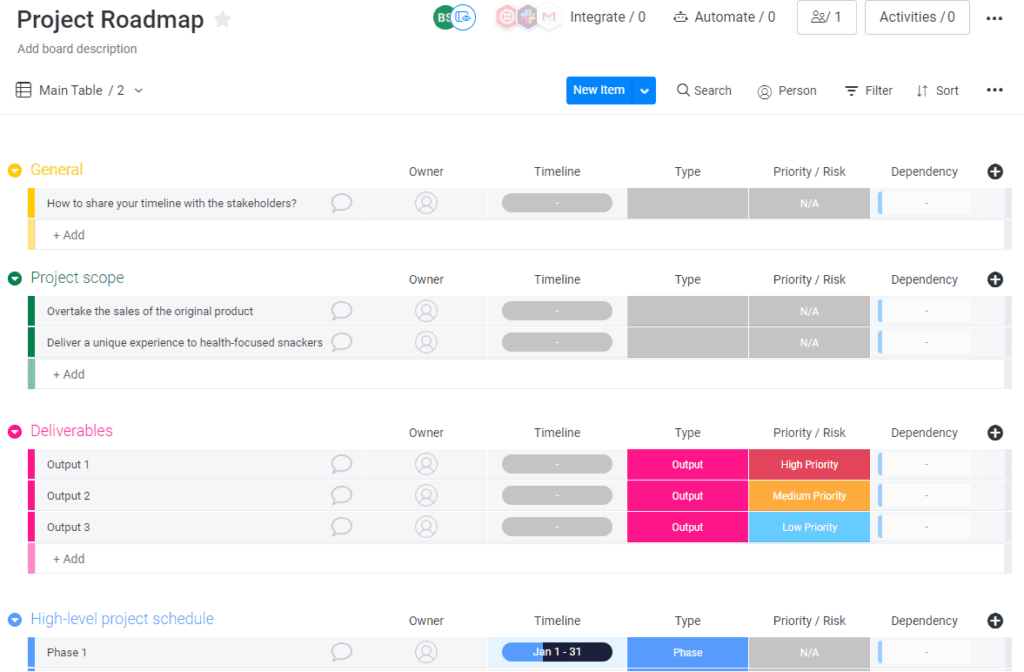
Presenting your roadmap to executives is your chance to tell a compelling story and secure their confidence. PMI research shows that professionals who combine project management skills with business acumen achieve significantly higher project success rates. Here’s how to make it count:
- Start with the “why”: Immediately connect the project to the company’s strategic goals. Explain the problem it solves or the opportunity it captures.
- Keep it high-level: Executives care about outcomes, not assignments. Focus on major milestones, key deliverables, and the expected business impact.
- Be visual: Use a clean, easy-to-read format like a Gantt chart or timeline view. Visuals make complex information digestible at a glance.
- Address the risks: Briefly mention potential risks and your mitigation plan. This shows you’ve done your homework and builds trust with your stakeholders.
- Be prepared for questions: Have the details ready, but don’t lead with them. Use your project plan as a backup for any deep-dive questions.
Build and manage your project roadmap with monday.com
A project roadmap is most effective when it stays connected to the work that brings it to life. monday.com’s AI Work Platform gives teams a flexible environment where planning and execution sit side by side, making it easier to keep roadmaps accurate, collaborative, and ready for change.
Core planning and visualization features

The platform supports every stage of roadmap creation and maintenance:
- Visual planning: Timeline View, Gantt chart visuals, and Calendar View let you map phases, milestones, and dependencies in a format anyone can understand at a glance.
- Real-time updates: When teams update items, statuses, or owners, your roadmap reflects those changes automatically. You never have to chase down the latest version.
- Automations that reduce manual work: Simple rules keep dates aligned, notify stakeholders of important shifts, and help maintain consistency across multiple workstreams.
- Dashboards for leadership visibility: Customizable dashboards turn roadmap-level data into insights on progress, risks, and resource allocation, giving leaders a view of the full picture without needing a deep dive.
AI-powered roadmap management
monday.com brings AI directly into the roadmap workflow, helping teams move faster and catch risks before they escalate:
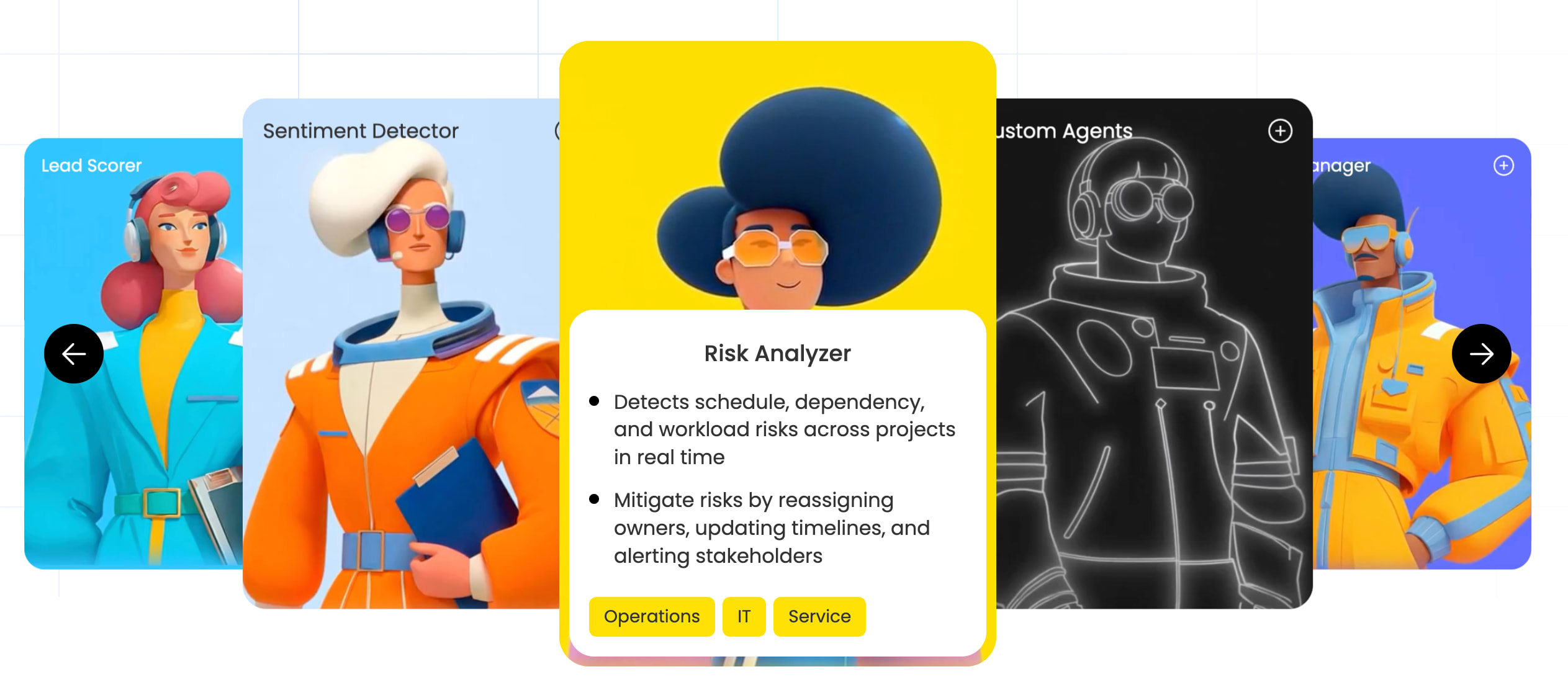
- monday agents: Purpose-built AI agents handle routine project management work automatically. The Status Reporter generates project status updates for stakeholders, summarizing progress, risks, and blockers without manual effort. The Risk Analyzer proactively flags deadline, dependency, and workload risks across your roadmap so you can act before small issues become large ones.
- monday vibe: An AI-powered app builder that lets teams create custom roadmap visualizations, OKR dashboards, or milestone trackers from a simple prompt. No code required, and it’s available on all plans with AI activated.
- monday MCP: Connects AI assistants like Claude or ChatGPT to your monday.com workspace using the Model Context Protocol. This enables sprint summaries, cross-board visibility, and automated project reporting directly from the AI assistant you already use.
- AI Blocks: Pre-built AI functions you can drop into any workflow to automate categorization, status summarization, and risk detection across roadmap items.
Roadmap types built on the platform
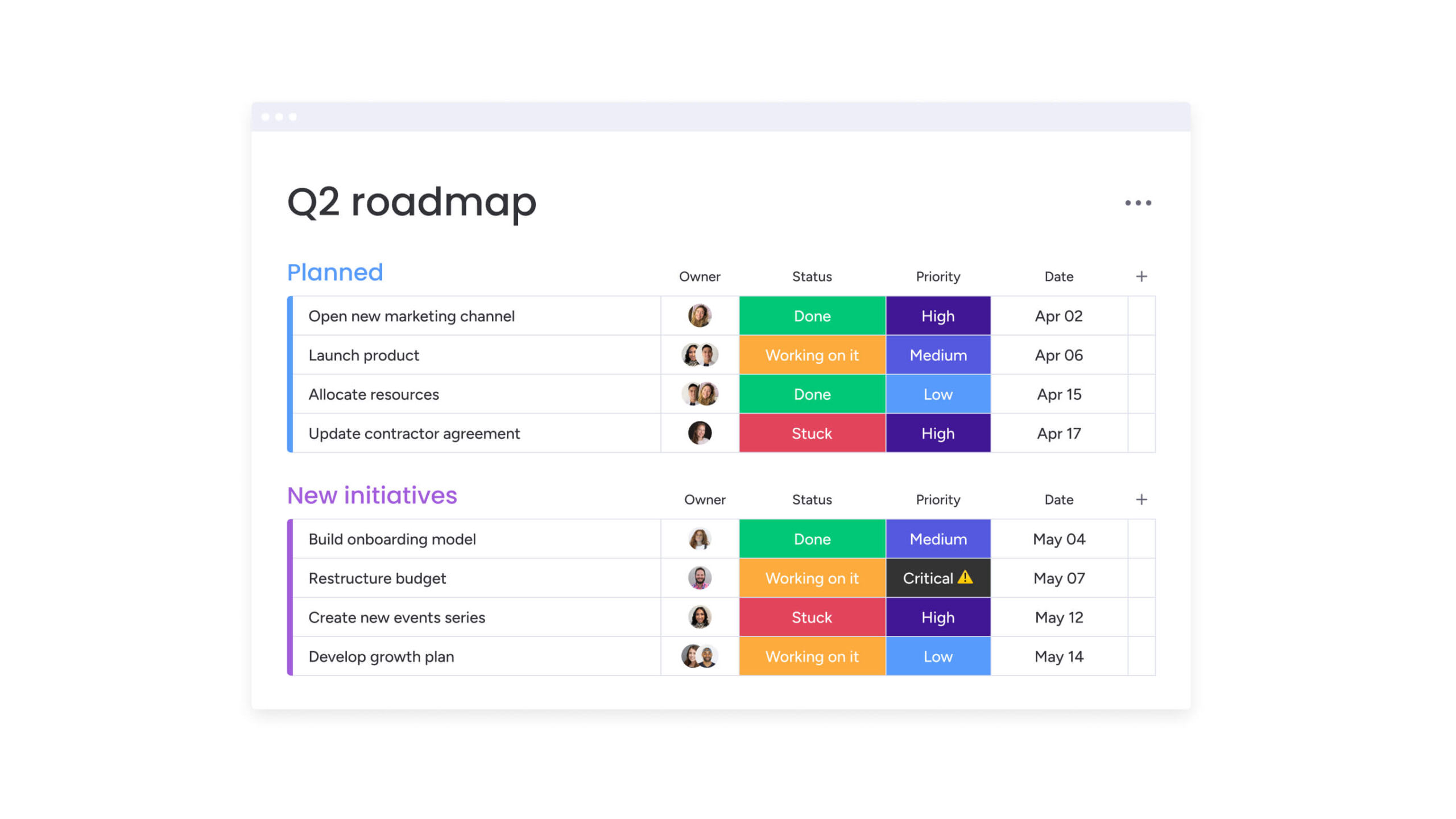
Because no two projects are alike, monday.com gives you the freedom to shape the roadmap format that fits your needs:
- Agile project roadmap: Ideal for sprint-based teams who plan around themes and epics instead of rigid dates.
- Marketing campaign roadmap: Supports channel planning, asset timelines, and cross-functional collaboration.
- Strategic goals roadmap: Connects high-level objectives to the initiatives driving them forward.
- Portfolio roadmap: Consolidates multiple project roadmaps into a single, high-level view using a Portfolio Dashboard or the Project Portfolio Management Template.
Your roadmap is only as strong as the system behind it
A project roadmap should be a living, connected document, not a static slide that’s outdated by the time you present it. When your roadmap is tied to real workflows, updates happen automatically, risks surface early, and every stakeholder sees the same version of the truth.
Ready to turn your roadmap into a living source of alignment? monday.com’s AI Work Platform gives you the visual planning, real-time collaboration, and AI-powered insights to keep your roadmap accurate from kickoff to closeout.
Get startedFAQs
What is in a project roadmap?
A project roadmap typically includes goals, milestones, deliverables, a high-level timeline, dependencies, and ownership. These elements give teams and stakeholders a shared view of priorities and progress. Together, they create a strategic reference point that keeps everyone focused on what matters most without getting lost in task-level detail.
Is a roadmap the same as a Gantt chart?
No. A Gantt chart is a scheduling visualization that plots activities against a timeline; a project roadmap is a strategic overview of goals, phases, and milestones. A roadmap may include a Gantt view, but the two serve different purposes. Think of the Gantt chart as one possible way to visualize timing within the broader strategic context a roadmap provides.
What are the 5 stages of project planning?
Initiation, planning, execution, monitoring and controlling, and closure. These stages are often mapped as milestones on a project roadmap to track overall progress. Each stage represents a distinct shift in focus and helps teams understand where they are in the project lifecycle at any given moment.
What are the 7 steps of a project?
Define the goal, gather requirements, outline the scope, build the schedule, assign resources, execute the work, and close the project. Each step aligns with a phase or milestone on the roadmap. Following these steps in sequence helps ensure nothing critical gets skipped and that the project moves forward with clear direction.
How often should a project roadmap be reviewed?
Most teams review their roadmap monthly or at major project checkpoints. Agile teams may review at the start or end of each sprint to keep it accurate. The key is finding a cadence that catches changes early without creating unnecessary overhead for the team.
Can a project roadmap change after the project begins?
Yes. Roadmaps are living documents that should evolve as priorities shift, risks emerge, or timelines change. Adjusting the roadmap keeps stakeholders aligned with the most current information. A roadmap that never changes often signals a disconnect between planning and reality, not project stability.

 Get started