


If coming up with the perfect idea was as easy as putting your mind to it, everybody would be rich.
Unfortunately, that’s not how it works. But the creativity needed for problem solving isn’t some mystical muse you can summon by arranging your pencils in a peculiar shape either — no matter how awesome that sounds.
Instead, you can use techniques and tools to nudge your brain in the right direction. The humble mind map is perhaps the most fundamental of these ideation tools.
In this guide, we’ll explain what a mind map is, when it’s useful — in business, specifically — and how to create your own efficiently.
What is a mind map and when is it useful?
A mind map is a visual diagram that helps you organize or explore related ideas, categories, and concepts.
Many of you might remember it from school, breaking down our ecosystem and highlighting the relationships between different animals.
But don’t worry. That’s not the only use case. For example, you can use it to break down all the different potential factors that impact marketing in a company.
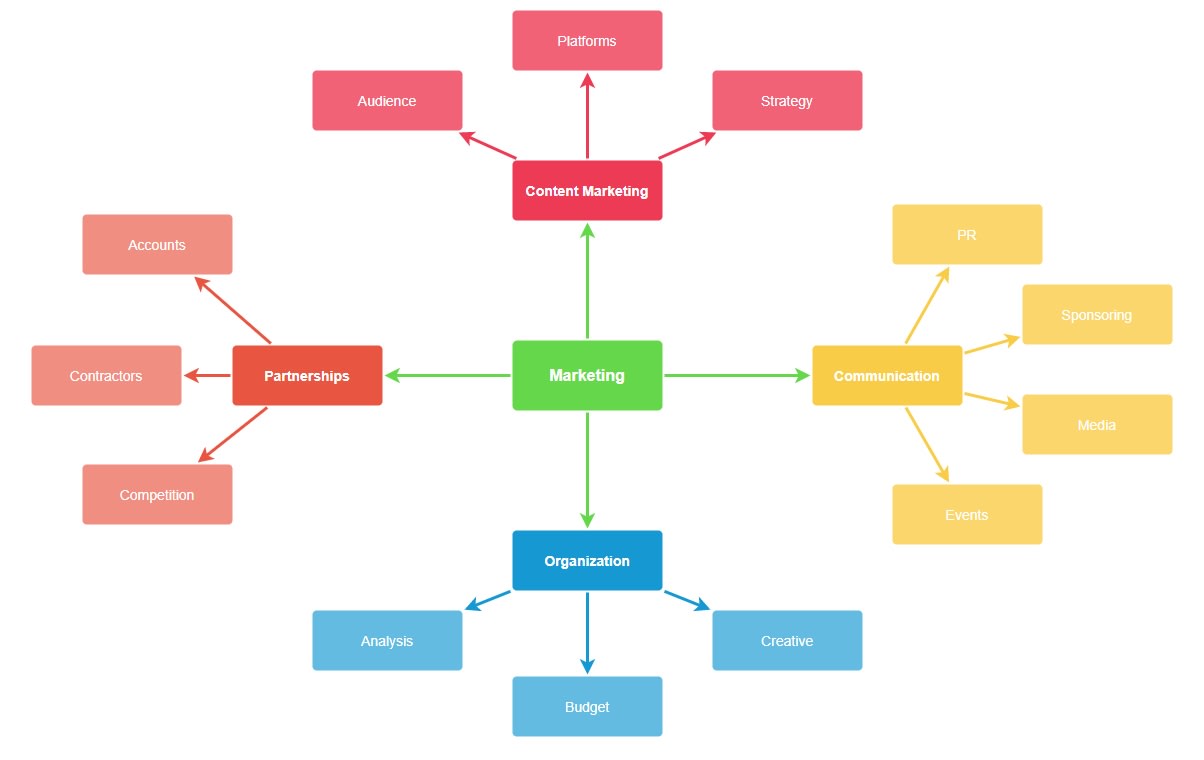
It takes the main topic, marketing, and breaks it down into some of the main focus areas of that business.
A mind map helps you grasp the bigger picture with a single glance. For example, imagine if I tried to list out all the items using an indented bullet list.
With a single category and only a few sub-items, it works.
- Marketing
- Content marketing
- Strategy
- Platforms
- Audience
- Content marketing
But imagine scaling this up to 10 categories, many with more subcategories than 3. Not only will it be a useless visual reference, but you can’t show the interrelationships between sections.
There’s a reason mind maps are the go-to for visualizing objects with tons of moving parts.
You can add pictures to highlight the different concepts and make the mind map even more effective. That helps your brain internalize all the moving parts much more efficiently.
Having all the moving parts on paper isn’t just useful for categorization. It can help you focus your thinking, make new connections, and come up with high-impact ideas.
Potential uses for mind maps
In a recent survey, 86% of respondents said mind mapping helped them tackle complex tasks they might otherwise have skipped.
A mind map is an excellent tool for visualizing all the moving pieces when you’re thinking about a larger problem.
Here are some examples of business use cases for mind maps:
- Reverse-engineering what areas to improve to meet a sales goal.
- Trying to understand all the factors that impact your target customers and their buying decisions.
- Trying to come up with the new “it” product or service in your industry.
- Solving business problems like new industry regulations, competitor price pressure, and more.
Other use cases for mind maps include:
- Figuring out a logical career path that factors in your skills, experience, and interests.
- Breaking down and planning a personal project step-by-step.
- Internalizing complex subjects that you initially struggled to understand.
The history of mind mapping as a teaching tool
English author and educational consultant Tony Buzan is credited with popularizing the mind mapping technique in the 1970s and beyond.
Here’s what his mind map identifying his achievements and life looks like, as highlighted on his websites.

This highlights the benefit of mind maps quite well. Without having to read 100s of words, a single glance gives you the highlights of Tony’s career.
The main selling point of the mind map in his day was education. He presented it as a more efficient way to use our brains to learn new information.
While that’s true to an extent, unfortunately, he used some bogus statistics and facts to promote his cause.
- He pushed the idea that humans only use 10% of their brains. He then claimed that mind maps somehow unlocked most of the other 90%. (The 10% capacity concept has been thoroughly debunked many times over the years.)
- He claimed that children start with a 98% capacity for learning. Then, it gradually decreases down to 10% when you’re an adult in an office job. (Completely made up numbers, although it may sound realistic if you’re uninspired at work.)
Luckily, his weird sales pitch doesn’t reduce the actual effectiveness of mind mapping.
Rigorous scientific research shows that mind maps work. For example, studies have shown that they help students learn and internalize new knowledge. Some research even suggests it helps with improving fundamental thinking skills.A 2020 study showed that mind maps helped 80% of students improve their questioning skills over 6 weeks.
Is it a magical fix for attaining superhuman brainpower? No. Can it help you learn more effectively? Yes, it can.
And at many companies, that’s still all it’s used for — not that that’s a bad thing, since it helps with learning.
Mind mapping for note-taking
Tony Buzan and his followers also swore by the effectiveness of using mind maps for taking notes when learning.
Instead of writing every word, you break down the topic into its main moving parts. The visualizing then helps you internalize the relationship between them.
But, if a mind map only worked for taking notes or teaching students, we wouldn’t be dedicating a whole 3,000-word guide to it. That’s only the beginning of its usefulness. Let’s explore how mind mapping can help in both business and life.
Mind maps beyond note-taking: making hard problems easier
Even though mind maps started as a memory or communication tool, they didn’t stop there.
Nowadays, many professionals rely on mind maps for ideation and brainstorming. They are the perfect vehicle for finding ideas when there are a lot of factors involved.
Flashback to the statistic that we mentioned earlier — more than 8 in 10 people find that mind maps help them solve complex tasks.
Finding new ideas utilizing a wide range of existing information
Mind mapping is a powerful instrument for finding ideas. It’s because of the same reasons that make it such a useful tool for learning.
You can clearly list, review, and internalize multiple factors and the relationship between them.
That makes mind mapping the perfect option when you need to make complex decisions.
That’s why the career center at Duke University recommends using mind maps. Deciding on a career path is a big decision with a lot of factors to consider.
Enter the mind map. It’s the best way to create a high-level overview of your life. If you just tried to write everything down on paper, you’d naturally create something similar.

Mind maps help people focus their thinking. They make everyone consider the whole picture when they’re coming up with new ideas.
With all your skills, experience, and interests visualized, it’s much easier to see which jobs fit. It creates a visual template for your brain to compare any ideas against.
And that’s what makes it so powerful for business problem solving as well. With all factors on the table, you can quickly dismiss lacking ideas.
Once you have a few preliminary ideas, you can also continue to explore them. For example, you can visually work out how to expand a solution to cover all the necessary areas.
Most popular applications of mind maps in business
According to a 2019 survey from the Mind Mapping Software blog, these are the most popular use cases for mind maps in companies:
- Knowledge management (69.2%)
- Creative problem solving (58.6%)
- Strategic planning (53.4%)
- To-do list (48.1%)
- Project management (47.4%)
- Capture ideas/group brainstorming (42.9%)
- Writing reports/outlining content (41.4%)
- Decision making (39.1%)
- Give presentations (38.3%)
- Taking meeting notes (37.6%)
This list shows the true versatility of mind maps.
Keeping and storing essential ideas was the top use case, as might be expected. It’s also a part of the creative workflow.
But around half of all companies also used it for strategic planning and even project management.
When used right, mind maps can help boost productivity throughout multiple areas of your business.
Mind maps and business productivity
The survey showed that using mind mapping software increased productivity.

It also helped managers and executives reach clarity on crucial business issues faster.
In the modern marketplace, speed is everything. Even slow and reliable tortoises are expected to keep up with the latest developments.
If you’re still not sold on mind mapping, let’s see how it stacks up against other ideation techniques.
Mind mapping vs. other brainstorming techniques
Of course, mind mapping isn’t the only technique for coming up with new ideas. Let’s take a closer look at some of the most popular techniques teams use to help innovate.
Free-format brainstorming
The first technique — if you can call it that — is a free format brainstorming session.
Someone writes down a problem on the whiteboard — or Zoom screen — and off everyone goes.
Studies have shown that unstructured brainstorming — or round-robin brainstorming — where everyone discusses the problem collectively from the beginning can lead to fewer, less diverse, lower-quality ideas than when people write their own.
Why? As soon as someone voices an idea, that affects everyone else. It makes people less likely to follow original trains of thought.
The final result: fewer, more similar ideas. Not exactly a technique to write home about.
Brainwriting and rapid ideation
It’s easy for perfectly good ideas to get lost as dominant personalities push theirs through.
To solve the main issue with brainstorming, psychologists and consultants have found 2 concepts: brainwriting and rapid ideation.
In Brainwriting, you pose the problem or question to everyone separately. Everyone writes down their ideas before meeting for a brainstorming session.
Rapid ideation is when brainwriting happens during the first few minutes of a meeting. Everyone writes their ideas down on the spot. After this initial silent, individual brainstorming, you talk to the group.
Both methods have their merits, but they’re not mutually exclusive with mind mapping.
The advantages of mind mapping
Compared to basic brainstorming techniques, mind mapping offers a few unique advantages.
Some of these advantages include:
- Mind maps clarify the relationship between moving parts.
- They lead to a more diverse set of ideas — with the right starting framework.
- The visual diagram helps with retention and prioritization.
Even if you use mind maps, you can still get the research-backed benefits of letting everyone write their ideas down first.
This gives you the added benefit of clearly representing everyone’s ideas during a brainstorming session.
Adding a mind-map also helps you adhere to 3 of the 7 Ideo rules of brainstorming. (If you don’t know Ideo, they’re the innovators behind the latest design thinking revolution.)
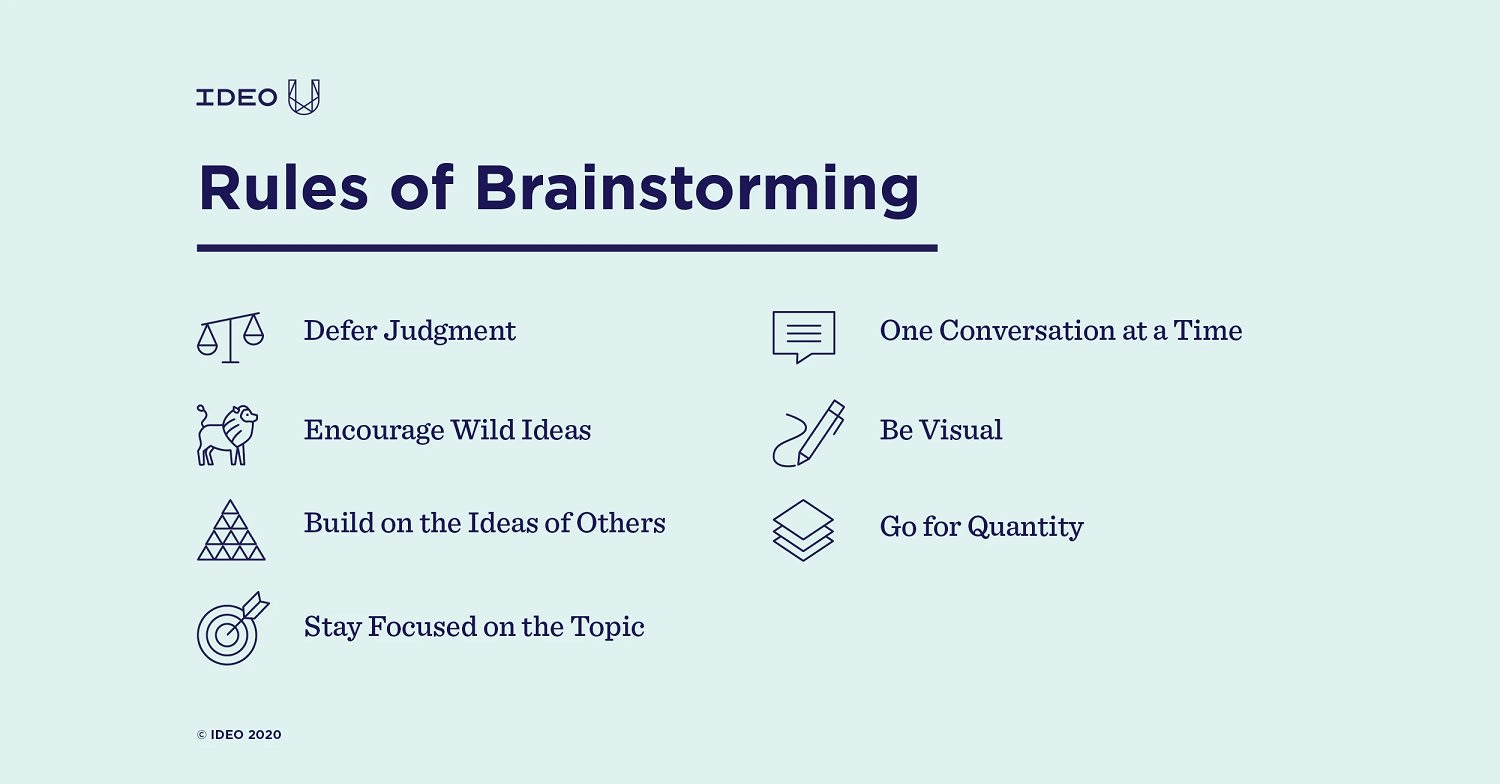
Mind mapping ensures the session is visual, that you can build on other ideas and stay focused on the topic at hand.
Having a process in place that helps your teams work together to generate better ideas is essential for workplace collaboration.
How do you create a mind map that suits your purpose?
When you’re creating your mind map, you must consider your objectives and reflect them in the main ideas.
Whether or not you are collaborating with other people will also play a part in the setup.
But let’s start with the basics first.
What 3 things must a mind map have?
Your mind map won’t get anywhere unless it includes your central idea or problem, different branches — potential solutions or problem areas — and their relationships.

In this simple 3-level mind map example, you divide the main idea into problem areas, and finally, list potential solutions.
Even if you break it down into more levels, the core building blocks are the same. You just keep adding branches to the main trunk.
You can also expand the mind map with images to help visualize the different moving parts at a glance.
Tips for using mind maps for problem solving
- Begin with the main problem and break it down into larger moving parts.
- Keep things high-level — concepts or broad categories — to allow free-flowing ideas.
- Once you have the fundamental structure covered, start exploring potential solutions.
- With multiple participants, letting everyone prepare ideas in advance before starting the discussion can lead to more diverse and better ideas.
For example, if you have an underperforming campaign, the bare minimum categories or problem areas would be targeting and creative.
From there, you can add potential solutions or specific problems to each area.

If you’re looking to boost performance in a marketing campaign, these broad ideas aren’t enough, of course. But they’re a starting point.
If you get a lot of ideas, you can either create a list and vote on what to follow up on or create a prioritized list.
If you are working with fewer ideas, you could create a subset of mind maps for the individual solutions to test that they hold water.
If your team includes remote workers, you can use a digital mind mapping tool instead of a whiteboard.
How monday.com can help you finalize your ideas and make your project a reality
In a connected world where many teams are distributed or even remote, a physical whiteboard doesn’t always cut it.
With monday.com, you can introduce mind maps in a way that engages your whole team. Go beyond the initial brainstorming, plan specifics, and turn the project into a reality.
Use our virtual whiteboard to collaborate on a mind map in real-time.
With our virtual whiteboard app, your team can easily collaborate on a rough whiteboard in real-time.
You can draw and drag shapes, write out text, and even add pictures in live collaboration.
You’ll be able to actively brainstorm and interact with your team while on a Zoom or Skype call.

The resulting mind map is saved automatically in the cloud, and you can easily export text to other boards.
Of course, mind mapping is just one technique you need to make your ideas a reality. You can also create rough wireframes or run hypothetical tests on ideas.
Once you’ve discovered a few initial ideas, you need to figure out which ones to take to the next level.
Luckily, monday.com gives you the perfect option for storing and evaluating your ideas as well.
Evaluate the quality of ideas using a Kanban board.
With the Kanban view, you can easily create an idea board to store, categorize, and review your ideas.
Add unique categories and color-code the board to suit your team’s preferences.
With a reliable process like this, you ensure the quality of ideas. You also guarantee that you have considered all options fairly.

Everything that you don’t write down or record will get forgotten over the long term.
Once you narrow the list of potential ideas down to only the usable ones, you can send them over for final approval from managers or executives.
Start breaking down the project into milestones and high-level deliverables.
monday.com isn’t a limited mind mapping tool or ideas platform. It’s a Work OS that enables you to create the project management platform your company needs.
You can use our project proposal template to break down the idea into actual milestones and deliverables.

The scope and timeline depend on the size of the problem you’re trying to solve. Optimizing a campaign might only take a few weeks. Rebuilding a process from the ground up can take months or even years.
In other words, plan accordingly.
Implement standardized workflows with customized templates and integrations.
Once you take the project live, the best way to keep things under is to standardize the entire process.
To do this, you can:
- Customize workflow boards to represent your unique process.
- Use our native integrations to make sure everyone — even across departments — is on the same page.
For example, you can send automated Slack messages based on item status changes. Or you can connect work items with issues in Zendesk or Jira.
Use a real-time dashboard to track progress.
Once a project is beyond the ideation stage, it’s like a child who leaves home for the first time — hard to keep track of.
That’s why monday.com lets you build custom dashboards that track multiple project boards at once.
You can highlight the metrics, KPIs, and schedules that matter the most to you.

With custom widgets, you can build an interface that shows only the data that you want. You can also add elements that include live data from third-party sources.
Real-time data will help you make the right calls at the right time.
A mind map is only the beginning
A mind map isn’t just a technique for taking notes or a diagram of related things. It’s a powerful tool for developing and refining ideas.
You can use our interactive whiteboard app to start mind mapping remotely today. But that’s only the first step of the journey.
If you’re using the mind map in the hopes of bringing an ambitious project to life, monday.com can help you manage the ideas and turn them into something real.
With the right platform, you can boost your productivity and ensure that more ideas see the light of day.
 Get started