


The average knowledge worker spends most of their day on status updates, chasing approvals, switching between apps, and manually copying data from one tool to another. That’s more than half of every workday lost to tasks that don’t move real projects forward. Time-saving apps exist specifically to reclaim those hours, giving teams a way to automate the repetitive, organize the chaotic, and focus on work that actually matters.
The problem isn’t that people are lazy or disorganized. It’s that modern work involves too many disconnected tools, too many meetings, and too little structure around how tasks flow from start to finish. Microsoft’s Work Trend Index found that employees using Microsoft 365 are interrupted every two minutes by a meeting, email, or notification. A well-chosen productivity app doesn’t add complexity. It removes it. The right tool handles your scheduling, tracks your hours, automates your follow-ups, or blocks out distractions so you can do deep work without interruption.
Whether you’re a freelancer tracking billable hours or a team lead coordinating dozens of moving pieces, the apps on this list address specific time drains that slow you down. Here’s what’s worth your attention in 2026, broken down by category so you can find the right fit fast.
Key takeaways
- The best time-saving apps target specific productivity gaps (time tracking, task management, automation, scheduling, or focus) rather than trying to do everything at once
- AI-powered scheduling and automation tools have matured significantly in 2026, making it possible to eliminate hours of manual calendar management and repetitive workflows
- monday AI Workspace combines project management, time tracking, automations, and AI assistance in a single workspace, reducing the need to juggle multiple apps
- Free tiers from tools like Clockify, Todoist, and Forest provide solid functionality for individuals, while paid plans unlock collaboration features teams need
- Choosing the right app depends on your biggest time drain: tracking where hours go, organizing tasks, automating handoffs, or staying focused during deep work
What are time-saving apps and why do they matter?
Time-saving apps are software tools designed to reduce or eliminate the manual effort involved in common work tasks. They cover a broad range of functions, from tracking how you spend your hours to automating entire workflows that would otherwise require human intervention at every step. The category includes time trackers that log billable hours, task managers that keep projects organized, automation platforms that move data between apps without manual copying, scheduling tools that handle calendar logistics, focus apps that block distractions, and AI assistants that draft content or summarize long threads in seconds.
What makes these tools genuinely useful, rather than another piece of software to manage, is their ability to remove friction from work that’s already happening. A time tracker doesn’t create extra work; it captures data you’d otherwise lose. An automation tool doesn’t add steps; it eliminates ones you were doing manually. The distinction matters because the best productivity tools are the ones you barely notice using.
The broader shift in 2026 is toward tools that don’t require you to change how you work. Instead, they adapt to your existing processes and quietly handle the administrative overhead. Teams that adopt even two or three of the right apps can recover several hours per week, and that time goes directly toward productivity strategies that help teams work smarter. The compounding effect over months is substantial, especially for teams where coordination costs are high, and every manual handoff introduces the risk of delays or errors.
For a fuller roundup across every category — time tracking, task management, automation, and focus — see this guide to the best time saving apps for 2026.
The best time-saving apps for 2026
The apps below span every major productivity category: time tracking, task management, automation, scheduling, and focus. Each one addresses a specific type of time waste, and most offer free tiers or trials so you can test before committing. Here’s how they compare at a glance before we dive into the detailed reviews.
| App | Best for | Key feature | Starting price | Rating |
|---|---|---|---|---|
| Toggl Track | Freelancer time tracking | One-click timer with browser extension | Free (paid from $9/user/mo) | 4.7/5 |
| Clockify | Unlimited free time tracking | Unlimited users on free plan | Free (paid from $3.99/user/mo) | 4.7/5 |
| monday AI Work Platform | All-in-one project and work management | AI-powered automations and 27+ project views | Free (paid from $9/seat/mo) | 4.6/5 |
| Todoist | Personal task management | Natural language task input | Free (paid from $4/mo) | 4.6/5 |
| Notion | Flexible docs and knowledge bases | All-in-one workspace with databases | Free (paid from $8/user/mo) | 4.7/5 |
| Asana | Team project coordination | Multiple project views with dependencies | Free (paid from $10.99/user/mo) | 4.5/5 |
| Zapier | No-code app automation | 7,000+ app integrations | Free (paid from $19.99/mo) | 4.5/5 |
| Reclaim | AI calendar management | Smart scheduling around priorities | Free (paid from $8/user/mo) | 4.8/5 |
| Forest | Focus and distraction blocking | Gamified focus timer with virtual trees | Free (paid from $3.99) | 4.5/5 |
| RescueTime | Automatic activity tracking | Passive time tracking across all apps | Free (paid from $12/mo) | 4.4/5 |
Best time tracking apps
Time tracking apps solve a simple but critical problem: you can’t improve how you spend your time if you don’t know where it’s going. These tools automatically or manually log hours across projects, clients, and tasks, giving you concrete data instead of guesswork. For freelancers, they’re essential for accurate billing. For teams, they reveal bottlenecks and help with capacity planning.
Toggl Track
Toggl Track has been a reliable name in time tracking for years, and it’s stayed relevant by keeping things simple. The core experience revolves around a one-click timer that runs in your browser, desktop app, or phone. You start it when you begin a task and stop it when you’re done, with no complicated setup required.

- One-click timer: Start and stop tracking from any device or browser extension without navigating away from your work
- Project and client tagging: Organize tracked time by project, client, or custom tags to generate clean reports for billing or internal review
- Detailed reporting: Visual breakdowns show where your hours go, with exportable reports for invoicing or team analysis
- Calendar integration: Syncs with Google Calendar and Outlook to pre-fill time entries from scheduled events
Pricing: Free for up to five users. Starter plan begins at $9/user/month.
Pro: Extremely low learning curve, and most people are tracking time within minutes of signing up.
Con: Advanced features like project budgets and scheduled reports require the paid plan.
Best for: Freelancers and small teams who need straightforward, reliable time tracking without complexity.
Clockify
Clockify stands out for one reason that matters to budget-conscious teams: its free plan supports unlimited users with no restrictions on tracking. You can run a 50-person team on Clockify’s free tier and still get time tracking, basic reporting, and project breakdowns. That’s genuinely unusual in this category.

- Unlimited free tracking: No cap on users, projects, or tracked hours on the free plan, which is rare among time tracking tools
- Timesheet view: Weekly timesheet layout makes bulk entry fast for teams who prefer logging time at the end of each day
- Billable rates: Set hourly rates per project or team member and generate invoicing-ready reports directly from tracked data.
- Kiosk mode: Shared device time tracking for on-site teams, warehouses, or agencies with rotating staff.
Pricing: Free for unlimited users. Pro plan starts at $3.99/user/month.
Pro: The most generous free plan in the time tracking category, making it hard to outgrow for basic needs.
Con: The interface feels utilitarian compared to competitors, and some workflow features require paid upgrades.
Best for: Teams of any size that want comprehensive time tracking without paying per seat.
Best task and project management apps
Task management apps bring order to scattered to-do lists, email threads, and sticky notes. Project management tools take that further by adding timelines, dependencies, and team coordination. The three apps below approach organization differently, but each one eliminates the time you’d spend figuring out what to work on next, who’s responsible for what, and whether deadlines are on track. If you’re looking for the best organizational apps, these belong on your shortlist.
Todoist
Todoist has refined personal task management into something genuinely effortless. Its natural language input lets you type “Submit report Friday p1 #work” and it’ll create a high-priority task due Friday in your Work project, with no clicking through dropdown menus. For individuals managing their own workload, it’s one of the fastest paths from thought to organized task.

- Natural language input: Type tasks the way you think about them, and Todoist parses dates, priorities, and projects automatically
- Karma system: Gamified productivity scoring motivates consistent task completion without feeling like a chore
- Cross-platform sync: Available on every major platform with near-instant syncing across devices
Pricing: Free for up to five active projects. Pro plan starts at $4/month.
Pro: The fastest task capture experience available, letting you add and organize tasks in seconds.
Con: Limited collaboration features make it better for individuals than teams managing shared projects.
Best for: Individuals and solopreneurs who need a fast, reliable personal task manager.
Notion
Notion blurs the line between task management, documentation, and knowledge management. It’s a workspace where you can build project trackers, wikis, meeting notes databases, and content calendars using the same set of flexible building blocks. That flexibility is its greatest strength and its biggest learning curve.

- Flexible databases: Build custom views (tables, boards, calendars, galleries) from the same underlying data, switching perspectives without duplicating information
- Templates ecosystem: Thousands of community and official templates let you skip setup for common use cases like sprint planning or content calendars
- Embedded content: Pull in files, videos, code blocks, and third-party embeds directly into pages for a single source of truth
Pricing: Free for individuals. Plus plan starts at $8/user/month.
Pro: Incredibly versatile and able to replace several standalone tools if you invest time in setup.
Con: The blank-canvas approach can overwhelm new users who want something that works out of the box.
Best for: Teams that value customization and want to consolidate docs, tasks, and wikis in one place.
Asana
Asana focuses on team project coordination with clear ownership, deadlines, and dependencies. Where Todoist excels at personal tasks, and Notion excels at flexible documentation, Asana excels at making sure everyone on a team knows exactly what they’re responsible for and when it’s due. Understanding the features of a great productivity app helps you see why tools like Asana emphasize clarity over customization.
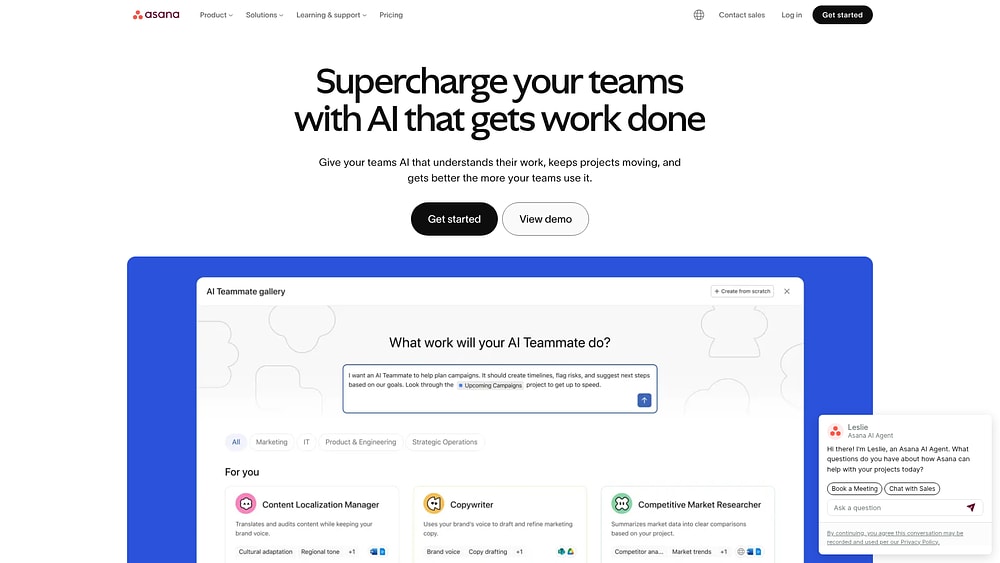
- Multiple project views: Switch between list, board, timeline, and calendar views to see work from different angles
- Task dependencies: Define which tasks must finish before others can start, preventing bottlenecks and confusion
- Workload management: Visual capacity tracking shows who’s overloaded and who has bandwidth for more work
Pricing: Free for up to 10 users. Starter plan begins at $10.99/user/month.
Pro: Strong project coordination features with clear task ownership and deadline tracking.
Con: The free plan is limited, and advanced features like timeline and workload views require premium tiers.
Best for: Mid-size teams that need structured project management with accountability and visibility.
Best automation and workflow apps
Automation apps eliminate repetitive manual tasks by connecting your tools and creating workflows that run without human intervention. Every time you copy data from a form into a spreadsheet, forward an email to a Slack channel, or update a CRM after a meeting, an automation tool could be doing it for you. The time savings compound quickly; a single automation that saves five minutes per day recovers over 20 hours per year.
Zapier
Zapier connects over 7,000 apps through automated workflows called “Zaps.” Each Zap follows a trigger-action pattern: when something happens in one app (a new form submission, for example), Zapier automatically does something in another app (creates a task, sends an email, updates a row). No coding required.

- 7,000+ integrations: The largest app library in the automation space, covering everything from niche CRMs to major enterprise tools
- Multi-step Zaps: Chain multiple actions from a single trigger, so one event can update several tools simultaneously
- Conditional logic: Add filters and paths to Zaps so different outcomes trigger different actions based on your rules
Pricing: Free for 100 tasks/month. Starter plan begins at $19.99/month.
Pro: Unmatched breadth of integrations. If two apps exist, Zapier probably connects them.
Con: Costs escalate quickly for teams with high-volume automations, and complex Zaps can be tricky to debug.
Best for: Teams that use many different tools and want to automate data flow between them without development resources.
Make
Make (formerly Integromat) takes a more visual approach to automation than Zapier. Its drag-and-drop scenario builder lets you map out complex workflows with branching logic, loops, and error handling in a flowchart-style interface. For automations that go beyond simple trigger-action pairs, Make provides more control and often costs less at scale.

- Visual scenario builder: Design workflows as visual flowcharts, making complex multi-step automations easier to understand and maintain
- Data transformation: Built-in functions for parsing, formatting, and transforming data between apps without external tools
- Error handling: Set up automatic retry logic and fallback paths so failed operations don’t break entire workflows
Pricing: Free for 1,000 operations/month. Core plan starts at $9/month.
Pro: More affordable than Zapier at higher volumes, with more powerful data manipulation capabilities.
Con: Steeper learning curve than Zapier because the visual builder is powerful but takes time to master.
Best for: Technical teams and power users who need complex, high-volume automations with detailed control over data flow.
Best calendar and scheduling apps
Calendar management eats up more time than most people realize. Between finding meeting slots, defending focus time, rescheduling conflicts, and balancing priorities across the week, the average professional spends hours each week on calendar logistics alone. AI-powered scheduling tools are changing this by automatically organizing your calendar around your priorities, protecting blocks for deep work, and resolving conflicts without manual intervention.
Reclaim
Reclaim uses AI to automatically find the best times for your habits, tasks, and meetings based on your priorities. You tell it what matters (two hours of focus time every morning, a weekly team sync, lunch at noon) and it arranges your calendar around those constraints. When conflicts arise, Reclaim automatically reschedules lower-priority items.

- Smart scheduling: AI analyzes your calendar patterns and priorities to place tasks and habits at optimal times
- Habit tracking: Recurring routines like exercise, planning time, or lunch get automatically scheduled and defended
- Scheduling links: Share availability links that respect your priorities and focus blocks, unlike basic calendar booking tools
- Team integration: Syncs across team calendars to find meeting times that work for everyone without email ping-pong
Pricing: Free for basic features. Starter plan begins at $8/user/month.
Pro: Set-and-forget scheduling that genuinely reduces the time you spend managing your calendar.
Con: Requires Google Calendar, with no support for Outlook or other calendar providers on the free plan.
Best for: Busy professionals who want AI to handle calendar optimization and protect their focus time.
Motion
Motion combines task management and calendar scheduling into a single AI-driven tool. You add tasks with deadlines and estimated durations, and Motion automatically schedules them into your calendar around existing commitments. When priorities shift or new meetings appear, it reschedules everything to keep you on track.

- Auto-scheduling: Tasks are automatically placed on your calendar based on deadline, priority, and available time slots
- Dynamic rescheduling: When something changes, Motion recalculates your entire schedule to accommodate the shift
- Meeting booking: Built-in scheduling pages eliminate back-and-forth emails for finding meeting times
Pricing: Individual plan starts at $19/month. Team plan from $12/user/month.
Pro: The most aggressive approach to AI scheduling. It truly manages your day, not your calendar alone.
Con: No free tier, and the opinionated scheduling approach doesn’t suit everyone’s work style.
Best for: Individuals and small teams who want their entire day automatically planned and optimized.
Best focus and productivity apps
Even with perfect task management and automation, productivity falls apart when you can’t focus. Distraction is the silent time killer: a quick social media check becomes 20 minutes, a notification pulls you out of deep work, and context-switching between tasks fragments your attention throughout the day. Focus apps attack this problem directly by blocking distractions and helping you build better concentration habits. Pairing these tools with strategies for working smarter amplifies their impact.
Forest
Forest uses a clever gamification approach to keep you off your phone. When you want to focus, you plant a virtual tree that grows as long as you stay away from your device. Leave the app, and the tree dies. Over time, you build a virtual forest that represents your cumulative focus time.

- Gamified focus timer: The growing tree mechanic creates a small but effective psychological incentive to stay focused
- Real tree planting: Forest partners with Trees for the Future to plant real trees when you spend in-app currency earned through focus sessions
- Friend challenges: Plant trees together with colleagues or friends for shared accountability during focus periods
Pricing: Free on Android with ads. One-time purchase of $3.99 on iOS.
Pro: Simple, fun, and surprisingly effective at reducing phone-based distractions.
Con: Only addresses phone distractions and doesn’t block desktop notifications or website access.
Best for: Anyone who struggles with phone-based distractions during work or study sessions.
RescueTime
RescueTime takes a passive approach to productivity tracking. It runs in the background on your computer and phone, automatically categorizing the time you spend across apps and websites. You don’t need to start timers or log anything. It quietly builds a detailed picture of how you actually spend your digital time.

- Automatic tracking: Passively monitors app and website usage without requiring any manual input or timer management
- Productivity scoring: Categorizes activities as productive, neutral, or distracting and generates a daily productivity score
- Focus sessions: Block distracting websites and apps during scheduled focus periods to enforce deep work
Pricing: Free lite version available. Premium starts at $12/month.
Pro: Zero-effort tracking that reveals patterns you’d never notice through manual time logging.
Con: Privacy concerns for some users, since the tool monitors all digital activity on installed devices.
Best for: Individuals who want data-driven insight into their digital habits and productivity patterns.
How to choose the right time-saving app
With dozens of productivity tools available, picking the right one comes down to understanding your specific time drains and matching them to the right solution. A tool that’s perfect for a freelancer managing client hours won’t necessarily help a marketing team coordinate campaign launches. Here are the key criteria to evaluate before committing to any app. For a deeper dive, check out this full guide to productivity apps.
- Identify your biggest time drain first: Before browsing features, pinpoint where you lose the most time. Is it tracking billable hours? Coordinating with teammates? Switching between tools? Managing your calendar? The answer determines which category of app will deliver the most impact
- Evaluate the free tier honestly: Most apps offer free plans, but they vary enormously in what’s included. Clockify gives you unlimited free tracking, while other tools cap users or features at the free level. Make sure the free tier covers your actual needs, not a watered-down version of them
- Check integration compatibility: An app that doesn’t connect to your existing tools creates more work instead of reducing it. Verify that the app integrates with the email, calendar, communication, and storage tools your team already uses.
- Consider the learning curve: A powerful tool that takes weeks to configure may save less time than a simpler one you can start using today. Balance feature depth against how quickly your team can adopt the tool and actually use it consistently
- Think about scalability: If you’re a growing team, choose tools that scale with you. Per-user pricing models can become expensive quickly, and migrating to a new tool mid-growth is painful and time-consuming
- Prioritize tools that consolidate: Every additional app in your stack adds context-switching costs. When possible, choose platforms that handle multiple functions (task management, time tracking, automations, reporting) in a single interface rather than bolting together separate point solutions
How monday AI Workspace saves you time across every workflow

Most teams cobble together a stack of separate tools: one for project management, another for time tracking, a third for automations, and a fourth for reporting. Each tool solves one problem but creates another: context switching, data silos, inconsistent processes, and the ongoing cost of maintaining integrations between apps that weren’t designed to work together. monday AI Workspace takes a different approach by bringing all of these capabilities into a single workspace where everything connects natively.
On the automation front, monday AI Workspace no-code automation builder lets you create rules like “when a status changes to Done, notify the client and move the item to the archive” without writing a single line of code. Teams run over 250,000 automations every week on the platform, handling everything from task assignments to approval routing. These automations eliminate the manual handoffs that slow projects down and introduce human error.
Reporting and visibility happen through customizable dashboards that pull real-time data from any board on the platform. Instead of compiling weekly status reports manually, you build a dashboard once, and it stays current as your team works. Managers see project health, resource allocation, and timeline progress without asking anyone for an update. Combined with 850+ integrations (including Slack, Google Workspace, Jira, Salesforce, and HubSpot), data flows between monday.com and your existing tools automatically.
The platform’s AI capabilities extend this further. monday sidekick acts as an AI assistant that generates content, summarizes long update threads, builds complex formulas from plain-language descriptions, and extracts action items from meeting notes. monday agents go a step further by functioning as an AI workforce that handles routine tasks autonomously, from triaging incoming requests and categorizing support tickets to preparing weekly summaries without manual intervention. For teams that want custom internal tools, monday vibe provides a no-code app builder to create tailored solutions without developer involvement.
Practical time tracking is built directly into the platform through time tracking columns that attach to any board. Team members start and stop timers from within the tasks they’re working on, and the logged time feeds directly into dashboards and reports. No separate tracking app needed. With 27+ project views including Gantt charts, Kanban boards, timelines, calendars, and workload views, every team member can see work in the format that makes sense for their role. And with 200+ ready-made templates, new teams skip the setup phase entirely and start managing work from day one.
| Capability | monday AI Workspace | Separate tools approach |
|---|---|---|
| Project management | Built-in with 27+ views | Requires dedicated PM tool ($10-25/user/mo) |
| Time tracking | Native time tracking columns | Separate app + integration setup |
| Automations | No-code builder, 250K+ weekly automations | Third-party automation tool ($20-50/mo) |
| Dashboards and reporting | Real-time, customizable dashboards | Manual report compilation or BI tool |
| Integrations | 850+ native integrations | Custom integrations per tool pair |
| AI assistance | monday sidekick + monday agents | Separate AI tool subscriptions |
| Context switching | Single workspace for everything | Constant switching between 4-6 apps |
| Onboarding | 200+ templates, start immediately | Configure and integrate each tool separately |
Start saving time with the right tools today
The best time-saving apps don’t ask you to overhaul how you work. They fit into your existing processes and quietly eliminate the friction that steals hours from your week: manual data entry, calendar juggling, status update chasing, distraction spiraling. Whether you need a focused solution for one specific problem or a unified platform that handles project management, time tracking, automations, and AI assistance in one place, the tools on this list give you practical options for reclaiming your time in 2026.
Start by identifying your single biggest time drain, pick one tool from this list that directly addresses it, and give it a real two-week trial. The productivity gains compound faster than you’d expect once the right systems are in place.
The content in this article is provided for informational purposes only and, to the best of monday.com’s knowledge, the information provided in this article is accurate and up-to-date at the time of publication. That said, monday.com encourages readers to verify all information directly.
FAQs
What is the best free time management app?
Clockify offers the most generous free plan for time tracking with unlimited users and projects. For task management, Todoist’s free tier covers up to five active projects and works well for individuals managing personal productivity.
What is the difference between time tracking and time management apps?
Time tracking apps record how you spend your hours, giving you data on where your time goes. Time management apps go further by helping you plan, prioritize, and organize tasks to use your time more effectively.
Can AI help with time management?
Yes. AI-powered tools like Reclaim and Motion automatically schedule tasks and protect focus time based on your priorities. Platforms like monday AI Workspace use AI agents and assistants to automate routine work, generate content, and summarize updates, saving hours of manual effort each week.
How do I choose the right time-saving app?
Start by identifying your biggest time drain, whether it’s tracking hours, organizing tasks, automating handoffs, or managing your calendar. Then evaluate apps in that specific category based on your team size, budget, and integration needs.
Are time management apps worth it?
For most professionals, yes. Even a simple time tracking or task management app can recover several hours per week by reducing manual work and improving focus. The return on investment grows as teams scale and coordination overhead increases.
What features should a time-saving app have?
Look for integrations with your existing tools, an intuitive interface that doesn’t require extensive training, automation capabilities to handle repetitive tasks, and reporting features that show where your time goes. Cross-platform access and a functional free tier are also valuable for evaluating the tool before committing.