

Marketing campaigns involve multiple teams and parallel workflows: creative producing assets, digital building landing pages, PR coordinating announcements, and social managing content calendars. Without a clear visual plan, tracking who does what and when can quickly become overwhelming.
A marketing Gantt chart provides a visual timeline of every campaign task, showing ownership, start and end dates, and task dependencies. This unified view makes it easy to spot bottlenecks, coordinate handoffs, and keep campaigns on track without constant check-ins or scattered spreadsheets.
This guide explores what makes marketing Gantt charts unique, highlights the key components for execution, and walks through building a timeline that ensures campaigns launch successfully. Templates and examples for common campaigns are also covered, along with guidance on platforms that turn static charts into dynamic execution tools.
Key takeaways
- Visualize campaign tasks and dependencies: Marketing Gantt charts show who is responsible for each task, when work happens, and how activities connect across teams.
- Identify and manage the critical path: Tracking task sequences that determine launch dates helps prevent delays on essential work from derailing campaigns.
- Balance workloads and allocate resources effectively: Gantt charts reveal overbooked team members, enabling proactive adjustments to maintain sustainable output.
- Use reusable templates for consistent execution: Starting with structured templates for launches, content series, or multi-channel campaigns streamlines planning and ensures consistency.
- Leverage monday work management for dynamic coordination: Transform static charts into living timelines with real-time updates, workload visibility, and automated dependency tracking.
What is a marketing Gantt chart?
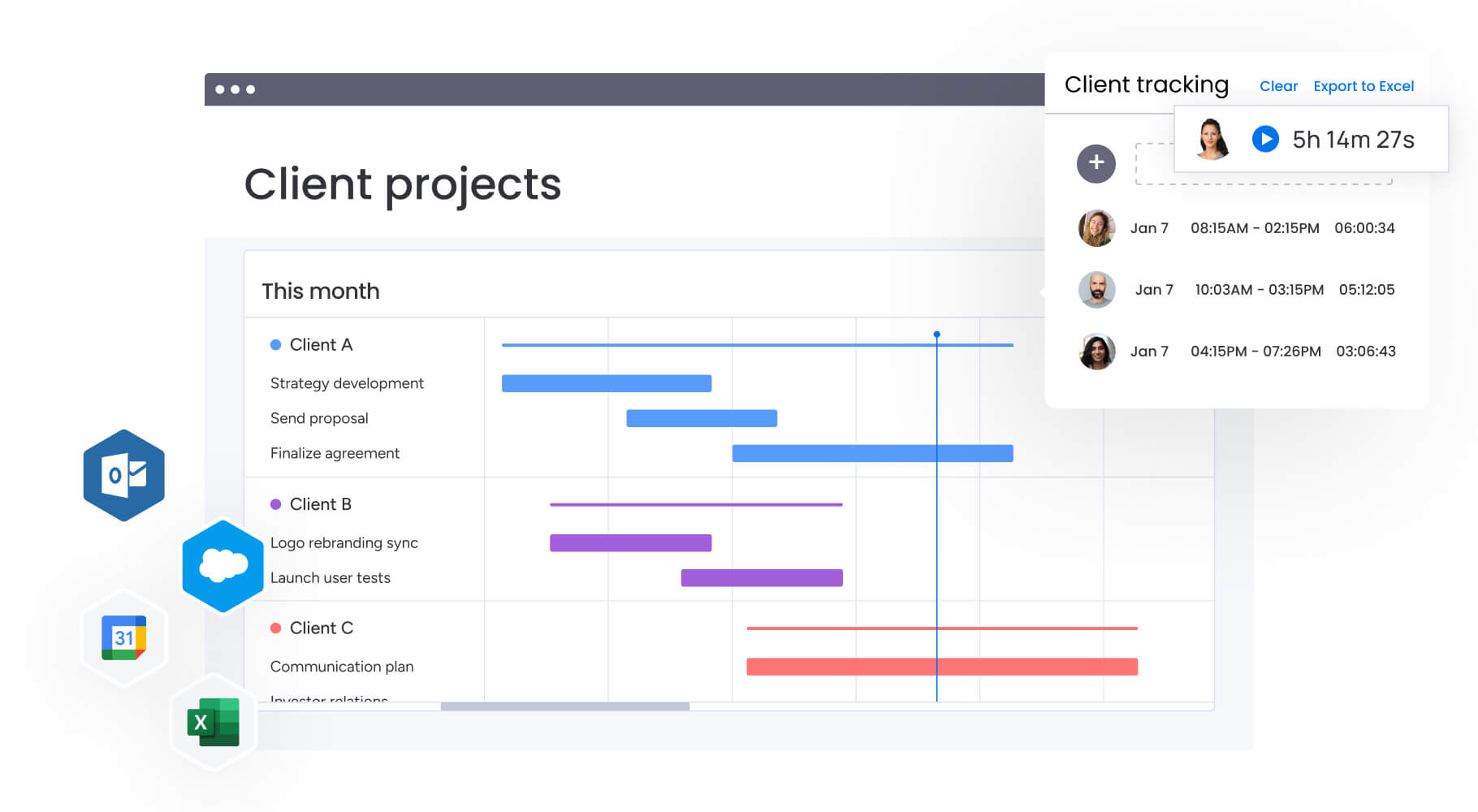
A marketing Gantt chart maps campaign workflows, dependencies, and resource assignments on a visual timeline. Teams can see who owns each activity, when work starts and ends, and how tasks connect across the campaign.
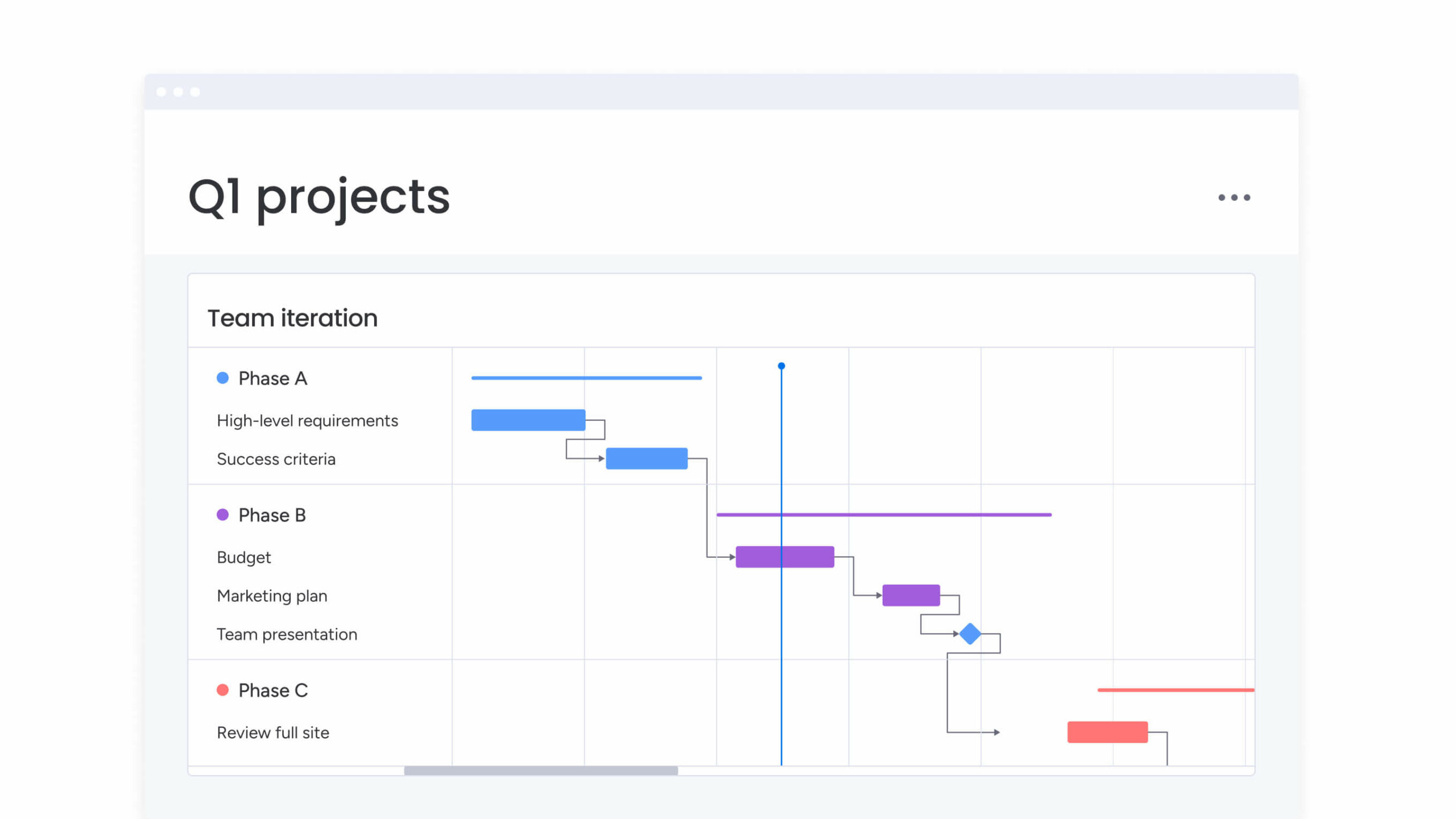
Picture the campaign laid out from left to right. Activities appear on the left, such as creating a landing page, launching an email sequence, or scheduling social posts. The timeline runs across the top. Horizontal bars show how long each activity takes, while connecting lines reveal dependencies. If email copy must be approved before design begins, the chart makes that relationship clear.
Marketing Gantt charts go beyond simple scheduling. They capture approval cycles, cross-channel coordination, and stakeholder handoffs that keep campaigns moving. Overlaps become easy to spot, such as video production running alongside media buying so assets are ready for launch.
Clear coordination matters because marketing execution still struggles with operational gaps. In fact, 71% of merchants say AI merchandising tools have limited impact, highlighting that software alone cannot close execution gaps without clearly defined dependencies and review cycles.
Marketing Gantt charts go beyond simple scheduling. They capture approval cycles, cross-channel coordination, and stakeholder handoffs that keep campaigns moving.
Why marketing teams need Gantt charts
Marketing campaigns rely on multiple teams working on connected deliverables. Creative teams produce assets while digital teams set up campaigns. PR coordinates announcements as social media schedules posts. When these parallel workflows run without a shared view, confusion and delays quickly follow.
Lack of coordination also creates operational friction. Research shows that marketing teams still spend 40% of their time on low-value work, such as reconciling siloed data and preparing performance reports. Clear workflows and defined ownership help teams reduce this overhead and focus on execution.
Visual campaign timeline management
A Gantt chart provides a single view of the entire campaign lifecycle. Influencer outreach, content creation, and other initiatives run in parallel, while gaps between asset delivery and launch become visible. This holistic view helps teams understand how individual workflows contribute to campaign goals.
Marketing leaders can identify quiet periods when the brand is inactive and adjust activities to maintain consistent visibility or amplify presence during key moments.
Resource allocation and workload balancing
Creative overload can occur when teams cannot see capacity. Gantt charts reveal when team members have overlapping deliverables. Managers can reassign workflows, engage freelancers, or adjust deadlines before bottlenecks occur.
This visual approach to capacity planning helps maintain quality output. Teams work at a sustainable pace with realistic deadlines, enabling proactive planning from start to finish.
Cross-channel dependency tracking
Campaigns succeed when all dependencies are visible. Paid ads cannot launch without the landing page, which requires approved copy that follows brand guidelines. Gantt charts make these connections clear.
Common dependency types marketing teams encounter include:
- Content production dependencies: Blog post must be approved before social media creates promotional snippets.
- Technical dependencies: Email automation must be tested before nurture sequence activates.
- Creative dependencies: Product photoshoot must complete before display ads enter design.
- Approval dependencies: Legal review must happen before any public-facing asset publishes.
7 essential components of a marketing Gantt chart
A marketing Gantt chart works best when it reflects actual workflows. Each component discussed below supports coordination across complex campaigns, helping teams track progress and deliver results.
Campaign tasks and deliverables
Actionable workflows form the foundation of the chart. These include specific deliverables like write three LinkedIn posts, QA checkout flow, or finalize press kit. Each workflow should be detailed enough to act on while remaining significant enough to track.
Marketing workflows often include attributes such as:
- Channel: Email, social, paid.
- Format: Video, PDF, HTML.
- Priority level: Critical path vs nice-to-have.
- Approval requirements: Legal, brand, stakeholder.
Timeline and duration bars
Duration bars show active work time and waiting periods. A stakeholder review might take thirty minutes of actual time but three days on the calendar. Gantt charts display that full window to keep schedules realistic.
This visibility highlights the critical path — the workflows that determine the minimum campaign timeline. Delaying a critical path workflow delays the entire launch.
Dependencies and milestones
Dependencies link related workflows visually. Milestones mark major events such as campaign launch, webinar date, or quarter end. These anchor points align sub-items and give teams clear targets.
Common dependency types include:
- Finish-to-start: Task A must complete before task B begins.
- Start-to-start: Tasks begin simultaneously.
- Finish-to-finish: Tasks must complete together.
Resource assignments
Assign ownership to every workflow. Marketing teams juggle internal staff, agencies, and freelancers. Displaying assignments on a timeline ensures workloads match availability and prevents overcommitment.
Campaign phases
Phases group related workflows on the timeline. Common marketing phases include research, strategy, content creation, design, review and approval, launch, and optimization. Grouping by phase provides high-level visibility while teams focus on execution details.
Phase organization also helps with:
- Budget allocation: Costs by campaign stage.
- Team coordination: Handoffs between departments.
- Risk management: Critical checkpoints.
Progress indicators
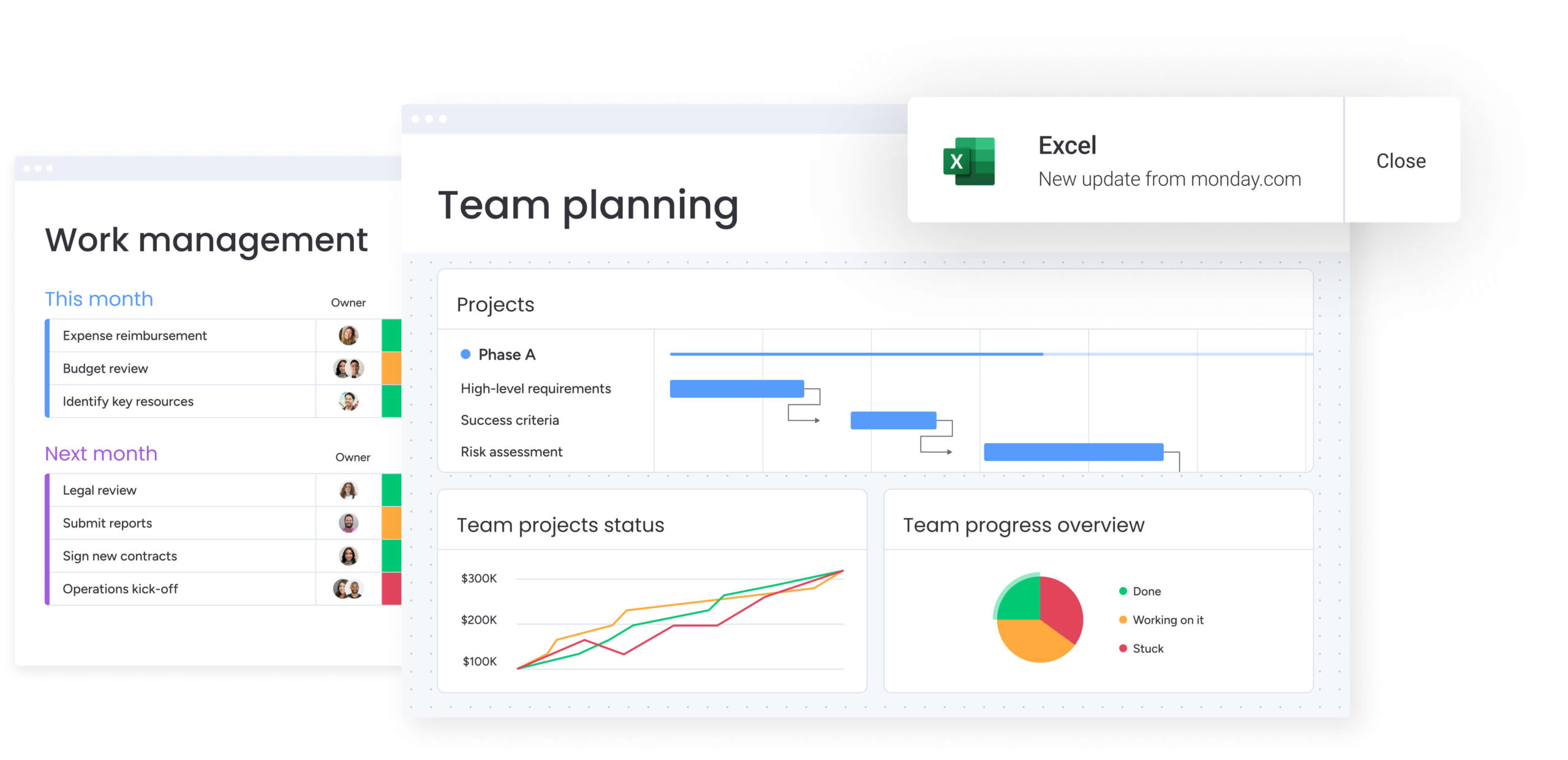
Visual indicators show the completion status of each workflow. A darker shade indicates progress. If video editing is scheduled for halfway completion but only 10% is done, teams can address the delay immediately.
Progress indicators help spot:
- Workflows falling behind schedule.
- Bottlenecks requiring intervention.
- Opportunities to accelerate delivery.
Budget and ROI tracking
Advanced Gantt charts integrate financial data. Each phase can display costs including ad spend, subscriptions, and contractor fees. Tracking costs against timelines supports profitability and performance monitoring.
Financial integration enables:
- Real-time budget monitoring.
- Cost-per-deliverable analysis.
- ROI projections based on timeline progress.
How to create a marketing Gantt chart in 5 steps
A marketing Gantt chart works best when it reflects the real complexity of a campaign. Breaking work into clear tasks, timelines, and dependencies turns a rough schedule into a practical execution plan. Following a structured process helps teams stay aligned, manage handoffs, and keep deadlines realistic.
Step 1: define campaign scope and objectives
Start with clear boundaries. Outline your target audience, key messages, and success metrics. Identify stakeholders responsible for approvals. Defining the scope prevents unplanned work from derailing your timeline.
Document what is included and excluded. If influencer partnerships are not part of this campaign, specify that. Clarity helps teams focus on priorities without confusion.
Key elements to define:
- Campaign goals: Awareness, lead generation, sales.
- Target audience: Demographics, personas, segments.
- Success metrics: KPIs, conversion targets, timeline milestones.
- Budget constraints: Total spend, cost per channel.
Step 2: List all marketing tasks and deliverables
Break the campaign into every required action. Consider all functional areas involved in execution. A comprehensive task list prevents surprises and ensures accountability.
Think across these categories when building your list:
- Creative: Copywriting, graphic design, video editing.
- Technical: Landing page setup, tracking pixel installation, automation configuration.
- Administrative: Legal review, budget approval, vendor onboarding.
- Distribution: Social scheduling, ad set configuration, email list segmentation.
Step 3: Map dependencies between marketing activities
Identify which tasks must happen first and the inputs each requires. For example, ad design cannot start until the key visual concept is approved. Documenting dependencies prevents teams from waiting on unplanned inputs.
Distinguish between hard dependencies that must occur sequentially and soft dependencies that improve efficiency. This distinction is essential when compressing timelines.
Step 4: Assign resources and set durations
Match tasks to team members based on skills and availability. Be realistic about creative work: drafting a whitepaper takes longer than creating a tweet. Include review and feedback loops in your estimates.
Consider both effort (actual work time) and elapsed time (calendar duration). A task might require four hours of work spread over three days. This ensures planning aligns with real-world execution.
Step 5: Build your visual marketing timeline
Input your tasks, dependencies, and durations into your chosen platform. Organize activities by phase for clarity. Set milestones first to establish the framework, then add tasks and dependencies. Highlight the critical path so teams know which deadlines cannot slip.
Marketing Gantt chart software and platforms
Choosing the right platform determines how easily teams can build, manage, and adapt their marketing timelines. Some solutions work well for simple campaign planning, while others support complex workflows, dependencies, and cross-team coordination at scale.
The table below compares common platform types and their capabilities. The sections that follow explore how each option fits different team sizes and campaign needs.
| Feature | Spreadsheet solutions | Basic project management | monday work management |
|---|---|---|---|
| Marketing templates | Manual setup required | Generic lists | Specialized (launch, content, event) |
| Visual dependencies | None or manual | Basic links | Advanced cross-board dependencies |
| Resource management | Manual calculation | Basic assignment | Workload view with capacity heatmaps |
| Collaboration | Disconnected comments | Basic chat | Contextual feedback on assets and timeline |
| Automation | None | Limited triggers | Custom automation for marketing workflows |
| Scalability | Low (breaks with data) | Medium | High (portfolio and enterprise views) |
Spreadsheet solutions for small teams
Small teams or single-channel campaigns can start with Excel or Google Sheets. These provide basic timeline visualization through manual formatting. They do not support dynamic dependencies, so adjusting dates requires updating all linked tasks manually.
Version control is challenging when multiple people need access. Spreadsheets are suitable for simple campaigns but may break down as complexity grows.
Project management platforms with Gantt views
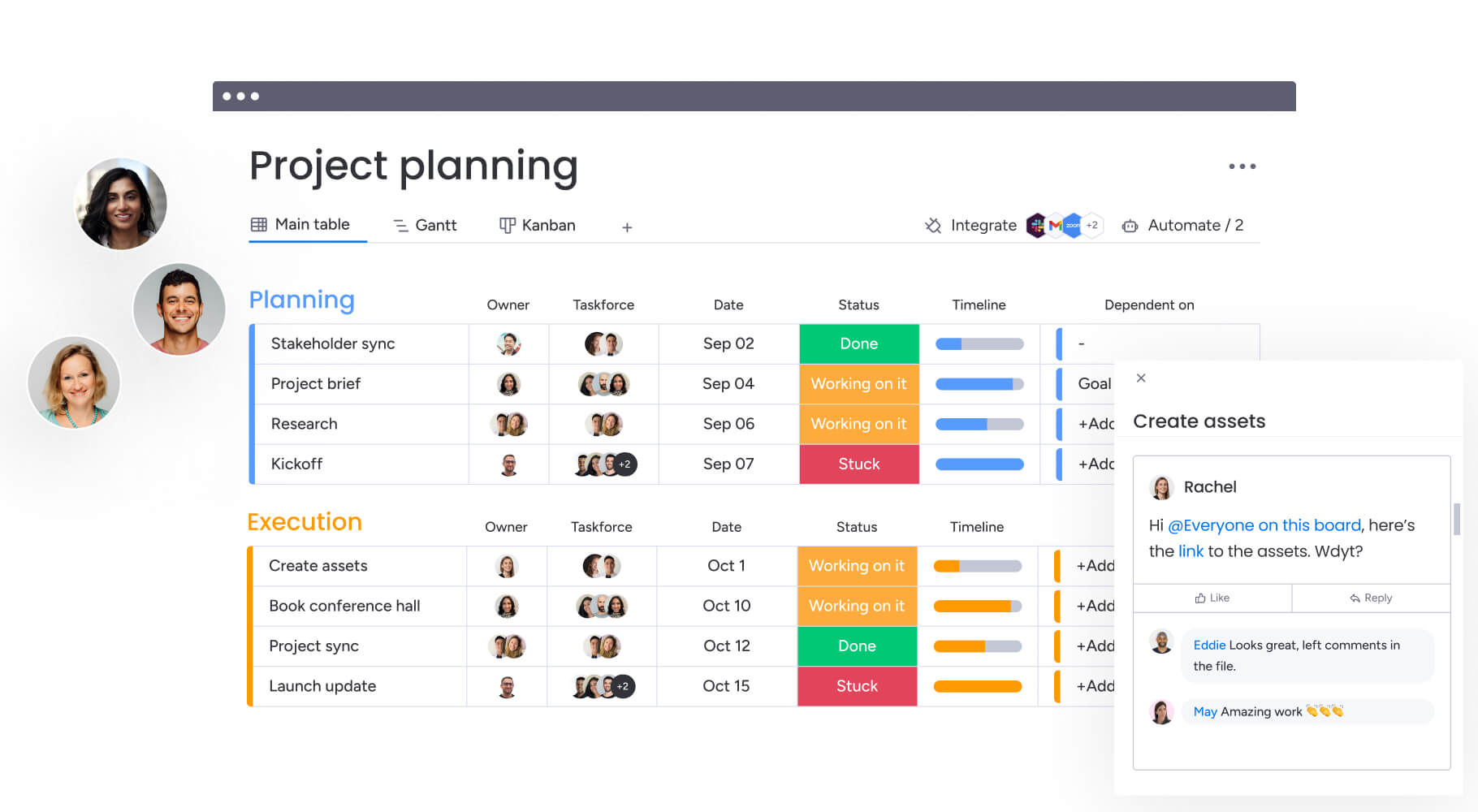
Mid-tier platforms include built-in Gantt functionality with drag-and-drop adjustments. Moving one task automatically updates dependent tasks. They include basic collaboration features like comments and file attachments.
These solutions support teams requiring more structure than spreadsheets but not full enterprise features. They handle moderate complexity but may struggle with cross-departmental workflows.
Enterprise marketing work management systems
Large organizations running multi-channel campaigns need comprehensive platforms. These systems provide cross-project dependencies, automated resource leveling, and integration with marketing automation tools. They act as a single source of truth for the marketing organization.
Try monday work managementVersion control is challenging when multiple people need access. Spreadsheets are suitable for simple campaigns but may break down as complexity grows.
Sample Gantt chart templates for marketing campaigns
Templates provide proven structures that teams can customize rather than building from scratch. They’re also really helpful when it comes to accelerating setup and maintaining consistency across campaigns.
Each template addresses specific marketing scenarios with built-in best practices to guide execution and reduce errors.
Product launch timeline template
This template focuses on the launch date milestone. Working backward from launch, it schedules critical path activities. Pre-launch includes market research, beta testing coordination, and teaser content.
Launch week covers:
- Press release distribution: Ensuring all media outlets receive timely announcements.
- Event logistics coordination: Confirming venue setup, staffing, and technical requirements.
- Social media activation: Scheduling posts and monitoring engagement.
- Sales team enablement: Providing product information, scripts, and training materials.
Post-launch focuses on customer feedback, sales enablement, and performance analysis to optimize future launches.
Content marketing calendar template
Designed for recurring content programs, this template organizes blog posts, whitepapers, and videos into a structured timeline. Early stages focus on keyword research, topic selection, and editorial approval before production begins.
Production typically includes:
- Content creation: Drafting and writing articles or scripts.
- Design and visuals: Creating graphics, illustrations, or video assets.
- SEO optimization: Refining keywords, metadata, and internal links.
- Quality assurance: Reviewing accuracy, formatting, and brand alignment.
Distribution then covers publishing, social promotion, and newsletter inclusion to maximize reach.
Digital marketing campaign template
This template coordinates paid and organic digital channels. It emphasizes asset synchronization across platforms. Paid media activities include ad copy creation, audience targeting, and budget allocation.
- Email campaigns: sequence design, A/B testing, and list management.
- Web optimization: Refining landing pages and conversion tracking.
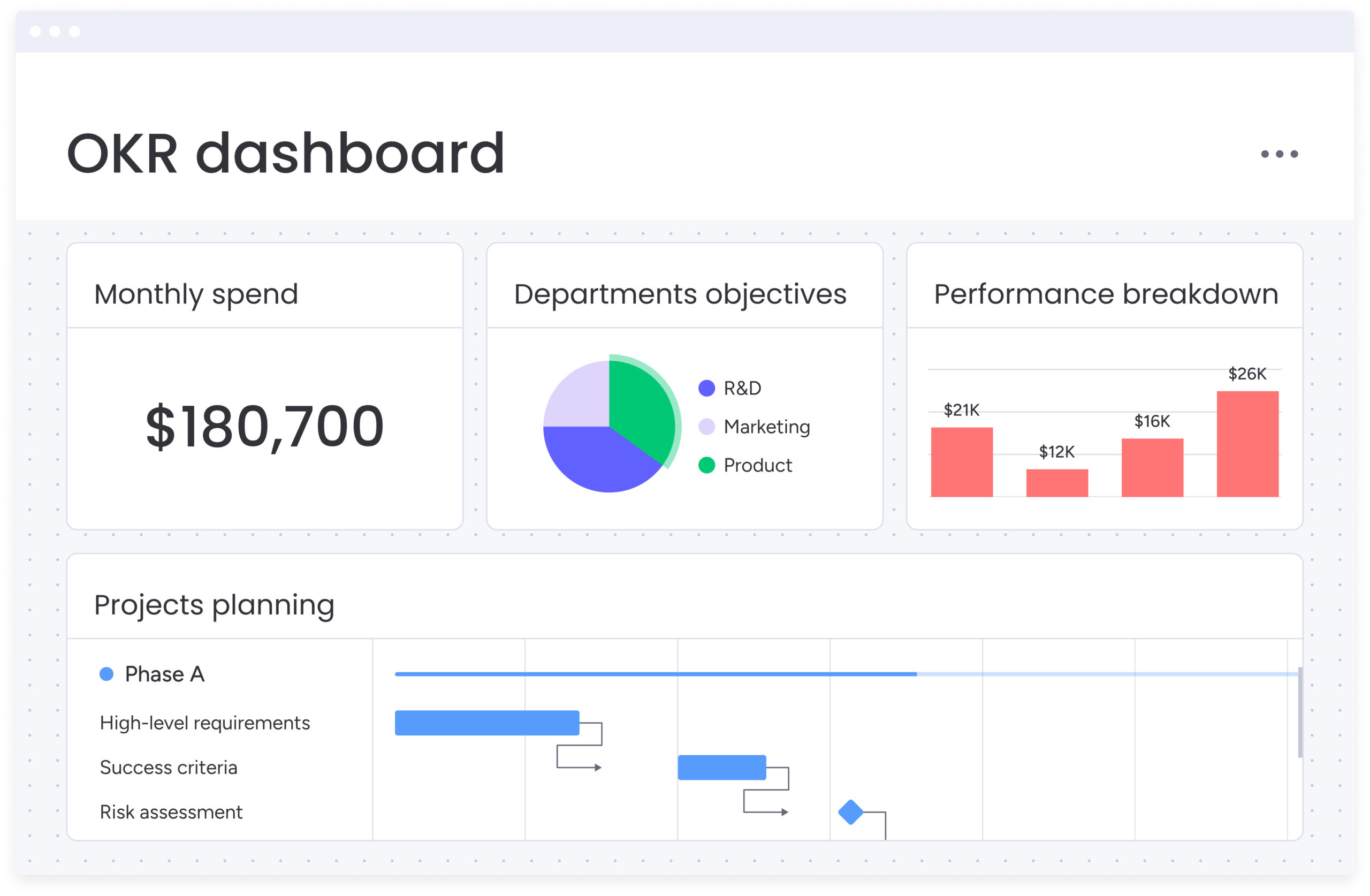
6 marketing Gantt chart examples by campaign type
Marketing campaigns vary widely in structure, which means their timelines look different too. Understanding how different campaign types are organized helps teams build Gantt charts that reflect real workflows and dependencies.
Product launch Gantt chart
Product launches involve heavy dependencies. Development schedules directly influence marketing timelines. The chart visualizes handoffs from product specs to marketing asset creation.
It highlights decision points where product delays trigger adjustments in marketing spend. This template helps teams prepare contingency plans for common launch setbacks.
Content marketing series timeline
For webinar series or themed blog campaigns, the Gantt chart shows content production cascading. Research for Part 1 informs Part 2’s outline. While Part 1 publishes, Part 2 enters design and Part 3 begins drafting.
This waterfall approach ensures consistent publishing while allowing content to evolve based on audience feedback.
Social media campaign schedule
Social timelines are fast-paced and granular. The chart tracks post creation or asset batches. It coordinates organic posts with paid boosts, using organic engagement data to inform paid targeting mid-campaign.
Real-time adjustments are critical as social sentiment and engagement patterns emerge.
Email marketing sequence
Email Gantt charts visualize nurture campaign logic. They track delays between emails and the production and technical setup in marketing automation platforms.
Trigger conditions and segmentation rules are mapped alongside creative development to keep technical and creative teams aligned.
Event marketing timeline
Event dates are fixed anchors. The Gantt chart works backward from the event, coordinating logistics like booth design and swag ordering with promotion such as invitation emails and social media hype.
A post-event phase includes lead processing and follow-up to maximize event ROI.
Integrated multi-channel campaign
This view layers multiple channels into a master timeline. It ensures message consistency by showing when TV spots air, digital takeovers launch, and PR embargoes lift.
Cross-channel coordination prevents conflicts and amplifies campaign reach through synchronized timing.
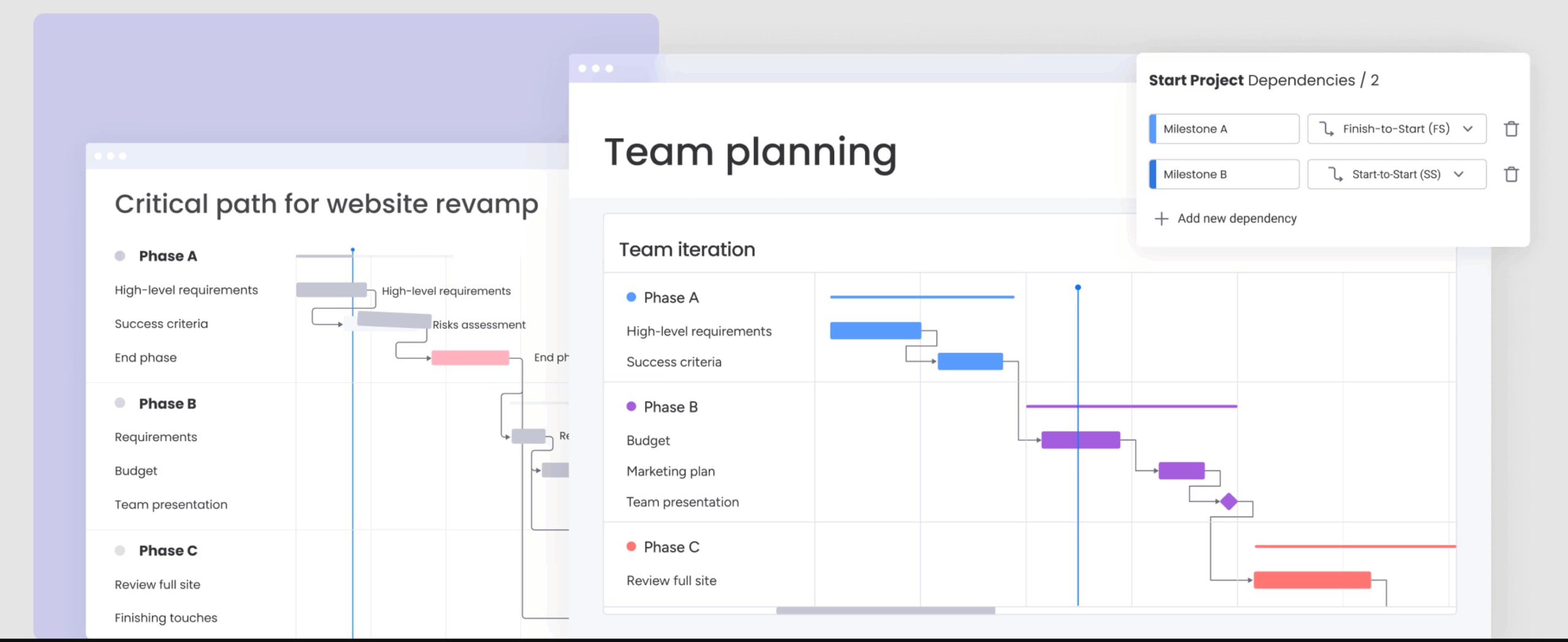
Advanced Gantt chart management for marketing teams
As marketing campaigns grow in scale and complexity, managing timelines requires more than basic task tracking. Teams need advanced methods to maintain visibility, coordinate dependencies, and keep execution on schedule.
Managing complex dependencies across channels
Advanced management addresses circular and soft dependencies: social sentiment can influence ad copy, which is a strategic consideration rather than a technical requirement. Sophisticated charts incorporate lag and lead times to create buffers between tasks, accounting for creative feedback and market response.
Cross-channel dependencies require deliberate mapping. When email performance informs social strategy or PR coverage triggers paid amplification, teams must visualize these connections explicitly to maintain alignment.
Key techniques include:
- Buffer time allocation: Extra days for creative iteration.
- Conditional dependencies: Tasks that trigger based on performance metrics.
- Parallel path planning: Alternative workflows for different scenarios.
Real-time resource capacity planning
High-performing teams rely on Gantt charts to balance workloads dynamically. Heat maps reveal resource availability at a glance, enabling managers to shift non-critical work when a team member is overbooked.
Intuitive platforms like monday work management provide real-time capacity insights across departments, helping teams adapt to shifting priorities while preventing burnout.
Automating timeline updates and alerts
Automation reduces manual maintenance. When designers mark tasks complete, creative directors receive automatic review notifications, and missed deadlines trigger alerts to project owners.
These automations ensure timelines stay current without manual intervention. Sophisticated solutions like monday work management streamline these workflows, from templated boards to approval reminders, saving hours of administrative work each week.
Try monday work management
Managing marketing timelines at enterprise scale
Enterprise marketing operates across dozens or even hundreds of campaigns at once. Coordinating this level of activity requires systems that provide clear visibility, structured workflows, and consistent processes across teams.
Portfolio-level campaign visualization
Enterprise leaders benefit from consolidated views across marketing initiatives. Portfolio management aggregates individual campaign charts into executive dashboards. CMOs can identify conflicts between regional and global campaigns, enabling strategic prioritization.
Modern platforms like monday work management pull data from multiple projects into high-level views, helping leaders detect bottlenecks and resource conflicts without reviewing individual campaigns.
AI-powered risk detection and timeline optimization
AI analyzes historical data to predict potential risks. For example, design tasks may take longer during Q4, prompting timeline adjustments. Predictive insights allow teams to shift from reactive to proactive planning.
monday work management’s Portfolio Risk Insights scans boards automatically, flagging potential issues by severity and enabling teams to address risks before launch dates are affected.
Cross-departmental workflow integration
Marketing connects with sales, product, and customer success teams. Enterprise Gantt charts integrate these workflows, automatically adjusting timelines when product releases are delayed. Shared milestones keep all teams aligned.
Integration with tools like Microsoft Teams, Slack, and Salesforce ensures marketing plans reflect organizational reality, reducing context switching and improving coordination.

“monday.com has been a life-changer. It gives us transparency, accountability, and a centralized place to manage projects across the globe".
Kendra Seier | Project Manager
“monday.com is the link that holds our business together — connecting our support office and stores with the visibility to move fast, stay consistent, and understand the impact on revenue.”
Duncan McHugh | Chief Operations OfficerMaximize campaign success with visual timeline management
Marketing Gantt charts transform chaotic execution into coordinated, predictable outcomes. Teams that master visual timeline management deliver campaigns on schedule, within budget, and with measurable impact.
However, choosing the right platform and building sustainable processes is absolutely crucial.
Modern platforms like monday work management turn Gantt charts into dynamic execution systems, addressing creative collaboration and campaign orchestration challenges so teams can focus on strategy and creativity rather than administrative tasks.
The platform offers capabilities designed for marketing complexity:
- AI-powered risk detection: Analyzes task completion rates to flag bottlenecks before launch delays.
- Marketing-specific templates: Pre-built workflows for events, content calendars, and product launches with embedded best practices.
- Cross-channel dependency tracking: Visualizes connections between digital, print, and event deliverables in unified views.
- Resource optimization: Workload view balances assignments based on real-time capacity and skill sets.
- Real-time collaboration: Feedback and approvals occur directly on timeline items, eliminating email chains.
- Budget integration: Financial columns track spend against timelines, providing instant ROI visibility.
Teams that adopt structured Gantt chart management gain clearer coordination and more predictable campaign execution. When timelines, dependencies, and ownership are visible in one place, marketing teams can launch with confidence and maintain consistent performance across campaigns..
Try monday work managementFrequently asked questions
What is a Gantt chart in marketing?
A Gantt chart in marketing is a visual timeline displaying campaign tasks, durations, and dependencies as horizontal bars. It helps teams coordinate complex initiatives by showing responsibility, timing, and interconnections between activities.
What are the disadvantages of a Gantt chart?
ChatGPT can generate text-based tables for Gantt chart planning but cannot create dynamic, interactive visuals. Specialized software is required for real-time updates and progress tracking.
How do marketing Gantt charts differ from project timelines?
Marketing Gantt charts account for creative approvals, multi-channel dependencies, and external vendor coordination. They include campaign phases, channel coordination, and stakeholder review cycles that standard project timelines do not cover.
What is the ideal timeline view for marketing campaigns?
The ideal view combines high-level phase breakdowns for stakeholders with detailed task information for execution teams. This dual perspective provides leadership oversight while supporting daily team management.
How often should marketing teams update Gantt charts?
Teams should update charts in real-time as tasks complete or encounter delays. At minimum, conduct weekly reviews to maintain accuracy and alignment in dynamic campaign environments.
How does monday work management enhance marketing Gantt charts?
Intelligent automation, real-time capacity planning, and direct asset collaboration turn static charts into active operating systems. Automated updates, AI insights, and seamless coordination reduce manual work while improving execution efficiency.

 Get started