



Your sales team just closed a great quarter. But when you pull next quarter’s forecast, the pipeline data looks like Swiss cheese: missing contact info, outdated close dates, deals stuck in the same stage with zero activity logged. This is the hidden cost of incomplete CRM data capture. CRM data capture is how customer information flows into your system from every touchpoint: emails, calls, meetings, forms, and integrations. When this breaks down, revenue teams lose pipeline visibility, waste hours reconstructing deal history, and make forecasting decisions on incomplete information.
This guide covers 7 proven strategies to fix missing CRM data in 2026, from smart automation that captures information without slowing down reps to AI-powered features that fill gaps automatically. You’ll learn how to audit your data quality in 15 minutes, build capture processes your team will actually follow, and transform incomplete records into reliable revenue intelligence. Teams using monday CRM can implement these strategies without IT help, thanks to no-code flexibility and built-in AI that handles the time-consuming parts of data capture.
Key takeaways
- Missing CRM data costs you deals and wastes selling time: Incomplete records force reps to spend up to 30% of their hours reconstructing deal history instead of selling, preventing follow-ups and harming forecasts.
- Start with smart required fields and email automation for instant ROI: Set conditional requirements based on deal stage and automatically capture emails and meetings to eliminate 60-70% of manual data entry.
- Run a 15-minute data audit to measure your gaps: Sample 20-30 deals to calculate missing field percentages and identify which data gaps directly prevent deals from closing versus just wasting time.
- AI-powered features extract information automatically: An intelligent platform can enrich contact data, summarize communication timelines, and assign leads to the right team members without manual work.
- Build visual processes teams actually follow: Create step-by-step workflows with screenshots and quick reference cards showing exactly what data to capture after each meeting or call.
What is CRM data capture and why missing data hurts revenue
CRM data capture is how you collect and store customer information from every touchpoint in your sales cycle: emails, calls, meetings, lead generation forms, documents, and integrations. Every interaction where data enters your system counts as a capture point.
Your capture process quality determines whether revenue teams can forecast accurately, follow up on time, and close deals fast. For mid-market teams, incomplete data means lost deals.
Missing data creates immediate business consequences:
- A sales rep missing a key decision-maker’s contact can’t advance a deal
- A manager without accurate close dates can’t predict quarterly revenue
- A CRO lacking visibility into deal stages can’t allocate resources or report confidently to the board
These problems compound daily. Every missing field represents a blind spot in your sales process. When reps don’t know who the economic buyer is, deals stall. When managers can’t see activity history, they can’t coach effectively. When forecasts are built on incomplete data, resource allocation becomes guesswork.
The hidden cost of incomplete CRM records
Missing CRM data hits you in three ways, and each one makes it harder to hit quota and grow revenue predictably. Know these three costs, and you’ll know which gaps to fix first.
| Cost category | Business impact | Who feels it most |
|---|---|---|
| Lost revenue opportunities | Missed follow-ups, stalled deals, invisible expansion potential, deals falling through cracks when next steps aren't logged | Sales reps, account managers |
| Wasted sales time | 20-30% of selling hours consumed by data reconstruction, searching email threads for context, manually researching contact information | Individual contributors |
| Forecasting failures | Unreliable pipeline predictions, poor resource allocation, inability to confidently report to the board or allocate headcount across territories | CROs, VPs of Sales, RevOps |
Incomplete contact records prevent follow-ups and hide expansion opportunities. One missing decision-maker contact can stall a deal. Reps waste hours reconstructing deal history instead of selling, asking colleagues about meetings they weren’t part of and manually researching information that should already exist. Without reliable CRM reporting, revenue leaders can’t forecast accurately or make confident resource decisions.
Common sources of data gaps in sales teams
Data gaps in mid-market sales teams come from a few predictable problems you can fix. Reps focus on closing deals, not updating the CRM. That’s what they’re paid to do. When quota pressure increases, CRM updates slip first. When reps skip manual entry, gaps pile up fast.
Another big problem: emails, calls, and meetings happen outside the CRM with no automatic capture. A rep has a productive call, hangs up, and immediately moves to the next activity. The conversation details never make it into the system. Find these sources, and you’ll know exactly where to focus your fixes.
Additional sources of incomplete data include:
- Siloed tools: Marketing automation, customer success platforms, and sales engagement tools capture valuable data that never flows to the CRM
- Mobile limitations: Reps can’t easily update records in the field, and by the time they’re back at their desk, details are forgotten
- Unclear data standards: Teams don’t know which fields are required, what level of detail is expected, or why it matters
- Handoff failures: Information gets lost when deals transfer between SDRs, AEs, and account managers
How bad data breaks sales forecasts
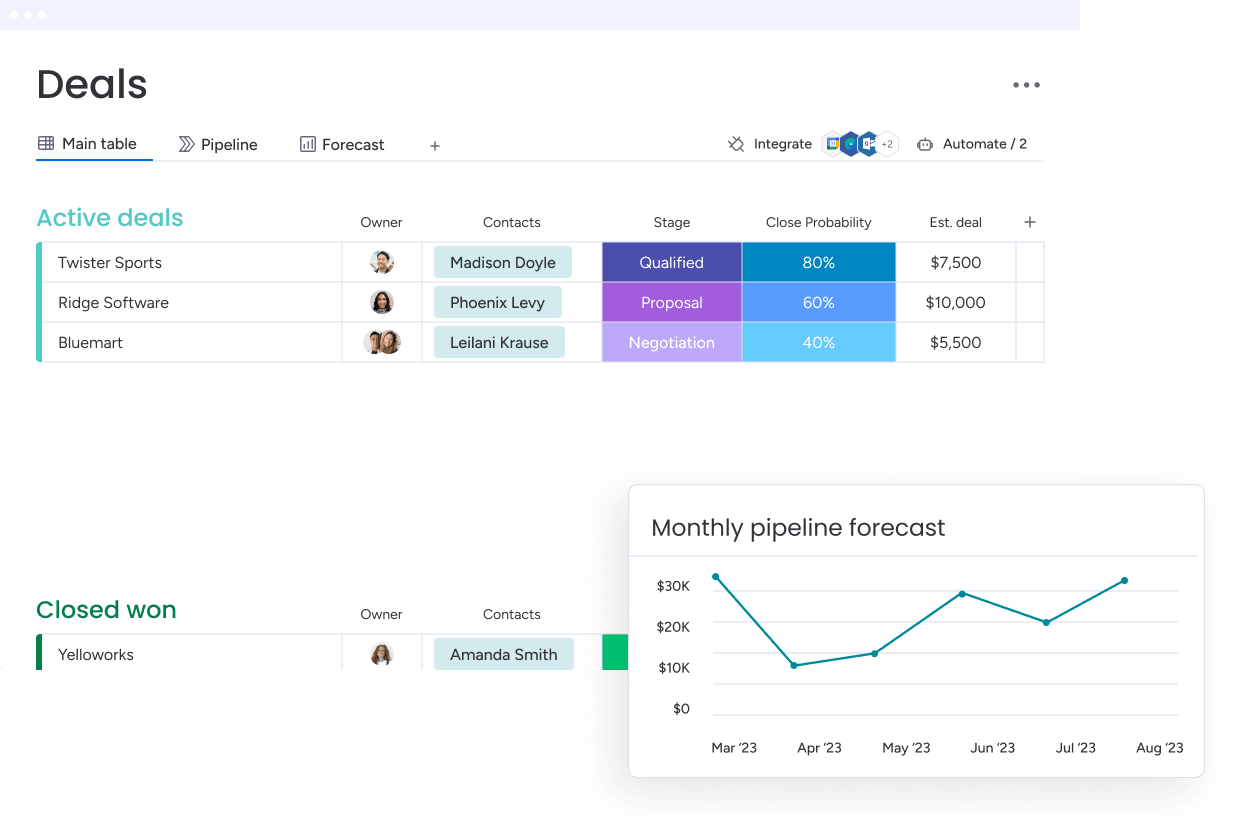
Incomplete CRM data kills forecasts in three specific ways. When your pipeline data has gaps, revenue predictions become guesswork instead of science. Here’s exactly how missing information breaks your forecasting accuracy and what to look for in your own data.
Deal stage accuracy
Deal stage accuracy determines whether pipeline reports reflect reality. When reps don’t update stages consistently, the pipeline becomes fiction. A deal sitting in “Discovery” for three months while active negotiations happen creates false pessimism. A deal marked “Verbal Commit” without documented buyer confirmation creates false confidence. Understanding your sales pipeline stages helps teams maintain accurate deal progression tracking.
Close date reliability
Close date reliability separates data-driven predictions from wishful thinking. When reps don’t capture actual buyer timelines or update dates as deals slip, forecasts become exercises in optimism rather than analysis.
Contact role gaps
Contact role gaps make it impossible to assess deal risk. Without knowing who the decision-makers, influencers, and champions are, every deal looks the same on paper. A $100K opportunity with documented executive sponsorship and a $100K opportunity with only a junior contact have vastly different close probabilities.
Audit your current CRM data quality in 15 minutes
Most revenue leaders know their data’s messy. A 15-minute audit gives you hard numbers to justify the fix and a baseline to track progress. Here’s how to audit your existing data quality in just a few minutes.
Step 1: Run a quick data health check
Anyone with report access can run this check in one sitting. Here’s how:
- Pull a report: Export all open opportunities from the last 90 days
- Sample records: Randomly select 20-30 records across different sales reps
- Check critical fields: Review each record for decision-maker contact, documented next steps, realistic close date, deal stage justification, and budget or deal size
- Review activity logs: Verify that emails, calls, and meetings are being captured
- Calculate completeness: Determine the percentage of records with complete versus incomplete data
- Compare across reps: Identify patterns in data completeness across different team members
Step 2: Find your most critical data gaps
Some data gaps kill deals. Others just waste time. Fix the right gaps first, or you’ll waste time trying to fix everything. Prioritize these critical data gaps:
- Decision-maker contacts: Can’t close without reaching the right person
- Budget information: Can’t forecast accurately without knowing deal size
- Buying timeline: Can’t predict close dates without understanding urgency
- Competitive threats: Can’t strategize without knowing who else is in the deal
- Previous conversation notes: Reps waste time reconstructing context
- Stakeholder roles: Unclear who influences versus decides
- Product interests: Harder to tailor proposals without this context
The prioritization question for each gap: “If this data were complete, would it directly help us close more deals or forecast more accurately?”
Step 3: Calculate your data capture debt
Data capture debt is what missing data costs you. This debt grows every day that capture processes aren’t fixed. Put a number on it, and you’ve got your business case.
| Data gap type | Time to fix per record | Affected records | Total hours |
|---|---|---|---|
| Missing decision-maker contacts | 15 minutes research | 200 deals | 50 hours |
| Incomplete activity logs | 10 minutes reconstruction | 150 deals | 25 hours |
| Missing next steps | 5 minutes per deal | 180 deals | 15 hours |
| Outdated close dates | 3 minutes verification | 220 deals | 11 hours |
At an average fully-loaded cost of $75/hour for a sales rep, 101 hours of data cleanup work represents $7,575 in labor cost. The debt compounds daily. Every new deal created without complete data adds to the backlog.
Manual vs. automated data capture ROI
Most teams use a combination of manual entry, automated capture, and hybrid approaches. Each has distinct advantages and costs. Here’s how they compare:
| Approach | Best for | Time investment | Key limitations |
|---|---|---|---|
| Manual CRM entry | Strategic insights requiring human judgment (deal risk assessment, relationship quality, competitive positioning) | 3-5 hours weekly for post-meeting admin, plus 60-90 minutes daily for email documentation | Creates data entry errors (typos, wrong fields, messy formatting), wastes selling time, inconsistent data quality across reps |
| Automated capture | High-volume, objective data (emails, meetings, calls, website visits, document views) | Minimal ongoing time after initial setup, captures data in real-time without rep action | Misses context and nuance, can't assess deal risk or relationship strength, requires integration setup |
| Hybrid solution | Meeting documentation, contact enrichment, activity tracking with strategic context | AI drafts notes and captures basics (2-3 minutes), reps add context and next steps (1-2 minutes) | Requires clear guidelines on what AI handles versus what needs human input |
Manual CRM entry eats hours your reps should spend selling. A rep with 20 meetings per week spends 3-5 hours on post-meeting administration: logging notes, updating fields, and creating follow-up activities. Manual entry can create errors: typos, wrong fields, and messy formatting trash your data and kill report accuracy.
Automated capture is often powered by CRM automation AI that collects data in the background. A prospect who opens a proposal three times in one day creates a signal that the rep can act on immediately, without anyone manually logging that activity.
The best approach is a hybrid solution, which uses automation for high-volume, objective data and reserves manual entry for strategic insights. Choose manual or automated based on data type, volume, and whether it needs human judgment.
7 proven strategies to fix missing CRM data
These seven strategies work as a system. Start with the foundational strategies, then layer on the advanced ones. Each strategy fixes a specific reason your data’s incomplete.
Strategy 1: Set up smart required fields
Most teams set up required fields wrong, there are either too many (reps find workarounds) or too few (critical gaps slip through). Smart required fields change based on deal stage and size.
Conditional requirements align with the rep’s natural workflow:
- Contact phone number: optional for early-stage leads, required at “Proposal” stage
- Budget information: required for deals over $50K
- Decision-maker contact: required before “Negotiation” stage
Start with 3-5 critical fields that directly impact forecast accuracy. Make fields required when that information naturally becomes available. With monday CRM’s customizable automations, teams can enforce data standards without slowing down sales processes.
Try monday CRMStrategy 2: Automate email and calendar capture
Email and calendar automation delivers the fastest ROI for most teams. This one integration cuts manual data entry by 60-70% and makes activity tracking more accurate.
Automated capture includes:
- Outbound emails: Sent to contacts or leads, automatically logged with full content
- Inbound emails: From prospects are logged and linked to the appropriate opportunity
- Meeting invites: Automatically create activity records with attendees and date/time
- Email threads: Preserve full conversation history, showing the progression of discussions
Revenue teams find that monday CRM’s Emails & Activities feature logs and tracks every interaction including emails, meetings, and notes in one timeline. Reps can email contacts directly from within the CRM, and all communication appears automatically in the activity history.
Strategy 3: Build validation rules that work
Validation rules stop bad data before it gets in. These checks catch errors at the point of entry.
Format validation ensures data is entered correctly:
- Email addresses: Must include @ and a valid domain
- Phone numbers: Must match regional format
- Dates: Must be in consistent format
Range validation catches obvious errors:
- Deal size: Between $1K and $1M to flag accidental extra zeros
- Close date: Within next 12 months to flag unrealistic timelines
Dependency validation ensures logical consistency: If deal stage is “Closed Won,” close date must be in the past. If contact role is “Decision Maker,” phone number must be present.
Strategy 4: Deploy AI for data enrichment
AI-powered data enrichment eliminates the research work that prevents reps from capturing complete contact and company information. Instead of spending 15-20 minutes researching each new contact, reps get complete profiles in seconds.
Contact and company enrichment automatically fills in missing details:
- Job title and seniority level
- Direct phone number and email address
- LinkedIn profile URL
- Company size (employees and revenue)
- Industry classification
- Headquarters location
With monday CRM’s Extract information capability, teams can automatically extract and organize key information from files like invoices, resumes, or contracts. Information can also be extracted from text columns, monday docs, and images. Specific details appear directly in board columns, eliminating manual input.
Learn more: Data enrichment software
Strategy 5: Connect your tech stack seamlessly
Most revenue teams use 5 to 10 tools beyond their CRM. When these tools don’t sync, critical information gets trapped in separate systems. Marketing automation captures lead behavior that never reaches the CRM. Conversation intelligence records call transcripts that sales reps can’t access in their CRM workflow.
You have three main integration options:
- Native integrations: Work best for popular tools with pre-built connections and require only configuration
- API integrations: Handle custom data flows with specific requirements but need developer resources
- Integration platforms: Connect systems without custom code through low-code setup
Teams discover that monday CRM integrates with everything, giving them flexibility in how they build their tech stack. Data flows automatically between systems, eliminating the manual transfer that leads to gaps and errors. For teams managing complex workflows, understanding CRM integration best practices ensures seamless data flow across all platforms.
Strategy 6: Enable mobile-first data entry
Sales reps spend most of their time out of the office. Mobile capture lets reps update deals while details are fresh, not hours later at their desk.
Mobile-first data entry includes:
- Simplified mobile interfaces: Prioritize the most critical fields and actions
- Voice-to-text capabilities: Let reps dictate meeting notes while driving or walking
- Offline functionality: Data entry works even without internet connection, with automatic sync when connectivity returns
Reps won’t use mobile entry if it’s clunky or slow. Revenue teams using monday CRM benefit from a dedicated mobile experience that lets reps update deals in real-time from customer meetings.
Strategy 7: Create real-time quality alerts
Real-time alerts catch data problems instantly, not weeks later during pipeline review. Alerts fire when critical data is missing or looks wrong.
Missing data alerts fire when deals reach certain stages without required information:
- “This deal is in Proposal stage but has no decision-maker contact”
- “This opportunity is closing in 7 days but has no next steps logged”
Stale data alerts warn when records haven’t been updated recently:
- “This deal hasn’t had any activity logged in 14 days”
- “This close date hasn’t been updated in 21 days”
These alerts help managers identify at-risk deals before they slip. Implementing effective sales management practices includes setting up automated alerts that keep your team accountable for data quality.
Use AI to transform your CRM data collection
AI doesn’t replace the basics. It makes them better. Get your capture processes solid first. Then, AI enhances your data with predictive insights and automated enrichment.
Extract data from conversations automatically
AI pulls key data from call recordings, meeting transcripts, and email threads automatically. It can automatically extract details like:
- Names of people mentioned and their roles
- Companies and competitors discussed
- Dates and deadlines
- Dollar amounts or budget ranges
- Commitments and next steps
With monday CRM’s AI Timeline Summary, teams can create a short summary of all communication events such as emails, calls, meetings, and notes. This helps sales and support teams save valuable time by simplifying the research process.
Try monday CRMPredict and fill missing information
AI spots patterns in your data and suggests what’s missing. Thanks to monday CRM’s Autofill with AI, teams can take multiple actions:
- Detect sentiment: Understand the tone of customer communications
- Extract information: Pull key details from documents and conversations
- Summarize: Create concise overviews of lengthy content
- Assign label: Categorize records automatically
- Assign person: Route leads to the right team member based on context from Emails & Activities
Show AI predictions as suggestions with confidence scores. The more data and corrections AI sees, the smarter it gets. Teams looking to maximize their AI capabilities should explore AI CRM features that continuously learn from your data patterns.
Detect and merge duplicate records instantly
AI finds duplicates even when names don’t match exactly. It compares multiple fields and uses intelligent matching algorithms to recognize that “John Smith” and “Jon Smith” are likely the same person, or that “Acme Corp” and “Acme Corporation” are the same company.
When combining duplicate records, the merge logic preserves the most complete data, combines activity histories from both records, and maintains relationships and associations. Maintaining clean data through CRM data management practices prevents duplicates from creating confusion and wasting time.
How monday CRM solves data capture challenges
Revenue teams struggle with incomplete CRM data because their systems make capture harder than it needs to be. Complex interfaces, rigid workflows, and disconnected tools create friction that prevents reps from logging information consistently.
A flexible platform like monday CRM eliminates these barriers by combining intelligent automation with intuitive design. When data capture happens automatically in the background and manual entry takes seconds instead of minutes, teams naturally maintain complete records without sacrificing selling time. Here’s how monday CRM solves the most common data capture challenges.
No-code customization for your exact workflow

Build capture processes that match how your team actually works with no coding required and no IT tickets needed. Using intuitive drag-and-drop builders, you can create custom fields, automations, and validation rules in minutes, then adjust requirements based on deal stage, size, or any other criteria. As your processes evolve, modify workflows on the fly so the CRM adapts to changing needs rather than forcing you into rigid structures.
AI-powered data enrichment and extraction

AI eliminates the manual research and data entry that eats up selling time by automatically filling in missing information across your records. monday CRM extracts key details from emails, documents, and files directly into the appropriate fields while enriching contact and company records with job titles, phone numbers, company size, and industry data. By handling the time-consuming work of data capture automatically, AI capabilities free your reps to focus on building relationships and closing deals.
Integrated email and activity tracking
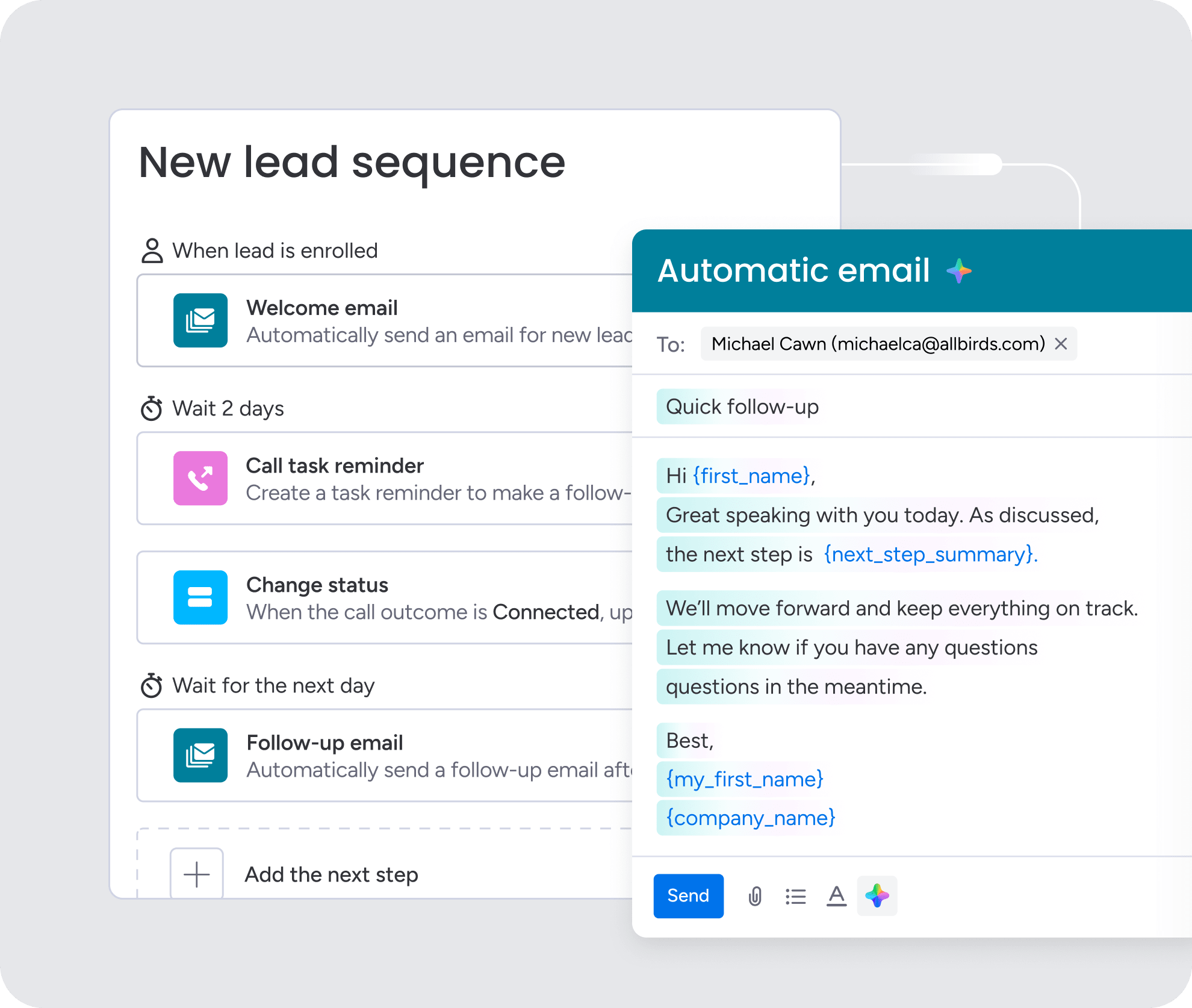
Every customer interaction gets captured automatically, eliminating manual logging that reps typically skip when they’re busy. When your team sends emails to contacts, those messages appear in the activity timeline with full content and context preserved. Reps can email directly from within monday CRM, and all communication syncs automatically to the appropriate deal or contact record, building a complete conversation history that anyone can reference.
Real-time alerts and quality monitoring

Intelligent alerts catch data gaps the moment they happen, notifying reps and managers when critical information is missing before it becomes a problem. Set up notifications that fire when deals reach certain stages without required fields, when records haven’t been updated within your specified timeframes, or when data looks inconsistent. Automated quality monitoring powered by AI ensures problems get fixed immediately rather than discovered weeks later during pipeline reviews, keeping your data clean and your forecasts accurate.
Transform your revenue operations with complete CRM data
Complete CRM data does more than keep records clean. It’s how you build predictable revenue growth. Capture data right, and forecasts get reliable, coaching gets sharper, and deals move faster. These CRM best practices work together as a system. Start with smart required fields and email automation, then add AI once your processes are solid.
Teams using monday CRM get a real edge here. No-code flexibility means you can implement these strategies without IT help. Built-in AI handles the time-sucking parts of data capture so your team does less admin and closes more deals.
Try monday CRMFAQs
What is CRM data capture?
CRM data capture is the process of collecting, recording, and storing customer and prospect information in a CRM system through manual entry, automated tools, or AI-powered methods.
How can I automate CRM data entry?
You can automate CRM data entry by connecting email and calendar systems for automatic activity logging, using AI to extract information from files and conversations, and setting up integrations with other tools in your tech stack.
Why is my CRM data incomplete?
CRM data is typically incomplete because reps prioritize selling over data entry, communication happens outside the CRM without automatic capture, and tools across the tech stack don't sync data to a central location.
What fields should be required in a CRM?
Required fields should include decision-maker contact information, deal stage, close date, next steps, and budget or deal size, with requirements triggered at the appropriate stage in the sales process.
How does AI help with CRM data capture?
AI helps with CRM data capture by automatically extracting information from emails, files, and conversations, enriching contact and company records, detecting sentiment, assigning labels, and routing leads to the right team members.
How often should CRM data be updated?
CRM data should be updated immediately after every customer interaction, with real-time alerts flagging records that haven't been updated within 7-14 days depending on deal stage and activity expectations.
