



A sales invoice template helps businesses get paid faster by ensuring every invoice includes the right details, calculations, and payment terms — without rebuilding invoices from scratch each time. Whether you need a simple sales invoice template for a small business or a more detailed format for Excel, Word, Google Docs, or PDF, starting with a standardized template reduces errors and speeds up billing.
This guide covers the essential elements of a sales invoice template, compares popular formats like Excel, Word, and Google Docs, and includes examples for different industries and regions. You’ll also see how monday CRM goes beyond static templates with AI-powered invoicing automations and workflows.
Try monday CRMWhat is a sales invoice template?
A sales invoice is a document that businesses send to customers detailing the items or services that were provided or delivered. A sales invoice template is an editable document that helps organizations standardize their sales invoices across the board by displaying critical formatting and information that repeats on every sales invoice.
Why should businesses use a sales invoice template?
The purpose of a template is to streamline the process of creating sales invoices so you don’t need to spend time reformatting documents every time you want to issue an invoice. Since the formatting is already there, sales invoice templates help companies save time and also avoid errors, like forgetting to add important details like a due date or payment details.
By preloading standard invoice fields, templates let you quickly replace default information with sale-specific data instead of rebuilding invoices each time.
Essential information to include on your sales invoice template
Before jumping into designing a branded sales invoice template, it’s critical to make sure you have all the right information on your invoice. The elements below should be standard on every sales invoice, no matter what industry you’re in, who you’re invoicing, or the size of your business. Later on, we’ll cover some industry-specific elements to include on your template.
- Your business details: Include the name of your business, phone number, address, and email address.
- Customer contact information: You should also add the name, phone number, address, and email for the client you’re invoicing, whether it’s an individual or a business.
- Invoice number: Every sales invoice should have a unique number to make it traceable for both your business and the recipient.
- Itemized services or products: A list of products or services sold and delivered to the customer, including the quantity and total cost for each item.
- Total amount: Include the total cost of all the items on your invoice, plus any applicable fees or taxes that are relevant.
- Due date: Include the latest date the full invoice should be paid by, whether that’s Net 30 (payment within 30 days of invoice receipt) or Net 60 (payment within 60 days of invoice receipt).
- Payment terms: Add any specific terms and conditions that were agreed upon with your client, such as preferred payment methods or late payment penalties.
Which platform should you choose for your sales invoice template?
Before you run straight to Excel to create a sales invoice template, consider which option might be best suited to your business. Other tools like Word, Google Docs, or Open Office may be a better choice depending on what you’re hoping to accomplish.
Google Docs sales invoice templates for collaboration
(Source)
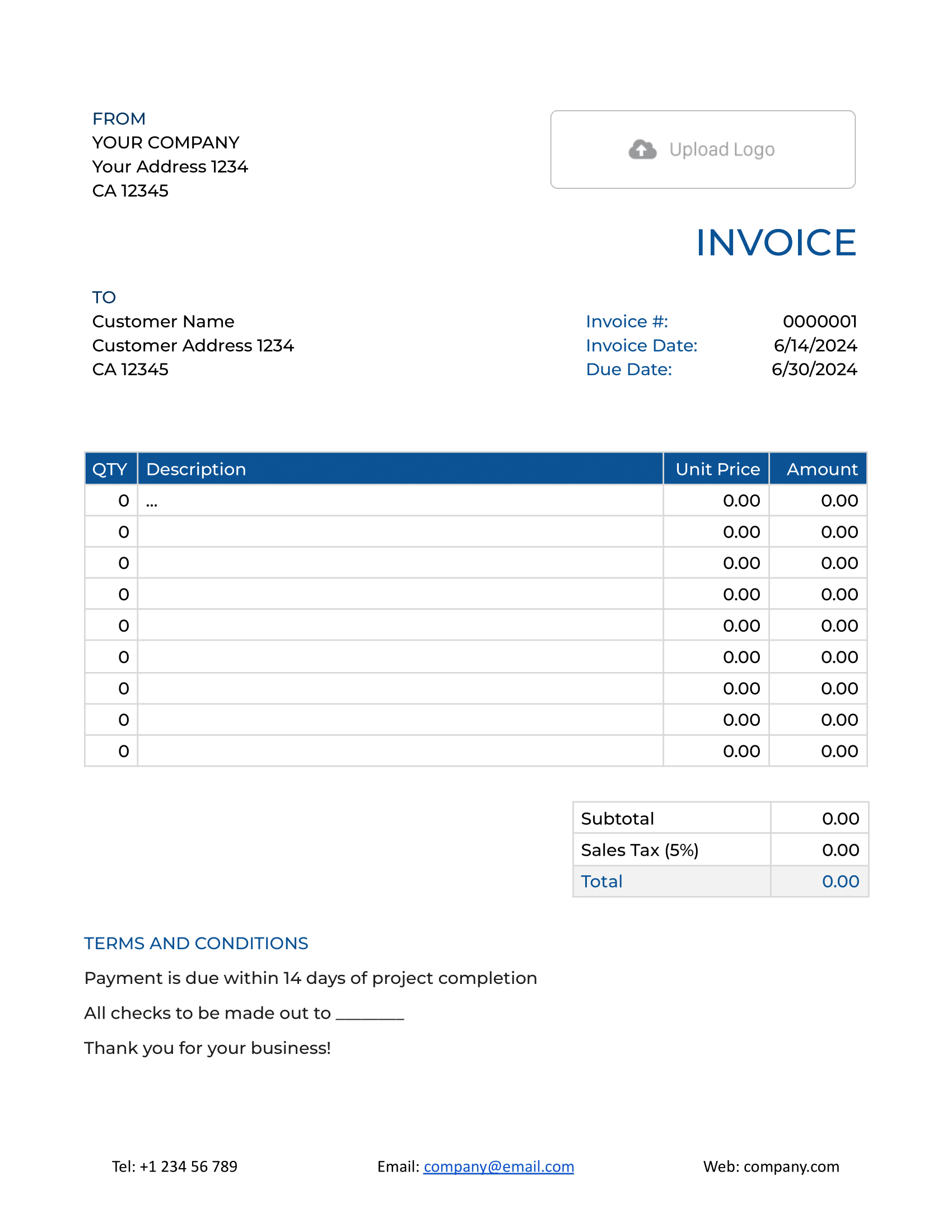
Occasionally, teams may need to collaborate on invoices or access and update invoice drafts in real time. With Google Docs, teams in different departments can update line items for services rendered to a single client, leave comments on invoice drafts, and easily format invoice templates to their liking.
Learn more: Google Docs invoice template
Microsoft Word and DOC sales invoice templates for simple layouts
(Source)
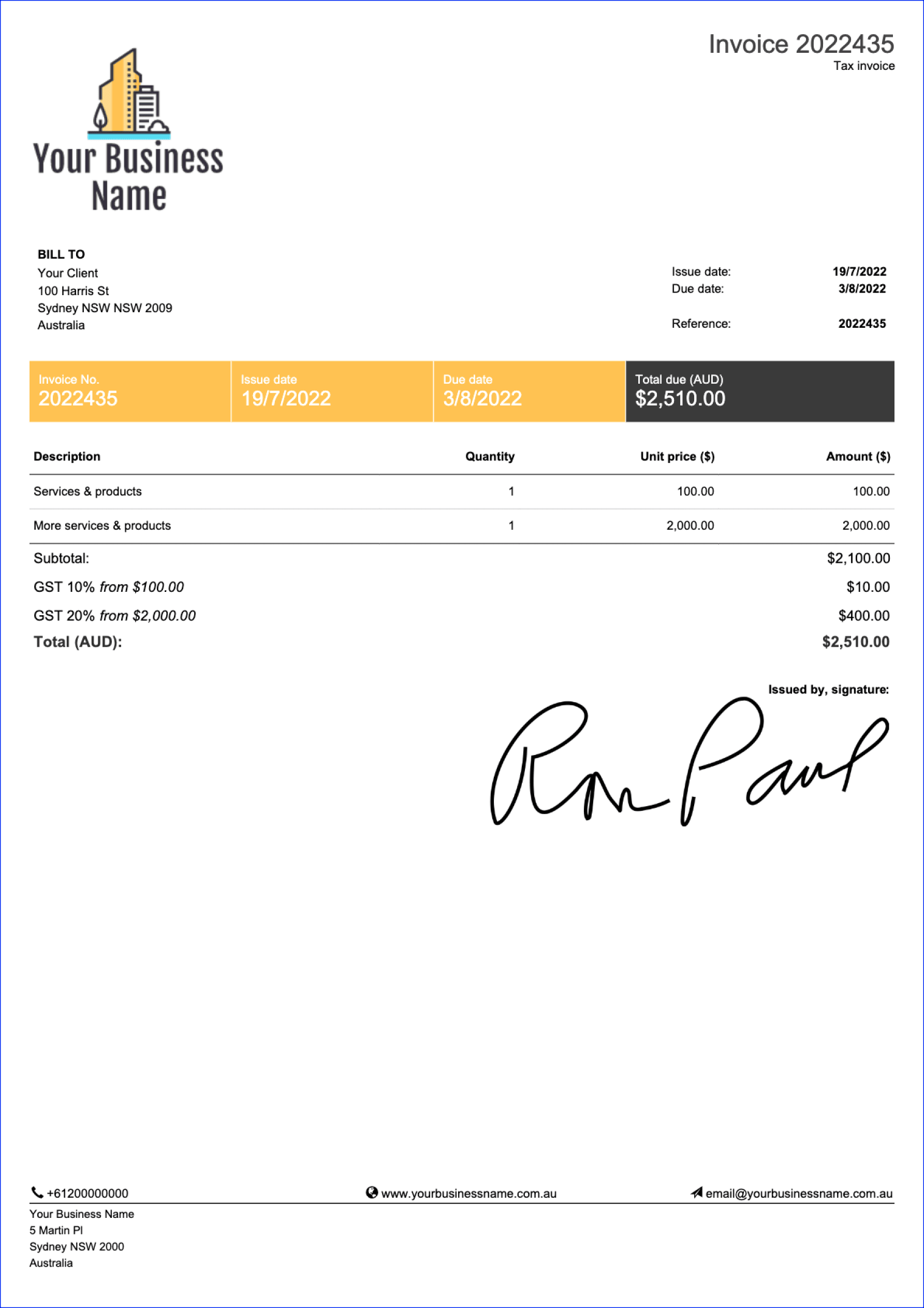
Microsoft Word is a great option for sales invoice templates that can also be stylized with different fonts, colors, and logos. Businesses can also better control invoice layouts to create more branded and visually interesting templates. The drawback is limited support for formulas and automated calculations, which makes Word better suited for straightforward, fixed-price invoices.
Excel sales invoice templates for automated calculations

(Source)
If your invoicing often involves multiple line items, different quantities, specific taxation, or discount requirements, Excel might be the better choice for creating your template. In Excel, you can create custom calculations to track variable pricing while keeping the formatting the same from one invoice to another. More complex sales invoices can also benefit from Excel’s conditional formatting and data validation features.
Open Office sales invoice templates as a free alternative
(Source)
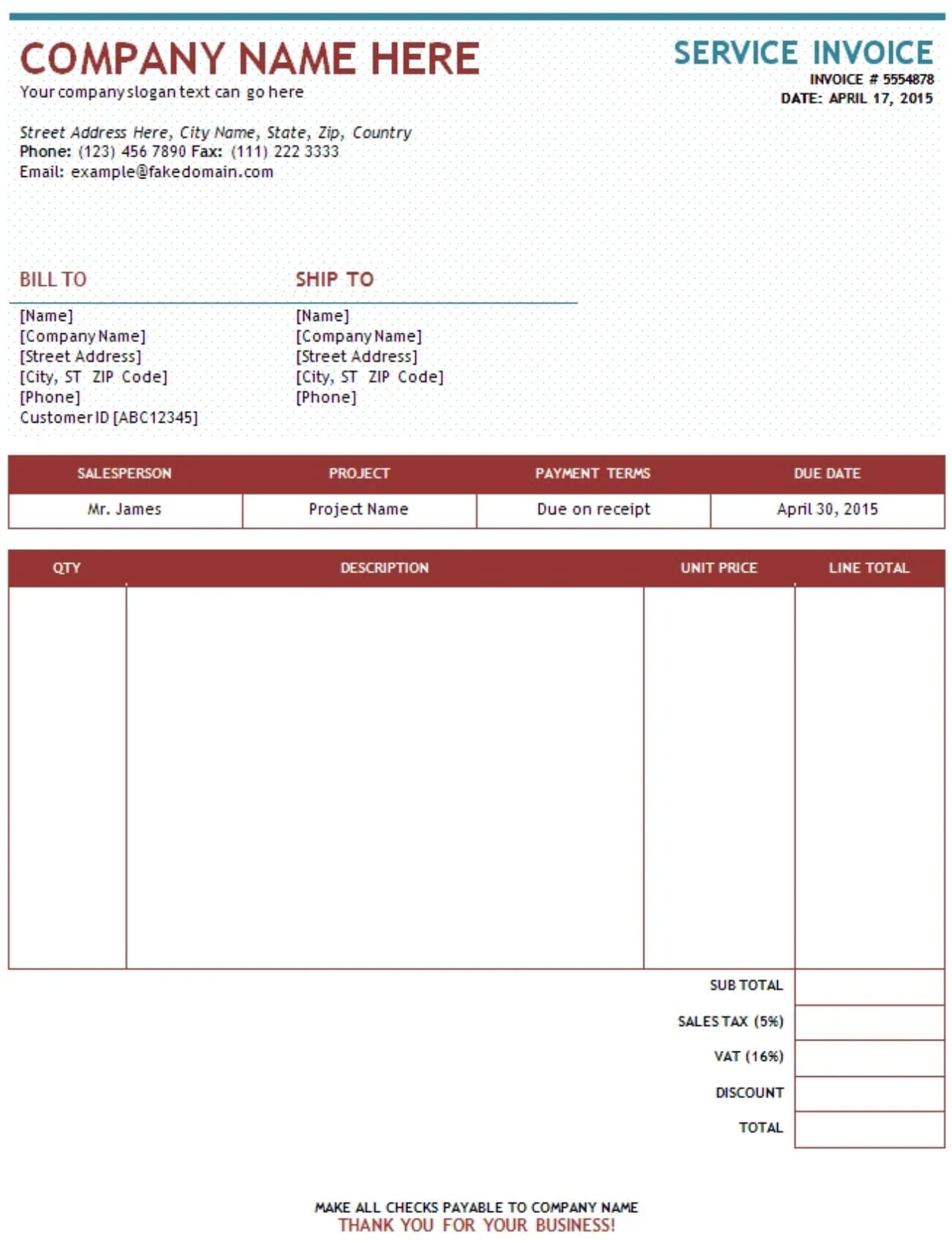
Open Office is an open-source alternative for businesses looking for invoice management software without subscription fees. Open Office Calc supports formulas and calculations for handling complex pricing structures, taxes, and discounts. The software also provides compatibility with Microsoft Office formats, making it easy to share invoices with clients and partners who use different platforms.
Thes 4 tools cover a wide range of invoicing needs across industries and business sizes, from simple sales invoice templates to more complex, calculation-heavy formats.
However, even for small businesses, these tools can be limiting when it comes to scaling and customizability.
Advanced CRM software platforms powered by AI, like monday CRM, include invoicing features and standardized templates. The platform can also integrate with external software and pull from client data to automate entire invoicing workflows in seconds.
Try monday CRMIndustry-specific sales invoice templates
Sales invoice templates will look different from one business to another, and each industry may have different requirements for what elements should be included. Whether because of regulatory requirements or unique sales needs, it’s important to be aware of specific items to include on industry-specific sales invoice templates. Here’s a look at a few industries and what’s unique about their sales invoice templates.
Small business sales invoice template
Small businesses often need flexibility in their invoicing since they may sell a variety of products or services to different types of customers. Their templates should be simple enough to customize quickly but professional enough to build credibility with clients.
Key elements include clear payment terms, multiple payment method options, and space for personalized notes or thank-you messages. Many small businesses also benefit from including late payment policies upfront to avoid collection issues down the line.
Automotive and used car sales invoice templates
In the automotive industry, sales invoices need to include detailed vehicle information, including VIN numbers, make, model, year, mileage, and condition reports. These invoices often need to account for trade-in values, financing terms, and various fees like documentation charges, registration, and dealer preparation costs.
Used car sales particularly benefit from itemized breakdowns that show the base price separate from add-ons and fees. Additionally, warranty information and disclosure statements may be legally required depending on your location.
These templates are especially useful for car dealerships, independent auto sellers, and anyone issuing an auto sales invoice template for private or commercial transactions.
Clothing sales invoice templates
Retail clothing sales invoices should capture item descriptions with specific details like size, color, style number, and SKU for inventory tracking purposes. These invoice templates work best when they can handle bulk orders with multiple items and variants while clearly showing unit prices versus total costs.
Clothing businesses may also want to include return policy information and exchange terms directly on the invoice. For wholesale clothing sales, templates should accommodate tiered pricing structures and volume discounts.
Computer and hardware sales invoice templates
Companies that sell computer hardware need invoices with detailed technical specifications for each item, including model numbers, serial numbers, and warranty information for future reference and support claims.
These templates should clearly separate hardware costs from software licenses, installation services, and ongoing support agreements. Finally, where relevant, invoices should reference extended warranty options and service level agreements with clear pricing breakdowns.
How to manage international standards in your sales invoice template
Depending on your country or region, sales invoice templates may need to include specific tax information to remain compliant. Building these requirements directly into your template helps ensure accuracy, avoids legal issues, and keeps required tax details clearly visible to customers.
In addition to the essential elements listed earlier, here are common international standards to account for when creating a sales invoice template.
United States: Sales tax and state requirements
Sales invoices in the United States must clearly display any applicable state and local sales tax, which can vary significantly by location. Depending on your state and business structure, your sales invoice template may need to include:
- Your business’s Tax Identification Number (TIN) or Employer Identification Number (EIN)
- The applicable tax jurisdiction if you operate across multiple states
- Sales tax exemption or resale certificate details for eligible B2B transactions
- Clear payment terms and due dates, as late fee rules vary by state
Including these details in your template helps ensure consistent compliance and simplifies tax reporting.
United Kingdom: VAT requirements
If your business is VAT-registered in the UK and the invoice total exceeds £250, your sales invoice template must include VAT information that complies with HMRC requirements. This includes:
- Your VAT registration number
- The VAT rate applied (standard, reduced, or zero-rated)
- The VAT amount shown separately from the net price
- Your business name and address
- A unique, sequential invoice number
For simplified invoices under £250, a streamlined format may be used, but VAT information must still be clearly displayed. Templates should also account for special VAT treatments such as reverse charge scenarios or distance selling where applicable.
Australia: GST and ABN compliance
Australian sales invoice templates must clearly display your Australian Business Number (ABN) for all business transactions. If your business is registered for GST, your template should also include:
- “Tax Invoice” clearly stated in the heading
- The GST amount shown separately from the base price
- Confirmation that totals include GST, or a clear note if prices are GST-exclusive
- The buyer’s identity or ABN for transactions over $1,000
- An indication of whether items are taxable or GST-free, particularly for exports
These elements help ensure invoices meet Australian Taxation Office (ATO) standards and reduce delays in payment processing.
If you invoice customers outside the US, UK, or Australia, make sure your sales invoice template supports country-specific tax identification numbers, VAT rules, and disclosure requirements for cross-border transactions.
7 crucial terms and conditions to include in your template
Terms and conditions on a sales invoice clarify how and when you’ll be paid, along with what happens if payment is delayed or disputed. Some sales invoices also include terms and conditions for other matters, like warranties, deliveries, or liability.
In each case, these terms and conditions should be previously discussed and agreed upon in a longer, formal contract, but including them on an invoice is a good way to reinforce expectations, stay compliant, and provide a quick reference for both parties at the point of sale.
- Payment terms: Make sure to mention when invoices should be paid by, include a clear due date, and indicate how payment should be made.
- Late payment terms: The invoice should include what happens in the event that payment is received after the due date, including late fees by day, week, or month.
- Delivery and acceptance: In the case that products are delivered, the sales invoice should stipulate that all goods were inspected and accepted by the buyer upon delivery and signed to avoid disputes or claims down the line.
- Warranty terms: If your business offers a warranty for services or goods, it should be noted either for all items or per item on an invoice.
- Return and exchange conditions: For products that can be returned, such as clothing, make sure the invoice mentions terms for returning or exchanging goods, such as the number of days and what condition the item should be in.
- Ownership and title transfer: For certain sales, like used cars, it’s important to specify when ownership of goods transfers from seller to buyer. Note whether it’s upon payment, upon delivery, or at another agreed point. This clarifies who bears responsibility for the goods at each stage and protects both parties in case of damage or loss.
- Dispute resolution and limitation of liability: Briefly explain how disputes are handled and outline any limits on liability related to the sale to protect both parties.
Template variations for different sales types: Cash sales, COD, and commission invoices
Not all sales follow the same payment structure, and your invoice template should reflect the type of transaction you’re processing. Whether you’re dealing with immediate cash payments, delivery-based collections, or commission splits, having the right template variation ensures you capture all necessary information without cluttering your invoice with irrelevant fields.
Cash sales invoice templates
Cash sales invoice templates should display “PAID IN FULL” or “Payment received” to confirm immediate payment. Include a receipt number for tracking purposes and remove credit-related fields like payment terms or due dates.
Cash on delivery (COD) templates
COD invoice templates need special fields for delivery instructions and carrier payment details. Include a section for the driver or delivery person to sign upon receiving payment, and clearly state any additional COD processing fees. Your template should also outline what happens if payment is refused at delivery, including return shipping responsibilities and associated costs.
Commission-based sales templates
Commission invoice templates require clear breakdowns showing the base sale price, commission rate or percentage, and the resulting commission amount. If the commission is split between multiple parties, include separate line items for each recipient. Include the sales rep’s name or ID number and specific payment terms for pay-outs.
Streamline sales invoice workflows and standardize templates with monday CRM
Having a good sales invoice template is one thing, but connecting it to a solution that allows you to automate invoicing workflows and improve client relationships is going to help you grow your business. Whether you’re a small business looking for invoicing software, a car dealership, or you work independently, monday CRM makes it easy to generate standardized invoices and scale as needed.
Backed by AI-powered automations, monday CRM helps teams generate invoices, predict payment timelines, and automate follow-ups directly from customer projects and interactions. The AI capabilities also allow you to gather and nurture more leads so you can spend more time growing your business strategically.
Here’s a closer look at some of the features that make monday CRM a reliable platform for your invoicing workflows.
Automate the quote-to-invoice process
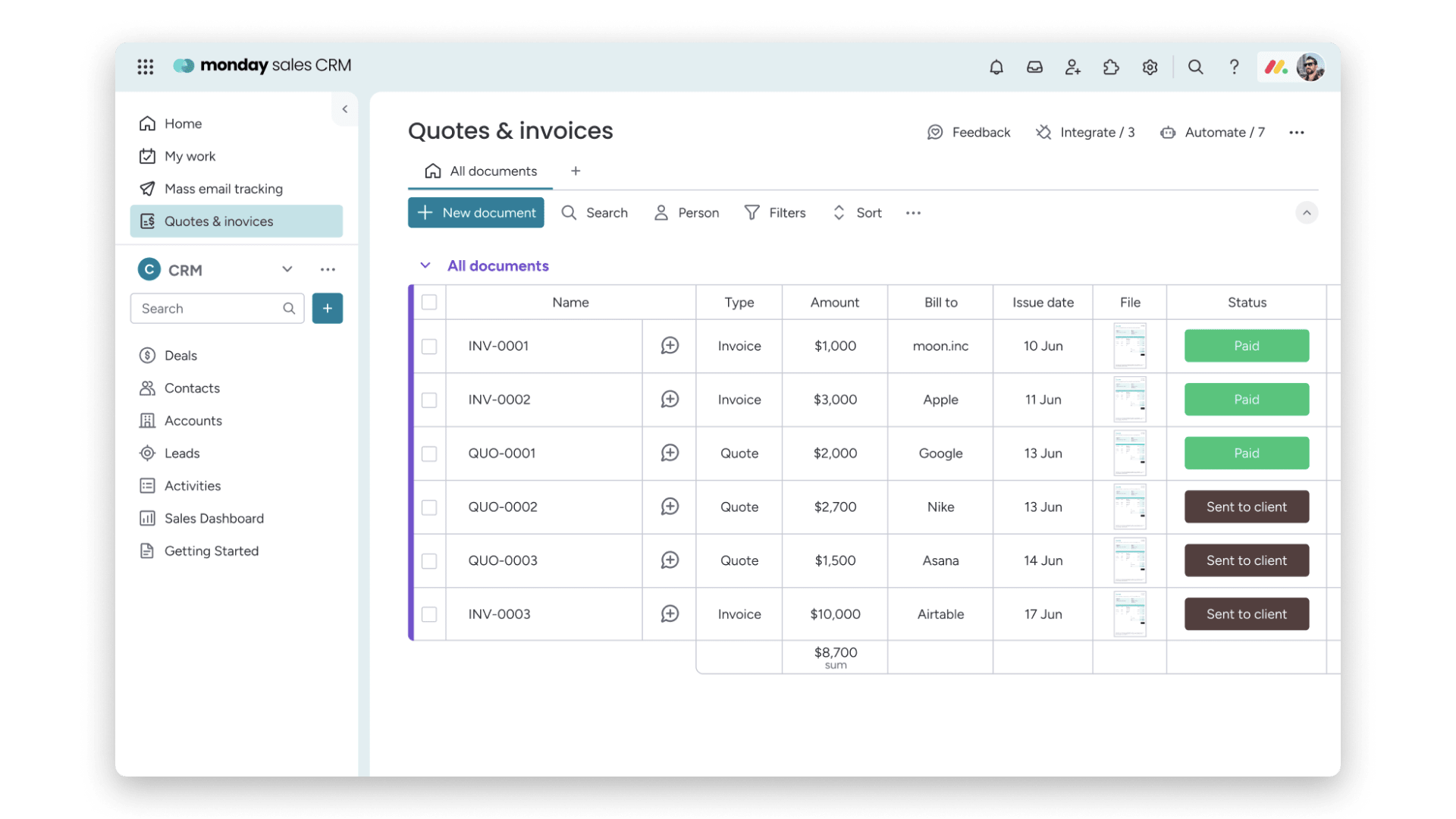
Create custom price quotes with templates to send to potential customers who inquire about your product or service. Once a quote is accepted and the product or service is delivered, you can implement an automation formula in monday CRM to turn the quote directly into an invoice.
Then, the platform can use AI to generate a personalized message to send to the client with the invoice and send follow-up messages on outstanding invoices.
Use AI to predict payment dates and gather analytics

With smart analytics and sales forecasting baked into the CRM, businesses can access predictive payment insights to understand when invoices are likely to be paid based on customer history and trending patterns. This helps teams plan resources and gain a better understanding of cash on hand so that your operations run within your budget and understand customer behaviors.
Build smart invoicing workflows

Build your own smart invoicing workflows that fit your existing operations. For example, with monday CRM, it’s possible to automatically generate and send an invoice the moment a project status changes to “Done.”
Then, you can create a workflow to trigger a series of payment reminders at 7 days before due, on the due date, and at 15 days overdue, all while automatically keeping your finance team in the loop if an invoice remains unpaid after 30 days.
Manage and prioritize leads with AI

Once your invoicing templates and processes are solidified, your next priority should be getting more leads. After all, more leads mean more invoices. Using monday CRM, teams can gather more leads using smart lead capture forms, then use AI to qualify and score incoming leads.
Finally, the platform’s AI can also nurture leads with carefully timed personalized messages, inviting leads to book a demo or learn more about a product.
Set up your invoicing for long-term success
The right sales invoice template will serve your business again and again, so it’s important to put effort into creating it from the start.
With monday CRM, the platform can create professional-looking invoices for you and connect those invoices to AI automations and smart workflows. With invoicing taken care of, you can redirect your attention to delivering exceptional service and scaling your operations without getting bogged down in paperwork.
Try monday CRMFAQs about free invoices templates
What is the difference between a cash sales invoice and a standard credit invoice?
A cash sales invoice confirms payment was received immediately at the time of sale, so it doesn’t need due dates or payment terms. Standard credit invoices, on the other hand, extend payment timelines to customers and include details like net payment terms, due dates, and late fee policies since payment isn’t usually received right away.
Can I use a blank sales invoice template for used car sales?
While you can start with a blank template, you’ll need to customize it significantly for automotive sales. Used car invoices require specific fields like VIN numbers, mileage, vehicle condition, trade-in values, and various fees that standard templates don’t include. Used car dealerships and sales reps will find it easier to use a template designed specifically for auto sales.
What terms and conditions should be included in a free sales invoice template to ensure on-time payment?
Before downloading and using a free sales invoice template, make sure it includes clear payment due dates, accepted payment methods, and specific late fee percentages or amounts that kick in after the deadline. You should also make sure to add early payment discounts to your template if you offer them, dispute resolution timelines, and a statement confirming the customer agrees to these terms upon receipt of goods or services.
How do I set up a sales invoice template with VAT in Microsoft Excel?
Create separate cells for your subtotal, VAT rate (usually formatted as a percentage), and VAT amount using a formula like =subtotal*VAT rate. Then add another cell that calculates the total by combining the subtotal and VAT. Make sure to label each section clearly and include your VAT registration number prominently at the top of the template.
What should be included in a sales return invoice template?
A sales return invoice template should reference the original invoice number and date, list the items being returned with their quantities and prices, and calculate the refund or credit amount. Include the reason for return, the condition requirements the items must meet, and whether you’re issuing a refund, store credit, or exchange, in addition to applicable restocking fees.
