

Your organization’s most critical information is often its least accessible. It lives in the minds of experienced employees, buried in email threads, or scattered across disconnected documents. This unwritten knowledge creates bottlenecks, slows down new hires, and forces your team to solve the same problems again and again. An internal knowledge base captures this expertise and makes it available to everyone, acting as your company’s single source of truth for processes, procedures, and solutions.
Building a successful knowledge base requires embedding information directly into your team’s daily workflows, so the right answers appear exactly when they are needed. This guide explores how to build an effective knowledge base, covering key features, common pitfalls, and practical examples for IT, HR, and other departments. You’ll discover how monday service transforms knowledge management by connecting documentation to action, helping your team execute with more speed and consistency.
Key takeaways
- Reduce ticket volume by 25%: Centralize answers to cut repetitive requests and onboard new agents in days, not weeks.
- Five essential features: Smart search, AI content creation, permission controls, real-time analytics, and workflow integration.
- Platform advantage: With monday service, you can embed articles in ticket workflows, generate AI content from resolved cases, and automate processes with AI service agents.
- Start with high-impact content: Troubleshooting, IT self-service portals, HR policies, and cross-department processes that cause the most confusion.
- AI-powered knowledge: Auto-creates articles from tickets, predicts content gaps, and delivers personalized recommendations by role.
What is an internal knowledge base?
An internal knowledge base is a centralized repository for storing, organizing, and sharing information within an organization. It’s your company’s private library where employees find answers to questions, learn processes, and access the documentation they need to do their jobs.
Think of your knowledge base as the digital version of “how we do things here.”
Instead of asking the same questions repeatedly or searching through old emails, your team can find verified answers in one searchable place.
Internal knowledge base vs external knowledge base
Internal and external knowledge bases serve completely different purposes. Understanding the distinction helps you build the right system for each audience.
Internal knowledge bases contain:
- Confidential procedures: Security protocols, vendor contracts, internal escalation paths
- Operational details: System admin instructions, approval workflows, troubleshooting steps
- Employee resources: HR policies, IT guides, compliance documentation
External knowledge bases include:
- Product documentation: How-to guides, feature explanations, troubleshooting tips
- Customer support: FAQs, IT self-service resources, product updates
- Public information: General company policies, terms of service
The key difference? Internal knowledge stays behind your firewall with role-based access controls. External knowledge is either public or requires basic customer authentication.
3 ways internal knowledge bases transform service operations
Service teams unlock significant strategic advantages when they implement an internal knowledge base, directly impacting resolution times and agent capacity. These are measurable changes you can track through ticket volumes and resolution times.
1. Slash repetitive tickets
Every service desk handles the same questions over and over. Password resets, software access requests, VPN issues — these routine tickets consume hours of agent time daily.
An internal knowledge base turns these repetitive issues into self-service solutions. When agents document the exact steps for common problems, future tickets get resolved faster. Some tickets disappear entirely when employees find answers themselves. According to McKinsey research, organizations can reduce repetitive ticket volume by up to 25% with effective knowledge management systems.
2. Accelerate new agent productivity
New agents typically need weeks to learn your systems, processes, and quirks. They constantly ask experienced teammates for help, which slows everyone down.
A comprehensive knowledge base captures all that tribal knowledge, the unwritten rules about which system to check first, when to escalate, and which workarounds actually work. New agents become productive in days instead of weeks because they have a reliable reference guide.
3. Connect departments through shared knowledge
Cross-functional processes often break down at department boundaries. HR creates an onboarding checklist, but IT doesn’t know the timeline. Finance has expense policies, but employees can’t find them.
Shared knowledge bases eliminate these silos. When departments document their processes in one place, everyone works from the same playbook. With monday service, this becomes especially powerful by linking knowledge directly to workflows, so the right information appears exactly when teams need it.
Try monday service5 must-have features for effective internal knowledge bases
The right features ensure your knowledge base becomes an essential, actively used resource that grows with your team. Focus on capabilities that drive real usage and measurable results.
1. Smart search and navigation
Your team needs to find answers fast, even when they don’t know the exact terminology. Smart search understands intent, whether it’s “email won’t sync” or “Outlook not updating,” the platform should surface the same solution.
To achieve this, your navigation should be intuitive and structured around how your team actually works. Key components include:
- Related articles: Links to connected topics for deeper exploration
- Search filters: Ways to narrow results by department, date, or type
2. AI-powered content creation
Writing documentation feels like extra work on top of regular duties. AI-powered knowledge base content creation changes this by turning resolved tickets into draft articles automatically.
The AI captures resolution steps, identifies common patterns, and suggests article structure. With monday service, your team just reviews and publishes AI-generated drafts instead of starting from scratch.
3. Permission-based access control
Not everyone needs access to everything. HR salary information stays with HR. Security procedures remain restricted to authorized personnel.
Granular permissions let you share broadly while protecting sensitive content. With monday service, you can handle this elegantly, matching knowledge access to existing team structures.
4. Real-time analytics dashboard
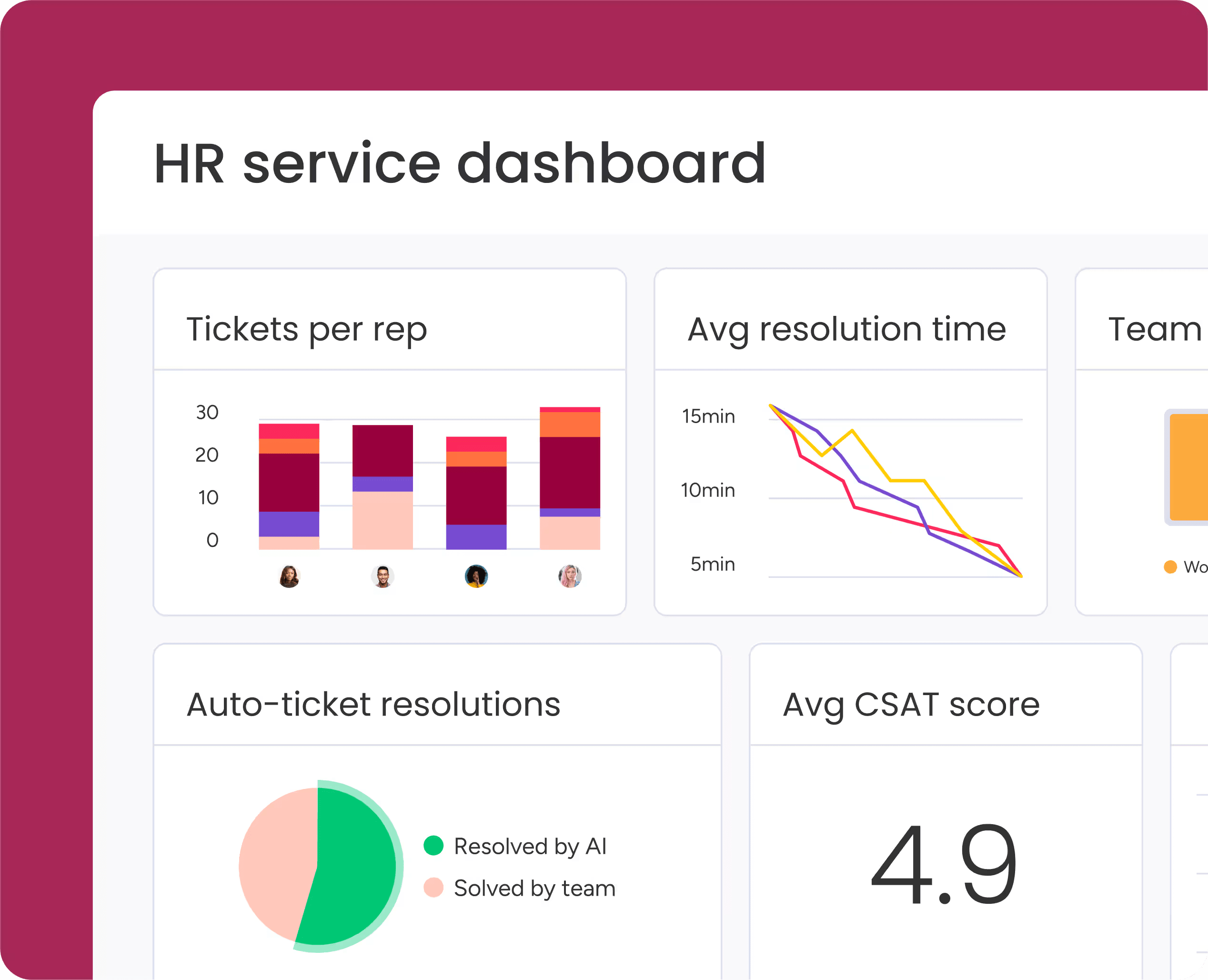
How do you know if your knowledge base actually helps? Analytics reveal which articles get used, what people search for, and where gaps exist.
Key metrics include search terms, article views, user feedback, and content gaps. This data guides your content strategy and proves ROI to leadership.
5. Service platform integration
Knowledge works best when it’s embedded in daily workflows. Integration means agents see relevant articles while working tickets, not in a separate window.
This is where ticketing systems like monday service excel. Knowledge articles appear directly in ticket views, automations suggest relevant content, and updates sync across all connected workflows.
Internal knowledge base examples by department
The most effective knowledge bases address specific departmental needs while connecting to broader organizational workflows. These practical examples show how IT, HR, and cross-functional teams structure their knowledge bases to solve real problems. Each example includes the essential content, key features, and measurable outcomes you can expect when implementing similar systems in your organization.
IT service desk internal knowledge base examples
IT teams handle hundreds of technical issues weekly. The right knowledge base transforms these repetitive requests into standardized, self-service solutions that reduce ticket volume and accelerate resolution times.
| Knowledge Base Type | Primary Purpose | Essential Content | Key Features |
|---|---|---|---|
| Password Reset Self-Service Portal | Eliminate the most common IT ticket type by empowering users to reset credentials independently | Step-by-step reset procedures for each system, identity verification requirements, troubleshooting tips for failed attempts | Multiple reset methods, security requirement documentation, escalation criteria, screenshots, decision trees for independent resolution |
| Software Installation Guides | Standardize deployment and reduce installation errors across your application catalog | Deployment methods, compatibility requirements, known issues for each application, version-specific instructions | Self-service and IT-assisted options, OS compatibility matrices, permission requirements, troubleshooting common installation failures |
| Network Troubleshooting Playbooks | Enable systematic diagnosis that reduces resolution time and prevents escalation | Connectivity checks, settings verification procedures, common problem identification, diagnostic commands | Flowchart structure (if X fails, try Y), specific commands with expected outputs, clear escalation triggers to network specialists |
| Equipment Setup Documentation | Ensure consistent configuration and smooth handoff for all new devices | Imaging procedures, security settings, standard software loads by device type, asset management steps | Checklists for IT staff and end users, unboxing-to-login workflows, asset tagging procedures, user handoff protocols |
Each of these knowledge base types addresses a specific pain point in IT operations. When implemented together, they create a comprehensive self-service ecosystem that reduces ticket volume while improving the employee experience. The key is documenting not just what to do, but when to escalate and how to handle edge cases that inevitably arise.
HR employee self-service knowledge base examples
HR fields countless questions about policies, benefits, and procedures. Using a platform like monday service to create a self-service knowledge base can reduce these repetitive inquiries while improving the overall employee experience.
| Knowledge Base Type | Primary Purpose | Essential Content | Key Features |
|---|---|---|---|
| Digital Onboarding Checklists | Provide clear guidance on tasks and timelines for new employees and their support teams | Tasks for employee, manager, HR, and IT; role-specific variations; timeline expectations; completion criteria | Automated progress tracking, overdue task notifications, role-based task assignment, integration with monday service workflows |
| Benefits Enrollment Portal | Centralize current benefits information and reduce repetitive HR inquiries during enrollment periods | Enrollment periods, plan comparisons, step-by-step enrollment instructions, eligibility requirements, location-specific variations | Coverage calculators, decision guides, plan comparison tools, deadline reminders, dependent documentation requirements |
| Time-Off Policy Database | Clarify leave types, eligibility, and approval processes to reduce confusion and policy violations | Leave type definitions, eligibility criteria, request procedures, manager responsibilities, documentation requirements | Location-specific policy variations, complex scenario guidance (FMLA, parental leave), approval workflows, accrual tracking integration |
| Training Resource Library | Organize learning opportunities by role and skill level to support career development | Internal and external training programs, enrollment instructions, cost information, completion tracking, certification paths | Role-based filtering, mandatory vs. optional designation, skill level indicators, completion certificates, learning path recommendations |
Each of these knowledge base types addresses a specific pain point in HR operations. When implemented together, they create a comprehensive self-service ecosystem that empowers employees while freeing HR to focus on strategic initiatives. The key is keeping content current and accessible exactly when employees need it.
Cross-department knowledge management examples
Some processes span multiple departments. These knowledge bases require shared ownership and consistent updates to prevent conflicting information.
| Knowledge Base Type | Primary Purpose | Essential Content | Key Features |
|---|---|---|---|
| Legal Compliance Documentation Workspace | Centralize compliance requirements across departments while maintaining clear ownership and accountability | Regulatory interpretations, implementation policies, operational controls, audit checklists, evidence requirements, ownership assignments | Department-specific views, audit trail tracking, version control, compliance deadline alerts, cross-functional contribution workflows |
| Finance Process Automation Guides | Simplify financial processes for non-finance teams to ensure compliance and smooth approvals | Expense reporting procedures, budget approval workflows, vendor management steps, approval thresholds, routing rules | Process examples, fillable templates, common mistake warnings, approval threshold matrices, automated routing based on request type |
| Operations Runbook Repository | Provide clear action plans for incidents and emergencies to ensure consistent response under pressure | Incident response procedures, escalation paths, communication templates, recovery procedures, business continuity steps | Automated runbook triggering, step-by-step checklists, role-based task assignment, real-time status updates, post-incident review templates |
| Training Resource Library | Organize learning opportunities by role and skill level to support career development | Internal and external training programs, enrollment instructions, cost information, completion tracking, certification paths | Role-based filtering, mandatory vs. optional designation, skill level indicators, completion certificates, learning path recommendations |
Each of these knowledge base types addresses a specific pain point in cross-functional operations. When implemented together, they break down departmental silos and create consistent processes across your organization. This is especially powerful with monday service, which automatically triggers relevant runbooks and routing requests based on specific conditions, ensuring the right people take the right actions at the right time.
How AI revolutionizes internal knowledge management in 2027
AI transforms knowledge management from static documentation to dynamic, self-improving systems. Here’s how AI transforms your knowledge base into a dynamic, predictive, and self-improving system.
Generate knowledge articles from resolved tickets
Every resolved ticket contains valuable knowledge. AI identifies patterns across tickets and converts successful resolutions into structured articles.
The AI extracts problem descriptions, solution steps, and validation checks. What once required manual documentation now happens automatically as part of normal ticket resolution.
Predict content gaps with usage analytics
AI knowledge base systems analyze search patterns to identify missing content before it becomes a problem. Repeated failed searches indicate knowledge gaps that drive unnecessary tickets.
The system also predicts seasonal needs like benefits questions during enrollment or VPN setup during hiring surges. This allows you to create content proactively, anticipating your team’s needs.
Deliver personalized knowledge recommendations
Not everyone needs the same information. AI personalizes content based on role, experience level, and current context.
New agents see basic troubleshooting guides while veterans get advanced diagnostics. Ticket context triggers relevant article suggestions automatically. With monday service, you can embed these recommendations directly in the ticket interface, making knowledge discovery effortless.
Try monday serviceBuild your internal knowledge base with monday service
Knowledge management comes directly into your service workflows with monday service. Articles connect to tickets, automations suggest relevant content, and AI helps create documentation from everyday work. Here’s how the platform transforms your knowledge operations:
AI-powered article generation from tickets
Every resolved ticket becomes a potential knowledge article. The AI in monday service analyzes successful resolutions and automatically generates draft articles complete with problem descriptions, solution steps, and validation checks. Your agents simply review and publish instead of writing from scratch. This means your knowledge base grows organically as your team works, capturing expertise without adding extra documentation burden.
Contextual knowledge delivery in ticket workflows
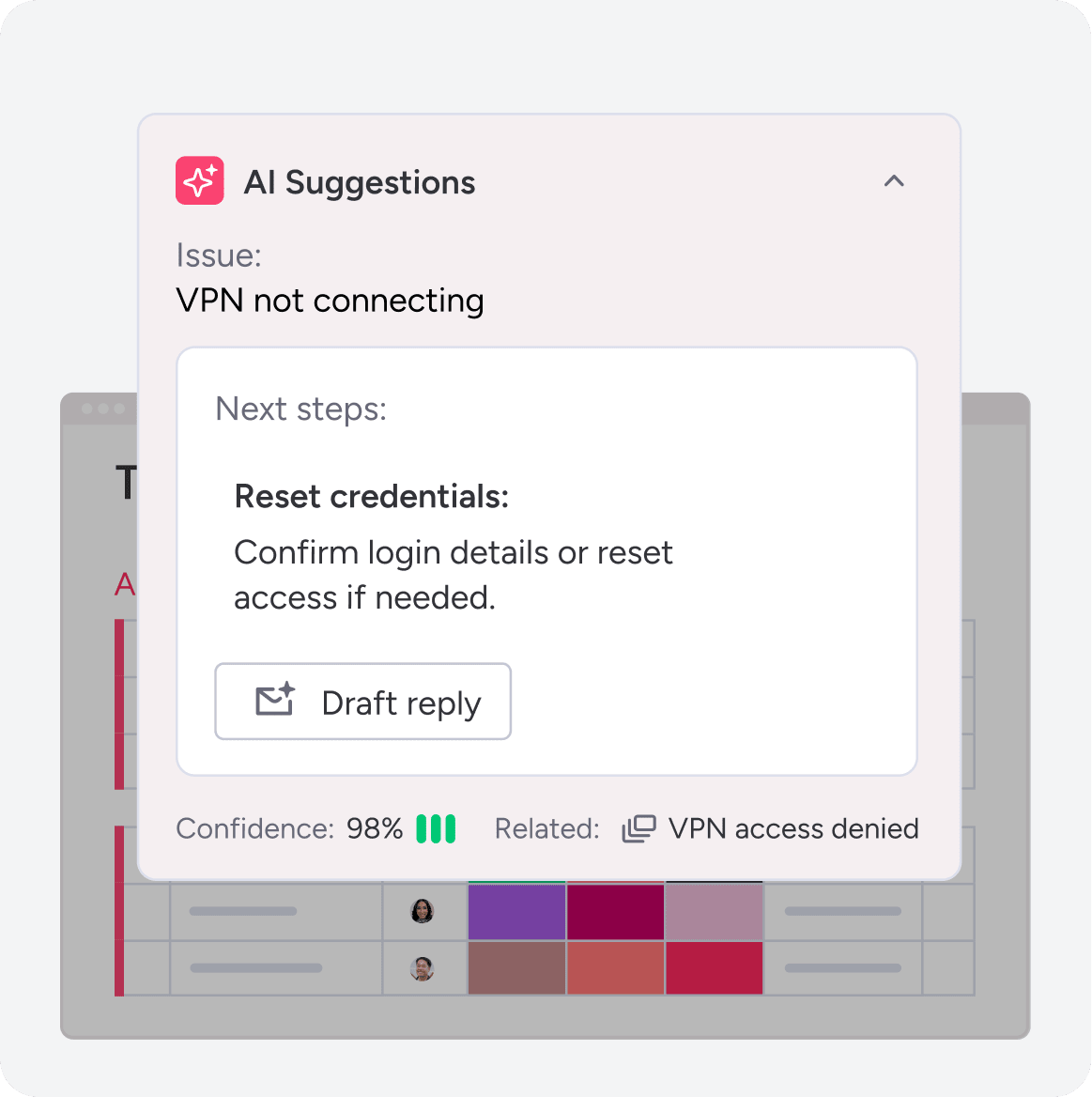
The right answer appears exactly when your team needs it. As agents work tickets, relevant articles surface directly in the ticket interface with monday service based on issue type, keywords, and historical patterns. No switching between systems or searching through documentation libraries. This embedded approach reduces resolution time and ensures consistent solutions across your team.
AI agents that surface knowledge automatically
The platform handles the complexities of permission management, search optimization, and content governance while keeping the user experience simple. Role-based access controls ensure sensitive information stays protected while making general knowledge broadly available. Automated workflows notify content owners when articles need updates, track review cycles, and archive outdated documentation. Your team gets answers faster, resolves issues more consistently, and builds institutional knowledge automatically.
Turn scattered knowledge into your competitive advantage
An effective internal knowledge base transforms internal expertise into a searchable, accessible resource that reduces ticket volume, accelerates onboarding, and connects departments through shared understanding. The difference between a knowledge base that gathers dust and one that drives real results comes down to integration. When knowledge lives inside your workflows, not in a separate system, your team actually uses it.
With monday service, this becomes possible by embedding articles directly in ticket views, generating content from resolved cases, and surfacing the right answers exactly when they’re needed. Start with high-impact content that addresses your most common pain points, then let AI help create articles from everyday work rather than treating documentation as a separate burden.
Try monday serviceFAQs
What's the difference between a knowledge base and a wiki?
The main difference between a knowledge base and a wiki lies in structure and control. A knowledge base is a structured repository with formal content management and controlled access. A wiki allows open collaboration with looser structure and broader editing permissions. Knowledge bases work better for official documentation, while wikis suit collaborative brainstorming.
How long does it take to implement an internal knowledge base?
Implementation typically takes two to eight weeks, depending on your content volume and complexity. Basic setup happens in days, but comprehensive content development and team adoption take longer. Starting with high-impact articles and expanding gradually works best.
Can you integrate multiple data sources into one knowledge base?
Yes, modern platforms integrate with existing systems through APIs and connectors. You can pull content from document repositories, ticketing systems, and databases into one searchable interface. With monday service, you can connect with dozens of platforms to unify your knowledge sources.
What security features protect sensitive internal knowledge?
Standard security features include role-based access controls, encryption at rest and in transit, audit trails, and SSO integration. Look for platforms that match your existing security requirements and compliance standards.
How much does an internal knowledge base typically cost?
Pricing ranges from $5-25 per user monthly for basic platforms to $30-100+ for enterprise solutions with AI and advanced analytics. Consider the total cost, including implementation, training, and ongoing maintenance, when comparing options.
Who should own and maintain the internal knowledge base?
Successful knowledge bases need a dedicated owner, typically in IT or operations. Subject matter experts from each department contribute content while the owner maintains consistency, governance, and platform administration. Clear ownership prevents knowledge decay.

 Get started