


Shared inboxes were a huge step forward for organizing team emails, giving everyone a central place to manage conversations. But as teams grow, simple questions often become projects that involve multiple departments. The platform that once brought order can start to slow things down, creating roadblocks instead of clear paths for collaboration.
This is the moment when teams realize they need more than just an inbox and begin looking for powerful Front alternatives. A true service platform connects support requests with the rest of the business, turning isolated conversations into coordinated action across departments.
This guide breaks down the 15 best options on the market, comparing their core features, pricing, and what makes each one stand out. From AI-powered automation to seamless integrations, these platforms help entire organizations work together seamlessly—transforming service delivery from reactive inbox management to proactive operational excellence.
Key takeaways
- Move beyond inbox management: front alternatives transform service delivery from reactive email handling into proactive, cross-departmental collaboration that connects support with your entire business operation.
- AI-powered automation accelerates resolutions: modern platforms use intelligent routing, auto-classification, and predictive insights to handle routine requests automatically while keeping your team focused on complex, high-value interactions.
- No-code customization puts control in your hands: the best alternatives empower your team to build and adapt workflows without developers, creating processes that mirror exactly how your organization operates.
- Transparent pricing prevents surprise costs: look for platforms that include advanced features like AI, automation, and analytics in base tiers rather than charging costly add-ons that inflate your total ownership costs as you scale.
- Unified platforms eliminate tool sprawl: leading Front alternatives like monday service connect service requests with projects, tasks, and team collaboration in one workspace, breaking down silos and creating seamless handoffs across departments.
What teams look for after outgrowing the Front?
Front was a game-changer for organizing chaotic shared inboxes, and for a while, that was a huge win. But as service operations scale, simply managing emails isn’t enough to deliver the fast, connected experiences employees and customers expect. What once felt like control now feels like a bottleneck.
Truly great service happens when different teams can jump in and solve problems together, without friction. When everything is funneled through an inbox, it creates roadblocks instead of runways for collaboration between departments like IT, HR, and Operations. Modern service teams need tools that connect them, not keep them in separate conversations.
This shift is about moving from a reactive inbox to a proactive service engine. Teams are looking for platforms that offer intelligent automation to handle the busywork and the flexibility to build workflows that actually mirror how organizations operate. It’s time for a system that sees the whole picture, not just one piece of the conversation.

15 best Front app alternatives for service excellence
Outgrowing the classic shared inbox signals growth. Tools like Front organized initial chaos, but teams now need a true service engine that powers entire operations, not just email. This is about upgrading service delivery across the board.
The best platforms unify teams, tools, and data in one place, using smart service desk automation to accelerate resolutions. Think intuitive workflows anyone can build, AI that genuinely helps clear the queue, and real-time analytics that provide instant performance insights. It’s about turning complex requests into streamlined wins.
The top contenders go beyond basic ticketing to offer truly connected, scalable solutions for entire organizations. This breakdown covers power, ease of use, and growth potential to help teams find the platform that enables perfect synchronization.
1. monday service
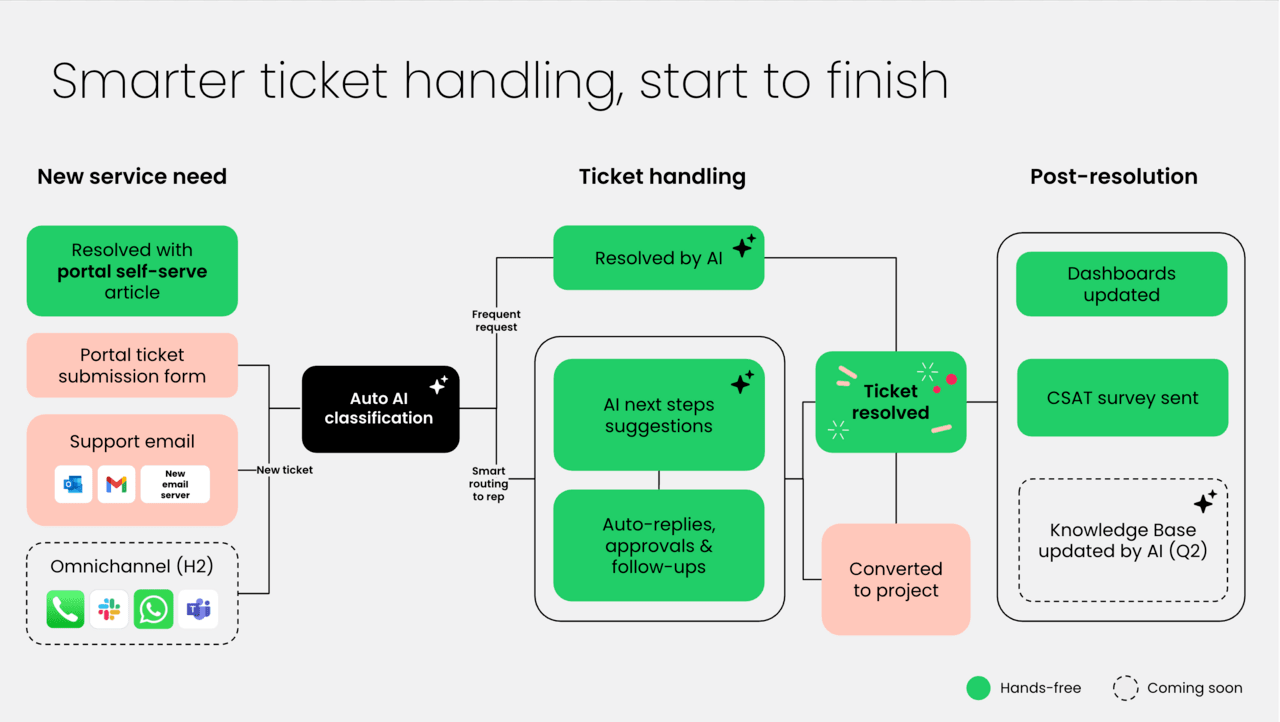
Organizations can transform how they handle service operations with monday service, which unifies IT, customer support, and cross-departmental workflows in one AI-powered platform. Built on the robust monday.com Work OS, it’s designed for teams who want to move beyond reactive support to proactive service management. The platform combines intuitive no-code customization with enterprise-grade security, making it perfect for organizations seeking a single source of truth for all their service needs.
Example:
Organizations can streamline service delivery across IT, HR, legal, and other departments with monday service through unified ticketing, AI-driven automation, and real-time analytics in one collaborative workspace.
Key features:
- AI-powered ticket management: automatically classifies, routes, and prioritizes tickets using built-in AI capabilities, with smart suggestions and one-click replies to accelerate resolution times.
- Unified service workspace: connects service requests, projects, and departmental tasks in a single platform, eliminating silos and providing complete visibility across teams.
- Self-service customer portal: branded portal with knowledge base, ticket tracking, and global search functionality, supporting multiple portals for enterprise customers.
Pricing:
- Standard: $31/seat/month (billed annually), includes unlimited tickets, AI triage for one board, up to ten portal users, and 250 automation actions/month.
- Pro: $45/seat/month (billed annually), adds AI triage for three boards, up to 100 portal users, and 5,000 automation actions/month.
- Enterprise: custom pricing, includes unlimited AI triage boards, multiple customer portals, HIPAA compliance, and advanced governance features.
- Annual billing: provides approximately 18% savings compared to monthly billing.
- Price increase: of 18% scheduled for February 10th, 2026.
Why it stands out:
- Seamless cross-department collaboration: unlike traditional service management platforms that focus solely on IT, monday service connects service operations with broader organizational workflows, enabling true enterprise service management across departments.
- AI-first approach with human oversight: built-in AI handles routine tasks like ticket classification and routing while keeping humans in control of complex decisions, creating the perfect balance of automation and personalization.
- Transparent, scalable pricing model: offers unlimited tickets across all paid tiers with clear automation quotas, avoiding hidden costs and surprise overages that plague other service management solutions.
2. Zendesk
With its AI-powered platform, Zendesk unifies customer and employee support in one comprehensive solution. The platform specializes in omnichannel service management with autonomous AI agents and built-in analytics, making it ideal for organizations seeking to scale their service operations without complexity.

Example:
Zendesk delivers unified customer and employee service management through AI-first workflows that accelerate resolution times while reducing operational complexity across departments.
Key features:
- AI-powered automation: autonomous agents handle routine requests end-to-end while AI Copilot guides human agents through complex issues.
- Omnichannel integration: centralizes support across email, chat, phone, social media, Slack, and Microsoft Teams for seamless service delivery.
- Enterprise-grade security: SOC 2 Type II, ISO 27001:2022, and FedRAMP compliance with optional advanced data privacy protection.
Pricing:
- Team: starting tier with basic features (pricing available on request).
- Growth: mid-tier plan with enhanced capabilities (pricing available on request).
- Professional: advanced features for growing teams (pricing available on request).
- Enterprise: full-featured plan with premium support (pricing available on request).
- Add-ons: Copilot ($50/agent/month), Quality Assurance ($35/agent/month), Workforce Management ($25/agent/month), Advanced Data Privacy & Protection ($50/agent/month).
Considerations:
- Limited native CMDB: asset management capabilities require third-party integrations for comprehensive IT infrastructure tracking.
- Costly add-ons: advanced features like enterprise-grade privacy controls and voice capabilities can significantly increase total ownership costs.
3. Hiver
By converting Gmail into a collaborative helpdesk, Hiver allows teams to manage support without leaving their inbox. The platform specializes in inbox-native service management with built-in AI, making it ideal for teams heavily invested in Google Workspace who want minimal change management. With over 10,000 teams using the platform, Hiver promises deployment in under two hours.

Example:
Hiver turns your inbox into a complete IT service desk, enabling teams to handle support requests, track SLAs, and collaborate on tickets directly within Gmail or Outlook.
Key features:
- Shared inbox management: assign, track, and collaborate on emails directly within Gmail with automated workflows and collision detection.
- AI-powered automation: built-in AI Copilot drafts responses, summarizes tickets, and AI Agents auto-tag, route, and resolve common queries.
- Multichannel support: handle requests via email, live chat, voice (through Aircall integration), WhatsApp, and self-service portal.
Pricing:
- Free: $0 forever with core ticketing, shared inboxes, live chat, basic knowledge base, and 24/7 support.
- Growth: $25/user/month (annual) or $35/user/month (monthly) with internal knowledge base, approvals, automations, and basic integrations.
- Pro: $65/user/month (annual) or $85/user/month (monthly) with voice/WhatsApp/portal, SLAs, CSAT, advanced analytics, and AI features.
- Elite: $105/user/month (annual) or $125/user/month (monthly) with skill-based routing, custom roles, SSO, HIPAA compliance, and AI QA.
- Annual billing: saves up to 20%.
- Minimum seats: two seats required, then increments of five seats.
Considerations:
- Limited native ITIL modules: advanced change, problem, or asset management requires integrations with tools like Jira for comprehensive ITSM.
- Voice support limitations: requires separate Aircall licensing, and some users report performance slowdowns at very high ticket volumes.
4. Freshdesk
Freshdesk brings order to customer service chaos with its AI-powered omnichannel platform. The cloud-based solution excels at consolidating customer interactions from email, chat, phone, and social media into one unified workspace, making it perfect for growing teams that need scalable automation without complexity.

Example:
Freshdesk empowers support teams to deliver consistent, high-quality customer service across multiple channels while leveraging AI automation to reduce response times and improve agent productivity.
Key features:
- Omnichannel ticketing: consolidates all customer communications from email, chat, phone, and social media into a single agent workspace with unified routing.
- Freddy AI suite: automates ticket classification, sentiment analysis, and response suggestions while providing real-time translation across 60+ languages.
- Smart SLA management: monitors service level agreements with imminent breach alerts, automatic pause on customer wait times, and capacity-aware routing.
Pricing:
- Growth: $19/agent/month (annual billing).
- Pro: $55/agent/month (annual billing).
- Enterprise: $89/agent/month (annual billing).
- Freshdesk Omni Growth: $29/agent/month (annual billing).
- Freshdesk Omni Pro: $79/agent/month (annual billing).
- Freshdesk Omni Enterprise: $119/agent/month (annual billing).
- Free 6-month program: available for one to two agents.
- Additional costs: for AI Agent sessions ($49 per 100 sessions after initial 500).
- Day passes: required for occasional agents ($2–$12 per day depending on plan).
Considerations:
- Field Service Management module discontinued for new customers: limiting on-site service capabilities.
- Advanced features and AI capabilities: can significantly increase per-agent costs especially with Omni suite and usage-based add-ons.
If you want to learn more about this, here’s a guide comparing Freshdesk vs Freshservice.
5. Help Scout
For teams prioritizing personal connection over robotic efficiency, Help Scout delivers human-centric customer support that feels personal, not automated. The platform specializes in creating email-like conversations across channels, making it perfect for small to mid-sized teams who want to build genuine customer relationships without the complexity of enterprise help desks.

Example:
Help Scout transforms customer support into meaningful conversations by combining shared inbox management with self-service tools, helping teams deliver personalized support that builds lasting customer relationships.
Key features:
- Shared inbox with collision detection: prevents duplicate responses while enabling seamless team collaboration through internal notes and @mentions.
- AI-powered assistance: drafts responses, summarizes conversations, and provides an AI chatbot that resolves up to 70% of routine requests in 50+ languages.
- Integrated knowledge base: reduces ticket volume by empowering customers with self-service resources and tracks failed searches to improve content.
Pricing:
- Free: five users, one inbox, one docs site.
- Standard: $25/user/month.
- Plus: $45/user/month.
- Pro: $75/user/month.
- AI Answers add-on: $0.75 per resolution (includes 3-month free trial).
- Annual billing: offers approximately 16% discount.
- Additional inboxes: cost $10/month each, extra docs sites $20/month each.
Considerations:
- No native SLA management: requires third-party integrations like Super SLA for tracking and alerts.
- Phone and SMS support relies on integrations: rather than built-in functionality, which may complicate setup for teams needing voice channels.
6. Missive
Missive merges email, chat, and task management into one unified platform, transforming team collaboration. The solution specializes in real-time collaborative email management with shared inboxes, making it perfect for customer support teams that need to blend traditional email workflows with modern messaging capabilities.

Example:
Missive empowers service teams to manage omnichannel customer communications through shared inboxes that combine email, SMS, WhatsApp, and social messaging in one collaborative workspace.
Key features:
- Omnichannel shared inboxes: manage email, SMS, WhatsApp, Messenger, Instagram, and live chat conversations in unified team queues with automated assignment and workload balancing.
- Real-time collaborative drafting: multiple team members can co-edit responses simultaneously with collision detection, plus internal chat threads within customer conversations.
- AI-powered automation: smart Rules engine with AI capabilities for intelligent routing, sentiment analysis, auto-drafting responses, and SLA management.
Pricing:
- Free: up to three users, 15-day history, five shared accounts per user.
- Starter: $14/user/month (billed annually), core channels, team spaces, tasks, SOC 2 Type II security.
- Productive: $24/user/month (billed annually), adds integrations, Rules and automations, basic analytics, API access.
- Business: $36/user/month (billed annually), adds SAML/SSO, IP restriction, advanced analytics, personalized onboarding.
- Annual billing: 20% discount available.
- Additional shared accounts: cost $15/month per increment of five accounts (organization-level).
Considerations:
- No native knowledge base: or in-app marketing messaging capabilities compared to dedicated help desk platforms.
- Live chat and video features: rely on third-party Twilio integration with pay-as-you-go pricing, which can add variable costs for teams with heavy chat usage.
7. Intercom
Intercom’s approach to customer service leverages AI-powered automation to handle frontline support, keeping human agents focused on complex issues. The platform combines proactive messaging, omnichannel support, and intelligent routing to create seamless customer experiences across chat, email, phone, and social channels. With its unified approach to customer engagement, Intercom helps businesses resolve issues faster while building stronger relationships.

Example:
Intercom excels at creating AI-first customer service experiences that blend automated resolution with human expertise, making it ideal for SaaS companies and digital businesses prioritizing proactive customer engagement.
Key features:
- Fin AI Agent: handles frontline customer questions with outcome-based pricing at $0.99 per resolution, automatically escalating complex issues to human agents.
- Omnichannel helpdesk: unifies support across chat, email, phone, SMS, WhatsApp, and social channels with conversational ticketing and real-time translation in 45+ languages.
- Proactive support toolkit: includes product tours, targeted messaging, and automated workflows to reduce support volume before issues arise.
Pricing:
- Essential: $29/month per seat (annual billing).
- Advanced: $85/month per seat (annual billing, includes 20 Lite seats).
- Expert: $132/month per seat (annual billing, includes 50 Lite seats).
- Fin AI Agent: $0.99 per resolved conversation (add-on to any plan).
- Intercom Phone: usage-based pricing starting at $0.012/minute for US inbound calls.
- Early Stage Program: up to 90% off first year for eligible startups.
Considerations:
- Manual translation requirement: help Center articles support 45 languages but require manual translation rather than automatic translation.
- Browser-only voice and video: voice and video calls through Messenger currently work only on web browsers, not mobile devices or SDKs.
8. Gorgias
Built specifically for online retailers, Gorgias revolutionizes ecommerce customer support by bringing order data, customer history, and powerful automation directly into your support workflow. The platform integrates seamlessly with Shopify, Magento, and other ecommerce platforms to deliver personalized support at scale. This ecommerce-first approach means agents can process refunds, edit orders, and access complete purchase histories without ever leaving the helpdesk.

Example:
Gorgias empowers ecommerce brands to deliver fast, revenue-focused customer support through deep store integrations and AI-powered automation that resolves up to 60% of inquiries automatically.
Key features:
- Unified omnichannel inbox: manage email, chat, social media, SMS, and voice conversations from one centralized dashboard with complete customer context.
- In-ticket ecommerce actions: process refunds, cancel orders, issue discounts, and view live inventory directly within support tickets without switching platforms.
- AI agent automation: deploy conversational AI that handles order tracking, returns, subscription changes, and product recommendations with human-like interactions.
Pricing:
- Starter: $10/month (50 tickets included).
- Basic: $50/month (300 tickets included).
- Pro: $300/month (2,000 tickets included).
- Advanced: $750/month (5,000 tickets included).
- Enterprise: custom pricing (5,000+ tickets).
- Annual billing: offers two months free (up to 16% discount).
- AI Agent: priced per successful automated interaction ($0.90–$1.00 per resolved conversation).
- Voice and SMS: available as add-ons.
- Overage fees: apply when monthly ticket limits are exceeded.
Considerations:
- Ecommerce-focused design: may not suit non-retail businesses or traditional ITSM use cases as effectively as generalist platforms.
- Usage-based pricing with overage fees: requires careful monitoring to avoid unexpected costs, especially with AI automation and add-on channels.
9. Crisp
A unified platform combining messaging, ticketing, and automation, Crisp delivers a seamless, AI-powered customer support experience. The EU-based company specializes in omnichannel support with flat per-workspace pricing, making it perfect for growing businesses that want predictable costs without sacrificing functionality.

Example:
Crisp empowers small to medium businesses to deliver exceptional customer support across multiple channels while maintaining GDPR compliance and predictable pricing structures.
Key features:
- Omnichannel shared inbox: centralizes messages from email, chat, WhatsApp Business, Instagram, Messenger, and more into one unified workspace.
- AI-powered automation: no-code chatbot builder with multilingual support and smart routing to deflect common issues and accelerate resolution times.
- Real-time assistance tools: built-in co-browsing and video support capabilities that help agents resolve complex issues faster without requiring customer downloads.
Pricing:
- Free: $0/month (two seats, basic features).
- Mini: $25/month (four seats, enhanced features).
- Essentials: $95/month (ten seats, omnichannel inbox, knowledge base, AI chatbot).
- Plus: $295/month (20+ seats, ticketing system, customer portal, advanced analytics).
- Enterprise: custom pricing (personalized SLAs and onboarding).
- Additional agents: cost $10/month each beyond included seats.
- 20% discount: available when subscribing 3+ websites to paid plans.
Considerations:
- Ticketing system and customer portal: are only available on the Plus plan, which may require upgrades for businesses needing structured ticket management.
- No completed SOC 2 audit: which could be a barrier for enterprise procurement processes requiring specific compliance certifications.
10. Kayako
Kayako’s AI-native support platform redefines customer service by unifying every customer interaction into a single, context-rich conversation thread. The platform specializes in scaling support operations without expanding headcount, making it ideal for growing teams that need to handle increasing ticket volumes efficiently. With its unique “pay-per-AI-resolution” pricing model, Kayako offers a refreshing alternative to traditional per-agent fees.

Example:
Kayako empowers customer support teams to deliver AI-powered, omnichannel service that automatically triages, routes, and resolves tickets while maintaining full customer context across all touchpoints.
Key features:
- SingleView customer context: surfaces complete customer history, purchases, previous tickets, and sentiment analysis in every conversation thread.
- AI-powered automation: automatically classifies tickets by urgency and intent, drafts responses, and escalates complex cases to human agents.
- Omnichannel unified inbox: consolidates email, chat, social media, WhatsApp, and web interactions into one seamless timeline.
Pricing:
- Kayako One: $79/agent/month plus $1 per AI-resolved conversation.
Considerations:
- No product-level SOC 2 certification: which may limit adoption for highly regulated industries.
- Time-based automations: run only hourly with a 1,000 case processing limit per run.
11. ServiceNow
For large organizations managing intricate service operations, ServiceNow delivers enterprise-grade IT service management that transforms how they handle complex service operations. The platform specializes in unifying ITSM, ITOM, and AIOps through a single data model and AI-powered automation, making it ideal for Fortune 500 companies managing intricate IT environments and compliance requirements.
Example:
ServiceNow excels at consolidating multiple service tools into one governed platform with out-of-the-box ITIL practices, analytics, and automation, reducing integration overhead while improving visibility across enterprise operations.
Key features:
- Service Operations Workspace: unified interface connecting ITSM and ITOM for proactive incident detection and faster resolution.
- AI-powered automation: Now Assist provides incident summarization, predictive classification, and AI agents for autonomous task execution.
- Common Service Data Model (CSDM): prescriptive data backbone that standardizes service definitions and relationships across all workflows.
Pricing:
- ITSM Standard: custom quote-based pricing (includes core ITIL processes, Asset/Request management, Universal Request).
- ITSM Pro: custom quote-based pricing (adds Analytics, Virtual Agent, Predictive Intelligence, Continual Improvement).
- ITSM Enterprise: custom quote-based pricing (adds Workforce Optimization, Process Mining).
- Pro Plus and Enterprise Plus add-ons: additional AI capabilities including AI Agents, AI Agent Studio, and enhanced Now Assist features.
- All pricing: quote-based with no publicly listed rates.
Considerations:
- Complexity barrier: rich capabilities require dedicated admins and skilled resources to configure and operate effectively, creating a steep learning curve for teams.
- Cost considerations: best value realized in enterprise or multi-workflow rollouts; smaller teams may find the platform over-featured relative to needs and budget compared to simpler ITSM alternatives.
12. Jira Service Management
By unifying development and operations on a single platform, Jira Service Management transforms how IT and business teams deliver service. Built for organizations already using the Atlassian ecosystem, it brings ITIL-ready workflows and AI-powered automation to streamline everything from incident response to change management. With 45,000+ customers and deep integration across Jira Software, Confluence, and Opsgenie, it’s designed for teams who need their service desk to work seamlessly with their development processes.

Example:
Jira Service Management excels at breaking down silos between development and IT operations teams through “high-velocity ITSM” that connects service requests directly to software development projects and deployment pipelines.
Key features:
- ITIL-compliant workflows: out-of-the-box support for incident, problem, change, and configuration management with 400+ pre-built templates.
- AI-powered automation: Atlassian Intelligence handles ticket triage, summarization, and response generation, plus a virtual agent across Slack, Teams, and portal channels.
- Native DevOps integration: deployment gating, change risk assessment, and direct connections to Bitbucket, Jenkins, and GitHub for seamless development workflows.
Pricing:
- Free: up to three agents with basic features.
- Standard: $20/agent/month with unlimited emails and 5,000 automation runs monthly.
- Premium: $51.42/agent/month including 99.9% uptime SLA, Assets CMDB, advanced incident management, and virtual agent.
- Enterprise: annual quote-based pricing with 99.95% SLA, multiple sites, and unlimited automation.
- Annual billing: saves approximately 17% across all paid plans.
- Rovo Customer Service: included but metered at $1 per resolution.
Considerations:
- Advanced capabilities locked behind higher tiers: change management and AIOps features are only available in Premium/Enterprise tiers, making the price jump significant for teams needing these functions.
- Virtual agent limitations: can only be enabled in either Slack or Teams (not both simultaneously), and certain AI features aren’t available in Atlassian Government Cloud.
13. Salesforce Service Cloud
Leveraging its industry-leading CRM foundation, Salesforce Service Cloud transforms customer service operations by unifying CRM data, AI-powered automation, and omnichannel engagement on a single platform. It empowers organizations to deliver personalized support experiences while maintaining complete visibility across sales, marketing, and service interactions. The platform’s Einstein AI and new Agentforce capabilities make it particularly powerful for enterprises seeking intelligent automation and scalable service operations.
Example:
Salesforce Service Cloud excels for organizations already using Salesforce CRM who want to unify their customer data across sales, marketing, and service operations while leveraging advanced AI automation for case routing and resolution.
Key features:
- 360-degree customer view: combines service, sales, and marketing data for personalized support experiences.
- AI-driven automations: uses Einstein AI for intelligent case routing, knowledge recommendations, and predictive analytics.
- Omnichannel engagement: supports email, chat, phone, social media, and messaging platforms in one unified console.
Pricing:
- Starter Suite: $25/month (billed annually).
- Pro Suite: $100/month (billed annually).
- Enterprise: $175/month (billed annually).
- Unlimited: $350/month (billed annually).
- Agentforce 1 Service: $550/month (billed annually).
- Contact Center bundle: $150/month (includes Voice, Digital Engagement, and analytics).
- Digital Engagement add-on: $75/month (for Enterprise/Unlimited users).
- Service Cloud Voice: starting at $50/month (BYO telephony) or $75–$200/month (with Amazon Connect minutes).
Considerations:
- Complex pricing structure: multiple add-ons and editions can significantly increase total cost of ownership, especially when factoring in Premier Success Plans (typically 30% of license fees).
- Implementation complexity: the platform’s extensive customization options require dedicated admin resources and can involve a steep learning curve for full optimization.
14. HubSpot Service Hub
By unifying ticketing, automation, and customer feedback on a single CRM-powered platform, HubSpot Service Hub transforms customer support. The solution specializes in connecting service operations with sales and marketing data, making it ideal for growing businesses that want to eliminate tool sprawl and create seamless customer experiences.

Example:
HubSpot Service Hub delivers comprehensive service management through a CRM-native help desk that combines omnichannel messaging, AI-powered automation, and customer success tools in one unified workspace.
Key features:
- Unified help desk workspace: centralizes tickets from email, chat, WhatsApp, Facebook Messenger, and phone calls with agent-specific views and automated triage.
- AI-powered customer agent: provides 24/7 automated responses across multiple channels, trained on your knowledge base and website content with seamless human handoff.
- Integrated customer success tools: includes health scoring, account prioritization, and CSM workflows alongside traditional support ticketing.
Pricing:
- Service Hub Free: $0/month with basic ticketing and team email.
- Service Hub Starter: $20/seat/month with simple automation and unbranded communications.
- Service Hub Professional: $100/seat/month including help desk workspace, knowledge base, and SLA management.
- Service Hub Enterprise: $150/seat/month with conditional SLAs, IVR, skill-based routing, and advanced analytics.
- Enterprise onboarding: one-time $3,500 fee required.
- Add-on costs: additional calling minutes ($50/1,000 minutes), WhatsApp messages ($70/1,000 messages), and workflow capacity ($200/100 workflows).
Considerations:
- Help desk functionality is not available in the HubSpot mobile app: limiting agent flexibility for on-the-go support.
- SMS capabilities are restricted to US numbers only: and can only send to US/Canada recipients, which may limit global service operations.
15. Google Collaborative Inbox
As a feature built directly into Google Workspace, Google Collaborative Inbox turns Gmail into a shared team workspace for managing group emails and basic service requests. It offers zero-cost shared inbox functionality for teams already using Gmail, making it perfect for small internal support queues or departments handling low-volume email-based requests.
Example:
Google Collaborative Inbox serves teams that need basic shared email management with assignment and status tracking capabilities without investing in dedicated help desk software.
Key features:
- Shared email management: allows teams to assign and track group emails within Google Groups with conversation history.
- Simple collaboration: enables basic task assignment, resolution statuses (Complete, No action needed, Duplicate), and conversation tracking.
- No-code setup: requires no additional software or complex configuration, just enable Groups for Business in your Google Workspace domain.
Pricing:
- Business Starter: $7/month per user (annual commitment).
- Business Standard: $14/month per user (annual commitment).
- Business Plus: $22/month per user (annual commitment).
- Enterprise: custom pricing (contact sales).
- Collaborative Inbox features: included at no extra cost with any paid Workspace plan.
- Promotional discounts: may apply for new customers (e.g., 20% off first three months).
Considerations:
- Limited to basic email-only workflows: with no SLA timers, automation rules, or advanced analytics dashboards that specialized help desk platforms offer.
- Assignment and status management features: only work through the Groups web interface, not within the familiar Gmail inbox, creating workflow friction for agents.
Essential features in modern Front competitors
Unified omnichannel communication
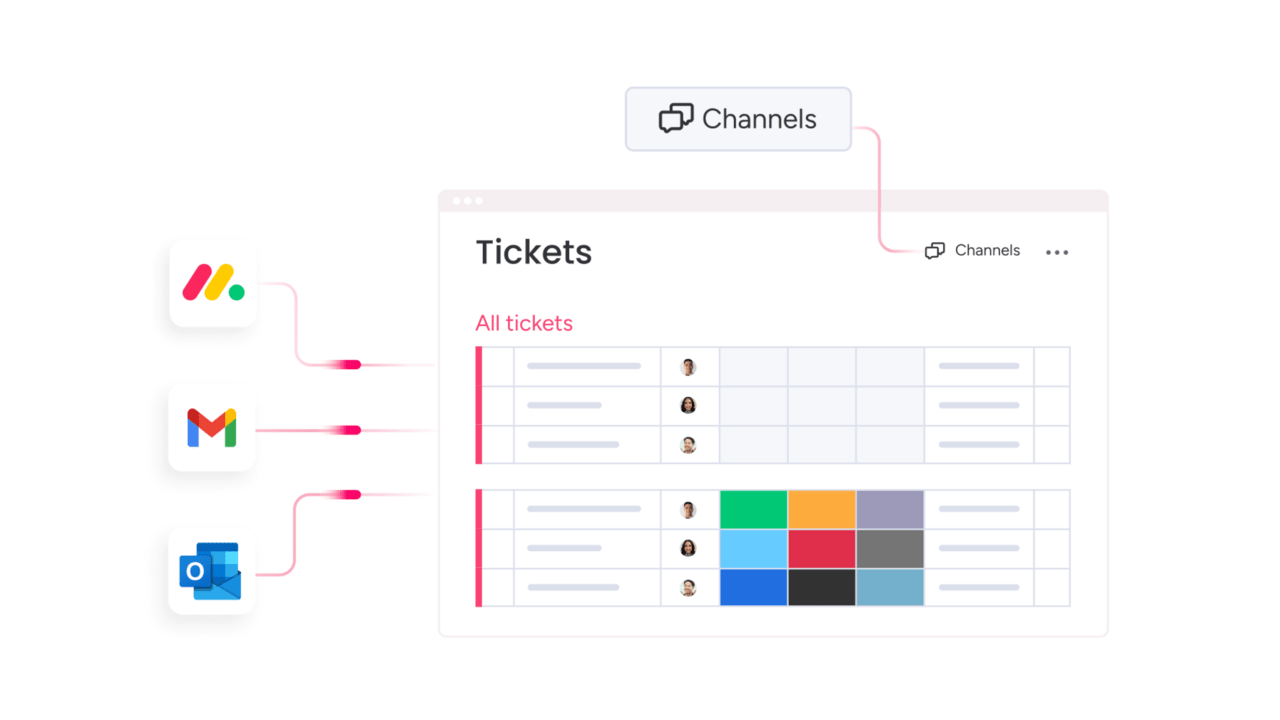
All conversations, from email and chat to social media, should converge into one clean, organized space. This provides your team a single view of every interaction, eliminating the need to switch between tabs and enabling consistent, connected support. It’s about meeting people wherever they are, without ever dropping the ball.
AI-powered ticket routing and automation
Advanced platforms place the ticket queue on autopilot, giving your team a major boost. Built-in AI instantly analyzes incoming requests and routes them to the perfect person for the job, accelerating resolutions and freeing your team from tedious sorting to focus on problem-solving.
No-code workflow customization
The people who know your processes best should be the ones to control them. With no-code workflows, you can build and tweak your processes with simple drag-and-drop tools, no developers needed. This means you can adapt on the fly, designing the perfect flow to match exactly how your team works.
Real-time analytics and predictive insights
Move from guesswork to informed decisions with analytics that reveal what’s happening right now, not last quarter. A live view of team performance and ticket trends, augmented by smart AI that predicts what’s coming next, helps you spot potential bottlenecks before they emerge and make proactive decisions.
Seamless third-party integrations
A service desk does not operate in a vacuum; its tools shouldn’t either. Seamless connections with the apps your team already loves, from your CRM to your chat tools, break down silos and keep everyone in sync, creating one unified command center for all your work.
Front alternative pricing comparison guide
Evaluating pricing requires looking beyond the monthly fee to the total value delivered for our team. The ideal platform is a true partner, one that doesn’t surprise you with hidden costs for essential features or charge you more just to get your team up and running. We’re looking for transparent pricing that fuels our growth, not slows it down.
Many tools start with a low price for basic email sharing, but the costs can jump unexpectedly when you need real power. Scalable platforms like monday service are different; we build in advanced AI, no-code automations, and deep analytics from the get-go. This means you get a complete service solution that grows with you, without getting penalized for scaling.
The right choice empowers us to build for the future, not just solve for today. By investing in a unified platform, we’re sidestepping the growing pains and surprise bills that come with limited tools. It’s about giving our team a single, powerful workspace to deliver incredible service, every single time.
AI revolution in Front email management alternatives
Service delivery is undergoing a massive AI-powered upgrade, turning hours of manual work into moments of clarity. Intelligent systems now understand customer context instantly, which lets your agents focus on delivering exceptional experiences instead of just sorting tickets. This is how we move from being reactive to becoming truly proactive.
Modern AI functions as an intelligent assistant that continuously learns from every interaction, going far beyond simple automation. Platforms like monday service integrate this intelligence directly into daily workflows, connecting service operations across your entire organization to provide predictive insights and smart assistance. This empowers teams to achieve faster, more effective resolutions.
The real win here isn’t just about speed; it’s about unlocking your team’s full potential. When AI handles the repetitive tasks, your best people are freed up to solve complex issues, prevent problems before they start, and build lasting customer loyalty. It’s time to let your team do what they do best, with greater impact.
How to choose your ideal alternative to the Front?
Selecting the right platform extends beyond a feature checklist. It’s about finding a true partner that amplifies your team’s impact. The best solutions don’t just manage tickets. They connect every part of your organization, turning scattered tasks into a streamlined, collaborative powerhouse. We’re looking for a platform that makes complex work feel simple and helps your entire team operate in perfect sync.
- Prioritize scalability and transparent value: your platform should grow with you, whether you’re adding new agents or expanding into new departments, without penalizing you with surprise costs. A transparent partner shows you the full picture upfront, helping you understand the incredible return you’ll get from boosted efficiency and happier teams.
- Demand speed to value: your team doesn’t have time for a platform that takes months to learn. The right choice feels intuitive from the start and plugs right into the tools you already use, creating seamless workflows instantly so you can get everyone onboard and deliver exceptional service faster than you can say “problem solved.”
Rapid implementation strategies for Front app alternative migration
Switching from Front should be approached as a strategic initiative that requires careful planning and execution. The key is developing a phased implementation plan, beginning with a pilot team to demonstrate early value and build organizational momentum. This transition involves making deliberate, well-informed decisions that deliver measurable business outcomes.
Next comes migrating your data and configuring your workflows, as your customer history represents valuable organizational knowledge and your processes should operate efficiently. Intuitive tools provided by monday service ensure every conversation, automation rule, and integration transfers seamlessly. This presents an opportunity to not only migrate your existing setup but to refine and optimize it during the transition.
A new platform achieves its full potential when your team embraces it, which is why the final focus should be on change management and user adoption. Identifying internal champions and establishing a comprehensive training and support system empowers everyone to succeed. When team members observe their colleagues achieving success with the new platform, adoption accelerates naturally, creating sustainable long-term value.

"Our team LOVES the monday service platform and we’re already exploring how we could incorporate it for other departments, too. It has streamlined our workflow in a way that both our team and customers appreciate."
Andrew Marshall | VP Operations
״monday service provides clear insights into requests volume and types, response times, and trends - helping us continuously improve operations"
Grant De Waal-Dubla | CIO
"The biggest value for us is speed and flexibility. You can get up and running in days, change anything instantly, and see everything in real time. And you don’t need a dedicated admin to do it."
Clive Camilleri | Head of People Tech & OperationsWhy does monday service lead the Front alternatives market?
Outgrowing Front indicates your organization is ready to transition from basic email management to comprehensive service operations mastery. While email-based tools facilitate conversations effectively, they frequently create departmental silos that hinder cross-functional collaboration. These limitations are addressed by monday service, which provides an integrated solution for modern service delivery.
As a unified digital workspace, monday service connects every component of your service delivery process. The platform brings together tickets, projects, and team collaboration within a single visual interface. This represents a fundamental shift in service management, one that reduces operational friction and enables teams to work more efficiently across departments.
The outcome is a streamlined workflow where teams access complete context immediately, resolutions accelerate, and service performance visibility extends across the entire organization. Here’s how these capabilities are delivered by monday service.
Connect service, projects, and teams in one platform
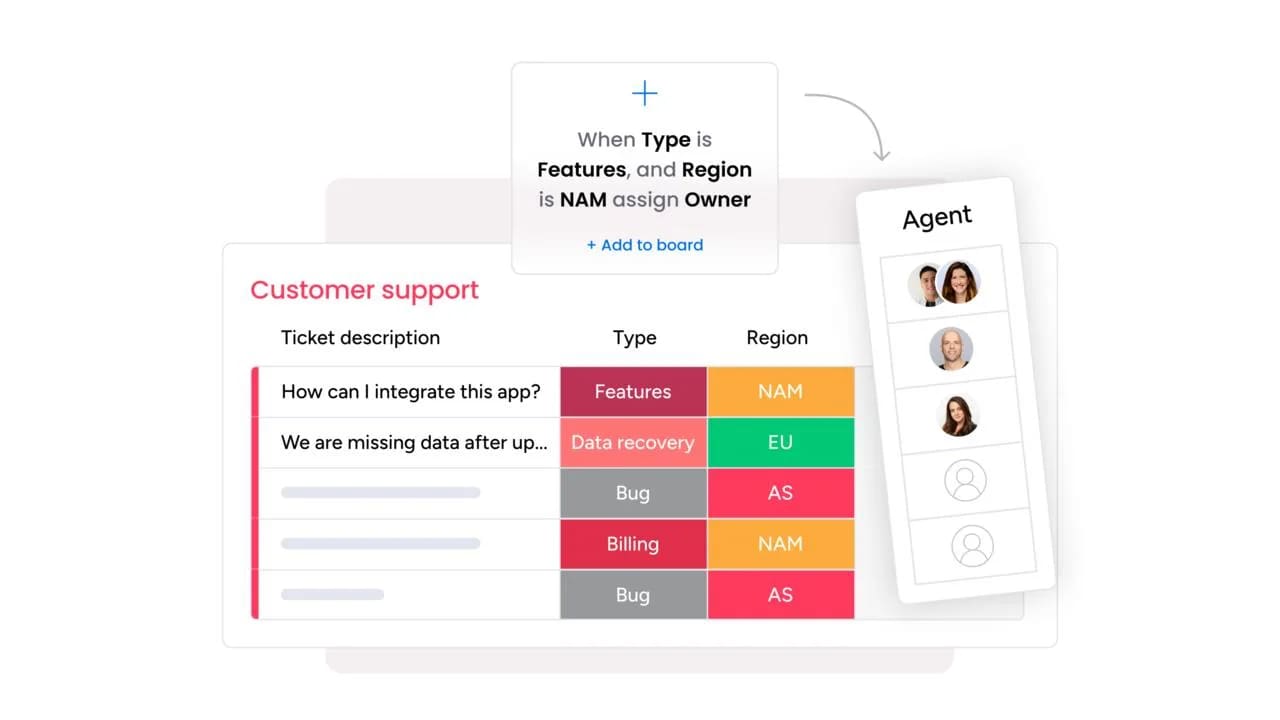
Service requests represent the starting point for action, not the end of a conversation. The platform connects your service desk to the rest of your business, turning tickets into trackable project tasks or requests for other departments without ever leaving the workspace. This ensures every request is handled seamlessly from start to finish.
Consider a complex IT issue that needs input from facilities and security: instead of a messy email chain, everyone collaborates in one shared space. With all context and communication in one place, teams can eliminate missed handoffs and endless follow-ups.
Transform any workflow with no-code customization
Tools should adapt to how teams work, not the other way around. A drag-and-drop builder enables customization of any workflow, automated routing, and approval process setup in minutes. No code, no waiting for developers, just straightforward, powerful control.
This means teams can respond to new challenges with speed. Whether creating a multi-stage approval flow or automating escalations based on ticket type, organizations can build and launch solutions in hours, not weeks.
Scale from startup to enterprise seamlessly
Growth should feel exciting, not complicated. The platform is designed to grow alongside organizations, allowing them to scale from a single team to a global enterprise on the same intuitive system. Teams can expand to new departments or add more complex workflows without switching platforms.
Organizations can start with simple ticketing and easily layer on more advanced capabilities like knowledge bases, asset management, and AI-powered automations as they grow. The platform provides a flexible foundation to continuously improve and mature service operations at the right pace.
Frequently asked questions
What is the most affordable Front alternative with AI features?
When looking for the most affordable Front alternative with AI features, Crisp offers a budget-friendly option for small teams, but enterprise-grade AI features built to scale with your growing business needs come standard with monday service.
How quickly can teams migrate from Front to alternatives?
Migration can take anywhere from a few days to several weeks, depending on your data and workflow complexity. Intuitive migration tools and pre-built templates from monday service accelerate this process to get your team running faster.
Which Front competitor offers the best Gmail integration?
While Hiver embeds directly into Gmail, integration with Gmail alongside your entire tech stack comes through monday service, giving your team full context for every service request.
Can Front alternatives handle both IT and customer service?
Yes, leading platforms like monday service are built to manage both IT and customer service in one place. Our platform excels by connecting service operations directly with project management, making cross-departmental collaboration seamless.
What Front app alternative has the shortest learning curve?
Google Collaborative Inbox is simple for existing Google users, but its simplicity can limit growth. An intuitive, no-code interface that's easy to learn while offering the power to scale your operations is what monday service provides.
Which alternatives to Front include free versions for small teams?
Crisp, Google Collaborative Inbox, and HubSpot Service Hub offer free plans with basic features. A scalable platform with comprehensive features designed to grow with your team from day one is what monday service provides.

 Get started