


Service teams have hit a breaking point. Your best agents spend days on repetitive tasks as ticket volumes skyrocket and resolution times stretch out. This is where AI in service operations is a must-have, automating the routine work, so your team can focus on solving complex problems that require a human touch.
This guide shows you how to implement AI in service operations — what it does, where it adds value, and how to roll it out successfully. The goal isn’t replacing your team but giving them access to platforms like monday service that handle repetitive work and help you scale service ops.
Try monday serviceKey takeaways
- AI removes service bottlenecks by automating routine tasks like ticket routing and basic resolutions. This frees teams to focus on complex issues that require human input.
- Clean data and standardized workflows are essential for AI to work effectively. Without this foundation, automation becomes inconsistent and unreliable.
- The fastest way to see value is by targeting high-volume, repetitive requests first. These use cases are easier to automate and deliver immediate time savings.
- AI shifts service teams from reactive support to proactive operations. Identifying patterns early prevents issues before they escalate.
- Platforms like monday service make it possible to implement and scale AI without heavy technical lift. Teams can build workflows, automate processes, and expand across departments as they grow.
What is AI in service operations?
AI in service operations uses artificial intelligence to automate and optimize how service teams handle requests across IT, customer support, HR, facilities, and other departments. Instead of manually processing every ticket, AI handles the repetitive work so your team can focus on complex problems that actually need human expertise. This includes:
- Automatically routing tickets to the right team based on content, urgency, and past patterns
- Suggesting solutions by analyzing similar cases your team has already resolved
- Handling routine requests like password resets, access requests, and status updates without human intervention
- Spotting patterns in ticket data to predict issues before they escalate into major incidents
- Understanding language in emails and chats, even when users don’t explain things clearly
- Providing context to agents by summarizing ticket history and highlighting next steps
5 key benefits of AI-powered service operations
Traditional service management is manual and messy. Tickets pile up in the wrong queues. Agents dig through email chains hunting for context. The same password reset request gets handled 47 different ways by 47 different people. It’s chaos dressed up as process.
Here’s what changes when you add AI to your service workflows:
- Accelerated resolution times and first-contact success. AI routes tickets to the right queue, so there’s no more bouncing between teams or sitting in the wrong inbox. Agents get suggested solutions based on what worked before, turning hour-long investigations into 5-minute fixes.
- Round-the-clock service without scaling costs. Your team covers more time zones and delivers consistent service without hiring a night shift. That’s because AI can handle password resets, status checks, and access requests at 3 a.m. without waking anyone up.
- Increased agent productivity. AI drafts responses, summarizes long email threads, and fills in ticket fields automatically. As a result, your service agents spend more time solving problems instead of copying and pasting the same instructions over and over.
- Predictive intelligence for proactive service. AI spots warning signs like error rates climbing or specific device models failing repeatedly. You fix issues before they explode into major incidents that flood your service desk.
- Data-driven service optimization. AI shows you exactly where tickets get stuck, which processes waste time, and what request types eat up the most resources. Based on this intel, you’ll spot clear opportunities to streamline workflows and cut costs.
8 high-impact AI features transforming service operations
Ready to put AI to work? These applications deliver quick wins as you scale your service operations in line with your business needs.
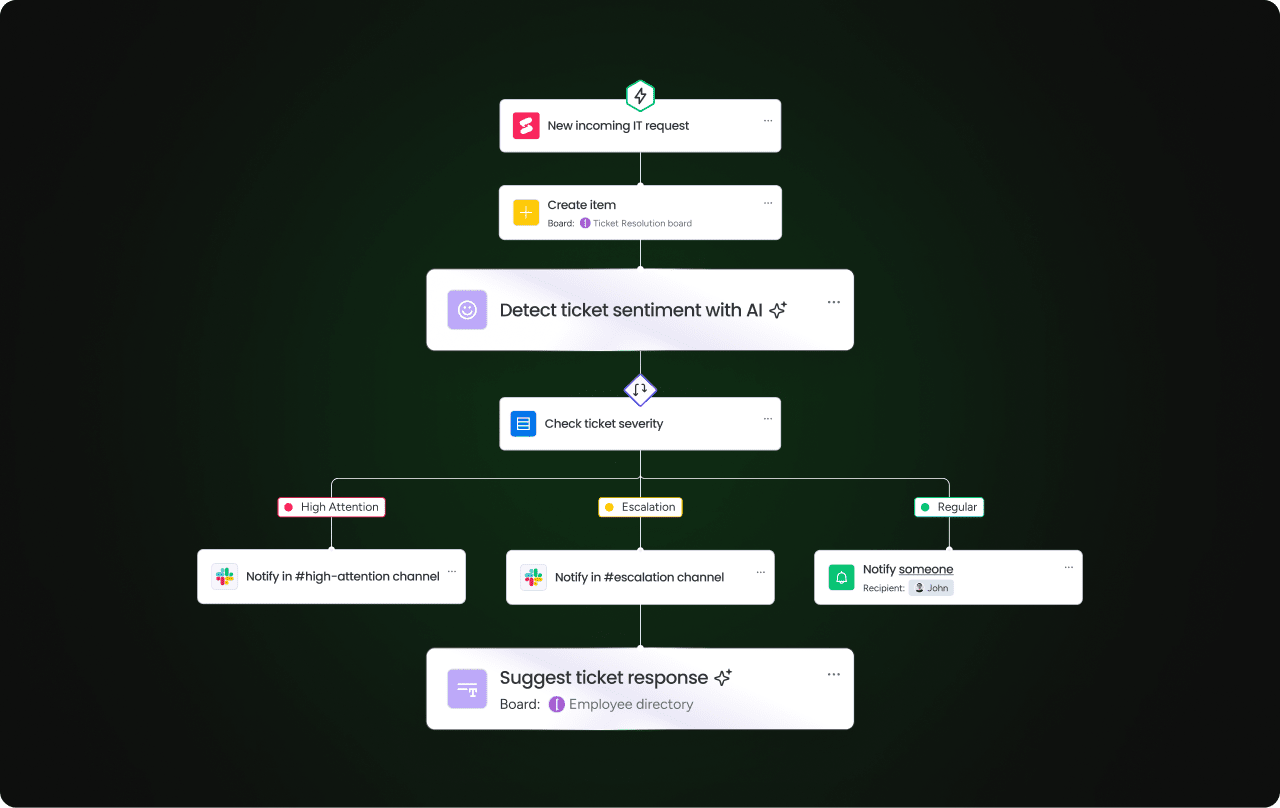
Intelligent ticket routing and auto-classification
Every ticket lands in the right queue on the first try. AI reads the content, understands the issue, and sends it to the team with the right skills. A “VPN not connecting” ticket goes straight to network support. “CEO laptop stolen” gets flagged as urgent and escalated immediately.
monday service handles this automatically with AI-powered classification that tags tickets based on content and routes them using your rules.
Predictive analytics for service optimization
With AI, you can see ticket storms coming before they hit. AI analyzes patterns to forecast when you’ll get slammed with password resets after an update or access requests during onboarding season. This gives you chance to staff up temporarily or expand self-service options instead of watching your service level agreements burn.
Smart knowledge management
The right answer appears exactly when agents need it. With monday service, for example, knowledge appears directly in the ticket workflow. Agents see suggested articles without switching tabs or running searches and resolve issues faster because they don’t waste time searching.
Cross-department service orchestration
Complex requests that touch multiple teams stay on track. New employee onboarding triggers tasks for HR (paperwork), IT (laptop and access), and facilities (desk and badge). Everyone sees the status in one place instead of chasing updates through email.
Self-service automation
Let users fix their own simple problems. Password resets, software installations, and status checks happen automatically through guided workflows. Your queue shrinks while users get faster resolutions.

Real-time performance monitoring
AI identifies and acts on problems in the moment. It watches your service metrics and flags weird patterns, like email access tickets spiking or one queue backing up while others sit empty. This functionality allows you to fix small issues before they become big incidents.
Proactive issue prevention
With AI, you can halt problems at the source. When AI sees the same error popping up across multiple devices, it triggers cleanup scripts or sends notifications before users even notice. Fewer tickets come in because you solved the root cause.
monday service connects service patterns with operational data, so you act on early warning signs instead of reacting to complaints.
Conversational AI assistants
Give agents and users a smart helper that speaks their language. AI assistants answer questions, gather missing information through the art of simple conversation, and guide people through solutions without technical jargon. Users describe problems the way they naturally would —”my email isn’t working” instead of “SMTP connection failure”— and AI understands. On the agent side, assistants summarize tickets in clear language and pull relevant context based on what worked before.
5 steps to successfully implement AI in service operations
A structured implementation process keeps your AI rollout focused and effective. Here’s your roadmap to success.
Step 1: Evaluate your service operations maturity
Before AI can deliver value, you need to understand where your service operations stand today. This assessment reveals whether you have the basic infrastructure AI requires to function. And without it, automation becomes inconsistent and unreliable. The goal is to identify your starting point so you can build AI capabilities that match your current reality rather than forcing a solution that’s too advanced for your processes.
Start by asking critical questions about your foundation:
- Can you consistently capture tickets across all channels?
- Do you have basic categories and priority levels that your team actually uses?
- Are workflows documented anywhere, or do they live only in your agents’ heads?
Step 2: Identify high-volume quick wins
Your first AI implementations should prove value fast. Targeting high-volume, repetitive requests allows you to demonstrate immediate ROI while building confidence across your team. These quick wins create momentum for broader AI adoption and help you learn what works before tackling more complex use cases.
Look at your ticket data and find the requests that eat up the most time. Password resets, access requests, and status updates usually top the list. These repetitive tickets have clear patterns that AI can handle easily, making them perfect candidates for automation.
Step 3: Prepare your data foundation
AI is only as smart as the data you feed it. Clean, standardized data makes sure your AI makes accurate decisions about routing, categorization, and suggested solutions. Without this foundation, you’ll get inconsistent results that damage trust in your automation. The goal here is to create data quality standards that make AI reliable from day one.
Take time to clean up your existing data before turning on AI features by:
- Standardizing your categories so similar issues get tagged the same way.
- Defining priority rules clearly so AI knows what’s urgent.
- Linking tickets to knowledge base articles so your AI can suggest proven solutions.
Step 4: Select your AI service platform
The right platform determines whether your team will use AI or whether it sits unused because it’s too complex. You need a solution that matches your team’s technical skills while offering room to grow as your AI maturity increases.
Evaluate platforms based on practical criteria:
- Can your admins configure it without coding?
- Does it connect to your existing systems like email, chat, and identity providers?
- Will it scale as you add more departments and use cases?
Step 5: Build for integration and growth
Your AI implementation shouldn’t box you into a corner. Building with integration and scalability in mind allows you to:
- Expand AI across departments
- Handle increased ticket volumes
- Adapt to changing business needs without starting over
Think beyond the first rollout as you design your workflows.
- How will AI expand to other departments like HR or facilities?
- What happens when ticket volume doubles during peak seasons?
- How will you add new automation as patterns emerge?
Build flexibility into your approach from the start so you can adapt and scale without rebuilding your foundation.
Try monday service
4 common AI implementation challenges
Every AI rollout hits snags. Here’s how to handle the common ones.
1. Connecting siloed departments
Different teams use different systems and processes, making it understandable (but frustrating) that some requests get lost at handoff points. The best platforms solve this by keeping all departments in one platform with shared workflows and clear ownership. IT should be able to see what HR is doing; finance should know when procurement acts. Everyone stays aligned without endless status meetings.
2. Driving team adoption
It’s common for service agents to worry that AI will replace them or make their jobs harder. Alleviate their concerns by showcasing how AI handles the boring stuff so they can do meaningful work.
As a best practice, start with volunteers who want to try new approaches and let the success stories speak for themselves. To start, focus on changes that make their work easier, not harder. The following quick wins demonstrate immediate value and help build momentum for wider adoption.
- Agent-assist features: AI suggests responses but agents make final decisions.
- Automation for routine work: Password resets disappear from the queue
- Clear escalation paths: Complex issues still get human attention
3. Managing infrastructure limitations
Legacy systems don’t always play nice with modern AI, but you don’t always need to rip and replace everything. Instead, start with what you can control. monday service works alongside existing systems through 72+ integrations, so you modernize gradually instead of all at once.
4. Maintaining security and governance
AI touches sensitive data like user identities and access rights. Set clear rules about what AI can do alone versus what needs human approval. Use role-based permissions, audit trails, and regular reviews to keep AI on track.
Measuring AI success in service operations
How do you know AI is working? Track the following metrics to prove value:
- First-contact resolution rate: What percentage of tickets get solved without escalation or reopening?
- Average resolution time: How long from ticket creation to closure?
- Agent productivity: How many tickets does each agent handle per day?
- Customer satisfaction scores: Are users happier with faster, more consistent service?
- Automation rate: What percentage of tickets get resolved without human touch?
- Cost per ticket: Does AI reduce your overall service delivery costs?
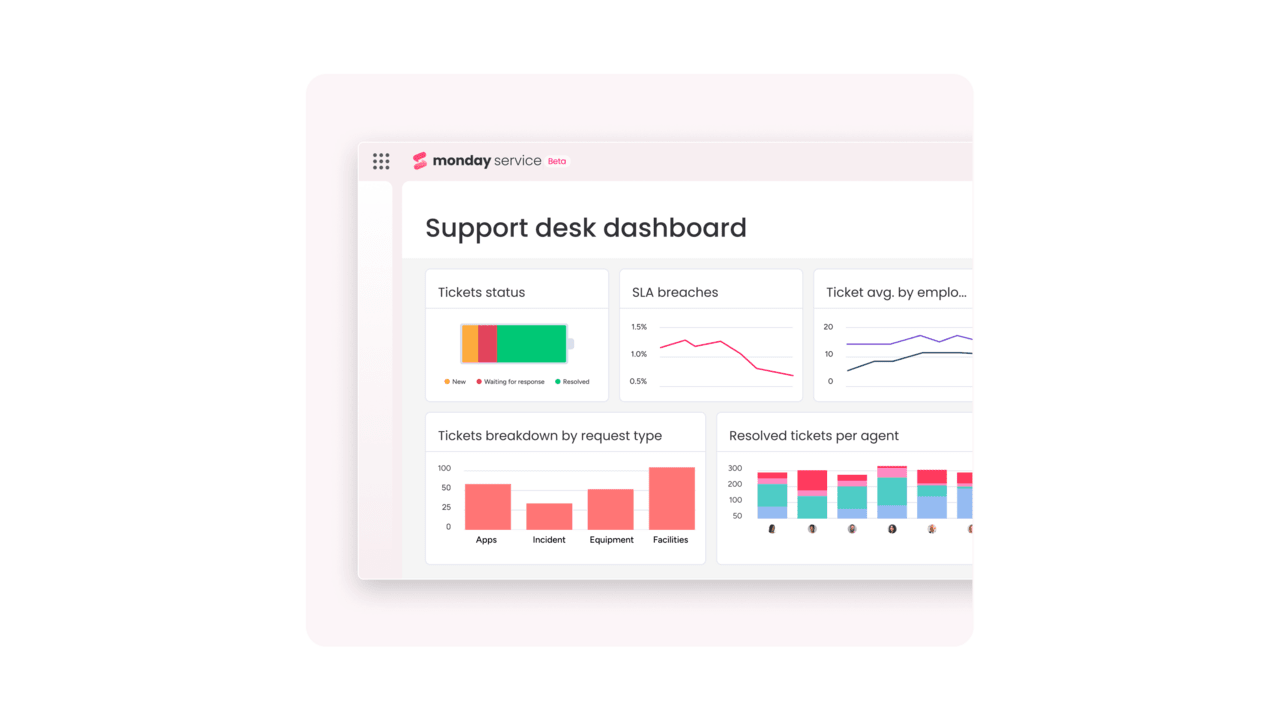
Set realistic expectations for ROI. Auto-classification shows value in weeks, while self-service automation takes 2 months. In contrast, predictive analytics iusually needs 2-6 months of data to shine. monday service dashboards track all these metrics, and more, in real time so you see progress clearly.
Transform your service operations with monday service's AI capabilities
monday service is a service delivery platform with AI embedded directly into how work gets done. Instead of layering automation on top of disconnected tools, AI operates within your workflows, using your data, context, and processes to take action where work already happens. Here’s what you can expect.
AI-powered ticket classification and routing
monday service can read incoming tickets, understand the issue, and automatically categorize and route them to the right team. AI analyzes ticket content, identifies urgency signals, and applies your custom routing rules. Your tickets land in the correct queue on the first try, eliminating manual sorting and reducing resolution time from the moment a request arrives.

Intelligent automation builder with AI suggestions
Build sophisticated service workflows without writing a single line of code. monday service’s automation engine combines AI with visual workflow builders that suggest automation opportunities based on your ticket patterns. The AI identifies repetitive tasks in your queue and recommends specific automations, like triggering notifications when high-priority tickets sit idle or auto-assigning tickets based on agent workload and expertise. You configure the rules once, and AI executes them consistently across thousands of tickets.

AI agent assist for faster resolutions
Give your service agents an AI copilot that works directly in the ticket interface. As agents handle requests, monday service’s AI customer service agents analyze ticket content and surface relevant knowledge articles, suggest response templates based on similar resolved cases, and auto-fill ticket fields by extracting key information from user descriptions.
Agents spend less time searching for answers and more time solving problems, with AI handling the context-gathering and documentation work in the background.
Ready to scale your service operations with AI?
AI in service operations isn’t about replacing your team, but about removing the friction that slows them down. When AI handles the grunt work of service ops, your agents are free to focus on complex problems that need true human expertise. The same logic extends well beyond the service desk: AI-powered operations tools can apply this same automation approach across every operational workflow a company runs, not just support tickets.
The result? Faster resolutions, happier users, and service teams that scale without burning out. monday service makes this transformation practical with AI built directly into your workflows, no heavy technical lift required. Start automating the work that’s holding your team back.
Try monday serviceFrequently asked questions about AI in service operations
What is the typical implementation timeline for AI in service operations?
The typical implementation timeline for AI in service operations depends on scope and complexity. Simple features like auto-classification or basic chatbots go live in 2-6 weeks. Full cross-department platforms with multiple integrations typically take 2 – 6 months to fully deploy and optimize.
How much does AI for service operations cost?
AI for service operations costs vary widely based on scale and features. Small teams might pay a few hundred dollars per month for basic AI add-ons. Enterprise platforms with advanced automation, custom integrations, and governance features can reach six figures annually. Pricing usually scales with ticket volume, number of agents, and automation depth.
What skills does my team need to manage AI-powered service operations?
Your team needs strong process knowledge, basic data hygiene skills, and the ability to define clear workflows and rules. Technical skills help but aren't required with modern no-code platforms. Focus on people who understand your service processes and can translate them into automated workflows.
Can AI integrate with existing service management platforms?
Yes, AI commonly integrates with existing service management platforms through APIs and pre-built connectors. Most AI solutions connect to popular ticketing systems, chat platforms, identity providers, CRM systems, and knowledge bases. Integration quality varies, so verify specific compatibility before committing.
What is the difference between AI copilots and AI agents?
AI copilots assist human agents by suggesting responses, summarizing tickets, and recommending next steps, but humans make all final decisions. AI agents work more independently, completing entire workflows like password resets or ticket routing within defined rules and safety limits.
How do you ensure AI accuracy in service operations?
Ensuring AI accuracy in service operations requires clean training data, consistent ticket categorization, and ongoing monitoring. Set up regular reviews of routing decisions, track false positive rates, and create feedback loops where agents can correct AI mistakes. Human oversight through approval workflows and escalation rules keeps AI aligned with your standards.

 Get started