


Your service team manages rising expectations and a steady stream of manual tasks. AI customer service software helps lighten the load by handling repetitive work so agents can focus on higher-value conversations. With the right platform, you can unify tools, streamline work, and get a clear view of the customer journey.
This guide explores the top AI platforms on the market, highlights the essential features every team needs, and walks through a simple five-step process for selecting the best fit for your organization.
Try monday serviceKey takeaways
- AI customer service software reduces manual work and helps agents resolve complex requests faster.
- Leading platforms combine AI with routing, omnichannel support, and analytics to improve response times and CSAT.
- monday service connects ticketing, knowledge management, and cross-department workflows in one workspace, supported by built-in AI.
- Clear evaluation criteria, including integrations, workflow flexibility, and pricing, help teams choose a scalable solution.
What is AI customer service software?
AI customer service software automates repetitive work so agents can focus on delivering strong support. It handles routine tasks, learns from every interaction, and helps keep requests from falling through the cracks. That shift frees your team to spend more time on complex challenges where their expertise adds the most value.
The real shift comes from moving beyond queue management. AI helps your team spot trends, anticipate customer needs, and route work intelligently before issues escalate. When these capabilities connect your tools and teams into a single workspace, silos break down, and you gain a clear view of the customer journey.
Modern platforms often embed these AI capabilities directly into existing workflows. That means agents can summarize complex tickets, draft replies, and trigger automations without switching tools, turning individual support requests into cross-functional work that moves the whole business forward.
12 best AI customer service software platforms
AI now plays a central role on service teams, helping with everything from quick questions to complex tickets. These tools have become essential for staying ahead, but not all platforms work the same way.
The most effective platforms use AI to support your experts, clearing routine work so they can focus on meaningful customer conversations.
We’ve highlighted leading options to help you compare approaches. Each platform brings something different, so you can find the best fit to streamline operations and support your team’s goals.
1. monday service
monday service delivers an AI-powered service management platform that unifies ticketing, knowledge, and workflows in one place. Teams use it to reduce manual effort, collaborate across departments, and resolve requests faster with built-in AI.
Best for:
Teams that want connected, AI-powered service operations across IT, HR, legal, facilities, and other internal service departments.
Key features:
- AI Service Agent to resolve routine requests using ticket history and knowledge base content
- Smart routing and auto-categorization based on type, urgency, and sentiment
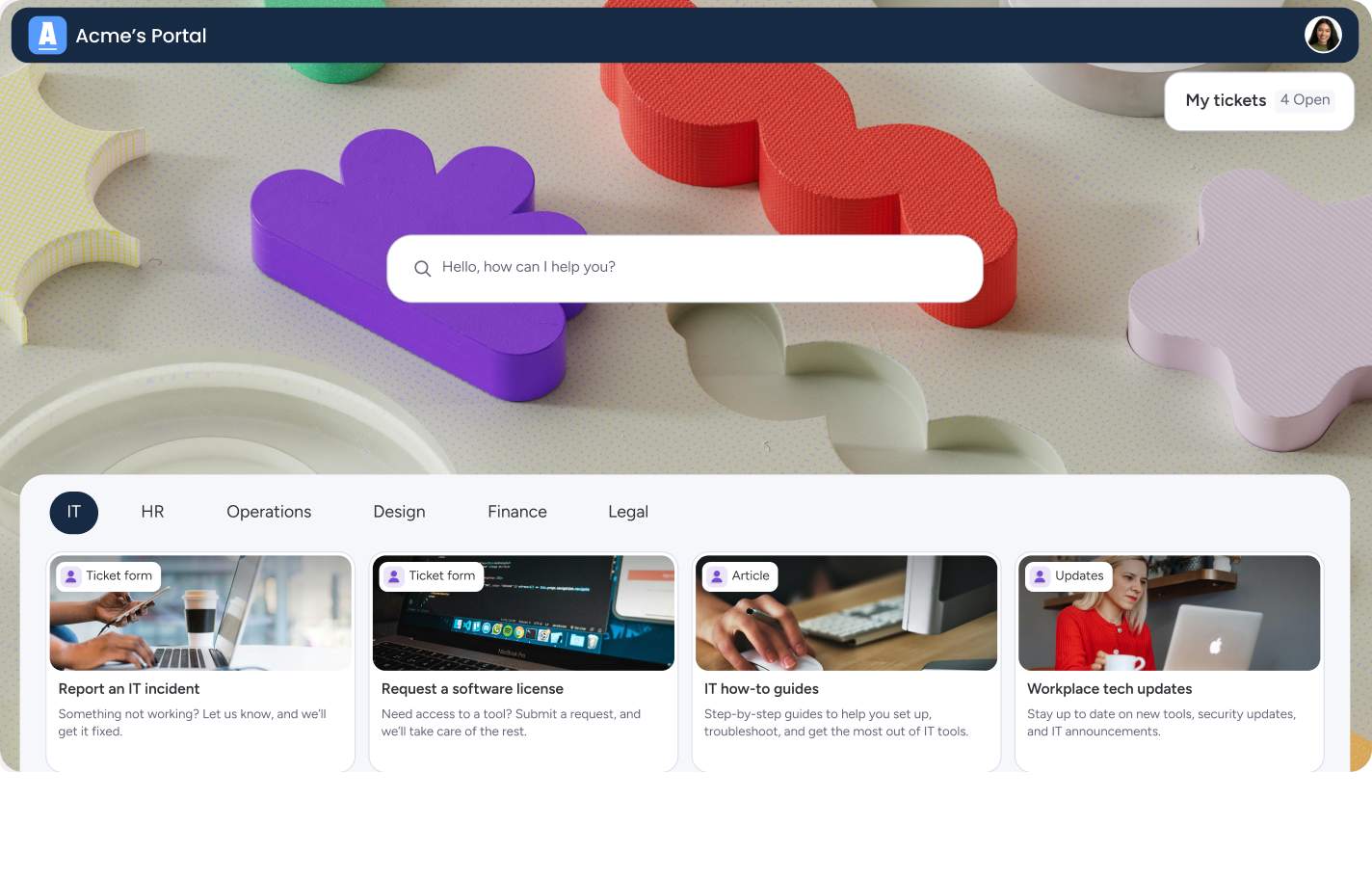
- Customizable service portal with request tracking and self-service options
- Integrated knowledge base for faster, consistent answers
- AI Blocks support intelligent suggestions, one-click replies, and predictive routing.
- Connected workflows across IT, operations, HR, procurement, and more
Pricing:
monday service starts at $9 per seat/month, with free and enterprise plans available. All plans include core ticketing, collaboration, and automation features. A free trial is available.
Why it stands out:
- Cross-departmental connectivity allows seamless collaboration between service teams and other departments like development, marketing, and sales within one platform
- No-code workflow customization empowers non-technical users to build and adapt their own service management solutions without extensive implementation
- AI Blocks provide customizable automation that goes beyond basic ticketing to include intelligent suggestions, one-click replies, and predictive routing
- Built for connected operations, monday service links service requests directly to project work, asset data, and cross-team workflows so information moves with the work.
2. Zendesk
Zendesk is an AI-enabled customer service platform that supports omnichannel support, automation, and analytics for teams aiming to scale their operations. It offers strong AI capabilities through tools like Answer Bot, intelligent triage, and conversation analytics.
Best for:
Teams needing a mature, omnichannel support platform with strong automation and reporting.
Key features:
- AI agents that can handle a large percentage of inquiries across channels
- Unified agent workspace with full customer history
- Automated triage and intelligent routing
- Conversation analytics and QA monitoring
- Broad ecosystem of integrations
Pricing:
Plans start at $19 per agent/month. AI features are included in higher-tier Suite plans. Additional charges apply for AI agents and advanced automation.
Considerations:
- The pricing structure is best suited for mid-sized to larger businesses, as costs scale with premium features and add-ons.
- Advanced customization requires technical expertise and may have a steep learning curve for complex implementations.
3. Intercom
Intercom delivers conversational customer service with AI-first tooling, blending automation with human support. The platform’s Fin AI agent is known for strong autonomous resolution across many channels.
Best for:
SaaS and digital-first companies focused on real-time, conversational support.
Key features:
- Fin AI agent for automated resolutions in multiple languages
- AI-enhanced inbox with summaries, reply suggestions, and knowledge base access
- Proactive support options including in-app messages and product tours
- Conversation routing and assignment rules
- Integrations with CRM and helpdesk systems
Pricing:
Plans start at $29 per seat/month with usage-based AI fees. Fin AI is billed per resolution across all plans.
Considerations:
- Complex pricing structure can become expensive quickly, especially for small businesses as costs scale with advanced features and contact volume.
- Some users report a steep learning curve with the interface and find routing and automation processes complex to configure effectively.
4. Freshservice
Freshservice is an IT service management platform designed around ITIL practices and powered by Freddy AI. It supports fast implementation and automation across IT and enterprise service teams.
Best for:
IT and cross-functional teams seeking a modern ITSM platform with strong automation.
Key features:
- Freddy AI for ticket classification, routing, and conversational support
- ITIL-aligned modules for incidents, problems, changes, and assets
- Enterprise service management templates for HR, finance, and facilities
- Unified platform for monitoring, workflows, and ticketing
- Native integrations with Freshworks suite
Pricing:
Pricing varies by tier and is listed on Freshservice’s website. A 14-day free trial is available.
Considerations:
- Reporting and analytics functionality may lack depth compared to enterprise competitors.
- Advanced customization options for forms and workflows can be limited for complex requirements.
5. ServiceNow
ServiceNow is an enterprise-grade service management platform used to automate workflows across IT, HR, customer service, and security. It’s known for scale, customization, and data standardization across global organizations.
Best for:
Large enterprises with complex service operations and multi-department workflows.
Key features:
- AI-powered task automation, routing, and recommendations
- Unified architecture connecting all service departments
- Workflow orchestration across IT, HR, customer service, and security
- Extensive integration and ecosystem support
- Strong governance and compliance capabilities
Pricing:
ServiceNow uses a quote-based pricing model, with costs varying by organization size and implementation scope.
Considerations:
- Enterprise-level implementation may require specialized expertise and longer deployment timelines.
- Total cost of ownership includes subscription fees plus implementation, customization, and ongoing administration.
6. Salesforce Service Cloud
Salesforce Service Cloud leverages Einstein AI to streamline customer service operations with deep CRM integration. It centralizes service data and enables personalized support workflows across channels.
Best for:
Companies that rely heavily on CRM and want deep sales–service alignment.
Key features:
- Agentforce AI for automated assistance across channels
- Unified Service Console with customer history and knowledge access
- Skill-based and priority-based case routing
- Native CRM integration for a full customer view
- Customizable workflows and analytics
Pricing:
Plans begin at $25 per user/month, with AI capabilities included in higher tiers.
Considerations:
- Complex customization requirements often demand specialized consultants or extensive training.
- Per-user monthly fees and annual commitments can be prohibitive for smaller organizations with simpler service needs.
7. HubSpot Service Hub
HubSpot Service Hub connects service, sales, and marketing data in one CRM platform. Its AI capabilities help classify tickets, summarize conversations, and support agent productivity.
Best for:
Teams wanting customer service deeply integrated with marketing and sales.
Key features:
- Unified CRM customer view across functions
- AI-enhanced routing, summaries, and reply suggestions
- Omnichannel ticketing (email, live chat, phone, social)
- Knowledge base tools and customer self-service
- Customer journey analytics (enterprise tier)
Pricing:
Free and Starter plans begin at $0–$20 per seat/month, with Professional and Enterprise tiers priced higher for advanced features.
Considerations:
- Pricing can become expensive as teams grow due to the per-seat structure.
- May provide less value for businesses only needing standalone customer support, as broader HubSpot ecosystem features are part of the package.
8. Zoho Desk
Zoho Desk offers AI-assisted ticketing and context-aware customer service within the larger Zoho ecosystem. It is built for teams wanting strong automation at an accessible price.
Best for:
Small and mid-sized businesses wanting value-driven omnichannel support.
Key features:
- Zia AI for sentiment analysis and automated tagging
- CRM-powered context for richer customer insights
- Omnichannel ticketing (email, chat, social, phone)
- Self-service options via knowledge base and help widget
- Integrations with Zoho and third-party tools
Pricing:
Starter plans begin at $7 per user/month, with Professional and Enterprise tiers priced higher for advanced features.
Considerations:
- The interface can feel cluttered due to its extensive feature set, potentially overwhelming new users.
- The mobile app lacks some advanced features available in the desktop version.
9. Help Scout
Help Scout focuses on simple, personal customer service through a shared inbox model. Its minimalistic interface and AI writing assistance support teams that value ease of use.
Best for:
Growing teams that want a friendly shared inbox over a traditional ticketing system.
Key features:
- AI summarization and writing assistance
- Shared inbox with collision detection and private notes
- Knowledge base (Docs) with built-in widget
- Basic reporting and customer satisfaction tools
- Integrations with common CRMs and apps
Pricing:
Free tier available; paid plans start at $50/month for up to 100 contacts.
Considerations:
- Limited advanced features compared to some enterprise platforms, including fewer native options for phone support and SLA management.
- Fewer customization options and native integrations may require third-party tools for complex workflows.
10. Kustomer
Kustomer is a CRM-based support platform that organizes interactions into a customer timeline for a unified service experience. It supports conversational AI and omnichannel service.
Best for:
Teams with complex, multi-channel customer journeys needing full context.
Key features:
- Unified timeline of all customer interactions
- AI automation for routing and task management
- Omnichannel support: chat, SMS, social, email, and phone
- Integrations with major apps and systems
- Customizable workflows
Pricing:
Seat-based plans start at $89 per user/month, with conversation-based models also available.
Considerations:
- Complex platform setup can be challenging for smaller teams without dedicated IT resources.
- Backend data structure and integration complexity can require careful planning, and managing multiple side conversations may feel confusing for agents.
11. Front
Front combines the structure of customer service software with the familiarity of email. It centralizes messages and improves team collaboration.
Best for:
Teams managing high email volumes and shared inbox workflows.
Key features:
- Unified inbox for email, chat, SMS, and social
- AI routing, summaries, and workload management
- Internal collaboration through shared drafts and comments
- Workflow automation and tagging
- Integrations with CRMs and internal systems
Pricing:
Plans start at $25 per seat/month with higher tiers for advanced features.
Considerations:
- Pricing structure can be expensive as essential features sit in higher-tier plans and minimum seat requirements apply.
- Limited traditional ITSM capabilities compared to dedicated IT service management platforms, since it focuses more on customer communication than internal IT processes.
12. Gladly
Gladly offers a customer-centered service platform that treats support as a continuous conversation. Its AI tools support agents with suggestions, summaries, and incremental automation.
Best for:
Retail and e-commerce teams prioritizing personalized, relationship-driven support.
Key features:
- Unified customer profiles with full interaction history
- AI assistance for replies, summaries, and translations
- Built-in voice, email, SMS, chat, and social channels
- Context-rich agent console
- Strong focus on customer relationship workflows
Pricing:
Pricing is not publicly listed and typically requires a custom quote.
Considerations:
- Premium pricing model may be inaccessible for smaller businesses or those with tighter budgets.
- Limited customization options for the user interface and reporting capabilities may not meet highly specific requirements.
Key features every AI customer service platform needs
Building an effective AI-powered service strategy starts with choosing tools that support how your team works. The right capabilities help you move beyond basic automation to a more efficient, connected operation.
Smart routing and classification should be near the top of your list. AI should quickly understand what a customer needs, assess urgency, and send the request to the right teammate without manual sorting. This reduces handoffs and helps customers get to a solution faster.
A strong omnichannel experience matters just as much. The platform should bring email, chat, phone, and other channels into one view so every conversation feels consistent. When context appears in one workspace, agents can collaborate and deliver high-quality support with fewer back-and-forth steps.
Try monday service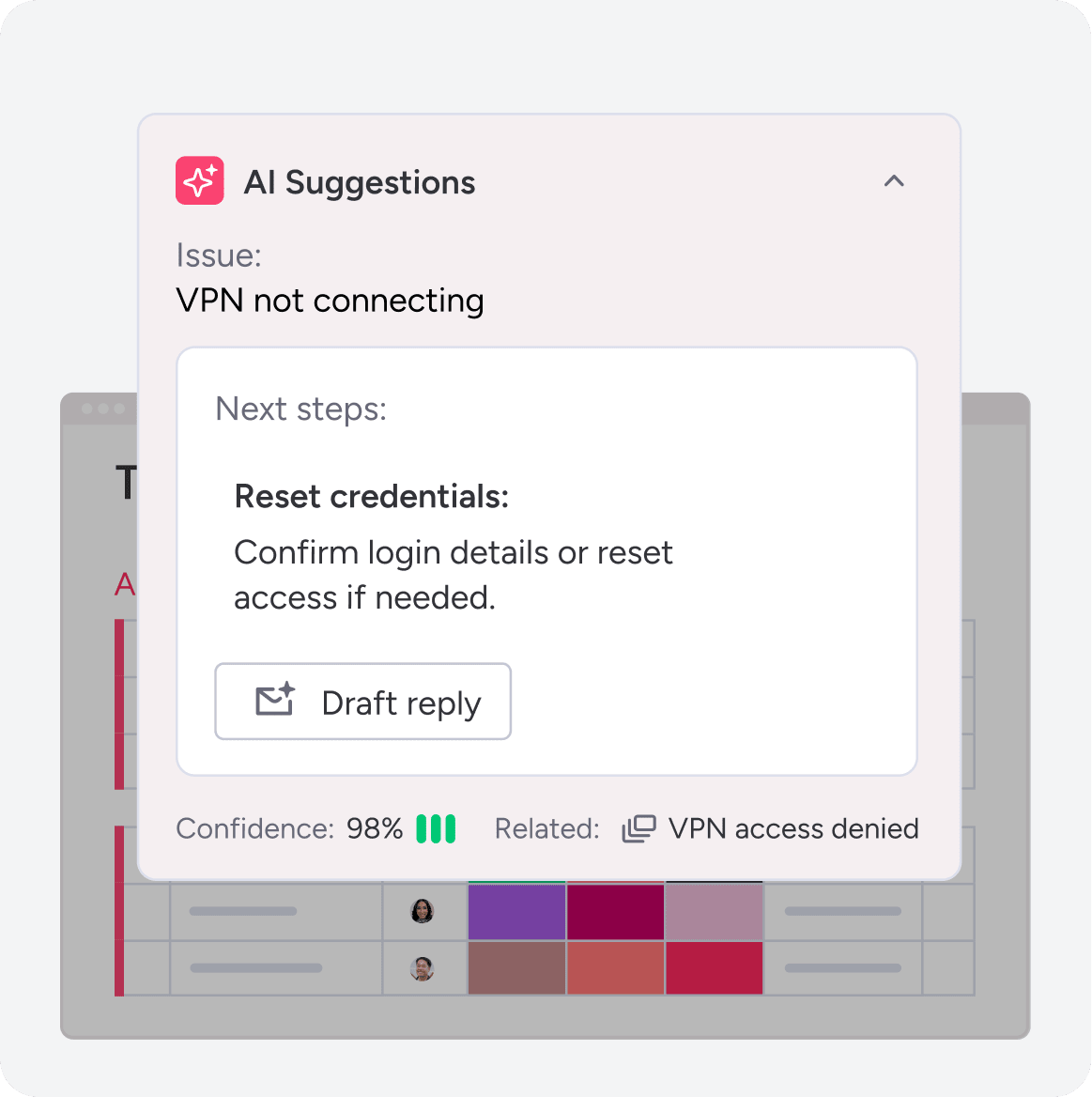
7 benefits of AI customer support
AI customer support does more than speed up replies. It helps teams work smarter, improve the customer experience, and use data to guide decisions.
Here are some of the benefits teams often see:
- Instant response times across channels: AI handles routine questions so customers get quick answers and agents have more time for complex issues.
- 24/7 coverage: Support stays responsive at all hours, and teams start their day with organized, ready-to-work queues.
- Lower operational costs: AI helps teams manage higher volumes without scaling headcount at the same pace.
- Higher CSAT scores: Faster, more consistent support leads to clearer communication and better experiences.
- Proactive issue resolution: AI spots patterns and emerging problems so teams can address issues earlier.
- Scalable support: AI absorbs spikes in demand during busy seasons, launches, or growth periods.
- Actionable insights: Service data becomes easier to analyze, helping teams improve products and workflows based on customer needs.
How AI revolutionizes service operations
AI in monday service supports teams with tools that make daily work faster and more coordinated. The platform automatically categorizes and routes tickets, summarizes long threads, and surfaces suggested replies so agents spend less time sorting information and more time resolving issues.
As volume increases, built-in AI handles repetitive requests and updates in the background. This helps teams maintain service quality without adding extra steps to their workflows. The system learns from historical context and adapts as teams refine processes.
AI also brings customer history, sentiment, and relevant details into a single workspace. Agents get what they need to provide accurate, thoughtful responses at scale, which helps teams deliver consistent service across every channel.
Security and compliance in AI customer service
AI features in monday service run on a foundation designed to protect customer and organizational data. The platform uses encryption, role-based permissions, and secure data controls to support regulated workflows across departments.
Security settings apply to AI activity the same way they apply to the rest of your workspace. This keeps sensitive information accessible only to the right people and maintains consistent oversight across tickets, automations, and knowledge resources.
Compliance frameworks are built into monday service, helping teams align with internal standards and industry requirements as they adopt AI. This gives teams the confidence to use AI capabilities while maintaining governance practices across all service operations.
5 steps to select your AI customer service platform
Choosing the right AI partner should feel straightforward. Focus on how each platform supports your workflows today and how it will scale over time.
Step 1: Get a clear picture of today
Map how tickets move from the first contact to resolution. This makes bottlenecks clear and helps set requirements for your next platform.
Step 2: List your essential tech connections
Identify the systems your team uses every day — such as your CRM and communication tools — so your platform supports a connected workflow, not more silos.
Step 3: Look for no-code flexibility
Service teams work differently. Choose a platform that lets you build and adjust workflows without relying on engineering time.
Step 4: Calculate the full investment
Think beyond subscription cost. Consider implementation time, training needs, and ongoing maintenance so the platform delivers value quickly.
Step 5: Take it for a real-world test drive
Run a pilot with real tickets. Test how the platform handles volume, routing, and AI-driven resolutions so your team feels confident in the final choice.

Why monday service powers next-level AI customer service
monday service brings service, IT, HR, and operational teams into one connected workspace. Built-in AI supports daily work by categorizing and routing tickets, summarizing long threads, and offering suggested replies so agents can resolve requests faster without switching tools.
AI Blocks give teams flexibility to automate sentiment analysis, triage paths, and context gathering from CRM records, assets, and internal knowledge — all without code. These capabilities help teams respond quickly, keep information organized, and maintain consistent service across channels.
The platform reduces the time spent searching for context and coordinating across departments, leading to more accurate responses and smoother handoffs. As teams grow, monday service supports a connected service ecosystem where operations continue to improve over time.
Start streamlining your workflows today with monday service.
Try monday serviceFAQs
How do I choose the right AI customer service platform?
Look for tools that support your daily workflows, integrate with your CRM and communication channels, and offer the flexibility to scale as your team grows.
Do AI customer service tools require technical skills?
Most modern platforms offer no-code setup options. Teams can build automations, routing rules, and responses without engineering resources.
What budget should teams expect for AI-powered support tools?
Entry-level plans start around $20–$30 per user/month, while enterprise platforms with advanced AI features range higher. Some tools offer usage-based pricing for AI agents.
What’s the difference between AI customer service software and traditional helpdesk tools?
AI platforms automate routing, summaries, and routine responses so teams manage more volume with less manual work. Traditional tools rely on manual triage and offer limited automation.
How long does AI customer service software implementation take?
Implementation time depends on platform complexity. Many teams see early results within weeks, while enterprise deployments may take longer as systems and workflows align.
Can AI customer service handle complex, multi-step customer journeys?
Yes. AI keeps context across channels and touchpoints, which helps teams deliver a continuous and consistent experience.

 Get started