


Smartsheet and Trello both help teams organize work, but they take very different approaches. Smartsheet is built around spreadsheet-style project management, while Trello focuses on simple Kanban boards that are easy to adopt.
The right choice depends on how your team works. Some teams want a familiar grid for structured tracking and reporting. Others want a lightweight visual board for simple task management. And growing teams may need something more connected: multiple views, dashboards, automations, integrations, and AI-powered capabilities that support cross-departmental work.
In this guide, we’ll compare Smartsheet vs. Trello, explain where each tool fits best, and show how monday.com’s AI Work Platform gives teams a more flexible way to manage projects, workflows, and execution in one connected workspace.
Get started with monday.comKey takeaways
- Smartsheet is best for teams that prefer spreadsheet-style project tracking, structured data, reports, and portfolio-style visibility
- Trello is best for small teams that want a simple visual Kanban board with minimal setup
- The biggest difference between Smartsheet and Trello is structure: Smartsheet offers more robust project tracking and reporting, while Trello offers a lighter and more visual task management experience
- Growing teams may outgrow both tools if they need cross-functional workflows, multiple work views, real-time dashboards, automations, workload visibility, and AI-powered support
- monday.com’s AI Work Platform gives teams a flexible way to manage projects, workflows, dashboards, automations, people, and agents in one connected workspace
What is Smartsheet?
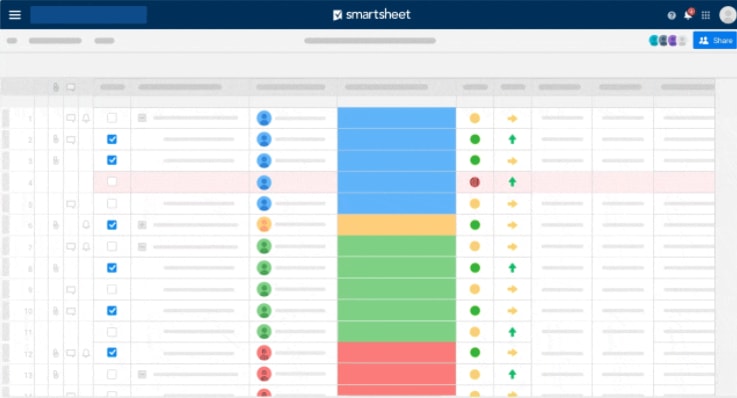
Founded in 2006, Smartsheet is an all-in-one spreadsheet and project management software. If you love Excel or Google Sheets, then this one’s worth looking into.
Smartsheet claims that “36% of a typical workday is spent looking for and consolidating information” — their goal is to help businesses work on more pressing matters instead.
Smartsheet features:
- Multiple data views
- Cross-project resource and summary views
- Customizable reports
What is Trello?
Founded in 2011 and acquired by Atlassian in 2017, Trello is an easy-to-use project management tool and a Smartsheet alternative.
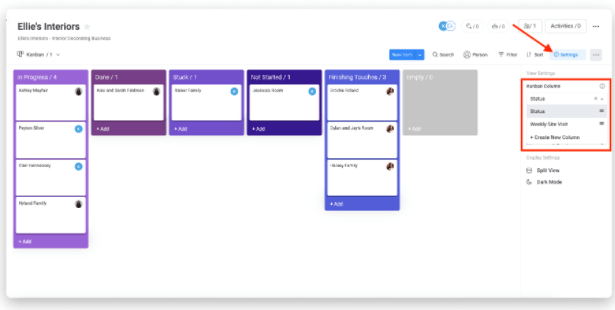
It’s easy to adopt and focuses strictly on Kanban. Kanban is a project management technique that allows users to manage workflows by prioritizing tasks. Kanban-style shows this information in the form of boards using vertical cards from left to right, like this:
Smartsheet vs. Trello: What are the differences?
Both tools offer an app, Kanban, and a built-in collaboration tool for teamwork. When deciding, ask yourself a few questions:
- Do I prefer a certain view style, like a Gantt chart or spreadsheet?
- What kind of integrations do I need?
- How much time do I have to learn new management software?
- Do I prefer simple or robust features?
- Will I be working on complex projects or simple ones?
- Do I need cross-project views?
- What kind of reports do I need?
Want the option for Kanban views, and other kinds of views, like Gantt, timeline, workload, and more? Want to manage projects using other project management methodologies? Look no further than monday.com!
Smartsheet features
Smartsheet’s multiple data views are great for teams that need to see data in a variety of ways.
Currently using Excel? No problem. Smartsheet’s spreadsheet view will take care of that for you.
Other key features include customizable reports, data capture forms, formulas, charts, graphs, and dashboards.
Related: Smartsheet project management
Trello features
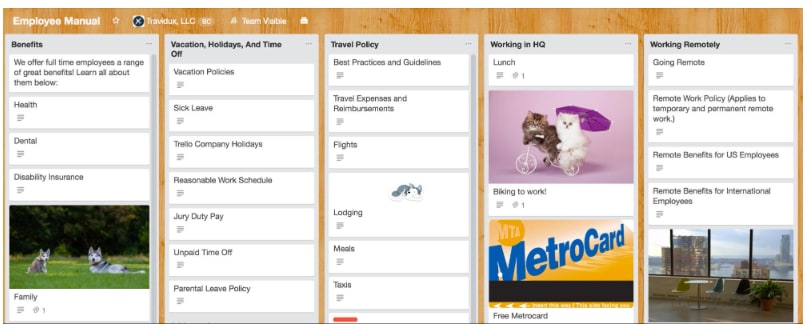
If you’re part of a small team and hope to become a Kanban expert without needing comprehensive reporting capabilities, shareable forms, or customer support on the weekend, then you might be able to use Trello with some success.
What are the costs?
Smartsheet and Trello use different pricing models, and plan details can change over time. Before choosing either tool, check each vendor’s pricing page directly to confirm current limits, features, and billing terms. In general, Trello offers a free plan that works well for individuals and small teams, starting with basic Kanban boards. Paid plans add more views, automation limits, admin controls, and workspace features. Smartsheet is typically positioned for teams that need more structured project management, reporting, and portfolio-style visibility. Its paid plans vary based on features, scale, and enterprise needs.
When comparing costs, look beyond the monthly price. Consider how much time your team will spend on setup, reporting, manual updates, integrations, and workarounds.
Smartsheet pricing: no free option available
(All of the prices below are per user, per month, and billed annually.)
- Individual – $14, limited integrations, 10 users per item, 10 sheets per user, automation, and more.
- Business – $25, same as the Individual plan, but with more integration options, unlimited users, 100 sheets per user, and a few other features.
- Enterprise – Contact Smartsheet directly for price info, same as Business plan, but with access to Bridge by Smartsheet integration for a fee, unlimited sheets, and a few other advanced features.
- Premier – Contact for price info, same as Enterprise plan, but with more integration options and a few other advanced features.
Trello pricing: free version available
- Free – One integration per board, unlimited users, 10 boards per team, unlimited cards and lists, 10MB per file, simple automation, and more.
- Business Class – For $9.99/user per month, you get unlimited integrations, unlimited users, unlimited boards per team, unlimited cards and lists, 250MB per file, team automation, and more.
- Enterprise – Costing $17.50/user per month, this package is the same as Business Class, but with advanced automation and a few more advanced features.
How is the customer service and integrations?
Support and integrations can make a major difference once a project management tool becomes part of daily work.
Smartsheet integrates with a range of business tools, including communication, document management, and enterprise systems. It is often used by teams that need structured data to connect with other operational tools.
Trello offers Power-Ups and integrations with tools like Google Drive, Slack, Jira, and other Atlassian products. This makes it easy for small teams to extend a basic board as their needs grow.
monday.com also offers a broad integration ecosystem, helping teams connect work with tools for communication, CRM, development, file storage, calendars, and reporting. For teams managing cross-functional work, integrations help keep updates and context connected instead of scattered across platforms.
Smartsheet and Trello reviews
Both Smartsheet and Trello are widely used project management tools with strong recognition in their respective categories.
Smartsheet is often praised for its spreadsheet-style structure, reporting, and ability to manage more formal project workflows. Trello is often praised for ease of use, visual simplicity, and fast setup.
When reviewing customer feedback, pay close attention to comments from teams similar to yours. A small creative team and an enterprise PMO may rate the same platform very differently because their needs are different.
Which one, Smartsheet or Trello?
Trello may be the better choice for teams that want a simple, visual Kanban board and do not need heavy reporting, dependencies, or portfolio visibility. It is easy to adopt and works well for lightweight task management.
Smartsheet may be the better choice for teams that prefer spreadsheet-style project tracking and need more structure, reporting, forms, and cross-project visibility.
But if your team needs flexibility across different departments, neither tool may be the full answer. Growing teams often need a platform that supports multiple work views, dashboards, automations, integrations, workload visibility, and AI-powered capabilities in one place.
That is where monday.com’s AI Work Platform can help.
Why teams choose monday.com’s AI Work Platform
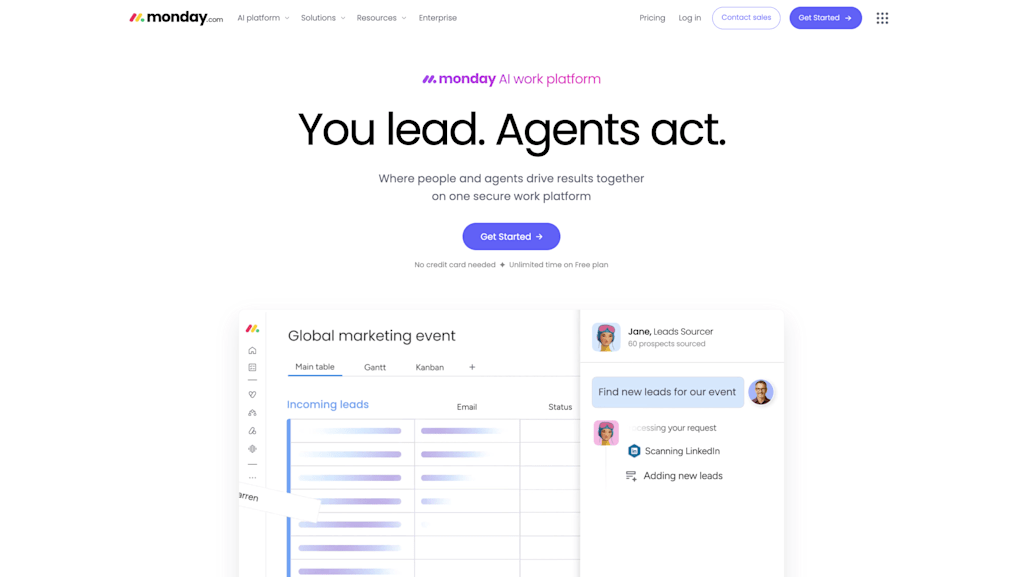
monday.com’s AI Work Platform gives teams a flexible way to manage projects, workflows, dashboards, automations, and AI-powered capabilities in one connected workspace.
Teams can use monday.com to manage simple task boards, complex project timelines, cross-functional workflows, and portfolio-level reporting without forcing every department into the same rigid process.
With monday.com, teams can:
- Manage work with multiple views, including Kanban, Gantt, timeline, calendar, workload, and dashboards
- Build workflows with no-code automations
- Connect tools through integrations
- Collect information with forms
- Track ownership, deadlines, status, and dependencies
- Use AI-powered capabilities like monday agents, monday sidekick, and monday vibe to support execution and reduce repetitive coordination
For teams comparing Smartsheet vs. Trello, monday.com offers a flexible middle ground: visual and easy to use, but powerful enough for more complex workflows as teams scale.
Conclusion
Smartsheet and Trello both help teams organize work, but they solve different problems.
Trello is simple, visual, and easy to start with, making it a strong option for small teams and lightweight workflows. Smartsheet offers more structure, reporting, and spreadsheet-style project management, making it a stronger fit for teams that need formal tracking and cross-project visibility.
For growing teams that need both flexibility and scale, monday.com’s AI Work Platform offers another option. Teams can manage work in multiple views, automate handoffs, build dashboards, connect tools, and use AI-powered capabilities to keep work moving across departments.
If you need more than a spreadsheet or a Kanban board, monday.com gives your team one connected place to plan, manage, and execute work.
Get started with monday.comThe content in this article is provided for informational purposes only and, to the best of monday.com’s knowledge, the information provided in this article is accurate and up-to-date at the time of publication. That said, monday.com encourages readers to verify all information directly.
FAQs
What is the main difference between Smartsheet and Trello?
The main difference is structure. Smartsheet uses a spreadsheet-style interface with stronger reporting and project tracking features. Trello uses visual Kanban boards that are simple to set up and easy for small teams to use.
Is Smartsheet better than Trello?
Smartsheet may be better than Trello for teams that need structured project tracking, reports, dashboards, forms, and cross-project visibility. Trello may be better for teams that want a lightweight Kanban board for simple task management.
Is Trello good for project management?
Trello can be good for simple project management, especially for small teams, personal task tracking, content calendars, and lightweight workflows. Teams with complex dependencies, reporting needs, or portfolio-level visibility may need a more robust platform.
What is the best alternative to Smartsheet and Trello?
The best alternative depends on your team’s needs. monday.com’s AI Work Platform is a strong option for teams that want multiple work views, dashboards, automations, integrations, forms, workload visibility, and AI-powered support in one connected workspace.

 Get started