


Projects don’t fail because teams lack ambition. They fail because the work starts before anyone agrees on what “done” actually means, who owns the decisions, or how much money is actually approved. That’s exactly what a project charter fixes. It’s the document that turns a verbal “let’s do this” into a formal, signed agreement that gives the project manager real authority to move. Most teams either skip the charter entirely or waste hours building one from scratch every time. A good template solves both problems by giving you a ready-made structure and creating consistency across your portfolio.
Here’s everything you need to build and use a project charter that actually works. You’ll find free templates for different project types, a breakdown of the eight components every charter needs, and a seven-step writing process. Plus, practical guidance on keeping your charter connected to live work after approval, including how AI can speed up drafting without taking people out of the real decisions. Teams can manage charter creation and project execution together using monday.com’s AI Work Platform to keep governance and delivery aligned from day one.
Key takeaways
- A project charter is your official green light: It formally authorizes the project, names who’s in charge, and gives the project manager real authority to spend budget and assign work.
- Eight components make or break every charter: Business need, SMART objectives, scope boundaries, stakeholder roles, milestones, budget, risks, and sponsor sign-off are non-negotiable, regardless of project size.
- Match your template format to the work: A lean one-page charter suits fast internal projects; complex enterprise programs need a fuller format with more governance detail.
- AI drafts the structure so you focus on the decisions: monday.com’s AI Work Platform can generate first-draft charter sections and flag missing fields, keeping people in control of scope, budget, and approvals.
- Keep your charter connected to live work: Link charter milestones and stakeholder roles to active project boards so the document stays useful long after the sponsor signs off.Get Started
What is a project charter?
A project charter is a formal document that officially authorizes a project to begin. It names the project manager, defines the project’s purpose, and grants them the authority to allocate resources and budget. Without this authorization, teams don’t have formal permission to commit time, money, or people to the work.
The difference between a verbal agreement and a documented charter is huge. Here’s what happens when a marketing team decides to redesign the company website without a charter:
- No defined budget
- No named decision-maker
- No shared agreement on what “done” actually looks like
Informal agreements lack accountability. They establish no clear project management scope boundaries and provide no formal authority to spend money or assign work.
A project charter establishes all operational boundaries and authorities before a single task gets assigned.
The document acts as the contract between the project team and the organization, clarifying expectations and preventing scope disputes down the line.
What is a project charter template?
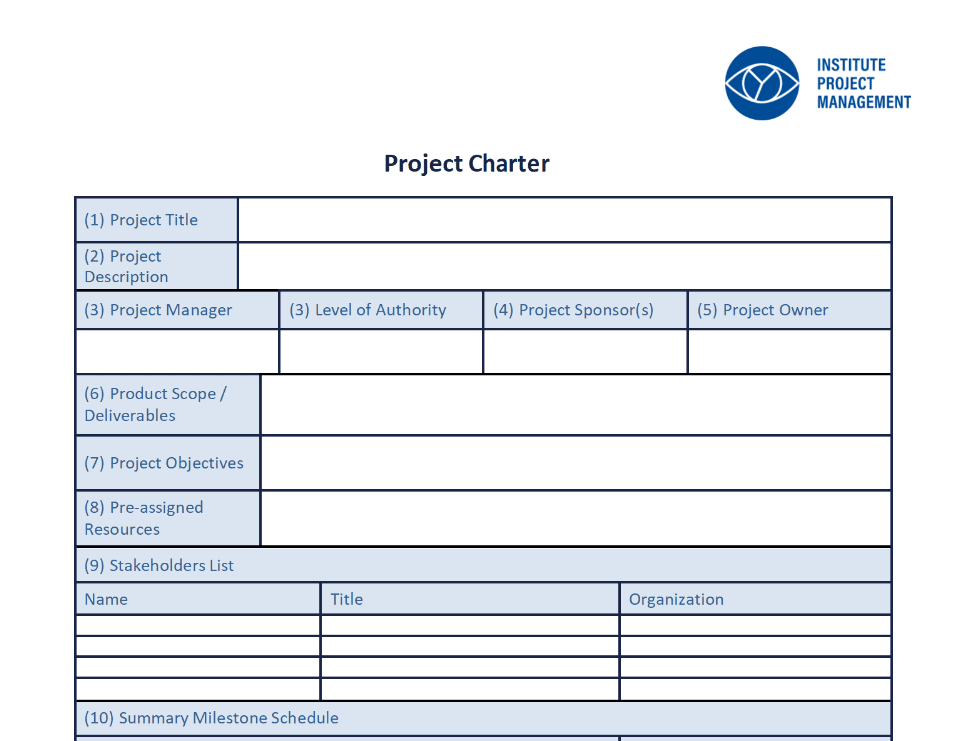
A project charter template is a pre-built framework with labeled fields and placeholder text that guides you through creating a charter from scratch. It eliminates the blank-page problem by providing the necessary structure while you provide the specific information.
Example scenario: A PMO at a mid-sized SaaS company creates one master charter template in monday.com’s AI Work Platform. When a new project kicks off, the project manager (1) opens the template, (2) fills in the sponsor and business need based on the kickoff meeting, (3) drafts SMART objectives, (4) defines scope and exclusions, and (5) routes the completed draft to the sponsor for sign-off, turning a half-day blank-page exercise into a 90-minute structured fill-in.
Think of the template as the reusable shell and the charter as the completed, project-specific document you create by filling in that shell. A charter template relates to a project charter the same way a tax form relates to a filed tax return. The form provides structure, and you provide the details.
Templates create consistency across a portfolio. When every project uses the same template:
- Stakeholders know exactly where to find critical information
- Approvals move faster
- New project managers ramp up more quickly
Teams using monday.com’s AI Work Platform can standardize charter templates across departments, ensuring governance consistency while allowing customization for specific project types.
Get StartedFree project charter templates by project type
Different project types need different charter formats. The scope, governance, and stakeholder complexity of a construction project looks nothing like a two-week agile sprint. Match the template to the work, and you’ll get the right level of rigor without drowning in paperwork.
Simple project charter template
This format strips the charter down to what you actually need. Unlike a full enterprise charter that may run 10+ pages with detailed governance sections, the simple template fits on a single screen and skips formal risk registers or RACI matrices. It works best for small internal projects, single-team efforts, or first-time charter writers who need speed over detail.
Example scenario: A five-person HR team launching a two-week onboarding survey could use this format to capture the sponsor (HR Director), the objective (collect feedback from 50 new hires), what’s in and out of scope, and the launch date.
- Project name and sponsor: Basic identification fields
- Core objective: Single statement of purpose
- In-scope and out-of-scope boundaries: Clear delineation of what’s included
- Key milestones and sign-off: Major checkpoints with approval requirements
- Project name and sponsor: Basic identification fields
- Core objective: Single statement of purpose
- In-scope and out-of-scope boundaries: Clear delineation of what’s included
- Key milestones and sign-off: Major checkpoints with approval requirements
One-page project charter template
A one-page charter forces you to prioritize by design. Every field competes for space, forcing you to be precise and focused. Compared to a multi-page traditional charter, this format eliminates narrative context and keeps only the essentials. It works great for executive communication or fast-moving teams that need brevity.
Example scenario: A product team pitching a Q2 mobile feature update to the executive board might use this format to fit the three-sentence summary, three SMART objectives, four milestones, and a $200,000 budget envelope on one slide for rapid steering committee approval.
- Executive summary: Three-sentence project overview
- Top three SMART objectives: Specific, measurable goals
- Critical path milestones: Essential delivery dates only
- High-level budget envelope: Total approved spending limit
- Executive summary: Three-sentence project overview
- Top three SMART objectives: Specific, measurable goals
- Critical path milestones: Essential delivery dates only
- High-level budget envelope: Total approved spending limit
Agile project charter template
Agile projects still need charters to authorize the work and define the product vision, even though the detailed plan evolves sprint by sprint. Unlike a waterfall charter that locks down deliverables upfront, this format shifts focus from rigid deliverables to iterative value, knowing requirements will emerge through customer feedback.
Example scenario: A scrum team building a new customer dashboard might document their product vision (‘a self-serve analytics view for SMB customers’), a definition of done (‘passes QA, deployed to production, validated by five pilot customers’), two-week sprint cadence, and named product owner, then revisit the charter quarterly as the backlog evolves.
- Product vision statement: The end state being pursued
- Definition of done: Clear completion criteria
- Iteration cadence: Sprint length and review schedule
- Product owner and scrum master roles: Key accountability assignments
- Product vision statement: The end state being pursued
- Definition of done: Clear completion criteria
- Iteration cadence: Sprint length and review schedule
- Product owner and scrum master roles: Key accountability assignments
Example: What a project charter looks like
A completed charter transforms abstract concepts into specific, clear boundaries. Here’s a realistic charter for a fictional company, Acme Corp, launching a new customer self-service portal.
- Project title: Customer Self-Service Portal Launch
- Sponsor: VP of Customer Experience
- Project manager: Sarah Jenkins
- Business need: Reduce inbound support tickets by enabling customers to resolve common issues independently
- Objective: Launch a functional self-service portal by Q3, reducing tier-1 support ticket volume by 20%
- In scope: Account management dashboard, FAQ knowledge base, secure ticket submission form
- Out of scope: Live chat integration, native mobile app version
- Key milestones: Beta launch by October 15; full public launch by November 30
- Budget: $85,000
- Risks: Third-party CRM integration delays; internal content creation bottlenecks
This charter works because it establishes specific boundaries and gives stakeholders an immediate understanding of what the project will and won’t deliver.
Eight key components of a project charter
Charter formats vary by project type, but eight core components show up in almost every effective charter. These non-negotiable building blocks form the minimum structure you need for project authorization. Understanding each component helps you write charters that hold up under scrutiny and actually serve the team throughout delivery.
1. Project title, sponsor, and project manager
These three fields establish who’s who and who’s in charge. Each role carries a distinct accountability:
- Sponsor: Owns the business outcome and provides funding authority. Their core question: “Did we achieve the business goal?”
- Project manager: Handles day-to-day delivery. Their core question: “Did we deliver on time and on budget?”
2. Business need and project justification
This section answers why the project exists by connecting it to a real business problem or opportunity. Without this link to business value, projects get canceled the moment priorities shift.
Example: “Our current legacy website generates a 45% cart abandonment rate, costing an estimated $50,000 in lost revenue monthly.”
3. Objectives and success criteria
Objectives are the specific outcomes your project must achieve. Success criteria are the measurable conditions that prove you hit those outcomes. Objectives should follow the SMART goals framework.
Example: “Achieve a customer satisfaction score of 4.2 or higher within 60 days of the portal launch.”
4. Scope, deliverables, and boundaries
Project scope defines what the project will produce, while boundaries explicitly state what the project will not do. Explicit exclusions prevent scope creep, as unstated items are often assumed to be included by stakeholders.
Example: “The website redesign includes all public-facing marketing pages but explicitly excludes the authenticated user dashboard.”
5. Stakeholders and roles
A stakeholder is anyone who affects the project or gets affected by it. The charter needs a clear RACI-style summary that distinguishes between internal team members and external vendors.
Example: “Marketing Director (Accountable for brand messaging); IT Security Lead (Consulted on data compliance).”
6. Milestones and summary timeline
Project milestones mark significant checkpoints showing completion of a phase or delivery of a major output. The charter includes four to six key milestones with target dates. Think of it as a summary estimate, not a detailed project schedule.
Example: “Design approval by March 15; beta launch by May 1; full production release by June 30; post-launch review by July 15.”
7. Budget and resources
The charter establishes the project budget envelope and identifies required resource types. Without this figure, the project manager doesn’t have formal authority to commit spending.
Example: “Approved budget envelope of $120,000, requiring two full-time backend developers and one contracted UI designer.”
8. Risks, assumptions, and approvals
Three distinct elements belong in this section:
- Risks: Potential negative events that could affect delivery
- Assumptions: Unconfirmed conditions believed to be true
- Approval block: Formal signatures that transform the draft into an authorized project
Capturing risks and assumptions early surfaces problems when they’re still cheap to fix.
How to write a project charter in seven steps
Most project managers start at the top of a template and just fill in fields top to bottom. Bad idea. The most important decisions end up rushed. The seven-step sequence below builds the charter in the right order, so each section informs the next. Teams using monday.com’s AI Work Platform can streamline this process by generating first-draft sections, flagging incomplete fields, and keeping charter data connected to live project boards throughout the writing process.
Step 1: Define the business need and strategic alignment
Everything in the charter flows from a clear statement of why the project exists. Start by interviewing the sponsor to understand the problem and how it connects to company strategy.
- Common mistake: Starting with the solution before establishing the need
- Target output: A two to three sentence problem statement that anchors every subsequent decision
Step 2: Identify the sponsor, project manager, and key stakeholders
Confirm roles. Don’t assume them. The sponsor must agree to their accountability. When identifying stakeholders, focus on three questions:
- Who has decision-making authority?
- Who is affected by the outcome?
- Who controls necessary resources?
Focus on decision-makers and key contributors. Don’t list too many stakeholders.
Step 3: Set measurable objectives and success criteria

Objectives must leave zero ambiguity at project close about whether you hit them. Convert vague goals into measurable objectives with this sequence:
- Start with the desired outcome
- Add a metric
- Define a target value
- Set a timeframe
Write objectives based on outcomes, not activities.
Step 4: Outline scope, deliverables, and exclusions
Scope definition means negotiating with the sponsor, stakeholders, and delivery team. Here’s the approach:
- List what the project will produce
- Immediately follow with what it will explicitly not produce
- Never leave the exclusions section blank, even when boundaries seem obvious
Step 5: Map milestones, budget, and resources
Precision matters less here than getting a credible range. Work backward from your end date to identify major checkpoints. Then:
- Establish the approved budget envelope based on sponsor input
- Identify the types of roles needed
- Avoid over-engineering the timeline with task-level detail at this stage
Step 6: Capture risks, assumptions, and constraints
Run a structured brainstorm with the project team to surface known risks. For each risk, note:
- The potential impact
- A preliminary mitigation approach
List unconfirmed dependencies as assumptions and fixed boundaries as constraints. Undocumented assumptions cause most scope disputes.
Step 7: Secure sponsor approval and sign-off
Approval transforms the charter from a planning document into formal authorization. Here’s the process:
- Circulate the draft to all required approvers
- Allow a defined review period
- Collect signatures and record the approval date
The signed charter becomes the project manager’s formal authority to ask for resources. Don’t rely on soft approvals like verbal agreements.
Get StartedProject charter vs. project brief vs. project plan
These three documents frequently cause confusion because they’re all created early in the project life cycle and describe the work to be done. But they serve entirely different purposes, target different audiences, and operate at different levels of detail. Here’s where each document fits and when to use it.
Project charter vs. project brief
A project brief is a shorter, less formal document used to communicate the project concept and secure initial buy-in before the full charter is written. The charter is the formal authorization document. The brief is the pitch.
| Feature | Project brief | Project charter |
|---|---|---|
| Purpose | Pitch the concept and gain initial buy-in | Formally authorize the project and commit funds |
| Audience | Executive sponsors and initial stakeholders | Project team, PMO, and all stakeholders |
| Formality | Low to medium | High (requires formal signature) |
| When created | Ideation phase | Initiation phase |
| Who owns it | Business analyst or project sponsor | Project manager |
The brief explores whether the project is worth doing. The charter officially says the project is happening and defines its boundaries.
Project charter vs. project management plan
The project management plan is the comprehensive execution blueprint. It includes the schedule, detailed budget, communication plan, and risk register. The charter authorizes the project, and the plan directs its execution.
| Feature | Project charter | Project management plan |
|---|---|---|
| Purpose | Authorize the project | Direct the execution and control of the project |
| Level of detail | High-level summary | Comprehensive, task-level detail |
| When created | Initiation phase | Planning phase |
| Who uses it | Sponsors for governance | Project managers for daily operations |
| Document length | Brief and concise | Extensive and highly detailed |
Think of the charter as the “go ahead” and the project management plan as the “here is exactly how we will do it.”
How AI speeds up project charter creation
Charter creation traditionally requires synthesizing information from business cases, stakeholder interviews, and existing documentation into a structured format. AI tools accelerate this process significantly while keeping people in control of critical decisions. Here is where AI adds the most value and where people must stay in the lead.
AI handles the mechanical work:
- Generates first-draft text for charter sections based on a simple project description, eliminating blank-page paralysis
- Scans draft charters to flag missing fields, vague objectives, or undocumented assumptions before the charter reaches the sponsor
- Extracts relevant information from business cases to pre-populate charter template fields, eliminating redundant data entry
Teams using the AI Work Platform can leverage these AI capabilities directly within their workflows, keeping charter creation and project execution in the same workspace.
People retain authority over what matters most:
- Sponsor sign-off and formal authorization
- Scope boundary negotiation
- Budget approvals and resource commitments
AI handles the mechanical work of synthesis and formatting, freeing the project manager to focus on strategic decisions that actually matter.
How to keep your project charter active after approval
The most common failure mode for a project charter is that it gets signed, filed away, and never referenced again. A charter that sits unused becomes merely a governance artifact, not a management tool. Keeping the charter active requires connecting it to the live work it authorizes.
When charter milestones, deliverables, and stakeholder roles connect to live project boards, the charter becomes a daily reference point rather than a forgotten PDF. Teams using the AI Work Platform can embed charter content alongside live boards and dashboards, ensuring the foundational agreement and daily execution exist in the same workspace.
Know when re-chartering is required. Significant changes trigger the need for a new or updated charter. These include:
- Scope expansion beyond original boundaries
- Budget increases requiring new approval authority
- Sponsor changes that shift accountability
- Strategic pivots that alter the project’s purpose
The rule is simple: if the change would have required a different approval decision at the start, it requires re-chartering now.
Maintain portfolio-level charter visibility. PMO leaders need to know, at any given moment:
- Which charters are approved and current
- Which are pending sign-off
- Which have been updated following a change
- Which projects are operating without a current charter
Portfolio-level dashboards in monday.com’s AI Work Platform display charter approval status across all projects, helping organizations maintain governance compliance at scale.
Get StartedManage project charters and execution together with monday.com's AI Work Platform
Project charters need to do more than satisfy a governance requirement. They need to stay connected to the work they authorize, from the first draft through final delivery. monday.com’s AI Work Platform brings charter creation and project execution into a single workspace, so the foundational agreement and daily tasks exist side by side. Teams can draft charters, route approvals, and link charter milestones directly to live project boards without switching between disconnected tools.
The platform combines AI-powered drafting with real-time collaboration, helping teams move from charter approval to active delivery faster while maintaining full governance visibility across the portfolio.
AI-assisted charter drafting and validation
The AI Work Platform’s AI capabilities generate first-draft charter sections based on simple project descriptions, eliminating blank-page paralysis and cutting drafting time significantly. The AI scans completed drafts to flag missing fields, vague objectives, or undocumented assumptions before the charter reaches the sponsor. Teams stay in control of scope, budget, and approval decisions while AI handles the mechanical work of synthesis and formatting.
Live connection between charters and project boards
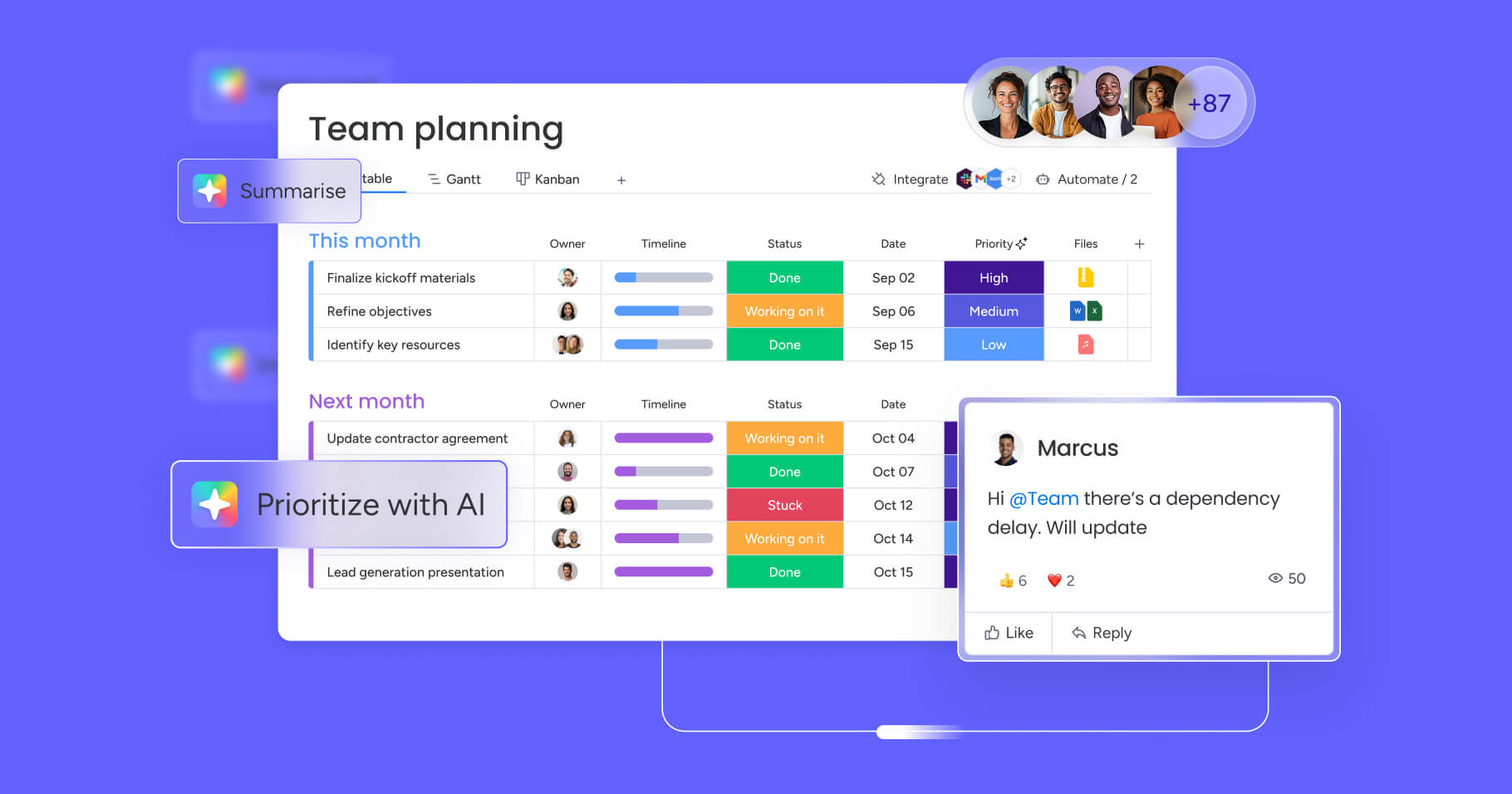
Charter milestones, deliverables, and stakeholder roles connect directly to active project boards, transforming the charter from a static PDF into a living reference document. When scope boundaries or budget envelopes change, updates flow automatically to connected boards and dashboards. The charter stays relevant throughout the project lifecycle, not just at kickoff.
Portfolio-level charter governance and visibility

PMO leaders can track charter approval status across all projects from a single dashboard, seeing which charters are approved and current, which are pending sign-off, and which projects are operating without proper authorization. Automated workflows route charters for approval based on project type and budget thresholds, ensuring governance compliance at scale without manual tracking.
Standardized templates with flexible customization
Organizations can create master charter templates that enforce consistent structure across departments while allowing customization for specific project types. Templates include pre-built fields for all eight essential components, ensuring nothing gets missed. Teams can clone and adapt templates for agile sprints, construction projects, or enterprise programs, maintaining governance standards while matching the format to the work.
From first draft to active governance: Putting your charter to work
A well-built project charter does more than satisfy a governance checkbox. It gives every stakeholder a shared understanding of what the project is, why it exists, and who is accountable for its success. The eight core components covered in this article form a reliable foundation regardless of project size or complexity. Whether you are writing a lean one-page charter for a fast-moving internal initiative or a comprehensive document for a regulated enterprise program, the same logic applies: define the need, confirm the authority, set measurable boundaries, and secure formal approval before work begins.
The next step is straightforward. Select the charter template that fits your project type, work through the seven-step sequence in the correct logical order, and connect the approved charter to your live project boards. Teams that manage charter creation and project execution together on the AI Work Platform keep governance and delivery aligned from day one, so the charter stays relevant long after the sponsor signs off.
Get StartedFAQs
What should a project charter template include?
A project charter template must include eight essential components: project title with sponsor and project manager names, business need and justification, measurable objectives with success criteria, scope boundaries including explicit exclusions, stakeholder roles using RACI format, key milestones with target dates, budget envelope with resource requirements, and documented risks with assumptions and formal approval signatures.
How do I write a project charter step by step?
Start by defining the business need and strategic alignment through sponsor interviews. Next, confirm the sponsor, project manager, and key stakeholder roles. Set measurable SMART objectives with clear success criteria. Define scope boundaries including explicit exclusions. Map four to six major milestones with budget and resource estimates. Document known risks, assumptions, and constraints. Finally, secure formal sponsor approval and signatures.
What is the difference between a project charter, project plan, and business case?
The business case answers "should we do this project?" by analyzing costs versus benefits. The project charter answers "are we authorized to begin?" by formally approving resources and naming the project manager. The project plan answers "how will we execute?" by detailing tasks, schedules, and assignments. Each document serves a distinct purpose at different project stages.
Who creates, approves, and uses a project charter?
The project manager creates the charter with input from sponsors and stakeholders. The executive sponsor approves and signs the charter, providing formal authorization. The project team uses the charter throughout the project lifecycle as the baseline for scope decisions, while the PMO uses it for portfolio governance and compliance tracking.
How can I turn a completed project charter into an actionable project plan?
Transform your charter into execution by having charter milestones automatically populate project timelines, budget envelopes connect to tracking boards, and stakeholder lists become notification groups. Teams using monday.com's AI Work Platform can connect charter data directly to project boards, eliminating manual re-entry while keeping the authorization document linked to daily work.

 Get started