


Are you an executive overseeing all your department or company’s projects? Or maybe you’re just an overworked project manager trying to juggle half a dozen projects — or more — at once?
Either way, portfolio management software could be the solution to all your problems — or at least all of your project-related ones.
The 2020 Wellingtone State of Project Management survey discovered that ‘attempting to run too many projects’ was the biggest project management challenge that people faced.
And it’s no wonder. If juggling priorities, resources, dependencies, deadlines, and more for one project is hard, then doing it for 10 projects at the same time is obviously going to be at least 10 times harder.
Especially if you can’t easily visualize overlapping deadlines and requirements across projects.
Portfolio management software solves that issue.
This article will explain what project portfolio management software is, some of the benefits gained from using it, and show you how you can manage a portfolio of projects using monday.com.
What is portfolio management software?
Portfolio management software enables you to see all of your projects in one place. It allows you to quickly keep tabs on how each project is doing and flag areas for concern. Perhaps more importantly, it also allows you to manage the interdependencies between projects.
Want to know how a delay in one project will affect others? Or thinking about pulling a key resource off a project to put them on a higher priority one?
Portfolio management software lets you see how these changes will impact all your projects across the board so that you can make the best decisions for your business.
When juggling multiple projects, you’ll need to balance out several elements:
- People: a key resource for any project portfolio manager.
- Hours in the day: balance project delivery against overburdened staff.
- Financial resources: so you don’t run out of money or lose profit.
- Other limited resources: whether it’s meeting rooms, machinery, or software licenses, any resources that are limited will need to be balanced out across projects.
It’s easy to feel overwhelmed by these different competing elements fighting for priority, so using a software platform to manage your projects is a good idea.
You need to rise above the daily noise and take a bird’s eye view of what’s best for the business as a whole.
Project portfolio management software (PPM software) can zoom out from the detail and give you an overview of the bigger picture.
You can summarize project timelines, use real-time KPIs, set reminders, and have other critical information close at hand to keep in control.
Think of it as a ‘mission control’ for your work ― without the need for any astronaut training or a physics degree.
Why should I use project portfolio management software?
Project prioritization and resource management were highlighted as 2 of the most challenging aspects of PPM management in the 2020 State of Project Management report from Wellingtone.
In the 2020 PMI Signposts Report, poorly managed dependencies — 22% — and limited/taxed resources — 21% — were attributed as a primary cause for project failure.
But, the State of Agile survey from 2020 showed that 40% of respondents are still, in part, using spreadsheets as a project management tool.
It’s difficult — or at the very least burdensome — to manage project dependencies and people using spreadsheet technology.
PPM software, instead, provides easier ways of managing these critical elements.
Project software lets you manage project dependencies using various methodologies, like Gantt Charts, Kanban, and Workload views. PPM software lets you manage these across multiple projects.
You can use PPM software to understand your team’s work distribution across everything they’re tackling — across multiple projects and their regular ‘day jobs’ if they also do non-project work.
It lets you see who is overloaded or under-utilized, so you can juggle people and timelines as needed.
You won’t need to call a meeting to see what everyone is up to or ask a bunch of different PMs and functional managers about whether a staff member has any free time for new work.
You can also see at-a-glance progress on work using helpful graphical views ― even displaying them on a digital dashboard.

These are just a few areas where PPM software can help you manage a portfolio of projects better.
Let’s take a closer look at some other PPM software features that help you oversee a busy portfolio.
A closer look at some essential features found in portfolio management software
This section considers some of the features we feel are essential in great portfolio management software.
Gantt charts
One feature that helps PMOs keep multiple projects on track is the Gantt chart. A Gantt chart displays work and timescales visually as a horizontal bar chart.
Gantt charts have been around since the 1900s, and started as hand-drawn diagrams to portray work schedules. But, today, Gantt charts are software-based and can change and adapt quickly when priorities shift.
Some of the key elements represented on the Gantt chart are:
- Work in progress, an easy way to visualize your projects.
- Time periods to show the estimated duration each project should take.
- Ownership, so that you know who’s responsible for actioning work.
- Status, showing you the current progress of each project.
Many project managers find Gantt charts to be an indispensable tool for managing work. You can also use them to manage a whole portfolio of projects.
Gantt charts are extra useful when your portfolio of projects contains multiple complex projects with overlapping deadlines.
For projects with interdependencies ― where one project requires completion before another can start ― Gantt charts help you time things right.
If you tracked your project portfolio’s dependencies using a Gantt chart, here’s what it could look like on monday.com.

Resource management
When you’re responsible for managing resources across projects, it can be a daunting job balancing staff workload.
As we mentioned above, limited/taxed resources are claimed as the primary cause of project failure 21% of the time. But, the Wellingtone 2020 State of Project management report claims that only 23% use formal resource management software solutions.
Additionally, 54% did not have access to real-time KPIs for their resources either. How can you manage resources across a portfolio of projects if you don’t understand their distribution in real-time?
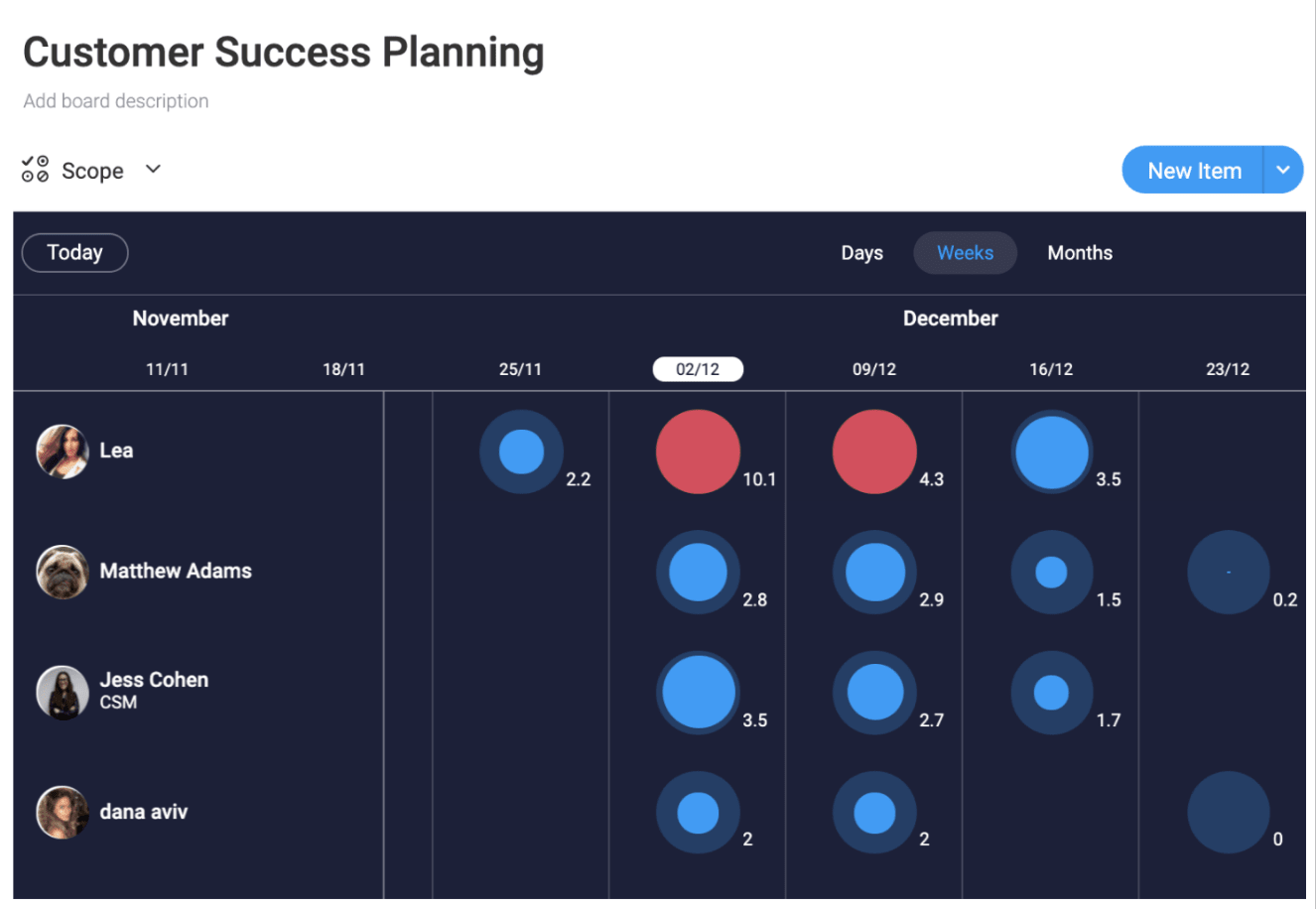
If you used monday.com to manage your PMO resources, you can see precisely how much work each of your team has on their plate. We call it the workload view.The workload view is a graphical representation of whether your team members are underutilized, overutilized, or have the right amount of work allocated to them.
It uses colored circles to show work levels, and you can easily redistribute work between staff by clicking into their circle to view a breakdown of the projects they are working on.
For greater day-to-day control over your resources, you can also view team workload in real-time by adding the monday.com workload widget to a digital dashboard.
Budget management
Delivering a project on budget is one of the key criteria for judging success. For PMOs managing multiple projects, keeping track of costs across all projects is an important undertaking that requires close attention to detail.
Most projects begin with a set budget — an estimation of the financial resources required to deliver the primary goals. Then, as work progresses, PMOs need to maintain running totals of expenditure to prevent overspend.
Effective budget management, though, is an area still in need of work for the PMO. The 2020 PMI survey found that only 59% of projects are completed within budget.
HR costs are likely to be a significant part of your overall budgets, so it makes sense to keep track of this cost across your entire project portfolio.
One of the helpful tools that will allow you to monitor HR costs on monday.com is the time-tracking feature. You can add a time-tracking column to any work board, and your team can use a purpose-built widget to record hours worked.
Once you have the time data recorded, you can further calculate costs using a formula column. Tracking these costs against the original estimation will help you quickly see if your projects are keeping within budget.

Customization
It would be nice if all of the projects in your portfolio required the same initial organization and setup. This way, the portfolio management software you use to manage your workload would just need a bit of cut, copy, and paste every time you added a new project in.
Unfortunately, life isn’t always like that, and you end up managing a range of projects that are frustratingly diverse.
The portfolio management software you choose to keep track of your duties should be flexible enough to cope with all eventualities.
Alongside flexibility, you should look out for:
- The ability to survey projects using multiple view types.
- A clutter-free workspace to focus on only what’s important.
- The ability to reduce repetitive tasks through automation.
- Integration with a variety of common business applications.
- A package that encourages team collaboration and communication.
monday.com is infinitely customizable, has dozens of integrations, automation options, and fosters collaboration.
We know we’re biased, but we think it’s pretty special.

Easy to use
Ease of use and functionality should be near the top of your wish list when choosing software for portfolio management. So look for a package that is feature-rich, intuitive, and requires minimal training to bring team members up to speed.
Functionality and ease of use remain 2 of the most important factors required from project management applications, according to research from Capterra.

Favor software that doesn’t require staff to attend training seminars or place a drain on IT resources when users encounter a problem.
monday.com is not a to-do list. It’s a feature-rich Work OS flexible enough to handle all situations. But — despite its capabilities — monday.com is easy to learn and feels natural to use.
Design your workflow the way you want, and use the hundreds of templates to get your team up and running quickly.
Why monday.com is the perfect solution for portfolio management
monday.com ticks all the right boxes for great portfolio management software.
Visually appealing and intuitive to use, you can create your project portfolio management workflow as you envision it.
With monday.com, you can:
- Check and track progress with custom status columns. If you want to track hours worked or see a visual progress bar, you can quickly add these in and have them populated automatically.
- Add new projects quickly and assign ownership to team members. Manage the micro and the macro in the same solution to cut down on transposition time and cut errors.
- Keep control of overall project costs. Add financial columns for your budget, plus one for actual figures. You can also add in a formula column too, to calculate the current position.
- Integrate your portfolio management workspace with the tools your business uses. monday.com integrates with dozens of popular tools commonly used by modern companies.
If you use monday.com to manage individual project workflow and activities, it’s easy to use it as a project portfolio management solution.
First, set out all the individual duties for your project in a format that makes it easy for your team to follow and execute, then set up a high-level board as mission control for your work.
As tasks get checked off on the lower-level boards, your progress indicators can automatically update the high-level one using a link column.
If you want to display something from your mission control into a low-level board — or in your boss’s even-higher-level one — you can do that too with the mirror column.
Here’s how a portfolio management workspace can look using monday.com.

Portfolio management software makes staying on top of your workload easy
A survey from the IPMA in 2019 reported 2 disturbing statistics for project managers.
- Only 30% of organizations were likely to deliver a project on time.
- Just 36% were likely to deliver a project within the budget.
Statistics that are likely impacted on some level by the number of projects a business has to handle at any given time.
Gain greater control over your project portfolio by using a PPM software platform.
You can start right now using monday.com to manage all of your tasks and projects. Why not start with our special project tracker template?
 Get started