


Missed deadlines rarely happen in isolation. One slipped date triggers a chain reaction: dependencies shift, resources scramble, and suddenly an entire team is working reactively instead of proactively. When schedules are scattered across spreadsheets or disconnected apps, no one has a single, reliable view of what needs to happen and when.
This guide walks through everything you need to know about project management calendars: what they are, the different types available, how to build one from scratch, and how to keep it running smoothly. You’ll also find ready-to-use templates, practical tips for avoiding common pitfalls, and an overview of how AI and automation are reshaping how teams plan their work.
monday AI Workspace makes it easier to bring deadlines, dependencies, and team capacity into a single calendar view, so nothing falls through the cracks.
The platform’s AI capabilities go beyond basic scheduling; they detect conflicts before they derail timelines, automatically balance workloads across teams, and send proactive alerts when deadlines are at risk. With 15+ customizable views, drag-and-drop Gantt charts, and 200+ integrations, monday AI Workspace transforms your project calendar from a static document into a dynamic planning engine that adapts as your work evolves.
Get started with monday.comKey takeaways
- A project management calendar centralizes deadlines, milestones, dependencies, and resource assignments into one living document that keeps every stakeholder aligned
- Choose the right calendar type – base, project, resource, or activity-level – to effectively visualize and manage work across teams
- Build a project calendar step by step (define scope, sequence activities, set milestones, and assign ownership) to prevent scheduling conflicts before they happen
- AI-powered automations can detect deadline conflicts, balance workloads, and send proactive reminders, turning your calendar from a static schedule into a dynamic planning engine
- monday AI Workspace offers 15+ views, drag-and-drop Gantt charts, and 200+ integrations so teams can build, manage, and adapt project calendars without switching between platforms
What is a project management calendar?
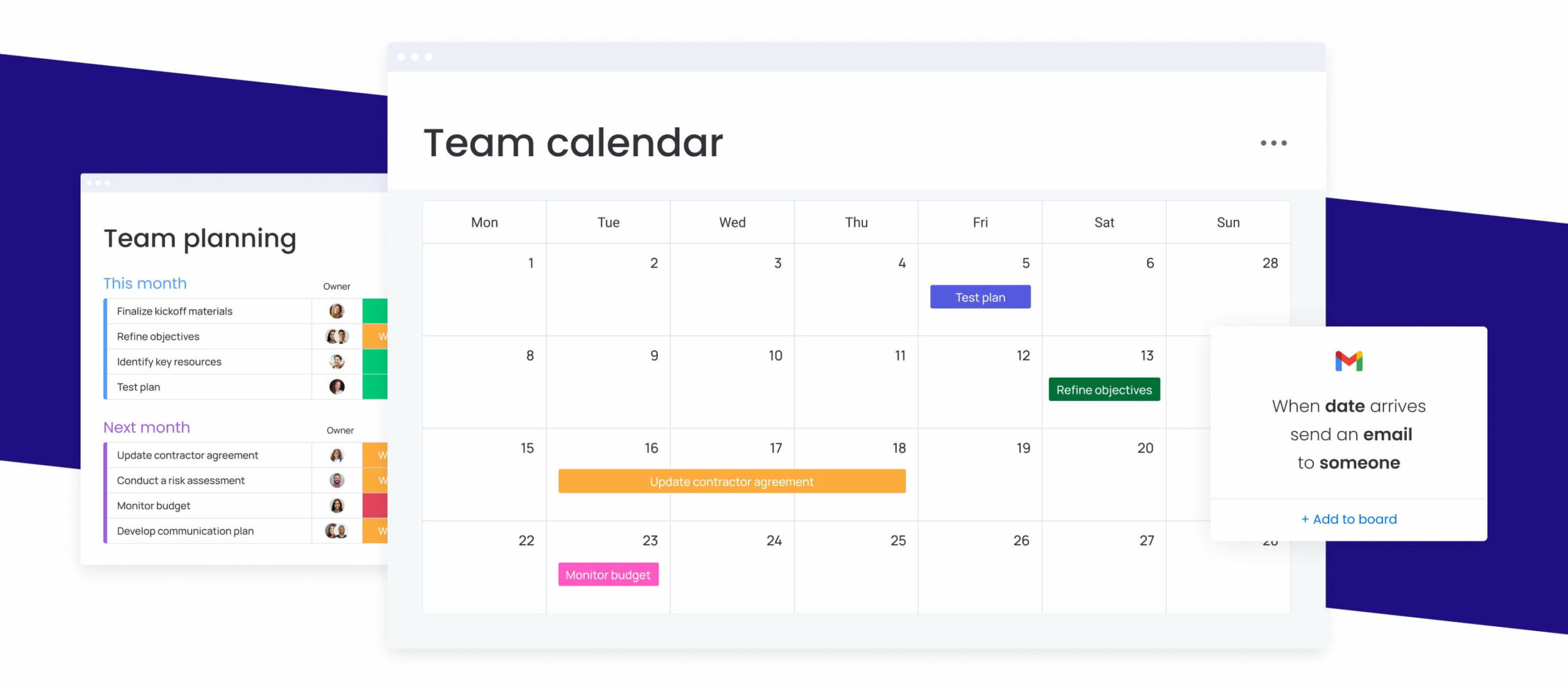
A project management calendar is a visual scheduling framework that maps every deadline, milestone, dependency, and resource assignment across the full project lifecycle. Unlike a basic online calendar or personal agenda, which tracks meetings and personal appointments, a project calendar ties dates directly to deliverables, ownership, and project phases. It answers the question every project stakeholder asks daily: “What is due, when is it due, and who’s responsible?”
Project managers, team leads, department heads, and executives all rely on project calendars to maintain visibility into timelines and workloads. A well-structured project calendar tracks milestones (key deliverables or phase completions), dependencies (which activities must finish before others can begin), resource assignments (who is doing what), and project phases (planning, execution, review, launch). It also surfaces scheduling conflicts early, before they become expensive problems.
Why does this matter? Because projects rarely fail for lack of effort, rather, they fail for lack of coordination. A project management calendar acts as the connective tissue between strategy and execution. It gives every contributor a shared understanding of the timeline, reduces back-and-forth status check-ins, and creates accountability at every stage. Without one, even experienced teams rely on memory, assumptions, and last-minute firefighting to stay on track.
A project calendar differs from a personal calendar in one fundamental way: it’s built around deliverables and dependencies, not time slots. When your scheduling framework accounts for how work connects, not just when it happens, you gain the visibility needed to make proactive decisions instead of reactive ones.
Three ways to visualize project calendars
The beauty of digital project calendars is that they can exist in various kinds of visual representations, so you can picture your project’s schedule any way you like. Some common forms of project calendars include:
Gantt Charts
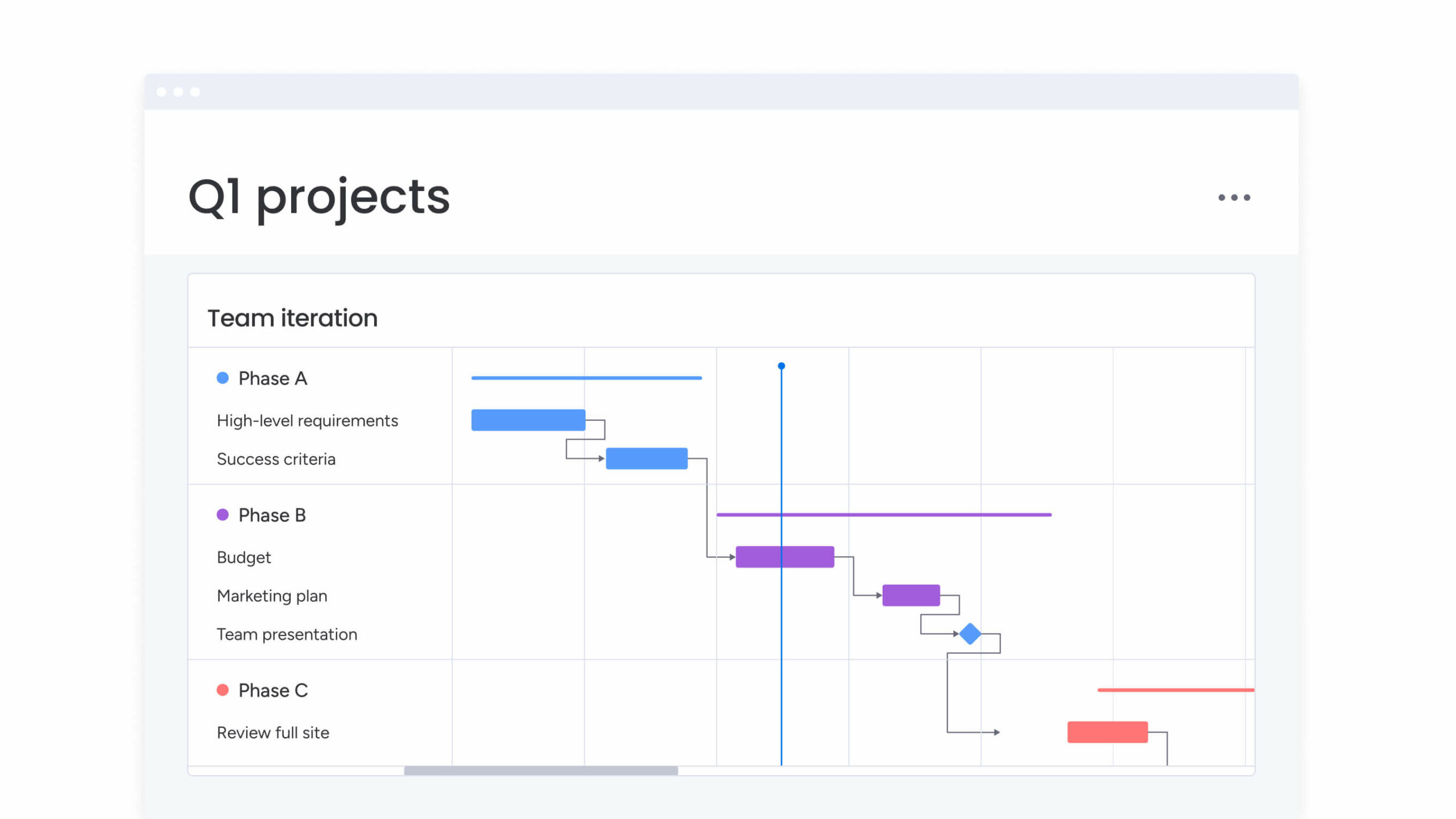
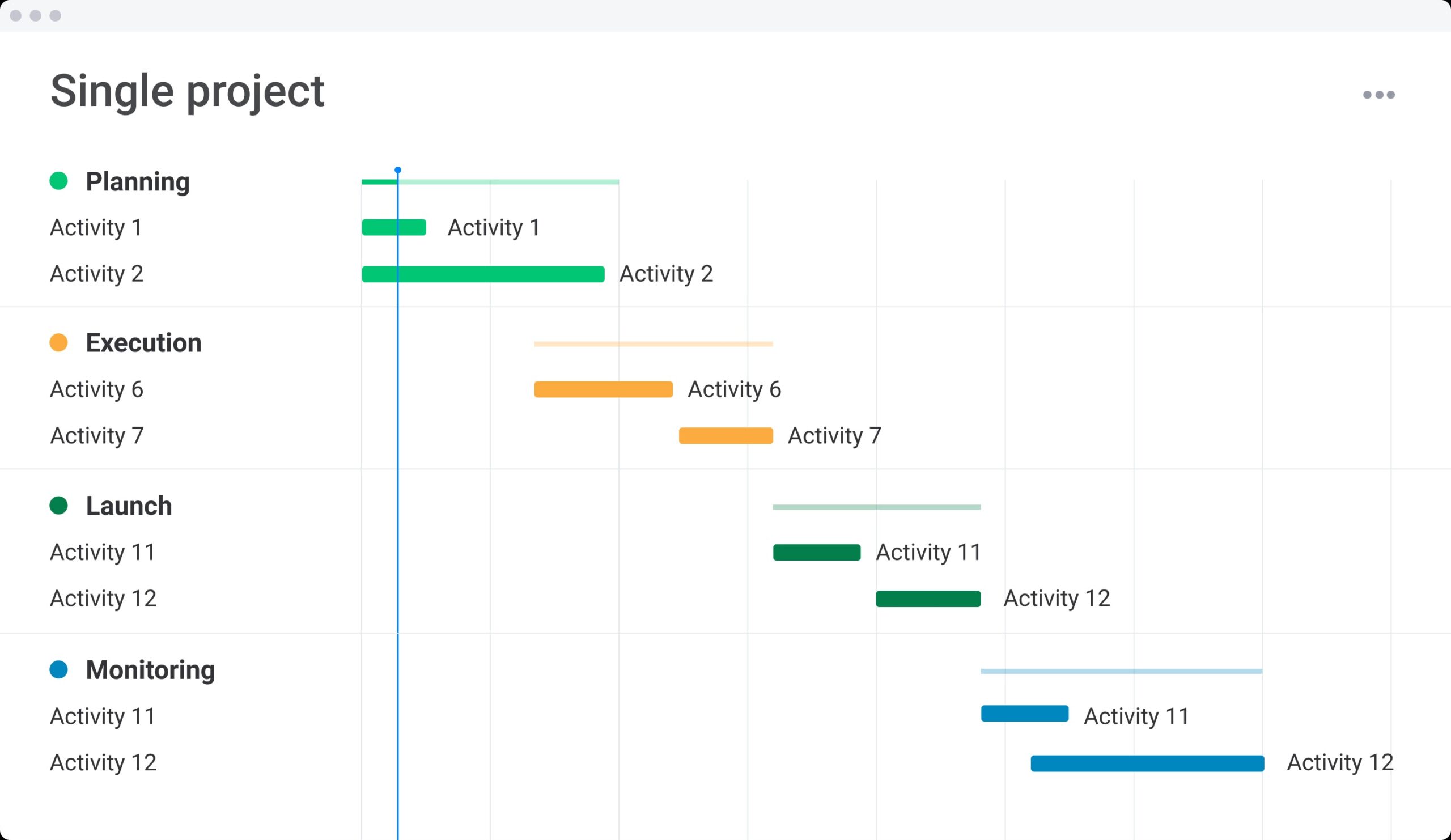
A Gantt Chart is a type of project calendar that uses bar graphing to illustrate progress over time. A line down the middle should show your current time. Trace your finger down the line and compare it with the progress in the bars, and you’ll see where you need to catch up. Gantt charts also help show the dependencies between different tasks in a project.
Kanban Boards
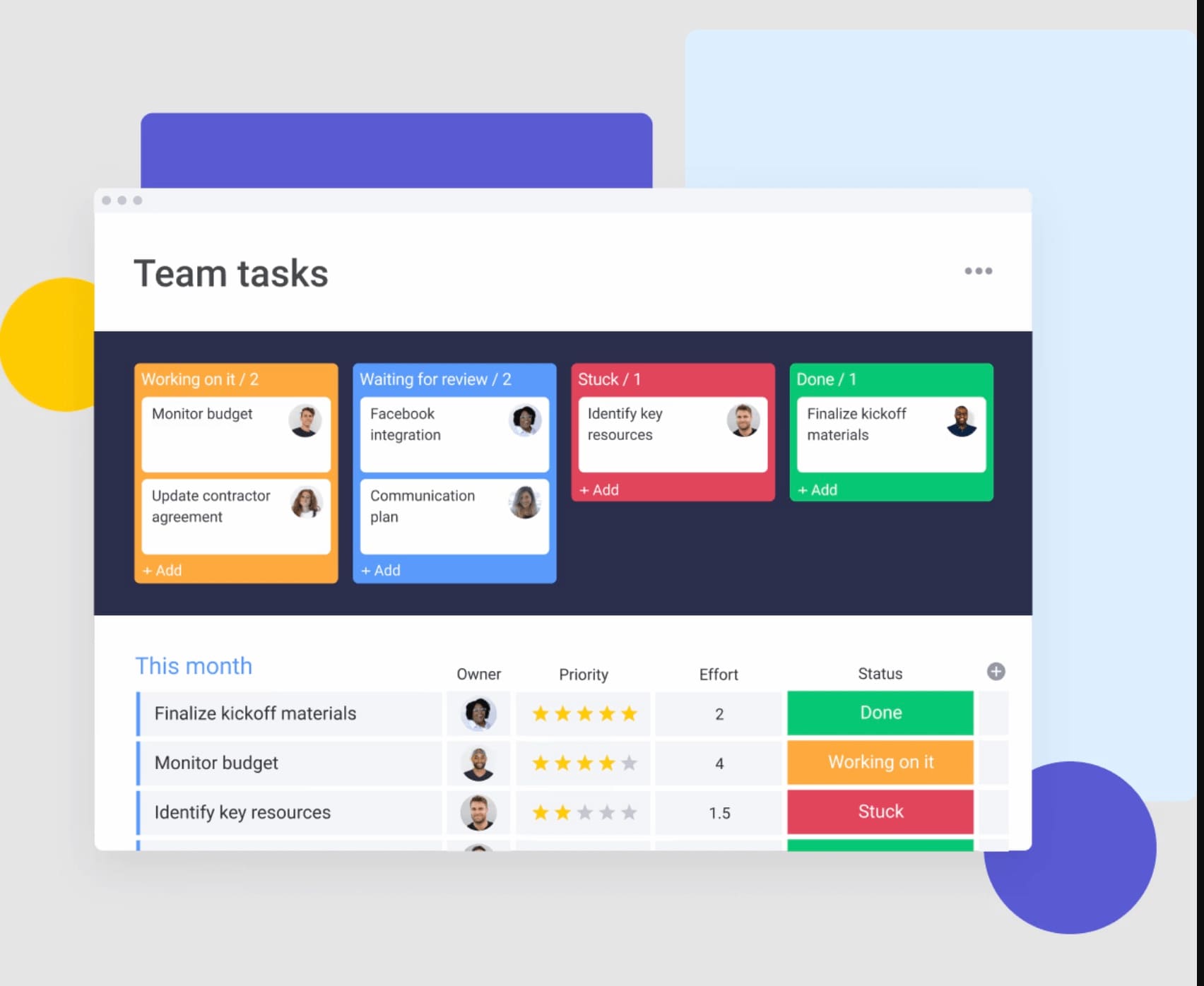
Kanban Boards are all about priorities. They split items into a left-to-right system demonstrating the progress of the project. In a Kanban Board, there’s less emphasis on the timeline of the project but rather the tasks involved. But with an effective project calendar app like monday.com, you can switch between Kanban view and Calendar view to get a sense of your progress. Get started using Kanban boards with one of our awesome Kanban board templates.
Timelines
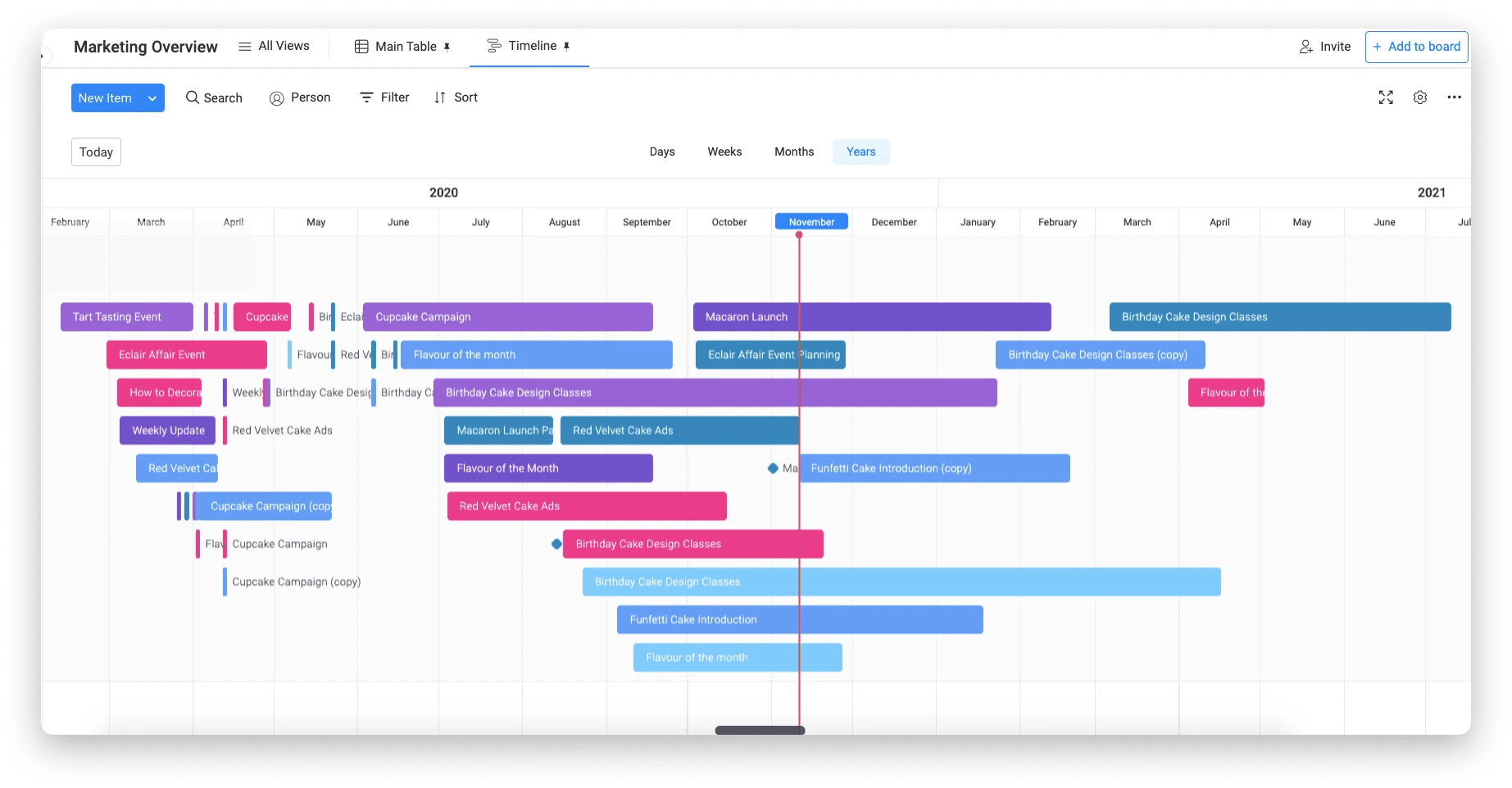
A timeline is a sequential graph that allows teams to visualize a project’s steps and timeframe at a glance. It uses elements of Gantt charts to demonstrate the different tasks that make up a project, who’s assigned to each task, and each task’s status against the current due dates.
With monday.com, you can turn virtually any project calendar into an interactive timeline by simply clicking on the Timeline View.
Get startedBenefits of a project calendar
It’s an inevitable fact that proper planning is the key to successful outcomes, so it’s no surprise that using a concrete planning tool such as a project calendar comes with many benefits. One study found that project calendars can help free you from the stress and anxiety of an under-planned project.
And today’s project calendars are far more robust than a pen and a piece of paper or an Excel spreadsheet. Here are some of the specific benefits that reinforce project calendars as an integral tool in project management.
Project visualization
A project calendar brings a project and its different phases to life in a visual way that anyone, from stakeholders to cross-departmental teams, can understand. Humans are visual creatures, so it’s inherently effective to actually see a mapped-out schedule of a project with dates, tasks, and milestones, to fully grasp the scope of a project and its trajectory.
Clear project planning
A project calendar is a fool-proof hack for organization because it forces teams to map out their project in advance, allocating tasks, resources, and deadlines. While some due dates and tasks may unavoidably change over time, a calendar ensures teams are aligned on a starting point for what needs to be done and when.
Effective resource management
By planning in a project calendar, project managers can evenly distribute tasks to ensure team members aren’t overworked and that resources are distributed evenly toughout the project lifecycle. Carefully mapping out where to allocate tasks and resources also avoids scheduling conflicts.
Enhanced accountability
When someone’s tasks and responsibilities in a project are clearly stated in a calendar that everyone can see, it’s more likely they’ll take full ownership of their role and get it done on time.
Better team collaboration/ communication
A management calendar is a unified tool that the whole team can access and collaborate on, so it ensures all team members are on the same page. Anybody can easily understand who is in charge of what, and when something is due. Most importantly, team members and stakeholders can be updated in real-time when a change in the schedule is made.
How to build an online project calendar
You should now have a solid understanding of why a project calendar is an essential tool for effectively organizing and executing your project. But the next question poses itself: how and where can you build your project calendar to ensure you’re getting the best use of it?
To build an online project calendar as effectively and simply as possible, follow these steps.
1. Pick a project calendar tool
The platform you select determines how flexible, collaborative, and scalable your calendar will be. For simple, short-term projects with a small team, a spreadsheet may suffice. For anything involving multiple stakeholders, dependencies, or ongoing updates, dedicated project management software provides the structure and automation needed to keep calendars accurate over time.
2. Define project goals
Before adding a single date to your calendar, document the project’s objectives, deliverables, and boundaries. What does success look like? What is included in scope, and equally important, what is excluded? A defined scope prevents scope creep from turning your calendar into an ever-expanding collection of unrelated activities. Write down three to five measurable goals and use them as the filter for everything that goes on the calendar.
3. Identify tasks & dependencies
Next, you’ll need to map out all the tasks needed to complete your project. You can start by writing out all project tasks in a task list in a shared document with your team, or on a monday board, where you can later assign due dates and owners to each task.
Make sure to be as specific as possible so there’s no confusion about exactly what each task entails. Can you break down individual subtasks within a task list that need to be completed?
It’s important to then identify task dependencies, i.e., the relationships between tasks. For example, note which specific task must be completed before the next task can proceed. This allows you to sequentially map out your project schedule in a logical way.
4. Map out tasks, setting deadlines
Next, you’ll need to map out the tasks in a project schedule. Based on dependencies, you can create a timeline that shows the order of tasks. You’ll then assign deadlines (make sure they’re realistic) to each task so you can gain an understanding of how long the entire project, and each of its steps, will take.
This is also the time to identify project milestones or key events that will serve as checkpoints throughout your project. Create milestones by due dates. For example: monday.com’s date column will automatically alert you when a milestone is behind once you’ve assigned due dates.
5. Assign people to each task
You’ll then need to consider each team member’s resources and capacity when assigning users to tasks. With monday.com, you can do this using the “Owner column” on a board. And by using our calendar integrations (which connect to Google Calendar, iOS, Outlook, and more), assigning ownership of specific tasks can automatically populate individual team members’ calendars.
You can also leverage the Workload View to keep an eye on each team member’s workload and make sure nobody has too much on their plate.
6. Routinely review & revise the calendar
The great thing about using a digital calendar tool is that it’s completely flexible, allowing you to make any changes as needed. Continuously refer to the calendar to ensure everything is progressing properly and due dates are being met. It’s natural to make adjustments to your original timeline as the project activities progress.
Five best project calendar templates
If creating a new project calendar seems overwhelming, the good news is you don’t have to start from scratch. A good project calendar app will include pre-made templates for you that serve as base calendars for your teams’ unique processes. There are different templates for different kinds of calendars. Some helpful templates included with monday.com include:
1. Marketing calendar
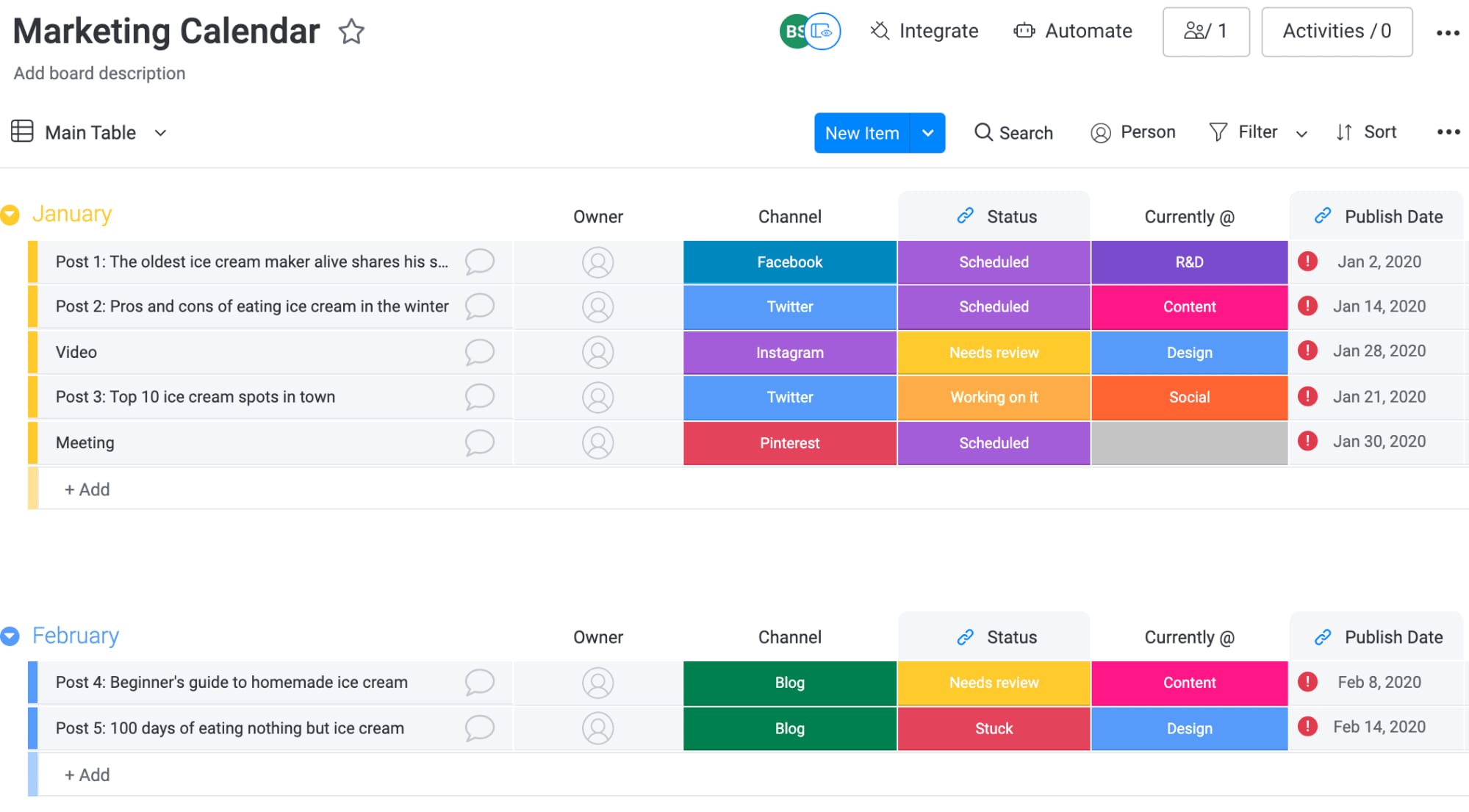
Plan, create, and monitor all of your marketing initiatives & strategy in one place. Keep track of and visualize your business goals, budgets, and campaigns with an interactive chart or timeline.
2. Social media content calendar
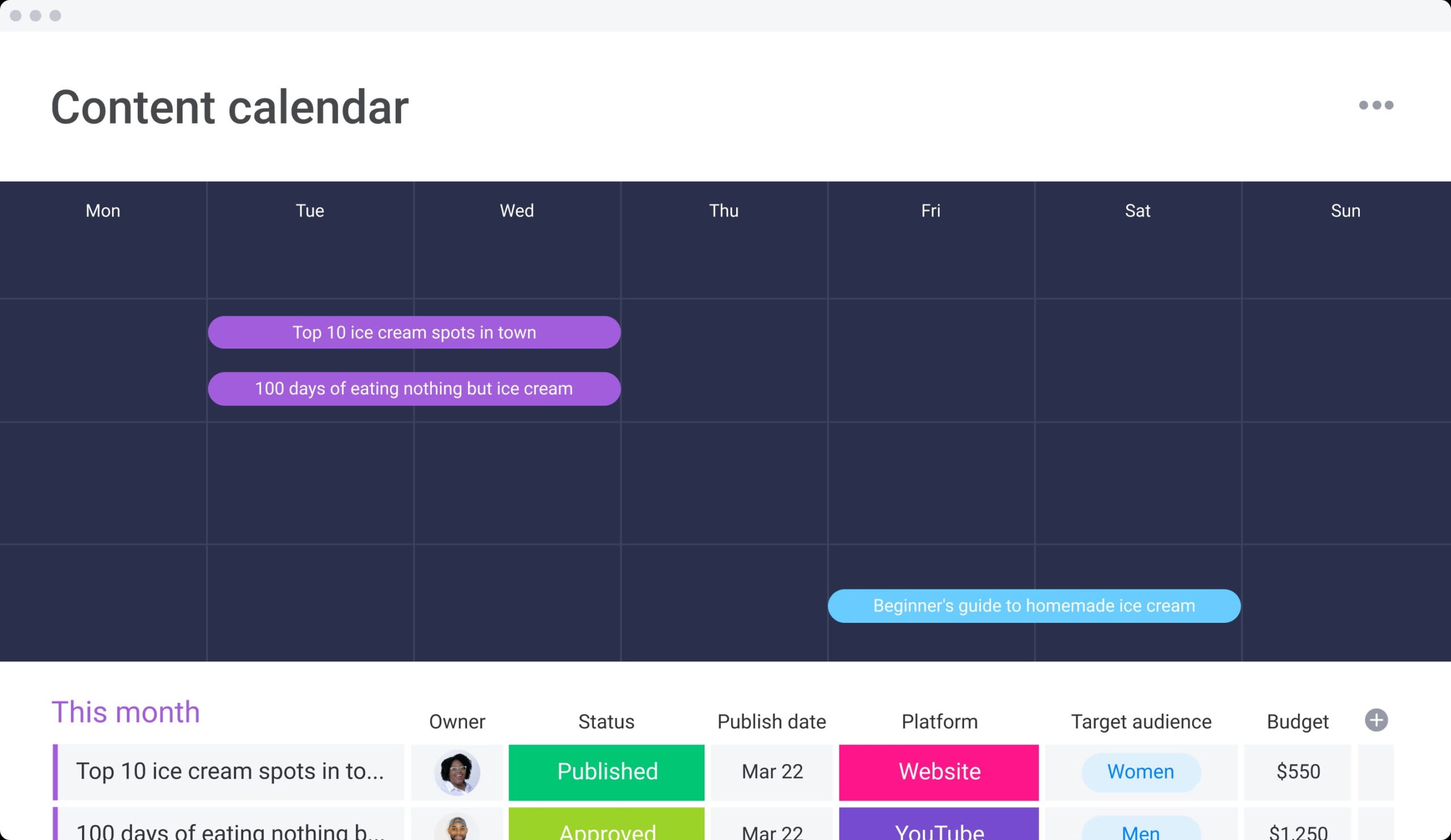
Organize your upcoming content by platform, publish date, status, and more to gain a visual, birds-eye view of your entire content strategy and schedule.
3. Work task calendar
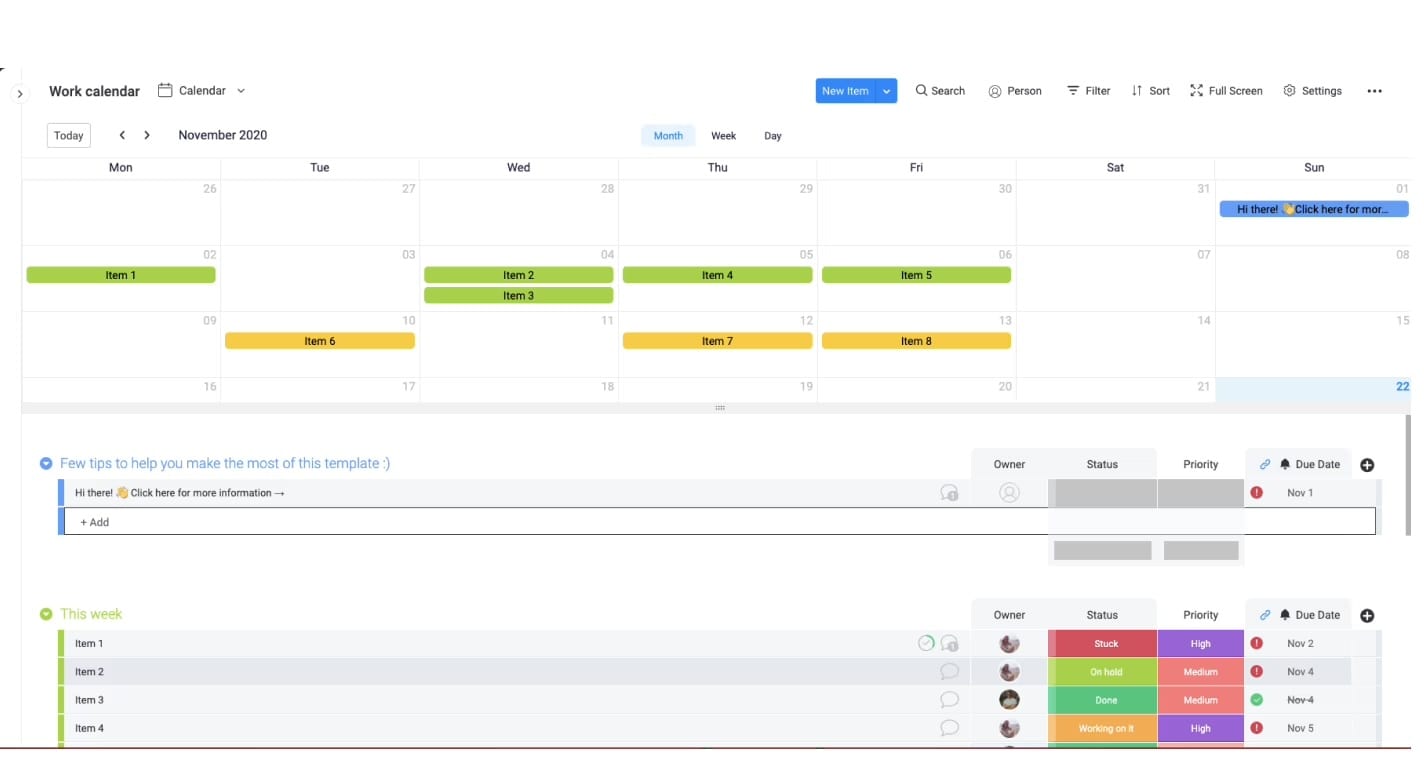
Use a shared calendar to visualize your team’s daily, weekly, and monthly tasks. Integrate this template with Google Calendar to track your team’s work deadlines in one place.
4. Resource allocation calendar
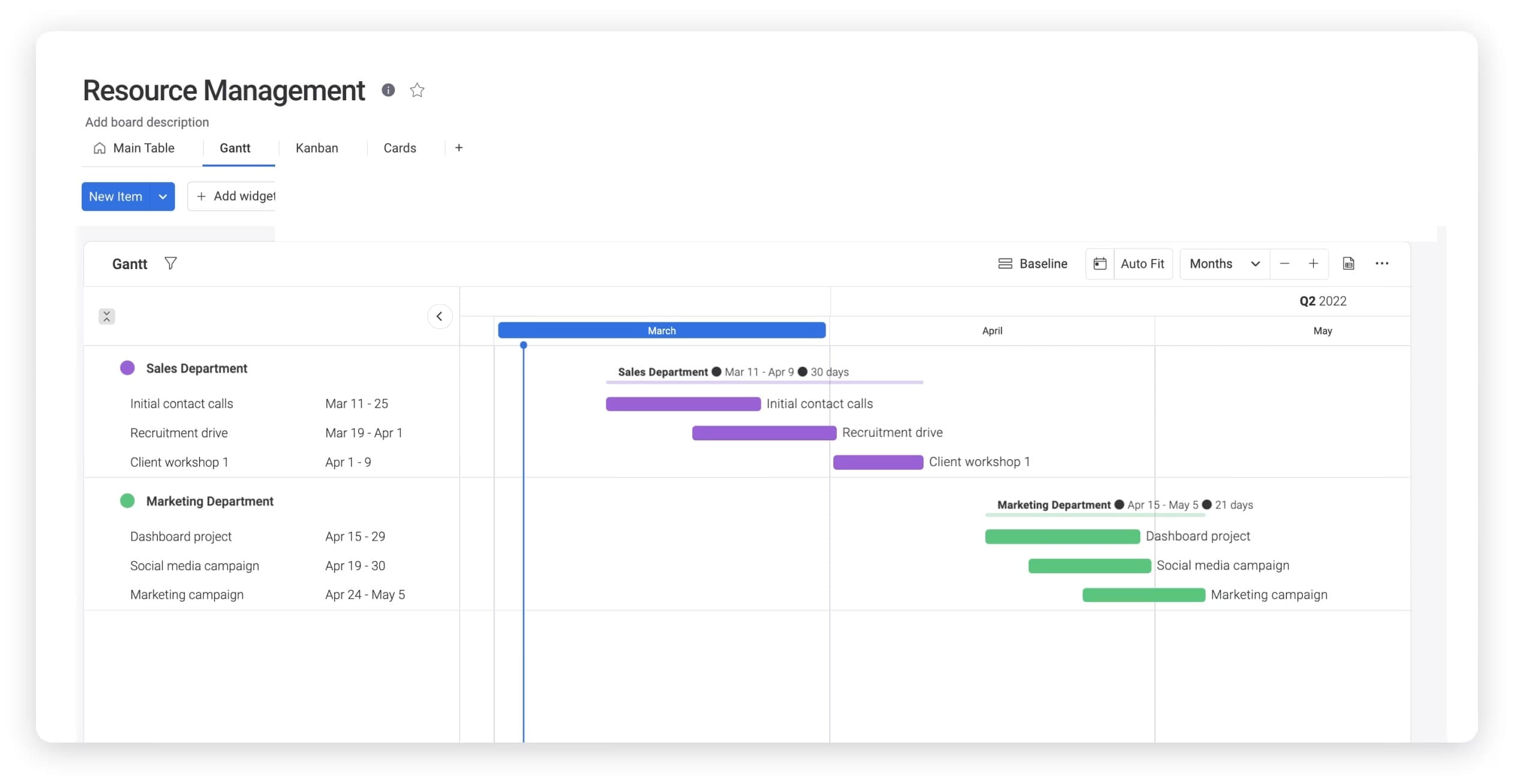
Forecast your project team’s resource bandwidth and understand the resources and hours needed per project. With a resource calendar, you can also detail your project plans, project resource requirements, and manage demands to ensure you have the right budget and team in place.
5. Project timeline calendar
Visualize your project’s workflow by bringing together deadlines, stakeholders, and budgets. Define and view project milestones in a sequential timeline that brings your project to life.
Tips for building an effective project calendar
How can you be sure the project calendar you’ve created will be effective? Here are some tips.
- Create deadlines, even if they’re artificial. It’s a project calendar, after all. Your most important variable is time. In fact, psychologists have found that deadlines create more interest in completing a project.
- Review your timeline before kickoff. Your timeline should create an equal balance of work, whenever possible. The Timeline Column in monday.com makes it easy to review upcoming deadlines.
- Start with the most important tasks first. An incremental approach might help you slowly build momentum. But you’ll have less stress down the road with each high-priority task under your belt.
- Stay flexible with due dates. Due dates are good for getting a project in motion. But be wary of due dates that are too rigid and force team members into rushing an important task.
- Integrate any existing assets. Do you already have data available in Excel? Your project calendar software should be able to import it into an online calendar. Look for other integrations, too, such as integrating MailChimp on an email newsletter calendar.
- Learn how to switch views. You can use a project Kanban boards view in monday.com, and just as easily switch to a calendar view. This gives you a comprehensive source known as an “information radiator.”
Create smarter project calendars with monday AI Workspace
Everything covered in this guide, from choosing the right calendar type to automating reminders and detecting conflicts, becomes significantly easier when your platform is purpose-built for intelligent project scheduling. monday AI Workspace brings every element of an effective project calendar into a single, AI-powered workspace where teams can plan, execute, and adapt without switching between disconnected applications.
Here’s what makes monday AI Workspace stand out for project calendar management:
15+ AI-enhanced board views
Switch between Calendar View, Timeline, Gantt, Workload, Kanban, and more, all built on the same underlying data with AI-powered insights surfaced in every view. Every team member gets the perspective that fits their role, from a high-level executive dashboard to a granular daily activity view, with intelligent recommendations that help prioritize what matters most.
AI-assisted drag-and-drop Gantt charts
Build and adjust project timelines visually with drag-and-drop scheduling enhanced by AI suggestions. The platform analyzes your project structure and recommends optimal sequencing, flags unrealistic timelines before you commit to them, sets baselines to track planned vs. actual dates, maps milestones and dependencies directly on the chart, and identifies the critical path so you know exactly which activities cannot slip without delaying the entire project.
Intelligent automations and proactive AI
Go beyond basic automation with AI that learns from your project patterns. Automate deadline reminders, status updates, overdue escalations, and assignment notifications with no-code automation recipes. The platform’s AI capabilities proactively detect scheduling conflicts, analyze workload distribution across teams, predict deadline risks based on historical data, and recommend schedule adjustments before problems escalate. helping teams stay ahead of conflicts instead of reacting to them.
Learn more: AI calendar agent
200+ integrations with AI-powered syncing
Connect your project calendar to Google Calendar, Outlook, Slack, Microsoft Teams, and hundreds of other applications your team already uses. Two-way syncing ensures that updates made on monday AI Work Platform, including through the dedicated monday.com Calendar, reflect instantly across every connected platform. AI monitors these integrations to surface relevant updates and ensure nothing falls through the cracks.
AI-driven dashboards for cross-project intelligence
Aggregate data from multiple project calendars into intelligent dashboards that give leadership real-time visibility into portfolio health. The AI analyzes patterns across projects to surface insights you might miss: which teams are consistently overallocated, which types of activities tend to run over schedule, and where risks are emerging. Track milestones, budget consumption, workload distribution, and AI-identified risk indicators across every active initiative without requesting manual status reports.
Predictive scheduling and capacity planning
The platform’s AI helps you plan smarter. By analyzing historical project data, team velocity, and resource availability, monday AI Workspace predicts realistic completion dates, recommends optimal resource allocation, and alerts you when proposed timelines conflict with team capacity. This predictive intelligence transforms your project calendar from a reactive tracking tool into a proactive planning engine.
Whether you’re managing a single project or coordinating a portfolio across departments, monday AI Workspace gives you the flexibility to start simple and scale as your needs grow. Every calendar view, AI-powered automation, intelligent insight, and integration works together, so your team spends less time managing the schedule and more time delivering results. The platform’s AI continuously learns from your workflows, becoming more effective at predicting risks and recommending optimizations the longer you use it.
Get started with monday.comBuild a project management calendar that keeps your team on track
A project management calendar is the foundation for how your team plans, communicates, and delivers. From defining the right calendar type and structuring it with milestones and dependencies, to automating reminders and using AI for proactive scheduling, every step you take builds a system that grows with your projects.
Start building yours today. Choose a structure, populate it with realistic timelines, assign ownership, and commit to keeping it up to date. Your future self (and your stakeholders) will notice the difference.
FAQs
What is a basic project management schedule?
A basic project management schedule is a detailed timeline of the different tasks and phases that make up a project. It includes the start and end dates of each task, and important milestones, and provides a general overview of the project activities required to complete a project.
How do you create a simple project schedule?
To create a project calendar, start by choosing a platform that supports your team’s needs, whether that's a spreadsheet, a personal calendar app, or dedicated project management software. Then define your project goals and scope, list and sequence all activities, set deadlines and milestones, assign ownership to each item, and commit to reviewing and adjusting the calendar regularly as the project progresses.
What should be included in a project calendar?
While many different project management calendars exist, they can be categorized into four types of calendars:
Base calendars - the foundational/ traditional calendar that acts as a template for all other calendars. It defines the standard days and hours available for work to be completed on each project.
Project calendars - organize a project’s timeline by scheduling the start and end dates of a project’s phases and milestones.
Resource calendars - map out and allocate the distribution of available resources during a project.
A project calendar should include milestones, deadlines, activity dependencies, resource assignments, status indicators, priority levels, and time estimates. These elements together create a comprehensive view that allows every team member to understand not just when work is due, but also how activities connect, who is responsible, and the current status of each deliverable.
How often should I update a project calendar?
You should update a project calendar at least once a week during active project phases. Weekly reviews allow you to compare planned dates against actual progress, adjust timelines when scope or priorities change, and communicate updates to the full team. For fast-moving or high-stakes projects, daily check-ins on the calendar ensure that every stakeholder has the most current view of the schedule.

 Get started