


Let’s face up to the reality that running marketing at scale is messy in 2026. When you’re coordinating 50-100+ team members across multiple channels, basic spreadsheets turn into bottlenecks fast. Teams start missing deadlines, duplicating work, and operating in silos — with no clear picture of how campaigns are actually performing.
Enterprise teams need more than a glorified calendar. You need a system that shows who’s overloaded before they burn out, keeps approvals moving through a single, centralized channel, and gives you real-time visibility across every initiative. The right platform doesn’t just organize work — it transforms how your team executes, helping you prove the impact of what you’re building together.
This guide examines the key capabilities that make content calendar software effective for enterprise marketing teams, compares leading platforms across essential features, and shows how organizations like Genpact achieve measurable improvements in collaboration and efficiency.
Read on and you will also learn how to evaluate solutions based on your team size and complexity, implement scalable workflows that grow with your organization, and connect content operations to strategic business objectives.
Key takeaways
When you’re managing content across 50-100+ team members, spreadsheets and basic calendars break down fast. While a Google Docs calendar template might suffice for smaller teams, these methods often become unwieldy at scale.
Here’s what actually moves the needle for enterprise marketing teams:
- Centralized visibility: see all campaigns, content, and creative workflows in one visual platform that eliminates silos and gives you real-time visibility across your entire marketing operation.
- Workload management: prevent team burnout with capacity planning features that balance resources across content, creative, acquisition, events, and operations teams.
- Scalable growth: scale from 50 to 200+ team members without breaking workflows using customizable templates, automations, and standardized processes that maintain governance while adapting to your needs.
- Strategic alignment: connect marketing work to company OKRs through integrated goal tracking and portfolio-level reporting that demonstrates impact to executive leadership.
What makes heads of marketing choose monday.com for content calendar management?
 Heads of marketing at enterprise tech companies choose monday.com because it solves the fundamental challenge of orchestrating content across 50-100+ team members without losing visibility, burning out teams, or sacrificing strategic alignment.
The platform delivers centralized visibility into all campaigns, performance, and team workloads. For even greater cross-team orchestration, the marketing calendar feature also helps unify scheduling and execution across multiple channels.
This single source of truth transforms disconnected execution into aligned, measurable marketing impact. When you’re managing large teams across content, creative, acquisition, events, and operations, you need more than a project management calendar. You need a platform that connects strategy to execution while preventing the resource burnout that comes from poor workload visibility.
The intelligent platform tackles the four problems that actually matter to marketing leaders:
- Siloed teams: working in duplicative processes without coordination.
- Ownership transparency: lack of clarity on who’s responsible for what.
- Progress tracking: inability to track progress and ROI in real-time.
- Strategic misalignment: disconnected work that leads to missed deadlines.
For a real-world demonstration of the value of utilizing monday.com, VML’s marketing teams save 7,000 hours per account monthly with 2x faster delivery. Canva also achieved 3x creative output.
These aren’t incremental improvements — they’re transformational results that come from having the right platform architecture for enterprise marketing operations.
monday.com top features for content calendar management
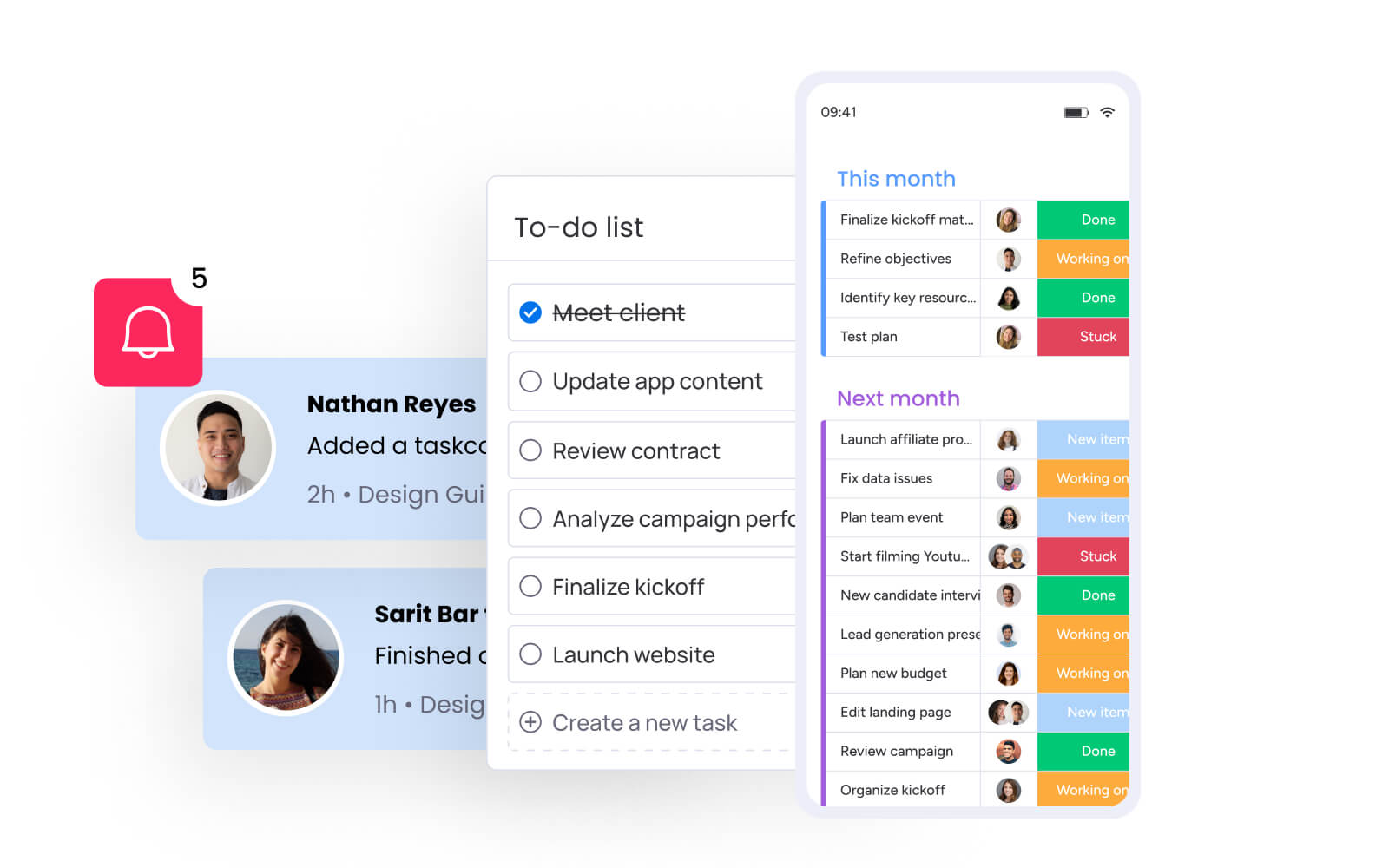
These six core capabilities transform how enterprise marketing teams plan, execute, and measure content initiatives. Each feature addresses specific challenges that arise when coordinating work across large, distributed teams while maintaining quality and strategic alignment.
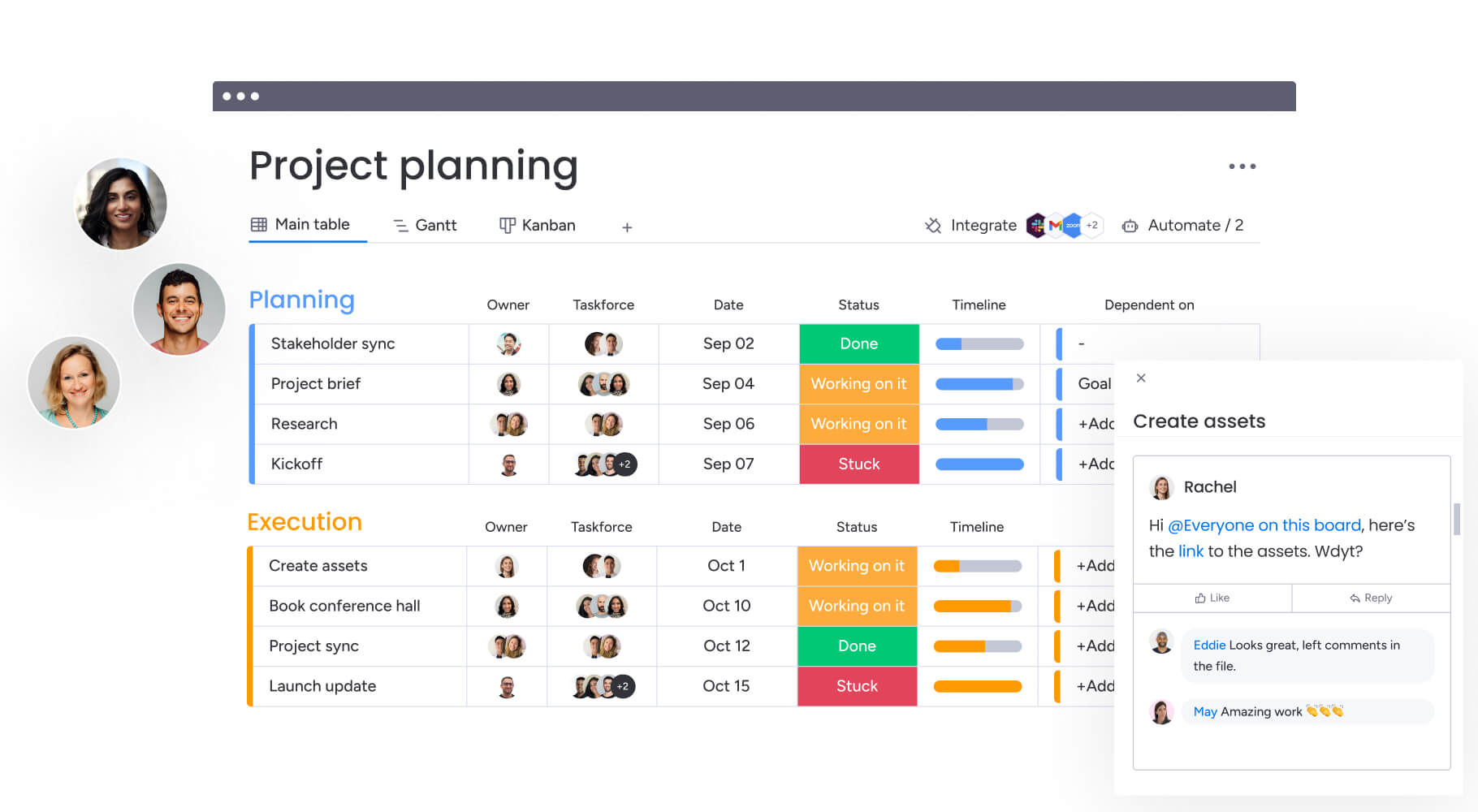
Campaign management with visual timelines
Modern and sophisticated, monday.com provides comprehensive campaign management that connects planning, execution, and measurement in one unified view.
Marketing teams plan, launch, and optimize integrated campaigns using calendars, timelines, and performance insights that ensure nothing slips through the cracks. If your focus includes multiple social channels, a social media calendar template helps streamline scheduling and content sequencing.
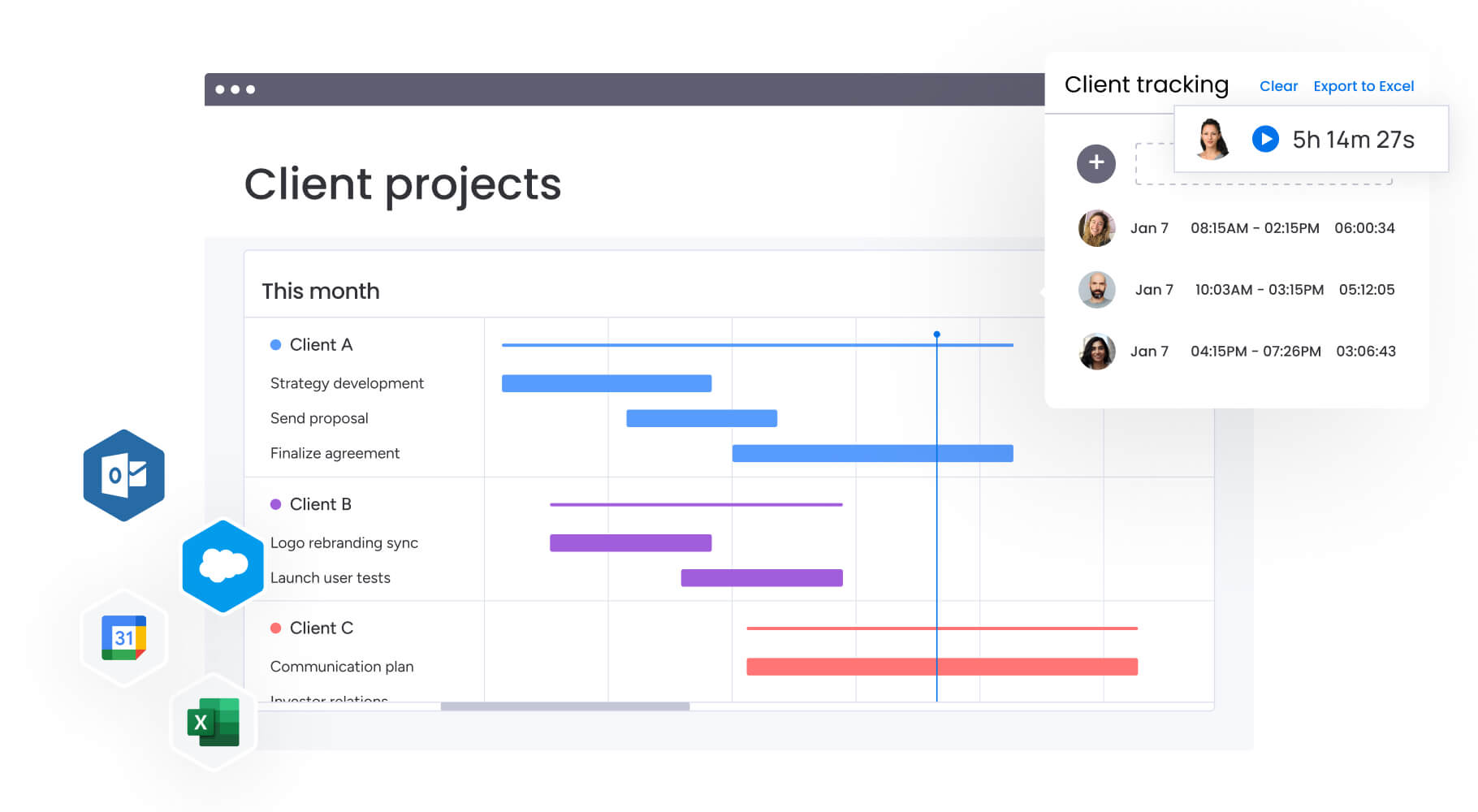
The platform’s visual timeline view allows you to see all content pieces, deadlines, and dependencies across multiple campaigns simultaneously. For heads of marketing managing 50-100+ team members, this visibility is critical.
Key capabilities include:
- Instant bottleneck identification: spot delays and resource conflicts before they impact deadlines.
- Drag-and-drop rescheduling: easily adjust timelines when priorities shift.
- Automated notifications: keep everyone aligned on changes without manual communication.
- Custom categorization: use labels and color-coding to organize content by campaign, channel, or audience.
Workload management and resource planning
The Workload Widget provides real-time visibility into team capacity across all content initiatives, enabling you to allocate resources strategically and prevent burnout before it happens. This feature addresses one of the most critical challenges for heads of marketing: ensuring your team can deliver high-quality content consistently without overloading individuals or missing deadlines.
You can view workload by individual, team, or department, making it easy to identify who has capacity for new projects and who needs support. The visual heat map instantly shows you where capacity issues exist, allowing you to rebalance work proactively.
Resource planning benefits:
- Capacity visualization: see exactly how team time is allocated across projects.
- Proactive rebalancing: redistribute work before team members become overloaded.
- Data-driven decisions: make informed choices about hiring, outsourcing, or reprioritizing.
- Performance tracking: monitor time-to-launch and on-time delivery metrics.
For enterprise marketing teams, this translates to improved budget adherence and forecasting accuracy. The platform helps you track metrics that demonstrate team productivity and resource utilization to executive leadership.
Studies even indicate that increasing time in flow from 5% to 20% of the workday creates approximately $60,000 in value per knowledge worker.
Multi-level approval workflows
monday.com’s approval workflows eliminate the chaos of email chains and endless meetings by providing structured, transparent approval processes that keep content moving. You can create custom approval chains that match your organization’s requirements, from internal team reviews to legal compliance to final executive sign-off.
This feature is particularly valuable for Heads of Marketing who need to maintain quality standards while accelerating time-to-market. You can set up different approval workflows for different content types:
Workflow examples:
- Blog posts: writer → Editor → SEO reviewer → Final approval.
- Campaign assets: creative director → Brand manager → Legal → Final approval.
- Social content: content creator → Brand reviewer → Publication approval.
The platform supports both sequential and parallel approvals, giving you flexibility to design workflows that match your team’s needs. For enterprise organizations with complex stakeholder requirements, this means you can involve legal, product, and finance teams in content approvals without slowing down your marketing operations.
Real-time dashboards and analytics
The platform’s dashboard capabilities provide instant visibility into campaign performance, content production metrics, and team productivity, all customizable to show exactly what matters to you and your executive stakeholders. You can create multiple dashboards for different audiences.
Dashboard types include:
- Operational dashboards: show task completion and bottlenecks for your team.
- Strategic dashboards: display campaign ROI and goal progress for leadership.
- Resource dashboards: track capacity and utilization across departments.
For heads of marketing responsible for reporting impact to executive leadership, these dashboards transform how you communicate marketing value. Instead of spending hours compiling reports from multiple systems, you can share live dashboards that automatically update with the latest data.
The analytics capabilities extend beyond basic reporting to provide actionable insights. You can identify which content types drive the most engagement, which team members are most productive, which campaigns deliver the highest ROI, and where bottlenecks consistently occur.
Cross-functional collaboration tools
The easy-to-use platform breaks down silos between marketing, creative, legal, product, and finance teams by providing a shared workspace where everyone can see relevant information and contribute to content development.
Clever collaboration features include in-context comments, @mentions, file attachments, and real-time updates that keep all stakeholders aligned without requiring constant meetings.
Here’s how this changes the game for marketing leaders juggling multiple teams:
Collaboration scenarios:
- Legal review: @mention legal team directly on content items, attach drafts, track review status.
- Product launches: coordinate between marketing, product, and sales with shared timelines and deliverables.
- Agency management: give external partners limited access to specific boards without exposing your entire operation.
The platform further supports different permission levels, so you can control who sees what information while still maintaining transparency where it matters.
Automation and templates
The platform’s automation capabilities eliminate repetitive manual work, allowing your team to focus on creative and strategic activities rather than administrative tasks. Research shows that the average worker toggles between tasks 1,200 times daily, with each tool switch costing 20-40% of productive time. You can create automations that trigger actions based on status changes, due dates, or other conditions.
Automation examples:
- Content brief approval: automatically notify creative team when briefs are approved.
- Deadline alerts: alert managers when deadlines are at risk.
- Recurring tasks: set up automated creation of regular content like newsletters or social posts.
- Workflow triggers: automatically assign work based on content type or team capacity.
Templates provide another layer of efficiency by standardizing processes across your organization. You can create templates for different content types that include all necessary tasks, timelines, and approval steps:
Template categories:
- Blog posts: editorial workflow with SEO optimization steps.
- Campaign launches: multi-channel coordination with stakeholder approvals.
- Event promotions: timeline-based content creation and distribution.
- Social campaigns: content creation, approval, and scheduling workflows.
When you start a new campaign, you simply duplicate the appropriate template and customize it, rather than building the workflow from scratch each time. This standardization is critical for scaling operations from 50 to 200+ team members without losing quality or consistency.
How a head of marketing in tech benefits from monday.com
Adopt monday.com and witness the measurable benefits that transform how enterprise marketing teams operate. These outcomes demonstrate the tangible value of implementing a comprehensive work management solution for content calendar management at scale.
Operational efficiency gains:
- Time savings: marketing teams using monday.com report saving 7,000+ hours per month through automated workflows, centralized communication, and elimination of manual status tracking.
- Cost efficiency: organizations achieve significant ROI through improved resource utilization and reduced operational overhead.
- Compliance and accuracy: with 100% removal of spreadsheets and centralized data management, marketing teams achieve higher data accuracy and improved compliance with approval requirements.
Team performance improvements:
- Productivity improvements: teams report 40% improvement in cross-team collaboration and 2x faster delivery times.
- Output quality improvements: with structured approval workflows and improved workload management, teams produce higher-quality content consistently.
- Visibility and tracking improvements: real-time dashboards and portfolio-level reporting give heads of marketing unprecedented visibility into campaign performance, team capacity, and strategic alignment.
How to manage content calendars at scale with monday.com
Let’s get practical for a moment: building content calendars that work for large teams isn’t about rigid systems — it’s about finding the sweet spot between flexibility and standardization.
Here’s our field-tested approach to building a content system that scales with you, without sacrificing quality or losing sight of your strategy.
Step 1: audit your current content workflows and identify bottlenecks
First, get honest about your current workflow. Map how content actually moves from idea to publish button — and don’t skip the messy parts. Where do things consistently get stuck? Which approval steps take forever? Where do teams complain about flying blind? These pain points are your biggest opportunities.
Audit activities:
- Process mapping: document each step in your content creation workflow.
- Stakeholder interviews: talk to team members across content, creative, and channel teams.
- Bottleneck identification: identify where work gets stuck or delayed.
- Pain point analysis: understand what frustrates teams most about current processes.
This audit provides the foundation for designing workflows that actually solve your problems rather than replicating broken processes.
Step 2: design your content calendar structure with appropriate views and permissions
Create your master content calendar board with columns that capture essential information: content type, campaign, owner, status, due date, channel, and any custom fields relevant to your organization.
Setup requirements:
- Multiple views: calendar view for timeline visualization, Kanban view for status tracking, workload view for capacity management.
- Permission configuration: ensure team members see relevant information while maintaining access controls for sensitive content.
- Custom fields: add organization-specific data points that support your workflow needs.
- Board structure: organize content hierarchically to support both tactical execution and strategic oversight.
Step 3: build approval workflows that match your organizational requirements
Map out your approval chains for different content types and implement them using monday.com’s automation capabilities. Consider the complexity of your organization and the different stakeholders who need to review content before publication.
Workflow design steps:
- Content type categorization: identify different approval requirements for blogs, campaigns, social content, etc.
- Stakeholder mapping: determine who needs to approve what content.
- Automation setup: configure automated notifications and escalation rules.
- Testing and refinement: pilot workflows with small teams before full rollout.
Step 4: create templates for recurring content types and campaigns
Develop standardized templates for your most common content initiatives: monthly newsletters, product launches, event promotions, social campaigns. Each template should include all necessary tasks, typical timelines, approval steps, and resource requirements.
Template components:
- Task breakdown: all activities required to complete the content initiative.
- Timeline estimates: realistic timeframes based on historical data.
- Approval checkpoints: required reviews and sign-offs.
- Resource assignments: roles and responsibilities for each task.
When you start a new initiative, duplicate the appropriate template and customize it rather than building from scratch. This standardization is critical for scaling operations from 50 to 200+ team members without losing quality or consistency.
Step 5: implement workload management to prevent team burnout
Configure the Workload Widget to track capacity across your team members. Set realistic capacity limits based on each person’s role and availability.
Workload management process:
- Capacity setting: define realistic work limits for each team member.
- Assignment monitoring: track workload as you assign content tasks.
- Proactive rebalancing: redistribute work before team members become overloaded.
- Regular reviews: schedule capacity assessments to identify patterns and adjust team structure.
Use this data to make informed decisions about priorities, deadlines, and resource allocation. Schedule regular capacity reviews to identify patterns and adjust team structure or hiring needs accordingly.
Step 6: connect your content calendar to strategic goals and measure performance
Link your content initiatives to company OKRs and marketing goals within monday.com. Create dashboards that show how content production and campaign performance contribute to strategic objectives.
Performance tracking elements:
- Goal alignment: connect content work to company and marketing objectives.
- Executive dashboards: show campaign ROI, content volume, time-to-market, and team productivity.
- Optimization insights: use data to continuously improve content strategy and resource allocation.
- Impact demonstration: present marketing value in terms that resonate with business leaders.
Platform comparison: monday.com vs competing solutions
When weighing up content calendar software for enterprise marketing teams, it’s essential to compare platforms across key features that impact scalability, collaboration, and strategic alignment.
This table will help you understand how different solutions address the unique challenges of managing content at enterprise scale.
| Feature | monday work management | Asana | CoSchedule |
|---|---|---|---|
| Visual content calendar | Multiple views (Calendar, Timeline, Gantt, Kanban) | Calendar, Timeline, Board views | Calendar-focused interface |
| Workload management | Built-in Workload Widget with capacity planning | Workload view (Business tier+) | Limited resource management |
| Approval workflows | Multi-level customizable workflows | Basic approvals (Business tier+) | Built-in approval process |
| Cross-team collaboration | Real-time updates, @mentions, in-context comments | Task comments, @mentions | Team collaboration features |
| Automation capabilities | 200+ automation recipes, custom automations | Rules and automation (Premium+) | ReQueue automation, workflows |
| Integration ecosystem | 200+ integrations including all major marketing tools | 200+ integrations | 30+ integrations focused on marketing |
| Customization flexibility | No-code customization, unlimited custom fields | Custom fields (Premium+) | Marketing-specific customization |
| Enterprise security | SOC 2, GDPR, HIPAA compliance, SSO, 2FA | SOC 2, GDPR compliance, SSO | Enterprise security features |
| Price per user/month | From $10/user (billed annually) | From $10.99/user (billed annually) | From $19/user |
| Implementation time | 2 weeks to 1 month (typical enterprise) | 2-4 weeks | 1-2 weeks |
| G2 rating | 4.7/5 (12,000+ reviews) | 4.4/5 (12,000+ reviews) | 4.4/5 (200+ reviews) |
| Best for | Enterprise marketing teams managing 50-100+ people across multiple functions | Teams prioritizing task management with marketing needs | Marketing teams focused primarily on content and social media |
Why monday.com stands out for enterprise teams
After identifying and exploring competitor features, it’s clear that monday.com combines the visual planning capabilities tech marketers need with the cross-functional collaboration features required to coordinate lots of team members.
While Asana offers strong task management, it lacks the built-in workload visibility that prevents team burnout. CoSchedule provides excellent marketing-specific features but doesn’t scale as effectively for large, complex organizations managing multiple teams and functions.
Finally, monday.com’s no-code customization means you can adapt workflows to your exact requirements without IT involvement, critical for marketing teams that need to move fast and iterate on processes.
Customer success story: how Genpact transformed their global marketing operations
Genpact’s globally distributed marketing team runs approximately 24 ongoing, large-scale marketing campaigns at any given time, each with several cross-channel activations jointly managed by campaign managers and channel owners. With multiple stakeholders and contributors involved, the team faced critical visibility challenges that threatened campaign effectiveness and team productivity.
The challenge: fragmented processes and lost visibility
Campaign managers relied heavily on spreadsheets saved across personal desktops, emails, and Microsoft SharePoint folders. No one knew who had the latest version or where to find it. “There was no single source of truth or central repository that kept track of the status, progression, and key information surrounding our marketing campaigns,” says Sarah Pharr, AVP, Marketing at Genpact.
The solution: unified platform for end-to-end campaign management
Genpact implemented monday.com to create a unified platform for end-to-end campaign planning and execution. The team built workflow apps outlining the entire activation process for each channel, with columns tracking target dates versus actual timelines to identify trends and bottlenecks.
Implementation highlights:
- High-level GTM calendar: created visibility across teams with subitems showing hierarchy of programs, campaigns, and activations.
- Leadership dashboards: provided executives with high-level snapshots of marketing campaigns at any given time.
- Automated workflows: implemented forms and automation recipes to streamline digital and creative processes.
- Formalized approvals: standardized campaign brief submission and approval processes.
Measurable results achieved
The transformation delivered significant improvements across collaboration, efficiency, and communication:
- 40% improvement in cross-team collaboration for successful end-to-end campaign planning and execution.
- 100% removal of spreadsheets from marketing operations, creating a single source of truth.
- 25% decrease in email exchanges through centralized communication on the platform.
Ongoing optimization
The marketing department is now working on implementing the Workload feature for resource allocation to ensure consistent delivery of marketing plans without overloading teams.
Level up your content calendar management with monday.com
When you’re leading marketing at scale, a simple calendar can’t keep up. Coordinating content across teams, channels, and campaigns requires clear ownership, realistic workloads, and visibility you can trust. Without that foundation, deadlines slip, teams burn out, and strategy gets lost in execution.
monday.com brings structure to complex marketing operations by unifying planning, execution, and reporting in one platform. You get a clear view of every campaign, balanced workloads across teams, and workflows that keep approvals and delivery moving without constant follow-ups. Instead of chasing updates, you can focus on driving impact and proving results.
Join 152,000+ organizations that use monday.com to align marketing teams, move faster with confidence, and scale without chaos. See how a connected content calendar can turn scattered activity into consistent execution.
The content in this article is provided for informational purposes only and, to the best of monday.com’s knowledge, the information provided in this article is accurate and up-to-date at the time of publication. That said, monday.com encourages readers to verify all information directly.
Frequently asked questions
How long does it take to implement monday.com for a 100+ person marketing team?
For a 100+ person marketing team, a typical implementation of monday.com takes two weeks to one month from initial setup to full team adoption. The timeline depends on the complexity of your workflows and the number of integrations required. Most organizations start with a pilot team to refine processes before rolling out to the full department.
Can marketing teams customize workflows without IT support?
Yes, monday.com is designed for no-code customization, allowing marketing teams to build and modify workflows independently. The drag-and-drop interface makes it simple to create custom boards, add columns, set up automations, and design approval workflows without technical expertise. This capability is essential for marketing teams that need to move fast and iterate on processes without waiting for IT resources.
What's the difference between content calendar software and project management tools?
Content calendar software is specifically designed for planning, scheduling, and managing content production and publication across channels. monday.com bridges this gap by providing content calendar capabilities within a comprehensive work management platform, giving you specialized content features plus the flexibility to manage other marketing initiatives in the same system.
How does monday.com help prevent marketing team burnout?
The platform's Workload Widget provides real-time visibility into team capacity, allowing you to identify overloaded team members before burnout occurs. You can see exactly how much work each person has assigned, compare it to their capacity, and rebalance workloads proactively. This capability is essential for heads of marketing who need to maintain high-quality output while protecting team wellbeing and preventing the productivity losses that come from overworked teams.
What happens to our existing content and processes during migration?
monday.com supports importing data from spreadsheets, other project management tools, and various file formats, making migration straightforward. Most organizations run parallel systems during the transition period, gradually moving content and workflows to monday.com as teams become comfortable with the platform. The migration process is designed to minimize disruption while ensuring no content or historical data is lost during the transition.
How much should we budget for enterprise content calendar software?
monday.com pricing starts at $10/user/month when billed annually, with enterprise plans offering additional features like advanced security, dedicated support, and custom integrations. For a 100-person marketing team, expect to budget $12,000-$36,000 annually depending on the feature tier and support level required. The investment typically pays for itself through improved efficiency, reduced operational overhead, and better resource utilization within the first year of implementation.

 Get started