


AI project management isn’t a future trend. It’s the operating standard for high-performing teams right now. Teams that aren’t using AI to plan, forecast, and execute are already falling behind.
This guide covers what AI project management actually means, where it delivers the most value, and how to adopt it without disrupting the workflows your team relies on.You’ll find practical examples across benefits, tool categories, adoption challenges, and best practices. Throughout, we’ll use monday.com’s AI Work Platform as a lens for what’s possible when AI is woven into every layer of project management, from automated status updates to autonomous AI agents that handle work around the clock.
Key takeaways
- What AI project management covers: AI project management applies machine learning, natural language processing, generative AI, and agentic AI to the planning, execution, and delivery of projects.
- Top benefits: Faster risk detection, reduced administrative workload, smarter resource allocation, and more accurate project planning.
- Adoption is accelerating: 91% of project managers say AI will have at least a moderate impact on project work (PMI), and 62% of organizations are experimenting with AI agents (McKinsey).
- Key AI capabilities: Assistants, agents, automation, vibe coding, predictive analytics, and open integrations via protocols like MCP.
- monday.com’s AI Work Platform: Combines all of these capabilities (sidekick, agents, vibe, AI Blocks, MCP, and predictive analytics) in a single platform trusted by 250,000+ customers.
What is AI project management?
AI project management is the practice of applying artificial intelligence, including machine learning, natural language processing, generative AI, and agentic AI, to the planning, execution, and delivery of projects. It covers everything from automated scheduling and risk forecasting to AI-generated status reports and autonomous task execution.
A common question: does “AI project manager” mean a robot is running your projects? Not quite. The role of the project manager isn’t being replaced, it’s being augmented. AI handles the repetitive, data-heavy work (think status roll-ups, dependency analysis, resource forecasting) so project managers can focus on leadership, stakeholder alignment, and strategic decision-making.
It helps to think of AI in project management across three layers. Predictive AI analyzes historical data to forecast timelines, budgets, and risks. Generative AI creates content like project plans, meeting summaries, and stakeholder reports. Agentic AI autonomously executes workflows, monitors progress, and takes corrective action with human oversight built in.
Benefits of AI in project management
AI enhances project management by improving visibility, accelerating decision-making, and reducing the manual work that slows teams down. According to PMI, 91% of project managers say AI will have at least a moderate impact on project work. Gartner projects that 80% of project management tasks will be handled by AI by 2030. Instead of tracking progress or identifying bottlenecks by hand, teams can rely on AI-driven insights to stay ahead of risks and keep projects moving.
Here are some of the most impactful benefits of AI in project management, with examples of what this looks like in practice:
Anticipate risks earlier
AI can monitor task progress, dependencies, and historical trends to identify potential delays before they escalate. How does AI improve risk management in projects? By continuously scanning for patterns humans would miss.
Example: If a design task is slipping behind its expected pace, AI can flag that the delay may impact development or testing later, giving teams time to reassign work or adjust timelines proactively.
Reduce manual administrative work
Routine work like creating status updates, preparing reports, or extracting action items from meetings often drains time your team could spend on strategy.
Example: AI can summarize meeting discussions and automatically pull deadlines, owners, and next steps so teams can move into execution faster.
Improve resource allocation and workload balance
AI can analyze team capacity, skill sets, and upcoming deadlines to predict where constraints are likely to occur.
Example: If a critical team member is forecasted to be overloaded next week, AI can suggest redistributing assignments or adjusting timelines before bottlenecks form.
Strengthen communication and stakeholder alignment
Consistent communication is essential but time-consuming. AI helps ensure everyone has access to up-to-date status visibility without hours of manual prep.
Example: AI-generated summaries can create weekly status reports that highlight completed work, upcoming deadlines, and potential issues—keeping stakeholders aligned automatically.
Make planning more accurate and adaptable
AI supports dynamic ai project planning by suggesting optimized project timelines, surfacing hidden dependencies, and highlighting potential scope issues.
Example: During project kickoff, AI can scan requirement documents and flag ambiguities or missing details that may cause delays later.
How AI supports agile, waterfall, and hybrid project teams
AI in project management adapts to however your team works. Whether you’re running sprints, following a phased plan, or blending both, AI powered project management capabilities fit each methodology differently. Here’s how:
- Agile teams benefit from real-time visibility, sprint forecasting, automated standup summaries, and AI-assisted backlog refinement. AI agents can continuously monitor velocity trends and flag sprint risks before retrospectives.
- Waterfall projects gain from stronger documentation analysis, phase-gate progress tracking, and early risk detection based on dependencies and timelines. AI assistants can generate phase-completion reports and surface schedule variances automatically.
- Hybrid teams use AI to connect multiple work styles, surfacing cross-team bottlenecks, predicting resource constraints, and keeping stakeholders aligned with unified, AI-generated updates. Agents can bridge the gap between sprint-based and milestone-based tracking across departments.
No matter the methodology, AI helps project managers anticipate issues sooner and make decisions with greater confidence.
AI tools and capabilities every project manager should know
If you’re ready to level up your AI skillset, there are several categories of AI tools for project management that can fundamentally change how your teams operate. These aren’t just about generating project plans, they’re about transforming workflows end to end.Here’s a breakdown of the ai project management tools and capabilities worth knowing.
AI assistants
An AI assistant embedded in your project management platform acts as a context-aware partner. It can summarize updates across boards, generate reports, draft project plans, and remind you of priorities, all without switching tabs. The most effective assistants understand your specific project data, not just generic prompts.
For example, monday sidekick on the AI Work Platform delivers context-aware answers, generates content, and takes action directly within your workflows. We’ll cover its full capabilities in the dedicated product section below.
AI automation and workflows
Many project teams already use some level of AI workflow automations to handle repetitive work. Advanced automation goes beyond simple if-then rules, it uses AI to categorize data, summarize text, extract information from documents, detect sentiment, and translate content.
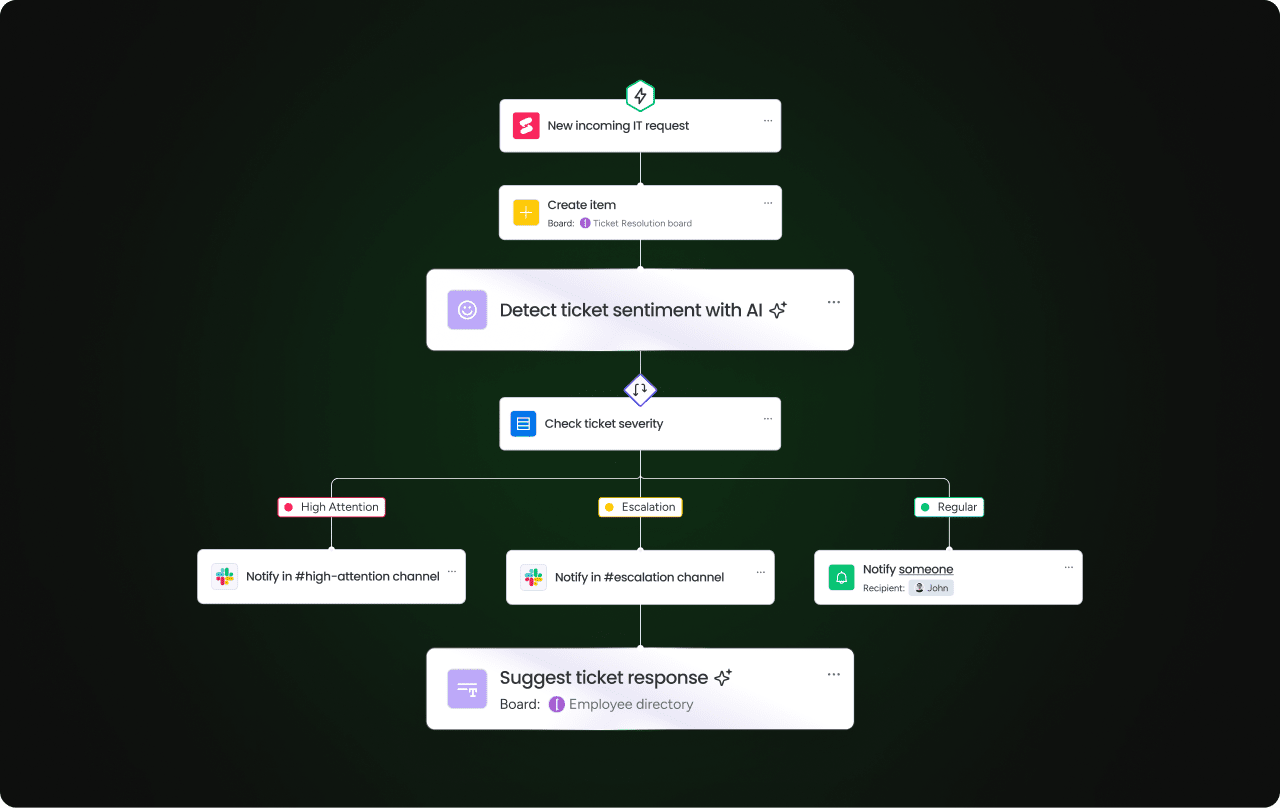 On monday.com’s AI Work Platform, AI Blocks let anyone add pre-built AI actions to any workflow with no technical expertise required. You can instantly summarize meeting notes, extract key data points, or prioritize tasks based on AI analysis.
Agentic AI systems
What is agentic AI and how does it apply to project management? Unlike assistants that respond to prompts, AI agents operate autonomously, they monitor, analyze, decide, and act on their own within defined guardrails. According to research by McKinsey, 62% of organizations are experimenting with AI agents.
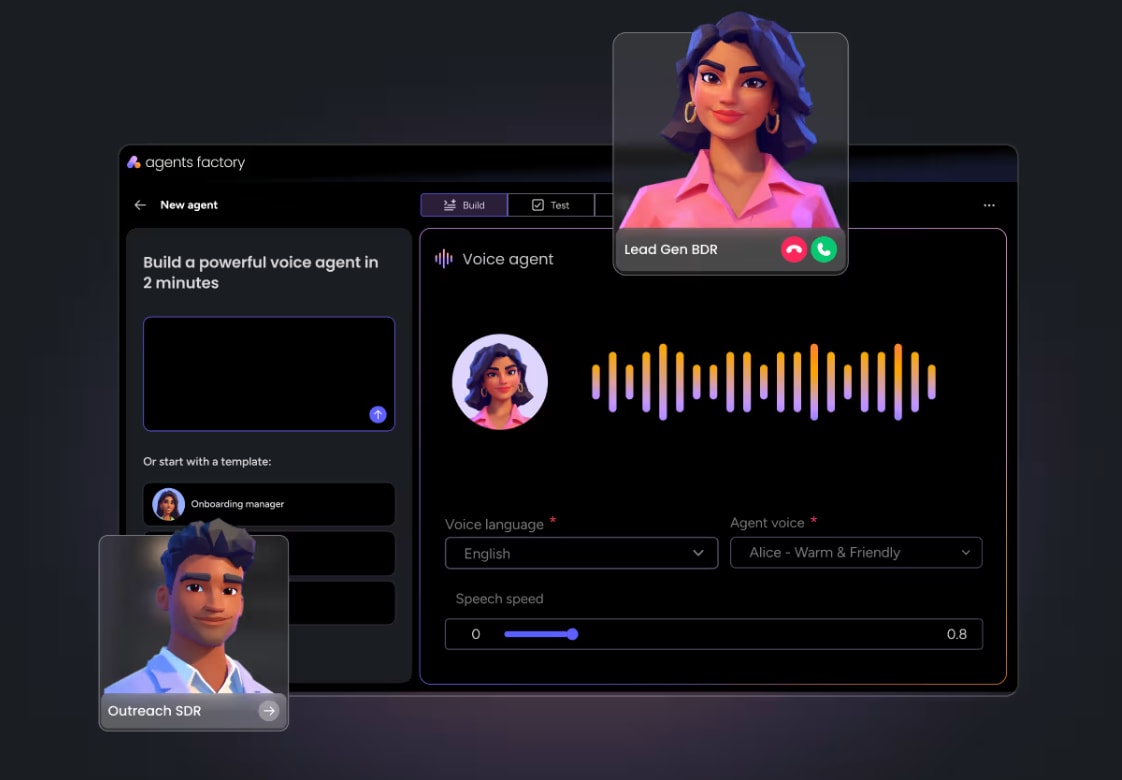 AI agents can take over time-consuming prep work, data analysis, and follow-ups that your project team currently handles manually. Platforms like monday agent Factory let you create custom AI agents that prep for meetings with real-time data, monitor project health, or handle recurring service requests, freeing your team to focus on strategy and complex problem-solving.
Vibe coding platforms
Vibe coding is making it painless for anyone to create simple applications with no coding knowledge. Google’s CEO sees it as an “innovation catalyst“, and it’s already changing how project teams build internal solutions.
Vibe coding platforms like monday vibe work by translating natural language descriptions into functional applications through AI. A project manager could instantly create a custom dashboard tracking sprint progress and resource allocation, then modify it on the fly during a stakeholder meeting without ever speaking to a developer.
Predictive analytics and risk management
Budget overruns, missed deadlines, and scope creep: some project risks feel unavoidable. Traditionally, identifying these relied on gut instinct and hindsight. AI-powered risk management uses predictive analytics to analyze historical project data, current metrics, and external factors to flag issues early.
Predictive analytics and risk management
Budget overruns, missed deadlines, and scope creep: some project risks feel unavoidable. Traditionally, identifying these relied on gut instinct and hindsight. AI-powered risk management uses predictive analytics to analyze historical project data, current metrics, and external factors to flag issues early.

Through advanced forecasting, these capabilities can estimate project timelines based on available data and alert you if a task is at risk of missing a deadline. AI can also detect budget spending patterns that signal overruns or identify dependencies that could create delays, then recommend solutions like resource reallocation or timeline adjustments.
AI integrations: MCP and APIs
Modern project management platforms don’t operate in isolation. The Model Context Protocol (MCP) is an emerging standard that connects external AI tools like Claude, ChatGPT, Copilot, and Cursor directly to your project management data. This means you can use your preferred AI assistant to query project status, create tasks, or generate reports without leaving the AI interface.
MCP-based integrations respect your platform’s permission model, require no additional cost, and expand what’s possible without vendor lock-in. It’s a shift toward open, interoperable AI that meets teams where they already work.
Get startedChallenges of adopting AI in project management
Although AI offers significant benefits for project management, successful implementation requires overcoming real challenges. Only 1% of organizations believe they’ve reached GenAI maturity (PMI), which means most teams are still figuring this out. Taking a proactive approach ensures AI enhances workflows rather than introducing new inefficiencies.
Common challenges
Without careful planning, your team could struggle with over-reliance on automation, difficulty integrating AI into existing processes, or managing compliance risks. Addressing these challenges early can make the difference between AI being a strategic advantage or an operational headache. Some challenges to watch for include:
- Bias in decision-making: AI relies on historical data, which can introduce bias if past decisions were flawed or incomplete.
- Over-reliance on automation: Leaning too heavily on AI may cause teams to miss context-specific nuances or market shifts that AI may not fully grasp.
- Unique workflow fit: Some AI platforms rely on rigid, predefined models that may not adapt to industry-specific needs.
- Data security and compliance risk: According to the monday.com World of Work report, a lack of trust in safety and security is the leading reason for low AI adoption (52%) since AI platforms process sensitive business data.
How to overcome these challenges
The monday.com World of Work report outlines different ways organizations can drive AI adoption across their teams. These strategies make it easier to optimize AI capabilities while using them responsibly:
- Democratize AI: Focus on user-friendly AI first so non-technical users can get on board before implementing more complex solutions.
- Prioritize trust: Start slow by encouraging team members to integrate AI in small ways in their daily workflows so they can build confidence over time.
- Promote ongoing learning: AI is an ongoing investment, so it’s essential to offer continuous learning opportunities so your team can improve their AI literacy skills.
- Create a feedback loop: Your team members need to feel comfortable offering feedback on AI solutions so they have a hand in improving AI models.
- ROI-first approach: Start with AI features that provide the highest ROI, such as automating manual work or improving risk forecasting, before scaling AI adoption across all project processes.
Best practices for using AI in project management
Even the most capable AI platforms won’t drive results without the right implementation strategy. Organizations that establish objectives, maintain human oversight, and adapt AI-driven processes see the greatest benefits. Here’s how to successfully integrate AI into project management workflows:
- Define success metrics upfront: AI should go beyond automating simple tasks. Define key performance indicators (KPIs) that measure productivity gains, risk reduction, and improvements in collaboration.
- Maintain human oversight: AI generates recommendations, but human expertise is still essential. Integrating “human in the loop” practices means project managers review AI outputs to ensure they align with broader business objectives.
- Implement change management strategies: Teams need confidence in AI-assisted workflows. Offer structured training, hands-on learning sessions, and ongoing support to encourage adoption across departments.
- Align AI with existing processes: AI should complement, not disrupt, how teams operate. Configure automation settings to work within current processes rather than forcing teams to adapt to rigid AI models.
- Constantly monitor your data: Your AI systems are only as strong as the data that feeds them. Regularly clean your data, monitor for accuracy, and ensure security protocols so that it remains trustworthy.
- Promote collaboration: AI should help different team members and departments work together. Regularly demonstrate how AI systems can improve cross-departmental initiatives, like approvals, budget requests, and stakeholder reporting.
- Continuously refine AI-driven processes: AI improves over time, but only with regular assessment and refinement. Monitor AI-driven actions, adjust automation rules, and incorporate feedback loops to improve decision-making accuracy.
AI is reshaping project management, but selecting the right platform is key to maximizing impact. A well-integrated solution, like monday.com’s AI Work Platform, brings together automation, predictive modeling, and AI-driven collaboration, empowering teams to work smarter and faster.
Don’t forget: Although AI can dramatically enhance visibility and decision-making, it also has limitations. AI models depend on the quality and completeness of the data they’re trained on, may miss nuance around team dynamics or shifting business priorities, and can surface false positives if not regularly reviewed. For these reasons, AI should complement human judgment in project management.
How to choose the right AI project management platform
Selecting an AI-enhanced project management platform requires a solid understanding of business needs and whether you’re prepared to integrate AI into your existing workflows. The right solution should provide tangible value, adapt to evolving demands, and support teams at scale.
Here are some considerations for choosing the right AI project management platform:
- Identify AI needs and business goals: Identify specific project challenges AI should address, whether automating recurring tasks, improving forecasting, or balancing workloads. The platform should align with your organization’s goals and enhance project visibility.
- Assess adaptability and scalability: The chosen AI-powered system must accommodate multiple teams and complex projects without slowing down operations. A scalable platform supports both small initiatives and enterprise-wide execution without disruptions.
- Gauge compatibility with existing systems: AI should seamlessly integrate with Enterprise Resource Planning (ERP), Customer Relationship Management (CRM), and collaboration platforms to maintain a unified workflow. Look for platforms with flexible APIs and built-in integrations that minimize disruption.
- Ensure security and compliance standards: Since AI processes large volumes of project data, robust security measures are essential. Choose a platform with enterprise-grade security protocols, encryption, and regulatory compliance to safeguard sensitive information.
- Look for customization options: No 2 teams work the same way. The right AI platforms allow businesses to personalize automation settings, tailor reports, and fine-tune recommendations to align with their specific workflows.
- Choose a provider that invests in innovation: AI technology is evolving rapidly. Opt for a vendor with a track record of continuous updates, strong enterprise support, and a roadmap for future enhancements.
Focusing on these criteria can help organizations adopt an AI solution that enhances project coordination, improves decision-making, and scales efficiently with business growth.
How monday.com's AI Work Platform transforms project management
Managing large-scale projects requires more than organization. It calls for intelligent automation, real-time visibility, and proactive risk management. monday.com’s AI Work Platform, powered by monday.com’s AI, brings these capabilities together in a single platform trusted by 250,000+ customers and 60%+ of the Fortune 500. Recognized as a Gartner Magic Quadrant Leader 2025 for both Adaptive Project Management and Collaborative Work Management, it’s built for teams that need AI woven into every layer of execution.
Here’s how the AI Work Platform’s capabilities work together to deliver results.
monday sidekick
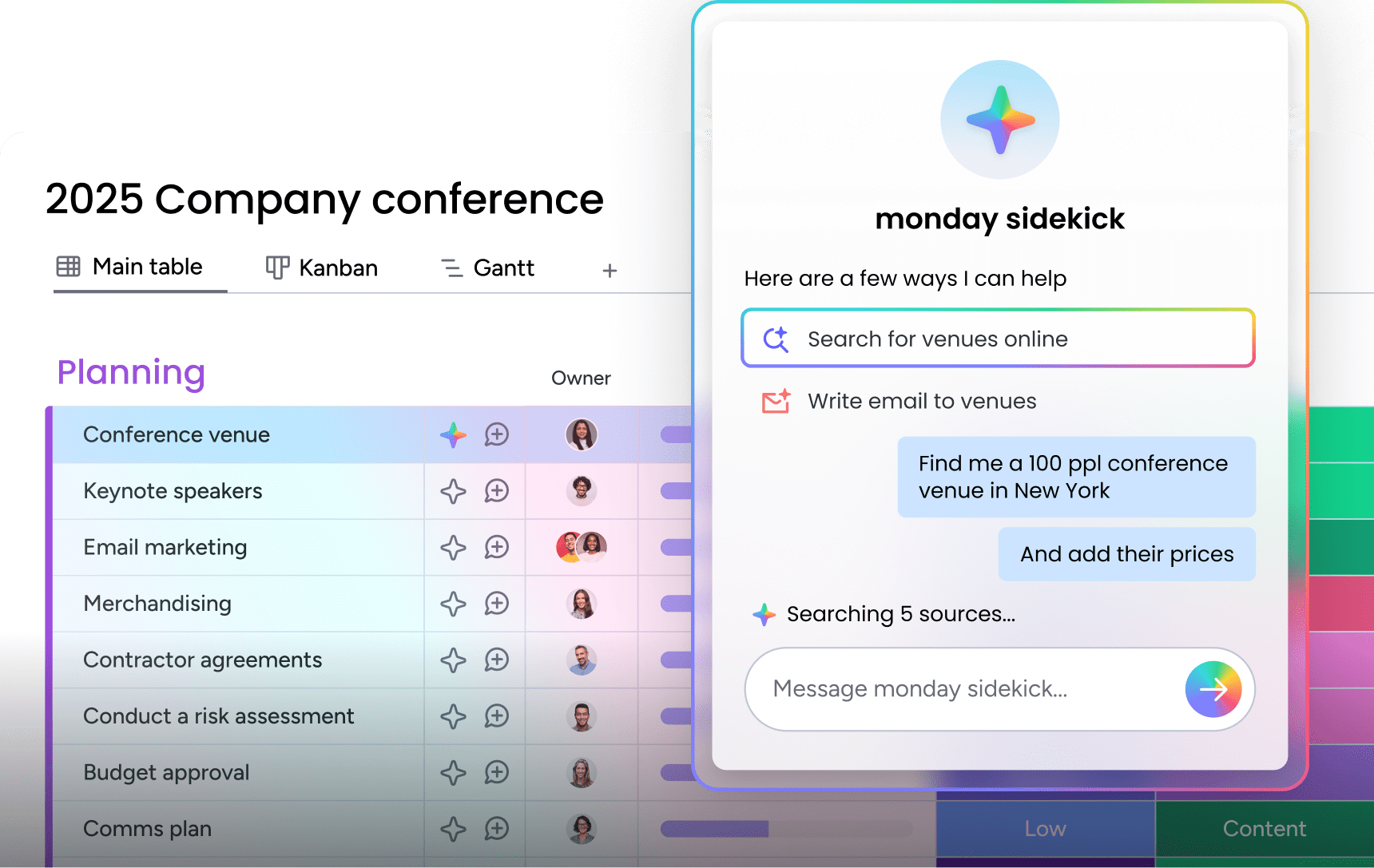
monday sidekick is a context-aware AI assistant that understands your project data and takes action directly within your workflows. It summarizes updates, generates content, analyzes data, creates automations, and builds dashboards from natural language prompts.
Sidekick integrates deeply with your work through voice mode for hands-free interaction, a mobile app for on-the-go management, and a Skills Marketplace that extends its capabilities. It’s available on all plans (except Basic) with no credits required.
monday agents
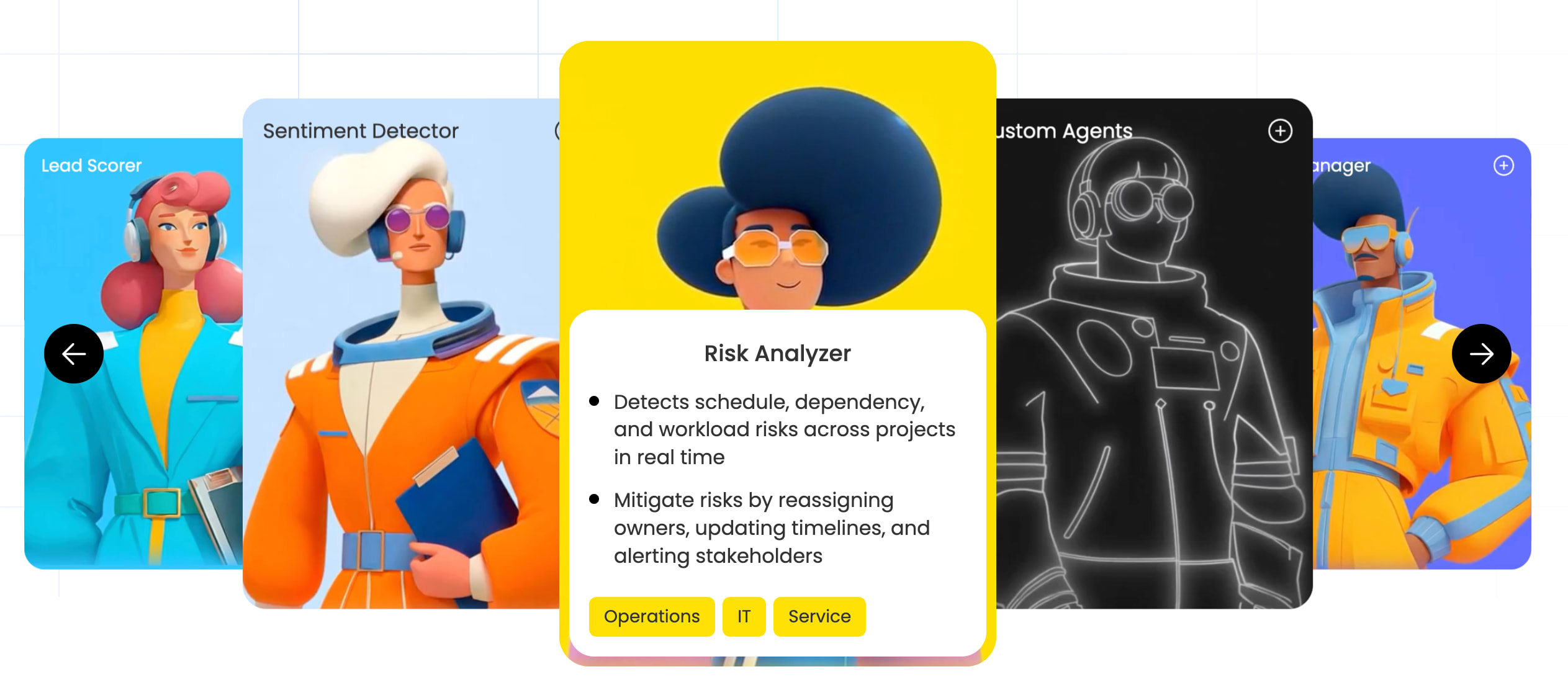
monday agents are AI-powered digital workers that handle critical tasksautonomously, 24/7. You can choose from ready-made agents or build your own through monday Agent Factory. Pre-built agents include:
- Project Analyzer: monitors projects in real time, flags bottlenecks, and surfaces schedule adjustments to prevent delays.
- Risk Analyzer: detects portfolio-level risks across multiple projects and recommends corrective action.
- Sales Advisor: identifies sales trends, predicts deal blockers, and provides coaching tips.
- Research Assistant: collects industry insights, auto-generates research summaries, and identifies emerging trends.
- Onboarding Helper: guides new hires through onboarding, answers common questions, and tracks milestone completion.
With AI agents handling administrative and operational planning work, teams can focus on problem-solving, innovation, and execution.monday agents are currently in Early Access with guardrails and human-in-the-loop controls built in.
monday vibe
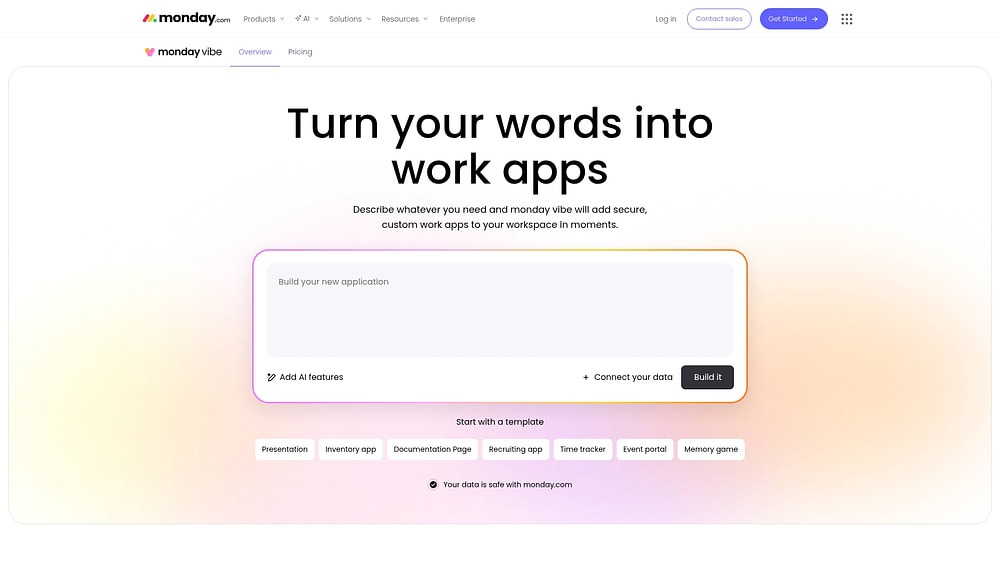
monday vibe is an AI-powered no-code app builder that turns natural language prompts into fully functional, secure applications. Anyone on your team can create custom dashboards, OKR tracking apps, org charts, or time tracking solutions with no developer required. Apps built with vibe support multi-board connections (up to 5 boards), are mobile responsive, and inherit your platform’s permissions.
AI Blocks and automations
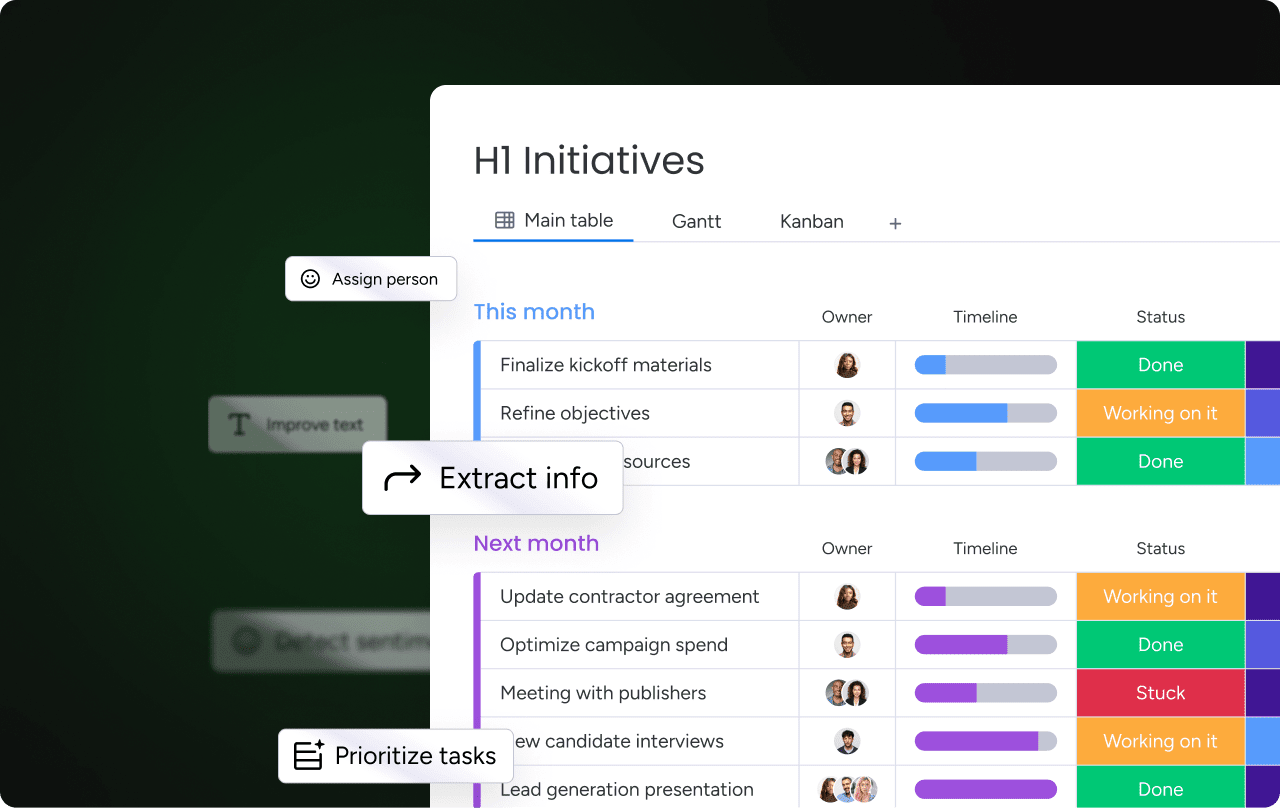
AI Blocks are pre-built AI actions you can add to any workflow. They’re designed to be accessible and easy to use, even without technical expertise. Examples include:
- Categorize data: automatically sort and tag incoming information across boards.
- Summarize text: extract key takeaways from meeting notes, project updates, and documentation.
- Detect sentiment: analyze customer feedback or team communications for tone and urgency.
- Translate: convert content across languages for global teams.
monday MCP
The monday Model Context Protocol (MCP) integration connects external AI tools (Claude, ChatGPT, Copilot, and Cursor) directly to your monday.com data. It’s OAuth-based, respects your platform’s permission model, and comes at no additional cost.
This means you can query project status, create tasks, generate reports, or manage workflows through your preferred AI assistant. MCP makes the AI Work Platform an open hub rather than a closed system.
AI-powered predictive analytics
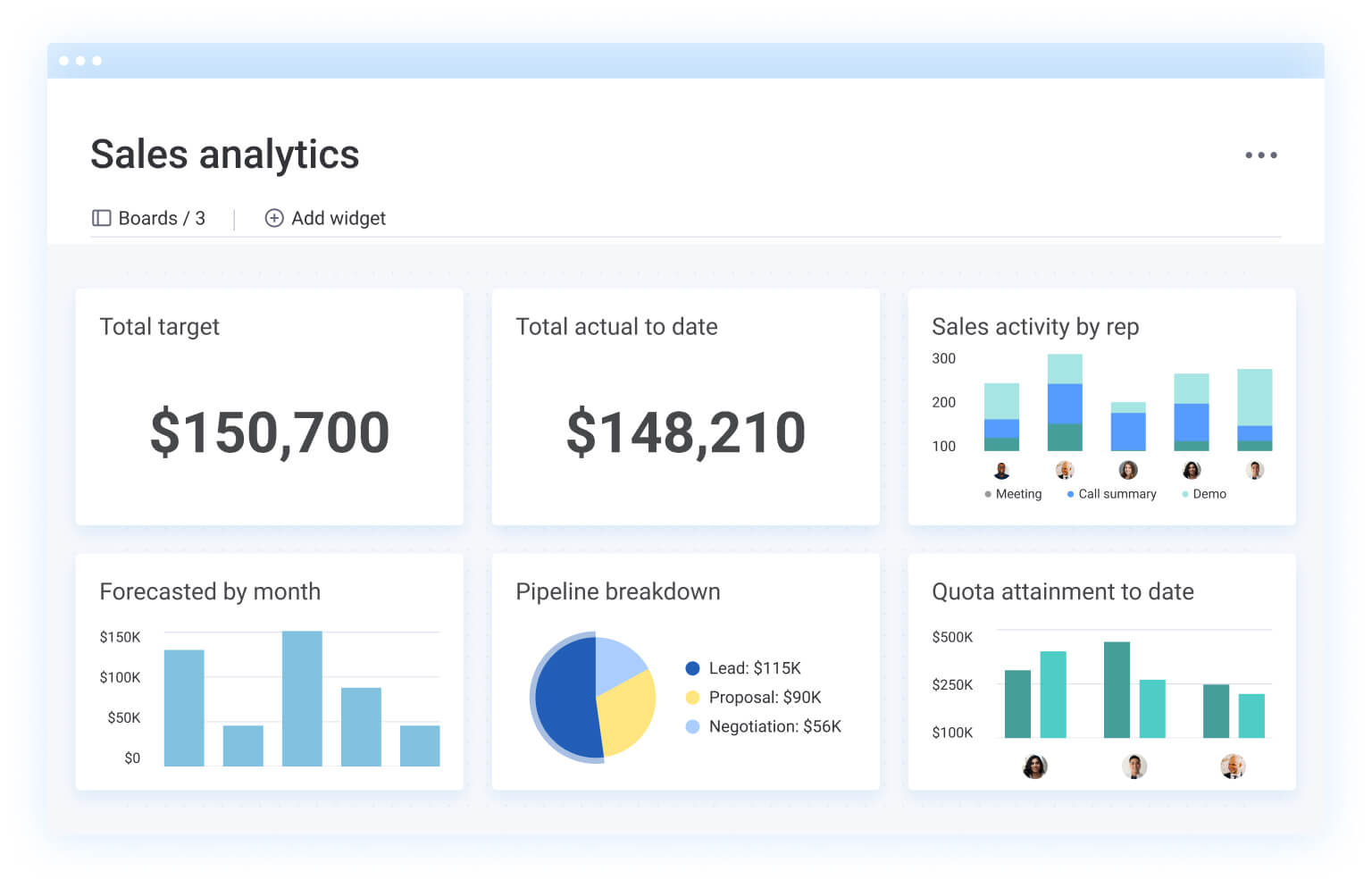
The AI Work Platform’s predictive analytics and smart forecasting featuresgive you continuous visibility into projected versus current progress. AI risk analyzers operate at the portfolio level, scanning across multiple projects to detect schedule risks, resource management constraints, and budget variances before they cascade.
For example, if a design phase is running 2 days behind in your product launch, AI predictive analytics can identify that this will likely cascade into a 3-week delay at launch unless resources are reallocated now, giving you time to act while there’s still room to course-correct.
The future of AI-driven project delivery
Industry analysts project that the majority of project management tasks will be handled by AI within the next few years. That’s shift is already underway. Agentic AI, autonomous workflows, and real-time decision-making are moving from pilot programs to production environments across industries.
The project managers who thrive in this environment won’t be the ones who resist AI, they’ll be the ones who use it to amplify their judgment, speed up delivery, and lead with confidence. monday.com’s AI Work Platform is built to scale with teams into that future, combining AI assistants, agents, automation, and predictive analytics in a single platform that grows as your needs evolve.
Get startedFAQs
Is AI going to replace project managers?
No. AI automates administrative and data-heavy tasks like status updates, risk detection, and resource forecasting, but project managers remain essential for leadership, stakeholder management, and strategic decision-making. The AI project manager role is about augmentation, not replacement: PMs who adopt AI outperform those who don't.
Can AI assist in risk management within projects?
Yes. AI improves risk management by detecting potential project delays, budget risks, and resource constraints early. On monday.com's AI Work Platform, the AI risk analyzer operates at the portfolio level, scanning across multiple projects to flag risks and recommend corrective actions before challenges escalate.
What is an example of AI in project management?
AI-driven scheduling automatically adjusts project timelines based on team availability and task dependencies. Risk assessment models highlight potential obstacles, while AI-generated summaries keep teams aligned with key developments, all without manual data gathering.
How secure is AI in enterprise project management?
Enterprise AI platforms follow strict security protocols, including encryption and access controls, to safeguard sensitive business data. Leading platforms like monday.com's AI Work Platform adhere to globally recognized compliance standards to ensure privacy and security.
What is agentic AI in project management?
Agentic AI refers to AI systems that operate autonomously, monitoring, analyzing, deciding, and acting on tasks with built-in guardrails and human oversight. In project management, AI agents can handle recurring work like project health monitoring, meeting prep, and follow-ups 24/7. monday Agent Factory lets teams build and deploy custom agents for their specific workflows.
How do you measure the ROI of AI in project management?
Measure AI ROI by tracking time saved on manual tasks, reduction in project risks and delays, and faster delivery cycles. A Forrester Total Economic Impact study found that monday.com's AI Work Platform delivers a 346% ROI over 3 years with less than a 4-month payback period.

 Get started