


You’ve crafted the perfect email campaign complete with a compelling subject line, beautiful copy, and professional design. Then reality hits: you need five versions for different segments, optimal send times vary across your list, and manual A/B testing awaits. AI-powered email templates change everything. They adapt automatically, personalizing content based on recipient data, optimizing send times for individual engagement patterns, and learning from performance to improve results.
In this guide, you’ll get access to 7 high-performing email templates and see how AI personalizes at scale. We’ll cover how to use intuitive drag-and-drop features and behavioral data to send emails that feel custom-made, even to thousands of people. Platforms like monday campaigns make this possible by connecting CRM data directly to intelligent templates that learn and optimize automatically.
Key takeaways
- AI-powered templates personalize at scale: Create one template that automatically adapts content, timing, and messaging for thousands of recipients based on their behavior and CRM data.
- Mobile-first design drives engagement: Over 60% of emails open on mobile devices, so responsive templates with single-column layouts and touch-friendly buttons are essential for results.
- Seven template types cover every campaign goal: Welcome emails, newsletters, promotions, nurture flows, win-back campaigns, product announcements, and event invitations each serve specific objectives.
- monday campaigns automates intelligent email marketing: Connect CRM data directly to AI-powered templates that learn from performance and optimize campaigns without manual intervention.
- Dynamic personalization goes beyond name insertion: Use real-time contact data to display different case studies, product recommendations, and messaging based on each recipient’s journey stage and preferences.
What are AI-powered email templates for marketing and sales teams?

AI-powered email templates are pre-built frameworks that personalize content, optimize send times, and adapt messaging based on how recipients behave. Static templates need manual tweaks every time. These adjust subject lines, body copy, and CTAs automatically using CRM data, engagement history, and campaign goals.
Here’s what sets AI templates apart: they learn and adapt. Traditional templates are fixed. You manually adjust content for each segment, guess send times, and run slow A/B tests. AI templates analyze past campaigns, spot behavior patterns, and refine content on their own.
CRM integration makes these templates smart. When templates connect to your CRM, they pull real-time data: deal stages, past purchases, engagement patterns, and contact details.
This connection goes way beyond first-name personalization. Templates show different product recommendations, case studies, or messaging based on each person’s profile and journey stage.
How AI-powered email templates work
AI-powered email templates transform how you connect with your audience. Instead of sending the same message to everyone, these templates automatically adjust content, timing, and messaging based on real recipient behavior and data.
Pre-built campaigns that adapt to your audience
Your welcome email can adjust its tone based on how someone signed up. A welcome email template adjusts its featured content and next-step recommendations based on whether the recipient signed up through a free trial, newsletter subscription, or product demo request.
Campaigns adapt in three ways:
- Recipient segment characteristics: Templates respond to industry, job role, and engagement history. A B2B software company’s nurture template might emphasize ROI calculators for finance contacts while highlighting integration capabilities for technical audiences.
- Real-time behavioral signals: Templates react to website visits, content downloads, and email interactions as they happen.
- Campaign objectives: Lead nurture sequences emphasize education and trust-building, while promotional campaigns focus on urgency and direct offers.
This allows you to create one template that works for multiple audiences, adapting automatically for each segment.
AI enhancements vs. traditional template design
Understanding the difference between traditional and AI templates helps you spot where automation saves time and boosts results. Here’s how each approach handles core email functions.
| Capability | Traditional templates | AI-enhanced templates |
|---|---|---|
| Content approach | Static blocks remaining the same for all recipients | Dynamic content adapting based on recipient data and preferences |
| Testing method | Manual A/B testing requiring marketers to create variations | Automated testing that generates variations and applies insights |
| Personalization | One-size-fits-all messaging sent to entire lists | Individualized content for thousands of contacts |
| Send timing | Fixed times chosen based on general best practices | Predictive optimization based on each recipient's patterns |
| Performance analysis | Manual spreadsheet exports and data manipulation | Real-time learning improving performance without intervention |
AI works at every stage, from creation to deployment. During creation, AI suggests subject lines, preview text, and body copy based on campaign objectives and audience characteristics. This workflow aligns with how today’s marketers operate, as a recent Gallup survey found that 36% of U.S. employees already use AI writing and editing tools at work. At send time, AI picks the best moment for each recipient and chooses the right content variation. After you send, AI analyzes performance and improves future campaigns automatically.
7 types of free email marketing templates that drive results
Different goals need different templates. A welcome email builds trust. A promo email drives action. Totally different jobs. Here’s how to pick the right template and boost engagement across your program.
1. Welcome email templates for instant engagement
Welcome emails get the highest engagement rates. This first email sets the tone for everything that follows.
Welcome templates work in multiple scenarios:
- New subscriber onboarding: Confirms subscription and sets content expectations
- Trial signup confirmation: Guides users toward first value and activation
- First purchase acknowledgment: Thanks customers and introduces support resources
- Account creation: Welcomes users and highlights key features
The best welcome emails include:
- Value proposition: Reminds recipients why they signed up and what they’ll receive.
- Specific next steps: Guides them toward activation with clear, actionable instructions.
- Brand introduction: Establishes tone and personality for future communications.
2. Newsletter templates that build relationships
Newsletters keep your audience engaged between promos and build your authority over time. They share educational content, industry insights, and company updates.
Key components:
- Content hierarchy: Guides readers through multiple sections with clear visual breaks
- Scannable design: Uses headers, bullet points, and white space for easy reading
- Mobile-responsive layouts: Adapts seamlessly to different screen sizes
- Consistent CTAs: Provides clear next steps without overwhelming readers
3. Email blast templates for promotions
Promo templates push time-sensitive offers, product launches, and limited-time deals. They prioritize urgency over relationships and everything points to one conversion goal.
What makes them work:
- Compelling offer: Presented prominently above the fold with clear value
- Strong visual elements: Showcase products with high-quality images
- Prominent CTAs: Stand out from surrounding content with contrasting colors
- Urgency elements: Include countdown timers or limited-quantity messaging
4. Nurture flow templates that guide prospects
Nurture emails are sequences that move prospects through the buying process over time. Unlike one-off campaigns, nurture flows build trust over multiple emails before introducing product content.
Each email builds on the last and moves recipients toward a goal:
- Educational content: Addresses pain points and provides solutions.
- Social proof: Includes case studies and testimonials relevant to the prospect’s stage.
- Progressive disclosure: Gradually introduces product benefits without overwhelming early-stage prospects.
5. Win-back templates that re-engage customers
Win-back templates bring inactive contacts and churned customers back. They acknowledge the gap and give people a reason to come back.
What works in win-back emails:
- Personal acknowledgment: Recognizes the recipient’s absence without sounding accusatory
- Compelling return reason: Addresses likely causes of disengagement with new value
- Special incentive: Creates immediate motivation with exclusive offers or content
- Easy re-entry path: Removes friction with simple next steps
6. Product announcement templates that generate excitement
Product announcement templates share new features, products, or services with customers and prospects. These templates balance excitement with practical information, helping recipients understand both the “what” and the “why” of new offerings.
What drives adoption:
- Benefit statement: Answers “why should I care” with clear value propositions
- Visual product showcases: Demonstrate new capabilities with screenshots or videos
- Early access offers: Reward existing customers with exclusive preview opportunities
- Clear next steps: Guide recipients toward trying the new feature or product
7. Event invitation templates that boost attendance
Event invites get people to register and show up for webinars, conferences, workshops, and virtual events. They need to show value fast and make registration easy.
What boosts registrations:
- Event value proposition: Clearly answers “what will I learn or gain”
- Speaker and agenda highlights: Build credibility with recognizable names and relevant topics
- Easy registration: Minimizes form fields and reduces scheduling friction
- Calendar integration: Allows one-click calendar saves for confirmed attendees
How to customize email templates with drag-and-drop AI builders
Building emails from scratch eats up hours. Visual AI tools let any marketer create pro-level emails while keeping your brand consistent. They pair easy design tools with smart content suggestions to speed up email creation.
Step 1: Master visual email template editor basics
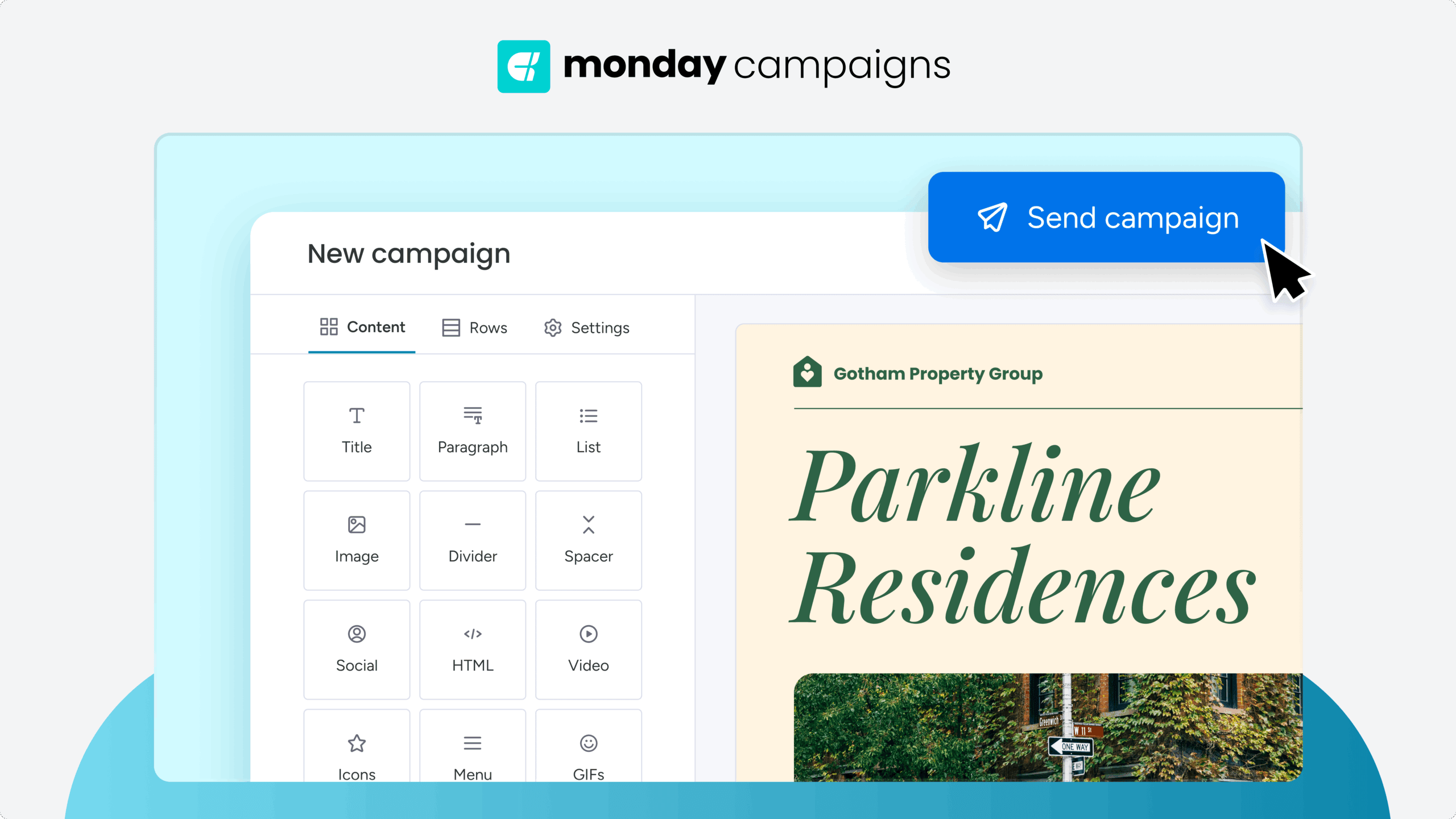
Drag-and-drop editors use blocks where you pick pre-built components and arrange them visually. No HTML needed, and you still get pro-level design flexibility.
Common blocks for any email:
- Text sections: For headlines, body copy, and formatted content
- Images: Product photos, hero images, and visual elements
- Buttons: Call-to-action elements with customizable styling
- Dividers: Visual breaks between content sections
- Social links: Icons linking to social media profiles
- Product showcases: Structured displays for merchandise or services
Drag blocks into place, resize them, rearrange as needed, and you’ll see real-time previews. You can customize everything: text formatting (fonts, sizes, colors), image placement, button styling, spacing, backgrounds, and layout.
Step 2: Leverage AI-powered copy suggestions
AI analyzes your goals, audience, and past performance to suggest messaging. It covers everything from subject lines to CTAs.
AI helps with:
- Subject lines: Driving opens with personalized, relevant messaging
- Preview text: Encouraging clicks with compelling secondary headlines
- Body copy: Communicating value with audience-appropriate tone and messaging
- CTAs: Motivating action with conversion-optimized button text
Subject line generation is one of AI’s biggest wins. AI looks at past campaigns, engagement patterns, and goals, then suggests multiple subject lines. CTA optimization uses conversion data to suggest button text, placement, and styling that get the most clicks.
Step 3: Implement dynamic personalization with CRM data
Dynamic email personalization changes content based on recipient data way beyond basic mail merge. Templates connected to your CRM pull real-time recipient data and show different content based on what they find.
| Data type | Personalization application |
|---|---|
| Contact properties | First name, company name, job title |
| Deal stage | Journey-appropriate messaging for prospects vs. customers |
| Past purchases | Related items, replenishment reminders |
| Engagement history | Topics and formats driving engagement |
| Industry/vertical | Industry-specific case studies and terminology |
With dynamic personalization, you can show or hide entire sections based on recipient data. For example, a sales email shows different case studies by industry, while a product announcement highlights features based on past purchases. A platform like monday campaigns can pull data from you CRM to customize emails based on customer history and past interactions.
Try monday campaignsMobile-responsive email templates for modern audiences
Chances are high that your email is being opened on a mobile device. That changes how you design and test emails since templates need to work on every screen size.
A responsive design ensures a seamless experience on any device, which is crucial for engagement. When text is readable and buttons are easy to tap, readers are more likely to interact with your content, strengthening brand trust and improving results.
Responsive design adapts to any screen size and includes readable text, no zooming, and touch-friendly buttons. Responsive design basics:
- Single-column layouts: Content stacks vertically for easy mobile scrolling, with multi-column desktop designs automatically collapsing on mobile.
- Readable font sizes: Body text should be minimum 14px, with headlines at 22px or larger.
- Touch-friendly buttons: CTAs need minimum 44×44 pixel tap targets for easy mobile interaction.
- Optimized images: Images automatically scale to screen width without distortion.
- Concise content: Front-load key information for mobile scanners who may not scroll through entire emails.
5 ways AI transforms email template personalization
AI makes real one-to-one personalization possible at scale. These five AI capabilities take email marketing way beyond basic personalization.
1. Smart segmentation from CRM insights
AI segmentation works differently than manual methods. Instead of you guessing at segments, AI finds patterns across multiple variables or groupings you’d probably miss.
AI uses multiple data points to predict behavior:
- Engagement patterns: How recipients interact with different content types
- Purchase behavior: Buying frequency, product preferences, and seasonal patterns
- Content preferences: Topics, formats, and messaging styles driving engagement
- Deal stage: Current position in the sales funnel and likelihood to convert
- Likelihood to convert: Predictive scoring based on historical data
These segments predict what people will do next — not just what they’ve done. That means more targeted campaigns.
2. Predictive send time optimization
Email send time optimization figures out when each person is most likely to open and engage. Instead of blasting your whole list at once, AI sends to each person at their best time.
AI looks at:
- Past open times: When recipients typically engage with emails
- Time zone: Automatic adjustment for global audiences
- Work schedule patterns: Business hours vs. personal time preferences
- Device usage: Mobile vs. desktop engagement patterns
This individualized approach can increase open rates by 15-20% compared to standard send times. That’s a meaningful gain, especially when you consider that precise timing is critical to standing out in crowded inboxes, where Microsoft’s Work Trend Index reports the average worker receives 117 emails per day.
3. Automated content variations
AI creates and tests multiple versions automatically, no more A/B testing limits. Instead of testing two subject lines and waiting for results, AI generates multiple variations across headlines, body copy, CTAs, and images and then picks winners fast.
Automated testing covers:
- Headlines: Multiple variations testing different value propositions
- Body copy: Varying length, tone, and messaging approaches
- CTAs: Different button text, colors, and placement options
- Images: Testing various visual elements and product showcases
4. Real-time performance learning
AI learns from every campaign and improves future sends on its own, fully automating the analysis process. Every open, click, conversion, and unsubscribe generates data AI uses to identify patterns and refine recommendations.
Learning encompasses critical performance factors:
- Subject line effectiveness: What messaging resonates with different audience segments
- Content preferences: Topics, formats, and styles driving engagement
- Send frequency tolerance: Optimal email cadence for different recipients
- Optimal email length: How much content different audiences prefer
5. Behavioral trigger automation
AI identifies behavioral signals and automatically triggers relevant email templates based on actions or inactions indicating readiness for specific messaging. This capability moves beyond simple rule-based automation to intelligent, context-aware email delivery.
Common trigger types include sophisticated behavioral analysis:
- Website visits: Specific page views indicating interest or intent
- Content downloads: Engagement with particular resources or topics
- Email engagement patterns: Changes in open or click behavior
- Purchase behavior: Buying patterns suggesting upsell or cross-sell opportunities
- Inactivity periods: Declining engagement requiring re-engagement campaigns
Transform your email marketing with monday campaigns
MarketsandMarkets projects that the marketing automation market will grow to $81.01B by 2030. Platforms like monday campaigns are at the forefront of this growth, holding the largest share of the market.
The platform connects directly to your CRM data, so every email you send is automatically personalized based on real recipient behavior and preferences. You’re not just sending emails, you’re creating intelligent conversations that adapt to each person on your list.
AI-powered template builder
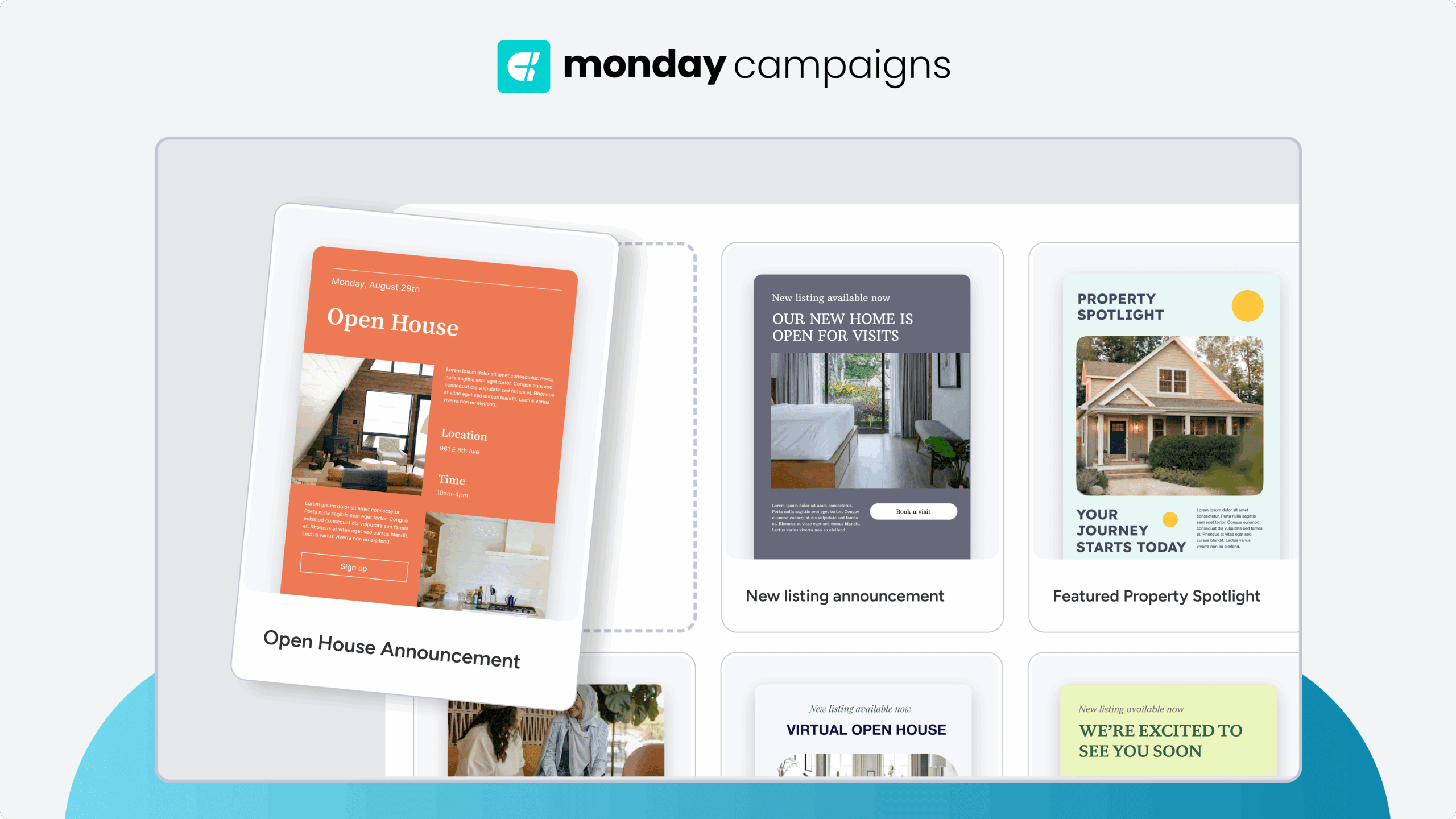
The drag-and-drop builder combines intuitive design with AI intelligence. Create professional emails in minutes using pre-built templates that automatically suggest subject lines, body copy, and CTAs based on your campaign goals and audience data. No design skills required, no coding needed.
Smart CRM integration
Your email templates pull real-time data directly from your CRM to personalize content at scale. Show different case studies based on industry, adjust messaging by deal stage, and display product recommendations based on past purchases. One template adapts automatically for thousands of recipients.
Predictive send time optimization
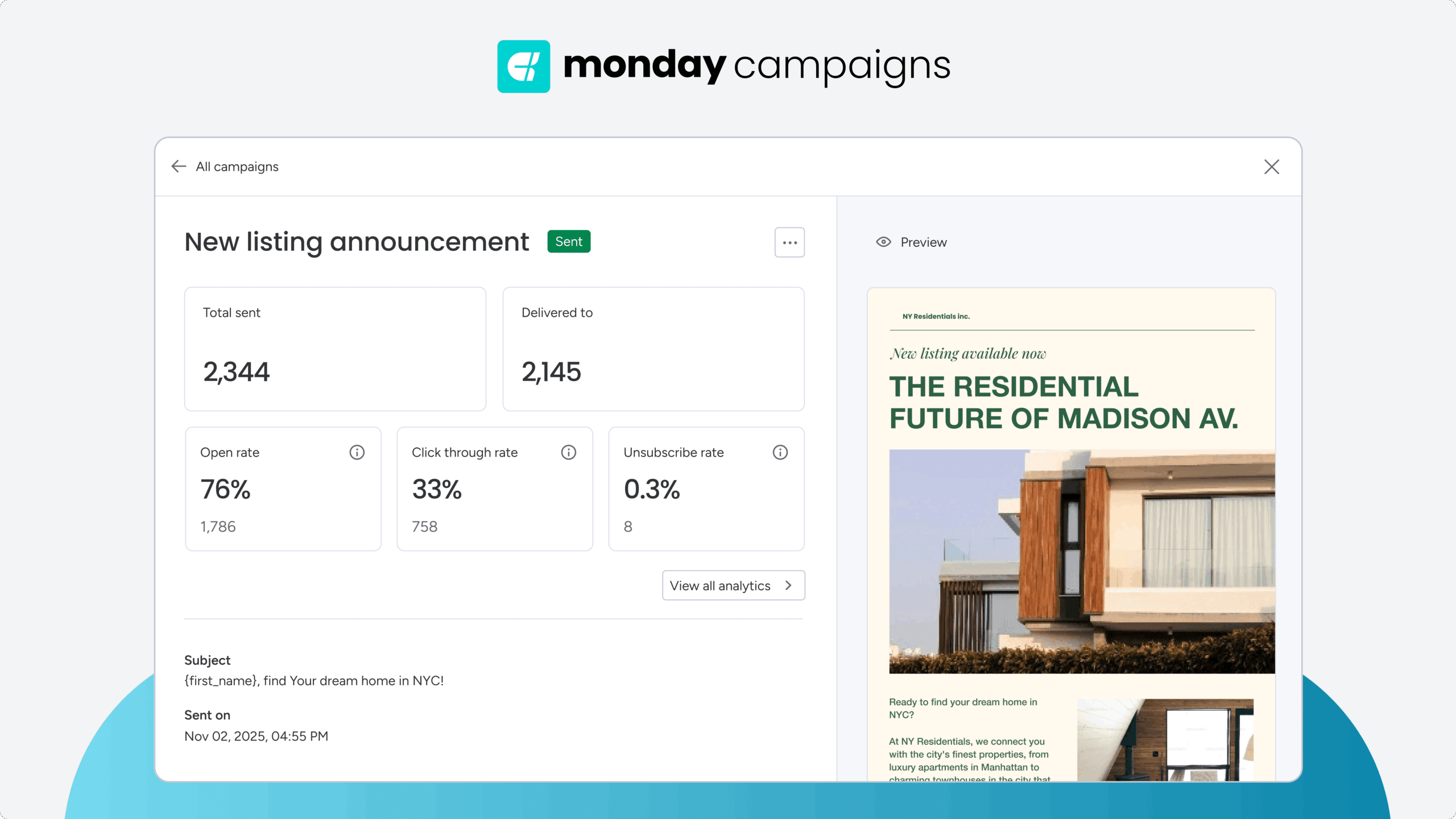
AI analyzes when each recipient typically engages with emails and automatically sends at their optimal time. Instead of blasting your entire list at once, the platform delivers each email when that specific person is most likely to open and click. This individualized timing can boost open rates by 15-20%.
Automated performance learning
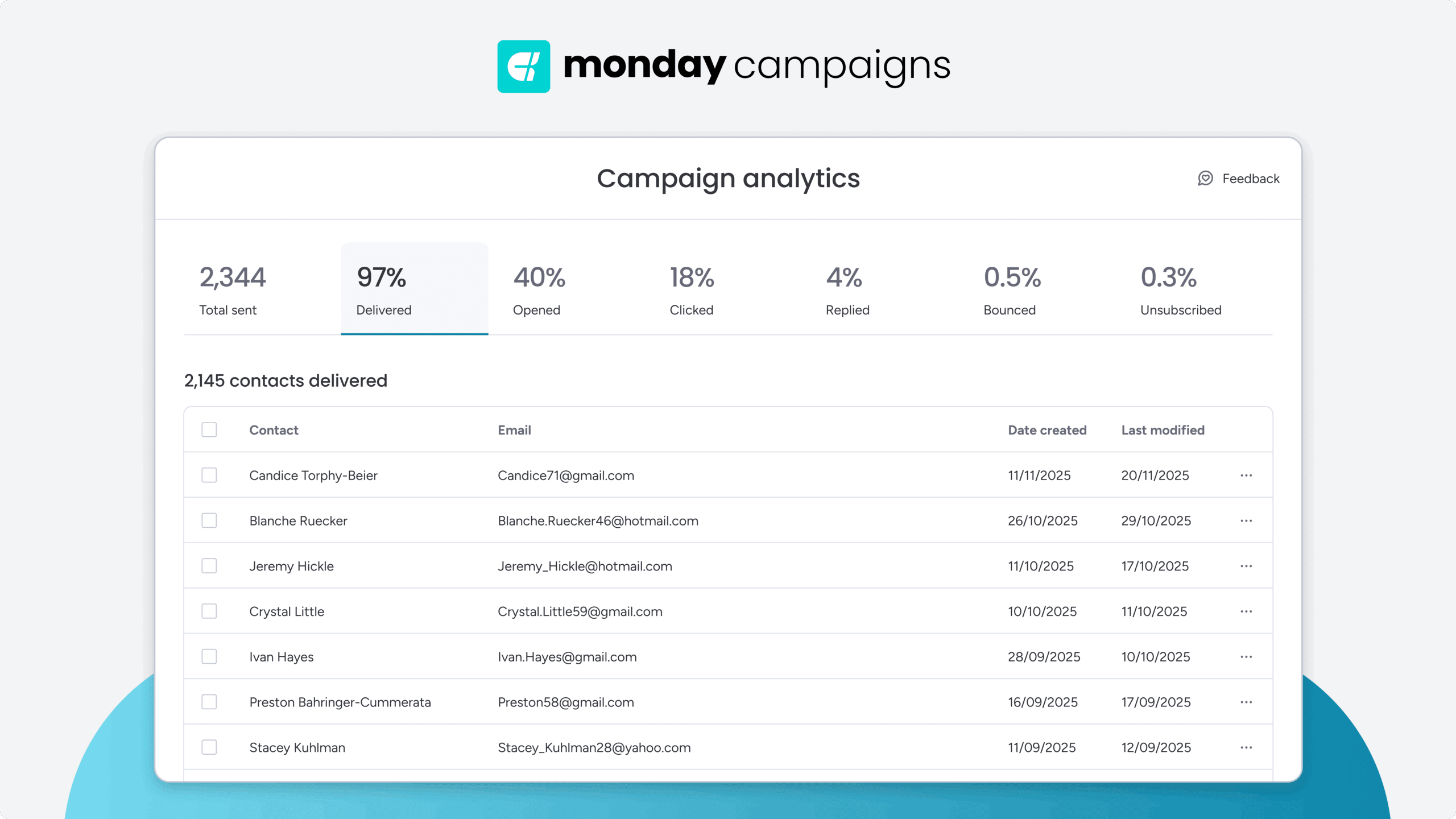
Every campaign generates insights that improve future sends. The platform continuously analyzes opens, clicks, and conversions to refine subject lines, content preferences, and send frequency for each recipient. Your flows gets smarter with every automated email marketing campaign you run, without manual intervention.

"With monday campaigns, we can launch professional emails in minutes and instantly see who engaged. Our sales team follows up directly with those showing interest - making outreach faster and more effective."
Michael Fitzpatrick | National Workplace Training ManagerStart sending smarter emails today
The most successful email marketing teams combine well-designed templates with smart automation and AI-driven personalization. This approach enables true one-to-one communication with thousands of contacts while maintaining the efficiency needed for modern marketing operations.
monday campaigns brings all these capabilities together in one platform. Connect your CRM data, choose from proven templates, and let AI handle the personalization, timing, and optimization. You’ll spend less time building emails and more time analyzing results that actually matter.
Try monday campaignsFAQs
What are the best free email templates for marketing campaigns?
The best free email templates for marketing campaigns are the ones that align with your specific objectives. Welcome emails achieve 4-5x higher engagement than standard campaigns. Newsletter templates build ongoing relationships. Product announcement templates drive feature adoption. Nurture sequences guide prospects through the buyer journey. The most effective template matches your specific campaign goal and audience needs.
How can I create a professional email template for free?
You can create a professional email template for free by using drag-and-drop email builders that require no design or coding skills. Many email marketing platforms offer free email templates with pre-built structures you can customize with your own content, branding, and imagery. AI-powered platforms assist with design suggestions and copy recommendations.
Can I use free email templates for commercial purposes?
Most free email templates from reputable email marketing platforms can be used for commercial purposes without restriction. Verify the specific license terms of your chosen platform or template source, as some free templates may have attribution requirements or usage limitations.
How do AI-powered email templates improve campaign performance?
AI-powered email templates improve campaign performance through personalization at scale, send time optimization, and continuous learning. AI analyzes recipient data to customize content for each individual, determines optimal send times based on engagement patterns, and learns from campaign results to improve future performance automatically.
What's the difference between email templates and email automation?
Email templates are the individual email designs and content structures used in campaigns. Email automation refers to the rules and triggers determining when and to whom emails are sent. Templates are the "what" while automation is the "when" and "who." Effective email marketing combines well-designed templates with smart automation to deliver relevant messages at the right moments.
How does CRM integration enhance email template personalization?
CRM integration enables email templates to pull real-time contact data, deal stages, purchase history, and engagement patterns to create truly personalized content. This goes beyond basic name insertion to display different product recommendations, case studies, or messaging based on each recipient's unique profile and journey stage.

 Get started