


Your marketing team sends dozens of emails every week. Welcome messages for new subscribers. Product updates for existing customers. Promotional campaigns for upcoming launches. Each email requires individual attention: writing copy, selecting recipients, scheduling sends, and tracking results. Meanwhile, leads slip through cracks, customers miss important updates, and your team spends more time managing email logistics than developing strategy.
Automated email campaigns fix this. Set up your rules once, and the platform handles the rest, sending the right message based on what subscribers do, where they are in the customer journey, and what your data shows. You’ll learn how to build campaigns that react to what customers do, pull data straight from your CRM, and prove their impact on revenue. Your team gets time back for strategy instead of email admin, with platforms like monday campaigns making it easy to deliver personalized emails at scale.
Key takeaways
- Strategy first: Define objectives, map your customer journey, and identify triggers before building campaigns.
- Start small: Perfect one high-impact campaign, measure results, then expand based on what works.
- Connect to your CRM: monday campaigns integrates with monday CRM for unified customer data and closed-loop attribution from email to revenue.
- Trigger on behavior: Send emails based on subscriber actions like form submissions or cart abandonment for higher engagement.
- Track business outcomes: Measure lead conversion, pipeline influence, and revenue attribution alongside opens and clicks.
What is email marketing automation?

Email marketing automation sends targeted emails to subscribers automatically based on predefined triggers, schedules, or user behaviors. Instead of crafting and scheduling every message individually, you configure rules once, and the system handles execution continuously.
Instead of manually sending every email, you build a system that sends what people need, when they need it.
For teams managing customers from first touch to renewal, automation keeps communication consistent without piling on more work.
Connect automation to your CRM, and emails pull in real customer context: recent purchases, support tickets, engagement history, lifecycle stage. That connection turns mass emails into conversations that feel personal and move the needle.
How email automation works
Email automation runs on three parts working together. Get these right, and your campaigns react to what subscribers actually do.
Triggers: Events or conditions that initiate an automated email. A trigger might be:
- Form submission
- Purchase completion
- Date-based milestone like a contract renewal approaching
- Behavioral signal like cart abandonment
Workflows: The sequence of emails and decision points that follow the trigger. Workflows can be:
- Simple single-email sends
- Complex multi-step sequences with branching logic based on recipient behavior
Delivery: How the system executes sends based on timing rules, segmentation criteria, and personalization tokens. Delivery rules control when emails go out, who gets them, and what content they see.
Here’s an example: Someone subscribes to your newsletter. The system sends a welcome email right away, then follows up three days later with educational content. No manual work required. If the subscriber clicks a link in the welcome email, the workflow might branch to send different follow-up content than if they didn’t engage.
Learn more: Sales email automation tools
Automated emails vs. manual email marketing
Automated and manual emails each have their place. Know when to use each, and your email program gets stronger.
| Dimension | Manual email marketing | Automated email campaigns |
|---|---|---|
| Execution | Requires hands-on creation and sending for each campaign | Runs continuously once configured |
| Personalization scale | Limited to basic merge tags | Delivers individualized content based on behavior and lifecycle stage |
| Timing | Sent at predetermined times chosen by marketer | Triggered by subscriber actions or milestones |
| Resource requirements | High ongoing time investment | Upfront setup time, then minimal maintenance |
| Best examples | One-time announcements, breaking news | Welcome series, nurture sequences, behavioral triggers |
Use manual campaigns for breaking news or one-off messages to small groups. Automation shines when you need consistent messages that scale to hundreds or thousands of people.
Why create automated email campaigns?
Automation saves time, but that’s not the whole story. It also drives engagement, revenue, and stronger customer relationships that build momentum over time. The scale of adoption reflects this: CMOs report that 1 in 6 marketing activities are currently automated or AI-enhanced, with up to half expected to be automated within three years. Here’s why the best marketing teams make automation a priority.
Save time while scaling personalization
Automation solves a real problem: how do you personalize at scale without burying your team in work? By doing the strategic work upfront, you can cut out the repetitive manual tasks that slow your team down.
Without automation, every new subscriber requires manual attention:
- Copying email lists
- Scheduling sends
- Updating content with subscriber details
- Tracking who received what
A welcome series that’d take 15 minutes per subscriber now runs automatically for thousands. Your team focuses on strategy, not email admin.
Boost customer engagement and retention
Automation boosts engagement because emails land when they matter most to the person reading them. Instead of blasting everyone at once, automated campaigns react to what each person does, in real time.
- When someone downloads a resource: Automation sends related educational content while interest is high.
- When a trial period nears expiration: Automation delivers timely reminders and conversion incentives.
- When a contact hasn’t interacted recently: Automation initiates re-engagement before the relationship goes cold.
Drive predictable revenue growth
Automation drives revenue in a few key ways that create predictable, growing income. Know these, and you’ll know which campaigns to build first.
- Nurturing leads: Educational sequences build trust and move prospects toward purchase decisions over weeks or months.
- Recovering abandoned transactions: Automated follow-up when customers don’t complete purchases recovers revenue that would otherwise disappear.
- Increasing customer lifetime value: Cross-sell, upsell, and renewal campaigns triggered by purchase history or contract dates generate additional revenue from existing customers.
- Accelerating sales cycles: Delivering the right content at the right stage of the buying journey keeps prospects moving forward rather than stalling.
Plan your email automation strategy
Start with strategy. What do you want to achieve? Who are you reaching? What triggers the email? How will you measure success? Skip this step, and you’ll end up with campaigns that don’t connect or convert. Here’s how to lay the groundwork for campaigns that work.
Step 1: Define campaign objectives
Every campaign needs a clear, measurable goal. That goal drives every decision you make about content, timing, and who gets the email. Specific objectives like “increase trial-to-paid conversion within 90 days” provide the focus needed for effective campaign design and measurement. Specific objectives like “increase trial-to-paid conversion within 90 days” enable focused campaign design and success measurement.
Common automation objectives include:
- Lead nurturing
- Onboarding new customers
- Maintaining engagement with existing customers
- Driving specific conversions
- Reducing churn through re-engagement
Step 2: Map the customer journey
The most effective automation mirrors the customer’s actual journey, ensuring every message aligns with their relationship stage. Journey mapping shows you where automation makes the biggest impact. The journey mapping process involves:
- Identifying key stages in your customer lifecycle
- Understanding customer needs and questions at each stage
- Determining critical transition points
- Identifying moments where timely communication has outsized impact
You’ll spot natural automation opportunities: welcome emails for new subscribers, educational content during consideration, onboarding after purchase, renewal reminders before contracts expire.
Step 3: Identify automation triggers
Triggers kick off automated campaigns. Pick the right triggers, and emails land when they matter most.
Action-based triggers:
- Form submissions
- Content downloads
- Link clicks
- Purchase completions
- Trial signups
Time-based triggers:
- Days since signup
- Days until contract renewal
- Birthday or anniversary dates
- Days of inactivity
Behavioral triggers:
- Website visits
- Email engagement patterns
- Product usage milestones
- Support ticket creation
Lifecycle triggers:
- Stage changes in CRM
- Lead score thresholds
- Customer status updates
Set up your email automation platform
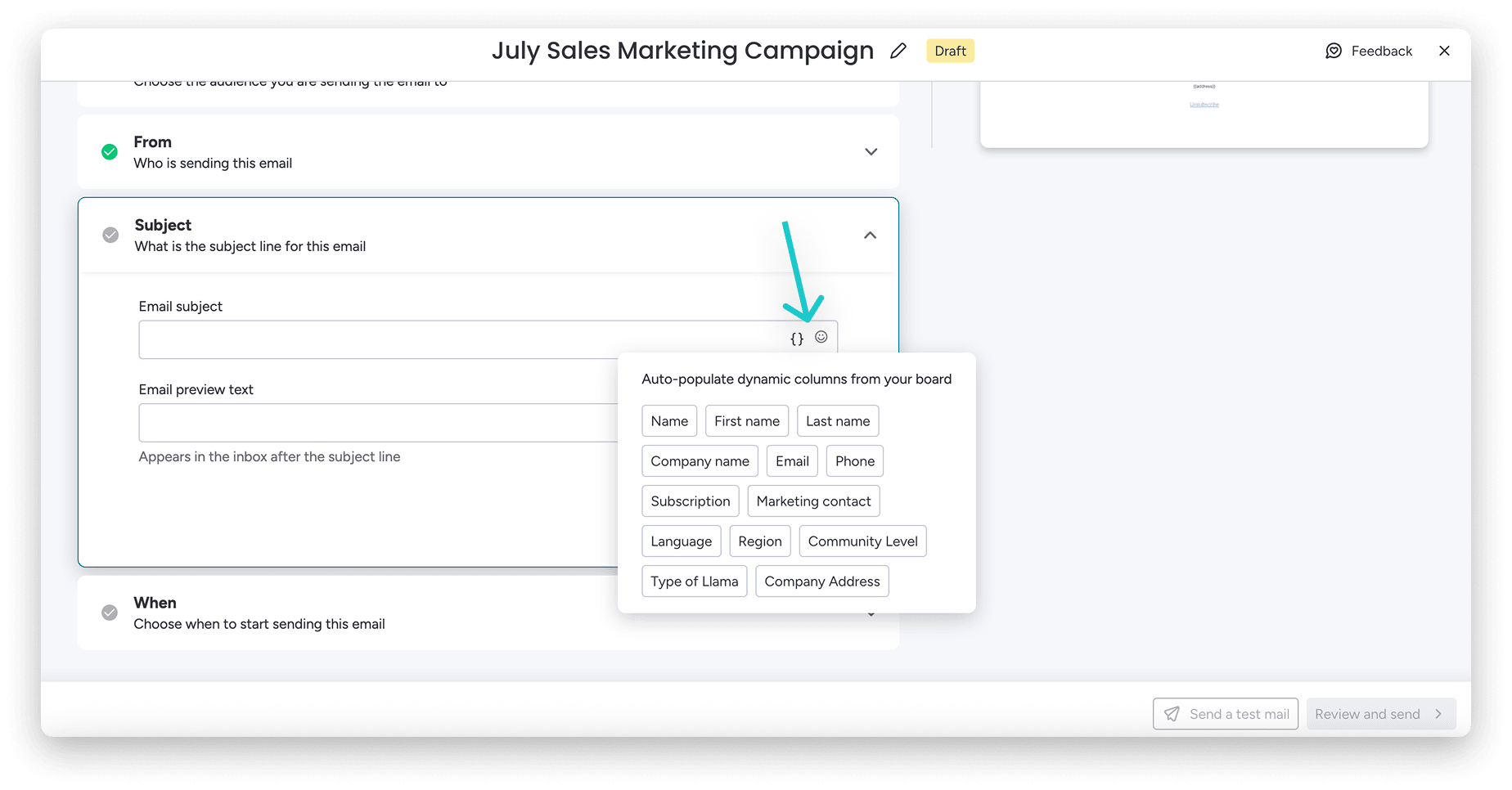
Platform setup means picking the right features, handling technical config, connecting your data, and setting up tracking. A proper setup ensures your campaigns will run smoothly from day one. Your campaigns will work from day one. Here’s what matters when choosing a platform.
Evaluate email automation capabilities
The right platform depends on your team size, technical expertise, current systems, budget, and the complexity of your automation needs. Evaluate platforms based on what they actually deliver, not what the marketing says.
Key selection criteria include:
- Automation capabilities with flexible workflow builders
- Integration ecosystem connecting to CRM and other business systems
- Segmentation and personalization depth
- Deliverability infrastructure
- Analytics with reporting capabilities
Platforms built directly into CRM suites eliminate integration complexity entirely, a meaningful advantage given that 47% of martech decision-makers cite stack complexity and system integration challenges as key blockers to realizing value. Email automation pulls current customer data automatically. No separate connections. No ongoing sync work.
Configure authentication and deliverability
Get the technical setup right, or your emails land in spam. Skip authentication, and even great campaigns won’t reach inboxes. Essential authentication protocols include:
- SPF (Sender Policy Framework): Verifies emails come from authorized servers
- DKIM (DomainKeys Identified Mail): Adds digital signatures proving emails haven’t been altered
- DMARC: Tells receiving servers how to handle emails that fail authentication checks
Connect your CRM for unified data
Connect email to your CRM, and automation becomes part of how you manage customer relationships, not just a standalone tactic. When email and CRM talk to each other, you can do things siloed systems can’t. Benefits of unified data include:
- Complete customer context with access to purchase history, support interactions, and sales activities
- Accurate segmentation based on actual customer attributes and behaviors
- Real-time personalization inserting current information into automated emails
- Closed-loop attribution tracking how email engagement influences pipeline and revenue
monday campaigns connects directly to monday CRM. Data flows constantly from campaign reports to lead conversion tracking. Marketing and sales work from the same funnel, same goals, same data.
Try monday campaignsBuild dynamic email lists and segments
Good segmentation turns mass emails into personalized messages that land with specific groups. Sending targeted automation to the right audience is the key to engagement and conversion.
To start, split your list into meaningful groups, and you can send targeted messages that generic blasts can’t match. Good segments group people by shared traits, needs, or behaviors, so your message hits home for everyone in that group. Common segmentation approaches include:
- Demographic segmentation: By industry, company size, or job role
- Behavioral segmentation: By website activity, email engagement, or purchase history
- Lifecycle segmentation: By relationship stage
- Engagement segmentation: By interaction level
Make segments dynamic. They should update automatically as people’s information and behavior change, ensuring your messaging is always relevant. monday campaigns lets you build dynamic segments that update automatically based on contact info in your board.
5 steps to create your first automated email campaign
To create your first automated campaign: define your goal, set triggers, design emails, write content, and configure timing. This works no matter which platform you’re using. Follow this framework, and your campaigns will work from day one.
Step 1: Choose your campaign type and goal
Pick the right campaign type for your goal, and everything else follows: triggers, content, sequence structure, metrics.
| Campaign type | Purpose | Typical goal |
|---|---|---|
| Welcome series | Introduce new subscribers to your brand | Increase early engagement |
| Lead nurturing | Educate prospects about your solution | Increase qualified leads |
| Onboarding sequence | Help new customers adopt your product | Reduce time-to-value |
| Abandoned cart recovery | Remind customers about incomplete purchases | Recover abandoned carts |
| Re-engagement campaign | Win back inactive subscribers | Reduce list attrition |
Start with one high-impact campaign. Focus on building one high-impact campaign first to achieve the best results. You’ll get better results. Welcome series and abandoned cart campaigns are great first wins if you’re new to automation.
Step 2: Set entry and exit conditions
Entry conditions kick off the campaign. Exit conditions stop it. Setting the right conditions ensures every subscriber receives the right message at the right time, such as pausing a nurture sequence after a purchase is made.
Entry condition considerations:
- What event initiates the campaign
- Whether there are qualifying criteria
- Whether there should be delays
Exit conditions that prevent inappropriate emails:
- Goal achievement
- Segment changes
- Engagement thresholds
- Time limits
Step 3: Design mobile-responsive templates
Make sure your templates work on all devices and email clients, or your message won’t land right. Mobile-responsive design principles include:
- Single-column layouts
- Large tappable buttons
- Readable font sizes
- Optimized images
- Concise content
monday campaigns has a drag-and-drop editor. Add text, images, video, and dynamic fields, no coding or design skills required.
Step 4: Write personalized email content
Good email copy connects with readers and gets them to act. You need both the right structure and the right execution. Personalization isn’t just first names. Good personalized content pulls in industry, role, past interactions, or what they’ve shown interest in. This distinction matters: according to Gartner, poorly timed or context-free personalization generated negative experiences for 53% of customers surveyed, making behavior- and lifecycle-aware personalization essential rather than optional.
Effective email copywriting principles include:
- Compelling subject lines: Creating curiosity in 40-50 characters
- Personalization beyond names: Referencing specific behaviors
- Scannable structure: Using short paragraphs and bullet points
- Single clear call-to-action
- Benefit-focused language: Emphasizing outcomes
Step 5: Configure timing and delivery rules
Timing rules control when emails go out. Get timing right, and engagement jumps. Send the right message at the wrong time? It flops. Same message at the right time? It works.
monday campaigns supports:
- Send now or schedule later options
- Timezone-based delivery
- AI recommendations for optimized send times
- Timezone selection for your campaign
- Delivery date and time customization
Learn more: Designing drip email campaigns
How do you measure whether automated emails are driving revenue?

Define success metrics upfront, so you know if campaigns are hitting their goals. Different goals need different metrics. Here’s what to track based on your goals.
Metrics should connect directly to campaign objectives: An educational nurture campaign might prioritize engagement metrics like opens and clicks; a promotional campaign focuses on conversion and revenue.
Key performance indicators by campaign type:
- Welcome series: Open rates, click-through rates, early engagement
- Lead nurturing: Lead scoring progression, sales-qualified leads generated
- Onboarding: Feature adoption, time-to-value, retention rates
- Revenue campaigns: Conversion rates, revenue per email, customer lifetime value
The best platforms tie email performance to real business results. monday campaigns tracks opens and clicks, but also lead conversion, pipeline influence, and closed-won attribution. Marketing leaders get the ROI proof they need.
Learn more: Best practices for email marketing campaigns
Build smarter email campaigns with monday campaigns
Email automation shouldn’t mean choosing between power and simplicity. monday campaigns gives marketing teams the tools to create sophisticated automated campaigns without the complexity that usually comes with them. Built directly into the monday ecosystem, it connects your email strategy to your CRM data, so every campaign pulls from real customer context and every result feeds back into your pipeline.
Whether you’re nurturing leads, onboarding customers, or driving conversions, monday campaigns handles the technical heavy lifting while you focus on strategy. AI-powered features optimize your campaigns automatically, and native CRM integration means your data stays unified without manual syncing or complex integrations.
AI-optimized send times that boost engagement
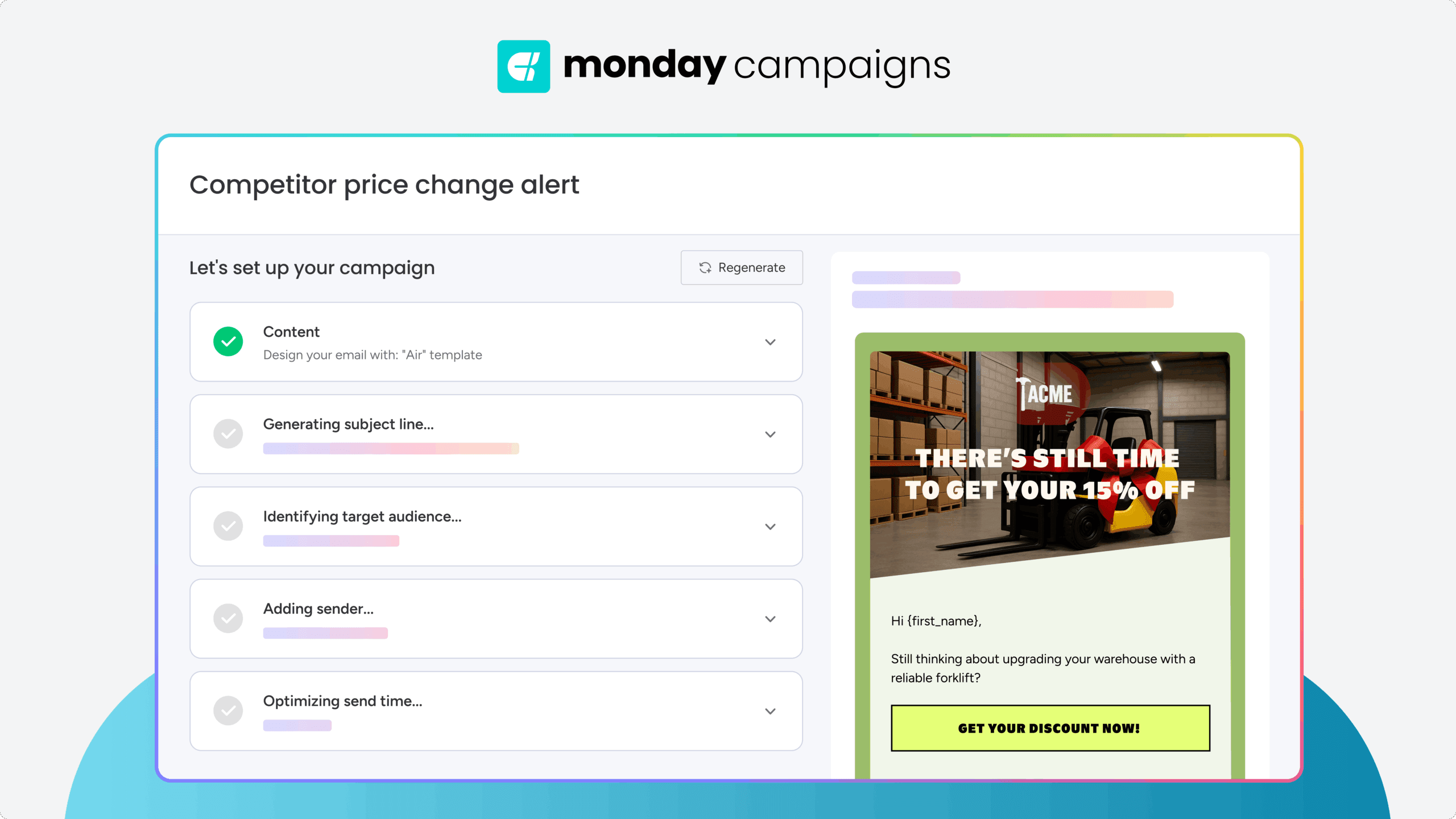
Timing makes or breaks email performance. monday campaigns uses AI to analyze your audience’s engagement patterns and automatically recommend the best send times for each campaign. Instead of guessing when to hit send, you get data-driven recommendations that increase open rates and clicks. The system learns from your results over time, continuously improving delivery timing based on what actually works for your subscribers.
Dynamic segmentation powered by CRM data
Segments that update automatically keep your targeting sharp without manual list management. Build dynamic segments based on any field in your monday CRM, from lifecycle stage to engagement history to custom properties. As contact data changes, segment membership updates in real time. Your nurture campaigns always reach the right people, and you never waste sends on contacts who’ve already converted or moved to a different stage.
Drag-and-drop email builder with smart personalization
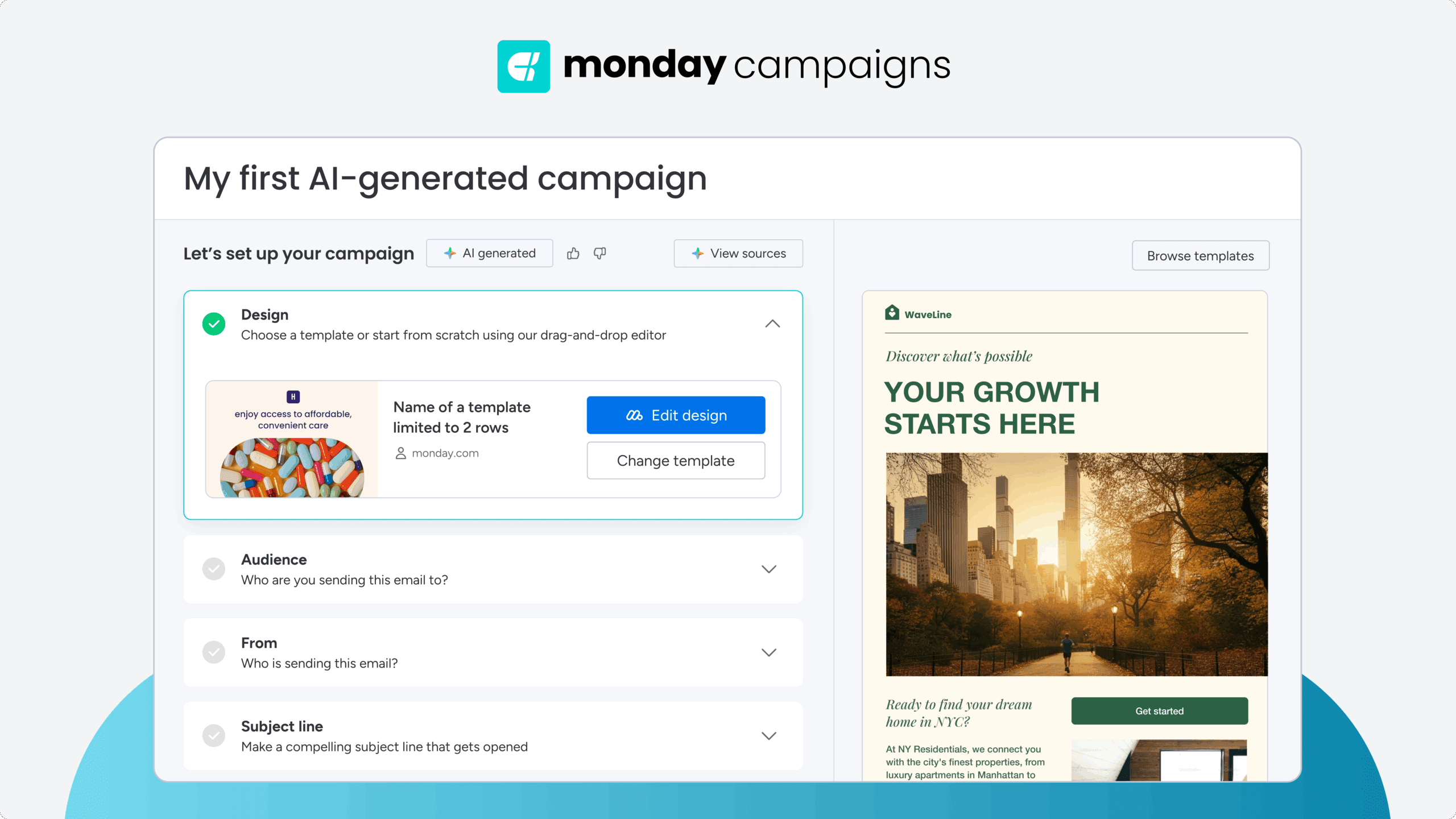
Create professional emails fast with a visual builder that requires zero coding. Add text, images, videos, buttons, and dynamic fields by dragging them into place. Personalization goes beyond first names with dynamic content blocks that pull current data from your CRM, so every email reflects the recipient’s actual relationship with your business. Templates are mobile-responsive by default, ensuring your campaigns look great on every device.
Closed-loop attribution from email to revenue
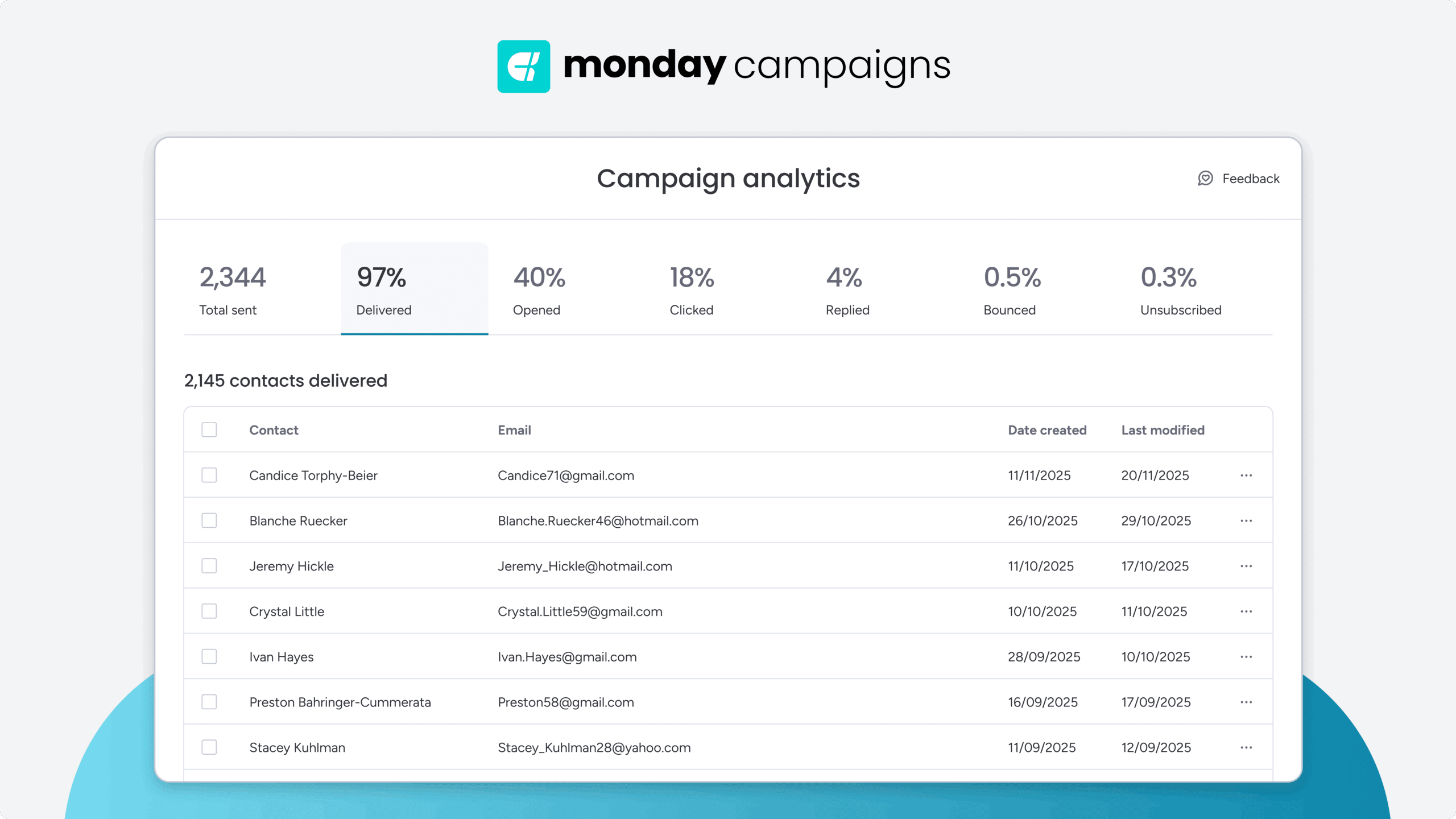
Track how email campaigns influence pipeline and revenue, not just opens and clicks. Because monday campaigns connects directly to monday CRM, you can see which campaigns generate qualified leads, contribute to deals, and drive closed-won revenue. Attribution data flows automatically between marketing and sales, giving both teams visibility into what’s working and eliminating the reporting gaps that plague disconnected systems.
Start automating your email campaigns today
Email automation changes how marketing teams engage prospects and customers. Start with clear strategy, pick the right platform, and build campaigns that match your customer journey. Focus on one high-impact campaign, measure results, then expand based on what works.
monday campaigns makes it easy to create, launch, and optimize campaigns that pull straight from your CRM. You get the insights and automation you need to deliver personalized experiences at scale and grow revenue predictably.
Try monday campaignsFAQs
How long does it take to create an automated email campaign?
The time it takes to create an automated email campaign depends on its complexity. Simple campaigns like welcome series or re-engagement sequences typically take under an hour. More complex multi-step nurture campaigns might take 2-4 hours for initial setup, then run automatically without additional effort. More complex multi-step nurture campaigns might take 2-4 hours for initial setup, then run automatically without additional effort.
Should I start with one automation or build several at once?
Start with one high-impact campaign, typically a welcome series or lead nurture sequence. Perfect it, measure results, then expand. This builds team confidence and establishes best practices before scaling to additional campaigns.
How often should I update automated email campaigns?
Review performance monthly, but only make changes when data shows opportunities. Test subject lines, timing, and content quarterly. Refresh campaign strategy annually or when business priorities shift significantly.
Can automated emails feel personal to recipients?
Automated emails feel personal when they use real customer data. Dynamic fields, behavioral triggers, and CRM-connected personalization make automated emails more relevant than generic batch sends because they reflect actual customer context and behavior.
What's the difference between drip campaigns and automated workflows?
Drip campaigns send a predetermined sequence on a fixed schedule regardless of recipient behavior. Automated workflows adapt based on recipient behavior, CRM data, and conditional logic, making them more flexible and relevant to individual subscribers.
What CRM data do you need for effective email automation?
Effective email automation requires demographic data like name and company, behavioral data like website visits and email engagement, lifecycle data showing relationship stage, and engagement history tracking previous interactions. Platforms with native CRM integration pull this data automatically without manual exports.

 Get started