


Search “AI email assistant” and you’ll find a category that covers everything from inbox sorters to full campaign platforms. That range isn’t a feature. It’s a source of real confusion for marketing teams trying to find a platform that actually drives revenue. Some tools help individuals process their inbox faster. Others give marketing teams the infrastructure to build, send, and measure campaigns tied directly to CRM data and pipeline outcomes.
Below, you’ll find 9 of the best AI email assistants available today, covering what each platform does, who it’s built for, and where it falls short. You’ll also find a clear breakdown of the two main categories these platforms fall into, the key criteria for evaluating your options, and a closer look at how the right platform connects campaign performance to actual revenue outcomes. For teams that need campaigns tied directly to their CRM, monday campaigns offers a unified solution built specifically for that job.
Try monday campaignsWhat is an AI email assistant?
An AI email assistant uses artificial intelligence to help you manage, create, and optimize your email communications. But they don’t all do the same job. The term is broad, and the platforms it describes solve completely different problems depending on your goals.
These platforms fall into two distinct categories. Inbox management assistants help individuals filter noise, prioritize messages, and draft quick replies. Meanwhile, campaign-focused AI assistants help marketing teams build, send, and track emails tied directly to CRM data and revenue goals.
Picking the wrong platform creates friction instead of momentum. A lifecycle marketer running complex nurture sequences needs a fundamentally different platform than an executive trying to clear their inbox. Understanding this distinction helps you choose the right path for your specific revenue and productivity goals.
9 best AI email assistants for marketing teams
The label “AI email assistant” covers a surprisingly wide range of tools. Some help individuals clear out their inboxes faster with smart replies and automated thread summaries. Others are built specifically for marketing teams who need to launch campaigns that actually drive revenue.
That gap matters more than most software comparison lists acknowledge. An app built for inbox triage won’t show you which audience segment is converting or give your sales team the context they need to close a deal.
We rounded up nine platforms spanning both categories so you can find exactly what fits your workflow. Take a look at the table below for a quick overview, or keep reading for more detailed reviews.
| Product | Best for | Main use case | Starting price |
|---|---|---|---|
| monday campaigns | Revenue-driven marketing teams | Creating, sending, and measuring email campaigns directly inside your CRM | Contacts-based pricing; 14-day free trial |
| Superhuman | High-performing professionals and sales teams | Speed-focused inbox management with AI triage and drafting | $30/month (Starter) |
| Shortwave | Gmail-based professionals and teams | AI-powered inbox organization, thread summarization, and reply drafting | Free (with limitations) |
| SaneBox | Professionals managing high email volume | Automated inbox prioritization and filtering across major email providers | $4.54/month (Snack) |
| Microsoft Copilot for Outlook | Microsoft 365 organizations | AI-assisted email drafting and thread summarization inside Outlook | $20/month (Copilot Pro) |
| Gemini for Gmail | Google Workspace teams | AI email drafting and inbox management integrated into Gmail | $7/month (Business Starter) |
| Front | Customer operations teams | Shared inbox management with AI-powered routing and drafting | $25/seat/month (Starter) |
| Missive | Small to mid-sized teams | Team email collaboration across multiple channels with AI assistance | $14/user/month (Starter) |
| Mailbutler | Freelancers and small business owners | AI productivity features layered onto existing email clients | Free (Starter with watermark) |
1. monday campaigns
Best for: Revenue-driven marketing teams that need campaigns tied directly to CRM data and pipeline outcomes.
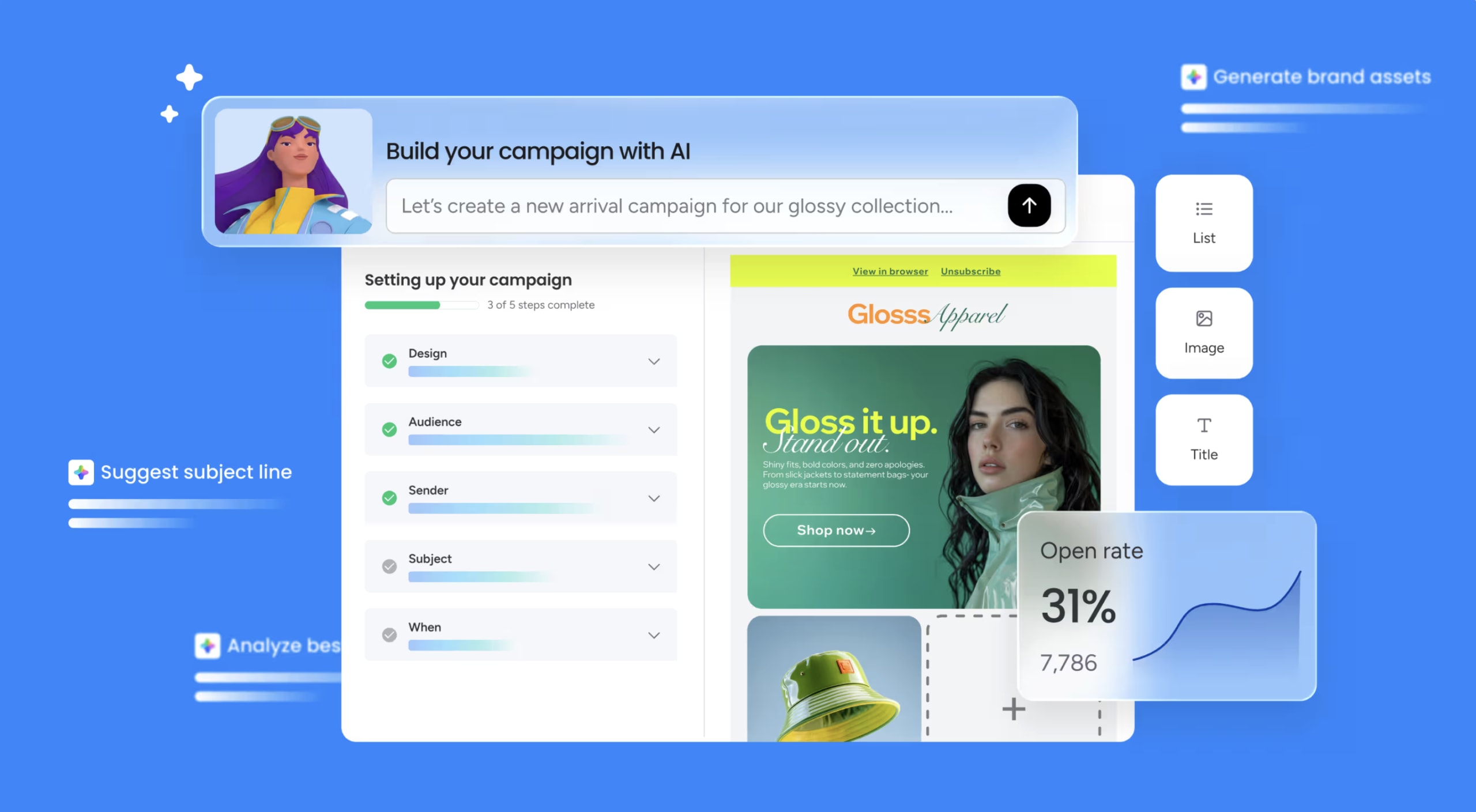
monday campaigns is the only AI email assistant on this list built specifically for revenue-driven marketing teams, not inbox management. It sits natively inside the monday CRM suite, so campaign data and sales data live in the same place, giving marketing and sales teams a single, unified view of every contact. The result: no more toggling between platforms to figure out whether a campaign actually drove results.
Use case
monday campaigns is purpose-built for marketing and sales teams that need to create, send, and measure email campaigns without ever leaving their CRM.
Key features
- AI-powered campaign creation: AI agents, alongside monday sidekick, the built-in AI assistant, generate subject lines, rewrite copy by tone, suggest audience segments drawn directly from CRM contact data, and keep every email on-brand using your saved brand kit.
- Dynamic segmentation: Segments automatically update as contact information changes in monday CRM, so your audience lists stay accurate without manual maintenance.
- CRM-native analytics: Track open rates, click rates, delivered rates, and unsubscribe rates inside the platform, with campaign performance connecting directly to lead conversion tracking in monday CRM.
Pricing
Pricing is contacts-based; visit the monday campaigns pricing page for current tier details. A 14-day free trial is available.
Why it stands out
- Revenue attribution built in: Because monday campaigns sits inside monday CRM, campaign engagement automatically logs on contact timelines, giving marketing directors a direct line between email activity and pipeline impact.
- AI that works end-to-end: AI handles writing, design, image generation, send-time optimization, and workflow configuration from a single chat interface. This reduces the number of platforms your team needs to manage a campaign.
- Enterprise-grade deliverability: Domain authentication, content safety scanning, and dedicated IP options on Enterprise plans mean your campaigns reach inboxes and stay on the right side of brand safety.
2. Superhuman
Best for: High-performing professionals and sales teams who need speed-focused inbox management with AI triage and drafting.

Superhuman transforms inbox management into a speed-focused workflow, cutting through email volume with AI that triages, drafts, and organizes on your behalf. Built for high-performing professionals and sales teams who live in Gmail or Outlook, it layers AI directly onto your existing inbox rather than replacing it. The result is a keyboard-driven, AI-native experience designed to get you to inbox zero faster.
Use case
Superhuman is built for individual professionals and sales reps who need to manage high email volume at speed, with AI that learns their voice and handles the heavy lifting of triage and drafting.
Key features
- Ask AI: Searches your inbox, calendar, and the web simultaneously to draft emails, create calendar events, and surface relevant context, indexing up to five years of email history.
- Auto Drafts and Auto Reminders: Automatically drafts replies and resurfaces threads that need a response, refreshing daily as context changes.
- Auto Labels and Split Inbox: AI-assisted labeling and configurable inbox triage keep high-priority emails front and center, reducing the time spent sorting manually.
Pricing
Superhuman offers three tiers: Starter at $30/month, Business at $40/month with advanced AI features like Ask AI and Auto Drafts, and custom Enterprise pricing. Annual plans save approximately 17% compared to monthly billing, and a free trial is not currently available.
Considerations
- Advanced AI features like Ask AI and Auto Drafts require the Business or Enterprise plan, making the entry-level Starter tier limited for power users.
- Superhuman is built for personal inbox management, not team campaign execution or CRM-connected marketing workflows. Marketing teams looking to build, send, and optimize campaigns at scale will need a dedicated solution.
3. Shortwave
Best for: Gmail-based professionals and teams who want AI to handle inbox organization, thread summarization, and reply drafting.

Shortwave transforms Gmail into an AI-powered inbox that anticipates your needs. Built by ex-Google engineers, it embeds an executive-assistant-style AI directly into your inbox, summarizing threads, drafting replies, and automating triage. You spend less time managing email and more time acting on it. It’s designed for Gmail and Google Workspace users who want a faster, more intelligent inbox experience.
Use case
Shortwave is ideal for Gmail-based professionals and teams who want AI to handle inbox organization, thread summarization, and reply drafting, reducing the time spent on email management without switching platforms.
Key features
- Instant AI summaries: Automatically condenses every email thread into key points the moment you open it, so you can scan and act fast.
- Ghostwriter personalization: Learns from your sent mail to draft replies in your own voice, making AI-generated responses feel authentic instead of generic.
- Natural-language search and AI filters: Ask questions in plain English across your full email history, with automated rules that label, archive, or prioritize messages.
Pricing
Shortwave offers a free plan with core productivity features and AI Assistant access, though outbound emails include a “Sent with Shortwave” signature. Paid plans start at $30/seat per month for Business, with a 14-day free trial available.
Considerations
- Shortwave requires a Gmail or Google Workspace account. Microsoft 365 and Exchange are not supported, which limits its reach for non-Google teams.
- Campaign creation, audience segmentation, and CRM integration aren’t supported, making it a poor fit for marketers who need more than inbox management.
4. SaneBox
Best for: Professionals managing high email volume who need automated inbox prioritization across multiple email providers.

SaneBox uses AI to automatically sort, filter, and prioritize emails so professionals can focus on what actually needs their attention. It works across most major email clients, from Gmail to Outlook to Apple Mail, without requiring a new app or major changes to your workflow. For individuals and teams managing high email volume, it runs entirely in the background.
Use case
SaneBox is built for professionals who want AI to handle inbox prioritization and filtering across most major email providers and compatible IMAP, Exchange, or ActiveSync accounts, without disrupting their existing setup.
Key features
- AI-powered filtering: Learns from your behavior (opens, replies, and response times) to sort low-priority emails into designated folders like @SaneLater, keeping your inbox focused on what matters.
- Follow-up tracking and snooze: SaneNoReplies flags emails that haven’t received a response, while snooze functionality removes messages from your inbox until you’re ready to respond.
- Daily Digest: Consolidates all filtered emails into a single email-based summary, letting you triage and train the AI right from your inbox, with additional support available via the iOS companion app.
Pricing
SaneBox offers three main tiers: Snack at $4.54/month (billed bi-yearly), Lunch at $7.46/month, and Dinner at $22.04/month. A 14-day free trial is available with no commitment required.
Considerations
- AI drafting features (SaneDrafts and SaneSummary) are currently in beta and require manual enablement, so teams looking for mature AI writing assistance may find the experience limited.
- SaneBox has no campaign creation, sending, or analytics capabilities, making it a strong inbox management platform but not a fit for teams who need to build and measure email campaigns.
5. Microsoft Copilot for Outlook
Best for: Microsoft 365 organizations that need AI-assisted email drafting and thread summarization embedded directly into Outlook.

Microsoft Copilot for Outlook adds AI-powered email assistance directly into the inbox, helping users draft, summarize, and manage email threads without switching platforms. Built for organizations already running on Microsoft 365, it extends AI capabilities across Outlook, Teams, Word, and beyond, making it a natural fit for enterprises.
Use case
Microsoft Copilot for Outlook is built for Microsoft 365 organizations that want AI-assisted email drafting, thread summarization, and calendar scheduling embedded directly into their existing Outlook workflow.
Key features
- AI email drafting: Generates full email drafts from short prompts and adjusts tone and length on demand, with a “Sound like me” setting that matches your personal writing style.
- Thread summarization: Condenses long email chains into key points with numbered inline citations linking back to the original messages.
- Calendar and meeting assistance: Converts email threads into scheduled meetings, suggests available times, and auto-reschedules conflicts, all from within Outlook.
Pricing
Copilot Pro starts at $20/user/month for individuals with a Microsoft 365 Personal or Family subscription. Microsoft 365 Copilot Business starts from $21/user/month paid yearly, while enterprise plans run $31.50/user/month on an annual subscription. No free trial is available for Microsoft 365 Copilot plans.
Considerations
- Inbox-only scope: Microsoft Copilot for Outlook is designed for personal email productivity. It doesn’t support marketing campaign creation, audience segmentation, or campaign performance analytics, so marketing teams will need a separate platform for those workflows.
- Mailbox and client limitations: Copilot features only work with a primary Exchange Online mailbox. Shared and delegate mailboxes aren’t supported. Additionally, the “Draft with Copilot” feature requires HTML composition in the new Outlook and web versions. For encrypted emails, S/MIME and Double Key Encryption aren’t accessible, and some Microsoft Information Protection-labeled emails have limitations.
6. Gemini for Gmail
Best for: Google Workspace teams who want AI-assisted email management integrated into the tools they already use every day.

Gemini for Gmail brings Google’s AI directly into your inbox, helping you draft emails, summarize long threads, and find information across Gmail and Google Drive without leaving the app. With over 3 billion Workspace users globally, Gemini benefits from deep ecosystem integration and strong privacy protections.
Use case
Gemini for Gmail is designed for Google Workspace teams who want to reduce inbox overwhelm and speed up email drafting without switching between platforms.
Key features
- AI email drafting: “Help me write” generates full email drafts from short prompts and can pull relevant context from your Gmail history and Google Drive files automatically.
- Thread summarization: AI Overviews appear at the top of long email threads, condensing key details so you can respond faster.
- Cross-app synthesis: The side panel “Ask Gemini” experience lets you search across Gmail, Drive, Calendar, and even Salesforce, surfacing the right information without leaving your inbox.
Pricing
Gemini for Gmail is included in Google Workspace plans starting at $7/user/month for Business Starter, with higher tiers at $14/user/month (Business Standard) and $22/user/month (Business Plus). Annual commitments save 16%, and promotional pricing is available for new customers.
Considerations
- Some features, including AI Overviews in Gmail search and “Help me write” for personal accounts, launched with geographic and language restrictions (initially US/English only), which may limit availability for global teams.
- Gemini for Gmail focuses on inbox management and email drafting. It doesn’t support marketing campaign creation, audience segmentation, or campaign performance tracking, making it a limited fit for CRM marketers managing lifecycle communications at scale.
7. Front
Best for: Customer operations teams managing high-volume shared inboxes with AI-powered routing and drafting.

Front improves shared inbox management for customer-facing teams by combining collaborative workflows with AI-powered assistance. Built specifically for B2B support, operations, and account management teams handling high volumes of inbound communication, it keeps every conversation organized. Where Front stands apart is its commitment to keeping emails looking like emails: no ticket formatting, no impersonal queues.
Use case
Front is built for customer operations teams that need AI to help them route, draft, and summarize high-volume inbound conversations at scale without losing the personal feel of direct email.
Key features
- AI Copilot: An always-on sidebar assistant that drafts replies, summarizes threads, and pulls context from connected knowledge sources and past conversations, all without leaving the inbox.
- AI Compose: Drafts and refines email responses directly in the composer. Includes grammar correction, tone adjustment, text expansion or condensation, and translation across 18 languages.
- AI-powered routing and sentiment analysis: Automatically directs incoming messages to the right team member and identifies tone and urgency so teams can prioritize responses.
Pricing
Front offers three main tiers: Starter at $25/seat/month (up to 10 seats), Professional at $65/seat/month (up to 50 seats), and Enterprise at $105/seat/month. Annual billing saves 24%, and a 14-day free trial is available without a credit card.
Considerations
- Front is designed for inbound inbox management. It doesn’t support outbound campaign creation, audience segmentation, or marketing analytics, making it a limited fit for teams with campaign-driven goals.
- AI Copilot requires the Enterprise plan or a $20/seat/month add-on. Specific AI actions, such as Compose and certain Copilot drafting or summarization tasks, are capped at 200 requests per team member per day, which limits high-volume workflows.
8. Missive
Best for: Small to mid-sized teams managing shared inboxes across email, SMS, and social channels.

Missive brings team email collaboration and AI writing assistance together in a single, inbox-native platform. Built for customer-facing teams that need to manage shared inboxes across multiple channels, it keeps internal discussion and external communication in one place. With support for email, SMS, WhatsApp, and social messaging, it covers a wide range of communication workflows without switching between platforms.
Use case
Missive is built for small to mid-sized teams that need to collaborate on email responses in real time without converting conversations into support tickets.
Key features
- AI-assisted drafting: The AI assistant reads full conversation threads, internal notes, and canned responses to generate grounded, context-aware email drafts, reducing back-and-forth and speeding up response times.
- Shared inbox management: Multiple team members can collaborate on responses, assign conversations, and triage incoming messages from one shared workspace.
- Multi-channel support: Manages email, SMS, WhatsApp, Instagram, and Messenger in a single interface, so teams handle every customer conversation without switching platforms.
Pricing
Missive offers three main tiers: Starter at $14/user/month, Productive at $24/user/month, and Business at $36/user/month, all billed yearly. Annual billing saves 20% compared to monthly rates, though AI usage is billed separately via Missive AI credits or your own API keys.
Considerations
- AI features are only available on Productive and Business plans, so teams on the Starter plan won’t have access to AI-assisted drafting or AI Rules.
- Missive is not HIPAA-compliant and does not sign BAAs, which makes it a less suitable fit for healthcare organizations handling sensitive patient data.
9. Mailbutler
Best for: Freelancers and small business owners who want AI productivity features layered onto their existing email client.

Mailbutler transforms your existing inbox into a smarter workspace without asking you to switch platforms. Trusted by 100,000+ professionals, it layers AI-powered drafting, tracking, and follow-up features directly into Apple Mail, Gmail, and Outlook. It’s a strong fit for freelancers, sales professionals, and small business owners who want AI productivity gains without disrupting their current email setup.
Use case
Mailbutler adds AI-assisted email drafting, behavioral tracking, and automated follow-up reminders to your existing email client, helping individual professionals respond faster and stay on top of every conversation.
Key features
- Smart Assistant: Uses GPT-4o to compose, reply, improve, and summarize emails with tuning controls for tone, length, style, and language, all from a sidebar inside your existing inbox.
- Email tracking and follow-up reminders: Delivers per-recipient open and click notifications, device and location insights, and automated alerts when expected replies don’t arrive.
- Task and contact extraction: Scans incoming emails to pull out actionable to-dos and contact details, converting them directly into Tasks and Contacts.
Pricing
Mailbutler offers a free Starter plan with a visible watermark on sent emails, Professional at $9/user/month (or $7/user/month yearly), and Smart at $14/user/month (or $11/user/month yearly), which is required for AI features. Annual billing saves up to 25%.
Considerations
- AI features are only available on the Smart plan or above, so teams primarily interested in AI-assisted drafting will need to evaluate whether the upgrade cost aligns with their usage volume.
- Smart Assistant requests may send email content and subject lines to OpenAI for processing. Organizations with strict data-handling requirements should review Mailbutler’s privacy policy before adopting it at scale.
AI email helpers vs. assistants vs. agents
Search for an AI email tool right now, and you will find the label slapped onto everything. The market is still figuring out its own vocabulary, applying the term to basic inbox filters and autonomous campaign platforms alike. Understanding this distinction dictates whether you buy a simple productivity shortcut or a strategic asset that actually drives revenue.
Evaluating these platforms requires knowing exactly what capabilities you need to execute your overarching strategy. The breakdown below clarifies these differences so you can choose the right engine for your marketing workflows:
- AI email helpers: These operate quietly in the background to sort, filter, and organize your messages. Think of this as basic inbox maintenance that reduces daily noise.
- AI email assistants: This tier actively supports your work by drafting copy, suggesting replies, and summarizing long threads. You still direct the strategy, but the AI significantly cuts down the manual effort required to execute your vision.
- AI email agents: Agents analyze CRM data, identify audience segments, and schedule sends at the exact right moment. They operate within a single, connected workflow to surface real-time performance insights automatically.
best ai email assistant
To overcome disconnected workflows, consider how a unified platform helps you centralize communications and launch targeted emails at scale. By simplifying campaign automation, you empower your team to deliver real business impact with significantly less manual effort.
Learn more: AI for email marketing
Benefits of AI email assistants for marketing teams
Most AI email assistants focus on inbox management. Marketing teams need something different: platforms that build campaigns, reach the right people, and connect directly to revenue.
AI-powered campaign creation and copy generation
AI-powered copy generation drafts subject lines, body copy, and CTAs from a short brief. The best platforms pull from CRM data, sales call notes, and customer insights to shape messaging that reflects what your audience actually cares about. Here is what AI copy generation typically covers:
- Subject line suggestions: AI generates and tests subject line variations based on audience data.
- Body copy drafting: AI writes full email drafts from a short prompt or campaign brief.
- Brand consistency checks: AI verifies that generated content matches brand voice and guidelines.
- Dynamic personalization fields: AI inserts contact-specific details to make mass emails feel individual.
Smart audience segmentation from CRM data
Static lists go stale fast as contact data changes and deal stages shift. AI-powered segmentation reads directly from CRM data to build or refresh audience segments automatically. Dynamic segmentation updates in real time, so your targeting reflects what is happening in your pipeline right now. Here is what smart segmentation includes:
- CRM data integration: Segments pull directly from contact records, deal stages, and behavioral data.
- Dynamic list updates: Segments refresh automatically as contact information changes.
- Behavioral targeting: AI identifies patterns in engagement history to predict future behavior.
- Multi-criteria filtering: Segments combine multiple data points for precise targeting.
Send-time optimization and delivery intelligence
AI-powered send-time optimization analyzes historical engagement patterns for each audience segment, recommending when a particular group is most likely to open and act. Delivery intelligence covers the mechanics of getting emails into inboxes in the first place. Here is what delivery intelligence covers:
- Audience-specific timing: AI recommends send times based on historical engagement patterns for each segment.
- Deliverability monitoring: Tracks bounce rates, spam complaints, and inbox placement.
- Domain verification: Ensures sender domains are authenticated to improve deliverability.
- Send volume management: Paces email sends to avoid triggering spam filters.
Real-time campaign performance tracking
Real-time performance tracking gives marketing teams the data they need to make adjustments while a campaign is still running. For teams connected to a CRM, tracking lead conversion and revenue attribution is where the real strategic value lives. Here is what real-time tracking includes:
- Core engagement metrics: Open rate, click rate, delivered rate, and unsubscribe rate.
- Lead conversion tracking: Connects campaign engagement to CRM deal stages and pipeline movement.
- Revenue attribution: Links campaign sends to closed-won deals and revenue outcomes.
- AI-generated insights: Surfaces patterns and recommendations based on performance data.
On-brand content at scale
When multiple team members create campaign content across dozens of sends, brand drift happens. AI-powered brand assistance embeds brand guidelines directly into the content creation process. Unified messaging builds audience trust over time. Here is what on-brand AI assistance includes:
- Brand kit integration: AI references approved colors, fonts, logos, and imagery.
- Tone verification: AI checks that generated copy matches brand voice guidelines.
- Content flagging: AI alerts team members when content deviates from brand standards.
- Template libraries: Pre-approved templates ensure consistency across campaigns.
5 criteria for choosing the right AI email assistant
Choosing an AI email assistant is a strategic move that directly impacts your revenue. A unified platform bridges the gap between your daily marketing efforts and the outcomes your leadership expects. How connected is your current campaign data to actual sales outcomes?
Before you commit, evaluate these five essential criteria to ensure your team can run high-converting campaigns.
- CRM integration depth: An assistant that operates natively within your CRM gives you a complete advantage. Your platform should connect campaign activity directly to deal stages, ensuring performance data flows automatically.
- Full-lifecycle AI capabilities: Look for intelligence that supports your entire workflow. Comprehensive AI empowers your team to automate audience targeting and optimize performance alongside content creation.
- Total cost of ownership: Monthly subscription fees rarely reveal the complete investment. Evaluate integration costs and seat pricing upfront to maintain predictable spending as your audience scales.
- Ease of deployment: You need a platform that is fast to deploy and accessible to non-technical team members from day one. An intuitive workspace lets your team launch campaigns instantly without relying on IT.
- Security and data governance: Your assistant processes sensitive behavioral signals and CRM records. Ensure your platform complies with major privacy regulations and protects your organization at scale.
The right platform makes these requirements feel effortless. When integration, pricing, and security work together, your team spends less time evaluating trade-offs and more time driving revenue.
How AI email assistants connect campaigns to revenue
Marketing leaders rarely ask if a platform uses artificial intelligence anymore. The real question is whether you can actually prove a specific campaign drove revenue. That is a significantly harder problem to solve, mostly because traditional platforms simply aren’t built to answer it.
Campaign data in one silo, deal data in another. Attribution becomes an exhausting, manual process of stitching together insights across disjointed platforms, which leaves leadership with incomplete results. Here is how bridging the gap between marketing and sales data transforms your approach to revenue intelligence:
- Connecting activity to pipeline data: Next-generation platforms link email engagement directly to your sales data. You can finally see exactly which campaigns generated leads and track the revenue that traces back to a specific send.
- Automating attribution: CRM-native systems record opens and clicks alongside your deal stages and contact records. This makes the connection between marketing efforts and sales wins completely automatic.
- Expanding beyond email: Effective teams reach audiences across SMS, ads, and social media using unified segmentation logic. This ensures consistent messaging across every single channel without rebuilding audiences from scratch.
When marketing and sales data finally share a home, attribution stops being a debate and starts being a clear dashboard. By unifying customer conversations, monday campaigns connects campaign performance directly to lead conversion tracking inside monday CRM, letting your team seamlessly show their impact on revenue.
How monday campaigns powers AI-driven email marketing
monday campaigns gives marketing teams a unified platform to create, send, and measure email campaigns without leaving their CRM. Built natively inside monday CRM, it eliminates the friction of switching between disconnected tools and keeps campaign data and sales data in one place. That means every email you send connects directly to pipeline outcomes, giving you a clear line from campaign activity to closed deals.
For teams managing complex nurture sequences or multi-touch campaigns, monday campaigns delivers the infrastructure to execute at scale while maintaining full visibility into what drives revenue. AI powers every stage of the workflow, from audience segmentation to content creation to performance optimization, so your team spends less time on manual tasks and more time on strategy.
AI-powered content creation
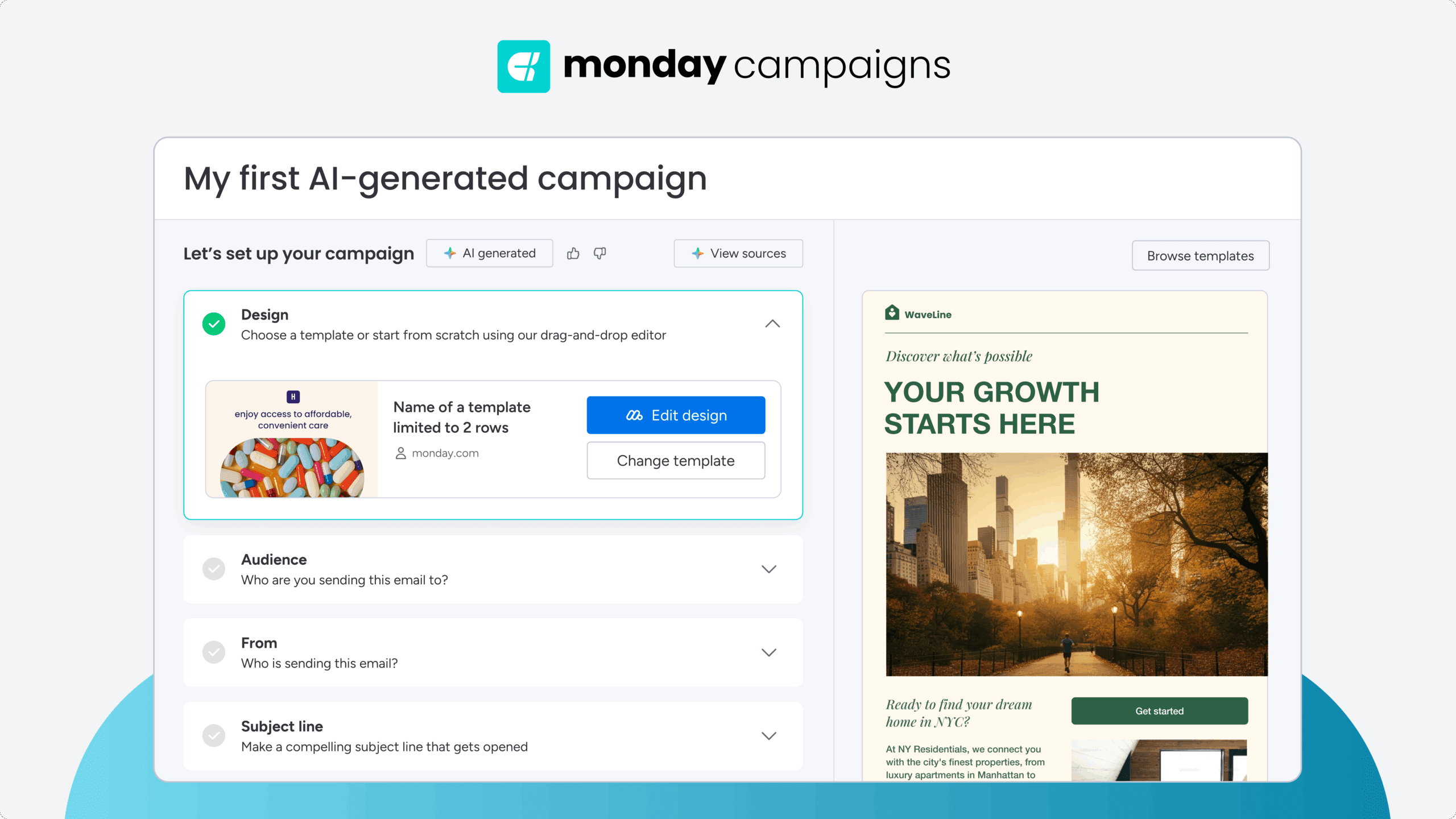
AI agents, alongside monday sidekick, monday’s built-in AI assistant, generate subject lines, rewrite copy by tone, and keep every email on-brand using your saved brand kit. They pull from CRM data and sales call notes to create messaging that reflects what your audience actually cares about, so you start with deep insights instead of a blank page. You can adjust tone, length, and style with simple prompts, and monday sidekick verifies brand consistency across every send to ensure whatever goes out the door accurately reflects your business.
Dynamic audience segmentation from CRM data

Segments in monday campaigns pull directly from your CRM contact data and update automatically as information changes, so your targeting stays accurate without manual list maintenance. AI suggests audience segments based on deal stage, engagement history, and behavioral patterns, helping you reach the right people at the right time. Because segmentation logic lives inside your CRM, you can build complex, multi-criteria audiences in seconds and trust that every send reflects the latest pipeline data.
Send-time optimization and workflow automation
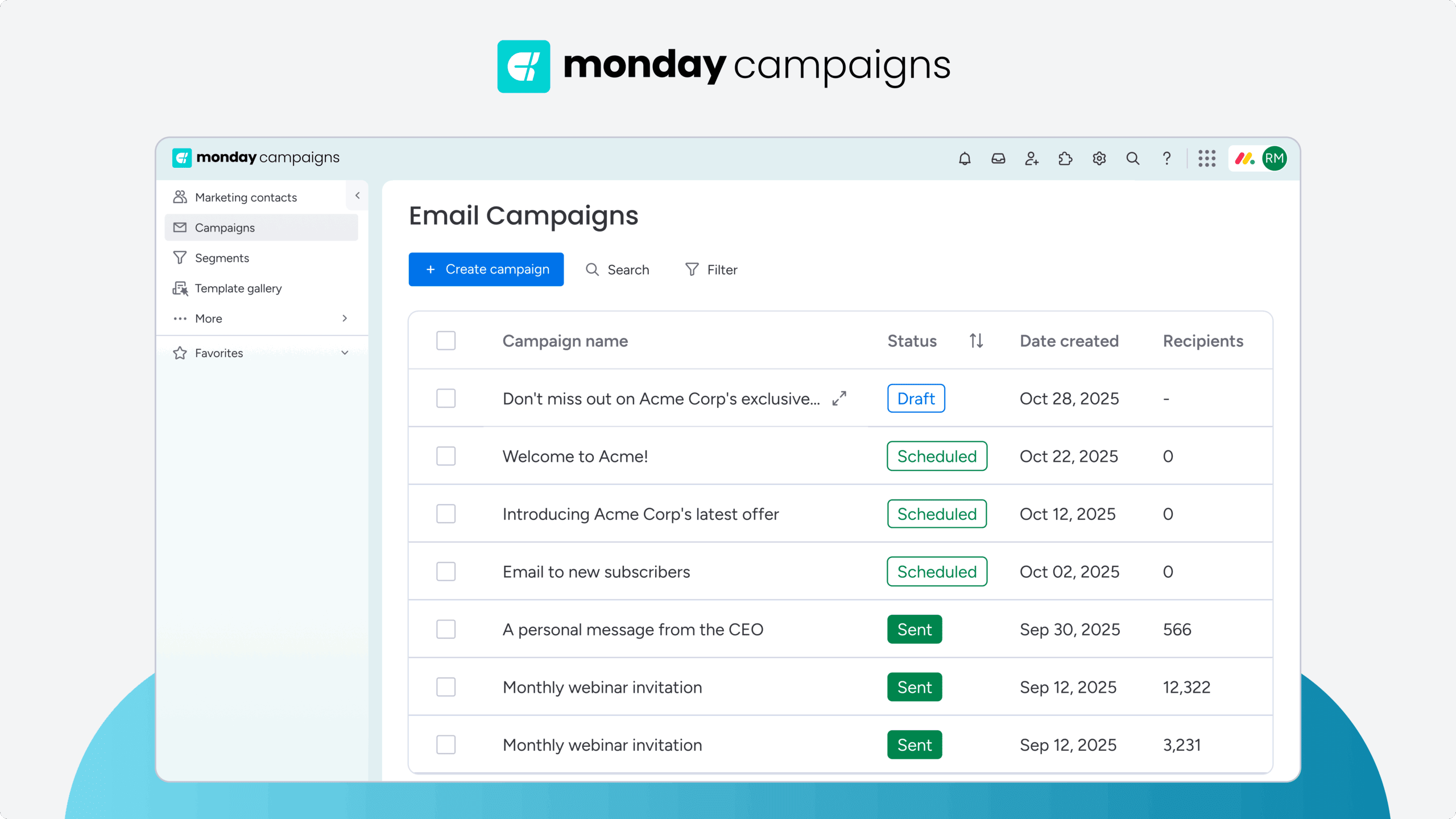
monday campaigns analyzes historical engagement patterns to recommend when each audience segment is most likely to open and act. You can schedule sends for a specific date, time, and timezone, or trigger campaigns automatically based on CRM updates like when a contact reaches a specific deal stage. Workflow automation removes manual intervention from your launch process, ensuring your messages reach the right inbox at the exact right moment without constant oversight.
Learn more: AI email automation
CRM-native performance insights and revenue attribution

Campaign analytics in monday campaigns track open rates, click rates, delivered rates, and unsubscribe rates in one dashboard, with every interaction logged directly on contact timelines in monday CRM. That connection lets you trace campaign engagement to lead conversion and closed-won deals, giving you a direct line between email activity and revenue outcomes. AI analyzes sales call notes and field data to surface optimization recommendations for future campaigns, so every send sharpens the next one and your team continuously improves performance based on real pipeline impact.

“With monday CRM, we’re finally able to adapt the platform to our needs — not the other way around. It gives us the flexibility to work smarter, cut costs, save time, and scale with confidence.”
Samuel Lobao | Contract Administrator & Special Projects, Strategix
“Now we have a lot less data, but it’s quality data. That change allows us to use AI confidently, without second-guessing the outputs.”
Elizabeth Gerbel | CEO
“Without monday CRM, we’d be chasing updates and fixing errors. Now we’re focused on growing the program — not just keeping up with it."
Quentin Williams | Head of Dropship, Freedom Furniture
“There’s probably about a 70% increase in efficiency in regards to the admin tasks that were removed and automated, which is a huge win for us.“
Kyle Dorman | Department Manager - Operations, Ray White
"monday CRM helps us make sure the right people have immediate visibility into the information they need so we're not wasting time."
Luca Pope | Global Client Solutions Manager at Black Mountain
“In a couple of weeks, all of the team members were using monday CRM fully. The automations and the many integrations, make monday CRM the best CRM in the market right now.”
Nuno Godinho | CIO at Velv
“monday.com provides developmental flexibility, operational efficiency, and data transparency — all in one place. We became a company that moved from chasing data to leading with it.”
Hyunghan Lee | Team Lead, Sandbox Network
"monday.com brought every part of our business into one connected space. The harmony between work management and CRM has become our operating system — giving us the clarity and confidence to scale.”
Jennifer Chinburg | Executive Vice President of Corporate Development & Brand, Chinburg Properties
“We just weren’t getting value from our old CRM. With monday.com, it's a thousand times better. Our sales teams are more informed, more consistent, and far more connected."
James Arnold | Chief Operating Officer, CenversaMaximize ROI on email marketing with AI
Email remains the most direct, measurable line to revenue. But that impact only materializes when the intelligence behind your sends actually works, when you know exactly who you are reaching, when they engage, and what happens after they click. The real divide isn’t between basic email platforms. It’s between systems that blast messages into the void and those that actively drive pipeline.
Disconnected software creates blind spots where campaign sends never map to closed deals, leaving marketing and sales perpetually out of sync. A shared workspace changes everything. When campaign insights and customer data live together, every send sharpens the next one. monday campaigns natively connects to monday CRM, uniting marketing execution and sales intelligence to create a full view of the customer lifecycle and track attribution from the very first click.
Try monday campaignsFAQs
Which AI is best for email?
The best AI for email depends on your specific goals. While tools like Gemini or Copilot handle personal inbox management, marketing teams rely on monday campaigns to create, send, and track campaigns directly connected to CRM data.
Is there a free AI email assistant?
There is a free AI email assistant available depending on your software ecosystem, such as Gemini for Google Workspace or Copilot for Microsoft 365. Marketers looking to test automated campaign management can also access a 14-day free trial of monday campaigns.
Can ChatGPT organize my emails?
ChatGPT cannot organize your emails on its own because it requires third-party plugins to securely access personal inboxes. Teams needing native, AI-powered campaign management should choose dedicated platforms built specifically for email workflows.
What is the best AI assistant for Outlook?
The best AI assistant for Outlook is typically Microsoft Copilot, which offers native email drafting and thread summarization. However, marketers managing large campaigns often switch to monday campaigns for advanced audience segmentation and real-time CRM syncing.
Are AI email assistants safe to use?
AI email assistants are safe to use when they come from established providers that enforce strict data encryption and comply with privacy regulations like GDPR. You should always review a platform's data governance policies before syncing your CRM contacts to ensure full compliance.
How much do AI email assistants cost?
Pricing varies widely. Basic inbox tools charge a low monthly fee while enterprise platforms price based on contact volume. Teams must evaluate the total cost of ownership, including integration fees and sending limits, to find the most cost-effective solution.

 Get started