

Creative teams produce campaigns that capture attention and drive results. Stunning visuals, compelling copy, and thoughtful design are essential, but even the best work can be lost without organized systems. Weeks after a campaign launch, high-resolution files may be difficult to locate, approved logos might be outdated, and important assets can sit buried across desktops, email threads, or shared drives.
Creative asset management organizes the entire lifecycle of creative work, from initial request through production, review, approval, and storage. Structured workflows reduce time spent searching for files, improve collaboration across teams, and ensure brand consistency across all channels. Modern tools also support automation of repetitive tasks such as version control, asset categorization, and performance tracking, helping creative teams work efficiently and scale their operations.
This helpful post explores the essential components of creative asset management, from standardizing intake processes to integrating AI for smarter workflows. It explains how to build processes that balance creative quality with production speed, highlights the differences between creative and digital asset management, and provides practical strategies to measure and optimize performance.
Key takeaways
- Standardized workflows streamline creative production: Structured intake forms, defined roles, and automated handoffs reduce delays and ensure projects move efficiently from request to delivery.
- Centralized asset management improves accessibility: Organizing files with version control and metadata allows teams to quickly locate approved visual, written, and design assets.
- Real-time visibility enhances collaboration: Dashboards and integrated review processes provide stakeholders with up-to-date project status, reducing miscommunication and bottlenecks.
- AI supports smarter creative operations: AI can automate asset categorization, generate briefs, and predict workflow bottlenecks, freeing teams to focus on high-value creative work.
- monday work management integrates workflows and asset tracking: Combining project management, approval processes, and asset organization in one platform enables teams to maintain efficiency, brand consistency, and measurable performance.
What are creative assets?
Creative assets are the visual and written materials that represent your brand across every customer touchpoint. They shape how audiences perceive your organization, from first impressions on social media to in-depth engagement with sales content.
Managing these assets goes far beyond file storage. Teams must control the entire lifecycle of creative work, including how assets are created, reviewed, approved, distributed, and evaluated for performance. Without structure, even high-quality work becomes difficult to reuse, update, or scale.
Core types of creative assets
Most organizations manage four primary categories of creative assets. Each requires distinct workflows, governance, and storage considerations.
1. Visual assets
Visual assets form the foundation of brand identity. They include:
- High-resolution logos.
- Product photography.
- Corporate headshots.
- Infographics.
- Raw video footage.
A single product launch can generate hundreds of visual files, such as lifestyle images for social channels, transparent PNGs for websites, and 4K video clips for paid campaigns. Each format serves a specific channel and requires different dimensions, file types, and usage rights. Without structured management, duplication and outdated files quickly become a risk.
2. Written content
Written assets carry your brand voice across every communication channel. These include:
- Approved ad copy.
- Video scripts.
- Blog drafts.
- Email templates.
- Brand messaging guidelines.
Version control is critical here. Messaging evolves, but core positioning and tone must remain consistent. Effective creative asset management ensures teams always access approved language, reducing the risk of inconsistent messaging across campaigns.
3. Design source files
Design files act as the working source materials behind published assets. They typically include:
- Adobe Creative Suite files such as Photoshop, Illustrator, and InDesign.
- Figma designs and collaborative prototypes.
- Reusable templates for presentations or social posts.
- Brand guideline documents.
Access to original design files allows teams to iterate quickly without rebuilding assets from scratch. Structured storage and permissions protect file integrity while maintaining agility.
4. Campaign-ready materials
Campaign materials are finished, distribution-ready assets prepared for specific channels and audiences. Examples include:
- Formatted social media posts
- HTML email templates
- Digital display ads
- Sales presentations
These assets often combine visual, written, and design components into finalized deliverables. Managing them effectively ensures teams can deploy approved assets quickly while maintaining traceability and performance tracking.
Effective creative asset management ensures teams always access approved language, reducing the risk of inconsistent messaging across campaigns.

What is creative asset management?
Creative asset management is a structured approach to organizing, producing, and optimizing creative work across its full lifecycle. It connects the systems, workflows, and governance that move projects from initial request through production, approval, distribution, and performance analysis.
Rather than treating assets as static files, creative asset management defines how work flows through the organization. Teams gain visibility into priorities, deadlines, ownership, and approval stages, turning fragmented request queues into coordinated production pipelines.
At its core, creative asset management rests on four operational components, outlined in the table below.
| Component | Function | Business impact |
|---|---|---|
| Request management | Standardizes how work enters the creative team through structured briefs | Captures all necessary details upfront, eliminating vague emails |
| Workflow coordination | Maps the path projects take from concept to completion | Enables parallel work streams and milestone tracking |
| Asset organization | Maintains searchable, metadata-rich libraries | Provides instant access to approved assets across global teams |
| Performance tracking | Measures creative impact and operational efficiency | Reveals cycle times, revision patterns, and asset ROI |
In practice, this means a marketing request submitted through a structured form can automatically generate a project, assign tasks based on team capacity and skill sets, and route assets through predefined review stages. Stakeholders are notified at the right time, approvals are logged, and once finalized, assets are tagged, version-controlled, and stored for reuse.
Creative asset management vs digital asset management
Creative asset management (CAM) and digital asset management (DAM) play very different albeit complementary roles within marketing operations. CAM focuses on how creative work gets produced. DAM focuses on how completed assets are stored, governed, and distributed.
The table below highlights the core differences.
| Aspect | Creative asset management | Digital asset management |
|---|---|---|
| Primary focus | Workflow orchestration and production management | File storage, organization, and retrieval |
| Scope | End-to-end creative process from ideation to approval | Post-production asset lifecycle and distribution |
| Key users | Creative teams, project managers, marketing leaders | Brand managers, external partners, sales teams |
| Main benefits | Faster production cycles, workload visibility, reduced bottlenecks | Brand consistency, rights management, searchability |
| Core features | Project tracking, proofing tools, resource management | Metadata tagging, advanced search, format conversion |
A simple way to think about it: CAM manages the production workflow, while DAM manages the asset library. CAM supports briefing, task coordination, reviews, and approvals. DAM ensures finalized assets are searchable, rights-managed, and accessible across teams.
Strong creative operations typically rely on both. Modern platforms like monday work management coordinate production workflows, while DAM systems manage long-term storage and distribution. Once approved, assets move from CAM into DAM, creating a structured and traceable lifecycle.
Why creative teams need organized workflows
Disorganized workflows create real business challenges, not just frustration. They disrupt brand consistency, delay campaigns, and reduce team morale. Structured workflows let creative teams focus on high-value work rather than administrative tasks.
Faster creative production and delivery
Efficiency drives competitive advantage. Organized workflows eliminate delays caused by unclear project details, slow approvals, and fragmented feedback. Standardized intake and automated handoffs enable multiple projects to progress simultaneously. Parallel workflows reduce time-to-market and let teams respond rapidly to market changes.
Research even shows that AI-enabled workflow automation can help practitioners reclaim up to 40% of their time by offloading repetitive administrative tasks.
Enhanced resource management for creative teams
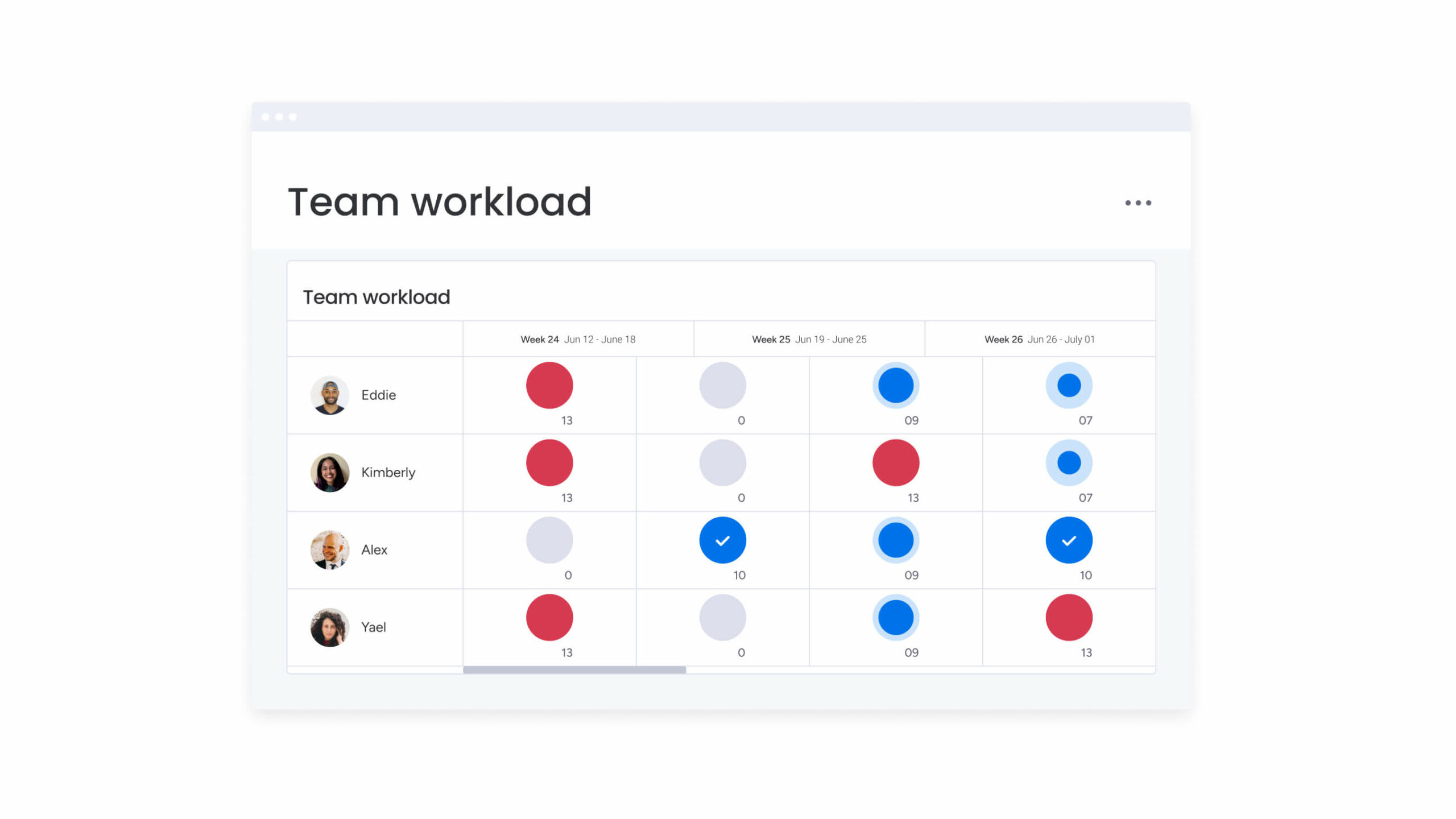
Creative talent is your most valuable resource — and your most expensive. Without visibility into workloads, managers guess who’s available instead of checking actual capacity.
This fragmented approach mirrors broader organizational challenges, where 71% of merchants report that AI tools have ‘limited to no’ business effect due to disconnected systems and workflows.
Organized workflows also show you every team member’s bandwidth in real time. A centralized platform with a workload view shows when designers are overbooked, enabling managers to route requests to available team members or adjust deadlines proactively.
This prevents burnout and makes sure high-priority work gets focused attention instead of getting buried in maintenance tasks.
Improved cross-team collaboration
Creative projects require input from marketing, product, legal, and leadership teams. Structured workflows eliminate silos by providing a single platform to track all projects.
Key collaboration benefits include:
- Transparent project status: Stakeholders see progress without sending follow-up emails.
- Timely input: Legal and compliance teams join reviews at the right moment, preventing last-minute delays.
- Contextual feedback: Comments and revisions happen directly within the workflow, not scattered across email threads.
This clarity reduces miscommunication, speeds feedback, and makes collaboration more effective.
Consistent brand standards
Brand consistency shapes market perception. Teams under pressure may use outdated templates or unapproved assets. Structured workflows integrate brand governance directly into the process. Mandatory approvals prevent noncompliant content from publishing. Version control ensures only current logos and messaging are used. When compliance is easy, brand identity is protected across campaigns.
5 core components of creative asset management systems
Efficient creative operations depend on connected capabilities that streamline requests, production, review, and analysis. The following five elements form the foundation of a scalable CAM system:
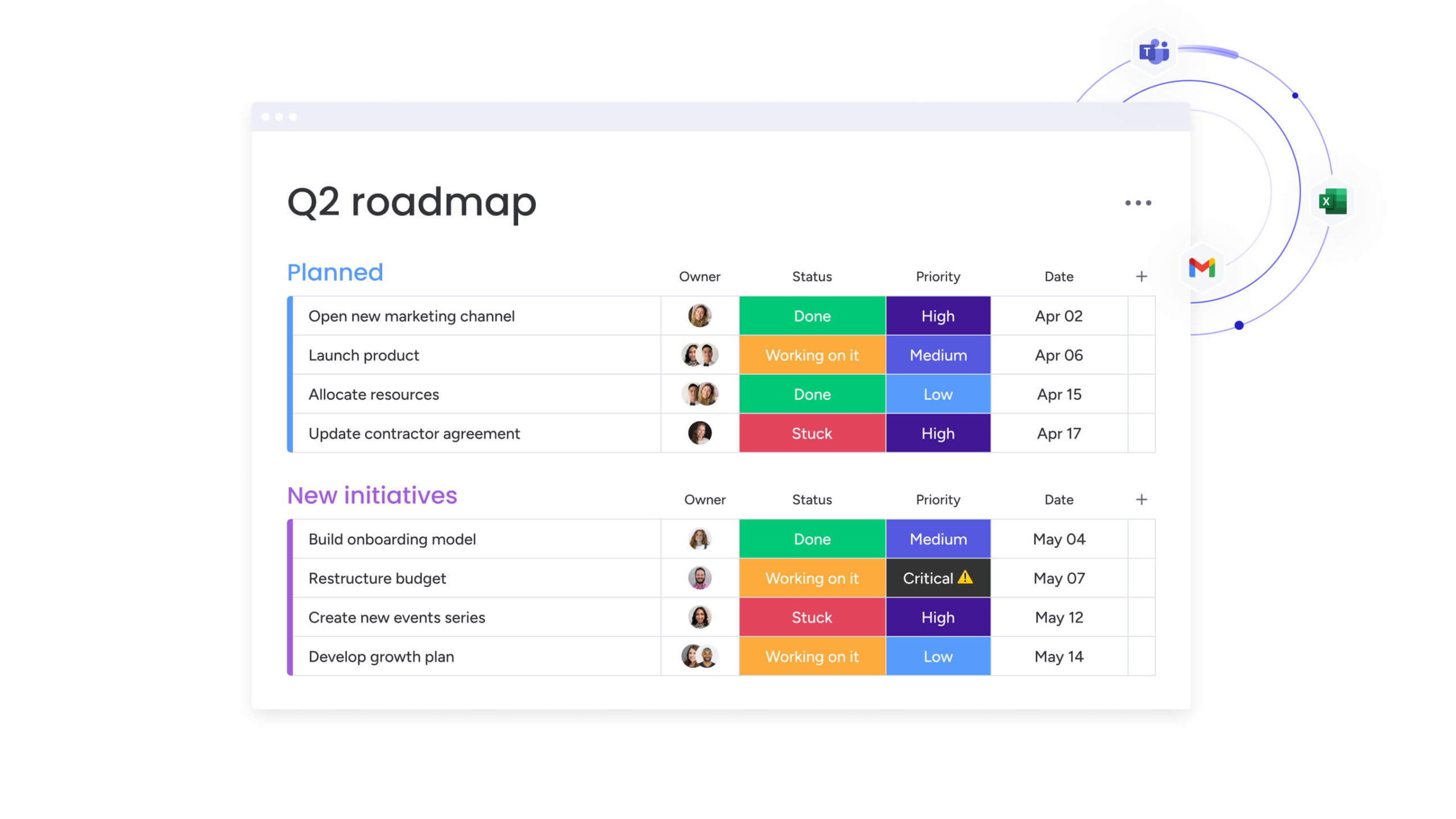
- Centralized creative request management: Standardizes intake and captures project details upfront. Dynamic forms collect specifications, deadlines, and deliverables to minimize delays before work begins. Solutions like monday work management automatically populate project boards so no request is overlooked.
- Automated workflow assignment: Routes projects based on type, required skills, and current capacity. Video projects go to motion graphics specialists, while blog posts route to content teams. Smart automation prevents overload and ensures urgent projects reach the right team members quickly.
- Real-time project visibility: Dashboards display campaign progress, approval bottlenecks, and resource allocation. Leaders can spot issues early, avoiding missed deadlines and reactive problem-solving.
- Integrated review and approval processes: Consolidates feedback and annotations in one system. Stakeholders provide time-stamped input on images, videos, and documents. Approval buttons create audit trails, accelerating review cycles without sacrificing quality.
- Creative performance analytics: Tracks cycle time, revisions, and on-time delivery. Data highlights systemic issues and improvement opportunities. Connecting operational metrics to performance demonstrates team impact and guides process optimization.
How AI enhances creative asset management
AI accelerates creative operations by taking on repetitive administrative tasks and analyzing complex patterns. Keep in mind that it doesn’t replace creative talent but allows teams to focus on strategic, high-value work.
Here’s how AI transforms the creative workflow at every stage.
Smart content categorization
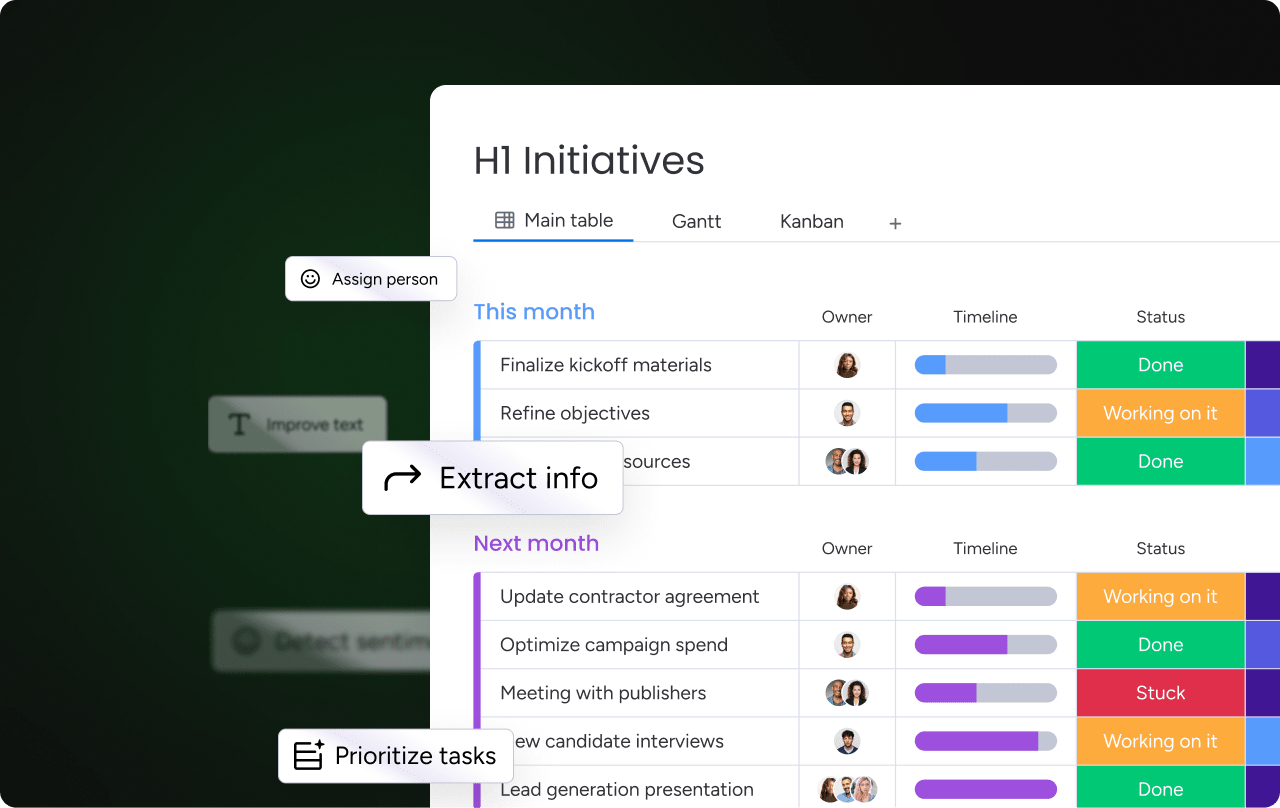
Manual file tagging consumes hours of productive time. AI analyzes assets as they are uploaded and automatically tags them based on content, color, sentiment, and format.
This capability addresses the massive scale of digital content management, where organizations like the U.S. National Archives have 2,419,233 textual-page scans online representing only 4.258% of their total collection — demonstrating the crucial need for automated organization and metadata systems.
An image of a product launch event is tagged with “product,” “launch,” “event,” “Q4,” and relevant product names. Automatic categorization ensures assets are discoverable across the organization, regardless of file naming conventions. Modern platforms like monday work management can even categorize incoming requests and assets continuously through advanced asset management software features (essentially keeping libraries organized without manual effort).
Automated creative brief generation
Starting projects often requires translating vague requests into actionable briefs. AI accelerates this phase by generating comprehensive briefs from minimal input.
By analyzing request types and referencing historical campaign data and brand guidelines, AI produces detailed briefs that include:
- Project objectives: What the campaign aims to achieve.
- Key messages: Core themes and value propositions.
- Required deliverables: Specific assets needed for each channel.
- Technical specifications: Format requirements and brand guidelines.
This gives creative teams strong starting points while ensuring briefs are complete and consistent, saving project managers hours of preparation time.
Intelligent resource allocation
Resource management becomes predictive with AI assistance. Algorithms analyze historical project data to estimate task duration and match work to real-time team availability and skills.
The system recommends the most suitable person for each task—not only who is free but also who has successfully delivered similar work previously. This prevents overallocation and ensures projects are staffed efficiently for optimal outcomes.
Predictive workflow optimization
AI functions as a continuous improvement engine for creative operations. By monitoring workflow patterns over time, it identifies inefficiencies that managers might miss.
It predicts potential bottlenecks, such as specific reviewers who consistently delay Friday approvals, and recommends process adjustments. Modern platforms like monday work management analyze project boards continuously, flag risks by severity, and provide proactive insights. This helps teams refine workflows consistently, remove friction, and increase velocity without compromising quality.
7 best practices for organizing creative workflows
Implementing creative asset management systems requires the right technology and approach. These practices explored below provide a framework for efficient creative operations that can scale with your business.
1. Map your complete creative process
Understanding your workflow is essential before automation. Document every step a project takes from idea to archiving, involving input from designers, writers, project managers, and stakeholders.
This mapping uncovers hidden delays—informal approvals, file conversions, or undocumented handoffs. Visualizing the current state provides a blueprint for streamlining. Focus on eliminating redundancies and clarifying ownership at each stage.
2. Define roles and responsibilities
Ambiguity creates delays. Every workflow benefits from clearly defined roles using frameworks like RACI (Responsible, Accountable, Consulted, Informed).
This clarifies:
- Who does the work: Individual contributors and their specific tasks.
- Who owns the outcome: Decision-makers accountable for results.
- Who provides input: Subject matter experts and stakeholders.
- Who needs updates: Teams requiring status information.
Establishing these hierarchies upfront prevents bottlenecks and ensures accountability throughout the project lifecycle.
3. Standardize creative brief templates
Quality output begins with quality input. Standardized brief templates ensure creative teams receive consistent, complete information for every request.
Robust templates prompt requesters for business objectives, target audiences, deliverables, and specifications. This reduces clarification emails that delay project starts and ensures alignment before work begins. Templates should evolve based on feedback, addressing common gaps.
4. Automate approval workflows
Automating approvals accelerates production. Automation ensures work moves instantly to the next reviewer once tasks are complete.
Automation rules also handle complex logic-routing low-risk assets for quick manager approval while sending high-stakes materials through legal and executive review.
5. Connect your creative tech stack
Creative teams work across multiple applications. Modern workflows integrate these tools rather than forcing context switching.
Connecting project management platforms with tools like Adobe Creative Cloud allows designers to see tasks and update statuses without leaving their creative applications. Integration with communication platforms ensures notifications reach teams where they already work, creating a seamless digital environment.
6. Implement smart version control
Version control maintains quality and consistency. Establish naming conventions and enforce them across all assets and projects.
Modern creative asset management systems automatically handle this, stacking new versions while preserving history. Stakeholders always access the latest iteration while maintaining a full audit trail. Version control prevents feedback on outdated drafts and reduces confusion during rapid cycles.
7. Build continuous feedback systems
Workflows improve through iteration. Regular retrospectives after campaigns allow teams to discuss successes and challenges openly.
Gather quantitative data from your systems to identify trends. If copy review consistently takes three times longer than planned, adjust the process. Build feedback loops that turn lessons learned into improvements, ensuring workflows evolve with team needs.

How to measure creative operations success
Creative work is often judged on taste and instinct, but creative operations should be measured with data. Clear performance tracking shifts the conversation from subjective opinion to operational evidence.
When teams quantify delivery speed, resource use, and business impact, they gain credibility with leadership and clarity for internal improvement. Defined metrics create a structured foundation for optimization, smarter planning, and stronger alignment with commercial goals.
Project completion metrics
These foundational metrics reveal the reliability and efficiency of your creative workflow:
- On-time delivery rate: The percentage of projects completed by agreed deadlines indicates overall process health.
- Cycle time: Total duration from request to delivery helps establish realistic service level agreements.
- Scope creep frequency: How often projects expand beyond initial briefs highlights the need for clearer upfront definitions.
Tracking these metrics consistently identifies patterns and opportunities for improvement. Dashboards on monday work management visualize trends automatically, making it easier to spot issues before they become systemic.
Creative resource utilization
Understanding how your team allocates time is essential for sustainable growth:
- Capacity utilization: Measures productive project time versus administrative overhead.
- Skill deployment effectiveness: Tracks whether senior talent focuses on strategic work or gets pulled into routine production.
These insights support resource planning. Data showing consistent overutilization justifies adding headcount or freelance support during peak periods.
Production turnaround times
Detailed tracking uncovers bottlenecks in your creative pipeline. Break down production timelines by asset type and stage to locate delays.
If analysis shows legal review accounts for forty percent of total cycle time, creative leaders gain concrete evidence to optimize processes. Specific data turns vague complaints into actionable improvement initiatives.
Creative asset ROI
Linking creative output to business outcomes demonstrates strategic value:
- Asset usage rates: Track how often created assets are deployed by sales and marketing teams.
- Campaign performance correlation: Connect creative assets to engagement, conversions, and other measurable results.
When teams quantify delivery speed, resource use, and business impact, they gain credibility with leadership and clarity for internal improvement. Defined metrics create a structured foundation for optimization, smarter planning, and stronger alignment with commercial goals.
How monday work management supports creative operations
Creative workflows break down when requests, assets, reviews, and reporting live in separate tools. Teams need a single system that connects production stages without adding complexity.
monday work management provides that coordination layer. It adapts to how your team actually works, centralizing briefs, timelines, assets, and communication in one workspace. Whether managing social content or global campaigns, workflows mirror real production stages rather than forcing rigid structures.
The table below outlines how the platform compares to traditional solutions.
| Capability | monday work management approach | Traditional solutions |
|---|---|---|
| Workflow flexibility | Fully customizable boards and automations matching any creative process | Rigid, linear workflows with limited adaptation |
| AI integration | Built-in AI Blocks and Digital Workers for categorization, analysis, and optimization | Basic search or completely absent AI capabilities |
| Collaboration scope | Unified workspace for creative teams, stakeholders, and external partners | Siloed focus excluding cross-departmental users |
| Scalability | Seamless scaling from small teams to global enterprise operations | Purpose-built for specific team sizes requiring migration |
| Integration ecosystem | 200+ native integrations including Adobe Creative Cloud and major platforms | Limited connectivity creating data silos |
AI-driven operational support
AI capabilities reduce manual administration and surface risks early:
- Automatic asset categorization.
- Action item extraction from meetings.
- First-draft content generation.
- Continuous project risk analysis.
AI Blocks and the Project Analyzer Digital Worker monitor boards in real time, helping teams maintain velocity without sacrificing oversight.
Structured collaboration without bottlenecks
Review and approval processes stay centralized and traceable:
- Shared workspaces for internal and external stakeholders.
- Automated notifications at the right review stage.
- Logged approvals and version history,
This ensures governance remains strong while feedback cycles move faster.
Real-time leadership visibility
Dashboards provide operational clarity across teams:
- Resource allocation by department.
- Budget tracking.
- On-time delivery rates.
Instead of reacting to missed deadlines, leaders can identify pressure points early and rebalance workloads proactively.
For teams running integrated campaigns across video, digital, and print, the platform becomes the coordination engine that connects execution, governance, and performance measurement in one structured system.

“monday.com has been a life-changer. It gives us transparency, accountability, and a centralized place to manage projects across the globe".
Kendra Seier | Project Manager
“monday.com is the link that holds our business together — connecting our support office and stores with the visibility to move fast, stay consistent, and understand the impact on revenue.”
Duncan McHugh | Chief Operations OfficerBuild your creative operations advantage now
Effective creative asset management turns scattered files and disorganized workflows into strategic operations. Transitioning from reactive file management to proactive workflow orchestration helps teams deliver faster, maintain brand consistency, and show measurable business impact.
Success requires more than storage solutions: it demands workflow orchestration, cross-team collaboration, and continuous optimization. Organizations treating creative operations as strategic functions gain advantages in speed, quality, and market responsiveness.
Modern platforms like monday work management combine these capabilities in one place. AI-powered categorization, automated workflows, and real-time dashboards provide the infrastructure creative teams need to scale efficiently. Complex manual processes transform into streamlined workflows that evolve with business needs.
Make creative asset management a strategic advantage and build more efficient creative operations today.
Try monday work managementFrequently asked questions
How long does it take to implement a creative asset management system?
Implementing a creative asset management system typically requires two to four weeks for the basic setup and workflow mapping. Full adoption usually occurs over two to three months as teams integrate legacy assets and refine their processes.
What is the difference between creative asset management and project management?
Creative asset management focuses on the creative lifecycle, including visual proofing, brand compliance, and asset rights. Project management covers broader coordination, timelines, and resource allocation across any business function.
Can creative asset management work for small creative teams?
Creative asset management is highly effective for small teams by reducing administrative tasks through organized workflows and automation. This allows limited team members to focus on creative output instead of coordination.
How much does creative asset management software cost?
Creative asset management software ranges from $10 to $50 per user monthly for comprehensive platforms. Enterprise tiers offer advanced security, governance features, and dedicated support at higher pricing levels.
What file types can creative asset management systems handle?
Creative asset management systems support all creative file formats, including Adobe Creative Suite files (PSD, AI, INDD), standard video and audio files, high-resolution images, documents, and web-based assets.
How does creative asset management improve remote collaboration?
Creative asset management provides a centralized creative workspace with real-time status updates and contextual feedback. This setup removes communication barriers and ensures distributed teams can access assets efficiently.

 Get started