



Late-stage deals go quiet. Reps scramble through inboxes hunting for call notes. Leadership asks for a forecast they can actually trust. That gap between what’s happening in your pipeline and what you can see is exactly why sales pipeline management software matters. The real challenge isn’t finding a platform with a long feature list. It’s finding one your team will actually use, one that shows what’s moving, what’s stuck, and where revenue risk is building without turning pipeline reviews into cleanup sessions.
We’ll break down what sales pipeline management software actually does, compare the leading options, and highlight the features that matter most for visibility, forecasting, and team coordination. You’ll also see how AI is changing pipeline management and how to choose a system that fits the way your team already sells. Platforms like monday CRM are built to give revenue teams that clarity without the complexity, helping you move from scattered data to confident decision-making.
Try monday CRMWhat sales pipeline management software actually does for revenue teams
Why do deals really slip away? In many organizations, missed numbers trace back to something simple: a follow-up that never happened or a stalled opportunity no one flagged in time. Sales pipeline management software closes that gap by giving the entire team a shared, real-time view of every deal in motion.
This software turns your sales process into a visual sequence of stages, from first touch to closed-won.
Rather than patching together spreadsheets, inboxes, and disconnected notes, teams work from one system that cuts waste and restores focus.
Here’s how the right platform changes that:
- Visual deal tracking: Every deal lives in one system with its own history, owner, and next action, removing the guesswork for your reps.
- Data-driven forecasting: Revenue operations leaders can finally pull forecasts based on actual data, rather than relying on a rep’s Friday afternoon optimism.
- Automated follow-ups: The system triggers next steps and surfaces neglected deals automatically.
Those reclaimed hours come from automation that nudges follow-ups forward and brings neglected deals back into view. For leadership, that means the predictability you need when the CEO asks hard questions.
9 best sales pipeline management platforms compared
Forcing a unique sales motion into a rigid pipeline tool kills speed fast. Some platforms require dedicated admins and months of implementation before teams can use them effectively. Others are designed for quick rollout. Pick the right architecture now, and you won’t have to reshape your process around software that was never built for it.
The table below compares 9 platforms by team size, sales cycle complexity, and technical demands. Use it to find the option that best matches how your team actually operates.
| Platform | Use case | Standout pipeline feature | Starting price |
|---|---|---|---|
| monday CRM | Mid-market revenue teams needing fast deployment and cross-functional visibility | No-code pipeline customization with AI-powered workflows | $12/user/month* |
| Pipedrive | Small sales teams with straightforward deal cycles | Activity-based pipeline tracking with visual deal management | $14/user/month* |
| HubSpot Sales Hub | Teams already using HubSpot marketing tools | Tight marketing-to-sales data integration within ecosystem | Free tier available; paid plans from $20/user/month* |
| Salesforce Sales Cloud | Large enterprises with dedicated admin resources | Deep customization and extensive integration ecosystem | $25/user/month*; enterprise pricing varies |
| Freshsales | Mid-market teams wanting built-in AI without complexity | Freddy AI for lead scoring and next-best-action suggestions | Free tier available; paid plans from $15/user/month* |
| Zoho CRM | Budget-conscious teams already in Zoho ecosystem | Feature-rich platform with AI-powered lead scoring (Zia) | $14/user/month* |
| Close | Outbound-heavy inside sales teams running high call volume | Built-in power dialer and SMS integrated with pipeline | $49/user/month* |
| Keap | Solopreneurs and very small businesses | All-in-one CRM with invoicing and payment processing | $249/month for 2 users* |
| Copper | Google Workspace-native teams | Automatic data capture from Gmail and Google Calendar | $29/user/month* |
Prices may vary based on plan, billing cycle, or region.
1. monday CRM
Best for: Mid-market revenue teams needing fast deployment and cross-functional visibility
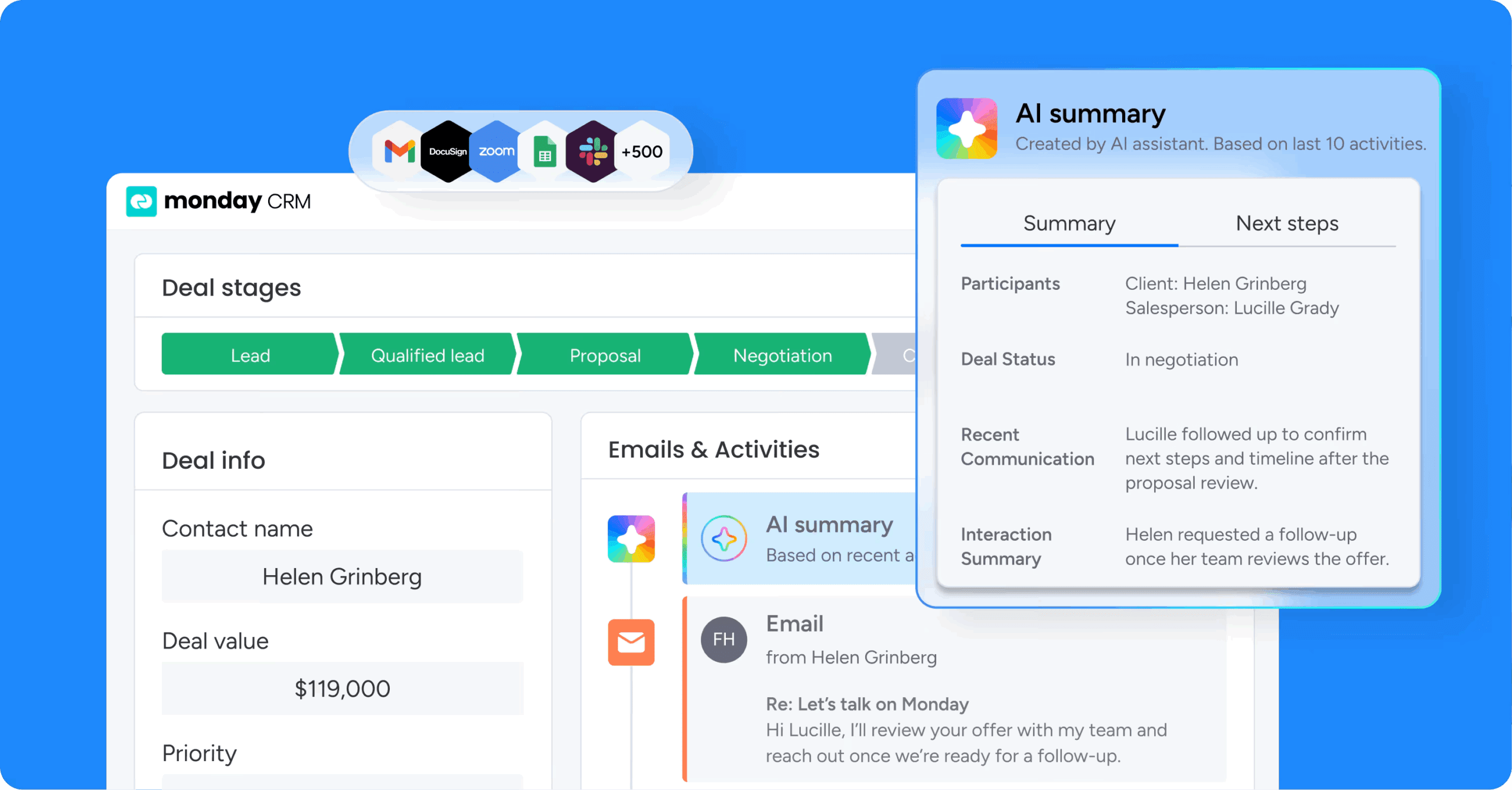
monday CRM gives revenue teams a customizable, no-code pipeline platform that fits how they sell, and how they need to report. Around 250,000 customers use monday.com across the broader platform, and monday CRM brings that same flexible foundation into sales and account management.
Use case
monday CRM works well for revenue teams that need speed and want to adjust their pipeline without filing IT tickets. Deals, contacts, and conversations stay in one central workspace. Here’s a common scenario: leads come in through website forms or social campaigns, company details get enriched with Crunchbase data, and then ownership, qualification, and outreach begin. From there, reps push qualified opportunities through a visual pipeline while every email, meeting note, and next step remains tied to the correct record in Emails & Activities.
Key features
- AI agents for pipeline execution: Deploy monday CRM agents that autonomously handle repetitive tasks like lead qualification, follow-up scheduling, and data enrichment, freeing reps to focus on high-value conversations.
- Visual pipeline management: See where deals stand at a glance with a visual pipeline, then customize it with drag-and-drop deal stages as your process changes.
- Centralized communication tracking: Log and track every interaction, including emails, meetings, and notes, in a single Emails & Activities timeline, so handoffs don’t turn into a guessing game.
- Real-time sales analytics: Use code-free dashboards to track pipeline status, forecasting, team performance, and activity. Manage quotas and attainment over time without writing a single line of code.
- Sales forecasting and reporting: Build forecasts and projections, then track forecast vs. actual sales. Drill down by month, sales rep, or any criteria your leadership team asks for at 4:55 p.m.
Pricing
monday CRM starts at $12/user per month (billed annually) on the Standard plan, with Pro and Enterprise tiers available for teams needing advanced capabilities. A free trial is available for teams to evaluate the platform before committing.
Why it stands out
- Flexible setup without the drama: Teams customize pipelines, fields, and workflows in minutes, so the CRM matches your sales motion, not the other way around.
- Built to run cross-functional deals: Revenue teams work seamlessly with legal and finance from the same system, with shared context and updated statuses.
- CRM+ coverage: Teams use monday CRM for lead management, deal management, account management, and post-sale work like onboarding progress, renewals, and collection tracking.
2. Pipedrive
Best for: Small sales teams with straightforward deal cycles

Pipedrive puts the pipeline front and center, literally. Built by salespeople for salespeople, it gives SMB sales teams a visual, drag-and-drop interface designed to move deals forward. Every feature ties back to activity-based selling, making it a focused choice for reps who want to know exactly what to do next.
Use case
Pipedrive is aimed at small and mid-sized sales teams that want a direct, deal-centric CRM without the added layer of cross-functional complexity.
Key features
- Visual pipeline management: Drag-and-drop deal cards across customizable stages, with “deal rotting” alerts that flag stalled opportunities before they go cold.
- Activity-based selling: Built-in activity reminders, calendar sync, and next-step prompts keep reps focused on the actions that actually move deals forward.
- Weighted forecasting and reporting: Stage- and deal-level probability settings feed into revenue forecasts, giving sales managers a real-time view of pipeline health.
Pricing
Pipedrive starts at $14/user per month (billed annually) on the Essential plan, with Growth, Premium, and Ultimate tiers available for teams needing more advanced capabilities. A 14-day free trial is available, though there is no free plan.
Considerations
- Core capabilities such as email sync, meeting scheduling, and advanced reporting are reserved for Growth and above, so the Essential plan can feel limiting fairly quickly.
- Pipedrive focuses tightly on sales execution. Teams needing post-sales tracking, broader departmental visibility, or extensive customization without developer support may find it too narrow.
3. HubSpot Sales Hub
Best for: Teams already using HubSpot for marketing who want unified pipeline and revenue visibility

HubSpot Sales Hub connects marketing and sales data inside a single CRM ecosystem, giving revenue teams a unified view from first touch to closed deal. It’s built for SMB and mid-market teams that want visual pipeline management, AI-assisted deal progression, and native quote-to-cash without stitching together separate platforms.
Use case
For teams already using HubSpot for marketing, Sales Hub is a natural fit because leads, pipeline activity, and revenue reporting can all live in one connected environment. The platform eliminates the friction of passing qualified leads between disconnected systems, keeping attribution clean and handoffs smooth.
Key features
- Visual deal pipelines with AI assistance: Drag-and-drop pipeline boards with customizable stages, predictive deal scoring, and Smart Deal Progression that suggests CRM updates and follow-ups after meetings.
- Forecasting and pipeline reporting: Converts pipeline data into revenue projections with rep-level insights, giving sales managers the visibility to coach based on data rather than instinct.
- Integrated quote-to-cash: Native CPQ, billing, and payments via Revenue Hub keep late-stage deals moving without switching platforms. Reps can generate quotes and collect payment directly from the deal record.
Pricing
HubSpot Sales Hub offers a free tier with basic contact and deal management, while paid plans start at $90/seat per month (billed annually) on the Professional tier. Each paid tier includes monthly HubSpot Credits for AI features, with additional credits available at $0.010 each.
Considerations
- Features like pipeline rules, stage validations, and event-based automation do not open up until Professional or Enterprise, and those tiers also include mandatory onboarding fees that can raise total cost quickly.
- Companies not already invested in HubSpot’s marketing tools may end up paying for ecosystem value they do not need, while more advanced CPQ features require a separate Revenue Hub subscription in addition to Sales Hub.
4. Salesforce Sales Cloud
Best for: Large enterprises with dedicated admin resources and complex, multi-layered sales processes

Salesforce Sales Cloud brings enterprise-grade pipeline management to organizations running complex go-to-market strategies. It combines AI-powered opportunity scoring, hierarchical forecasting, and deep customization through its proprietary development environment. For organizations with dedicated Salesforce administrators and the resources to match, it delivers deep pipeline capabilities.
Use case
Salesforce Sales Cloud is designed for large enterprises that need fine-grained pipeline control across product lines, territories, and approval structures, with AI insights layered throughout the workflow.
Key features
- Pipeline Inspection: A consolidated workspace showing week-over-week deal changes, activity timelines, and AI insights with inline editing so managers can act without leaving the view.
- Collaborative Forecasts: Supports role- and territory-based rollups, custom forecast groupings, and configurable guidance, giving revenue leaders a structured view of what’s likely to close.
- Agentforce Pipeline Management: AI agents surface specific next-step recommendations directly inside Pipeline Inspection and Slack, with rationale attached so reps know what to do and why.
Pricing
Salesforce Sales Cloud offers multiple tiers ranging from $25/user/month on the Starter Suite to $550/user/month for Agentforce 1 Sales (billed annually). Important pipeline features like Pipeline Inspection sit behind higher-tier editions or require additional paid add-ons such as Revenue Intelligence, Sales Engagement, and Sales Planning, which can significantly increase total cost beyond the base license.
Considerations
- High implementation overhead: Getting full value from Salesforce usually requires dedicated admins, ongoing configuration, and significant onboarding investment, so teams without in-house expertise often struggle.
- Feature access tied to higher tiers: Important pipeline features like Pipeline Inspection and advanced forecasting sit behind Enterprise editions or additional paid products, which can drive total cost well beyond the base license.
5. Freshsales
Best for: Mid-market teams wanting built-in AI without complexity

Freshsales brings AI-powered pipeline management to sales teams that want built-in intelligence without a heavy setup. The platform targets startups, SMBs, and mid-market teams, with Freddy AI surfacing deal predictions and suggested next steps directly inside the pipeline view. For teams that want multichannel engagement (email, phone, chat) all in one place, Freshsales removes the need to juggle separate tools.
Use case
Freshsales is a strong choice for growing sales teams that want AI-assisted prioritization and built-in communication channels, but do not want the weight of a large enterprise CRM.
Key features
- Freddy AI deal insights: Tags deals as “Likely to Close,” “At Risk,” or “Gone Cold,” and groups them by prediction so reps know exactly where to focus their time.
- Visual Kanban pipeline: Drag-and-drop deal management with multiple pipeline support, custom stage probabilities, and rotting-deal alerts to flag stalled opportunities.
- Built-in phone and email: Reps make calls and send emails directly from the CRM, with automatic call logging and activity timelines keeping every interaction on record.
Pricing
Freshsales offers a free tier for up to 3 users, with paid plans starting at $9/user/month (billed annually) on the Growth plan. AI Deal Insights become available from the Pro plan onward at $39/user/month, and annual billing saves 20% compared to monthly plans.
Considerations
- Freddy AI Deal Insights depends on enough historical data to produce useful predictions. Newer teams or low-volume teams may not get immediate value from it.
- The number of available pipelines varies by plan tier: 1 on Growth, 10 on Pro, 25 on Enterprise. Lower-tier customers managing several motions may feel constrained.
6. Zoho CRM
Best for: Budget-conscious teams already in Zoho ecosystem

Zoho CRM packs a wide range of pipeline management capabilities into an affordable package, making it a practical choice for SMB and mid-market teams that want depth without the enterprise price tag. The platform’s AI assistant, Zia, analyzes deal data to surface forecasts and suggested actions, giving sales leaders more signal and less guesswork across their pipeline.
Use case
Zoho CRM works well for revenue teams that need multiple pipelines, tighter process control, and AI-assisted forecasting, especially if they are already operating within the wider Zoho ecosystem.
Key features
- Multiple pipelines with stage builder: Design distinct pipelines by product line, region, or buyer type, each with custom stages, probability mapping, and automation rules to keep deals moving.
- Blueprint process enforcement: Mandate specific fields, approvals, and actions at each pipeline stage to reduce deal leakage and keep reps executing consistently.
- Zia AI forecasting: Analyze pipeline data to predict deal outcomes, flag anomalies in sales patterns, and recommend optimal times to contact prospects.
Pricing
Zoho CRM starts at $14/user per month (billed annually) on the Standard plan, with Professional, Enterprise, and Ultimate tiers available for teams needing advanced capabilities. A free tier is available for up to 3 users, and AI features become available on Enterprise and above.
Considerations
- With so many capabilities packed in, the platform carries a steeper learning curve. Teams that value fast adoption may need weeks of setup and training before they see the full payoff.
- Higher-end features like Cadences and some Zia recommendations require the Enterprise tier and enough historical data. That can limit near-term impact for smaller or newer teams.
7. Close
Best for: Outbound-heavy inside sales teams running high call volume

Close is built for outbound sales teams that depend on call volume, sequences, and speed. No stitching together separate tools, just calling, email automation, and pipeline management in one place. It’s a strong fit for inside sales teams running high-velocity outreach.
Use case
For outbound-focused sales teams, Close offers a single workspace for calls, emails, SMS, and pipeline activity. The benefit? Far less context switching.
Key features
- Built-in power dialer (Growth and Scale plans): Reps work through lead lists fast with automatic call logging, voicemail drops, and call recording, keeping pipeline data accurate without manual data entry.
- Customizable pipeline views: Kanban-style management with filtering by rep, date, or Smart Views. You also get Expected Value forecasting based on deal value and confidence at the opportunity level.
- AI-assisted pipeline guidance: Pipeline Guidance flags at-risk deals and suggests the next move. Chloe Chat lets reps ask questions about their pipeline and take action directly in the app.
Pricing
Close starts at $49/user per month (billed annually) on the Essentials plan, with Growth and Scale tiers available for teams needing advanced capabilities. Telephony (calls, SMS) is usage-based and billed separately, and AI features come with included credits tied to your plan.
Considerations
- The power dialer and workflow automation don’t appear until the Growth and Scale plans, so lower-tier teams should expect more manual work to keep pipeline activity moving.
- Close is built specifically for outbound motions. Teams that need extensive post-sales tracking or broad visibility across other departments will likely find it too specialized.
8. Keap
Best for: Solopreneurs and very small businesses needing all-in-one CRM with invoicing and payment processing

Keap combines CRM, marketing automation, invoicing, and payment processing into one platform designed for small businesses. It targets solopreneurs, consultants, and small teams who want to manage customers from first contact to payment without juggling multiple platforms. The tight integration between pipeline stages and automated follow-up sequences makes Keap worth considering.
Use case
Keap gives small business owners one place to capture leads, nurture contacts, close deals, and collect payment, all without jumping between disconnected tools.
Key features
- Stage-based automations: Trigger emails, SMS reminders, and workflows automatically when a deal moves between pipeline stages.
- Multi-pipeline support: Build separate pipelines for different products, services, or teams, each with its own automation logic.
- Built-in invoicing and payments: Generate quotes, send invoices, and collect payment through Keap Pay directly from a closed deal without requiring a third-party billing platform.
Pricing
Keap starts at $299/month (billed annually) for 2 users, with additional users at $39/user/month and a required one-time implementation fee of $500. A 14-day free trial is available with no credit card required.
Considerations
- With a starting price of $299/month plus required implementation, the upfront commitment can be hard to justify for solo operators or very small teams on tight budgets.
- SMS automation works only in the US, and the mobile app is limited to five English-speaking markets. That narrows its usefulness for teams outside those regions.
9. Copper
Best for: Google Workspace-native teams needing automatic data capture from Gmail and Google Calendar

Copper lives entirely inside Google Workspace, capturing emails, contacts, and calendar events automatically so your team doesn’t have to. If you live in Gmail, this feels like a natural extension of your inbox, not a clunky separate platform. Manual data entry kills momentum. Copper fixes that by keeping your pipeline moving without the busywork.
Use case
Copper works best for small teams running straightforward sales cycles in Google Workspace who want to eliminate manual data entry.
Key features
- Zero-touch data capture: Pulls contact details from email signatures and logs meetings directly from Google Calendar. Records stay current without reps lifting a finger.
- Visual pipelines: Drag-and-drop deal boards give you a fast, clear read on exactly where your revenue stands.
- Gmail-native: Manage deals, update stages, and track conversations without ever leaving your inbox.
Pricing
Copper starts at $29/user per month (billed annually) on the Basic plan. Advanced automation and reporting unlock on higher tiers.
Considerations
- Teams outside Google Workspace should move on. Copper’s main advantage depends almost entirely on that ecosystem.
- Customization on the pipeline side is fairly limited, so complex, multi-stage revenue operations are likely to outgrow it quickly.
7 key features to look for in a sales pipeline management platform
You don’t need another vague CRM promise. What matters is whether the platform gets used and helps close deals. The gap between a system that drives revenue and one that gathers dust usually depends on a small set of capabilities.
Think about your current pipeline data. When a VP of Sales preps for a board update or RevOps heads into a forecast call, these seven features have an outsized impact:
- Visual pipeline customization and drag-and-drop stages: A visual pipeline gives your team an immediate read on every deal from prospecting to closed-won. Prioritize platforms that let you rename stages and filter views without involving developers.
- Sales automation and AI-powered workflows: Manual updates drain selling time fast. Good automation handles the repetitive work so reps can stay focused on revenue-producing activity. Watch how easily custom triggers can be built without IT support.
- Real-time dashboards and sales pipeline tracking: Outdated reports create bad decisions. Leaders need sales reporting they can trust in the moment. Look for customizable widgets and drill-down reporting that surface both team and individual performance.
- Centralized contact, lead, and deal management: Once customer history is scattered across inboxes and spreadsheets, handoffs start to fail. Centralization solves that by keeping every contact, lead, and deal in one accessible system.
- Cross-functional collaboration across revenue teams: A deal can lose momentum fast when legal reviews contracts in isolation or finance approvals vanish into a black box. The best platforms offer permission controls that protect sensitive information while giving each team enough context to do its job.
- Mobile access for pipeline sales tracking on the go: If CRM updates require a laptop, many of them simply won’t happen. A strong CRM app changes that by letting reps log calls, update deals, and pull contact details from anywhere.
- Native integrations with your existing tech stack: Software that ignores the tools reps already rely on creates adoption problems almost immediately. Native integrations reduce that friction by connecting email, marketing automation, and calendars directly into the CRM. Two-way sync matters here; one-way exports just create new silos.
How AI is reshaping sales pipeline management platforms
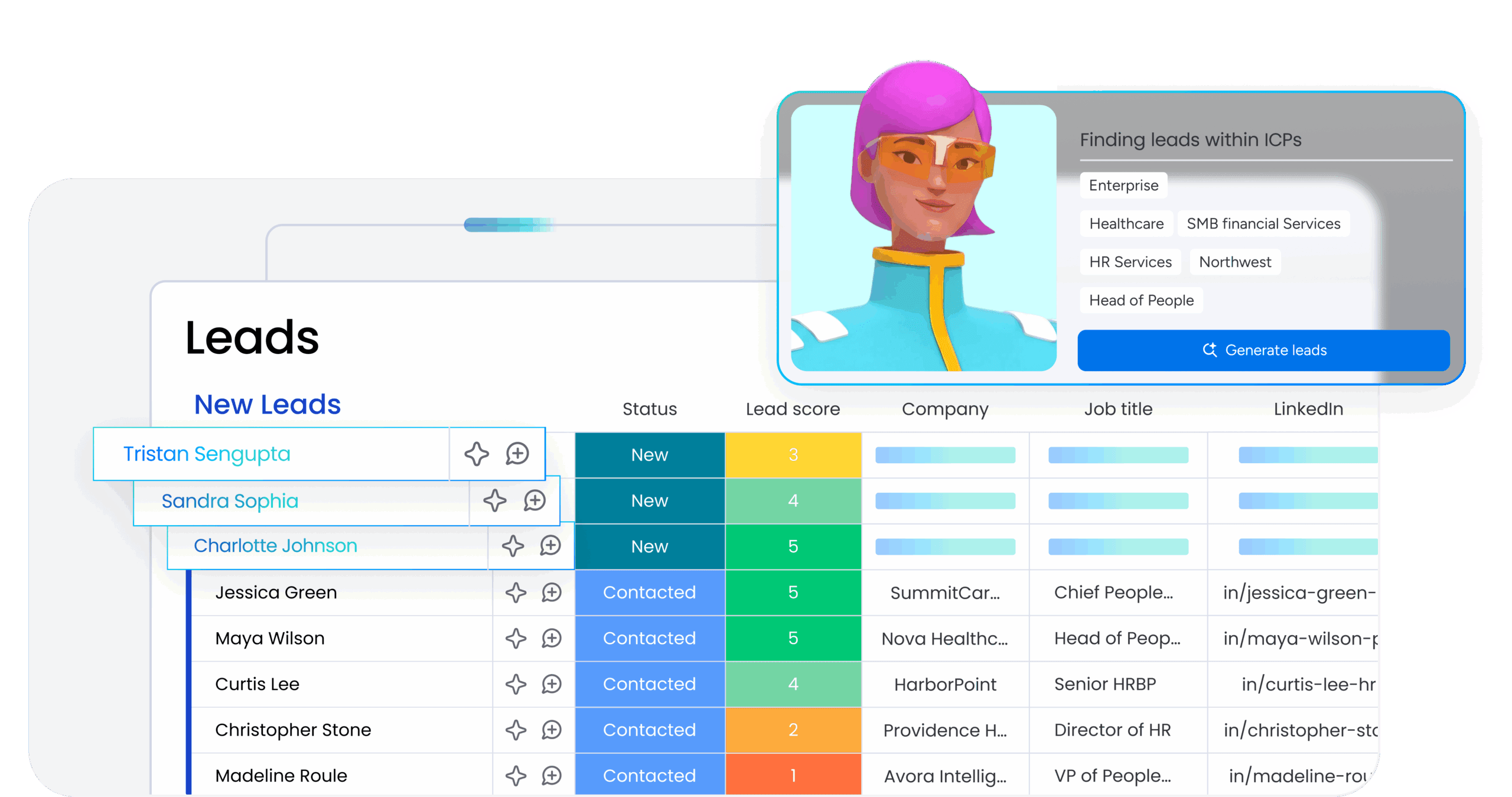
AI sales pipeline management is not one isolated feature you turn on and forget. It is changing how revenue teams capture information, prioritize opportunities, and manage performance. The platforms that stand out don’t bolt AI onto weak processes; they embed it directly into the work itself.
That distinction matters because without it, AI becomes noise instead of leverage.
Deploying AI as a co-pilot for sales reps
The best pipeline AI supports reps without taking control away from them. Selling still depends on relationship history, timing, and strategic judgment that algorithms cannot fully understand. Humans steer. AI handles the repetitive, time-consuming execution work around them.
Eliminating manual CRM data entry with automated activity capture
One of the fastest ways CRM data goes stale is manual entry. Reps skip updates when their schedule gets packed, and leadership ends up forecasting from incomplete information. Automated capture changes that by logging emails, calls, and meetings without asking people to remember every step.
monday CRM helps remove much of that administrative burden. The platform’s AI Blocks can extract useful details from files and populate the right fields automatically, keeping records clean without adding more work for the team.
Spotting deal risks early with predictive forecasting
What happens when forecasts are built on gut feel instead of actual patterns? Leaders lose confidence in resource planning, hiring decisions, and strategic bets. Predictive forecasting brings a more disciplined view by using historical close rates and pipeline velocity to estimate outcomes.
It also helps surface risk earlier. If an account goes quiet or misses a key milestone, those warning signs can appear automatically in the workspace. No one has to remember to pull a complex report just to see where things are breaking down.
Securing data with governed AI agents and human oversight
AI without guardrails introduces compliance risk fast and undermines trust just as quickly. Governed AI operates within clear permissions, accessing only the information a specific user should see, and routes meaningful actions through human review.
Many organizations use monday CRM to support that model of secure, governed automation. Human-in-the-loop validation is built directly into workflows, so teams can move faster without giving up the controls the business depends on.
5 steps to choose the right sales pipeline management CRM for your team
A CRM shapes how your entire revenue organization works. Get the decision wrong, and the result is usually the same: poor adoption, unreliable data, and wasted budget.
These five steps make it easier to cut through polished demos and judge platforms based on practical fit.
Step 1: Identify your biggest pipeline bottlenecks
Start by mapping where deals actually stall before you book a single demo. Maybe proposals sit untouched in the middle of the cycle. Maybe prospects disappear right before close. Whatever the friction point is, your platform should address that issue directly. A polished pipeline board will not repair a broken process on its own.
Step 2: Match features to your actual sales process
Feature lists are seductive, but workflow fit matters more. First document your real sales pipeline stages, handoffs, and approval paths.
Then assess whether the platform supports that motion naturally or forces the team to work differently. If reps have to change how they sell to accommodate the software, resistance shows up fast and data quality suffers.
Step 3: Test team adoption before rolling out
The clearest predictor of CRM success is adoption. Run a pilot with a small group using live deals and see how easily they can create opportunities and keep them updated.
Just as important, test whether managers can pull the views they need without assembling manual pipeline reports. Even the most impressive platform delivers no value if the team avoids using it.
Step 4: Weigh implementation speed and total cost
Base price tells only part of the story. Ask how long implementation usually takes and what the process looks like when your sales workflow changes later.
Can revenue teams make their own updates, or does every adjustment require IT? Platforms that depend heavily on technical support tend to raise total cost over time while slowing execution.
Step 5: Check integration depth with your existing stack
A platform that ignores the tools reps use every day creates duplicate work and messy data almost immediately. Begin with a list of core systems, then confirm that each integration is native and syncs in both directions. Disconnected tools waste time and frustrate the people expected to use them.
Many revenue teams choose monday CRM to centralize that workflow in one place. Once email, calendar, and everyday apps are connected directly to the pipeline, reps spend less time jumping between tabs and more time pushing deals forward.
How monday CRM delivers pipeline visibility without the complexity
Plenty of platforms promise a complete view of the pipeline. Then implementation drags on for half a year, and teams quietly return to spreadsheets they trust more.
What you need instead is visibility that works immediately, not something hidden behind months of setup or premium add-ons.
Built-in AI features that eliminate manual admin work
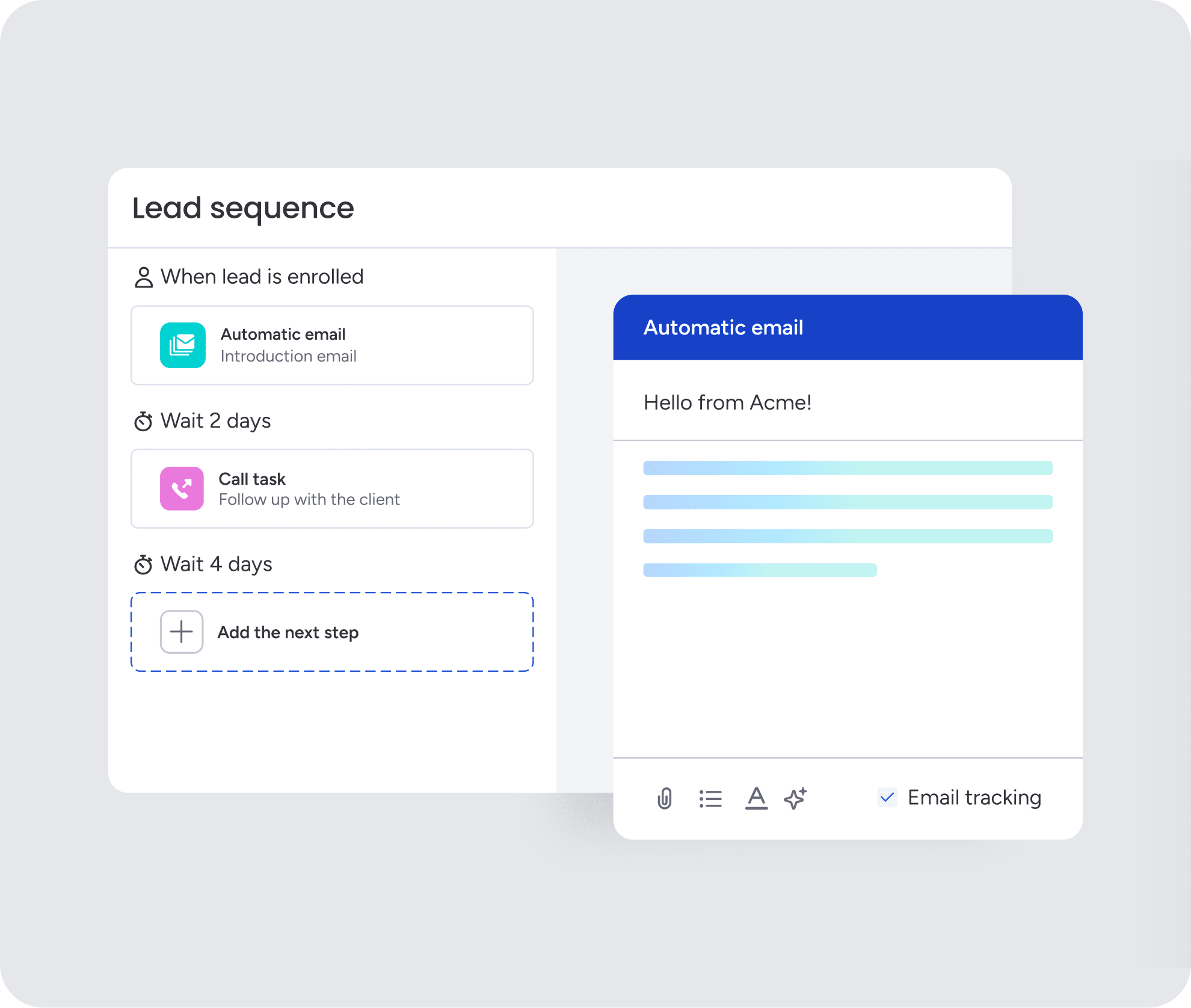
Too much admin work pulls reps away from active selling. monday CRM addresses that with AI Blocks that categorize information at scale, summarize meeting notes, extract document details, and even draft emails without leaving the workspace. Timeline Summary condenses full communication histories into quick recaps, while Custom AI Actions handle everything from contract term extraction to lead sorting, letting teams spend more time closing and less time managing records.
No-code pipeline customization built for any sales cycle
With monday CRM, revenue leaders can create visual pipelines using drag-and-drop stages that reflect the way their team actually sells. That applies whether the motion is a simple three-stage cycle or a more complex enterprise process involving legal approvals. Stages, conditions, and automation triggers can all change without developer support, which helps the system keep pace with the business instead of lagging behind it.
Real-time dashboards for accurate sales forecasting
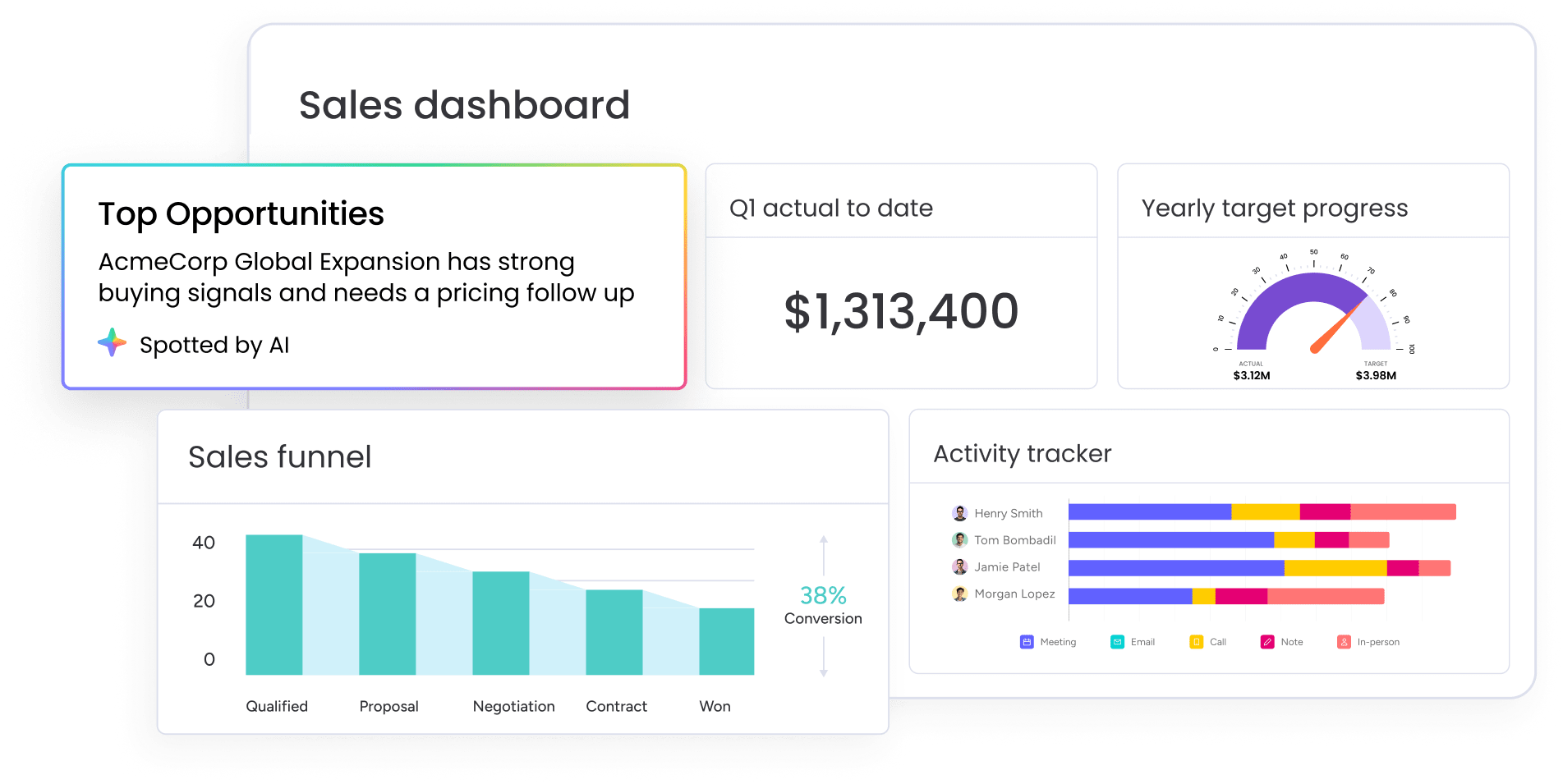
Walking into a forecast meeting without confidence in the numbers is a momentum killer. monday CRM gives teams visual dashboards for forecast versus actual sales, quota attainment, and activity status, all without requiring an analyst to assemble them first. That makes it easier to report upward with confidence and act on pipeline changes as they happen.
Cross-functional alignment across your entire revenue team
Pipeline data becomes far more valuable when it connects to the rest of the business. Sales can coordinate with legal on contract reviews, finance on approvals, and customer success on onboarding from the same system. Post-sales work, including account management and client project tracking, also lives in that shared environment, so the context does not disappear after close-won.

“With monday CRM, we’re finally able to adapt the platform to our needs — not the other way around. It gives us the flexibility to work smarter, cut costs, save time, and scale with confidence.”
Samuel Lobao | Contract Administrator & Special Projects, Strategix
“Now we have a lot less data, but it’s quality data. That change allows us to use AI confidently, without second-guessing the outputs.”
Elizabeth Gerbel | CEO
“Without monday CRM, we’d be chasing updates and fixing errors. Now we’re focused on growing the program — not just keeping up with it."
Quentin Williams | Head of Dropship, Freedom Furniture
“There’s probably about a 70% increase in efficiency in regards to the admin tasks that were removed and automated, which is a huge win for us.“
Kyle Dorman | Department Manager - Operations, Ray White
"monday CRM helps us make sure the right people have immediate visibility into the information they need so we're not wasting time."
Luca Pope | Global Client Solutions Manager at Black Mountain
“In a couple of weeks, all of the team members were using monday CRM fully. The automations and the many integrations, make monday CRM the best CRM in the market right now.”
Nuno Godinho | CIO at Velv
“monday.com provides developmental flexibility, operational efficiency, and data transparency — all in one place. We became a company that moved from chasing data to leading with it.”
Hyunghan Lee | Team Lead, Sandbox Network
"monday.com brought every part of our business into one connected space. The harmony between work management and CRM has become our operating system — giving us the clarity and confidence to scale.”
Jennifer Chinburg | Executive Vice President of Corporate Development & Brand, Chinburg Properties
“We just weren’t getting value from our old CRM. With monday.com, it's a thousand times better. Our sales teams are more informed, more consistent, and far more connected."
James Arnold | Chief Operating Officer, CenversaTurn your sales pipeline into a predictable revenue engine
A sales pipeline should not feel like guesswork. When data is centralized, repetitive work is automated, and teams are aligned, reps spend more time building relationships and leadership gets cleaner visibility. The best platform adapts to your sales motion instead of forcing your team into rigid workflows.
Begin by identifying your biggest bottlenecks and pinpointing where deals stall most often. From there, compare platforms based on how easily they fit your tools and workflows. monday CRM gives revenue teams that clarity without the complexity, helping you move from scattered data to confident decision-making.
Try monday CRMFAQs
What is the difference between CRM and sales pipeline management software?
The difference between CRM and sales pipeline management software comes down to scope. Pipeline tools strictly track active deals from first contact to close, while a comprehensive platform like monday CRM manages the entire customer relationship alongside your pipeline.
What is the difference between a sales pipeline and a sales funnel?
The difference between a sales pipeline and a sales funnel is perspective. A sales pipeline tracks individual deals moving through your active sales stages, whereas a funnel measures the overall conversion rates of leads dropping off as they move toward a purchase.
How long does sales pipeline management software take to implement?
How long sales pipeline management software takes to implement entirely depends on the platform's complexity. You can set up intuitive, no-code platforms like monday CRM in a matter of days, whereas legacy systems often drag on for months with heavy IT involvement.
Can small businesses use sales pipeline management platforms without prior CRM experience?
Small businesses can absolutely use sales pipeline management platforms without prior CRM experience. Revenue teams moving away from spreadsheets find that monday CRM offers a highly visual workspace they can adopt instantly without any technical background.
How do you measure ROI on sales pipeline management software?
You measure ROI on sales pipeline management software by tracking improvements in win rates, deal cycle speed, and forecast accuracy before and after launch. Teams also see massive returns simply by calculating the hours saved on manual admin work, which translates directly into more time spent closing deals.
Is there free sales pipeline management software?
There is free sales pipeline management software available, but most zero-cost plans limit your access to crucial automations, AI capabilities, and reporting. Teams can start with a free trial of monday CRM to experience the full value of a complete revenue workspace before committing to a paid plan.
What integrations should pipeline management platforms support?
Pipeline management platforms should support integrations with the tools your team already uses daily, like Gmail, Outlook, calendar apps, and Slack. As your sales operations grow, you will also want seamless connections to marketing platforms and LinkedIn to keep all your data centralized in one place.
