



The ROI of AI in strategic workforce planning is measurable, but you need more than a formula. It requires a baseline you can defend, metrics tied to actual decisions, and a process that turns AI signals into owned actions. Without those three things, the math looks good on paper and stays there.
Here’s how to calculate workforce planning ROI in 6 steps, which metrics actually matter, where AI creates the strongest returns, and how to build the discipline that turns insight into results. Whether you’re making the case to finance or running a pilot, these frameworks paired with a connected system like monday CRM give you something concrete to work with.
Key takeaways
- Set a baseline before you do anything else: Document planning cycle time, vacancy duration, and forecast accuracy now, without it, your ROI numbers won’t hold up.
- Measure value in three buckets: Track cost saved, capacity created, and risk avoided separately. Lumping them together makes the math harder to defend.
- Assign every AI insight to a real owner: Every recommendation with a named owner and due date is what turns AI insight into measurable ROI. Action is the only thing that turns insight into value.
- Count all your costs, not just the software: Setup, training, data prep, and governance labor all eat into returns. Account for all of them, and your business case will stand up to scrutiny.
- Connect demand signals to workforce decisions early: Pipeline shifts and territory pressure show up in your CRM before they hit headcount plans. Catch them there, and you’ll close capacity gaps faster.
What is AI in strategic workforce planning?
AI in strategic workforce planning uses models to align future business demand with the people, skills, and capacity you need to meet it. In practice, that means running AI workforce planning software against your pipeline, hiring, and attrition data instead of stitching the analysis together manually. That means predicting when to hire, matching skills to roles, and catching capacity gaps before they become problems.
The difference from spreadsheet-based planning is significant.
Spreadsheets show you where you’ve been, while AI helps you see where you’re heading and act sooner.
This isn’t just an HR conversation. Here’s who has a stake in the outcome:
- Finance cares about labor costs and budget predictability.
- Operations cares about delivery capacity and resource availability.
- Revenue leaders care about coverage, quota attainment, and territory health.
For revenue teams, demand signals often show up first in the CRM, not the HR stack. That’s where monday CRM becomes relevant: it helps teams make pipeline growth, territory pressure, and account concentration visible before they turn into hiring fire drills.
6 steps to calculate the ROI of AI in strategic workforce planning
The formula is straightforward, but the discipline behind it is the hard part. Before you calculate anything, ask one blunt question: are you measuring value, or are you measuring enthusiasm? They’re not the same.
ROI formula = ((cost saved + capacity value + risk avoided) − total AI costs) / total AI costs
Here is how to build the calculation step by step.
Step 1: Set a pre-AI baseline you can actually defend
A baseline is your pre-AI state, or what you’ll compare against later. Without it, your ROI story becomes opinion. Track these metrics across one fixed period before rollout:
- Planning cycle time: How long it takes to complete a full planning cycle from data gathering to approved headcount plan
- Forecast refresh frequency: How often you update workforce projections in response to business changes
- Vacancy duration: Average days from requisition approval to accepted offer for critical roles
- Internal fill rate: Percentage of open roles filled by internal candidates versus external hires
- Hiring mix: Breakdown of full-time, contract, and temporary workers by function
Document the period you’re measuring (quarter, half, or full year) and who validated the numbers. When finance challenges your ROI claim six months later, you’ll need both.
Step 2: Calculate direct financial value tied to changed decisions
Only count gains you can tie to a changed decision. That keeps the model grounded and easier to defend when finance asks questions. If AI flagged a retention risk but nobody acted on it, the value is zero.
| Value source | Calculation approach |
|---|---|
| External hiring avoided | Roles filled internally × average external hiring cost |
| Manual planning hours removed | Hours saved × loaded hourly cost |
| Contractor reduction | Contractor hours replaced × rate difference |
| Overtime avoided | Overtime hours prevented × premium cost |
For external hiring avoided, include agency fees, job board costs, interview time, and onboarding expenses. Most organizations underestimate this number. A conservative estimate for a mid-level role runs between $15,000 and $30,000 when you count the full cycle.
Step 3: Add capacity created by reclaimed time or expanded output
Convert reclaimed hours into dollars, or track expanded output with the same team. Either works, just stay consistent. A planner’s loaded cost includes salary, benefits, taxes, and overhead. Use that full figure, not base salary alone.
If your planning team used to spend 120 hours per quarter building headcount models manually and AI cuts that to 30 hours, you’ve reclaimed 90 hours. Multiply that by the team’s fully loaded hourly rate. If those hours now go toward scenario modeling or skills gap analysis instead of spreadsheet maintenance, document what changed and who benefited from the new work.
Step 4: Estimate risk avoided using explicit assumptions
Risk is the hardest value category to quantify, but it’s often the largest. Use explicit assumptions and document them. Estimate three things:
- The probability of a bad outcome without AI (example: 40% chance of missing a critical hire by two quarters)
- The probability of that outcome with AI (example: 10% chance with early pipeline signals)
- The cost if it happens (example: $200K in lost revenue or delivery penalties)
Then calculate: (probability without AI minus probability with AI) × cost of the outcome. In this example, that’s (0.40 minus 0.10) × $200K = $60K in risk avoided. Finance may push back on your assumptions, but remember that the goal is an estimate, not an exact cost.
Step 5: Subtract total AI costs
Count software, setup, data prep, training, governance labor, and ongoing optimization. This is where inflated ROI claims fall apart. Include license fees, implementation consulting, IT integration work, data cleaning, training time for planners and managers, and the hours your team spends refining prompts or reviewing AI recommendations.
If you’re running a pilot, separate one-time setup costs from recurring costs. That distinction matters when you model what happens at scale.
Step 6: Adjust for adoption and scale before claiming enterprise value
A pilot with 30% adoption in one business unit doesn’t justify enterprise-wide value claims. What happens if only a fraction of planners use the process? The realized return shrinks fast.
If your pilot shows $150K in annual value with full adoption across 10 planners, but only 4 planners actively use the system, your realized value is closer to $60K. Multiply your per-user or per-decision value by actual adoption rate, then apply that to the population you’re planning for. Anything else is a forecast, not a result.
Why is it so hard to put a number on AI in workforce planning?
If proving value feels harder than understanding the concept, you’re not imagining things. A few reasons make the math tricky, and naming them keeps your business case honest.
The biggest culprits show up across planning teams:
- Scattered data: Inputs live across emails, notes, onboarding records, account histories, and spreadsheet exports, which creates lag and weak accountability.
- Weak baselines: No documented “before” means no credible “after.”
- Long lag times: Value from a staffing decision often shows up quarters later, not days.
- Hard-to-price risk: Naming the risk and estimating its impact takes deliberate assumptions.
- Fuzzy ownership: When AI produces a signal and nobody owns the next step, value leaks.
Revenue teams using monday CRM close some of these gaps by centralizing deal, account, and activity data, so planners work from cleaner inputs instead of stale exports. When teams manage CRM data effectively, they can feed workforce models with real-time pipeline signals rather than waiting for quarterly exports.
Try monday CRMWhat metrics should you track to measure AI impact in workforce planning?
Good ROI tracking uses a short list of metrics tied to decisions. A focused dashboard with a handful of decision-linked metrics earns more trust than one packed with 40 numbers. The table below gives a practical starting set, grouped by decision type.
| Metric family | Example metric | What it tells leaders | When to use it |
|---|---|---|---|
| Productivity and capacity | Planning cycle time | Whether teams respond faster | Continuous forecasting |
| Cost and spend | External hiring spend avoided | Whether hard-dollar savings exist | Internal mobility |
| Skills and mobility | Internal fill rate | Whether matching improves | Redeployment programs |
| Hiring and vacancy | Time to fill critical roles | Whether gaps close faster | Capacity planning |
| Adoption | Recommendation acceptance rate | Whether teams trust the outputs | All initiatives |
| Governance and trust | Human review rate | Whether oversight is working | High-stakes decisions |
Two metric groups deserve attention because teams skip them most:
- Adoption metrics: Move beyond login counts and track recommendation acceptance rate and time from insight to action instead.
- Governance metrics: Human review rate and audit trail completeness show whether oversight actually happens.
Teams that build CRM dashboards with these metrics visible to finance and operations create shared accountability for workforce decisions.
What business outcomes does AI improve in strategic workforce planning?
AI creates the strongest returns when leaders make repeated, high-stakes decisions under uncertainty. One-off decisions rarely justify the work. The table below shows where AI tends to pay off first and who usually owns the outcome.
| Workforce decision area | What AI improves | Primary value type | Typical owner |
|---|---|---|---|
| Continuous forecasting | Planning frequency, demand response | Capacity created, risk avoided | HR, finance, operations |
| Skills intelligence and mobility | Matching speed, internal fill rate | Cost saved, capacity created | HR, talent acquisition |
| Scenario modeling | Decision speed, option quality | Risk avoided, capacity created | HR, finance, revenue |
| Retention and workforce risk | Earlier intervention | Risk avoided, cost saved | HR, business leaders |
Two areas stand out as particularly high-impact:
- Continuous forecasting helps teams update plans as pipeline, delivery demand, or attrition shifts. Revenue teams using monday CRM often have the earliest view into those changes because deal flow moves before headcount plans do.
- Scenario modeling matters because leaders rarely choose between one option and zero options. They choose between hiring now, redeploying talent, or changing ramp assumptions. AI helps compare those paths faster.
How to capture AI workforce planning ROI
Calculating ROI is one thing; capturing it is another. That gap is where many pilots quietly stall. The difference comes down to operational follow-through, because insight without execution is just a report nobody acts on.
- Choose measurable decisions: Start with repeated decisions tied to visible outcomes, such as sales hiring, internal mobility for hard-to-fill roles, or attrition risk in critical teams.
- Connect data in one place: AI can’t support strong decisions if demand, cost, and capacity live in separate systems. Revenue teams often use monday CRM to make pipeline growth, account load, and territory strain visible to workforce planners on monday.com. By integrating your CRM with HR and finance systems, you can create a single source of truth for capacity planning.
- Build baselines first: Define skills, proficiency levels, available capacity, and critical roles before you ask AI to recommend moves. Precise definitions produce reliable recommendations.
- Design human review: Keep humans accountable for consequential decisions. Redeployment suggestions, retention flags, and major scenario shifts should all pass through named reviewers.
- Track adoption by team and role: Don’t stop at logins. Track who reviewed recommendations, who accepted them, and who completed the next step.
- Turn insights into workflows: Action is what turns insight into ROI. On monday CRM, teams can use Autofill with AI, Assign person, and AI automations to turn signals into owned records with owners, statuses, and due dates.
- Review ROI regularly: Review baseline versus current results monthly or quarterly. Ask:Which assumptions held? Where did adoption lag? Which workflows deserve expansion?
How sales capacity planning connects workforce ROI to revenue
For revenue teams, workforce planning is really capacity planning tied to target attainment. The question isn’t just headcount. It’s whether productive capacity will be there when revenue demand shows up.
That’s why monday CRM fits this conversation. It gives revenue leaders a shared view of pipeline, account activity, onboarding progress, and forecast inputs in one place. Three capacity signals matter most:
- Pipeline-based hiring signals: AI can translate pipeline growth and territory expansion into staffing implications earlier, so RevOps and finance can review them before coverage gaps hit the forecast.
- Quota coverage: Leaders need to know whether current rep capacity supports the target, making hiring timing an ROI decision. Teams that set and track sales quotas in their CRM can model capacity gaps against revenue targets with greater precision.
- Ramp time: Headcount is not instantly productive capacity. Teams using monday CRM for sales team onboarding can compare expected ramp against actual ramp.
How monday CRM helps revenue teams capture workforce planning ROI
monday CRM gives revenue teams a shared system to connect pipeline signals, account activity, and capacity decisions before they turn into hiring fire drills. It sits on monday.com, which means demand signals from the CRM can trigger workflows that involve finance, HR, and operations without forcing everyone into separate tools or stale exports.
That matters because workforce planning decisions often start on the revenue side. When pipeline pressure shows up in a CRM but stays buried in reports, planners react late. monday CRM makes those signals visible early and turns them into trackable actions with owners, statuses, and due dates, so ROI becomes easier to measure because the insight and the follow-through live in the same place.
AI Timeline Summary for faster context before coverage decisions
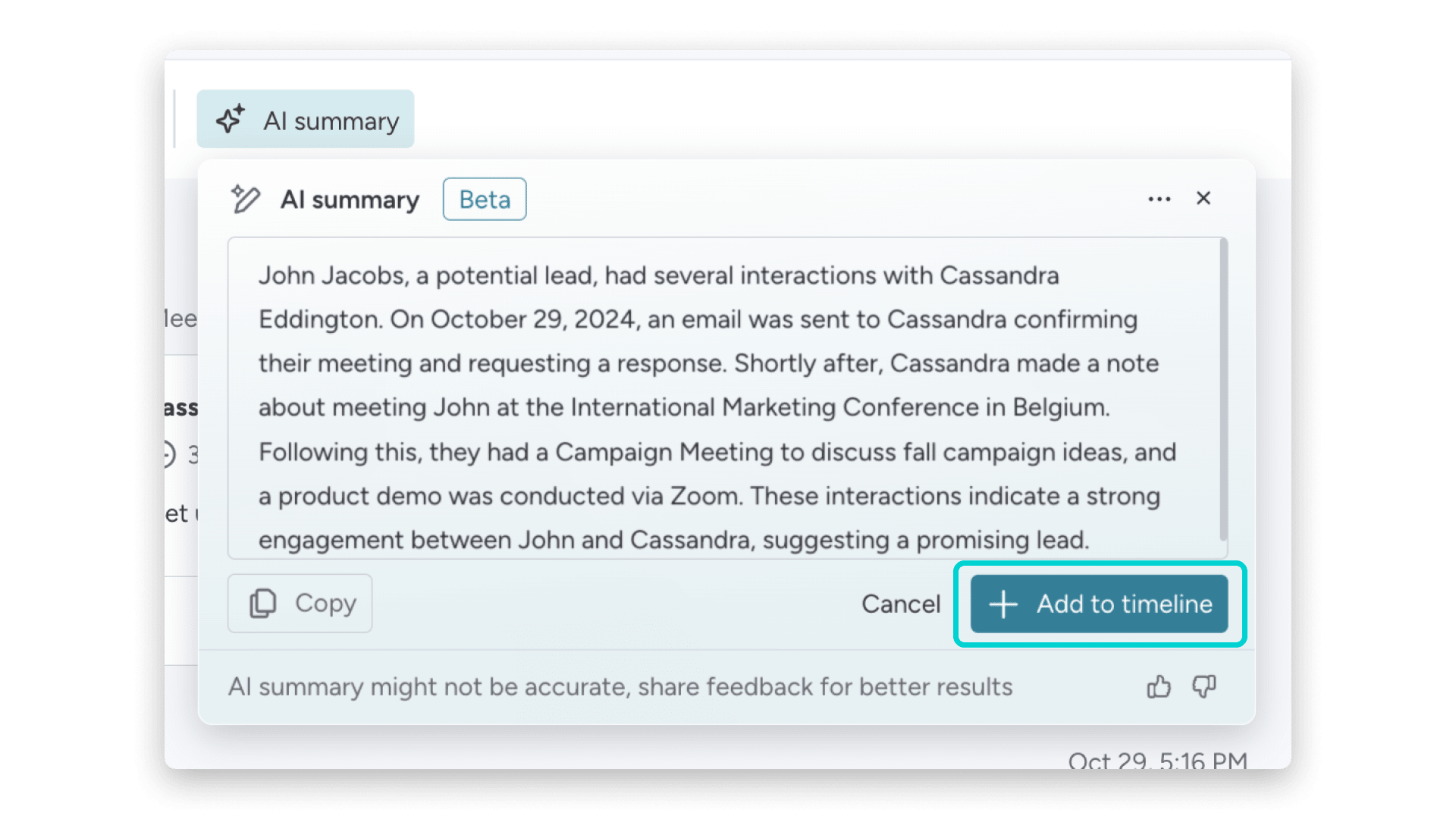
AI Timeline Summary condenses emails and activities into a readable summary so managers can scan account history without digging through threads. That speeds up coverage decisions when leaders need to understand territory health, account risk, or rep workload before adjusting headcount or redeploying talent. The summary pulls context forward so the decision starts from signal, not guesswork.
Extract information to structure workforce data from unstructured files
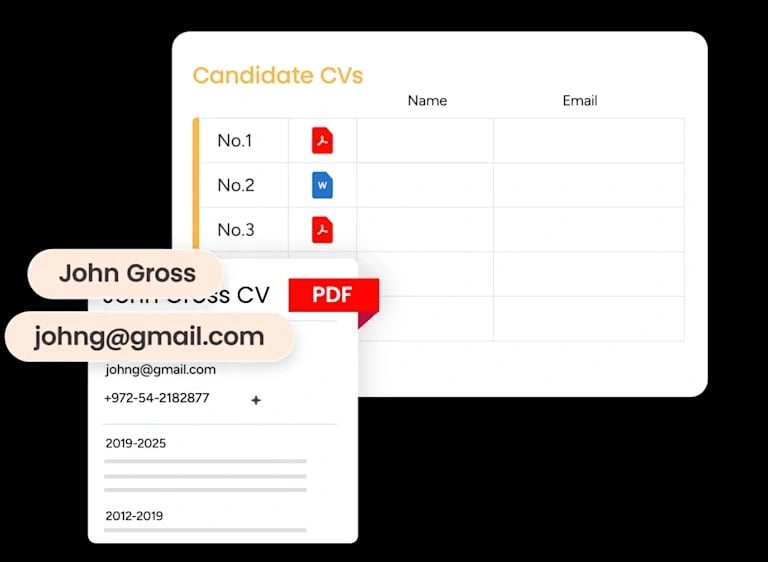
Extract information pulls structured details from resumes, contracts, onboarding documents, or role descriptions into board columns. That turns messy files into usable data for skills matching, internal mobility, or scenario modeling. Instead of manually copying candidate details or role requirements, teams let AI populate the fields so planners can compare options faster and track decisions in one system.
Assign person and Assign label to route workforce actions based on role or context
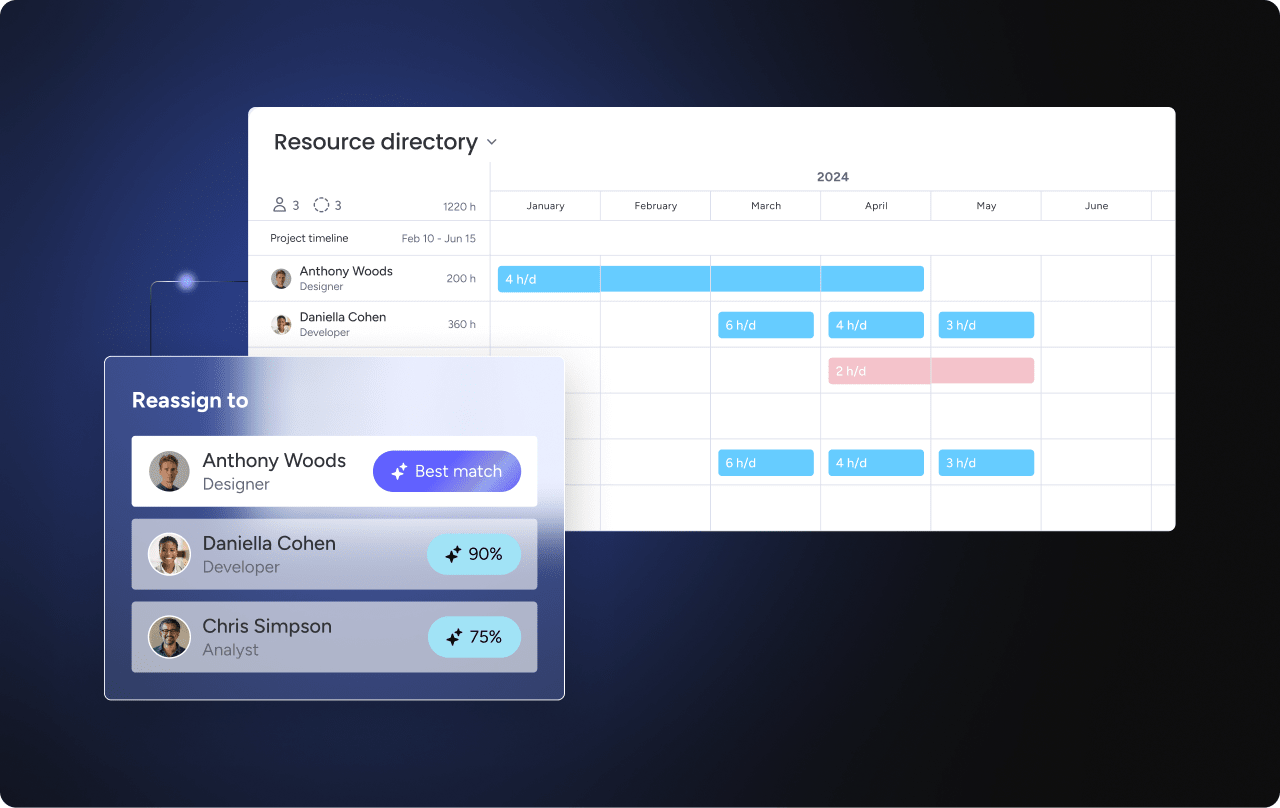
Assign person and Assign label use AI to route work based on role, expertise, territory, or context. When a retention flag surfaces or a capacity gap opens, the system can assign the follow-up to the right manager or tag it with the right priority without manual triage. That keeps workflow moving and makes sure every AI insight has a named owner and a next step, which is what turns signal into measurable ROI.
Run history to review and refine AI actions over time
Run history lets teams audit which AI actions ran, when they triggered, and what instructions guided them. That creates accountability and helps teams refine prompts or rules as adoption grows. For high-stakes decisions like redeployment or retention intervention, reviewable history keeps governance working and lets leaders adjust the system based on what actually happened, not what they assumed would happen.
What is AI workforce transformation ROI, and how is it different from planning ROI?
These two terms get used interchangeably, but they measure different things over different time horizons. Knowing the distinction helps you set the right expectations with stakeholders from the start.
| Workforce planning ROI | Workforce transformation ROI | |
|---|---|---|
| Scope | Decision-specific | Operating model-wide |
| Time horizon | Nearer-term | Long-term |
| What you measure | Whether AI improved a hiring, mobility, or coverage decision | Reskilling, role redesign, and long-term adaptability |
| Where to start | Measurable planning use cases | After planning ROI is established |
Where do they overlap? Both need a baseline and honest cost accounting. That’s it. Start with measurable planning use cases first, then expand.
Turn AI workforce planning insights into measurable ROI
Workforce planning ROI is hard to prove because value spreads across time, productivity, risk, and revenue. But it’s measurable when you count the right things and when someone actually owns the follow-through. The teams that capture value share a few habits: they set a baseline before rollout, measure value by category, count full costs, and adjust for adoption. Most importantly, they treat AI outputs as the start of a workflow, not the end of one.
The market’s moving toward continuous, cross-functional planning with AI built into daily decisions, not side experiments. Revenue teams that connect pipeline signals to workforce decisions early and act on them inside a shared system like monday CRM will close the gap between forecast and attainment, quarter after quarter.
Try monday CRMFAQs
What is ROI in artificial intelligence?
ROI in artificial intelligence measures the business value you gain from AI compared with the full cost of the initiative. It includes software, setup, training, data preparation, and ongoing optimization labor. The calculation compares total value created (cost saved, capacity gained, risk avoided) against total investment. Without honest cost accounting and a defensible baseline, the number won't hold up under scrutiny from finance or operations leaders.
How should leaders measure AI ROI in workforce planning?
Leaders should measure AI ROI in workforce planning by setting a pre-deployment baseline, calculating cost saved, capacity created, and risk avoided, subtracting full costs, and adjusting for adoption and scale. Document planning cycle time, vacancy duration, and forecast accuracy before rollout. Track only value tied to changed decisions, count all implementation and governance costs, and multiply projected value by actual adoption rate to get realized returns.
What metrics matter most for AI workforce planning ROI?
The metrics that matter most are planning cycle time, internal fill rate, time to fill critical roles, hiring spend avoided, recommendation acceptance rate, and human review rate. These metrics tie directly to decisions and outcomes that finance can validate. Track them by decision type, not in aggregate. A focused dashboard with six decision-linked metrics earns more trust than one packed with forty numbers that nobody acts on.
What is the 10/20/70 rule in AI?
The 10/20/70 rule in AI says value often comes roughly 10% from the algorithm, 20% from data, and 70% from people and process change. The technology matters less than adoption, workflow design, and whether someone owns the follow-through. Teams that treat AI outputs as the start of a workflow, not the end of one, capture more value. Without process discipline and clear ownership, even the best model produces reports nobody acts on.
How does monday CRM support AI workforce planning ROI for revenue teams?
monday CRM supports workforce planning ROI by surfacing pipeline and account demand signals, turning them into owned workflows, and helping revenue, finance, and operations act from the same view. It connects deal flow, territory pressure, and account concentration to capacity decisions before they become hiring fire drills. AI capabilities like Assign person, Extract information, and Timeline Summary turn insights into trackable actions with owners, statuses, and due dates on the monday.com Work OS.
How does monday CRM keep AI-driven workflows governed and reviewable?
monday CRM keeps AI-driven workflows governed through role-based permissions, admin controls, and reviewable AI run history on monday.com. Teams can audit which AI actions ran, when they triggered, and what instructions guided them. Human review stays in the loop for consequential decisions like redeployment, retention flags, or major scenario shifts. Every recommendation passes through named reviewers before it becomes action, which keeps accountability clear and oversight working.
